@guiiai/logg


Yet another simple, nearly zero dependency, structural log compliance logger implementation.
Features
- 🛠️ Stack Parse: Automatically captures and includes stack trace information for enhanced debugging
- 📞 Caller Records: Provides detailed information about the calling function and file with clickable hyperlinks
- 🗄️ JSON Format & stdout: Outputs logs in JSON format to stdout for easy parsing and integration with log management tools
- 🎨 Pretty Format: Beautiful colored output for development with browser console support
- 🔄 Drop-in Replacement: Can be used as a direct replacement for popular loggers like Winston
- 📏 Best Practices: Implements industry best practices for structured logging
- 🧩 Intuitive API: Simple and easy-to-use fluent API for quick integration
- 🌐 Universal: Works in both Node.js and browser environments
- ⚡ Zero Config: Works out of the box with sensible defaults
Preview

Installation
npm install @guiiai/logg
Quick Start
import { initLogger, useGlobalLogger } from '@guiiai/logg'
initLogger()
const log = useGlobalLogger('MyApp')
log.log('Hello world!')
Usage Examples
Basic Usage
import { createLogg, Format, LogLevel, setGlobalFormat, setGlobalLogLevel } from '@guiiai/logg'
setGlobalLogLevel(LogLevel.Debug)
setGlobalFormat(Format.Pretty)
const log = createLogg('http/request').useGlobalConfig()
log.debug('Debugging info')
log.log('Regular log')
log.warn('Warning message')
log.error('Error occurred')
Adding Custom Fields
log
.withField('requestId', req.id)
.withField('url', req.url)
.error('Resource not found (404)')
log
.withFields({
userId: '12345',
ip: '192.168.1.1',
userAgent: 'Mozilla/5.0'
})
.log('User logged in')
Error Handling
try {
} catch (err) {
log.withError(err).error('Operation failed')
log.errorWithError('Failed to process request', err)
}
Child Loggers
const parentLog = createLogg('app').useGlobalConfig()
const childLog = parentLog.child({
module: 'database',
version: '1.0.0'
})
childLog.log('Connected to database')
Auto-Context Logger
import { createLogger } from '@guiiai/logg'
const log = createLogger().useGlobalConfig()
log.log('This log knows where it came from!')
Custom Time Format
const log = createLogg('app')
  .useGlobalConfig()
  .withTimeFormatter((date) => {
    return date.toLocaleString('en-US', {
      timeZone: 'America/New_York'
    })
  })

log.log('Log with custom timestamp')
Error Processing
const log = createLogg('app')
.useGlobalConfig()
.withErrorProcessor((err) => {
if (err instanceof CustomError) {
return { ...err, customField: 'value' }
}
return err
})
log.withError(someError).error('Processed error')
API Reference
Logger Factory Functions
createLogg(context: string): Logg
Creates a new logger instance with the specified context.
const log = createLogg('MyModule')
createLogger(context?: string): Logg
Creates a logger with automatic context from the call site (file path and line number). Includes clickable hyperlinks in supported terminals.
const log = createLogger()
const log2 = createLogger('CustomContext')
createGlobalLogger(context?: string): Logg
Creates a logger with automatic context and applies global configuration.
const log = createGlobalLogger()
initLogger(level?: LogLevel, format?: Format): void
Initializes global logger configuration with defaults.
import { initLogger, LogLevel, Format } from '@guiiai/logg'

initLogger(LogLevel.Verbose, Format.Pretty)
Aliases:
useLogg → createLogguseLogger → createLoggeruseGlobalLogger → createGlobalLogger
Logger Instance Methods
Configuration Methods
useGlobalConfig(): Logg - Applies global configuration to the logger instancechild(fields?: Record<string, any>): Logg - Creates a child logger with additional persistent fieldswithContext(context: string): Logg - Sets context dynamically (returns cloned instance)withLogLevel(logLevel: LogLevel): Logg - Sets log level dynamically (returns cloned instance)withLogLevelString(logLevelString: LogLevelString): Logg - Sets log level using string (returns cloned instance)withFormat(format: Format): Logg - Sets output format dynamically (returns cloned instance)withFields(fields: Record<string, any>): Logg - Alias for child()withField(key: string, value: any): Logg - Adds a single custom fieldwithError(err: Error | unknown): Logg - Attaches error object with automatic extraction of message, stack, and causewithCallStack(errorLike: { message: string, stack?: string }): Logg - Adds call stack informationwithTimeFormatter(fn: (date: Date) => string): Logg - Sets custom time formatter functionwithErrorProcessor(fn: (err: Error | unknown) => Error | unknown): Logg - Sets custom error processor function
Logging Methods
debug(message: any, ...optionalParams: any[]): void - Logs debug-level messageverbose(message: any, ...optionalParams: any[]): void - Logs verbose-level messagelog(message: any, ...optionalParams: any[]): void - Logs info-level messagewarn(message: any, ...optionalParams: any[]): void - Logs warning-level messageerror(message: any, stack?: string, ...optionalParams: any[]): void - Logs error-level messageerrorWithError(message: any, err: Error | unknown, ...optionalParams: any[]): void - Logs error with automatic error extraction
Global Configuration
Log Level
import { getGlobalLogLevel, setGlobalLogLevel, LogLevel } from '@guiiai/logg'
setGlobalLogLevel(LogLevel.Debug)
const level = getGlobalLogLevel()
import { setGlobalLogLevelString, getGlobalLogLevelString } from '@guiiai/logg'
setGlobalLogLevelString('debug')
const levelString = getGlobalLogLevelString()
Format
import { getGlobalFormat, setGlobalFormat, Format } from '@guiiai/logg'

setGlobalFormat(Format.Pretty)
const format = getGlobalFormat()
Time Formatter
import { setGlobalTimeFormatter, getGlobalTimeFormatter } from '@guiiai/logg'

setGlobalTimeFormatter((date) => date.toISOString())
const formatter = getGlobalTimeFormatter()
Enums and Types
LogLevel
enum LogLevel {
  Error = 0,
  Warning = 1,
  Log = 2,
  Verbose = 3,
  Debug = 4
}
LogLevelString
type LogLevelString = 'error' | 'warn' | 'log' | 'verbose' | 'debug'
Format
enum Format {
  JSON = 'json',
  Pretty = 'pretty'
}
Configuration
Log Levels
Log levels control which messages are output. Higher levels include all lower levels.
| Error | 0 | Only error messages |
| Warning | 1 | Errors and warnings |
| Log | 2 | Errors, warnings, and general logs |
| Verbose | 3 | All above plus verbose information |
| Debug | 4 | All messages including debug info |
Output Formats
JSON Format
Structured JSON output, ideal for production environments and log aggregation tools.
{"level":"log","context":"app","timestamp":"2024-01-01T00:00:00.000Z","message":"User logged in","fields":{"userId":"123"}}
Pretty Format
Human-readable colored output for development. Automatically detects browser environments and adjusts output accordingly.
[2024-01-01 00:00:00] LOG app: User logged in { userId: '123' }
Environment Support
Node.js
Full support for all features including:
- Terminal hyperlinks (VS Code, iTerm2, etc.)
- Colored output
- Stack trace parsing
Browser
Optimized browser support with:
- Console-friendly output
- Proper object expansion in browser devtools
- Automatic format detection
Why @guiiai/logg?
- Lightweight: Minimal dependencies (only 3 runtime deps)
- Type-safe: Full TypeScript support with complete type definitions
- Flexible: Works in any environment without configuration
- Developer-friendly: Beautiful output and clickable source links
- Production-ready: JSON output for log aggregation systems
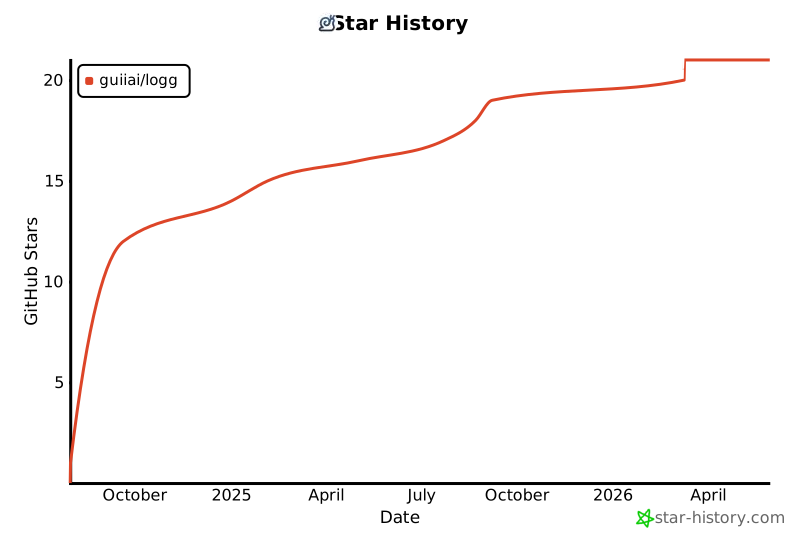
Star History
Contributors

Made with ❤




