🚀 Harness Forge
Deterministic AI workspace bootstrapping for Codex, Claude Code, and adjacent agentic runtimes.
Install skills, knowledge packs, workflows, validation gates, and repo intelligence into a real repository - without mixing package content with workspace state.









Quick Start
·
Project Activity
·
Why Harness Forge
·
How It Works
·
Supported Targets
·
Commands
·
Credits
[!TIP]
First time here? Run npx @harness-forge/cli from the repository you want to equip. Harness Forge acts like a guided front door for onboarding on first run and a lightweight project hub after initialization.
📈 Project Activity
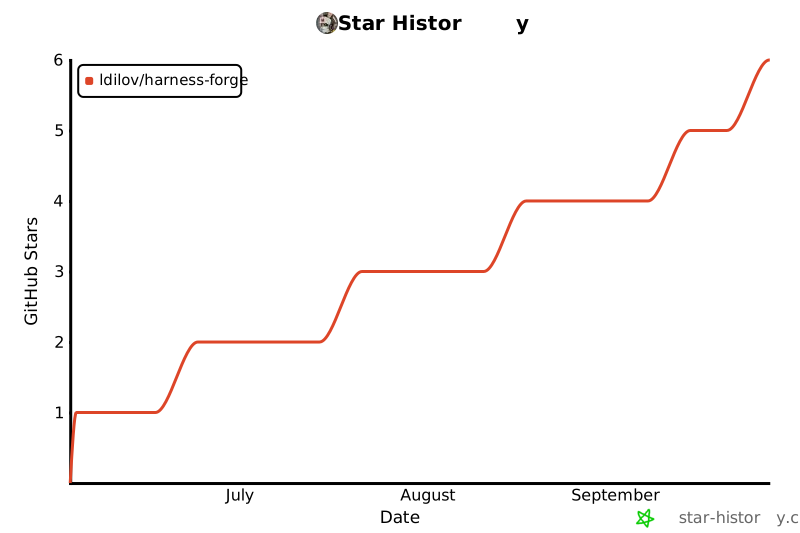
Point-in-time signals: live stars, forks, issues, and npm download badges above, plus a historical star timeline chart here.
✨ Why Harness Forge?
Harness Forge is a packaging-friendly agentic workspace kit for teams that want a repeatable, inspectable, and maintenance-safe AI runtime inside real repositories.
Instead of relying on one-off prompts or tribal setup knowledge, it gives you a deterministic way to:
- bootstrap agent-ready runtime surfaces into a real repo
- compose targets, profiles, language packs, framework packs, and capability bundles through one CLI
- keep product code and workspace state cleanly separated
- generate repo-aware guidance with evidence instead of generic assumptions
- validate what ships before release, handoff, or adoption across teams
What makes it different?
| 🧠 Runtime surfaces | Materializes AGENTS.md, .agents/skills/, target runtimes, and a canonical hidden .hforge/ layer | Agents get a predictable operating contract instead of improvising from prose |
| 🔎 Repo intelligence | Scans, recommends, cartographs, classifies boundaries, and synthesizes instructions | Setup becomes evidence-backed rather than guess-based |
| 🧩 Composition | Combines targets, profiles, languages, frameworks, and capability bundles | Teams can standardize without hard-coding one stack |
| 🛡️ Validation | Ships doctor, audit, diff-install, review, and release gates | Support claims stay honest and installs stay measurable |
| 🔁 Lifecycle | Supports bootstrap, refresh, sync, prune, upgrade, export, backup, repair, and restore flows | The workspace can evolve without becoming a black box |
| 📊 Observability | Keeps local-first effectiveness summaries and signal files under .hforge/observability/ | Operators can inspect what is working without sending telemetry to a backend |
🧬 Capability Snapshot
| 🎯 Runtime targets | 4 target surfaces: Codex, Claude Code, Cursor, OpenCode |
| 🧠 Knowledge system | 14 language packs total: 5 seeded + 9 structured |
| 🧩 Framework coverage | 12 framework packs including React, Next.js, Vite, Express, FastAPI, Django, ASP.NET Core, Spring Boot, Laravel, Symfony, Gin, and Ktor |
| 🛠 Skills | 45 packaged skills across language engineering, workflow orchestration, operational helpers, and workload-specialized flows |
| 🔁 Flow support | .specify/ spec → plan → tasks → implement flow plus flow-state recovery |
| 🔬 Intelligence | scan, recommend, cartograph, classify-boundaries, and synthesize-instructions |
| 📊 Local observability | Effectiveness summaries, recommendation acceptance, hook runs, maintenance traces, and runtime summaries |
| 🧱 Hard-task support | Recursive runtime sessions, structured recursive analysis, parallel planning, merge-checks, and decision recording |
🚀 Quick Start
1) Guided onboarding
npx @harness-forge/cli
Best for first-time operators who want:
- target selection
- setup depth selection:
quick, recommended, or advanced
- optional module selection
- a review step before files are written
2) One-shot bootstrap for the current repo
npx @harness-forge/cli bootstrap --root . --yes
Ideal when you want Harness Forge to:
- detect supported runtimes already present in the repo
- choose a sane first-class fallback target when none are present
- recommend repo-aware packs and bundles
- install runtime files, discovery bridges, and workspace state in one pass
3) Enable bare hforge on your PATH
npx @harness-forge/cli shell setup --yes
4) Validate the install
hforge status --root . --json
hforge doctor --root . --json
hforge audit --root . --json
🧠 CLI Mental Model
Harness Forge works across four layers:
| 🔍 Understand | Inspect the repo and infer what matters | scan, recommend, cartograph, classify-boundaries |
| 🧩 Compose | Decide what should be installed | targets, profiles, language packs, framework packs, bundles |
| 🚀 Install | Materialize runtime surfaces into the workspace | init, install, bootstrap, catalog add |
| 🛡 Operate | Verify, maintain, and evolve the runtime | status, doctor, audit, refresh, review, export, diff-install |
Think: analyze → compose → install → validate → evolve
⚙️ How It Works
flowchart LR
    A[Repository] --> B[hforge recommend / scan / cartograph]
    B --> C[Select target + profile + packs + bundles]
    C --> D[Install visible bridges]
    C --> E[Install hidden canonical AI layer]
    D --> F[AGENTS.md + .agents/skills + target runtimes]
    E --> G[.hforge/library + .hforge/templates + .hforge/runtime]
    G --> H[status / doctor / audit / review / export]
    H --> I[long-term maintenance, observability, and flow recovery]
The architecture in one sentence
Harness Forge keeps agent-discoverable bridge files visible while the canonical runtime, knowledge, rules, templates, and generated state live under .hforge/.
What gets installed?
AGENTS.md | Human and agent-visible root contract |
.agents/skills/ | Thin, discoverable wrappers for supported runtimes |
.hforge/library/skills/ | Canonical installed skill library |
.hforge/library/rules/ | Canonical installed rules |
.hforge/library/knowledge/ | Canonical installed knowledge packs |
.hforge/templates/ | Canonical installed templates and workflow artifacts |
.hforge/runtime/ | Shared runtime state, repo intelligence, findings, and decision indexes |
.hforge/generated/agent-command-catalog.json | Machine-readable command catalog for agents |
.hforge/agent-manifest.json | Stable custom-agent contract |
.hforge/generated/bin/ | Workspace-local launchers for PowerShell, CMD, and POSIX |
.specify/ | Structured spec-driven delivery flow |
.codex/ / .claude/ | Target-specific runtime payloads and bridge files |
Why this architecture helps
- Visible where runtimes need discovery
- Hidden where canonical AI content should stay authoritative
- Structured for upgrade, audit, and long-term maintenance
- Safe to re-run through refresh, doctor, and audit workflows
🎁 Benefits for teams
Reliability impact summary
| Task consistency | High improvement |
| Install reproducibility | High improvement |
| Runtime correctness | Medium to high improvement |
| Cross-agent consistency | High improvement |
| Failure recovery | Medium to high improvement |
Will it improve “memory”?
Yes - but as externalized operational memory, not model memory
Harness Forge does not make the model itself smarter or increase intrinsic memory.
What it does is create a persistent repo memory system and "runtime env" around the project.
What that means
Instead of the agent re-deriving everything on every task, the workspace can retain:
- install state
- runtime summaries
- repo maps
- findings
- decision indexes
- optional recursive session state
- structured plans/tasks/spec artifacts
Why this matters
This helps with:
- continuity across sessions
- less re-discovery of architecture
- more durable reasoning traces
- lower chance of repeating earlier mistakes
- cleaner handoff between humans and agents
Will it improve decision-making?
Yes - mostly by constraining bad choices and improving context quality
AI agents make worse decisions when they have:
- weak architecture visibility
- no explicit workflow
- no capability boundaries
- no durable task state
- no validation feedback loop
Why it can reduce token usage
Harness Forge can lower token burn because it gives the agent:
- focused runtime summaries
- machine-readable manifests
- curated skills
- a promoted token-budget-optimizer skill for context compaction and reuse-first work
- reusable task/state artifacts
- repo-aware recommendations
- structured entrypoints instead of blind exploration
For senior engineers
- bootstrap a repo quickly without hand-assembling prompts and docs
- get repo-aware recommendations before choosing packs
- inspect runtime state instead of reverse-engineering what happened
- keep advanced workflows like recursive planning and parallel execution available when work gets messy
For custom-agent builders
- rely on
.hforge/agent-manifest.json instead of scraping prose
- consume a command catalog and runtime indexes that are machine-readable
- route discovery via
.agents/skills/ while execution points to canonical packaged surfaces
For platform and enablement teams
- standardize AI-assisted workflows across repositories
- keep support claims explicit with a canonical capability matrix
- hand teams a consistent install and maintenance surface
- preserve auditability through generated runtime state and validation outputs
Advantages
A. Better repo perception
Features like scan/cartograph/classify/recommend help the agent answer:
- what kind of repo is this?
- what frameworks are present?
- where are the service boundaries?
- what target/runtime setup makes sense?
B. Better workflow structure
The spec/plan/tasks flow pushes the agent toward:
- decomposition before implementation
- explicit planning
- clearer validation expectations
- less one-shot improvisation
C. Better decision persistence
Indexes and runtime artifacts allow the workspace to retain:
- findings
- decisions
- task context
- recovery state
That makes later decisions less myopic.
D. Better target-awareness
The agent can act differently for Codex vs Claude Code vs partial runtimes instead of pretending all environments are equal.
Decision-making impact summary
| Choosing the right workflow | High improvement |
| Choosing packs/bundles | High improvement |
| Architectural consistency | Medium to high improvement |
| Recovery from failed work | Medium improvement |
| Avoiding unsupported behavior | High improvement |
Main benefits
1. More predictable AI behavior
Agents get a structured runtime instead of improvising from the root folder.
2. Lower context reconstruction cost
The workspace retains maps, state, and machine-readable guidance.
3. Better handoff quality
Humans can inspect what was installed, what decisions were made, and what state exists.
4. Safer scaling across teams
Multiple engineers and multiple agents can operate against the same contract.
5. Better release confidence
Validation and maintenance commands make AI-assisted changes easier to verify.
6. Better target-specific execution
Codex, Claude Code, and partial runtimes can be treated differently instead of flattened into one mental model.
🎯 Supported Targets
Harness Forge is strongest with Codex and Claude Code today.
| Codex | First-class | Partial, documentation-driven | First-class | Default choice when you want full install, recommendation, maintenance, and flow support |
| Claude Code | First-class | First-class | First-class | Best choice when native hook support matters |
| Cursor | Partial | Partial | Partial | Use for docs, manifests, and recommendation output |
| OpenCode | Partial | Partial | Partial | Use for docs, manifests, and recommendation output |
[!NOTE]
Canonical support truth lives in manifests/catalog/harness-capability-matrix.json. The broader compatibility view is derived into manifests/catalog/compatibility-matrix.json, and docs/target-support-matrix.md is the operator-facing summary.
📚 Content Coverage
Language packs
Seeded packs
- TypeScript
- Java
- .NET
- Lua
- PowerShell
Structured packs
- Python
- Go
- Kotlin
- Rust
- C++
- PHP
- Perl
- Swift
- Shell
Framework packs
- React
- Next.js
- Vite
- Express
- FastAPI
- Django
- ASP.NET Core
- Spring Boot
- Laravel
- Symfony
- Gin
- Ktor
Skill families
- seeded language engineering skills
- structured language engineering skills
- Speckit workflow orchestration skills
- operational helper skills
- workload-specialized skills such as incident triage, dependency upgrade safety, profiling, API contract review, database migration review, release readiness, repo modernization, observability setup, cloud architecture, and token-budget optimization
🧭 Onboarding Flow
flowchart TD
    A[Run npx @harness-forge/cli] --> B[Choose folder]
    B --> C[Choose one or more targets]
    C --> D[Select setup depth]
    D --> E[Add optional modules]
    E --> F[Review planned writes]
    F --> G[Apply install]
    G --> H[Run status / doctor / audit]
Your first 10 minutes
- Run the CLI in the target repository.
- Choose one or more targets such as Codex or Claude Code.
- Pick a setup depth:
quick, recommended, or advanced.
- Enable optional modules like recursive runtime, decision templates, or export support.
- Review planned writes before applying anything.
- Confirm health with
status, doctor, and audit.
🛠 Install Modes
| Guided onboarding | npx @harness-forge/cli | First-time setup, interactive review, and a polished onboarding experience |
| Direct setup | hforge init --root . --agent codex --setup-profile recommended --yes | CI, scripts, automation, or operators who already know the target choices |
| Dry-run planning | hforge init --root . --agent codex --dry-run | Preview writes before modifying a repo |
| Bootstrap | npx @harness-forge/cli bootstrap --root . --yes | Auto-detect runtimes and install a sensible target stack in one pass |
| Catalog expansion | hforge catalog add ... | Add languages, frameworks, or bundles as the repository evolves |
Example installs
Codex
node dist/cli/index.js install \
  --target codex \
  --profile core \
  --lang typescript \
  --framework react \
  --with workflow-quality \
  --root /path/to/your/workspace \
  --yes
Claude Code
node dist/cli/index.js install \
  --target claude-code \
  --profile core \
  --lang python \
  --framework fastapi \
  --with workflow-quality \
  --root /path/to/your/workspace \
  --yes
🔬 Repo Intelligence & Guidance Synthesis
Harness Forge can inspect a repository and recommend packs, profiles, skills, and missing validation surfaces with evidence.
hforge recommend tests/fixtures/benchmarks/typescript-web-app --json
hforge cartograph tests/fixtures/benchmarks/monorepo --json
hforge classify-boundaries tests/fixtures/benchmarks/monorepo --json
hforge synthesize-instructions tests/fixtures/benchmarks/monorepo --target codex --json
This is one of the strongest parts of the project:
- it helps choose the right runtime and pack mix
- it keeps support claims tied to real repo evidence
- it turns repo exploration into a reusable operator workflow instead of a one-off setup task
🧱 Advanced Runtime Features
Recursive runtime
For difficult work, Harness Forge can escalate into a durable recursive session under:
.hforge/runtime/recursive/sessions/RS-XXX/
That gives you:
- a durable session identity
- budget and promotion state
- a canonical language-capability map for recursive structured analysis
- compact working memory
- session-scoped structured analysis runs with durable run records
- append-only trace output
- resumable investigation flow
Parallel planning and merge safety
Harness Forge also supports shard planning and merge-readiness checks:
hforge parallel plan specs/<feature>/tasks.md --json
hforge parallel status --json
hforge parallel merge-check --json
Local-first observability
Observability is designed to remain local, inspectable, and diagnostic:
.hforge/observability/effectiveness-signals.json.hforge/observability/summary.jsonhforge observability summarize --jsonhforge observability report . --json
🔐 Trust, Safety, and Inspectability
Harness Forge is designed to be inspectable, deterministic, and operator-friendly.
- no external observability backend is required
- generated runtime state stays inside the repository under
.hforge/
- dry-run setup is supported before writes
- lifecycle commands are diagnostic first and destructive second
- support claims are grounded in capability matrices rather than vague marketing
- generated runtime artifacts remain traceable back to canonical authored surfaces
In practice, that means teams can understand:
- what was installed
- what drifted
- what is safe to refresh, repair, prune, or upgrade
Recursive structured analysis also stays intentionally honest about support:
- structured runs are host-executed and session-bounded rather than arbitrary native code execution
- language capability truth lives in
.hforge/runtime/recursive/language-capabilities.json
- Codex and Claude Code promote the recursive surface directly, while Cursor and OpenCode rely on translated shared-runtime guidance instead of claiming native parity
✅ Verify Everything Is Healthy
Run these after installation:
npx @harness-forge/cli shell setup --yes
hforge status --root /path/to/your/workspace --json
hforge refresh --root /path/to/your/workspace --json
hforge doctor --root /path/to/your/workspace --json
hforge audit --root /path/to/your/workspace --json
hforge review --root /path/to/your/workspace --json
What success looks like
| Install state | Installed targets, bundles, timestamps, and file writes are present |
| Agent command catalog | .hforge/generated/agent-command-catalog.json exists |
| Custom-agent manifest | .hforge/agent-manifest.json exists |
| Skill discovery layer | .agents/skills/ is present |
| Canonical AI layer | .hforge/library/skills/, rules/, and knowledge/ are populated |
| Runtime state | .hforge/runtime/index.json and related findings and decision files exist |
| Target runtime | .codex/ or .claude/ exists in the workspace |
| Local launchers | .hforge/generated/bin/hforge, .ps1, or .cmd exists |
📚 Operator Cheat Sheet
Agents should not assume bare hforge is on PATH. In installed workspaces,
resolve commands in this order:
.hforge/generated/bin/hforge.cmd or .ps1 on Windows, or ./.hforge/generated/bin/hforge on POSIX- bare
hforge
npx @harness-forge/cli
| Initialize the hidden runtime in a repo | npx @harness-forge/cli init --root /path/to/your/workspace --json |
Enable bare hforge on PATH | npx @harness-forge/cli shell setup --yes |
| Auto-detect targets and bootstrap | npx @harness-forge/cli bootstrap --root /path/to/your/workspace --yes |
| Inspect the catalog | hforge catalog --json |
| List commands agents can use | hforge commands --json |
| Inspect what is installed | hforge status --root /path/to/your/workspace --json |
| Refresh runtime summaries | hforge refresh --root /path/to/your/workspace --json |
| Update Harness Forge safely in place | hforge update --root /path/to/your/workspace --yes |
| Summarize runtime health | hforge review --root /path/to/your/workspace --json |
| Export runtime state | hforge export --root /path/to/your/workspace --json |
| Generate repo-aware recommendations | hforge recommend /path/to/your/workspace --json |
| Build a repo map | hforge cartograph /path/to/your/workspace --json |
| Inspect target capabilities | hforge target inspect codex --json |
| Validate templates | hforge template validate --json |
| Compare install state vs workspace | hforge diff-install --root /path/to/your/workspace --json |
| Inspect flow recovery state | hforge flow status --json |
| Review observability effectiveness | hforge observability summarize --json |
| Inspect recursive structured-analysis support | hforge recursive capabilities --root /path/to/your/workspace --json |
| Submit one structured recursive analysis run | hforge recursive run <sessionId> --file /path/to/snippet.mjs --root /path/to/your/workspace --json |
| List prior structured recursive runs | hforge recursive runs <sessionId> --root /path/to/your/workspace --json |
| Inspect one structured recursive run | hforge recursive inspect-run <sessionId> <runId> --root /path/to/your/workspace --json |
🧪 Release Validation
Fast local validation
npm run validate:local
Release or handoff validation
npm run release:dry-run
Full release gate
npm run build
npm run validate:local
npm run smoke:cli
npm run commands:catalog
npm run bootstrap:current
npm run recommend:current
npm run cartograph:current
npm run instructions:codex
npm run target:codex
npm run target:claude-code
npm run target:opencode
npm run validate:release
npm run validate:compatibility
npm run validate:skill-depth
npm run validate:framework-coverage
npm run validate:doc-command-alignment
npm run validate:runtime-consistency
npm run observability:summary
npm run knowledge:coverage
npm run knowledge:drift
[!IMPORTANT]
npm run validate:release is the front-door release gate for shipped changes.
🗂 Repository Structure
Expand repository layout
.agents/ | Auto-discoverable skill wrappers and target-facing bridge surfaces |
.hforge/ | Hidden canonical AI layer, runtime state, templates, observability, and generated outputs |
.specify/ | Structured delivery flow assets (spec -> plan -> tasks -> implement) |
dist/ | Built CLI output from the TypeScript source tree |
docs/ | Front-door documentation, catalogs, target guidance, and lifecycle docs |
knowledge-bases/ | Source-authored seeded and structured knowledge packs |
manifests/ | Catalogs, bundles, profiles, target definitions, and package metadata |
scripts/ | CI, runtime, knowledge, intelligence, validation, and maintenance scripts |
skills/ | Source-authored canonical packaged skills and reference packs |
src/ | TypeScript implementation of the CLI and supporting layers |
targets/ | Target adapters and runtime payloads for supported harnesses |
templates/ | Reusable task, instruction, and workflow templates |
tests/ | Contract, integration, and fixture coverage |
📖 Read Order for Custom Agents
When integrating a custom agent, start here:
AGENTS.md.hforge/agent-manifest.json.hforge/runtime/index.json.hforge/generated/agent-command-catalog.json.agents/skills/<skill>/SKILL.md.hforge/library/skills/<skill>/SKILL.md
🧠 Agent Usage Playbook
If you want Claude Code, Codex, or another custom agent to use Harness Forge
more explicitly instead of merely coexisting with it, use
docs/agent-usage-playbook.md.
That playbook includes:
- launcher-aware command resolution when
hforge is not on PATH
- concrete operator prompts that tell agents to read the installed runtime
- examples for task artifacts, decision records, recursive mode, support verification, and token-budget compaction
In runtimes that expose packaged markdown commands, Harness Forge can also ship
triggerable command docs such as /hforge-init, /hforge-analyze,
/hforge-review, /hforge-refresh, /hforge-decide, /hforge-status,
/hforge-commands, /hforge-recommend, /hforge-cartograph,
/hforge-task, /hforge-recursive, and /hforge-update, alongside
supporting command surfaces like commands/plan.md and commands/test.md.
🙌 Acknowledgements
Harness Forge was inspired by github/spec-kit.
A lot of the thinking around structured specification flow, disciplined planning, and operator-friendly delivery benefited from that inspiration. Big credit to the GitHub team for helping shape a cleaner workflow model.
📄 License
This project is licensed under GPL-3.0. See LICENSE.md.
Built for teams who want their agent workflows to be repeatable, inspectable, and release-safe.



