OpenCLI
Convert any website into a CLI & run Browser Use on your logged-in Chrome.
Turn websites, browser sessions, Electron apps, and local tools into deterministic interfaces for humans and AI agents.
Or run Browser Use against any page — navigate, fill forms, click, extract, automate.




OpenCLI gives you one surface for three different kinds of automation:
- Use built-in adapters for sites like Bilibili, Zhihu, Xiaohongshu, Reddit, HackerNews, Twitter/X, and many more.
- Let AI Agents operate any website — install the
opencli-browser skill in your AI agent (Claude Code, Cursor, etc.), and it can navigate, click, type/fill, extract, and inspect any page through your logged-in browser via opencli browser primitives.
- Write new adapters end-to-end with
opencli browser + the opencli-adapter-author skill, which guides from first recon through field decoding, code, and opencli browser verify.
It also works as a CLI hub for local tools such as gh, docker, longbridge, tg, discord, wx, ntn (Notion), and other binaries you register yourself, plus desktop app adapters for Electron apps like Cursor, Codex, Antigravity, and ChatGPT.
Quick Start
1. Install OpenCLI
OpenCLI requires Node.js >= 21.
node --version
npm install -g @jackwener/opencli
2. Install the Browser Bridge Extension
OpenCLI connects to Chrome/Chromium through a lightweight Browser Bridge extension plus a small local daemon. The daemon auto-starts when needed.
Option A — Chrome Web Store (recommended):
Install OpenCLI from the Chrome Web Store.
Option B — Manual install:
- Download the latest
opencli-extension-v{version}.zip from the GitHub Releases page.
- Unzip it, open
chrome://extensions, and enable Developer mode.
- Click Load unpacked and select the unzipped folder.
3. Verify the setup
opencli doctor
4. Optional: name your Chrome profile
Each Chrome profile runs its own OpenCLI extension instance. If you use multiple Chrome profiles, list the connected profiles and assign local aliases:
opencli profile list
opencli profile rename <contextId> work
opencli profile use work
opencli --profile work browser state
With only one connected profile, OpenCLI uses it automatically. With multiple connected profiles and no default, OpenCLI asks you to choose instead of guessing.
5. Run your first commands
opencli list
opencli hackernews top --limit 5
opencli bilibili hot --limit 5
For Humans
Use OpenCLI directly when you want a reliable command instead of a live browser session:
opencli list shows every registered command.opencli <site> <command> runs a built-in or generated adapter.opencli external register mycli exposes a local CLI through the same discovery surface.opencli doctor helps diagnose browser connectivity.
Extending OpenCLI
If you want to add your own commands, start with the Extending OpenCLI guide. README keeps this short; the guide covers the directory layout, source-control model, and install commands.
| Keep personal website commands in your own Git repo | opencli plugin create + opencli plugin install file://... |
| Quickly draft a private local adapter | opencli browser init <site>/<command> in ~/.opencli/clis/ |
| Modify an official adapter locally | opencli adapter eject <site> + opencli adapter reset <site> |
| Publish or install third-party commands | opencli plugin install github:user/repo |
| Wrap an existing local binary | opencli external register <name> |
For AI Agents
OpenCLI's browser commands are designed to be used by AI Agents — not run manually. Install skills into your AI agent (Claude Code, Cursor, etc.), and the agent operates websites on your behalf using your logged-in Chrome session.
Install skills (also refreshes existing installs)
npx skills add jackwener/opencli
Or install only what you need:
npx skills add jackwener/opencli --skill opencli-adapter-author
npx skills add jackwener/opencli --skill opencli-autofix
npx skills add jackwener/opencli --skill opencli-browser
npx skills add jackwener/opencli --skill opencli-usage
Which skill to use
| opencli-adapter-author | Write a reusable adapter for a new site or add a command to an existing site | "Write an adapter for douyin trending" / "Make a command that grabs the top posts from this page" |
| opencli-autofix | Repair a broken adapter when a built-in command fails | "opencli zhihu hot is returning empty — fix it" |
| opencli-browser | Drive a real Chrome page ad-hoc — navigate, fill forms, click, extract | "Help me check my Xiaohongshu notifications" / "Help me fill out this form" / "Use browser commands to scrape this page" |
| opencli-usage | Quick reference for all OpenCLI commands and sites | "What commands does OpenCLI have for Twitter?" |
How it works
Once opencli-browser is installed, your AI agent can:
- Navigate to any URL using your logged-in browser
- Read page content via structured DOM snapshots (not screenshots)
- Interact — click buttons, fill forms, select options, press keys
- Extract data from the page or intercept network API responses
- Wait for elements, text, or page transitions
The agent handles all the opencli browser commands internally — you just describe what you want done in natural language.
Skill references:
Available browser commands include open, state, click, type, fill, select, keys, wait, get, find, extract, frames, screenshot, scroll, back, eval, network, tab list, tab new, tab select, tab close, init, verify, and close.
opencli browser commands require a <session> positional immediately after browser. opencli browser work open <url> and opencli browser work tab new [url] both return a target ID. Use opencli browser work tab list to inspect target IDs, then pass --tab <targetId> to route a command to a specific tab. tab new creates a new tab without changing the default browser target; only tab select <targetId> promotes that tab to the default target for later untargeted commands in the same session.
Writing a new adapter
When the site you need is not yet covered, use the opencli-adapter-author skill end-to-end:
- Recon the site and pick a pattern (SPA / SSR / JSONP / Token / Streaming).
- Discover the right endpoint — network inspection, initial state, bundle search, token trace, or interceptor fallback.
- Pick auth —
PUBLIC / COOKIE / INTERCEPT / UI / LOCAL.
- Decode response fields and design output columns.
opencli browser recon analyze <url> → opencli browser recon init <site>/<name> → write adapter → opencli browser recon verify <site>/<name>.- Site knowledge persists to
~/.opencli/sites/<site>/ so the next adapter for the same site starts from context.
Prerequisites
- Node.js: >= 21.0.0 (required for the standard npm install path)
- Bun: >= 1.0 (optional alternative runtime)
- Chrome or Chromium running and logged into the target site for browser-backed commands
Important: Browser-backed commands reuse your Chrome/Chromium login session. If you get empty data or permission-like failures, first confirm the site is already open and authenticated in Chrome/Chromium.
Configuration
OPENCLI_DAEMON_PORT | 19825 | HTTP port for the daemon-extension bridge |
OPENCLI_PROFILE | — | Browser Bridge profile alias/contextId to use when multiple Chrome profiles are connected |
OPENCLI_WINDOW | command default | Set to foreground or background to override Browser Bridge window placement. Browser-backed commands also accept --window <foreground|background>. |
OPENCLI_BROWSER_CONNECT_TIMEOUT | 30 | Seconds to wait for browser connection |
OPENCLI_BROWSER_COMMAND_TIMEOUT | 60 | Seconds to wait for a single browser command |
OPENCLI_CDP_ENDPOINT | — | Chrome DevTools Protocol endpoint for remote browser or Electron apps |
OPENCLI_CDP_TARGET | — | Filter CDP targets by URL substring (e.g. detail.1688.com) |
OPENCLI_VERBOSE | false | Enable verbose logging (-v flag also works) |
DEBUG_SNAPSHOT | — | Set to 1 for DOM snapshot debug output |
opencli browser * requires an explicit <session> positional, uses a foreground browser window by default, and keeps that session's tab lease until opencli browser <session> close or idle cleanup. Browser-backed adapters use a background adapter window and release one-shot tab leases by default. Interactive adapters can declare siteSession: 'persistent' to keep a stable site tab for continuity; pass --site-session ephemeral for a one-shot tab.
For Developers
Install from source:
git clone git@github.com:jackwener/opencli.git
cd opencli
npm install
npm run build
npm link
To load the source Browser Bridge extension:
- Open
chrome://extensions and enable Developer mode.
- Click Load unpacked and select this repository's
extension/ directory.
Built-in Commands
| xiaohongshu | search note comments feed user download publish notifications creator-notes creator-notes-summary creator-note-detail creator-profile creator-stats |
| bilibili | hot search history feed ranking download comments dynamic favorite following me subtitle summary video user-videos |
| zhihu | hot search question download follow like favorite comment answer |
| hackernews | top new best ask show jobs search user |
| linkedin | connect inbox safe-send search sent-invitations thread-snapshot timeline salesnav-search salesnav-inbox salesnav-message salesnav-thread |
| reddit | hot frontpage popular search subreddit read user user-posts user-comments upvote upvoted save saved comment subscribe |
| twitter | trending search timeline tweets lists list-tweets list-add list-remove bookmarks post download profile article like likes notifications reply reply-dm thread follow unfollow followers following block unblock bookmark unbookmark delete hide-reply accept |
| claude | ask send new status read history detail |
| gemini | new ask image deep-research deep-research-result |
| notebooklm | status list open current get history summary note-list notes-get source-list source-get source-fulltext source-guide |
| amazon | bestsellers search product offer discussion movers-shakers new-releases rankings |
Curated highlights — → see all 100+ supported sites & commands (douyin / weibo / spotify / 1688 / quark / nowcoder / google-scholar / hupu / xianyu / weread / weread-official / xiaoyuzhou / and more).
CLI Hub
Unified passthrough for your existing command-line tools. Run opencli <tool> ... for any of:
gh · docker · vercel · wrangler · ntn · obsidian · longbridge · lark-cli · dws · wecom-cli · tg · discord · wx
Register your own with opencli external register <name>; list everything with opencli external list.
Desktop app adapters (Electron, via CDP): Cursor / Codex / Antigravity / ChatGPT App / ChatWise / Discord / Doubao — see docs/adapters/desktop/.
Download Support
OpenCLI supports downloading images, videos, and articles from supported platforms.
| xiaohongshu | Images, Videos | Downloads all media from a note |
| rednote | Images, Videos | Downloads all media from a signed rednote note URL |
| bilibili | Videos | Requires yt-dlp installed |
| twitter | Images, Videos | From user media tab or single tweet |
| douban | Images | Poster / still image lists |
| pixiv | Images | Original-quality illustrations, multi-page |
| 1688 | Images, Videos | Downloads page-visible product media from item pages |
| xiaoyuzhou | Audio, Transcript | Downloads episode audio and transcript JSON/text with local credentials |
| zhihu | Articles (Markdown) | Exports with optional image download |
| weixin | Articles (Markdown) | WeChat Official Account articles |
For video downloads, install yt-dlp first: brew install yt-dlp
opencli xiaohongshu download "https://www.xiaohongshu.com/search_result/<id>?xsec_token=..." --output ./xhs
opencli xiaohongshu download "https://xhslink.com/..." --output ./xhs
opencli rednote download "https://www.rednote.com/search_result/<id>?xsec_token=..." --output ./rednote
opencli bilibili download BV1xxx --output ./bilibili
opencli twitter download elonmusk --limit 20 --output ./twitter
opencli 1688 download 841141931191 --output ./1688-downloads
opencli xiaoyuzhou download 69b3b675772ac2295bfc01d0 --output ./xiaoyuzhou
opencli xiaoyuzhou transcript 69dd0c98e2c8be31551f6a33 --output ./xiaoyuzhou-transcripts
opencli xiaoyuzhou download and transcript require local Xiaoyuzhou credentials in ~/.opencli/xiaoyuzhou.json.
Output Formats
All built-in commands support --format / -f with table (default), json, yaml, md, and csv.
opencli bilibili hot -f json
opencli bilibili hot -f csv
opencli bilibili hot -v
Exit Codes
opencli follows Unix sysexits.h conventions so it integrates naturally with shell pipelines and CI scripts:
0 | Success | Command completed normally |
1 | Generic error | Unexpected / unclassified failure |
2 | Usage error | Bad arguments or unknown command |
66 | Empty result | No data returned (EX_NOINPUT) |
69 | Service unavailable | Browser Bridge not connected (EX_UNAVAILABLE) |
75 | Temporary failure | Command timed out — retry (EX_TEMPFAIL) |
77 | Auth required | Not logged in to target site (EX_NOPERM) |
78 | Config error | Missing credentials or bad config (EX_CONFIG) |
130 | Interrupted | Ctrl-C / SIGINT |
opencli spotify status || echo "exit $?"
opencli gh issue list 2>/dev/null
[ $? -eq 77 ] && opencli gh auth login
Plugins
Extend OpenCLI with community-contributed adapters:
opencli plugin install github:user/opencli-plugin-my-tool
opencli plugin list
opencli plugin update --all
opencli plugin uninstall my-tool
See Plugins Guide for creating your own plugin.
Testing
See TESTING.md for how to run and write tests.
Troubleshooting
- "Extension not connected" — Ensure the Browser Bridge extension is installed from the Chrome Web Store and enabled in
chrome://extensions.
- "attach failed: Cannot access a chrome-extension:// URL" — Another extension may be interfering. Try disabling other extensions temporarily.
- Empty data or 'Unauthorized' error — Your Chrome/Chromium login session may have expired. Navigate to the target site and log in again.
- Node API errors / missing
fetch / startup crash on old Node — OpenCLI requires Node.js >= 21. Run node --version, upgrade Node if needed, then retry.
- Daemon issues — Check status:
curl localhost:19825/status · View logs: curl localhost:19825/logs
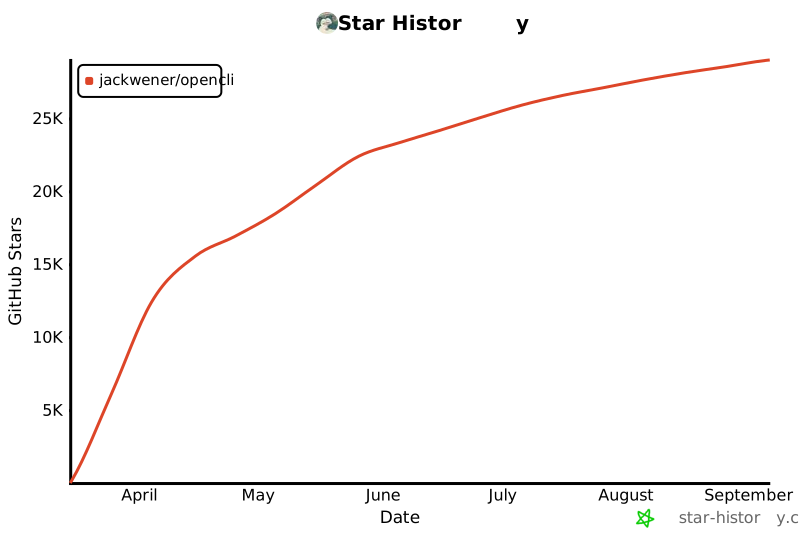
Star History
License
Apache-2.0




