
Meta-Architect
Quality gates and evidence verification for AI coding agents.
Your agent writes code fast. Meta-Architect makes it prove each stage first. Design, evidence, logic, security, experience, build. Each gate stays locked until the one before it passes.





Quick Start · Demo · Verified Coverage · Contributing · Issues
[!NOTE]
Meta-Architect is a workflow layer for teams that want architecture, evidence, review, and release discipline before build execution.
Meta-Architect does not replace your coding runtime.
It wraps that runtime with architecture, evidence, gate enforcement, and release-sensitive workflow control.
🔌 All 33 plugins & features
The plugin and feature inventory is maintained in the support bundle manifest and skills manifest, with verification in the coverage documentation.
Why do AI coding agents need gates?
Your agent writes code faster than you review it. Studies and dev surveys keep finding the same failures:
- Plausible code with wrong logic
- Imports of packages which don't exist
- Outdated APIs from training cutoffs
- "Done" claims with zero proof
Meta-Architect blocks each one:
- No architecture without a decision record.
$arch writes the blueprint and the trade-offs.
- No stack claims without evidence.
$sage grades every dependency claim VERIFIED, PARTIAL, or MISSING against upstream repos through GitMCP.
- No build while a gate is red. Logic, security, and DX reviews fail closed.
- No release claims without proof. Releases need issue-linked, production-verified evidence.
What is Meta-Architect?
An open-source workflow governor for AI coding agents. You install it as a skill package in your agent host. It adds six gated lanes plus $maestro, a bounded manager which routes your work through them. It doesn't replace your agent, runtime, or model. It governs what they produce.
| Type | Skill and plugin package for AI coding agent hosts |
| Reference host | Codex (full support) |
| Compatibility scope | Codex, OpenCode, Gemini CLI, Amp, Claude Code, Goose, Hermes, Pi, Cursor, Windsurf, Cline, Continue, Roo, Kiro CLI, Junie, GitHub Copilot, and Antigravity (coverage evidence) |
| Runtime | Node.js 20+ |
| Install | npm i -g @jstn-sdk/ma |
| Evidence sources | GitMCP / MCP endpoints |
| License | MIT |
How does it work?
State your intent once. $maestro picks the next safe step and stops when something fails.
$maestro I want to build: a multi-tenant analytics API for logistics customers
Meta-Architect Status
=====================
Idea: CLEAR
Architecture: APPROVED
Evidence: VERIFIED
Logic: GREEN
Security: GREEN
Experience: GREEN
Build: LOCKED
Build stays LOCKED until every upstream gate passes. Red stays red.
The six gates
$arch | What are you building, and why this shape? | architecture_status |
$sage | Do your stack choices trace to real upstream evidence? | evidence_status |
$flow | Do the logic and state transitions hold? | logic_status |
$vet | Does it survive security and dependency review? | security_status |
$vibe | Will developers and users tolerate it? | experience_status |
$build | What's the narrowest safe thing to build now? | build_status |
Four helpers support the lanes without moving gates: $align, $diagnose, $tdd, $cleanup.
How is it different from Spec Kit, BMAD, or Agent OS?
Spec-driven tools structure what your agent writes. Meta-Architect enforces what your agent proves.
| Structured workflow | Yes | Yes | Yes | Yes |
| Gates which block | No | No | No | Yes |
| External evidence verification | No | No | No | Yes, GitMCP-graded |
| Learning loop with promotion rules | No | No | No | Yes |
| Multi-host | Yes | Yes | Yes | Codex today, expanding |
Already using a spec tool? Keep it. Their specs become inputs. MA's gates verify the execution.
Quick start
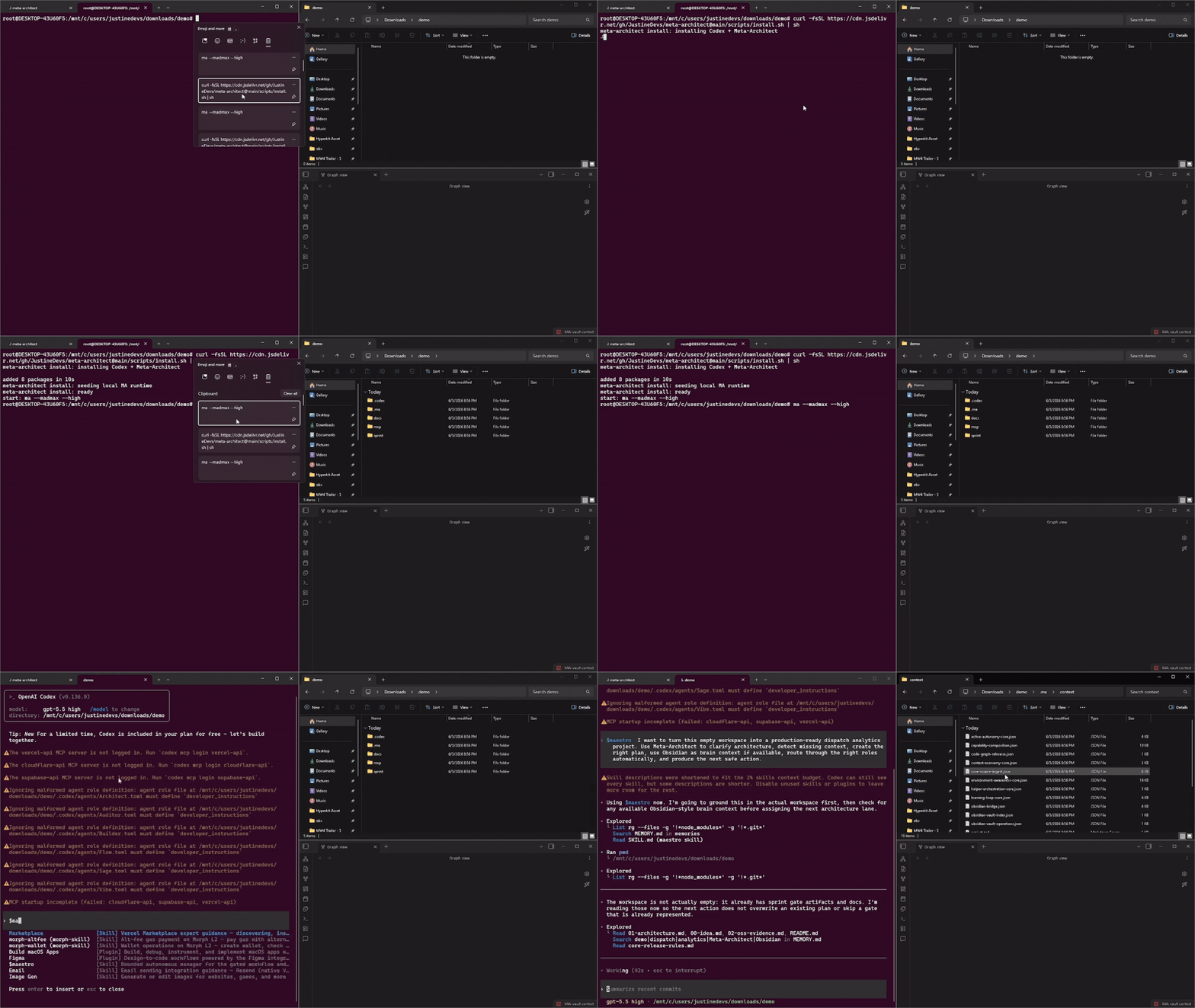
curl -fsSLo install.sh https://cdn.jsdelivr.net/gh/JustineDevs/meta-architect@latest/scripts/install.sh && curl -fsSLo install.sh.sha256 https://cdn.jsdelivr.net/gh/JustineDevs/meta-architect@latest/scripts/install.sh.sha256 && sed 's#scripts/install.sh#install.sh#' install.sh.sha256 | sha256sum -c - && sh install.sh
ma --madmax --high
$maestro I want to build: [your project idea]
AI agent installation prompt
Copy and paste this prompt into your AI coding agent:
Install Meta-Architect for this project.

1. Detect the current AI host and its native project configuration surface.
2. Install or update `@jstn-sdk/ma@latest` using the host's supported package manager.
3. Set `MA_AGENT` to the detected host ID when a host-specific surface is available.
4. Run `ma setup` and accept the detected project scope and targets.
5. Verify the generated `.ma/` state and native host artifacts.
6. Report the installed version, selected host, generated files, and any unsupported capabilities.

Do not overwrite user-owned files, modify unrelated configuration, or claim a host is supported without verification.
Windows PowerShell: npm i -g @openai/codex@latest @jstn-sdk/ma@latest
More install options: docs/getting-started.md
Uninstall Meta-Architect: npm uninstall -g @jstn-sdk/ma
Uninstall Meta-Architect and Codex: npm uninstall -g @jstn-sdk/ma @openai/codex
Install into an AI vendor host
Install Meta-Architect once, then select the host surface before launch. The
pre-launch step detects installed hosts and writes the selected scope and
targets to .ma/prelaunch.json.
npm i -g @openai/codex@latest @jstn-sdk/ma@latest
ma --madmax --high
MA_AGENT=claude-code npm i -g @jstn-sdk/ma@latest
MA_AGENT=claude-code ma --madmax --high
MA_AGENT=cursor npm i -g @jstn-sdk/ma@latest
MA_AGENT=cursor ma --madmax --high
MA_AGENT=<host-id> npm i -g @jstn-sdk/ma@latest
MA_AGENT=<host-id> ma --madmax --high
MA installs or reuses the native skill/configuration surface for the selected
host and keeps the canonical workflow unchanged. See the host compatibility
evidence and skills publishing
guide for the complete registry and distribution
rules.
Who is it for?
- Solo builders shipping with AI agents who want release discipline without enterprise process
- OSS contributors who need stack decisions they defend in review
- Skip it if you want an unattended agent writing code. MA governs your agent. It isn't one.
How do I contribute?
- Open an issue before a PR. It saves rework.
- Start here: issues labeled
triage
- Branch from
development. main is protected and release-facing.
- Run
npm test before you submit. Follow AGENTS.md.
- AI-assisted PRs welcome. Explain every line you submit or expect a close.
Learn more
License
MIT. Built by @JustineDevs. Shaped by ideas from the oh-my-codex ecosystem.
Found a bad claim before it shipped? Star the repo. It helps other developers find it.



