[!NOTE]
Meta-Architect is a workflow layer for teams that want architecture, evidence, review, and release discipline before build execution.
Meta-Architect does not replace your coding runtime.
It wraps that runtime with architecture, evidence, gate enforcement, and release-sensitive workflow control.
Meta-Architect is an architecture-governance and execution-verification layer that helps AI coding agents design scalable, secure, and resilient systems by making business goals, constraints, trade-offs, evidence, and quality gates explicit.
🧩 Setup
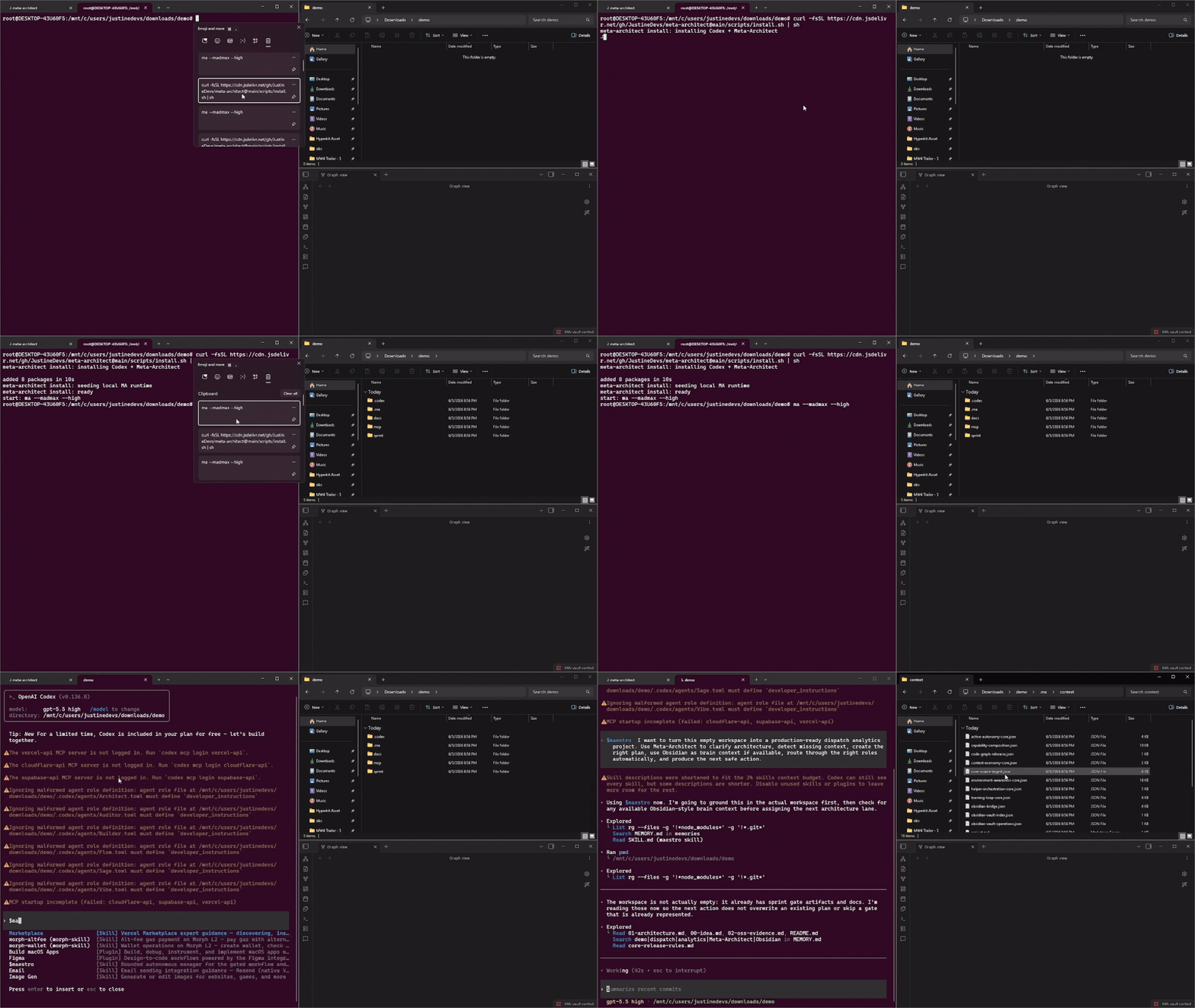
Install and start
Requires Node.js 20+ and a TypeSafe API key for autonomous Maestro routing.
npm install --global @jstn-sdk/ma@latest
ma auth typesafe
ma setup
ma --madmax --high
For a project-local dotenv setup, create .env.local in the project root:
TYPESAFE_API_KEY=jv_live_your_key
Keep .env.local out of version control. Meta-Architect reads .env.local,
then .env, then the global credential file; explicit environment variables
still take precedence. The default jev-latest model is selected automatically;
no model setting is required. Check the resolved source without revealing the key:
ma auth typesafe --status
Then give Maestro the project goal inside your AI coding agent:
$maestro I want to build: [your project idea]
ma setup detects the active host, installs the compatible Meta-Architect
surface, and writes project state to .ma/. The credential is never written
to .ma/, receipts, logs, or generated context.
End-to-end example
After setup, the normal workflow is one goal, not a manually selected lane
sequence:
ma setup
ma --madmax --high
Inside the AI coding agent, state the goal once:
$maestro Build a multi-tenant analytics API with authentication and tests.
When the local Maestro runtime is running with the live provider configured,
Maestro reads the current .ma/ state, asks Jev to choose the next eligible
action, dispatches the owning lane, records evidence, and repeats the
decision-execute-verify loop. The user does not need to manually run
$arch, $sage, $flow, $vet, $vibe, or $build.
Loading $maestro as an in-session skill alone does not call Jev. Report
provider use: not verified unless a successful local Maestro receipt records
the provider decision.
$maestro
  -> selects the next eligible lane
  -> executes the lane
  -> verifies the result
  -> records evidence
  -> continues until complete or blocked
Inspect the current state at any time:
ma status
ma doctor
Maestro uses the bounded local policy when TypeSafe credentials are missing,
and stops for destructive operations, deployments, or explicit approval gates.
Interrupted work resumes from the persisted .ma/ state.
AI agent installation prompt
Copy and paste this prompt into your AI coding agent:
Install Meta-Architect for this project.

1. Detect the current AI host and its native project configuration surface.
2. Install or update `@jstn-sdk/ma@latest` using the host's supported package manager.
3. Set `MA_AGENT` to the detected host ID when a host-specific surface is available.
4. Run `ma setup` and accept the detected project scope and targets.
5. Verify the generated `.ma/` state and native host artifacts.
6. Report the installed version, selected host, generated files, and any unsupported capabilities.

Do not overwrite user-owned files, modify unrelated configuration, or claim a host is supported without verification.
Alternative Installation
Use the signed jsDelivr installer on macOS, Linux, WSL, or Git Bash.
curl -fsSLo install.sh https://cdn.jsdelivr.net/gh/JustineDevs/meta-architect@latest/scripts/install.sh
curl -fsSLo install.sh.sha256 https://cdn.jsdelivr.net/gh/JustineDevs/meta-architect@latest/scripts/install.sh.sha256
sed 's#scripts/install.sh#install.sh#' install.sh.sha256 | sha256sum -c -
sh install.sh
ma --madmax --high
$maestro I want to build: [your project idea] | npm global
npm i -g @openai/codex@latest @jstn-sdk/ma@latest
Meta-Architect only
npm i -g @jstn-sdk/ma@latest
Windows PowerShell
npm i -g @openai/codex@latest @jstn-sdk/ma@latest
Debian / Ubuntu
sudo apt install ./meta-architect_<version>_all.deb
Arch Linux
sudo pacman -U ./meta-architect-<version>-1-any.pkg.tar.xz
Fedora / openSUSE
sudo dnf install ./meta-architect-<version>-1.noarch.rpm |
More install options: docs/getting-started.md
Uninstall Meta-Architect: npm uninstall -g @jstn-sdk/ma
Uninstall Meta-Architect and Codex: npm uninstall -g @jstn-sdk/ma @openai/codex
Install into an AI vendor host
Install Meta-Architect once, then select the host surface before launch. The
pre-launch step detects installed hosts and writes the selected scope and
targets to .ma/prelaunch.json.
npm i -g @openai/codex@latest @jstn-sdk/ma@latest
ma --madmax --high
MA_AGENT=claude-code npm i -g @jstn-sdk/ma@latest
MA_AGENT=claude-code ma --madmax --high
MA_AGENT=cursor npm i -g @jstn-sdk/ma@latest
MA_AGENT=cursor ma --madmax --high
MA_AGENT=<host-id> npm i -g @jstn-sdk/ma@latest
MA_AGENT=<host-id> ma --madmax --high
MA installs or reuses the native skill/configuration surface for the selected
host and keeps the canonical workflow unchanged. See the host compatibility
evidence for supported surfaces.
Claude Code marketplace
The repository includes a hosted Claude Code marketplace for the existing
plugins/meta-architect bundle:
/plugin marketplace add JustineDevs/meta-architect
/plugin install meta-architect@meta-architect
ChatGPT Desktop local marketplace
ChatGPT Desktop cannot resolve direct filesystem links to local Codex skills.
The canonical $maestro source is the
remote GitHub skill file.
Install the portable plugin through the repository marketplace instead:
npm run plugin:validate
codex plugin marketplace add ./
Restart ChatGPT Desktop, open Plugins, select the local Meta-Architect
marketplace, and install Meta-Architect. Use the installed plugin or its
available @ mention with a normal request such as:
Use Meta-Architect Maestro to choose the next safe workflow step for this task.
The Desktop plugin packages the skills only. Live local ma and Jev
execution still requires the local Codex/Node runtime; hosted ChatGPT Work
execution requires a separately deployed authenticated MCP app. See the
ChatGPT integration guide.
Zero-config MCP setup
Meta-Architect exposes a production, read-only MCP server at
https://ma.jstn.site/mcp. “Zero-config” means no project files, API keys, or
vendor-specific wrapper code are required: register the URL with the host you
already use.
Codex
codex mcp add meta-architect --url https://ma.jstn.site/mcp
codex mcp list
Claude Code
claude mcp add --transport http meta-architect https://ma.jstn.site/mcp
claude mcp list
Run /mcp inside Claude Code to confirm the connection. Use --scope user
when the server should be available across Claude Code projects:
claude mcp add --transport http --scope user meta-architect https://ma.jstn.site/mcp
Cursor
Add the server to ~/.cursor/mcp.json:
{
  "mcpServers": {
    "meta-architect": {
      "url": "https://ma.jstn.site/mcp"
    }
  }
}
VS Code with GitHub Copilot Agent mode
Add .vscode/mcp.json to the project:
{
  "servers": {
    "meta-architect": {
      "type": "http",
      "url": "https://ma.jstn.site/mcp"
    }
  }
}
ChatGPT developer mode uses the same URL in its MCP connection form. No
additional local configuration is needed. The server exposes only read-only
workflow guidance tools and does not access or modify the connected project.
These examples follow the host contracts documented by OpenAI Docs MCP, OpenAI plugin MCP guidance, and Claude Code MCP documentation.
Product details
🔌 All 33 plugins & features
The plugin and feature inventory is maintained in the support bundle manifest and skills manifest, with verification in the coverage documentation.
Why do AI coding agents need gates?
Your agent writes code faster than you review it. Studies and dev surveys keep finding the same failures:
- Plausible code with wrong logic
- Imports of packages which don't exist
- Outdated APIs from training cutoffs
- "Done" claims with zero proof
Meta-Architect blocks each one:
- No architecture without a decision record.
$arch writes the blueprint and the trade-offs.
- No stack claims without evidence.
$sage grades every dependency claim VERIFIED, PARTIAL, or MISSING against upstream repos through GitMCP.
- No build while a gate is red. Logic, security, and DX reviews fail closed.
- No release claims without proof. Releases need issue-linked, production-verified evidence.
What is Meta-Architect?
An open-source workflow governor for AI coding agents. You install it as a skill package in your agent host. It adds six gated lanes plus $maestro, a bounded manager which routes your work through them. It doesn't replace your agent, runtime, or model. It governs what they produce.
| Type | Skill and plugin package for AI coding agent hosts |
| Reference host | Codex (full support) |
| Compatibility scope | Codex, OpenCode, Gemini CLI, Amp, Claude Code, Goose, Hermes, Pi, Cursor, Windsurf, Cline, Continue, Roo, Kiro CLI, Junie, GitHub Copilot, and Antigravity (coverage evidence) |
| Runtime | Node.js 20+ |
| Install | npm i -g @jstn-sdk/ma |
| Evidence sources | GitMCP / MCP endpoints |
| License | MIT |
How does it work?
State your intent once. $maestro picks the next safe step and stops when something fails.
$maestro I want to build: a multi-tenant analytics API for logistics customers
Meta-Architect Status
=====================
Idea: CLEAR
Architecture: APPROVED
Evidence: VERIFIED
Logic: GREEN
Security: GREEN
Experience: GREEN
Build: LOCKED
Build stays LOCKED until every upstream gate passes. Red stays red.
The six gates
flowchart LR
    A["$arch<br/>Architecture"] --> B["$sage<br/>Evidence"]
    B --> C["$flow<br/>Logic"]
    C --> D["$vet<br/>Security"]
    D --> E["$vibe<br/>Experience"]
    E --> F["$build<br/>Safe build slice"]
    F --> G["Implementation ready"]

    A -. "blocked" .-> R["Repair the failed lane"]
    B -. "blocked" .-> R
    C -. "blocked" .-> R
    D -. "blocked" .-> R
    E -. "blocked" .-> R
    R -. "rerun owner" .-> A

    classDef gate fill:#eef2ff,stroke:#4f46e5,color:#111827
    classDef outcome fill:#ecfdf5,stroke:#059669,color:#064e3b
    classDef repair fill:#fff7ed,stroke:#ea580c,color:#7c2d12
    class A,B,C,D,E,F gate
    class G outcome
    class R repair
Each gate owns one decision. A failed gate sends work back to the lane that can
repair it. $build stays locked until the earlier gates pass.
Four helpers support the lanes without moving gates: $align, $diagnose, $tdd, $cleanup.
How is it different from Spec Kit, BMAD, or Agent OS?
Spec-driven tools structure what your agent writes. Meta-Architect enforces what your agent proves.
| Structured workflow | Yes | Yes | Yes | Yes |
| Gates which block | No | No | No | Yes |
| External evidence verification | No | No | No | Yes, GitMCP-graded |
| Learning loop with promotion rules | No | No | No | Yes |
| Multi-host | Yes | Yes | Yes | Codex today, expanding |
Already using a spec tool? Keep it. Their specs become inputs. MA's gates verify the execution.
Who is it for?
- Solo builders shipping with AI agents who want release discipline without enterprise process
- OSS contributors who need stack decisions they defend in review
- Skip it if you want an unattended agent writing code. MA governs your agent. It isn't one.
How do I contribute?
- Open an issue before a PR. It saves rework.
- Start here: issues labeled
triage
- Make changes on
dev; main is protected and release-facing. Automation
branches are ephemeral workflow artifacts, not developer branches.
- Run
npm test before you submit. Follow CONTRIBUTING.md.
- AI-assisted PRs welcome. Explain every line you submit or expect a close.
See the Code of Conduct and security policy
for participation and private vulnerability reporting.
Found a bad claim before it shipped? Star the repo. It helps other developers find it.








