

Product
Microsoft Teams Notifications Are Now Available in Socket
Socket can now send alerts and supply chain attack notifications to Microsoft Teams, with filters that route the right updates to each channel.
By Jeppe Hasseriis - Sep 01, 2026
@particlr/runtime
Advanced tools
Framework-agnostic particle simulation core + Pixi v8 and Pixi v7 adapters for the .prt format.

Plays .prt particle effects in PixiJS v8 (and PixiJS v7, via a separate
subpath — see below). Design effects visually in the
particlr editor, export a .prt file, play it
back with this package. The editor previews through this exact runtime, and
playback is deterministic (same document + seed ⇒ same frames) — so what you
tune is what you ship.
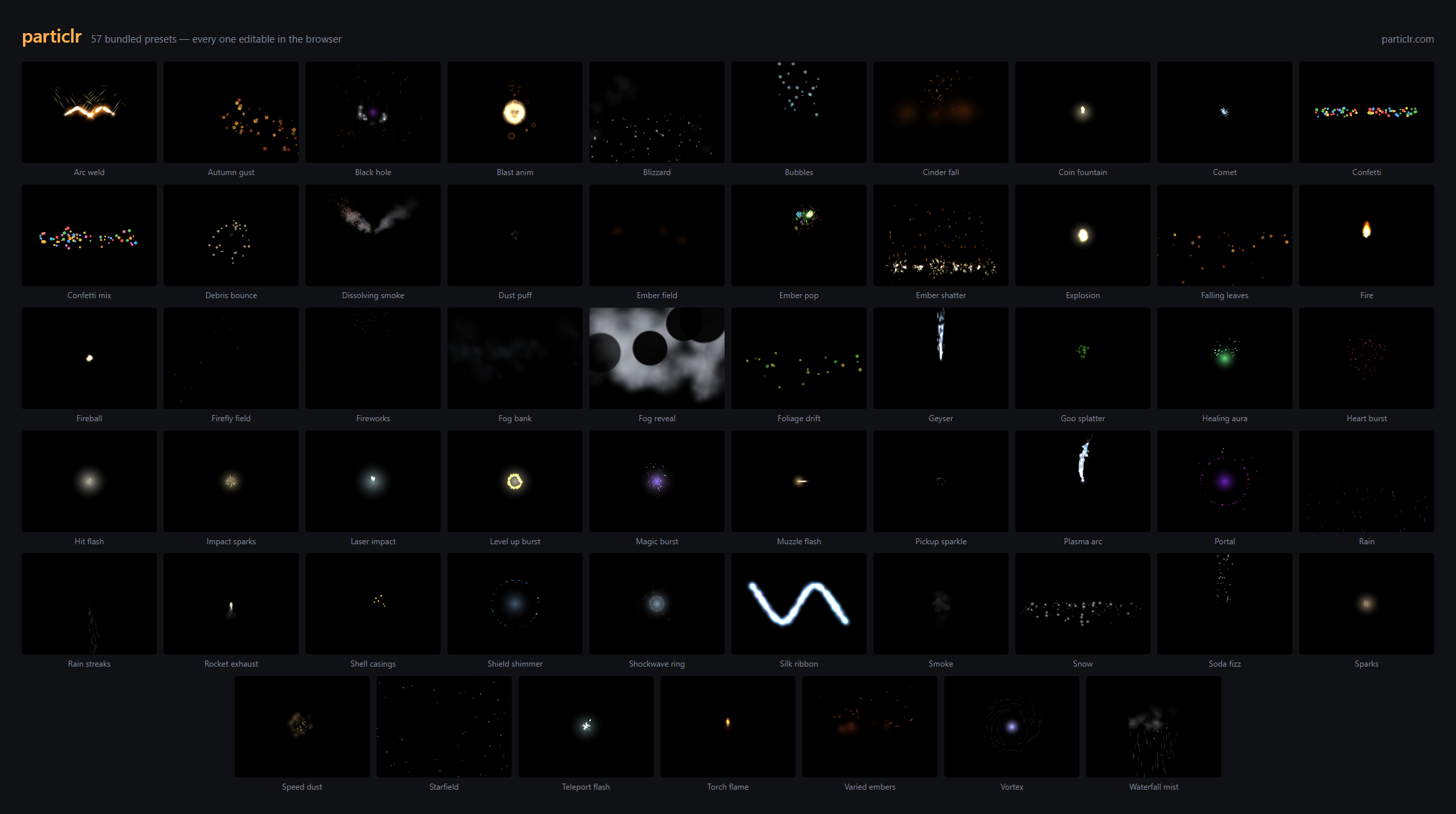
The editor ships 57 CC0 presets — every frame above was rendered by this package. Open any of them at particlr.com, tune it, export, and play it back here.
npm install @particlr/runtime pixi.js
import { Application } from "pixi.js";
import { parseParticle, Effect } from "@particlr/runtime";
import { PixiParticleRenderer } from "@particlr/runtime/pixi";

const app = new Application();
await app.init({ width: 800, height: 600 });
document.body.appendChild(app.canvas);

const doc = parseParticle(await (await fetch("boom.prt")).text()).doc!;
const fx = new Effect(doc, { seed: 1337 });
const view = new PixiParticleRenderer(fx);
view.container.position.set(400, 300); // where the effect plays
app.stage.addChild(view.container);

app.ticker.add((t) => {
  fx.step(t.deltaMS / 1000); // advance the simulation
  view.sync();               // draw it
});
That's the whole integration. Live example: particlr.com/sample.
Games still on PixiJS v7 (the v7 → v8 migration is a large lift) can consume the
same .prt effects without migrating. The v7 adapter lives on its own subpath —
one subpath per major: ./pixi is the v8 adapter, ./pixi7 is the v7
adapter. The pixi.js peer range is ">=7.2.0 <9", and the v7 adapter is
developed and golden-tested against pixi.js 7.4.3.
The only differences from the v8 snippet above are the v7 Application idiom
(the constructor is synchronous — no await app.init() — and the canvas is
app.view) and the import path:
import { Application } from "pixi.js";
import { parseParticle, Effect } from "@particlr/runtime";
import { PixiParticleRenderer } from "@particlr/runtime/pixi7";

const app = new Application({ width: 800, height: 600 });
document.body.appendChild(app.view);

const doc = parseParticle(await (await fetch("boom.prt")).text()).doc!;
const fx = new Effect(doc, { seed: 1337 });
const view = new PixiParticleRenderer(fx);
view.container.position.set(400, 300); // where the effect plays
app.stage.addChild(view.container);

app.ticker.add(() => {
  fx.step(app.ticker.deltaMS / 1000); // advance the simulation
  view.sync();                        // draw it
});
The public API is identical to ./pixi — migrating between majors is a one-line
import change. The v7 adapter is at full feature parity: flipbooks, trails
(including connect ribbons), sub-emitter rendering (driven by the shared core),
and dissolve (via a forked v7 particle pipeline). The one hard limit is the
renderer: v7 has no WebGPU, so the v7 adapter is WebGL only.
Effect also has a movable emitter for trails (setEmitterPosition),
playback control (timeScale, onDone), a host-driven attractor
(setAttractor), and per-instance parameters (setParam, setColorParam) —
one boom.prt, many weapons. The full API is documented in the shipped
TypeScript types, and the .prt format's reference is the bundled JSON
Schema: import schema from "@particlr/runtime/particle.schema.json".
MIT. See LICENSE.
FAQs
Framework-agnostic particle simulation core + Pixi v8/v7, Three.js, and Phaser 4 adapters for the .prt format.
The npm package @particlr/runtime receives a total of 36 weekly downloads. As such, @particlr/runtime popularity was classified as not popular.
We found that @particlr/runtime demonstrated a healthy version release cadence and project activity because the last version was released less than a year ago. It has 1 open source maintainer collaborating on the project.
Product
Socket can now send alerts and supply chain attack notifications to Microsoft Teams, with filters that route the right updates to each channel.

Security News
pnpm 12 rewrites the package manager in Rust, cutting install times by up to 90% while preserving pnpm 11 workflows and lockfiles.

Security News
Socket CTO Ahmad Nassri joins AppSec leaders at Black Hat to discuss active malware, package manager risks, and software supply chain defense.