

Product
Microsoft Teams Notifications Are Now Available in Socket
Socket can now send alerts and supply chain attack notifications to Microsoft Teams, with filters that route the right updates to each channel.
By Jeppe Hasseriis - Sep 01, 2026
@particlr/runtime
Advanced tools
Framework-agnostic particle simulation core + Pixi v8/v7 and Three.js adapters for the .prt format.

Plays .prt particle effects in PixiJS v8 and PixiJS v7 (each via a
subpath), and in Three.js (also via a subpath — see below). Design effects
visually in the
particlr editor, export a .prt file, play it
back with this package. The editor previews through this exact runtime, and
playback is deterministic (same document + seed ⇒ same frames) — so what you
tune is what you ship.
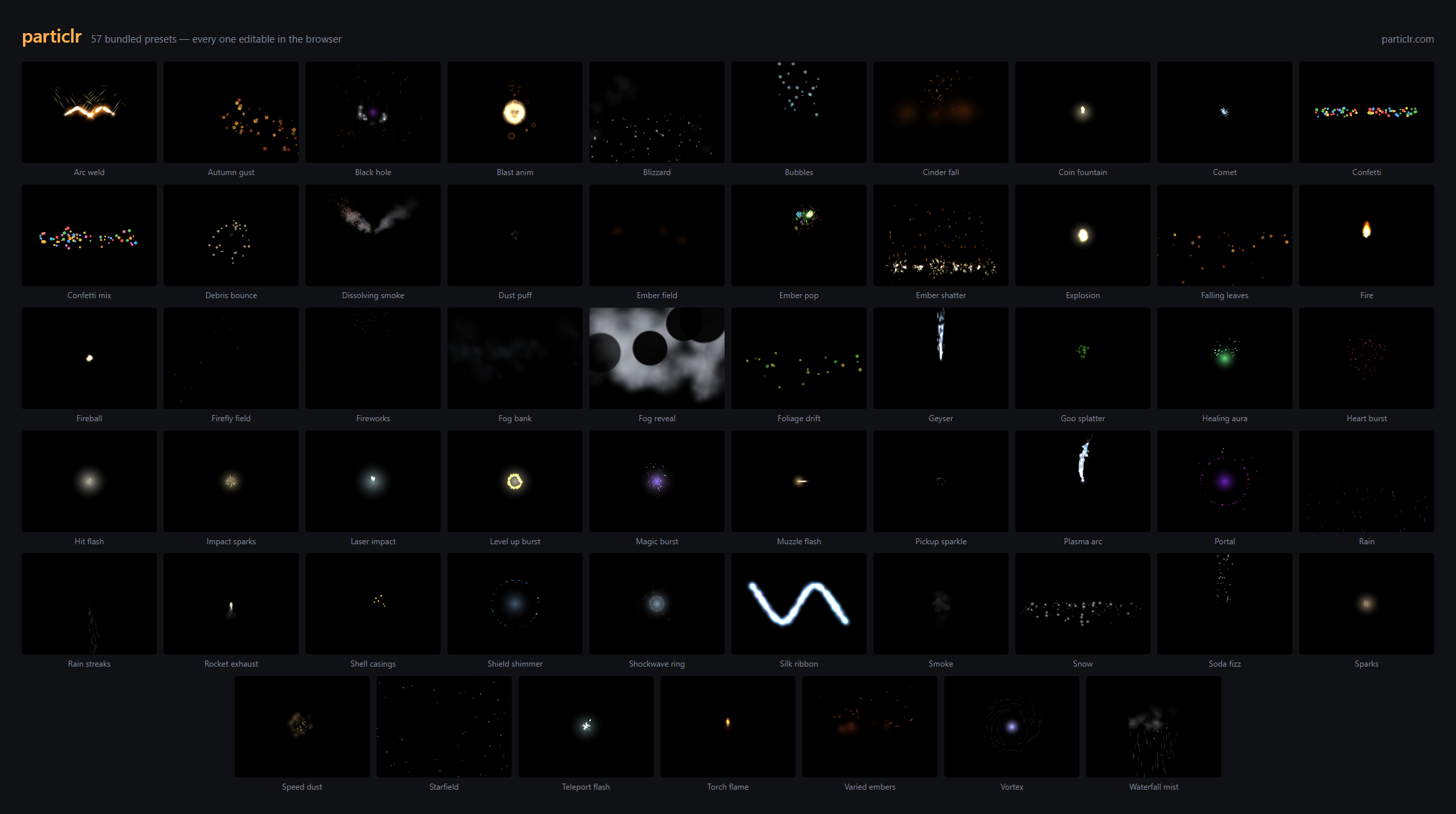
The editor ships 57 CC0 presets — every frame above was rendered by this package. Open any of them at particlr.com, tune it, export, and play it back here.
npm install @particlr/runtime pixi.js
import { Application } from "pixi.js";
import { parseParticle, Effect } from "@particlr/runtime";
import { PixiParticleRenderer } from "@particlr/runtime/pixi";

const app = new Application();
await app.init({ width: 800, height: 600 });
document.body.appendChild(app.canvas);

const doc = parseParticle(await (await fetch("boom.prt")).text()).doc!;
const fx = new Effect(doc, { seed: 1337 });
const view = new PixiParticleRenderer(fx);
view.container.position.set(400, 300); // where the effect plays
app.stage.addChild(view.container);

app.ticker.add((t) => {
  fx.step(t.deltaMS / 1000); // advance the simulation
  view.sync();               // draw it
});
That's the whole integration. Live example: particlr.com/sample.
Games still on PixiJS v7 (the v7 → v8 migration is a large lift) can consume the
same .prt effects without migrating. The v7 adapter lives on its own subpath —
one subpath per major: ./pixi is the v8 adapter, ./pixi7 is the v7
adapter. The pixi.js peer range is ">=7.2.0 <9", and the v7 adapter is
developed and golden-tested against pixi.js 7.4.3.
The only differences from the v8 snippet above are the v7 Application idiom
(the constructor is synchronous — no await app.init() — and the canvas is
app.view, typed as ICanvas, hence the cast) and the import path:
import { Application } from "pixi.js";
import { parseParticle, Effect } from "@particlr/runtime";
import { PixiParticleRenderer } from "@particlr/runtime/pixi7";

const app = new Application({ width: 800, height: 600 });
document.body.appendChild(app.view as HTMLCanvasElement);

const doc = parseParticle(await (await fetch("boom.prt")).text()).doc!;
const fx = new Effect(doc, { seed: 1337 });
const view = new PixiParticleRenderer(fx);
view.container.position.set(400, 300); // where the effect plays
app.stage.addChild(view.container);

app.ticker.add(() => {
  fx.step(app.ticker.deltaMS / 1000); // advance the simulation
  view.sync();                        // draw it
});
The public API is identical to ./pixi — migrating between majors is a one-line
import change. The v7 adapter is at full feature parity: flipbooks, trails
(including connect ribbons), sub-emitter rendering (driven by the shared core),
and dissolve (via a forked v7 particle pipeline). The one hard limit is the
renderer: v7 has no WebGPU, so the v7 adapter is WebGL only.
Performance note, measured honestly: v7's ParticleContainer renders full
Sprite objects where v8 renders lightweight Particle structs, so the v7
adapter costs more CPU per frame by construction — in our benchmarks (~500
live particles, high churn, real Chromium) the v7 adapter spends ~1.3 ms per
frame where v8 spends ~0.1 ms. Both are far under a 60 fps budget; at typical
2D-game particle counts this is not a limiting factor, but if you are pushing
tens of thousands of particles, v8 is the faster target.
A second rasterizer for the same 2D simulation, @particlr/runtime/three.
The host gets a THREE.Group (view.root) it places in its own scene; the
effect renders on that object's local XY plane, with an optional billboard
mode that faces the camera every frame.
npm install @particlr/runtime three
import { WebGLRenderer, Scene, PerspectiveCamera, Vector3 } from "three";
import { parseParticle, Effect } from "@particlr/runtime";
import { ThreeParticleRenderer } from "@particlr/runtime/three";

const renderer = new WebGLRenderer({ antialias: true });
renderer.setSize(innerWidth, innerHeight);
document.body.appendChild(renderer.domElement);
const scene = new Scene();
const camera = new PerspectiveCamera(50, innerWidth / innerHeight, 1, 10000);
camera.position.set(0, 300, 900);
camera.lookAt(0, 0, 0);

const doc = parseParticle(await (await fetch("boom.prt")).text()).doc!;
const fx = new Effect(doc, { seed: 1337 });
const view = new ThreeParticleRenderer(fx, { billboard: true });
view.root.position.copy(new Vector3(0, 200, 0)); // where the effect plays
scene.add(view.root);

function frame(now: number): void {
  fx.step(1 / 60);   // advance the simulation
  view.sync();       // draw it
  renderer.render(scene, camera);
  requestAnimationFrame(frame);
}
requestAnimationFrame(frame);
That's the whole integration; see samples/three-game/src/main.ts for a
click-to-spawn host with resize handling and one-shot teardown.
| Option | Type | Default | Notes |
|---|---|---|---|
billboard | boolean | false | false: quads stay in the group's local XY plane. true: the corner offset is applied in view space after transforming the instance center, so every particle faces the camera regardless of the group's orientation. Applies to sprite quads only — trail ribbons are not billboarded and always stay in the group's local plane, even with billboard: true. Live-settable (view.billboard = true). |
loadTexture | (dataUrl: string) => Promise<Texture> | browser decode via createImageBitmap | Overrides async user-texture loading — useful in Node/test environments without a DOM Image/createImageBitmap. |
Every .prt blend mode maps to a fixed RawShaderMaterial blend-function
tuple. This table is the single source of truth — it is unit-tested
verbatim in test/three/materials.test.ts.
.prt blend | blending | blendSrc | blendDst | blendEquation |
|---|---|---|---|---|
normal | CustomBlending | OneFactor | OneMinusSrcAlphaFactor | AddEquation |
add | CustomBlending | OneFactor | OneFactor | AddEquation |
multiply | CustomBlending | DstColorFactor | OneMinusSrcAlphaFactor | AddEquation |
screen | CustomBlending | OneFactor | OneMinusSrcColorFactor | AddEquation |
erase | CustomBlending | ZeroFactor | OneMinusSrcAlphaFactor | AddEquation |
erase is destination-out, exactly as the editor thumbnails model it. Every
tuple assumes a premultiplied source: textures upload straight alpha, and
the fragment shader multiplies texel × tint in straight alpha then writes
premultiplied output (vec4(rgb·a, a)).
The sim is 2D screen-space, y-down, with rotation in degrees,
clockwise-positive (Pixi conventions). Three is y-up, CCW-positive. The
adapter maps sim space to the group's local space as position: (x, y) → (x, -y) and angle: aAngle = -velAngleDegrees · π/180 (radians, negated),
so an effect authored in the editor reads upright and un-mirrored on the
plane. A particle renders size px wide and size × frameAspect px tall
(frameAspect = frameHeight / frameWidth), matching the Pixi adapter's
sizing rule.
This is not a 3D particle sim. Positions stay (x, y); the .prt
document is unchanged; there are no 3D emission shapes, no 3D forces, and no
depth interaction between particles and the rest of your scene beyond
standard alpha-blended draw order (V2_DESIGN Part 1). If your effect needs a
camera-facing plane, use billboard: true; if it needs true 3D particles,
this adapter is not that — place a plane where you want the effect and treat
it as a 2D layer in a 3D world, the same way a sprite-based VFX plane works
in any 3D engine.
Every layer's Mesh carries mesh.userData.particlrLayer (the layer's
index in the document) so a host can find/inspect a specific layer's draw
call. A layer with a trail adds an extra Mesh for the ribbon, tagged with
both userData.particlrLayer (same index) and userData.particlrTrail = true.
LayerRenderBuffers — no 8-bit quantization (Pixi's tint
is a packed 8-bit-per-channel color). Raster goldens are per-adapter
(Three-vs-Three across commits), so this divergence from Pixi's output is
expected, not a bug.aFrame attribute instead. Concrete
consequence for a layer that combines a flipbook with dissolve: the Three
adapter samples the dissolve noise at the per-frame WINDOWED uv (already
offset/scaled to the flipbook cell), whereas Pixi's dissolve shader samples
at the raw SHEET uv — so the erosion pattern shifts per flipbook frame in
Three but not in Pixi. This does not fail any test (raster goldens are
per-adapter, never cross-compared); it is a visual difference between
adapters.RawShaderMaterial, so three injects no attribute declarations and
applies no color-space transform or tone mapping — output matches Pixi's
un-color-managed pipeline.view.destroy() disposes geometries and materials
only.The five builtin textures (circle-soft, circle-hard, square, spark,
smoke) are generated as pure-math straight-alpha RGBA pixel buffers — no
canvas, no GPU, no pixi.js. They are the same bytes every adapter uploads.
If you are writing a renderer for another engine and only need those buffers,
import them from the ./textures subpath, which pulls in zero Pixi code:
import { generateBuiltinTexture, type TextureData } from "@particlr/runtime/textures";

const tex: TextureData = generateBuiltinTexture("circle-soft");
// tex.width, tex.height, tex.pixels (Uint8Array, RGBA, non-premultiplied)
This entry needs no pixi.js peer and runs in bare Node. The ./pixi and
./pixi7 adapters continue to re-export generateBuiltinTexture for existing
consumers, so nothing changes for Pixi users.
step(dt) is host-driven and defensive (tightened in 0.6.0):
dt is first scaled by timeScale, then clamped to 1/20 s so a tab
unhide or debugger pause cannot explode emitters. When the clamp engages,
emitter displacement for that step is scaled by clampedDt/rawDt, so a
moving emitter's world-space trail stays continuous instead of teleporting.NaN dt are silent no-ops — a NaN never enters the
simulation. +Infinity is clamped like any large dt.Effect also has a movable emitter for trails (setEmitterPosition),
playback control (timeScale, onDone), a host-driven attractor
(setAttractor), and per-instance parameters (setParam, setColorParam) —
one boom.prt, many weapons. The full API is documented in the shipped
TypeScript types, and the .prt format's reference is the bundled JSON
Schema: import schema from "@particlr/runtime/particle.schema.json".
MIT. See LICENSE.
FAQs
Framework-agnostic particle simulation core + Pixi v8/v7, Three.js, and Phaser 4 adapters for the .prt format.
The npm package @particlr/runtime receives a total of 36 weekly downloads. As such, @particlr/runtime popularity was classified as not popular.
We found that @particlr/runtime demonstrated a healthy version release cadence and project activity because the last version was released less than a year ago. It has 1 open source maintainer collaborating on the project.
Product
Socket can now send alerts and supply chain attack notifications to Microsoft Teams, with filters that route the right updates to each channel.

Security News
pnpm 12 rewrites the package manager in Rust, cutting install times by up to 90% while preserving pnpm 11 workflows and lockfiles.

Security News
Socket CTO Ahmad Nassri joins AppSec leaders at Black Hat to discuss active malware, package manager risks, and software supply chain defense.