@reportwright/cli
pw: render, snapshot-test, diff and import ReportWright reports from the command line, with no server.


Live demo: mrarun005.github.io/reportwright-demo. Switch to ReportWright runs the same importers as pw import in your browser: drop a .jrxml, .rdl or .rptdesign and see what carries over.
The CLI carries @reportwright/engine; fonts come from @reportwright/fonts.
Screenshots
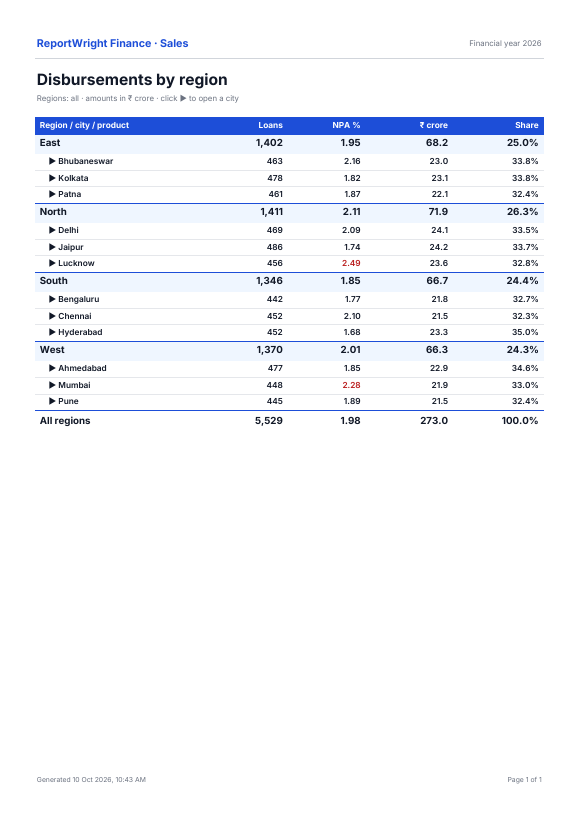
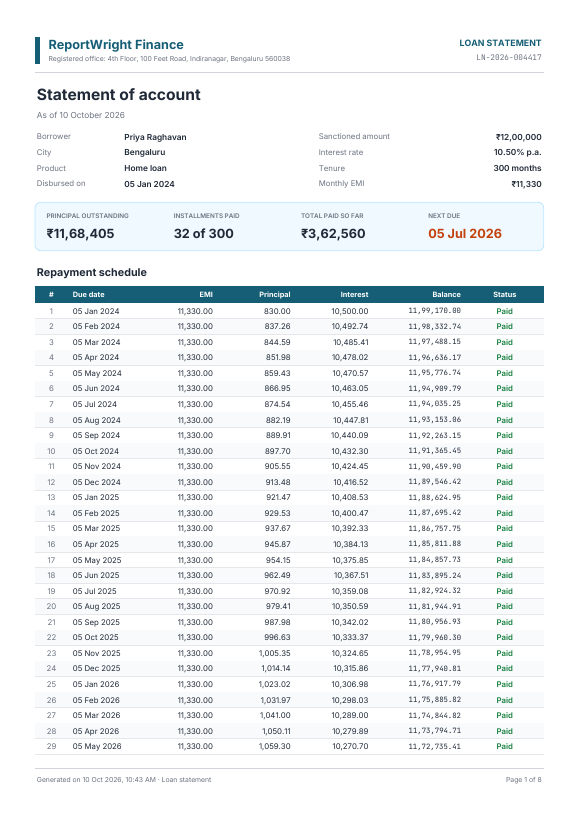
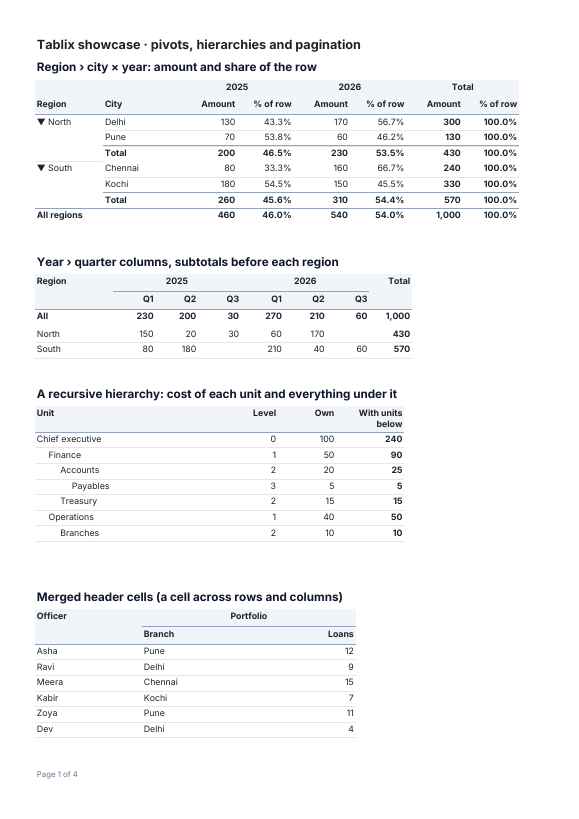
pw render output, page 1 (reports from the repository's reports/):
Install
npm i -D @reportwright/cli @reportwright/fonts
npx -p @reportwright/cli pw --version
Quick start (30 seconds)
orders.pw.json is the report from the engine's examples (a table of customers and amounts with a
total); orders.json is its data:
{ "rows": [{ "customer": "Asha Rao", "amount": 1200.5 }, { "customer": "Ben Ode", "amount": 80 }] }
npx pw render orders.pw.json -d orders=orders.json -f pdf -o orders.pdf
-d orders=orders.json replaces the data source named orders with the file's JSON.
Examples
Each was run against this version.
Render to every format. -f is pdf, xlsx, docx, pptx, html, csv, json or txt; -o - writes to stdout.
npx pw render orders.pw.json -d orders=orders.json -f xlsx -o orders.xlsx
npx pw render orders.pw.json -d orders=orders.json -f csv -o orders.csv
npx pw render statement.pw.json -p accountId=LN-1 -f pdf -o statement.pdf
Archival, accessible or protected PDF.
npx pw render orders.pw.json -d orders=orders.json --pdfa --ua -o orders.pdf
npx pw render orders.pw.json -d orders=orders.json --password s3cret --deny copy -o locked.pdf
Bulk import a folder of legacy reports. One bad file does not stop the batch; the exit code says how it went.
npx pw import legacy -o imported --recursive
echo $?
Snapshot-test reports as code. With reports/__tests__/orders.test.json:
{ "report": "../orders.pw.json", "cases": [{ "name": "two-orders", "data": { "orders": "orders.json" } }] }
npx pw test reports --update
npx pw test reports
Diff two versions of a report (the words, page by page; exit 1 when they differ):
npx pw diff orders.pw.json orders-v2.pw.json -d orders=orders.json
Commands and options
pw render <report.pw.json> | -p name=value (repeat), -d source=data.json (repeat), -f format (default pdf), -o file|-, --base URL (where relative data URLs go), --allow-internal, --pdfa, --ua, --values (Excel totals as values), --html tables|static (the HTML file; unset: the report's export.html, then PW_HTML_EXPORT; interactive needs the viewer), --drill-links inline|new-tab|off (drill-through needs a public --base), --static (alias of --html static), --layout (CSV of the printed layout), --password, --owner-password, --deny print|modify|copy|annotate|fillForms|accessibility|assemble|printHighQuality |
pw import <file> | -o out.pw.json |
pw assess <folder> | -o dir, --recursive, --usage file, --retire-days N (180), --hours simple=…,medium=…,complex=…, --fail-under pct, --max-files N (500), --max-bytes N (8 MB) |
pw import <folder> | -o outDir, --recursive, --force, --verify, --report path, --max-files N (2000), --max-bytes N (16 MB) |
pw test [folder] | --update, --layout |
pw diff <old> <new> | -p, -d, --base |
pw compare <original.pdf> <converted.pdf|report.pw.json> | -o dir (default .), -d, -p, --base, --tolerance PT (2), --threshold PCT (0), --dpi 72-100 (72), --numbers-only, --no-visual, --no-positions |
pw --version | prints the CLI and engine versions |
Exit codes: 0 ok; 1 a test failed, the pages differ or pw compare found a difference over its gate; 2 bad usage (pw import <folder>: 2 some failed, 1 none imported).
Supported formats
Output (-f) | pdf (also --pdfa, --ua, encrypted), xlsx, docx, pptx, html, csv, json, txt |
| Import | SSRS .rdl / .rdlc (+ shared data sources .rds), JasperReports .jrxml (+ style templates .jrtx), BIRT .rptdesign, ActiveReports .rdlx-json, referenced images. Jasper and BIRT crosstabs carry over as matrices (groups, measures, totals, styles); Jasper and BIRT charts as charts; Jasper markup as rich text; SSRS custom code's simple functions as report functions; SSRS maps as map items (embedded shapes as GeoJSON; a shapefile layer's .shp + .dbf are read when they are in the imported folder; SQL spatial layers are drawn from the query's geography binary or STAsText() WKT) |
Requirements and limits
- Node 20.9 or later. Install
@reportwright/fonts next to the CLI.
pw render -f pdf -o file streams a flowing table, so memory stays flat on large reports (see the engine's
streaming notes); other formats render the whole model in memory.- Bulk import reads at most
--max-files files (2000) of at most --max-bytes each (16 MB). BIRT libraries
(.rptlibrary) are listed but not read.
Related packages
@reportwright/engine (the same rendering from code), @reportwright/fonts,
@reportwright/fonts-cjk, @reportwright/viewer (view and design in the browser).
Notes on pw render
pw render -f pdf -o file streams a flowing table into the file as it is laid out (exportPdfStream; the message says
streamed), so a large report's memory stays flat; other reports, --password and -o - render the whole model first.
It writes to a temporary file beside the target and renames it when the export succeeded: a failed run leaves no
damaged PDF, and an older file at the path stays as it was.
Assess a folder first
pw assess <folder> answers "should we migrate, and how much work is it?" without writing a single converted report.
It runs the bulk importer in dry-run mode and writes only assessment.html and assessment.json (to -o, default .).
npx pw assess legacy -o assessment --usage runs.csv --retire-days 180 --hours simple=0.25,medium=2,complex=8 --fail-under 60
- The summary leads with "X reports can be retired, Y migrate automatically, Z need work", then the status counts,
readiness, the effort estimate, the top blockers (grouped, with the reports each affects), the untranslated expressions
by function, and the server settings to configure (
PW_DB_<NAME>).
- Status:
full converts as it is; small has approximated items, report notes or missing files; manual has dropped
items or untranslated expressions; failed does not parse. Configuring data sources and fonts is not a fix.
- Tiers: Retire (only with
--usage: no run in --retire-days, default 180); Simple (effort Low); Medium; Complex
(effort High, or failed). Effort: Low up to 3 issues in a small report, Medium above that; High for manual work with more than 3.
- Hours: per report, Simple 0.25 h, Medium 2 h, Complex 8 h, Retire 0 h. Override with
--hours simple=…,medium=…,complex=….
These are planning numbers, not measurements.
- Usage: a CSV or JSON table. The SSRS execution log (one row per run) is exported from the report server database with:
SELECT ItemPath, TimeStart, UserName, Format, Status FROM ExecutionLog3 WHERE ItemType = 'Report' AND TimeStart >= DATEADD(day, -365, GETDATE()).
A generic table has a report name (name, report or reportpath), runs and lastrun (or last run date). Rows
join to reports by file name without the extension. A report with no row has no runs.
- Exit codes: 0 always, or 1 when the readiness is below
--fail-under <pct>; 2 bad usage.
- Limits: 500 files, 8 MB per file, 256 MB in all (
--max-files, --max-bytes).
Bulk import
pw import legacy-reports -o imported --recursive [--force] [--verify] [--report path] [--max-files 2000] [--max-bytes 16777216]
pw import <folder> imports every SSRS (.rdl, .rdlc), JasperReports (.jrxml), BIRT (.rptdesign) and
ActiveReports (.rdlx-json) report in the folder (and its subfolders with --recursive) into <outDir>, which mirrors
the folder. Each report becomes <its folder>/<report id>.pw.json (the id is the file name in lower case with dashes,
e.g. Sales Report.rdl → sales-report.pw.json), because pw render and the server find subreports by that id.
-
One bad file never stops the batch. Its error goes into the report and the rest go on.
Exit code: 0 every report was imported, 2 some failed, 1 none was imported (or the folder has none).
-
References are resolved across the batch. These are found among the folder's files: by their path relative to
the report, else by their file name, nearest first.
- subreports by their id;
- SSRS shared data sources (
.rds, named by a DataSourceReference): the provider comes from the .rds, but the
connection string does not (set PW_DB_<NAME> on the server, as for any SQL source);
- JasperReports style templates (
.jrtx, nested ones too): the report's own style of the same name wins;
- images named by a relative path: copied next to the report once per content (the same picture referenced from two
folders is one file) and the report's
src rewritten to the copy.
An unresolved reference is listed for its file and does not stop the import. BIRT libraries (.rptlibrary) are
listed, but the BIRT importer does not read them, so their items are missing.
-
The migration report is import-report.json and import-report.html in <outDir>. With
--report file.json it goes there with the .html beside it, and with --report folder it goes into that folder.
For each file it gives the status, the counts of items mapped, approximated and dropped, and every item approximated
or dropped with the reason. It also lists every expression that was not translated with its item and its line and
column, and the references with what each resolved to. The rest of the importer's notes are listed under the report.
Every importer warning is in the report once. The HTML page stands alone and escapes file names and expressions.
Line and column are where the item's element starts in the XML file. ActiveReports .rdlx-json is JSON and gives
none. A data set's or a filter's expression is reported in that report's notes, not with a line.
-
Edited outputs are kept. <outDir>/.pw-import.json holds the hash of each file as written. On a re-run, a
target whose hash differs (you edited it, or it was there before and is not from an import) is skipped with a message.
--force overwrites it. Unchanged targets are refreshed, and new ones are written.
-
--verify renders each imported report with its embedded data, or with <id>.data.json beside the output
({ "<data source>": [rows] }). A report with neither is skipped with a note. When the run replaced an earlier output,
the two are compared with pw diff's comparison (the words, page by page), and the changed lines go into the report.
Otherwise the check confirms that it renders. A verify makes no network requests.
-
The folder is untrusted. A report never opens a file by the path it names. Only files found by walking the
folder are read, so ../ and absolute paths cannot reach outside it. Symbolic links that point out of the folder,
or to folders, are refused and listed. Every output path is checked to stay in <outDir>, and nothing is written
through a link. --max-files and --max-bytes cap the file count and each file's size. Nothing in an imported file
is run: scriptlets stay text, and SSRS custom code is translated (simple single-Return functions become report
functions), never executed. A map's shapefile (.shp + .dbf) is read only from inside the folder, with the same caps.
pw --version (or -v) prints the CLI's version and the version of the engine it carries.
Prove a migrated report matches: pw compare
npx pw compare sales-ssrs.pdf sales.pw.json -d sales=sales.json -o compare/
npx pw compare sales-ssrs.pdf sales-rw.pdf --threshold 0.5
npx pw compare sales-ssrs.pdf sales.pw.json -d sales=sales.json --numbers-only
Writes compare.html (self-contained) and compare.json, prints a summary. A .pw.json second argument is rendered
first, with -d/-p as in pw render. What it checks:
- Numbers first (Reconciliation). Every number on both sides, with its page, position and label (the words before it
on its line). Equal values count as equal however they are formatted (
1,234.50 = 1234.5 = 1.234,50 =
$1,234.50; (12.00) = -12); a rounding difference (1,234.504 → 1,234.50) is flagged as rounding; anything
else is mismatched with the delta and % delta. Totals (labels with total, sum, grand, subtotal, Gesamt, Summe,
totale, somme, suma, 合計…) are reconciled separately.
- Text. Words aligned page by page: missing, extra, changed; moved more than
--tolerance points (positions
normalised for a different page size). Positions need pdftotext (poppler-utils); without it the words are compared
in reading order, from @reportwright/pdf's reader, and moves are not reported.
- Pixels (when
pdftoppm is installed): both pages at --dpi, a red-on-faded overlay and the % of pixels that
differ per page.
Verdict: Matches, Minor differences (only moves or pixels) or Differences found. Exit 1 when any number or
total differs (rounding included), the page counts differ, or the % of differing words or pixels passes --threshold;
--numbers-only gates on the numbers alone. Inputs are untrusted: each PDF is read under the reader's budget (at most
50 MB, 300 pages, 20,000 words a page, 50 pages rendered, 4 megapixels a page, tools stopped after 15 s). The
viewer and designer have no compare button yet: use the CLI or POST /api/reports/compare. See
docs/migration-compare.md.
Snapshot tests: pw test
pw test <folder> renders every <folder>/__tests__/*.test.json and compares it with a snapshot beside it. Each test file says which report to render and which cases to run:
{
  "report": "../loan-statement.pw.json",
  "cases": [
    { "name": "home-loan", "parameters": { "accountId": "LN-1" }, "data": { "loans": "loans.data.json" }, "now": "2026-01-01T09:00:00" },
    { "name": "shape", "layout": true }
  ]
}
report: the report, relative to the __tests__ folder.cases[].name: names the snapshot (<file>.<name>.snap.txt). Required.cases[].parameters: report parameters (name → value).cases[].data: JSON for a data source by name: a file path (relative to __tests__) or the JSON itself.cases[].now: the report's "now" (default 2026-01-01T09:00:00), so dates in the output do not drift.cases[].state: drill-down toggles, e.g. { "toggles": { "Pivot|r0|/North": false } }.cases[].layout: true compares this case by layout (see below).
A case without layout is compared by its words, page by page: pw test passes when the text is the same. A font size, a colour or a column width can change and still pass.
pw test reports --layout (or "layout": true on a case) compares the layout instead. Each page's snapshot lists every item's box (x, y, w, h in points, rounded to 0.5), a text's font size and colour, a shape's fill, and each table's column widths. Changing any of them fails the test and prints the lines that changed. Snapshots for layout cases are <file>.<name>.layout.snap.txt, so a case can be kept in both modes.
pw test reports --update writes the new snapshots: the words, or the layout for --layout runs and layout: true cases. Exit code 1 means a test failed.
The package is the report commands only (render, test, diff, import): no server code, no child processes, and it
reads no environment variables. pw audit and pw migrate-storage work on a ReportWright server's storage, so they run
from the app folder (node bin/pw.mjs audit verify).
MIT.



