

Security News
Rust 1.100 Will Add Dependency Cooldowns to Cargo
Rust 1.100 will add opt-in dependency cooldowns to Cargo, giving security scanners and maintainers time to catch malicious crate releases.
By Sarah Gooding - Oct 20, 2026
@reportwright/viewer
Advanced tools
The ReportWright report viewer for any web app: parameters, paging, search, drill-down, exports. React is bundled inside.
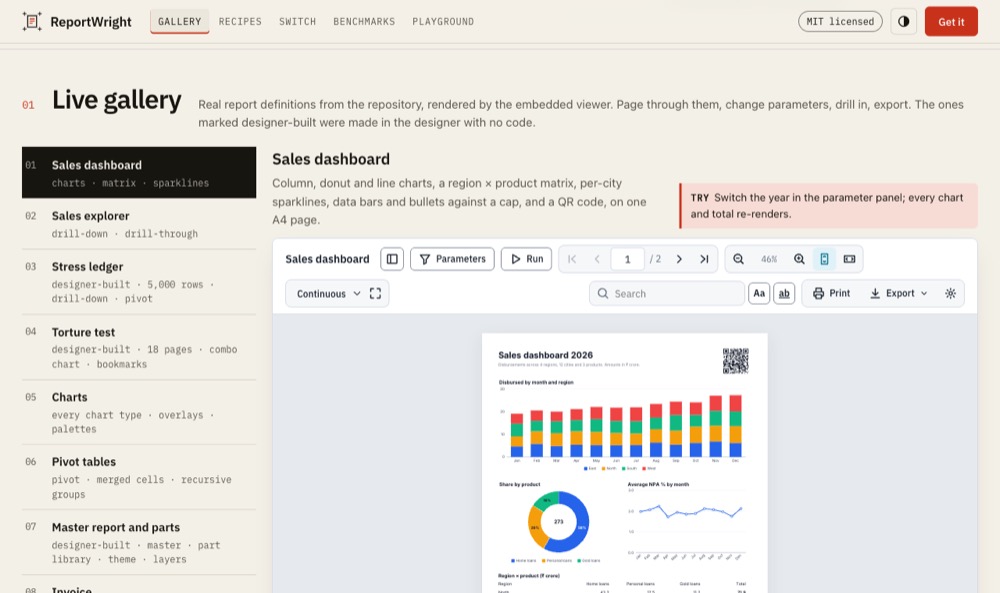
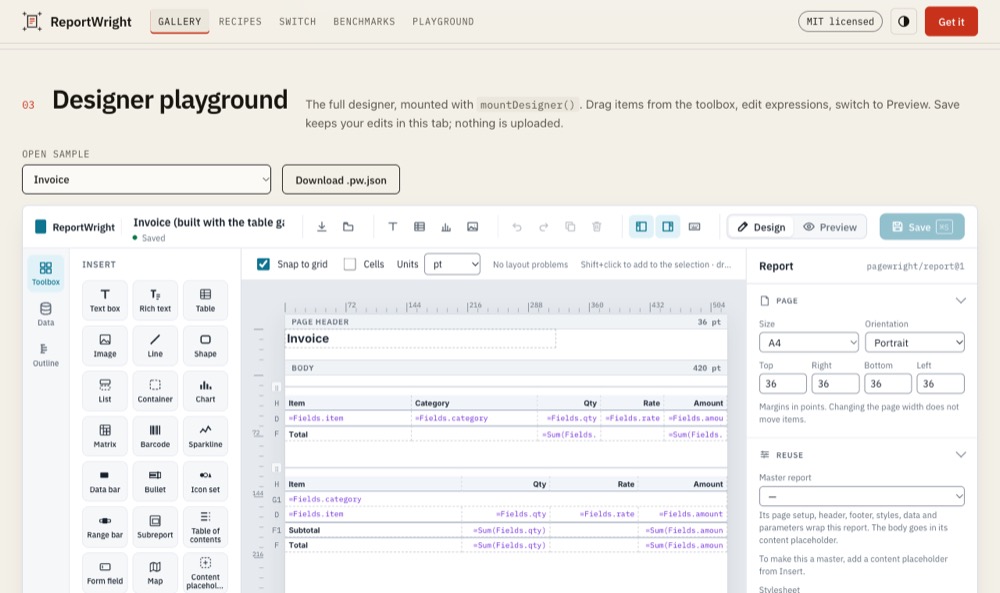
An embeddable report viewer and drag-and-drop report designer for any web page: view, page, search, drill down and export PDF, Excel, Word, PowerPoint, HTML or CSV in the browser.


Live demo: mrarun005.github.io/reportwright-demo: the gallery is this viewer, the designer playground is mountDesigner with your own pasted JSON or CSV, and made by hand in the designer walks through building reports step by step.
The ReportWright report viewer in any web app (React is bundled inside, in a shadow root, so your styles do not leak in). A React app imports @reportwright/viewer/react-peer (and /react-peer/designer) instead, the same viewer using the app's own React, so the page loads React once; @reportwright/react does this for you:
npm i @reportwright/viewer @reportwright/fonts
cp -r node_modules/@reportwright/fonts/public public/pw     # serve fonts/, harfbuzz-subset.wasm, icc/ as static files
React and React DOM 18+ are peer dependencies (the default build carries its own copy inside the shadow root; /react-peer uses yours).
<!-- index.html -->
<div id="report" style="height: 600px"></div>
<button id="save-pdf">Save PDF</button>
<script type="module" src="./main.js"></script>
// main.js
import { mountViewer } from '@reportwright/viewer';
import definition from './orders.pw.json';       // the report from @reportwright/engine's README examples

const viewer = mountViewer('#report', {
  definition,
  data: { orders: { rows: [{ customer: 'Asha Rao', amount: 1200.5 }, { customer: 'Ben Ode', amount: 80 }] } },
  fontsUrl: '/pw/fonts/',
});
viewer.on('ready', ({ pages }) => console.log(`${pages} page(s)`));
document.querySelector('#save-pdf').onclick = async () => open(URL.createObjectURL(await viewer.export('pdf')));
Run it with npx vite (Vite 7: set worker: { format: 'es' }, see below). Verified against this version in Chromium
with Vite 7.
Embed the designer and keep the definition in your app.
import { mountDesigner } from '@reportwright/viewer/designer';
const designer = mountDesigner('#designer', {
  definition,
  fontsUrl: '/pw/fonts/',
  onSave: (def) => fetch('/api/reports/orders', { method: 'PUT', body: JSON.stringify(def) }),
  toolbox: { hide: ['map'] },
});
designer.isDirty();        // unsaved changes?
designer.getDefinition();  // the current definition
Re-run with new parameters without remounting.
viewer.setParameters({ minAmount: 100 });
viewer.on('parameters', (p) => history.replaceState(null, '', '?' + new URLSearchParams(p)));
Trim the toolbar and show render warnings while developing.
mountViewer('#report', { definition, data, fontsUrl: '/pw/fonts/', toolbar: { hide: ['powerpoint', 'csv', 'sidebar'] }, showWarnings: true });
React, Vue, Svelte, Angular: use @reportwright/react, @reportwright/vue,
@reportwright/svelte or @reportwright/angular; they take the same options.
| Area | Viewer | Designer |
|---|---|---|
| Navigation | pages, thumbnails, document map, search, zoom, single / continuous / galley view | live preview |
| Interactivity | parameters, interactive sort, drill-down, drill-through (onDrill, reports) | data panel, inspector, toolbox (each can be hidden) |
| Export in the browser | PDF, PDF/A, Excel, Word, PowerPoint, HTML, CSV, JSON; print | the same, from the preview |
| Embedding | shadow root (no style leaks), CSP without 'unsafe-inline', nonce | onSave, onOpen, readOnly, dataSourceTemplates, warnOnLeave |
| Performance | rendering in a Web Worker; fonts fetched only when the layout needs them |
From dist/viewer.d.ts and dist/designer.d.ts.
mountViewer(target, options) → ViewerHandle
| Option | Type | Meaning |
|---|---|---|
definition | object | the report JSON |
data | Record<string, unknown> | JSON by data source name (a definition with one source also takes the JSON itself) |
fontsUrl | string | URL of the served copy of @reportwright/fonts/public/fonts |
server, report, params | string, string, object | a self-hosted server, a saved report id and its parameters |
reports | Record<string, object> | definitions by id for drill-through and subreports without a server |
lang, title, height | string | interface language, document title, element height |
toolbar | { hide?, add? } | hide built-in items, add buttons ({ id, label, title?, after?, onClick(api) }) |
viewMode | 'single' | 'continuous' | 'galley' | page layout on screen |
showWarnings | boolean | list the render's warnings under the pages |
exportOptions | { html?, drillLinks? } | the HTML export: html interactive (default) | tables | static; drillLinks inline (default) | new-tab | off. Wins over the report's export and the server's settings. The Export menu offers HTML (interactive) and HTML (print); when the interactive file cannot be made the viewer says why and asks before exporting the print file |
onReady | (error | null) => void | the first run ended |
onDrill | (report, params) => void | handle a drill-through yourself |
fonts, customFonts, uiFontCss | extra report fonts and the interface font | |
snapshot | object | show a stored run |
allowHosts, unsafeFetch, fetch | data request guard (see below) | |
nonce | string | for the fallback <style> under a CSP |
mountDesigner(target, options) → DesignerHandle (unmount, getDefinition, save, isDirty): server,
fontsUrl, report, definition, lang, height, onSave, onOpen, readOnly, toolbox: { hide },
panels: { data, inspector }, dataSourceTemplates, nonce, allowHosts, unsafeFetch, fetch, warnOnLeave
(default true), onDirtyChange.
<style> element). Node 20.16+ for the build tooling (engines).@reportwright/engine.@reportwright/engine (the same rendering in Node), @reportwright/fonts (required),
@reportwright/fonts-cjk, @reportwright/cli, and the wrappers
react, vue, svelte, angular.
The viewer renders in a Web Worker (engine.worker.js, one self-contained file next to the viewer). Bundlers that understand
new Worker(new URL(...)) pick it up; two settings matter:
worker: { format: 'es' } in vite.config.js. Without it the build fails with
Invalid value "iife" for option "worker.format".new Worker(new URL(...)): copy the worker files next to your bundle:
cp node_modules/@reportwright/viewer/dist/engine.worker*.js dist/. engine.worker.js has no static imports (its libraries are
inside it); it dynamically imports ./engine.worker.bwip.js (barcodes, a file next to it) only when a report
needs it, so copy both. Without it those reports render on the main thread, with the warning below.If the worker cannot load, the viewer still renders, on the main thread (slow and janky at 100k rows), and logs once
[reportwright] worker did not load (<reason>); rendering on the main thread. handle.usesWorker tells you which one you got.
Import it through your bundler (Vite, webpack, esbuild, Rollup, Next…). Its third-party libraries (@reportwright/pdf, @pdf-lib/fontkit, bwip-js, bidi-js) are ordinary dependencies, pinned to the versions the tests ran against, so the package itself holds only ReportWright's own readable code.
npm i @reportwright/viewer @reportwright/fonts
# serve the fonts as static files, e.g. from your app's public folder
cp -r node_modules/@reportwright/fonts/public public/pw     # fonts/, harfbuzz-subset.wasm, icc/
import { mountViewer } from '@reportwright/viewer';
mountViewer('#report', {
  definition,                         // the report JSON (see @reportwright/engine/report)
  // data: JSON for each data source, by name. Match the data set's path: { orders: { rows: [...] } } when it reads "$.rows"
  // (docs/QUICKSTART.md), or { orders: [...] } when it has no path (the array is the rows). A mismatch gives empty tables.
  data: { orders: { rows: [...] } },
  // REST sources in the definition are fetched as usual
  fontsUrl: '/pw/fonts/',             // the copied fonts folder; PDF subsetting and PDF/A use ../harfbuzz-subset.wasm and ../icc/
});
Nothing calls /api; each font is downloaded once, and only when the layout first needs it (a report in Inter Regular and Bold fetches those two files, not all seven); the toolbar uses the system font.
If a font cannot be loaded (wrong fontsUrl, the folder not served), the report does not draw: the viewer shows
"The report did not run. Font "Inter-Regular" did not load (HTTP 404)" with a Retry button, and onReady(error) is called
with that error. Fix the path and retry; there is no fallback font. onReady(error) is called when the first run ends:
null when it went through, or the error that stopped it. Bundled apps: serve the fonts folder at the URL
you pass as fontsUrl; fontsUrl is not inferred from the package. Copying only fonts/ works too
(PDFs then embed whole fonts, and PDF/A export needs icc/).
Serve fontsUrl with Cache-Control: public, max-age=31536000, immutable: the files do not change within a package version, so a returning visitor downloads none of them.
The npm packages are a library: nothing here needs a ReportWright server. The server is a separate, self-hosted app (not on npm): github.com/MrArun005/reportwright, run it with Docker (instructions). Options that need it are optional and hidden without it.
| Feature | Standalone (definition, data, fontsUrl) | With server |
|---|---|---|
| View, page, search, zoom, parameters, sort, drill-down, document map | yes | yes |
| Export PDF, PDF/A, Word, Excel, PowerPoint, HTML, CSV (in the browser) | yes | yes |
| REST / JSON / XML / CSV data sources the browser can reach (CORS) | yes | yes |
Designer: edit, preview, onSave / onOpen to your app | yes | yes |
Load a saved report by id (report: 'id'), drill-through to another saved report | pass reports: { id: definition } | yes |
Designer Save without onSave (writes to the server), version history | no (Save is hidden) | yes |
| SQL data sources (the server holds the connections) | no | yes |
| Server-side PDF for very large reports, schedules and e-mail, uploaded fonts, AI drafts, users and roles | no | yes |
In Node, @reportwright/engine renders and exports with no server and no browser.
A report definition says which URLs its data comes from, and the viewer's browser requests them. So that a definition
cannot point a viewer at your network, a data source on another host may reach public http(s) addresses only: literal
private, loopback, link-local and CGNAT addresses (192.168.1.1, 127.0.0.1, [::1], 169.254.169.254,
100.64.0.1, in any spelling), localhost / .local / .internal names and other schemes are refused, redirects are
checked hop by hop, and a parameter may fill a URL's path and query but not its host.
mountViewer(el, { definition, allowHosts: ['reports-api.corp.example'] }); // private hosts that may be reached
mountViewer(el, { definition, unsafeFetch: true });                          // no check (trusted definitions only)
mountViewer(el, { definition, fetch: myFetch });                             // every data request goes through yours
A browser cannot resolve DNS, so a public name that resolves to a private address is not caught. When definitions come
from people you do not trust (a multi-tenant app), render on the server (its guard checks DNS), or pass a fetch that
allows only the hosts you know. The same options apply to mountDesigner.
The viewer needs no 'unsafe-inline': its styles are constructable stylesheets, and the style attributes of the drawing
are applied through CSSOM. The policy for a page with the viewer (standalone, fonts on the same origin):
default-src 'self';
script-src 'self';
style-src 'self';
font-src 'self';
img-src 'self' data: blob:;
connect-src 'self'
This is the policy the viewer's standalone page is tested under (PDF export included). Keep the viewer's script in a
file (<script type="module" src="…">), not inline. The viewer adds a <style> element only in browsers without
constructable stylesheets, and gives it the nonce you pass (mountViewer(el, { nonce })).
mountViewer('#report', { server: 'https://reports.example.com', report: 'loan-statement', params: { accountId: 'LN-1' } });
The ReportWright server must allow your site's origin (PW_EMBED_ORIGINS). PDF export and barcodes load only when used. MIT.
The designer is a second entry, loaded only by pages that use it:
import { mountDesigner } from '@reportwright/viewer/designer';
const designer = mountDesigner('#designer', {
  server: 'https://reports.example.com',
  definition,                                   // or report: 'id' to load it from the server
  onSave: (def) => saveToMyApp(def),            // without onSave, Save writes to the ReportWright server
  onOpen: () => pickAReport(),                  // shows an Open… button; return a definition
  readOnly: false,
  toolbox: { hide: ['map', 'chart'] },
  panels: { data: true, inspector: true },
  dataSourceTemplates: [{ label: 'Orders API', source: { name: 'orders', type: 'rest', url: 'https://api.example.com/orders' } }],
});
designer.getDefinition();
Types are included (ViewerOptions, DesignerOptions, …). Framework wrappers: @reportwright/react, @reportwright/vue, @reportwright/svelte, @reportwright/angular.
toolbar.hidetoolbar: { hide: [...], add: [...] } hides built-in items. A group key hides the whole group; an item id hides that one item. Hiding every export format also hides the Export menu and its Export options button.
| Key | Hides |
|---|---|
export | the Export menu: every format and the Export options button (Print stays) |
pdf, excel, word, powerpoint, html, csv, json | that one export format |
print | the Print button |
search | the search box and its match controls |
zoom | zoom out, zoom value, zoom in, whole page, fit width |
navigation | first page, previous, page number, next, last page |
sidebar | the page thumbnails and the document map buttons |
parameters | the Parameters button |
run, viewMode, fullScreen, stats | those single items (use their id) |
exportOptions | the Export options button (the formats stay) |
Any other key is taken as an item id. Unknown keys hide nothing.
showWarningsshowWarnings: true shows the render's warnings (a data value that does not read as a number, an unknown field, content cut off at the page edge…) under the pages, as a collapsed list headed "8 warnings" or "1 warning". The default is false: readers of a finished report do not see them. The designer's Preview always shows them.
mountViewer('#report', { definition, data, fontsUrl: '/fonts/', showWarnings: true });
ViewerHandlemountViewer returns a handle (the React, Vue, Svelte and Angular wrappers give you the same one through their ready callback or event):
| Method | What it does |
|---|---|
setParameters(params) | merges params into the current parameters and runs the report again; the host element is not remounted |
setDefinition(def) | shows another report definition in the same element |
goToPage(n) | scrolls to page n (1-based) |
getPageCount() | the page count of the last run (0 before the first) |
print() | opens the print dialog for the PDF |
export(format) | Promise<Blob>: format is pdf, xlsx, docx, pptx, html, csv or json (or the item ids excel, word, powerpoint) |
on(event, fn) | listens for ready (a run finished, detail: { pages }), error (detail: message), page (detail: current page), parameters (detail: the parameters); returns an unsubscribe function |
unmount() | removes the viewer |
const viewer = mountViewer('#report', { server, report: 'loan-statement' });
viewer.setParameters({ accountId: 'LN-2' });      // re-runs; 'ready' fires when it is done
document.querySelector('#save-pdf').onclick = async () => {
  const pdf = await viewer.export('pdf');         // a Blob of the report as shown
  open(URL.createObjectURL(pdf));
};
export() exports the last finished run. ready fires once that run is on screen, so calling export() inside a
ready listener (or onReady) works.
What a page downloads when the viewer mounts: 847 KB gzipped (0.7.3: 877 KB), readable unminified code with
source maps. Loaded only when used: other interface languages (about 20 KB gzipped each), PDF export (@reportwright/pdf),
barcodes (bwip-js), Excel/HTML/CSV export, the designer. Most of the first load is the font engine (fontkit) the
layout measures text with, and React. The package is larger unpacked (two builds: React inside, and React from your
app at @reportwright/viewer/react-peer, plus source maps); only one build reaches your page. PDF export, fontkit,
barcodes, zip and bidi come from the dependencies above, so your bundler can share them with the rest of your app.
What a bundler writes is more than what a page loads: the lazy chunks are emitted too. Measured with esbuild (minified,
code splitting) on 1.0.1: a viewer-only app (import { mountViewer } from '@reportwright/viewer') has a 126 KB entry
chunk and emits 4.2 MB in all: mounting fetches the React viewer (~960 KB), while the barcode library (~945 KB) is
fetched only for a report with barcodes; the designer (~970 KB) is not in that build. With a framework wrapper it is
emitted too (5.2 MB in all), as a lazy chunk fetched only when the designer component mounts.
FAQs
The ReportWright report viewer for any web app: parameters, paging, search, drill-down, exports. React is bundled inside.
The npm package @reportwright/viewer receives a total of 214 weekly downloads. As such, @reportwright/viewer popularity was classified as not popular.
We found that @reportwright/viewer demonstrated a healthy version release cadence and project activity because the last version was released less than a year ago. It has 1 open source maintainer collaborating on the project.
Security News
Rust 1.100 will add opt-in dependency cooldowns to Cargo, giving security scanners and maintainers time to catch malicious crate releases.

Security News
Cloudflare is acquiring Deno’s team, which will provide another year of bug fixes and security updates before ending support for the runtime.

Security News
Anthropic’s free OSS Scanner uses Mythos and other Claude models to find open source vulnerabilities and send maintainers reports with proposed fixes.