


Product
Microsoft Teams Notifications Are Now Available in Socket
Socket can now send alerts and supply chain attack notifications to Microsoft Teams, with filters that route the right updates to each channel.
By Jeppe Hasseriis - Sep 01, 2026
@slickfast/mcp
Advanced tools
SlickFast — render 47 chart & info-design types (bar, line, pie, KPI, cards, funnel, matrix, gauge, calendar…) plus multi-chart dashboards tiled into one image, as SVG/PNG via MCP. Local and deterministic; nothing leaves your machine.



A tiny JSON spec in → a finished, retina-quality chart out. Milliseconds, a handful of tokens, nothing leaves your machine.
SlickFast is a native SVG engine built for AI agents — not a browser screenshotting a
webpage, not a plotting library an agent has to write code against. A pure
spec → SVG → PNG pipeline: 47 chart and information-design types (bar, line, pie, KPI,
cards, funnel, gauge, heatmap, calendar, gantt, waterfall…), plus entire multi-chart
dashboards tiled into one image in a single call. It runs as an
MCP tool, so an agent hands it a spec and gets back a
finished PNG (or SVG).
render_chart({ type: "bar", data: { labels: ["Q1","Q2","Q3"], series: [{ values: [12,19,8] }] } })
  → a retina PNG, rendered on your machine
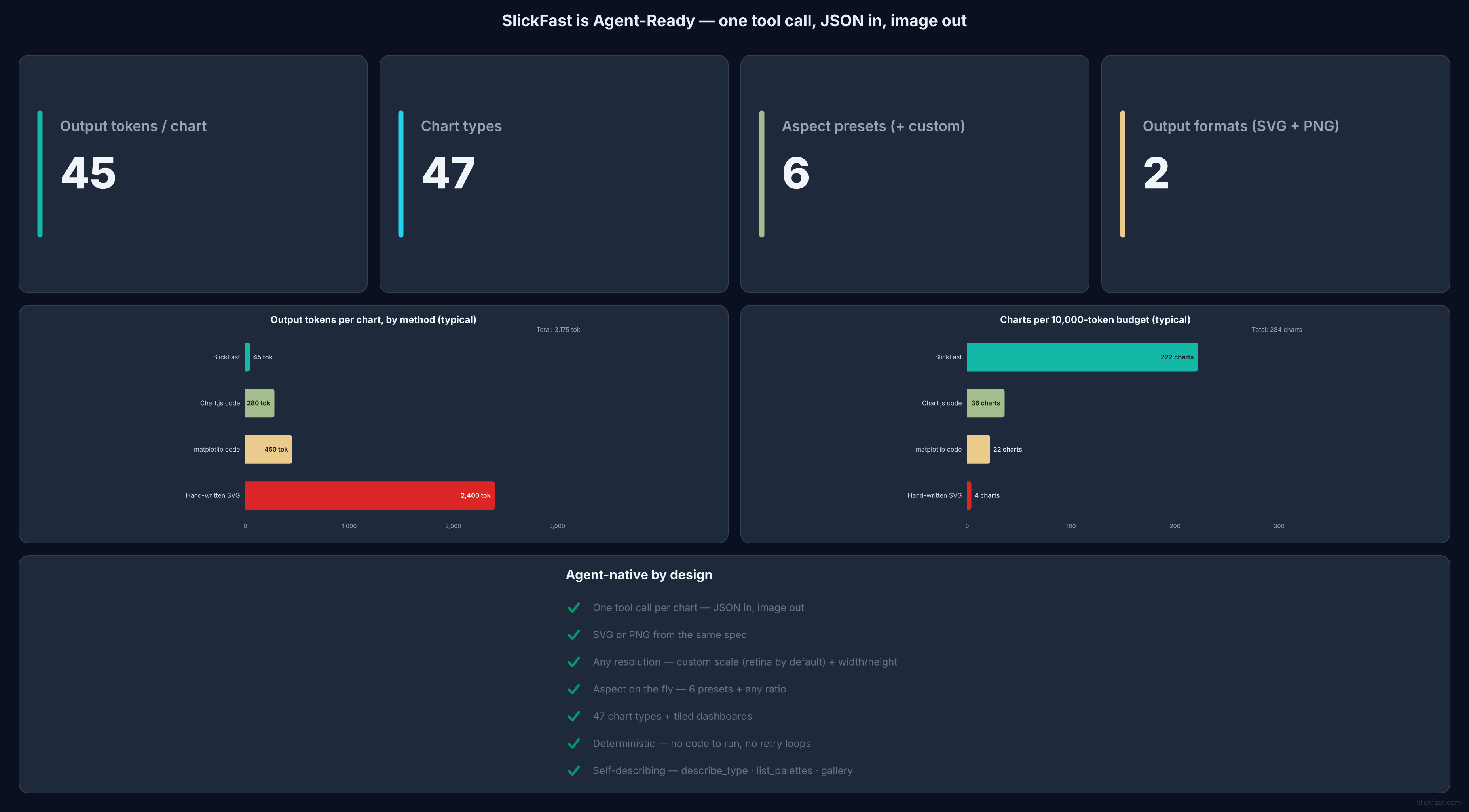
One tool call, JSON in, image out — and the token math that makes it agent-native:
One call → a whole dashboard — KPIs, trend, gauge, heatmap, funnel, all in one render:
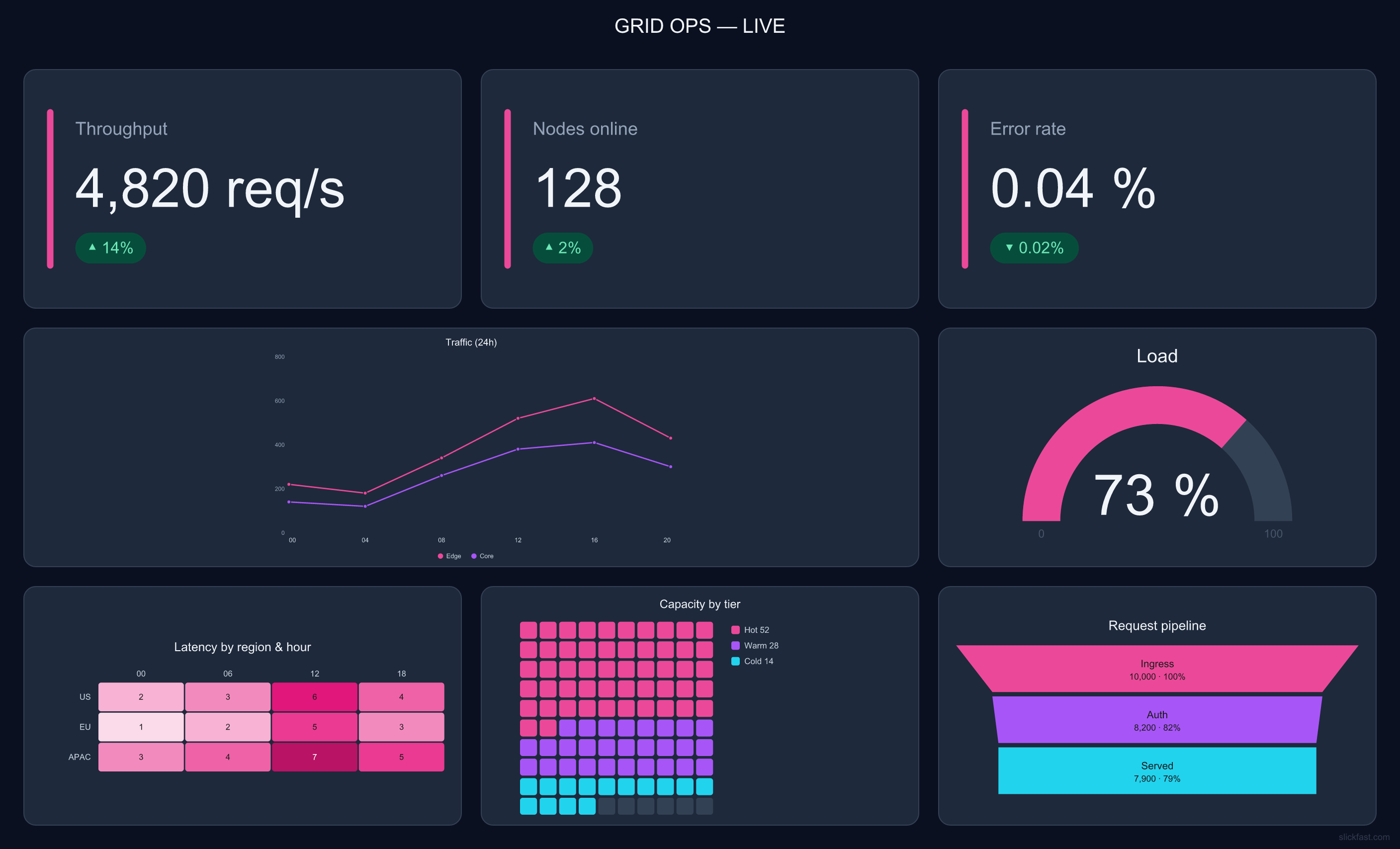 More at slickfast.com/#gallery — every image there is engine output.
{type, data} alone is a
finished, well-designed chart. A whole dashboard is one tool call, not ten renders
and layout math.bar → line, change a palette, resize for a
slide: edit one key, re-render. The agent never rewrites code or reasons about a diff —
which is what makes iteration with a human ("make it dark, bigger title") actually cheap.render_chart(spec) → the chart as a PNG image (default) or SVG (format: "svg"). For a
dashboard, pass type: "dashboard" with tiles: [{ chart, span }] — each tile is a full spec
of any other type, composited into one image in a single render.describe_type(type) → the exact data shape, a minimal working spec, and per-type
gotchas. Call it first when you're unsure how to structure a type.gallery() → a curated demo gallery of example charts and dashboards — each as a
rendered image plus its spec. Just ask "show me a demo" or "what can you make?".
gallery({board:"comparison"}) tiles a whole family into one image; board:"all" shows
every type across 6 boards.list_palettes() → every valid palette name, grouped into flat palettes and nested
themes, with their colors. Ask "what palettes are available?".report_issue(summary, spec?) → "report this bug." Formats a bug report and returns a
prefilled GitHub-issue link and email link you click to send — SlickFast sends nothing itself.Add to your MCP config and restart — it runs locally via npx, no clone or build needed:
{ "mcpServers": { "slickfast": { "command": "npx", "args": ["-y", "@slickfast/mcp"] } } }
claude_desktop_config.json (Settings → Developer → Edit Config).mcp.json at the workspace rootThen ask it to "render a bar chart of last quarter's revenue" or "build a dashboard with an MRR tile, a signups funnel, and a usage heatmap."
Rendering is always local — nothing leaves your machine. This section is purely about which
surface displays the result. render_chart returns two ways, and they differ a lot:
format:"svg" → the reliable inline path. Returns SVG text. In a chat surface that supports
artifacts (claude.ai, Claude Desktop), the agent creates an artifact containing that SVG
and presents it — that's the display step; the SVG string in the tool result is not user-visible
on its own. Ask for a chart and Claude does this — no config, no gymnastics.format:"png" (default) → a base64 image block. It only paints where the client renders MCP
image blocks, which is inconsistent across surfaces — many chat UIs, and every coding/terminal
view, don't. Don't depend on it for inline display.Other ways to get the picture:
…/chart.png?spec=… URL that renders everywhere, independent of any MCP client.outputPath to write the PNG/SVG to
disk and open the file. In a hosted/sandboxed MCP the process is filesystem-isolated (a saved file
is invisible to you) — use the SVG-artifact path instead.If you asked for a chart and see nothing: it rendered (the agent can read you the values) —
it's a display-surface gap, not a bug. Have the agent re-render with format:"svg" into an
artifact, or view it in a claude.ai / Claude Desktop chat. If the tool is missing or erroring
entirely, that's a connection problem — restart so the MCP server reconnects.
Rendering is fully local and needs no network. Separately, SlickFast runs a hosted API
that turns a spec into a public …/chart.png?spec=<url-encoded spec> link — useful for
embedding, posting to Slack/X/email, or getting a chart into a surface that can't display a
local image (see the table above). The agent should offer this only when you ask to share
or post — it never auto-inserts links. Get an API key (free tier, no card) at
slickfast.com.
AGPL-3.0-only. Free to use, self-host, and embed under the AGPL's terms (your friends running it locally are completely unaffected). Building it into a closed-source product or a hosted service? That needs the AGPL'd source opened — or a commercial license from us instead. Write to feedback@slickfast.com for commercial terms.
report_issue tool drafts
the report (with the repro spec) for you. Nothing is ever sent automatically.Clone the repo, then from the package directory:
cd apps/mcp
npm install
node test-client.mjs   # spawns the server, calls render_chart, checks the output
To point an MCP client at a local checkout instead of the published package, use
"command": "node", "args": ["<path-to-clone>/apps/mcp/server.mjs"].
FAQs
SlickFast MCP — JSON → charts, dashboards, and Pages. Twin at .json, fingerprint on the Page. News and Get started in chat. Local by default; share/publish with a free key.
The npm package @slickfast/mcp receives a total of 1,116 weekly downloads. As such, @slickfast/mcp popularity was classified as popular.
We found that @slickfast/mcp demonstrated a healthy version release cadence and project activity because the last version was released less than a year ago. It has 1 open source maintainer collaborating on the project.
Product
Socket can now send alerts and supply chain attack notifications to Microsoft Teams, with filters that route the right updates to each channel.

Security News
pnpm 12 rewrites the package manager in Rust, cutting install times by up to 90% while preserving pnpm 11 workflows and lockfiles.

Security News
Socket CTO Ahmad Nassri joins AppSec leaders at Black Hat to discuss active malware, package manager risks, and software supply chain defense.