



Product
PHP and Composer Support Is Now in Beta
Socket’s PHP and Composer support is now in Beta for all customers, with PHP reachability analysis generally available.
By Trevor Norris, Benjamin Barslev - Aug 21, 2026
@slickfast/mcp
Advanced tools
SlickFast — render 47 chart & info-design types (bar, line, pie, KPI, cards, funnel, matrix, gauge, calendar…) plus multi-chart dashboards tiled into one image, as SVG/PNG via MCP. Local and deterministic; nothing leaves your machine.



SlickFast is a pure rendering primitive: JSON spec → SVG → PNG in milliseconds. No browser, no Puppeteer, no heavy dependencies. Deterministic by design — same spec, same image, every time.
Most chart-to-image tools secretly spin up a full headless browser — hundreds of MB, slow cold starts, flaky screenshots. SlickFast renders pure in-memory: no Chromium, no GPU, no DOM, no randomness, no drift. That one decision is why it's fast enough for agents, cheap enough to cache by spec-hash, and reproducible enough to test against.
47 chart and information-design types (bar, line, pie, KPI, cards, funnel, gauge, heatmap, calendar, gantt, waterfall…), plus entire multi-chart dashboards tiled into one image in a single call. It runs as an MCP tool, so an agent hands it a spec and gets back a finished PNG (or SVG) — 100% local, nothing leaves your machine.
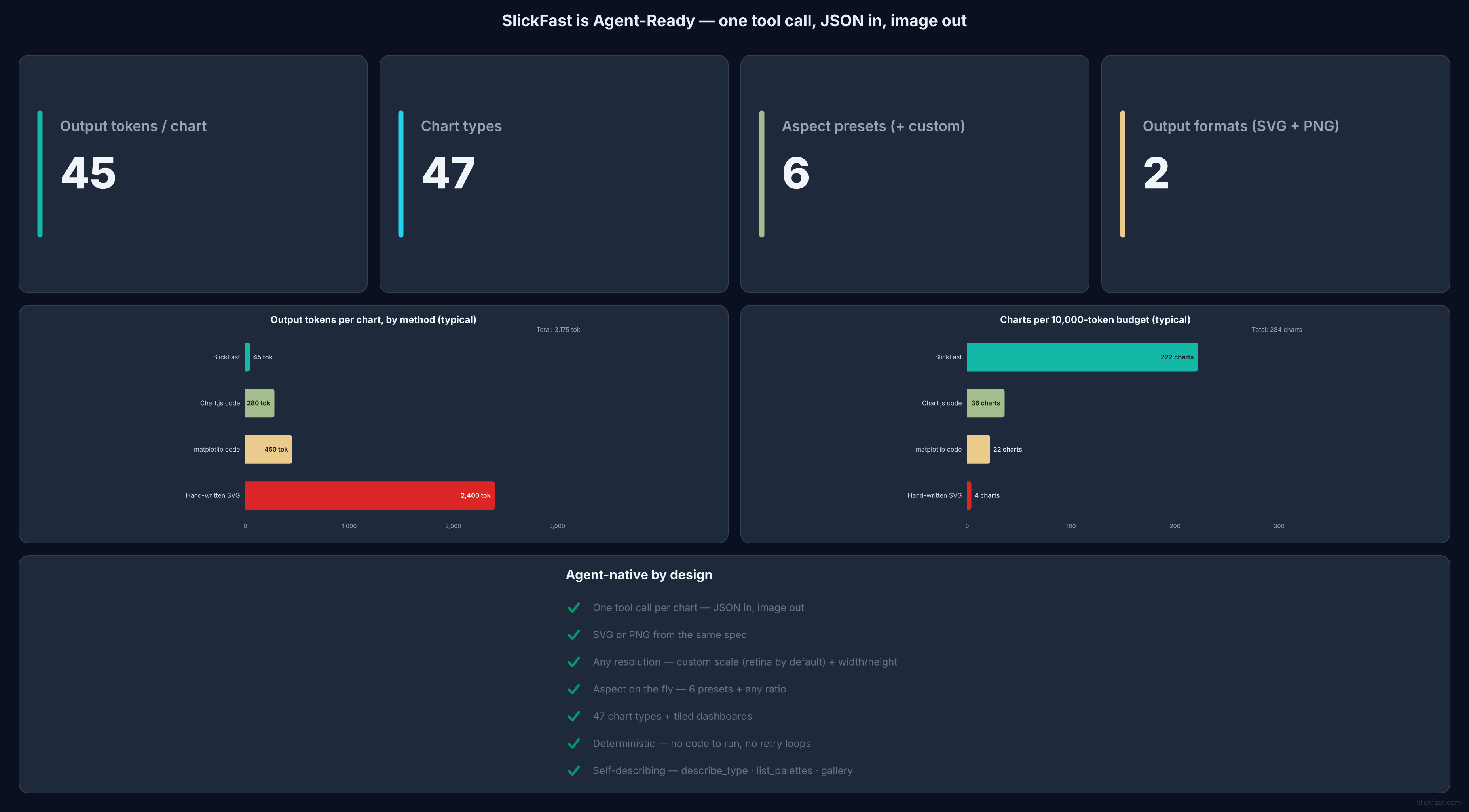
⚡ This image is LIVE — SlickFast rendering its own real project stats right now, updated automatically by a cron. The same one-URL trick works in your README:

render_chart({ type: "bar", data: { labels: ["Q1","Q2","Q3"], series: [{ values: [12,19,8] }] } })
→ a retina PNG, rendered on your machine
One tool call, JSON in, image out — and the token math that makes it agent-native:
More at slickfast.com/#gallery — every image there is engine output.
{type, data} alone is a
finished, well-designed chart. A whole dashboard is one tool call, not ten renders
and layout math.bar → line, change a palette, resize for a
slide: edit one key, re-render. The agent never rewrites code or reasons about a diff —
which is what makes iteration with a human ("make it dark, bigger title") actually cheap.render_chart(spec) → the chart as a PNG image (default) or SVG (format: "svg"). For a
dashboard, pass type: "dashboard" with tiles: [{ chart, span }] — each tile is a full spec
of any other type, composited into one image in a single render.describe_type(type) → the exact data shape, a minimal working spec, and per-type
gotchas. Call it first when you're unsure how to structure a type.gallery() → a curated demo gallery of example charts and dashboards — each as a
rendered image plus its spec. Just ask "show me a demo" or "what can you make?".
gallery({board:"comparison"}) tiles a whole family into one image; board:"all" shows
every type across 6 boards.list_palettes() → every valid palette name, grouped into flat palettes and nested
themes, with their colors. Ask "what palettes are available?".share_chart(spec, name?) → turn a chart into a public, embeddable URL — for a
README, email, Slack, or a live auto-updating chart (push new data, every embed updates).
Ask to "share this chart" or "make this a live chart." The one tool that talks to the
hosted API (free key at slickfast.com); everything else is 100% local.
The returned URL contains no key — safe to paste anywhere.report_issue(summary, spec?) → "report this bug." Formats a bug report and returns a
prefilled GitHub-issue link and email link you click to send — SlickFast sends nothing itself.Everything renders locally and privately for free. When you want a public URL for a README, email, or Slack — or a live auto-updating chart — there's a hosted API with a generous free tier (no card required).
One-click:

Or add to your MCP config and restart — it runs locally via npx, no clone or build needed:
{ "mcpServers": { "slickfast": { "command": "npx", "args": ["-y", "@slickfast/mcp"] } } }
claude_desktop_config.json (Settings → Developer → Edit Config; macOS:
~/Library/Application Support/Claude/)claude mcp add slickfast -- npx -y @slickfast/mcp~/.cursor/mcp.jsonTry this first (after restarting):
"Show me what SlickFast can do" — renders the gallery, live in your chat.
Then: "build a dashboard with an MRR tile, a signups funnel, and a usage heatmap."
Two ready-made starter prompts (Try SlickFast and Build a dashboard) also appear in clients that surface MCP prompts — one click, no typing.
Not seeing it? Restart the app after editing the config (MCP servers load at startup) ·
needs Node 18+ (node -v) · first npx run downloads once, then it's instant · one stray
comma breaks the JSON. Still stuck → open an issue.
Rendering is always local — nothing leaves your machine. This section is purely about which
surface displays the result. render_chart returns two ways, and they differ a lot:
format:"svg" → the reliable inline path. Returns SVG text. In a chat surface that supports
artifacts (claude.ai, Claude Desktop), the agent creates an artifact containing that SVG
and presents it — that's the display step; the SVG string in the tool result is not user-visible
on its own. Ask for a chart and Claude does this — no config, no gymnastics.format:"png" (default) → a base64 image block. It only paints where the client renders MCP
image blocks, which is inconsistent across surfaces — many chat UIs, and every coding/terminal
view, don't. Don't depend on it for inline display.Other ways to get the picture:
…/chart.png?spec=… URL that renders everywhere, independent of any MCP client.outputPath to write the PNG/SVG to
disk and open the file. In a hosted/sandboxed MCP the process is filesystem-isolated (a saved file
is invisible to you) — use the SVG-artifact path instead.If you asked for a chart and see nothing: it rendered (the agent can read you the values) —
it's a display-surface gap, not a bug. Have the agent re-render with format:"svg" into an
artifact, or view it in a claude.ai / Claude Desktop chat. If the tool is missing or erroring
entirely, that's a connection problem — restart so the MCP server reconnects.
Rendering is fully local and needs no network. When you want a chart other people can see —
embedded in a README, an email, Slack — ask to "share this chart": the share_chart tool
publishes it to the hosted API and returns a permanent public URL (no key inside, safe to
paste anywhere). It's a live chart: push new data to the same name and every embed updates
by itself — that's what powers the live dashboard at the top of this page. The agent offers
this only when you ask to share or publish — rendering stays local and private otherwise.
Needs a free API key (250 renders/mo, no card) at slickfast.com, set
as SLICKFAST_API_KEY in the MCP config.
AGPL-3.0-only. Free to use, self-host, and embed under the AGPL's terms (your friends running it locally are completely unaffected). Building it into a closed-source product or a hosted service? That needs the AGPL'd source opened — or a commercial license from us instead. Write to feedback@slickfast.com for commercial terms.
report_issue tool drafts
the report (with the repro spec) for you. Nothing is ever sent automatically.Clone the repo, then from the package directory:
cd apps/mcp
npm install
node test-client.mjs   # spawns the server, calls render_chart, checks the output
To point an MCP client at a local checkout instead of the published package, use
"command": "node", "args": ["<path-to-clone>/apps/mcp/server.mjs"].
FAQs
SlickFast — render 47 chart & info-design types (bar, line, pie, KPI, cards, funnel, matrix, gauge, calendar…) plus multi-chart dashboards tiled into one image, as SVG/PNG via MCP. Local and deterministic; nothing leaves your machine.
The npm package @slickfast/mcp receives a total of 783 weekly downloads. As such, @slickfast/mcp popularity was classified as not popular.
We found that @slickfast/mcp demonstrated a healthy version release cadence and project activity because the last version was released less than a year ago. It has 1 open source maintainer collaborating on the project.
Product
Socket’s PHP and Composer support is now in Beta for all customers, with PHP reachability analysis generally available.

Product
Socket is bringing experimental protection to Firefox, scanning 97,000+ extensions in Mozilla's official directory for malware and risky updates.

Research
/Security News
Three compromised Rust crates pulled in a malicious dependency that downloaded and executed cross-platform malware during Cargo builds.