

Product
Introducing Repository Access Permissions and Custom Roles
Socket now supports Custom Roles and Repository Access Permissions so organizations can control who can access specific repositories and actions.
By Joe Werle - Jun 19, 2026
@snowdreamtech/unirtm-linux-arm-6
Advanced tools





Dev tools, env vars, and tasks in one CLI with built-in security.
Inspired by and paying tribute to mise.
Getting Started • Documentation • Dev Tools • Environments • Tasks
[!TIP] UniRTM's powerful task runner empowers you to orchestrate deep security scans (like Trivy & Syft) perfectly alongside your environments.
UniRTM (Universal Runtime Manager) prepares your development environment before each command runs. It keeps project tools, environment variables, and tasks in one .unirtm.toml file so new shells, checkouts, and CI jobs all start from the exact same setup.
.env files and secure secret managers like SOPS.While taking heavy inspiration from the brilliant tool mise (dev tools, env vars, and tasks in one CLI), UniRTM introduces several distinct architectural choices:
$PATH explosion while maintaining near-native execution speeds.unirtm.lock file that pins the exact checksums and versions of your downloaded tools for reproducible environments.Fully supported on macOS (Apple Silicon / Intel), Linux (glibc & musl/Alpine), and Windows.
The following demo shows how to use UniRTM to install a specific version of go globally.
Notice the speed and the built-in vulnerability scanning!
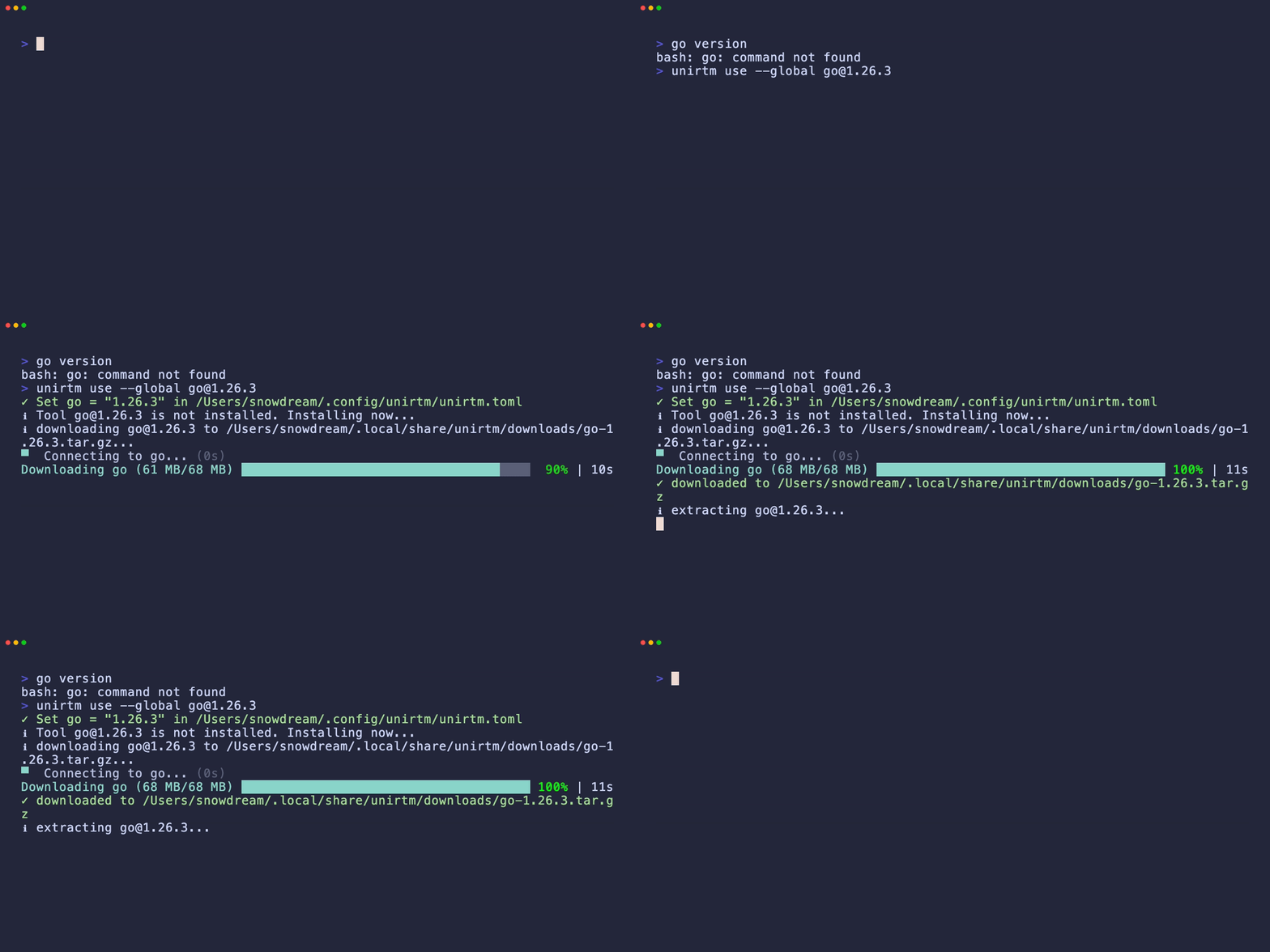
See Getting started for more options.
$ curl -sL https://raw.githubusercontent.com/snowdreamtech/UniRTM/main/install.sh | bash
$ ~/.local/bin/unirtm --version
UniRTM v0.1.0 macos-arm64 (2026-05-28)
Hook UniRTM into your shell (pick the right one for your shell):
# note this assumes unirtm is located at ~/.local/bin/unirtm
echo 'eval "$(~/.local/bin/unirtm env)"' >> ~/.bashrc
echo 'eval "$(~/.local/bin/unirtm env)"' >> ~/.zshrc
echo '~/.local/bin/unirtm env | source' >> ~/.config/fish/config.fish
$ unirtm exec node@20 -- node -v
unirtm node@20.x.x ✓ installed
v20.x.x
$ unirtm use --global node@22 go@1.22
$ node -v
v22.x.x
$ go version
go version go1.22.x macos/arm64
See dev tools for more examples.
# .unirtm.toml
[env]
SOME_VAR = "foo"
$ unirtm set SOME_VAR=bar
$ echo $SOME_VAR
bar
Note that UniRTM can also load .env files.
# .unirtm.toml
[tasks.build]
description = "build the project"
run = "echo building..."
$ unirtm run build
building...
See tasks for more information.
Here is a combined example to give you an idea of how you can use UniRTM to manage your a project's tools, environment, and tasks with security baked in.
# .unirtm.toml
[tools]
terraform = "1"
aws-cli = "2"
node = "20"

[env]
TF_WORKSPACE = "development"
AWS_REGION = "us-west-2"
NODE_ENV = "production"

[tasks.plan]
description = "Run terraform plan with configured workspace"
run = """
terraform init
terraform workspace select $TF_WORKSPACE
terraform plan
"""

[tasks.validate]
description = "Validate AWS credentials and terraform config"
run = """
aws sts get-caller-identity
terraform validate
"""

[tasks.audit]
description = "Run deep security scans using Trivy and Gitleaks"
run = """
trivy fs --format cyclonedx --output sbom.json .
gitleaks detect --source . --no-banner
"""

[tasks.deploy]
description = "Deploy infrastructure after validation and audit"
depends = ["validate", "audit", "plan"]
run = "terraform apply -auto-approve"
Run it with:
unirtm install # install all required tools specified in .unirtm.toml
unirtm run deploy # automatically runs validation and audit dependencies first
See snowdreamtech.github.io/UniRTM
We believe in making deliberate architectural choices to support modern enterprise environments. Here is how UniRTM compares to ecosystem pioneers like mise and asdf across multiple dimensions:
| Dimension | asdf (Bash) | mise (Rust) | UniRTM (Go) | Why it matters |
|---|---|---|---|---|
| Execution Path | Bash Shims | Rust Shims / PATH | Lightweight Go Shims | Uses a single compiled Go binary as a router to perfectly solve the performance issues of Bash shims and ensure cross-platform compatibility. |
| Concurrency Model | None | OS Threads | Goroutines | Go's ultra-lightweight goroutines provide extreme parallel throughput during massive toolchain downloads. |
| Config Hierarchy | .tool-versions | mise.toml | .unirtm.toml | Standardized, unified TOML configs across your entire project. |
| Feature | asdf | mise | UniRTM | Details |
|---|---|---|---|---|
| Scope Management | Tools only | Tools + Env + Tasks | Tools + Env + Tasks | Seamlessly manage environments contextually per directory. |
.env Parsing | ❌ | Native | Native | Reads traditional .env files automatically without external loaders. |
| Secrets Engine | ❌ | Plugins / Integrations | Native SOPS | Treats secure secret management as a first-class citizen using native SOPS integration. |
| Feature | asdf | mise | UniRTM | Details |
|---|---|---|---|---|
| Windows Support | WSL/MSYS Dependent | Supported | Native (Ground-up) | Engineered natively for a flawless Windows and Cygdrive experience. |
| Alpine/Musl | Partial | Supported | Hardcore Supported | Runs flawlessly in minimal musl/Alpine containers without glibc overhead. |
| Reproducibility | Versions | mise.lock (Supported) | unirtm.lock (Default) | Strictly pins exact checksums to ensure reproducible team environments. |
| Feature | asdf | mise | UniRTM | Details |
|---|---|---|---|---|
| Hybrid Path Resolution | ❌ | Partial | Deeply Supported | Dedicated optimizations for translating paths seamlessly across Windows Git Bash / Cygdrive environments. |
| External Dependencies | Bash Ecosystem | Minimal | Absolute Zero | Core plugins are compiled directly into the binary. Drop it into any minimal OS and it runs out of the box. |
| Shim Overhead | Standard (Bash script) | Optimized (Rust binary) | Lightning Fast (Go) | All tools symlink back to the unirtm engine for instant routing, perfectly preventing $PATH explosion. |
| DevOps Integration | Custom Scripts | Good | Native Synergy | Go-based architecture naturally aligns with cloud-native infrastructure, making custom integrations frictionless. |
Inspired by the architecture and developer experience pioneered by mise.
MIT License. Copyright (c) 2026-present SnowdreamTech Inc.
FAQs
unirtm binary for Linux armv6
We found that @snowdreamtech/unirtm-linux-arm-6 demonstrated a healthy version release cadence and project activity because the last version was released less than a year ago. It has 1 open source maintainer collaborating on the project.
Did you know?

Socket for GitHub automatically highlights issues in each pull request and monitors the health of all your open source dependencies. Discover the contents of your packages and block harmful activity before you install or update your dependencies.
Product
Socket now supports Custom Roles and Repository Access Permissions so organizations can control who can access specific repositories and actions.

Product
Socket MCP now lets AI assistants review org alerts, investigate threats using the Socket threat feed, and inspect package files in addition to dependency scoring.

Product
Socket Firewall blocks malicious VS Code and Open VSX extensions before install, protecting developers from compromised editor marketplaces.