Fork of getagentseal/codeburn with hardened git invocation, SonarQube quality-gated builds, plan-aware leverage UX, multi-provider plan auto-detect, and an HTML report. See Fork notes.
CodeBurn tracks token usage, cost, and performance across 25 AI coding tools. It breaks down spending by task type, model, tool, project, and provider so you can see exactly where your budget goes.
Everything runs locally. No wrapper, no proxy, no API keys. CodeBurn reads session data directly from disk and prices every call using LiteLLM.
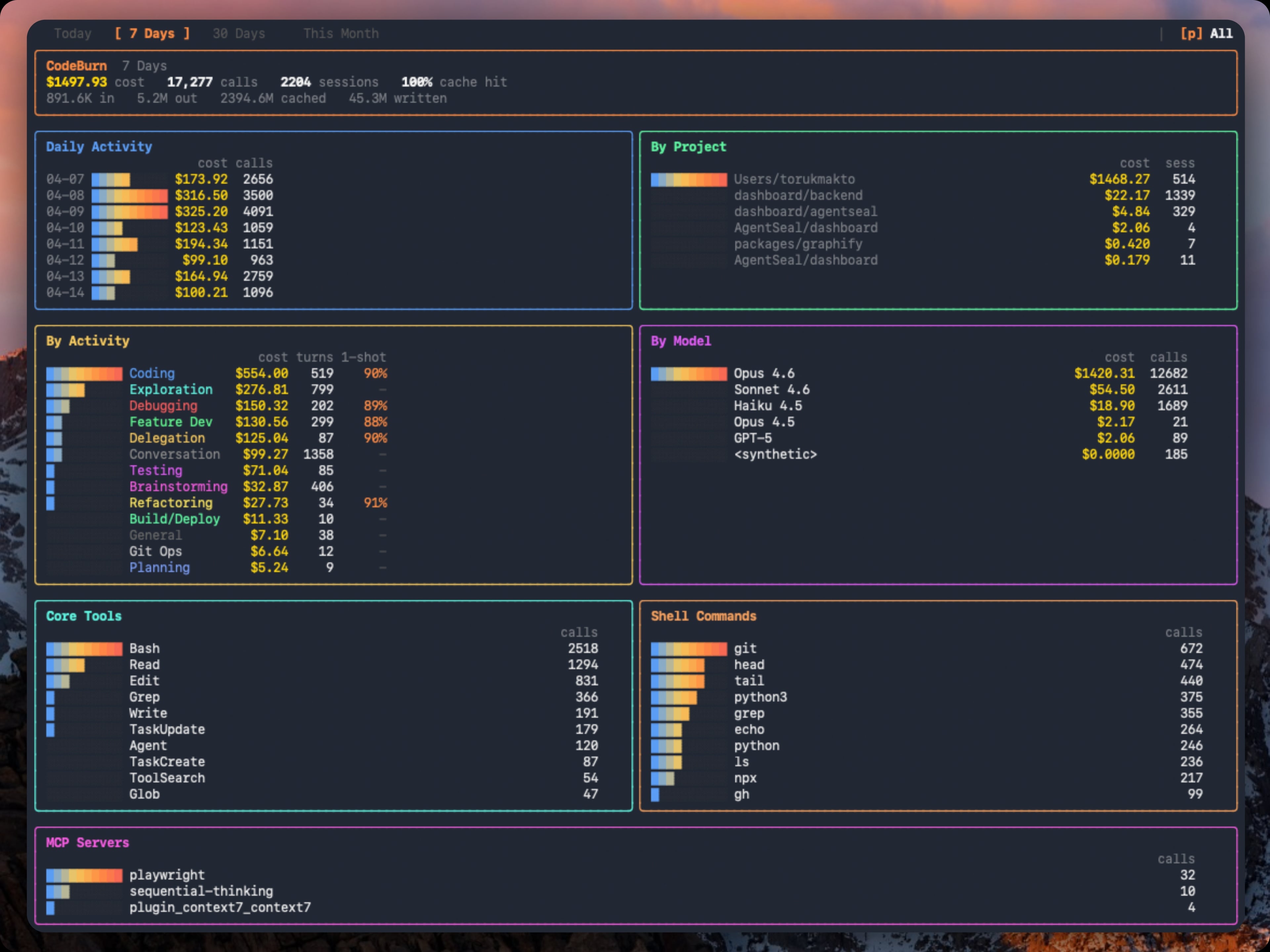
Dashboard
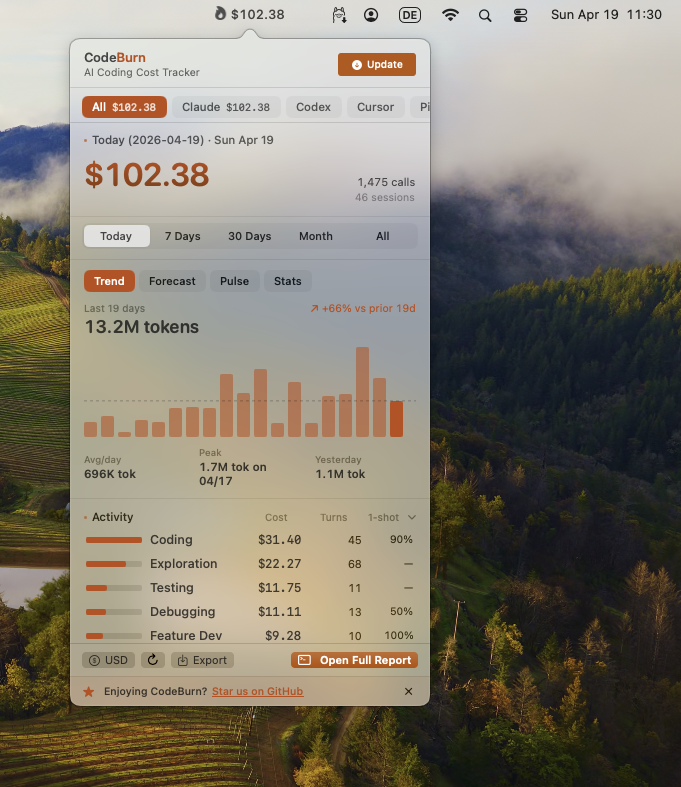
Menu Bar
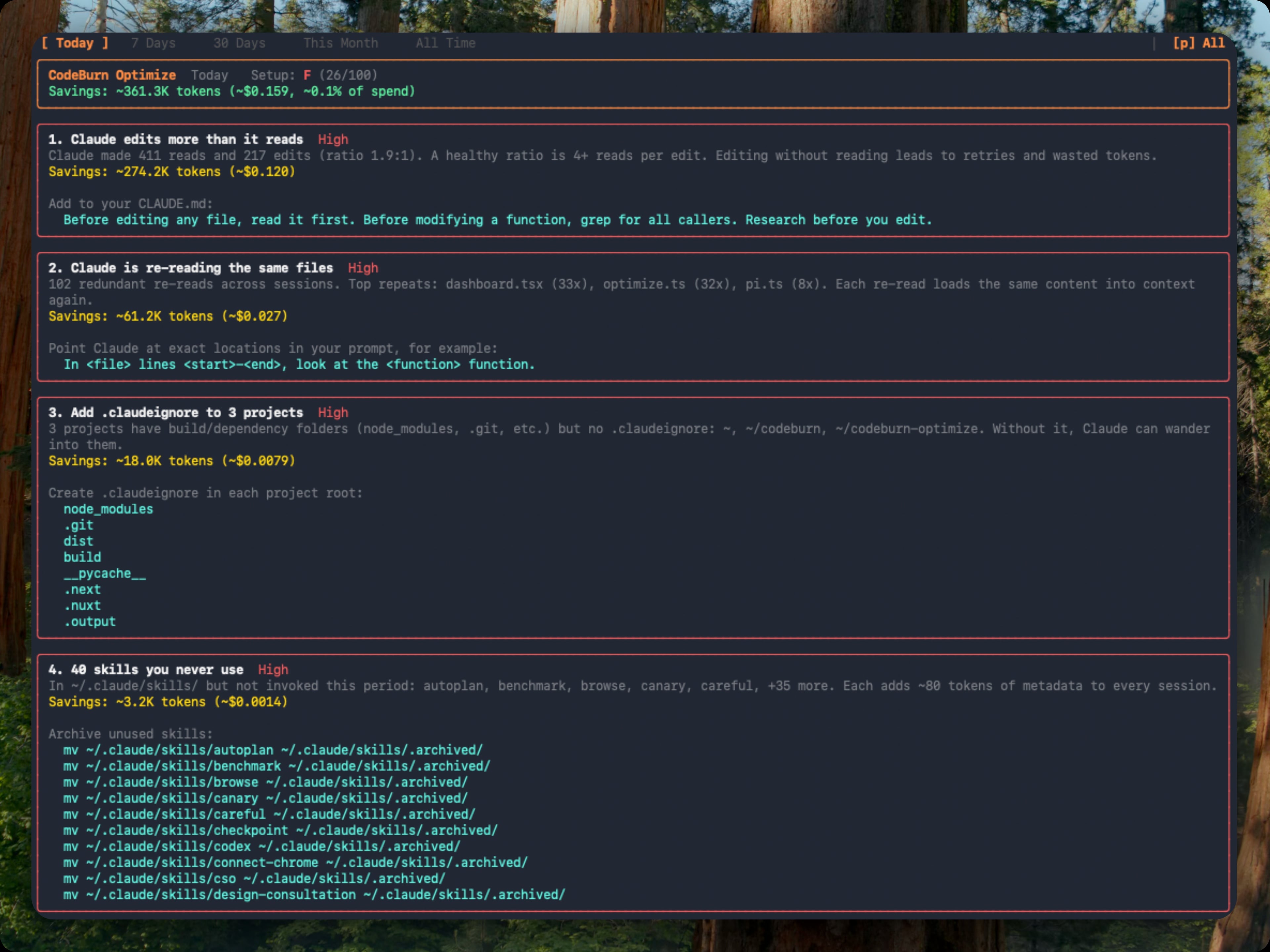
Optimize
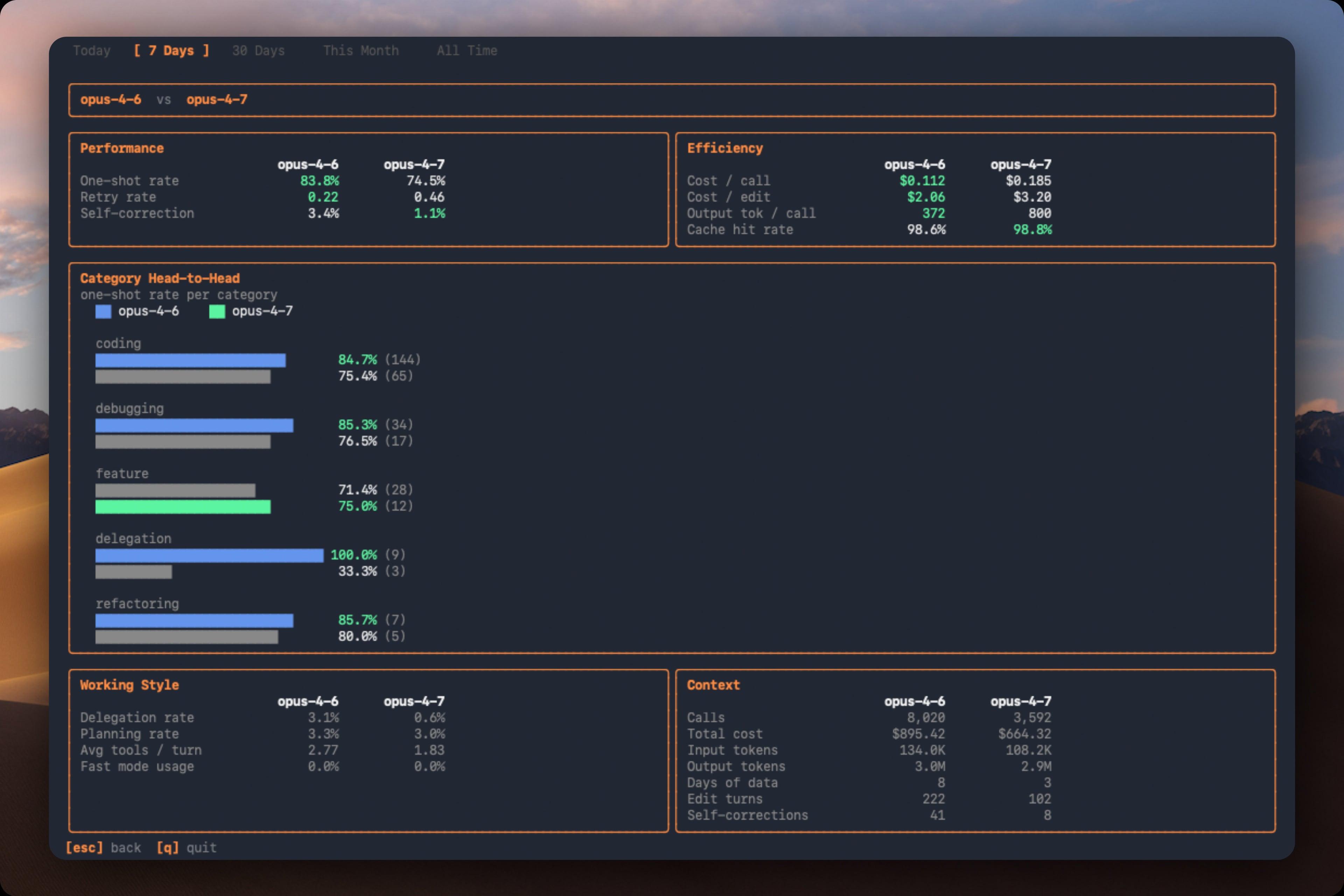
Compare
Requirements
Node.js 22+ (matches package.json engines)
At least one supported AI coding tool with session data on disk
For Cursor and OpenCode support, better-sqlite3 is installed automatically as an optional dependency
Install
npm install -g @soumyadebroy3/codeburn
Or with Homebrew:
brew tap soumyadebroy3/codeburn
brew install codeburn
The binary is codeburn once installed. Or run directly without installing:
codeburn # interactive dashboard (default: 7 days)
codeburn today # today's usage
codeburn month # this month's usage
codeburn report -p 30days # rolling 30-day window
codeburn report -p all # every recorded session
codeburn report --from 2026-04-01 --to 2026-04-10 # exact date range
codeburn report --format json # full dashboard data as JSON
codeburn report --refresh 60 # auto-refresh every 60s (default: 30s)
codeburn status # compact one-liner (today + month)
codeburn status --format json
codeburn export# CSV with today, 7 days, 30 days
codeburn export -f json # JSON export
codeburn optimize # find waste, get copy-paste fixes
codeburn optimize -p week # scope the scan to last 7 days
codeburn compare # side-by-side model comparison
codeburn yield # track productive vs reverted/abandoned spend
codeburn yield -p 30days # yield analysis for last 30 days
Arrow keys switch between Today, 7 Days, 30 Days, Month, and 6 Months (use --from / --to for an exact historical window). Press q to quit, 12345 as shortcuts, c to open model comparison, o to open optimize. The dashboard auto-refreshes every 30 seconds by default (--refresh 0 to disable). It also shows average cost per session and the five most expensive sessions across all projects.
Paths shown are for macOS. Linux and Windows equivalents are detected automatically. If a path has changed or is wrong, please open an issue.
Provider logos are trademarks of their respective owners. The icon set was sourced from tokscale (MIT), official vendor assets, and simple provider identifiers, used under nominative fair use for the purpose of identifying supported tools.
CodeBurn auto-detects which AI coding tools you use. If multiple providers have session data on disk, press p in the dashboard to toggle between them.
The --provider flag filters any command to a single provider: codeburn report --provider claude, codeburn today --provider codex, codeburn export --provider cursor. Works on all commands: report, today, month, status, export, optimize, compare, yield.
Provider Notes
Cursor reads token usage from its local SQLite database. Since Cursor's "Auto" mode hides the actual model used, costs are estimated using Sonnet pricing (labeled "Auto (Sonnet est.)" in the dashboard). The Cursor view shows a Languages panel instead of Core Tools/Shell/MCP panels, since Cursor does not log individual tool calls. First run on a large Cursor database may take up to a minute; results are cached and subsequent runs are instant.
Gemini CLI stores sessions as single JSON files. Each session embeds real token counts (input, output, cached, thoughts) per message, so no estimation is needed. Gemini reports input tokens inclusive of cached; CodeBurn subtracts cached from input before pricing to avoid double charging.
Mistral Vibe stores sessions as folders under ~/.vibe/logs/session/ (or $VIBE_HOME/logs/session/). CodeBurn reads cumulative prompt/completion totals and model pricing from meta.json, then reads messages.jsonl for the first user prompt and assistant tool calls. Subagent sessions under agents/ are counted as separate Vibe sessions.
Kiro stores conversations as .chat JSON files. Token counts are estimated from content length. The underlying model is not exposed, so sessions are labeled kiro-auto and costed at Sonnet rates.
GitHub Copilot reads from both ~/.copilot/session-state/ (legacy CLI) and VS Code's workspaceStorage/*/GitHub.copilot-chat/transcripts/. The VS Code format has no explicit token counts; tokens are estimated from content length and the model is inferred from tool call ID prefixes.
OpenClaw reads JSONL agent logs from ~/.openclaw/agents/ and also checks legacy paths (.clawdbot, .moltbot, .moldbot).
Roo Code and KiloCode are Cline-family VS Code extensions. CodeBurn reads ui_messages.json from each task directory and extracts token usage from api_req_started entries.
Adding a new provider is a single file. See src/providers/codex.ts for an example.
Features
Cost Tracking
Prices every API call using input, output, cache read, cache write, and web search token counts. Fast mode multiplier for Claude. Pricing fetched from LiteLLM and cached locally for 24 hours. Hardcoded fallbacks for all Claude and GPT models to prevent mispricing.
Task Categories
13 categories classified from tool usage patterns and user message keywords. No LLM calls, fully deterministic.
Category
What triggers it
Coding
Edit, Write tools
Debugging
Error/fix keywords + tool usage
Feature Dev
"add", "create", "implement" keywords
Refactoring
"refactor", "rename", "simplify"
Testing
pytest, vitest, jest in Bash
Exploration
Read, Grep, WebSearch without edits
Planning
EnterPlanMode, TaskCreate tools
Delegation
Agent tool spawns
Git Ops
git push/commit/merge in Bash
Build/Deploy
npm build, docker, pm2
Brainstorming
"brainstorm", "what if", "design"
Conversation
No tools, pure text exchange
General
Skill tool, uncategorized
Breakdowns
Daily cost chart, per-project, per-model (Opus, Sonnet, Haiku, GPT-5, GPT-4o, Gemini, Kiro, and more), per-activity with one-shot rate, core tools, shell commands, and MCP servers.
One-Shot Rate
For categories that involve code edits, CodeBurn detects edit/test/fix retry cycles (Edit, Bash, Edit patterns). The one-shot column shows the percentage of edit turns that succeeded without retries. Coding at 90% means the AI got it right first try 9 out of 10 times.
Pricing
Fetched from LiteLLM model prices (auto-cached 24 hours at ~/.cache/codeburn/). Handles input, output, cache write, cache read, and web search costs. Fast mode multiplier for Claude. Hardcoded fallbacks for all Claude and GPT-5 models to prevent fuzzy matching mispricing.
Optimize
codeburn optimize                       # scan the last 30 days
codeburn optimize -p today              # today only
codeburn optimize -p week               # last 7 days
codeburn optimize --provider claude     # restrict to one provider
Scans your sessions and your ~/.claude/ setup for waste patterns:
Files Claude re-reads across sessions (same content, same context, over and over)
Low Read:Edit ratio (editing without reading leads to retries and wasted tokens)
Context-heavy sessions where effective input/cache tokens swamp output
Possibly low-worth expensive sessions with no edit turns or repeated retries
when no git/gh delivery command is observed
Each finding shows the estimated token and dollar savings plus a ready-to-paste fix: a CLAUDE.md line, an environment variable, or a mv command to archive unused items. Findings are ranked by urgency (impact weighted against observed waste) and rolled up into an A to F setup health grade. Repeat runs classify each finding as new, improving, or resolved against a 48-hour recent window.
You can also open it inline from the dashboard: press o when a finding count appears in the status bar, b to return.
Compare
codeburn compare                        # interactive model picker (default: last 6 months)
codeburn compare -p week                # last 7 days
codeburn compare -p today               # today only
codeburn compare --provider claude      # Claude Code sessions only
Or press c in the dashboard to enter compare mode. Arrow keys switch periods, b to return.
Section
Metric
What it measures
Performance
One-shot rate
Edits that succeed without retries
Performance
Retry rate
Average retries per edit turn
Performance
Self-correction
Turns where the model corrected its own mistake
Efficiency
Cost per call
Average cost per API call
Efficiency
Cost per edit
Average cost per edit turn
Efficiency
Output tokens per call
Average output tokens per call
Efficiency
Cache hit rate
Proportion of input from cache
Also compares per-category one-shot rates, delegation rate, planning rate, average tools per turn, and fast mode usage.
Yield
codeburn yield                  # last 7 days (default)
codeburn yield -p today         # today only
codeburn yield -p 30days        # last 30 days
codeburn yield -p month         # this calendar month
Correlates AI sessions with git commits by timestamp:
Category
Meaning
Productive
Commits from this session landed in main
Reverted
Commits were later reverted
Abandoned
No commits near session, or commits never merged
Requires a git repository. Run from your project directory.
Plans
codeburn plan set claude-max                                  # $200/month
codeburn plan set claude-pro                                  # $20/month
codeburn plan set cursor-pro                                  # $20/month
codeburn plan set custom --monthly-usd 150 --provider claude  # custom
codeburn plan set none                                        # disable plan view
codeburn plan                                                 # show current
codeburn plan reset                                           # remove plan config
Subscription tracking for Claude Pro, Claude Max, and Cursor Pro. The dashboard shows a progress bar of API-equivalent cost against your plan price. Supports custom plans. Presets use publicly stated plan prices (current as of May 2026); they do not model exact token allowances, because vendors do not publish precise consumer-plan limits.
Currency
codeburn currency GBP          # set to British Pounds
codeburn currency AUD          # set to Australian Dollars
codeburn currency JPY          # set to Japanese Yen
codeburn currency CNY          # set to Chinese Yuan
codeburn currency              # show current setting
codeburn currency --reset      # back to USD
Any ISO 4217 currency code is supported (162 currencies). Exchange rates fetched from Frankfurter (European Central Bank data, free, no API key) and cached for 24 hours. Config stored at ~/.config/codeburn/config.json. The currency setting applies everywhere: dashboard, status bar, menu bar, CSV/JSON exports, and JSON API output.
Model Aliases
If you see $0.00 for some models, the model name reported by your provider does not match any entry in the LiteLLM pricing data. This commonly happens when using a proxy that rewrites model names.
codeburn model-alias "my-proxy-model""claude-opus-4-6"# add alias
codeburn model-alias --list # show configured aliases
codeburn model-alias --remove "my-proxy-model"# remove alias
Aliases are stored in ~/.config/codeburn/config.json and applied at runtime before pricing lookup. The target name can be anything in the LiteLLM model list or a canonical name from the fallback table (e.g. claude-sonnet-4-6, claude-opus-4-5, gpt-4o). Built-in aliases ship for known proxy model name variants. User-configured aliases take precedence over built-ins.
Filtering
codeburn report --project myapp                  # show only projects matching "myapp"
codeburn report --exclude myapp                  # show everything except "myapp"
codeburn report --exclude myapp --exclude tests  # exclude multiple projects
codeburn month --project api --project web       # include multiple projects
codeburn export --project inventory              # export only "inventory" project data
Filter by provider, project name (case-insensitive substring), or exact date range. The --project and --exclude flags work on all commands and can be combined with --provider.
codeburn report --from 2026-04-01 --to 2026-04-10   # explicit window
codeburn report --from 2026-04-01                    # this date through today
codeburn report --to 2026-04-10                      # earliest data through this date
Either flag alone is valid. Inverted or malformed dates exit with a clear error. In the TUI, the custom range sets the initial load only; pressing 1 through 5 switches back to predefined periods.
JSON Output
report, today, and month support --format json to output the full dashboard data as structured JSON to stdout:
codeburn report --format json             # 7-day JSON report
codeburn today --format json              # today's data as JSON
codeburn month --format json              # this month as JSON
codeburn report -p 30days --format json   # 30-day window
The JSON includes all dashboard panels: overview (cost, calls, sessions, cache hit %), daily breakdown, projects (with avgCostPerSession), models with token counts, activities with one-shot rates, core tools, MCP servers, and shell commands. Pipe to jq for filtering:
For lighter output, use status --format json (today and month totals only) or file exports (export -f json).
Menu Bar
macOS
codeburn menubar
One command: downloads the latest .app, installs into ~/Applications, and launches it. Re-run with --force to reinstall. Native Swift and SwiftUI app lives in mac/ (see mac/README.md for build details).
The menubar icon always shows today's spend (so $0 is normal if you have not used AI tools today). Click to open a popover with agent tabs, period switcher (Today, 7 Days, 30 Days, Month, All), Trend, Forecast, Pulse, Stats, and Plan insights, activity and model breakdowns, optimize findings, and CSV/JSON export. Refreshes every 30 seconds.
Windows
codeburn tray
Same idea, Windows-flavoured. Downloads the latest .msi, runs it (basic-UI installer), launches the system-tray app. Tauri-based (Rust shell + WebView frontend) so the binary stays small (~10 MB) and renders the popover with native Windows 11 Mica blur. Source lives in windows/ (see windows/README.md). Same JSON data path as the macOS menubar — same panels, same refresh, same brand.
First run shows a Microsoft SmartScreen warning (artefact is ad-hoc signed); click "More info → Run anyway" once.
Compact mode shrinks the menubar item to fit the text, dropping decimals (e.g. $110 instead of $110.20):
Relaunch the app to apply. To revert: defaults delete org.agentseal.codeburn-menubar CodeBurnMenubarCompact.
Reading the Dashboard
CodeBurn surfaces the data, you read the story. A few patterns worth knowing:
Signal you see
What it might mean
Cache hit < 80%
System prompt or context is not stable, or caching not enabled
Lots of Read calls per session
Agent re-reading same files, missing context
Low 1-shot rate (Coding 30%)
Agent struggling with edits, retry loops
Opus 4.6 dominating cost on small turns
Overpowered model for simple tasks
dispatch_agent / task heavy
Sub-agent fan-out, expected or excessive
No MCP usage shown
Either you don't use MCP servers, or your config is broken
Bash dominated by git status, ls
Agent exploring instead of executing
Conversation category dominant
Agent talking instead of doing
These are starting points, not verdicts. A 60% cache hit on a single experimental session is fine. A persistent 60% cache hit across weeks of work is a config issue.
How It Reads Data
Claude Code stores session transcripts as JSONL at ~/.claude/projects/<sanitized-path>/<session-id>.jsonl. Each assistant entry contains model name, token usage (input, output, cache read, cache write), tool_use blocks, and timestamps.
Codex stores sessions at ~/.codex/sessions/YYYY/MM/DD/rollout-*.jsonl with token_count events containing per-call and cumulative token usage, and function_call entries for tool tracking.
Cursor stores session data in a SQLite database at ~/Library/Application Support/Cursor/User/globalStorage/state.vscdb (macOS), ~/.config/Cursor/User/globalStorage/state.vscdb (Linux), or %APPDATA%/Cursor/User/globalStorage/state.vscdb (Windows). Token counts are in cursorDiskKV table entries with bubbleId: key prefix. Requires better-sqlite3 (installed as optional dependency). Parsed results are cached at ~/.cache/codeburn/cursor-results.json and auto-invalidate when the database changes.
OpenCode stores sessions in SQLite databases at ~/.local/share/opencode/opencode*.db. CodeBurn queries the session, message, and part tables read-only, extracts token counts and tool usage, and recalculates cost using the LiteLLM pricing engine. Falls back to OpenCode's own cost field for models not in our pricing data. Subtask sessions (parent_id IS NOT NULL) are excluded to avoid double counting. Supports multiple channel databases and respects XDG_DATA_HOME.
Pi / OMP stores sessions as JSONL at ~/.pi/agent/sessions/<sanitized-cwd>/*.jsonl (Pi) and ~/.omp/agent/sessions/<sanitized-cwd>/*.jsonl (OMP). Each assistant message carries token usage (input, output, cacheRead, cacheWrite) plus inline toolCall content blocks. CodeBurn extracts token counts, normalizes tool names to the standard set (bash to Bash, dispatch_agent to Agent), and pulls bash commands from toolCall.arguments.command for the shell breakdown.
Gemini CLI stores sessions as single JSON files at ~/.gemini/tmp/<project>/chats/session-*.json. Each session embeds real token counts (input, output, cached, thoughts) per message. Gemini reports input tokens inclusive of cached; CodeBurn subtracts cached from input before pricing to avoid double charging.
Codebuff (formerly Manicode) stores per-chat history as JSON at ~/.config/manicode/projects/<project>/chats/<chatId>/chat-messages.json. Codebuff bills in credits rather than tokens, so CodeBurn records each completed assistant message (via msg.credits) and approximates cost at the public pay-as-you-go rate ($0.01 / credit). When Codebuff routes a call through an upstream provider and the stashed RunState records token-level usage, the real tokens and LiteLLM-calculated cost take precedence. Codebuff-native tool names (read_files, str_replace, run_terminal_command, spawn_agents, etc.) normalize to the canonical set (Read, Edit, Bash, Agent). Honors CODEBUFF_DATA_DIR for a custom root.
Mistral Vibe stores session folders at ~/.vibe/logs/session/. Each folder contains meta.json with cumulative prompt/completion token totals, model pricing, timestamps, and working directory, plus messages.jsonl with user prompts and assistant tool calls. CodeBurn emits one record per Vibe session because the source data is cumulative, not per assistant turn.
OpenClaw stores agent sessions as JSONL at ~/.openclaw/agents/*.jsonl. Also checks legacy paths .clawdbot, .moltbot, .moldbot. Token usage comes from assistant message usage blocks; model from modelId or message.model fields.
Cline / Roo Code / KiloCode are Cline-family coding agents. CodeBurn reads ui_messages.json from each task directory, filtering type: "say" entries with say: "api_req_started" to extract token counts. Cline scans both VS Code's globalStorage/saoudrizwan.claude-dev and ~/.cline/data.
IBM Bob stores IDE task history in User/globalStorage/ibm.bob-code/tasks/<task-id>/ under the IBM Bob application data directory. CodeBurn reads ui_messages.json for API request token/cost records and api_conversation_history.json for the selected model, with support for both GA (IBM Bob) and preview (Bob-IDE) app data folders.
Kimi Code CLI stores session logs under $KIMI_SHARE_DIR/sessions/<workdir-hash>/<session-id>/ or ~/.kimi/sessions/<workdir-hash>/<session-id>/. CodeBurn reads wire.jsonlStatusUpdate.token_usage records, maps input_other, input_cache_read, input_cache_creation, and output into the standard token columns, and includes subagent sessions under each session's subagents/ folder.
CodeBurn deduplicates messages (by API message ID for Claude, by cumulative token cross-check for Codex, by conversation/timestamp for Cursor, by session ID for Gemini, by session+message ID for OpenCode, by responseId for Pi/OMP, by session+message ID for Kimi), filters by date range per entry, and classifies each turn.
Environment Variables
Variable
Description
CLAUDE_CONFIG_DIR
Override Claude Code data directory (default: ~/.claude)
CODEX_HOME
Override Codex data directory (default: ~/.codex)
CODEBUFF_DATA_DIR
Override Codebuff data directory (default: ~/.config/manicode)
FACTORY_DIR
Override Droid data directory (default: ~/.factory)
KIMI_SHARE_DIR
Override Kimi Code CLI share directory (default: ~/.kimi)
KIMI_MODEL_NAME
Override Kimi model name when Kimi sessions do not record the model
QWEN_DATA_DIR
Override Qwen data directory (default: ~/.qwen/projects)
VIBE_HOME
Override Mistral Vibe home directory (default: ~/.vibe)
Hardened git invocation — every git spawn (used by codeburn yield and the cwd auto-scope detector) goes through safeRunGit, which resolves an absolute git binary, scrubs GIT_* env vars, forces safe.directory=*/core.fsmonitor=/core.sshCommand= to neutralize .git/config exec vectors, and refuses cwds outside $HOME / strict-subpaths of $TMPDIR (extendable via CODEBURN_ALLOWED_PROJECT_ROOTS).
Pricing accuracy for cache tiers — Anthropic's 1-hour cache write rate is now read separately from the 5-minute rate, fixing an ~8.5% undercount on long-cache workloads.
Plan-aware leverage UX — when a codeburn plan set is configured, headlines say "Today value / Month value · 6.2× leverage" instead of raw API spend, so users on flat subscriptions don't misread the metered total as a bill.
Multi-provider plan auto-detect — surfaces providers we know you use but can't auto-detect a tier for (Cursor, Codex, Copilot, Kiro, …) with a one-line codeburn plan set snippet for each.
HTML report — codeburn export --format html produces a single self-contained HTML file with a calendar heatmap, daily timeline, anomaly spikes, per-provider donuts, optimize findings, and yield panel — handy for sharing or reviewing a period offline.
Reproducible builds — scripts/litellm-pin.json pins the upstream LiteLLM model-prices file by commit SHA + SHA-256 so npm run build is deterministic.
SonarQube-gated CI — quality gate ✅, coverage threshold 80% on new code, 0 bugs / 0 vulnerabilities / 0 hotspots, plus a Semgrep no-bracket-assign-hot-paths guard. The mcp-sonar/ MCP server lets you drive scans + issue triage from inside Claude Code.
See where your AI coding tokens go - by task, tool, model, and project
The npm package @soumyadebroy3/codeburn receives a total of 59 weekly downloads. As such, @soumyadebroy3/codeburn popularity was classified as not popular.
We found that @soumyadebroy3/codeburn demonstrated a healthy version release cadence and project activity because the last version was released less than a year ago.It has 1 open source maintainer collaborating on the project.
Package last updated on 12 Jun 2026
Did you know?
Socket for GitHub automatically highlights issues in each pull request and monitors the health of all your open source dependencies. Discover the contents of your packages and block harmful activity before you install or update your dependencies.
The White House’s Gold Eagle Initiative aims to coordinate AI-discovered vulnerabilities, validate findings, and accelerate patching across critical software.