Demo
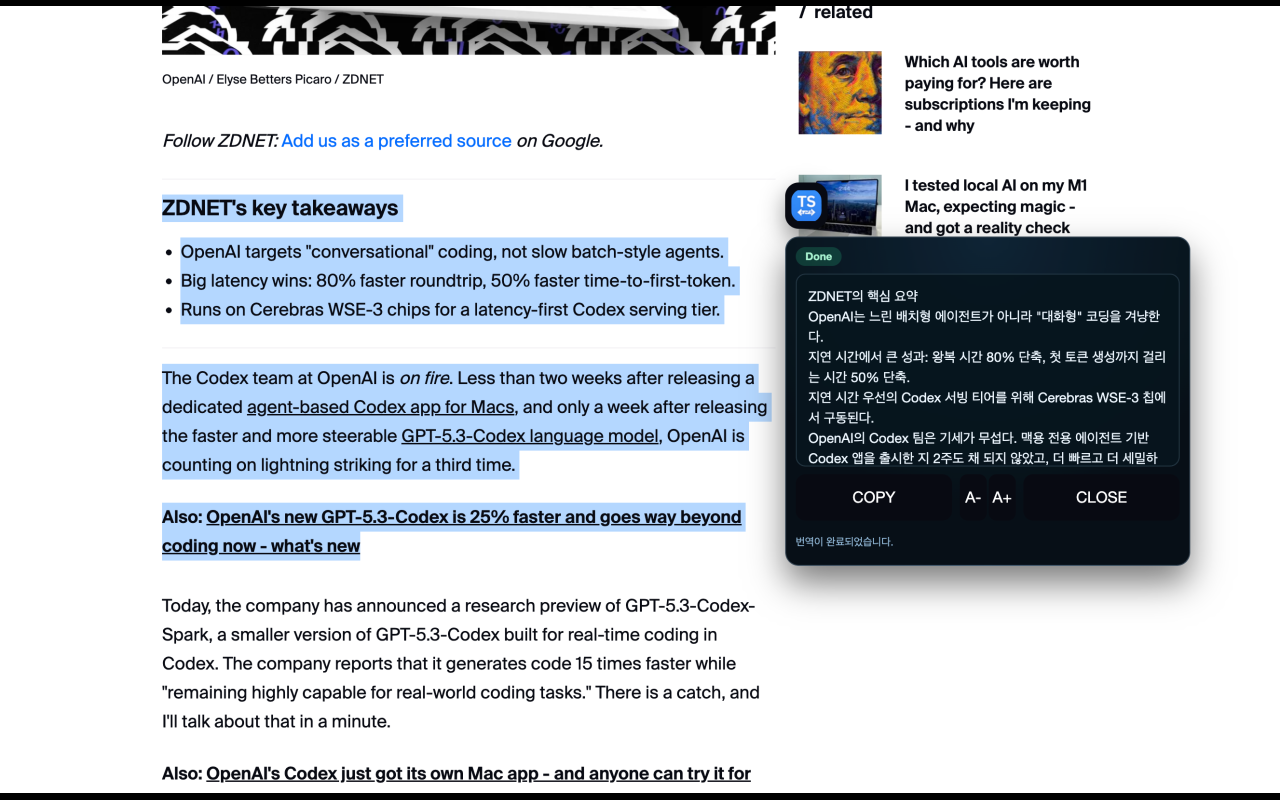
Select text on any webpage → click the icon → instant translation
Features
| Inline Translation | Select text on any webpage and translate instantly with a single click |
| Popup Panel | Standalone translation interface from the Chrome toolbar |
| Multi-Language | English, Korean, Japanese, Chinese, Spanish, and more |
| Secure | No API keys in extension; reuses local Codex CLI authentication |
| Font Controls | Adjust translation font size (A+ / A-) for readability |
| Model Benchmarking | Automated performance testing to select the fastest model |
How It Works
Web Page → Content Script → Background Worker → Native Host → Codex CLI
(select) (click icon) (send request) (codex exec) (translate)
The extension uses Chrome's Native Messaging to securely communicate with the locally installed Codex CLI. No API keys are stored or transmitted by the extension.
Supported Languages
🇺🇸 English · 🇰🇷 Korean · 🇯🇵 Japanese · 🇨🇳 Chinese · 🇪🇸 Spanish
Additional languages planned for future releases.
Installation
Quick Setup
npm install -g @textswift/textswift
This automatically:
- Detects your Codex CLI installation
- Registers the Native Messaging Host
- Opens
chrome://extensions for extension setup
If Codex is not logged in, run:
codex login
Chrome Extension
From Chrome Web Store (recommended):
TextSwift Beta
Unpacked (development):
- Open
chrome://extensions
- Enable Developer mode
- Click Load unpacked → select the
dist/ folder
- Copy the extension ID, then run:
textswift setup YOUR_EXTENSION_ID
CLI Commands
textswift setup [id] | Register native host (id = Chrome extension ID) |
textswift status | Show installation status |
textswift uninstall | Remove native host manifest |
Prerequisites
- Node.js 18+ and npm
- Google Chrome
- Codex CLI installed and logged in
- macOS (Windows/Linux support planned)
Usage
Inline Translation
- Select text on any webpage
- Click the TextSwift icon that appears next to your selection
- View the instant translation in the inline panel
- Adjust font size with A+ / A- buttons
- Click Close to dismiss
The icon stays visible during translation — click it again to reopen the panel.
- Click the TextSwift icon in the Chrome toolbar
- Paste or type text into the input field
- Select source and target languages
- Click Translate
- Copy the result or retry with different settings
Development
Available Scripts
npm run build | Build extension and native host artifacts |
npm run typecheck | Run TypeScript type checking |
npm run test:unit | Run unit tests |
npm run smoke:native | Test native messaging with real Codex CLI |
npm run smoke:native:mock | Test native messaging with mock responses |
npm run smoke:playwright | Run Playwright end-to-end tests |
npm run smoke:inline | Validate inline selection icon flow |
npm run smoke:sites | Verify extension on multiple real websites |
npm run checklist | Run all quality checks |
Quality Assurance
npm run checklist
Runs type checking, unit tests, smoke tests, and benchmarks before committing.
Model Strategy
TextSwift uses a primary/fallback model chain:
| Primary | gpt-5.3-spark | Faster, cost-effective |
| Fallback | gpt-5.1-codex-mini | Reliable backup |
Benchmarking
bash scripts/benchmark-models.sh
TEXTSWIFT_BENCHMARK_MODE=codex TEXTSWIFT_BENCHMARK_ITERATIONS=1 bash scripts/benchmark-models.sh
TEXTSWIFT_BENCHMARK_MODE=mock bash scripts/benchmark-models.sh
Troubleshooting
Icon/panel remains visible before text selection
Stale content script from a previous build. Reload the extension from chrome://extensions, then refresh the page.
"Cannot read properties of undefined (reading 'sendMessage')"
Content script running without extension runtime binding. Reload both the extension and the web page.
Extension context invalidated
Extension was reloaded while content scripts were active. Close and reopen the affected tabs.
Security
- No API keys embedded in the extension
- No access to Codex authentication files
- Native host reuses local Codex CLI auth via
codex exec
- All requests go through Chrome's secure native messaging channel
Milestones
License
MIT