

Company News
AWS Security Hub Adds Socket for Supply Chain Security
Socket is now in the AWS Security Hub Extended plan. Adopt it through AWS, apply committed spend, and block malicious open source packages.
By Feross Aboukhadijeh - Aug 04, 2026
@toolwright-adk/linear-bootstrap
Advanced tools
MCP server for bootstrapping Linear projects from natural language descriptions



Describe a project in plain language, get a fully structured Linear project — milestones, epics, issues, labels, and dependency chains.
The server reads your team's existing conventions (workflow states, labels, cycles) and generates plans that fit how your team already works. Existing labels are reused, not duplicated. Issues start in your team's default state. Project names avoid collisions with active work.
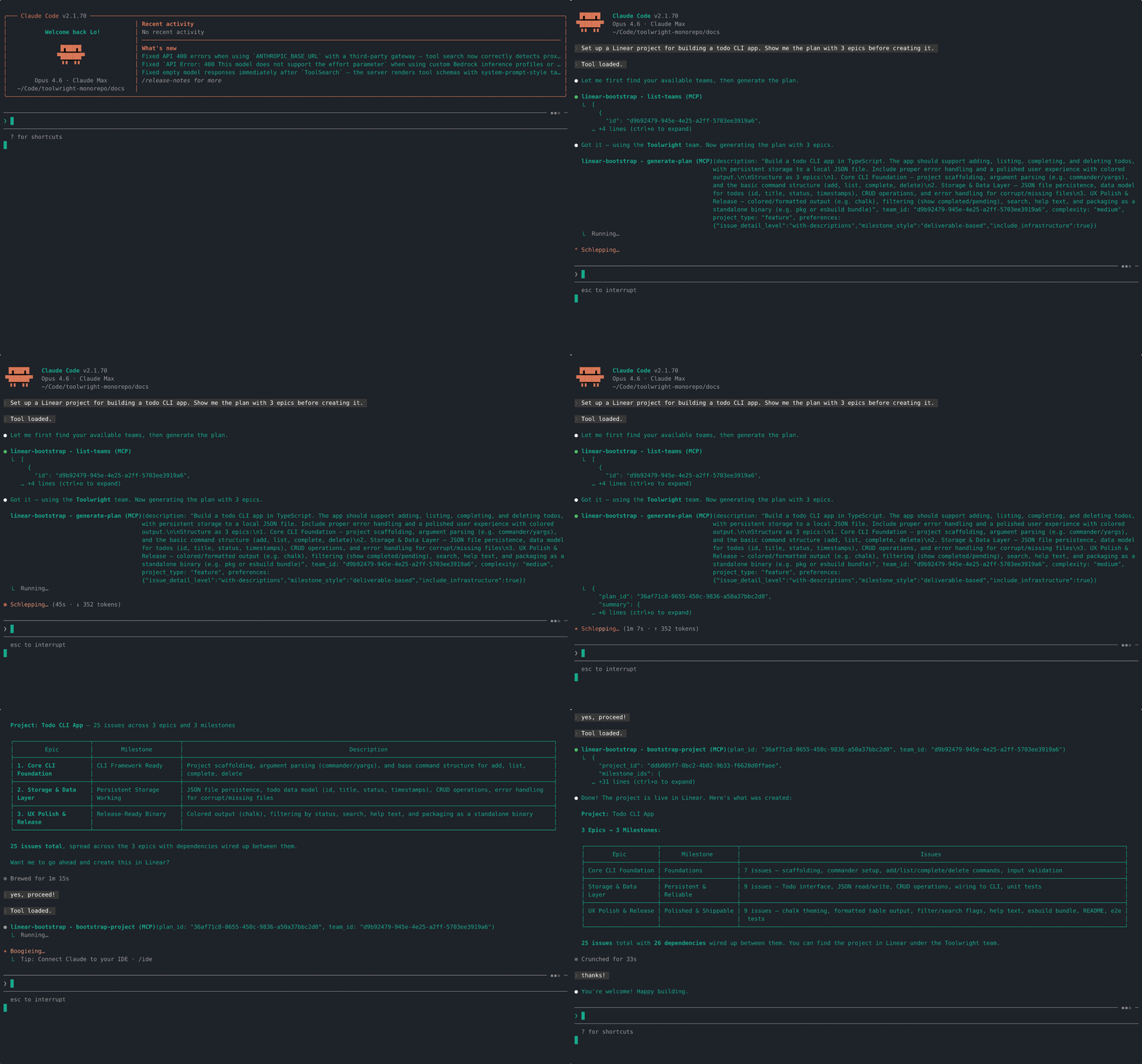
"Set up a Linear project for building a todo CLI app. Show me the plan with 3 epics before creating it."
The agent introspects your team's workspace, generates a structured plan, and creates everything in Linear:
Add to your MCP client config (Claude Code, Cursor, Windsurf, etc.):
{
"mcpServers": {
"linear-bootstrap": {
"command": "npx",
"args": ["-y", "@toolwright-adk/linear-bootstrap"],
"env": {
"LINEAR_API_KEY": "lin_api_...",
"LLM_API_KEY": "...",
"LLM_BASE_URL": "https://openrouter.ai/api/v1",
"LLM_MODEL": "anthropic/claude-sonnet-4.6"
}
}
}
}
No LLM keys needed — just your Linear API key. Available as a managed MCP server on Apify with pay-per-event pricing ($0.35 per project bootstrap).
The included Agent Skill gives your agent a /linear-bootstrap slash command with step-by-step instructions for team selection, plan review, and project creation.
One-command install (recommended — works with Claude Code, Cursor, Gemini CLI, Goose, OpenCode, and more):
npx skills add toolwright-adk/toolwright-monorepo --skill linear-bootstrap
Manual install (if you prefer):
npm install @toolwright-adk/linear-bootstrap
cp -r node_modules/@toolwright-adk/linear-bootstrap/.claude/skills/linear-bootstrap .claude/skills/
The skill works with any agent that supports the Agent Skills format. It's tool-agnostic — it describes what needs to happen (find team, generate plan, validate, create), not which specific tool to call. Any agent with the MCP server connected will have the right tools available.
/linear-bootstrap CLI tool for managing database migrations
The skill walks you through team selection, plan review, and project creation interactively. Say "just do it" to skip the review step.
The skill is optional — you can also direct your agent to use the tools directly or according to your own agent guidelines. For example: "Bootstrap a Linear project for building a Slack integration."
One tool call like this:
{
  "description": "Build a Slack integration for posting Linear updates",
  "team_id": "team-abc123",
  "project_type": "feature"
}
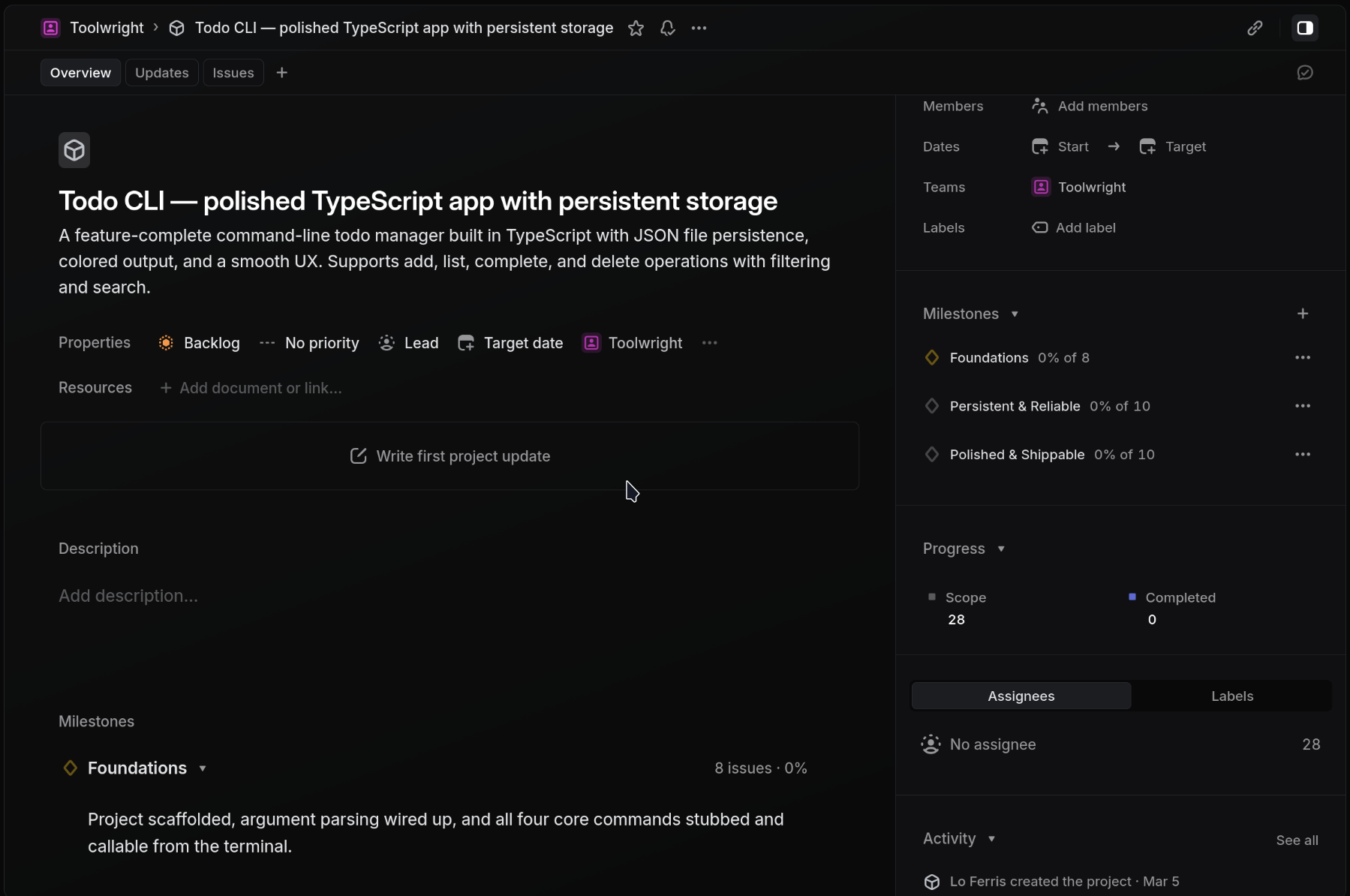
Creates all of this in Linear:
The plan generation is context-aware — it introspects your team's workspace first, so the output respects your existing setup rather than creating a mess of duplicates.
Context-aware generation — Before generating a plan, the server reads your team's workspace: workflow states, labels, active cycle, existing projects. This context is injected into the LLM prompt so plans use your team's naming conventions and avoid conflicts.
Label reuse — During bootstrap, existing team labels are matched by name. New labels are only created when there's no match. No duplicates.
Plan caching — The full plan is cached server-side and referenced by plan_id. Only a summary crosses into your agent's context window (~100 tokens vs ~3,000+ for the full plan). This keeps multi-step workflows lean.
Idempotency — bootstrap-project checks for an existing project with the same name before creating. If found, it returns the existing project ID without making changes.
The project_type parameter tailors the plan structure:
| Type | When to use | Example milestones |
|---|---|---|
feature (default) | New user-facing functionality | Spec & design → MVP behind flag → Public launch |
infrastructure | Internal tooling, platform work | Prototype → Dogfood → Org-wide rollout |
api | Public or internal API development | API design sign-off → Implementation → GA |
migration | Moving between systems | Dual-write → Backfill → Cutover → Decommission |
These apply to Option A. The Apify hosted version only requires a Linear API key.
| Variable | Required | Description |
|---|---|---|
LINEAR_API_KEY | Yes | Linear API key (create one here) |
LLM_API_KEY | Yes | API key for an OpenAI-compatible provider |
LLM_BASE_URL | Yes | Provider's base URL |
LLM_MODEL | Yes | Model ID for your provider |
Any provider that uses the OpenAI chat completions API works. Common setups:
| Provider | LLM_BASE_URL | LLM_MODEL example |
|---|---|---|
| OpenRouter | https://openrouter.ai/api/v1 | anthropic/claude-sonnet-4.6 |
| Together | https://api.together.xyz/v1 | meta-llama/Llama-3-70b-chat-hf |
| OpenAI | https://api.openai.com/v1 | gpt-4o |
| Ollama (local) | http://localhost:11434/v1 | llama3 |
List all Linear teams accessible to the configured API key. Call this first if you don't know your team ID.
Input: none
Returns: [{ id, name, key }]
API calls: 1 Linear read — teams query
Read team conventions from Linear. Called automatically by generate-plan, but available standalone to inspect your team's setup. Results are cached server-side for 30 minutes; subsequent calls for the same team return instantly.
Input: { team_id }
Returns: { team_name, workflow_states, default_state_id, default_state_name, labels, custom_fields, cycles_enabled, active_cycle?, existing_projects }
API calls: 5–6 Linear reads — team info, workflow states, labels (with parent resolution), default issue state, team projects, and active cycle (only if cycles are enabled)
Generate a structured project plan from a natural-language description. The full plan is cached server-side and only a plan_id + summary is returned to keep your agent's context lean.
If LINEAR_API_KEY is set and workspace context isn't already cached, this tool auto-introspects the team first (see introspect-workspace above). The workspace context is injected into the LLM prompt so the generated plan uses your team's existing labels, respects triage states, and avoids project name collisions.
Input:
| Field | Type | Required | Default |
|---|---|---|---|
description | string | yes | |
team_id | string | yes | |
complexity | "small" | "medium" | "large" | no | "medium" |
project_type | "feature" | "infrastructure" | "api" | "migration" | no | "feature" |
preferences.milestone_style | "time-based" | "deliverable-based" | "hybrid" | no | |
preferences.issue_detail_level | "titles-only" | "with-descriptions" | "full-acceptance-criteria" | no | |
preferences.include_infrastructure | boolean | no | |
preferences.include_docs | boolean | no |
Returns: { plan_id, summary } — summary has total_issues, total_epics, total_milestones, estimated_points
API calls: 1 LLM call (chat completion via LLM_BASE_URL/LLM_MODEL) + 0–6 Linear reads (auto-introspect, skipped if cached)
Check a plan for structural issues before creating anything. No external calls — pure logic.
Input: { plan_id } or { plan } (inline plan object), plus optional complexity and preferences (affects scale-check warnings)
Returns: { valid, errors, warnings }
API calls: none
Checks for: circular dependencies, orphaned dependency references, undefined milestones, empty epics, duplicate titles, oversized epics (>12 issues), high estimates (>5 points).
Create a complete Linear project from a plan. Validates the plan first; if validation fails, returns the errors without creating anything.
Input:
| Field | Type | Required | Default |
|---|---|---|---|
plan_id | string | one of plan_id/plan | |
plan | Plan | one of plan_id/plan | |
team_id | string | yes | |
dry_run | boolean | no | false |
Returns: { project_id, milestone_ids, label_ids, epic_ids, issue_ids, dependency_count } (when dry_run: false). When dry_run: true, returns { valid, errors, warnings } (the validation result).
API calls: 1 Linear read (project name check for idempotency) + N Linear writes, specifically:
createProjectcreateProjectMilestone per milestonecreateIssueLabel (only for labels not already on the team)createIssue per epic + 1 per child issuecreateIssueRelation per dependencyLabels that already exist on the team (matched by name from workspace cache) are reused by ID. All issues are created with the team's default workflow state. Label and dependency creation failures are non-critical (logged and skipped).
Add a single epic (parent issue with children) to an existing project.
Input: { project_id, team_id, epic, milestone_id?, label_ids? }
Returns: { epic_id, issue_ids }
API calls: 1 Linear read (project issues for idempotency check) + N Linear writes (1 epic issue + 1 per child issue + 1 per dependency)
Compound tool — generates a plan, validates it, and creates everything in Linear in one call. Combines generate-plan + validate-plan + bootstrap-project internally. Best for when you don't need to review the plan before execution.
Input: Same as generate-plan plus dry_run (boolean, default false)
Returns: { plan_id, summary, validation, bootstrap? } — bootstrap is omitted if validation fails or dry_run is true
API calls: 1 LLM call + 0–6 Linear reads (introspect) + 1 Linear read (idempotency) + N Linear writes (all resources)
Step by step (full control):
list-teams and pick your team_id.generate-plan with your description and team_id. You get back a plan_id and summary.validate-plan with the plan_id to check for structural issues.bootstrap-project with the plan_id and team_id to create everything in Linear.One-shot (skip the review):
Call generate-and-bootstrap — it runs all three steps internally and creates the project in one call.
Both paths auto-introspect the workspace. Context is cached for 30 minutes per team.
For a higher-level experience, the linear-project-manager plugin adds skills, agents, and commands that teach your agent when to use linear-bootstrap vs the official Linear MCP. It prevents common anti-patterns like creating 3+ issues one-by-one instead of using add-epic.
claude --plugin-dirThe plugin is optional — the MCP server works standalone with any client.
The Quick Start config works with any stdio-compatible MCP client. Client-specific locations:
.claude/mcp.json or claude mcp add.cursor/mcp.jsonFor generic stdio clients:
LINEAR_API_KEY=... LLM_API_KEY=... LLM_BASE_URL=... LLM_MODEL=... npx -y @toolwright-adk/linear-bootstrap
When self-hosted, the server needs two sets of credentials:
LLM_BASE_URL. No Linear data (issues, comments, user info) is sent to the LLM — only the project description you provide, plus a summary of team labels, workflow states, and project names used to avoid duplicates.No credentials are logged or cached to disk. Plan and workspace caches are in-memory only and cleared on server restart.
LINEAR_API_KEY determines the workspace. To work across workspaces, run separate server instances.plan_id is only valid within the same process for 30 minutes. Under horizontal scaling, use generate-and-bootstrap (single request) or pass inline plan objects instead of plan_id references.custom_fields array is always empty.The package also exports core functions for programmatic use:
import { createServer } from "@toolwright-adk/linear-bootstrap";
// Creates a configured McpServer with all tools registered
const server = createServer();

// Or use the core functions directly (no MCP overhead)
import {
  generatePlan,
  validatePlan,
  bootstrapProject,
  introspectWorkspace,
  addEpic,
  generateAndBootstrap,
  listTeams,
} from "@toolwright-adk/linear-bootstrap";
import { createLogger } from "@toolwright-adk/shared";

const logger = createLogger("my-app");

// generatePlan and introspectWorkspace require a logger as second parameter
const { plan_id, summary } = await generatePlan(
  { description: "Build a feature", team_id: "team-123" },
  logger,
);
pnpm build    # compile
pnpm test     # run tests
pnpm lint     # type-check
FAQs
MCP server for bootstrapping Linear projects from natural language descriptions
We found that @toolwright-adk/linear-bootstrap demonstrated a healthy version release cadence and project activity because the last version was released less than a year ago. It has 1 open source maintainer collaborating on the project.
Did you know?

Socket for GitHub automatically highlights issues in each pull request and monitors the health of all your open source dependencies. Discover the contents of your packages and block harmful activity before you install or update your dependencies.
Company News
Socket is now in the AWS Security Hub Extended plan. Adopt it through AWS, apply committed spend, and block malicious open source packages.

Research
/Security News
Popular npm packages keyv and cacheable compromised.

Security News
A misconfiguration gave three Anthropic models internet access, and one, believing it was in a simulation, shipped a credential-stealing package to PyPI.