╦╔╗ ╦═╗
║╠╩╗╠╦╝
╩╚═╝╩╚═
Interface Built Right
Visual eyes for Claude Code.
Catch what changed, keep what works.



IBR is a Claude Code plugin that screenshots your UI before and after changes, diffs them pixel-by-pixel, and tells you exactly what moved. No more "does this look right?" — you get a verdict: MATCH, EXPECTED_CHANGE, UNEXPECTED_CHANGE, or LAYOUT_BROKEN.
It works from the terminal, from Claude Code slash commands, or from code. Two commands to learn. Zero config required.
How It Works
Before — npx ibr start <url> | After — npx ibr check |
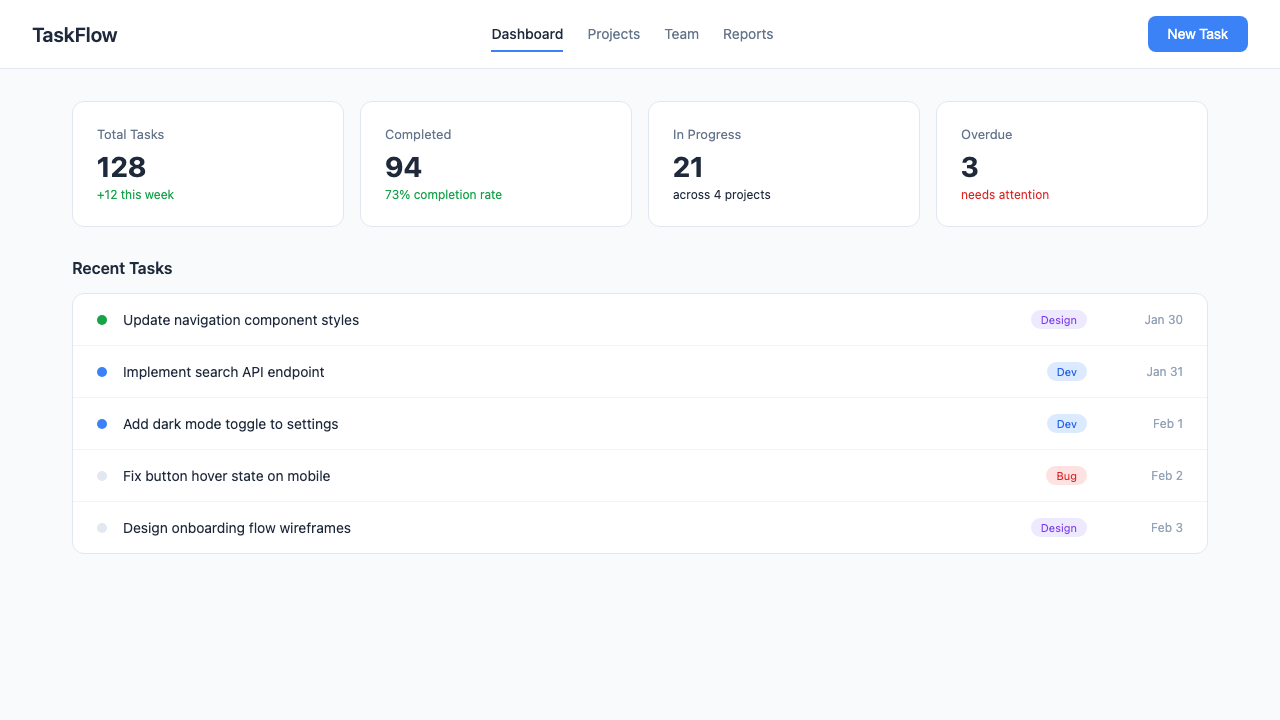 | 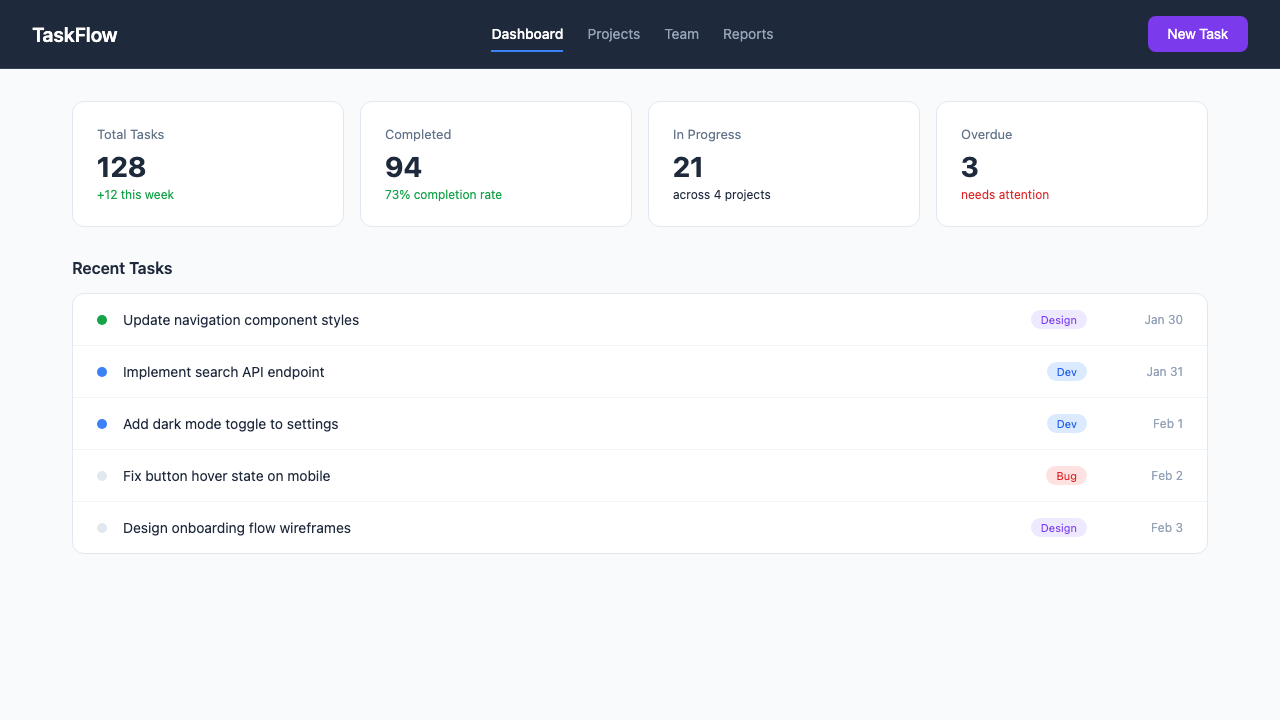 |
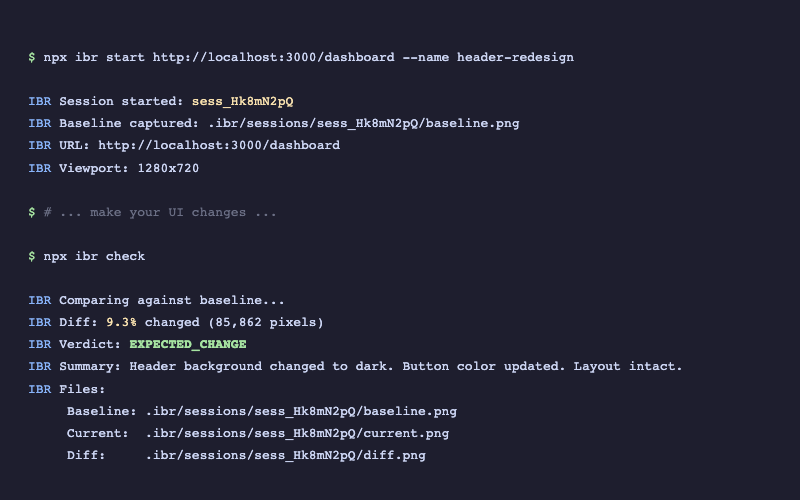
Header changed to dark, button turned purple — IBR detects the 9.3% diff and returns EXPECTED_CHANGE.
See terminal output
Quick Start
npm install @tyroneross/interface-built-right
That's it. .ibr/ is auto-added to your .gitignore on install.
Two commands:
npx ibr start http://localhost:3000
npx ibr check
Setup as Claude Code Plugin
IBR works standalone, but it's built for Claude Code. As a plugin, it automatically nudges Claude to verify UI changes and suggests IBR over manual screenshots.
1. Add to your project's .claude/settings.json:
{
  "plugins": ["node_modules/@tyroneross/interface-built-right/plugin"]
}
2. Restart Claude Code. You now have:
/ibr:snapshot | Capture baseline before making changes |
/ibr:compare | Compare current state against baseline |
/ibr:ui | Open the web dashboard at localhost:4200 |
3. Use in conversation:
"Redesign the header" → Claude captures baseline → makes changes → runs ibr check → iterates if LAYOUT_BROKEN
The plugin hooks handle the rest — reminding Claude to capture baselines before UI work and verify after.
What IBR Does For You (Plugin Hooks)
When installed as a Claude Code plugin, IBR silently provides:
- Bash safety — blocks destructive commands (
rm -rf /, git push --force, DROP TABLE, etc.)
- Sensitive path protection — prevents writes to
~/.ssh, ~/.aws, /etc/
- UI change detection — detects when
.tsx, .jsx, .vue, .svelte, .css files are edited
- Verification reminders — nudges to run
npx ibr check after UI changes
- Session end check — reminds if UI work was done but IBR wasn't run
All hooks use prompt-based evaluation (not shell scripts), so they never crash or show error messages.
CLI Reference
Core Commands
npx ibr start <url> | Capture baseline screenshot |
npx ibr check | Compare current state against baseline |
npx ibr serve | Open web UI at localhost:4200 |
npx ibr list | List all sessions |
npx ibr update | Accept current as new baseline |
npx ibr clean --older-than 7d | Clean old sessions |
Interactive Sessions
For pages that need clicks, typing, or navigation before capturing:
npx ibr session:start http://localhost:3000 --name "search-test"
npx ibr session:type <id> "input[name=search]" "quantum computing"
npx ibr session:click <id> "button[type=submit]"
npx ibr session:wait <id> ".search-results"
npx ibr session:screenshot <id>
All interactive commands
session:start <url> | Start browser session |
session:click <id> <selector> | Click an element |
session:type <id> <selector> <text> | Type into an element |
session:press <id> <key> | Press keyboard key |
session:scroll <id> <direction> | Scroll page |
session:screenshot <id> | Capture screenshot |
session:wait <id> <selector> | Wait for element |
session:navigate <id> <url> | Navigate to URL |
session:html <id> | Get page HTML |
session:text <id> <selector> | Extract text content |
session:close <id|all> | Close session |
Memory (UI Preferences)
Store UI expectations that IBR enforces during scans:
npx ibr memory add "Primary buttons are blue" --category color --property background-color --value "#3b82f6"
npx ibr memory list
Authenticated Pages
npx ibr login http://localhost:3000/login
npx ibr start http://localhost:3000/dashboard
npx ibr logout
Verdicts
After ibr check, you get one of four results:
MATCH | Nothing changed | You're done |
EXPECTED_CHANGE | Changes look intentional | Review and continue |
UNEXPECTED_CHANGE | Something changed that shouldn't have | Investigate |
LAYOUT_BROKEN | Major structural issues | Fix before continuing |
Programmatic API
import { compare } from '@tyroneross/interface-built-right';
const result = await compare({
url: 'http://localhost:3000/dashboard',
baselinePath: './baselines/dashboard.png',
});
console.log(result.verdict);
console.log(result.diffPercent);
console.log(result.summary);
Session-based workflow
import { InterfaceBuiltRight } from '@tyroneross/interface-built-right';
const ibr = new InterfaceBuiltRight({
baseUrl: 'http://localhost:3000',
outputDir: './.ibr',
threshold: 1.0,
});
const { sessionId } = await ibr.startSession('/dashboard', {
name: 'dashboard-update',
});
const report = await ibr.check(sessionId);
console.log(report.analysis.verdict);
await ibr.close();
Configuration
Optional — create .ibrrc.json in your project root:
{
  "baseUrl": "http://localhost:3000",
  "outputDir": "./.ibr",
  "viewport": "desktop",
  "threshold": 1.0,
  "fullPage": true
}
Available viewports: desktop, laptop, tablet, mobile, iphone-14, iphone-14-pro-max
Troubleshooting
Command not found: ibr | Use npx ibr --help |
| Playwright browsers not installed | npx playwright install chromium |
| Auth state expired | npx ibr login <url> |
| Session not found | npx ibr list to see available sessions |
Requirements
- Node.js 18+
- Playwright (installed automatically with IBR)
License
MIT




