
The local runtime for your coding agents.
Node gives your code one predictable place to run. unerr gives your coding agents one
predictable place to work — the live call graph, your team's rules, and edit-time guardrails,
in the agent's loop, on your machine, the same across every agent and every repo.
One install wires up every agent you run. No five-plugin toolchain to assemble and keep current — one local layer that finds the right code, keeps your rules in front of the agent, trims the noise out of reads, and catches a breaking change before the edit lands. It plugs into the agents you already use; it is not a new IDE and not a new model.
SPEND · CONSISTENCY · VISIBILITY · INSIGHT — across every agent, in one place.
Running more than one agent? unerr is the one view across all of them — what they spend, catch, and change. The same view across a whole team is arriving soon.
Works with Cursor · Claude Code · Windsurf · Gemini CLI · Antigravity · GitHub Copilot CLI · and every MCP-compatible client.





npm install -g @unerr-ai/unerr
Install, restart your IDE, and the next prompt already knows your repo. No config, no account, nothing leaves your machine.
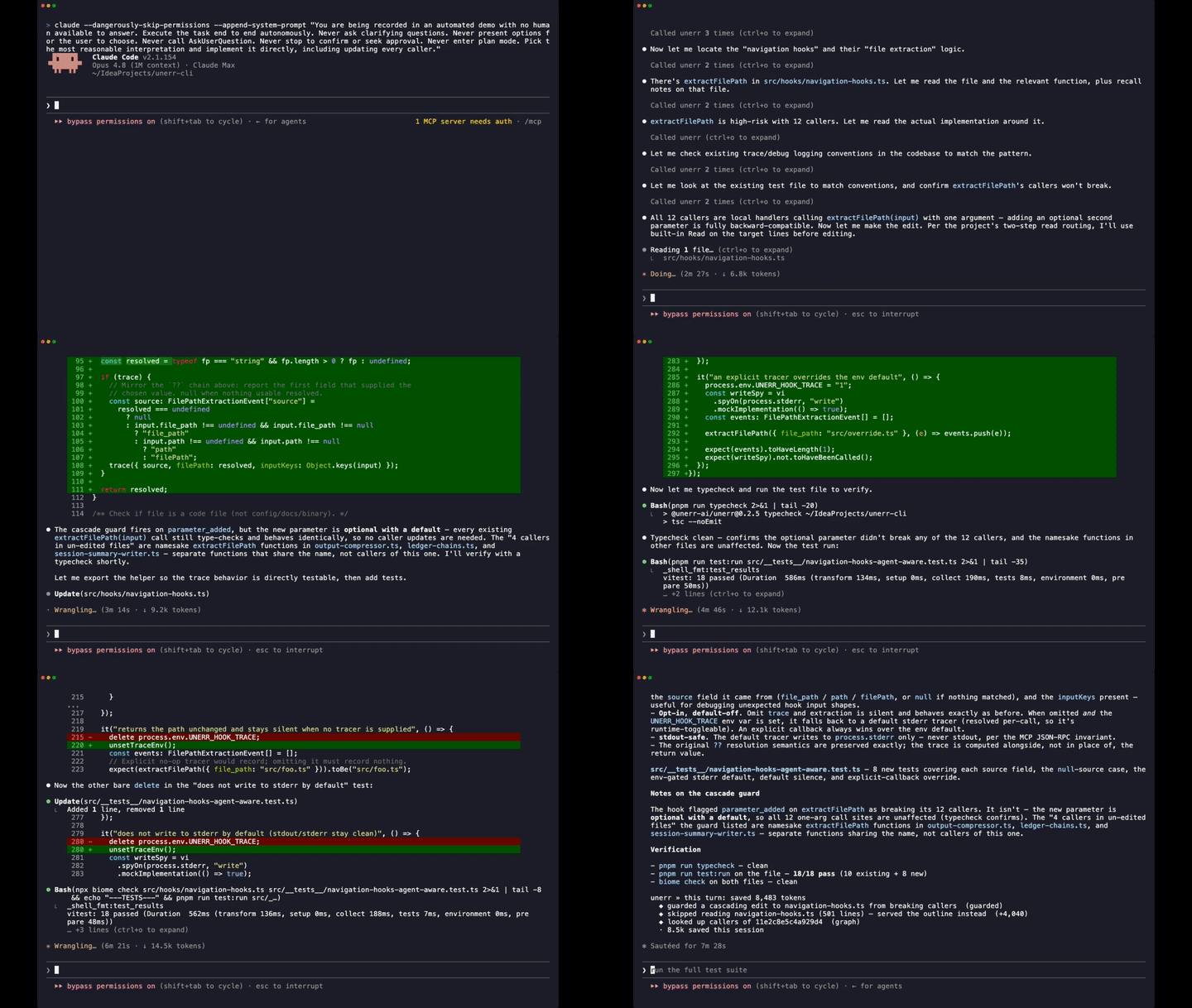
Live, inside the agent · the agent tries to change extractFilePath; before the edit lands, unerr surfaces the 12 places that depend on it across 4 files — so it fixes every one in the same turn instead of breaking them silently. ▶ Watch the full demo.
Contents
What it actually is
unerr is not a new IDE and not a new model. Runtime is the role it borrows, not the mechanism — the way Node or Docker gives code one predictable place to run, unerr gives every coding agent on your machine one predictable layer to work through. Its safety comes from a live code graph, rules tied to the code, and checks that run in the agent's loop; it plugs into the agents you already use instead of replacing them. Here's the literal version in one breath.
Every coding agent on your machine — Cursor, Claude Code, Copilot, Windsurf — speaks the same protocol, MCP. unerr sits in that one path, on your machine, and does four jobs while the agent works instead of waiting to be asked:
- finds the right code and hands the agent the 50 lines that matter, not 3,000;
- keeps your rules pinned to the code they're about and brings them up at the edit;
- trims long command output and file reads down to the slice the agent needs;
- catches a change that would break callers it never read — before the edit lands.
One install does all four, for every agent you run, on every repo. No rules file to hand-maintain, no five-plugin toolchain to keep current, nothing the agent has to remember to call. That's the whole product. Everything below is detail.
It runs entirely on your machine — the one runtime behind every agent you run, here today. The same runtime extends to a shared view across your whole team, arriving soon — and your individual setup carries straight over.
Why one runtime instead of five plugins
To make an agent behave on real code, the usual answer is to bolt on separate tools — one to search code, one for memory, one to trim output, your rules, a reviewer. Five point tools to wire up, keep current, and hope the agent calls. Two things go wrong with that, every time.
MCP only carries requests the agent chooses to make. A memory plugin, a code-search plugin, a context trimmer — they all just sit there waiting to be called, and a busy agent low on room skips the one it has to remember to call. Optional advice is optional.
Every tool you add costs the agent attention before it does any work. GitHub's own MCP server spends ~42,000 tokens just defining its tools before the first request; a handful of servers together can eat the majority of the context window. The more you add, the worse each one performs.
unerr doesn't sit and wait. It steps in at the moments that matter — when the agent reads a file, when it's about to make a change — and puts the one relevant thing in front of it on its own. You can't forget to call something that isn't waiting to be called.
And the useful behaviors only exist when the pieces live together, because each needs information no single plugin has alone:
| Catch a breaking change | what the agent is about to edit and everything that depends on it |
| Know a saved rule has gone stale | that rule tied to real code, so it notices the moment the code moves |
| Spot a convention slipping | the patterns your codebase already uses and the new code being written |
| Stop a retry-loop | the full history of what the agent already tried this session |
You can't buy those as five separate tools and bolt them together. That's why unerr is one local runtime, not a fifth plugin in the list — and why one thing instead of five also means the agent isn't burning attention deciding which plugin to call.
This isn't an MCP gateway that bundles your existing servers behind one address — those still hand the agent every tool up front. unerr replaces what those add-ons do, so there's nothing left to bundle.
The four things it gives you
The same runtime, four things you feel in your own work — across every agent and every repo on your machine, with no dashboard-per-tool to keep checking. (Running a team? The same four roll up into one shared view — arriving soon.)
⚡ SPEND — cut what the agents cost to run
Because unerr only ever hands the agent the one relevant thing — the rule for the function in front of it, 50 lines instead of 3,000 — it spends far fewer tokens getting there. In head-to-head benchmarks against grep-and-read, unerr removes 86–90% of the tokens an agent spends reading and navigating code — same questions, same tokenizer, with a fidelity gate that throws out any "saving" that lost the answer.
That number is the read/navigate slice, not a promise about your whole bill. It's measured, not estimated, and you can reproduce it on your own repo.
📐 CONSISTENCY — your conventions, applied at the edit
A rules file is something an agent can acknowledge and then skip three turns later. unerr ties each rule to the part of the code it's about, brings it up the moment the agent touches that part, and keeps it pinned there even after the code moves. Conventions it detects on its own once a pattern holds across the codebase become rules without you writing them down. One standard, applied the same way across every agent you run and every session — Cursor today, Claude Code tomorrow, same rule.
👁 VISIBILITY — one view across every agent and repo
What your agents are spending, what they caught, what they changed — read from the same place the agents read from, not reconstructed from billing metadata after the fact. One local daemon sees across your IDEs and repos, so moving from Claude Code in the terminal to Cursor in the editor is one continuous thread, not a relearn each session. Local-first: your code never leaves the machine.
🧭 INSIGHT — see what the AI actually did
Usage dashboards tell you tokens went out. They don't tell you whether the spend produced anything. unerr surfaces the decisions the agent made, capability versus dependency, and whether you're still steering the work. Today it's a mirror for your own work — self-coaching, not scoring. (When shared team views land, they stay aggregate and team-level — never per-developer ranking.) The question is whether the AI is helping, not who to rank.
Quick Start
Three steps. Step 1 is once per machine; steps 2–3 are per repo.
1. Install the CLI
npm install -g @unerr-ai/unerr
Puts the unerr binary on your PATH. If your shell can't find it afterward (this happens with nvm, fnm, volta, and pnpm), run unerr doctor once — it patches your shell config and won't need to run again.
2. Set it up for your agent (per repo)
cd ~/your-project
unerr install cursor
That writes the MCP config, skills, hooks, and instructions for that agent in the current repo. Swap cursor for any supported agent:
unerr install claude-code
unerr install cursor
unerr install antigravity
unerr install windsurf
unerr install gemini-cli
unerr install github-copilot-cli
You can install more than one agent in the same repo — each writes its own config. Re-running updates the setup if anything changed and skips it if nothing did. Remove it with unerr uninstall.
3. Restart your IDE
Close and reopen your IDE, or start a new chat session. Your agent picks up unerr through MCP and everything is available from the next prompt.
Dashboard: http://localhost:9847 — open it any time to watch unerr work.
Using a different MCP client, or setting it up by hand? unerr install --show-instructions <agent> prints copy-pasteable steps.
See it in action
The demo at the top is one moment, caught live. Day to day, there are two places you watch it working — in the chat, and in a browser.
In the chat. Before an edit runs, unerr drops a line into the agent's context on its own:
⚡ unerr · editing src/payments/gateway.ts changes a function that 24 other places depend on, across 6 files. Update every one of them in this same change before finishing.
Every turn opens with one line naming what unerr brought in and closes with one line totalling what it caught and saved — named, countable catches, not a vague percentage.
In a browser. A live dashboard at http://localhost:9847 reads from the same place the agent reads from — what it remembers, what it caught, and which of those things actually shaped the next answer.
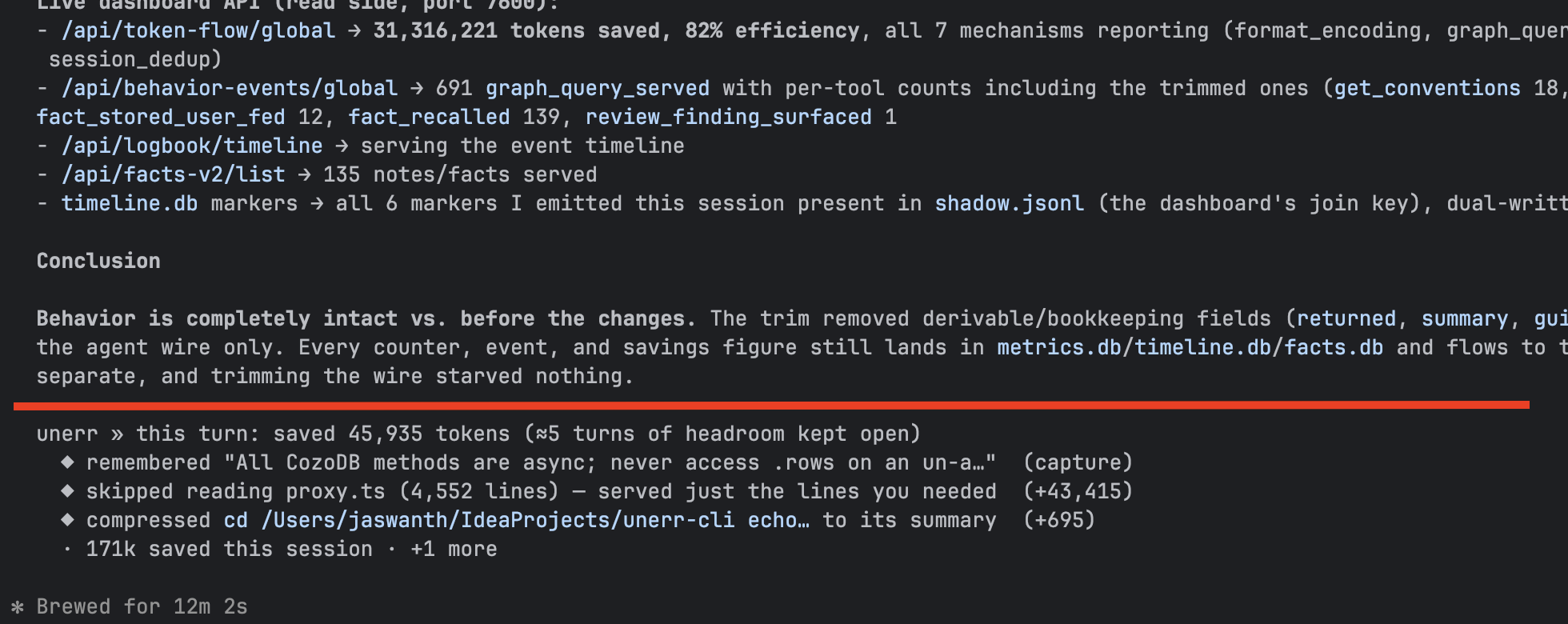
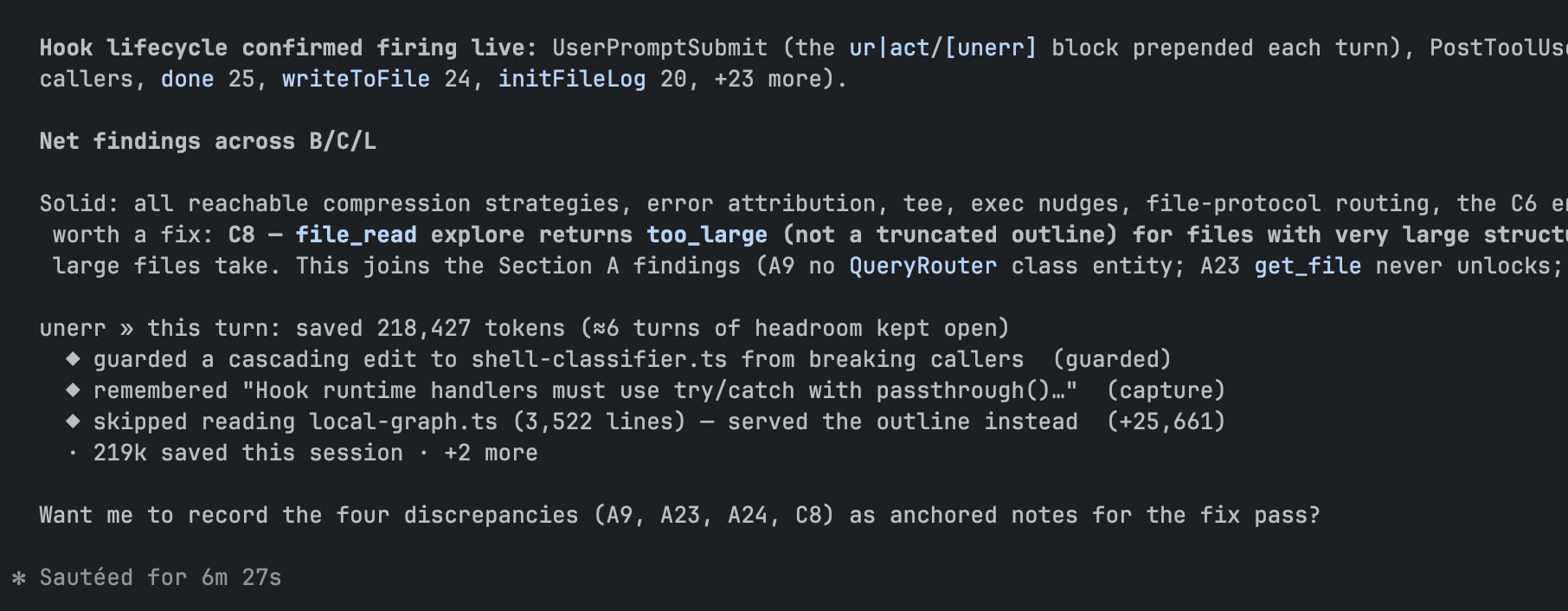
End-of-turn receipt · every turn closes with one line totalling what unerr caught and saved you — named, countable, not a ratio.
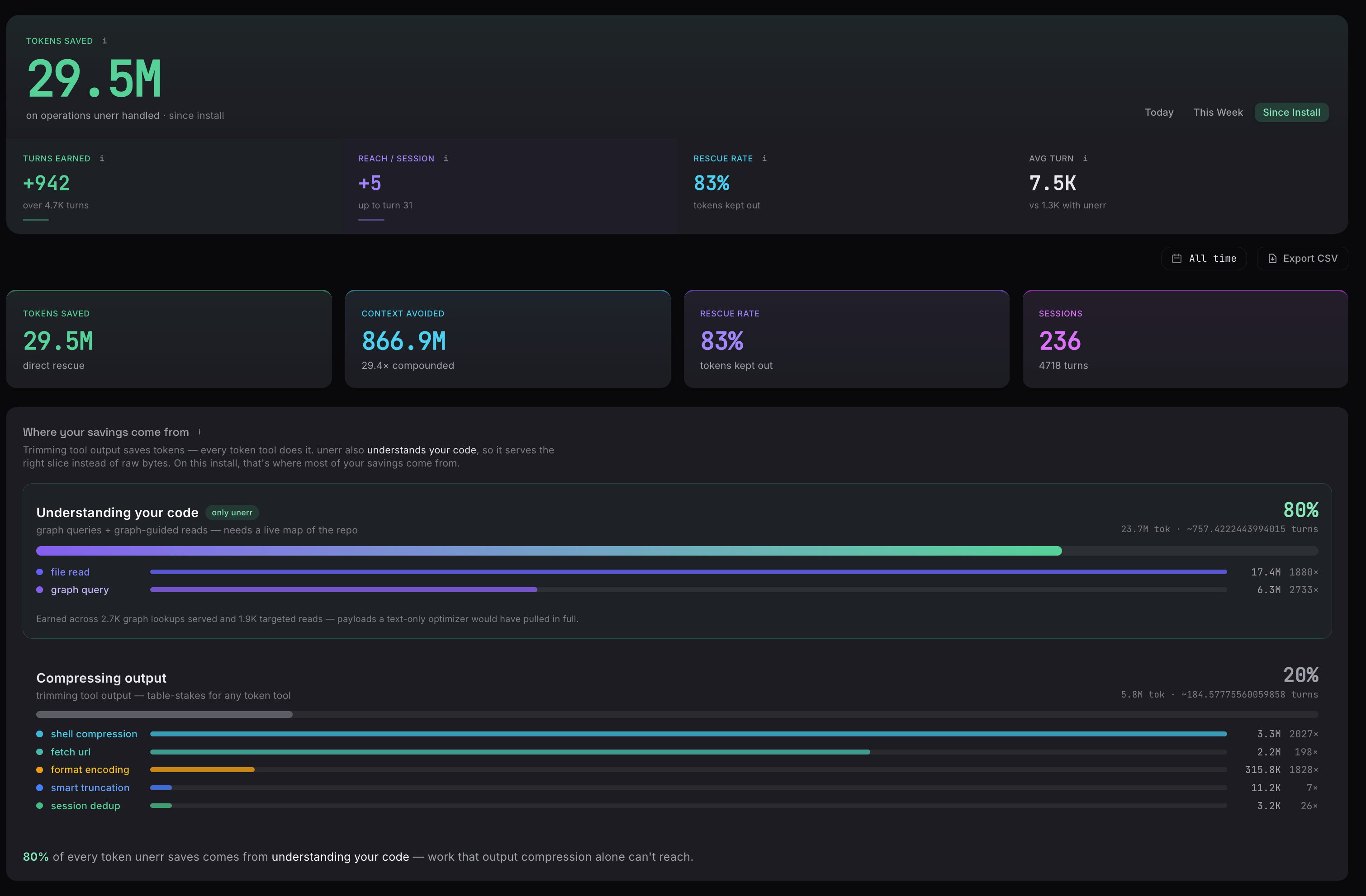
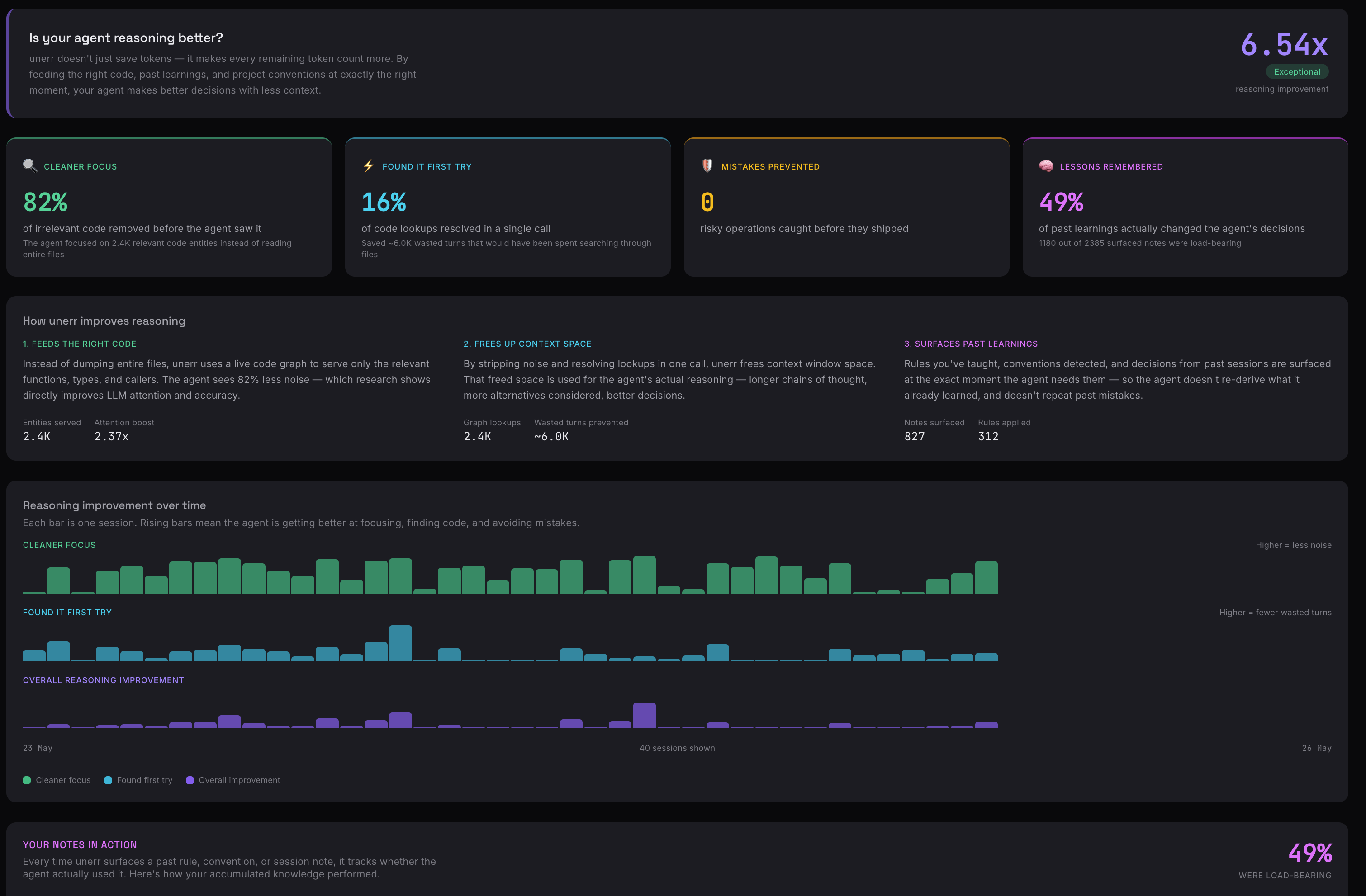
Token trace & reasoning quality · where the agent's tokens actually went — and that the answer quality held while the count came down. Cost-per-useful-action, not cost-per-token.

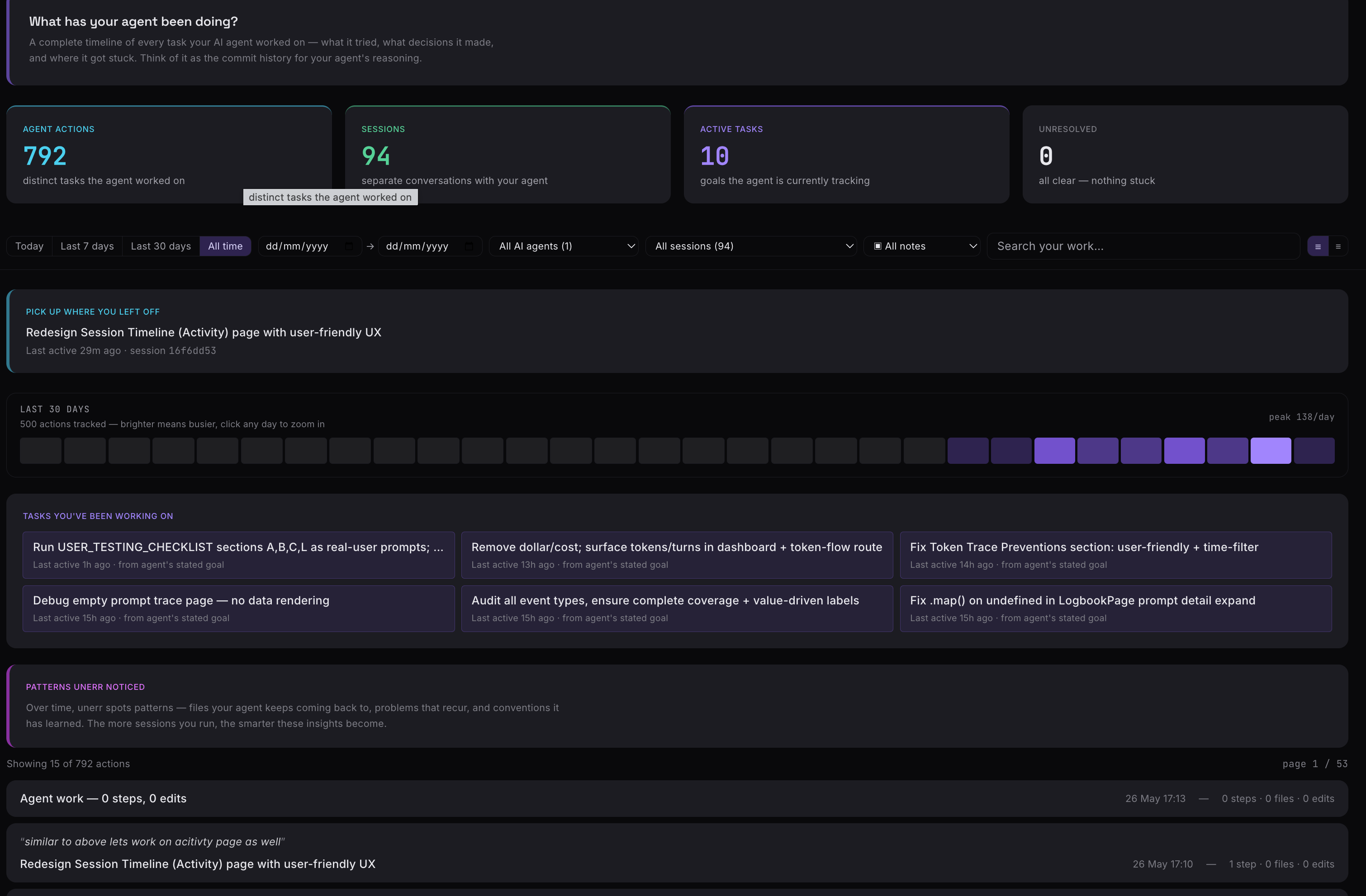
Memory & activity · what unerr remembered for this repo across sessions, and a live feed of what it caught and surfaced as the agent worked.
You today, your team soon
Today unerr is the local runtime behind the agents you run: the code map, the seven MCP tools, all the in-loop behaviors, memory, and the dashboard — local, no account needed, across your tools and your repos.
The same runtime extends to your whole team — one shared view across every engineer's agents — and that's arriving soon. Your individual setup carries straight over; there's nothing to redo when it lands. For platform and engineering leads, that's Datadog-style visibility and control across every agent your team runs: what they cost, what they changed, and whether the team is building capability or dependency — in one place, and without code or prompts ever leaving your engineers' machines.
| Code map, the 7 MCP tools, all in-loop behaviors | ✓ | ✓ |
| Output trimming + savings receipts, hooks, skills, every agent | ✓ | ✓ |
| Memory, conventions, dashboard for your own work | ✓ | ✓ |
| One continuous thread across the agents and repos you run | ✓ | ✓ |
| Conventions and memory shared across the team | | ✓ soon |
| Edit-time behaviors enforceable org-wide (block / approve) | | ✓ soon |
| One rolled-up view of what the whole team's agents spend and catch | | ✓ soon |
The individual product works with no account and no network, forever. Follow unerr.dev for the team rollout.
Logging in (optional)
Logging in is optional and the bare runtime — code map, memory, the guards — works fully without it. Today it connects this machine to your account and tells the CLI which plan you're on; it's also the identity your team's shared view is built on.
unerr login
unerr whoami
unerr logout
What gets sent — and what never does. The connection carries settings only: the plan you're on, and any shared conventions document (plain text you chose to share). Your source code, your prompts, and your diffs never leave your machine — the service has no endpoint that accepts them.
Where credentials live. The token for this machine goes into your OS keychain (Keychain Access on macOS, Secret Service on Linux, Credential Manager on Windows). If no keychain is available, it falls back to ~/.unerr/credentials.json (readable only by you) and warns you once.
Revoking access. unerr logout disconnects this machine. You can also revoke any machine from the web app under Settings → Machines — the token stops working right away, even if the laptop is lost.
Offline behavior. The CLI caches your plan locally and keeps working without a connection. If it can't reach the service for about a week, it falls back to the free plan until it reconnects — but everything local needs no plan and never stops working.
Who it's for
- Engineers in large, existing codebases. What a senior engineer keeps in their head — what depends on what, which patterns are load-bearing, what broke here before — handed to the agent before every edit, so it stops breaking code it never read. Your review goes back to being about the change, not a hunt for the callers the agent never saw.
- Anyone running more than one agent. One continuous thread across your tools — move from Claude Code in the terminal to Cursor in the editor and what unerr knows about your repo comes with you, instead of relearning it every session.
- Developers with conventions worth keeping. The standard you settled on once, applied every time your agent touches that part of the code — no rules file to hand-maintain, re-paste, or fight merge conflicts over, and no hoping the agent remembers to look.
- Solo builders and vibe coders shipping into a codebase that's already grown. The guardrails of a careful senior engineer, on a project you're moving through fast and can't hold in your head.
Your team's shared view is arriving soon, and this same individual setup carries straight over to it.
What it does under the hood
One local process per repo. You don't have to think about any of this to use it — but if you want to know what's running, here it is.
| A live map of your code | CozoDB · tree-sitter · SCIP-verified call data · 18+ languages · sub-5ms lookups | Before any file read, the agent gets the 50 lines that matter and the list of what depends on them — not 3,000 lines and a guess. |
| Memory tied to the code | typed facts · conventions auto-detected once a pattern holds ≥70% of the time · confidence that decays over time | Every saved fact is pinned to a real file or function. When that code moves, the fact flags itself instead of quietly going wrong. |
| The right slice, delivered automatically | shell-output trimming (645+ command types) · web pages fetched at 5–10× less bulk · function-targeted file reads | The relevant piece shows up the moment the agent reads — it never has to remember which tool to reach for. |
| The behaviors that catch problems | breaking-change guard · convention-slip guard · retry-loop breaker · session continuity · auto-doc · change narrative · architecture guard | Each fires on a combination of the three above, at the moment of the edit — not as a tool the agent picked, not as a review after the fact. |
Architecture, CLI commands, MCP tools, manual config
Architecture
AI Agent (Claude Code / Cursor / Windsurf / any MCP client)
    │
    ├── stdio MCP ──→ unerr --mcp (bridge, per IDE session)
    │                       │
    │                       └── UDS ──→ unerrd (one lightweight Node process
    │                                           per machine, auto-spawned,
    │                                           exits after 30 min idle)
    │                                       │
    │                                       └── per-repo unerr process(es)
    │                                              ├── CozoDB graph     (in-process, <5ms)
    │                                              ├── Fact store       (cross-session memory)
    │                                              ├── Timeline + ledger (every tool call)
    │                                              ├── File watcher     (incremental reindex)
    │                                              ├── Convention engine
    │                                              ├── Compression engine
    │                                              └── Behavior modules
    │
    └── Dashboard ──→ http://localhost:9847 (SSE-streamed live)
One local DB per repo. Zero network calls. No API keys. No cloud. Your code never leaves the machine.
Design principles — zero network calls; stdout is sacred (MCP JSON-RPC only, everything else to stderr); sub-5ms query responses; first useful output in under 5s (shallow index first, deep enrichment in the background); graceful degradation (the agent still works if unerr is down — you just lose the extra layer).
Tech stack — TypeScript (ESM) · CozoDB (Rust/NAPI) · web-tree-sitter (WASM) · MCP SDK · Ink (React CLI) · React + Vite (dashboard) · tsup · Vitest
CLI commands
unerr install <agent>
unerr uninstall
unerr doctor
unerr status
unerr stats
unerr --mcp
unerr login
unerr whoami
unerr logout
unerr pm status
unerr pm logs
unerr pm dashboard
unerrd is a lightweight Node process that supervises every registered repo. Your IDE invocation auto-spawns it; it exits cleanly after 30 minutes of no activity. unerr pm --help lists the rest.
No lock-in: any @sem domain comments unerr's agent adds are plain comments — your code runs identically without them and without unerr. unerr uninstall --strip-annotations removes every sentinel line repo-wide while keeping the prose summaries.
MCP tools (7 advertised)
Grouped by what the agent gets, not by file:
- Reads (6) —
search_code (ranked entity search; detail:true resolves one entity — signature plus callers / callees / imports in the same call), file_outline (structure without body), file_read (context-aware, auto-injects conventions, facts, and drift), get_references (callers or callees — catches indirect refs grep misses), fetch_url (DOM-extracted markdown, BM25 re-ranking, content-hash cache — replaces built-in WebFetch), and unerr_context (one call that folds anchored notes + search + references + conventions for what you're about to edit).
- Memory & session (1) —
unerr_track (one op-union call for intent / decision / blocker / resolution / fact / recall — powers turn titles and the cross-session resume strip).
Persistence costs zero tool calls: a UserPromptSubmit hook captures user-stated rules ("remember this", "always X") automatically, and agent notes + session markers ride a unerr-save: sentinel in the closing message that a Stop hook scrapes and persists. On Claude Code the rest of the always-on ceremony runs automatically: the prompt hook injects recalled notes, a PostToolUse hook injects detected conventions on the first file read, and the Stop hook prints the turn close-out — all at zero extra round-trip.
Every response carries inline ur|<tag> signals for high-priority guidance — drift, breaking-change warnings, loop-breaker halts — so the agent acts on what it just learned without burning a turn.
Manual MCP config (any MCP-compatible client)
{
  "mcpServers": {
    "unerr": {
      "command": "npx",
      "args": ["@unerr-ai/unerr", "--mcp"]
    }
  }
}
Benchmarks
unerr removes 86–90% of the tokens an agent would otherwise spend navigating and reading code — measured, not estimated, across the same questions and the same tokenizer, with a fidelity gate that discards any "saving" that lost the answer. Methodology, reproduction commands, and per-repo results live in the separate unerr-benchmarks repo.
Contributing
See CONTRIBUTING.md for setup, day-to-day commands, code conventions, and the pre-PR checklist.
About the fewer tokens
Token savings is a receipt, not the reason — a dozen tools now claim some version of the same number, so it isn't where the product lives. But it's real, and you get it as a side effect of only ever handing the agent the one relevant thing:
- 86–90% of an agent's code-navigation tokens removed in head-to-head benchmarks against grep-and-read — real tokenizer, fidelity-gated, reproducible on any repo. See the benchmarks →
- Roughly 84% of an agent's tokens are tool output, mostly file reads (JetBrains, NeurIPS 2025). unerr steps in at the read, so the window doesn't fill up with noise.
- 0 AI calls per query in the core — the lookups, facts, and warnings are computed directly. No API keys, no per-turn inference cost, no telemetry.
The point was never the number. The point is that the agent lands on the right code, sees the thing that would have stopped the break, and you stop paying — in money and in afternoons — for work it would otherwise have had to undo.
npm install -g @unerr-ai/unerr
unerr.dev · npm registry · Discord · X · LinkedIn · Fully local. No account. No cloud.




