Programmable Transaction Blocks Builder (PTB Builder)
PTB Builder is a graphical toolkit for building, simulating, and executing Programmable Transaction Blocks (PTBs) on the Sui blockchain. It provides an intuitive drag‑and‑drop interface, automatic code generation, and on‑chain execution support — bridging the gap between developers and non‑developers.
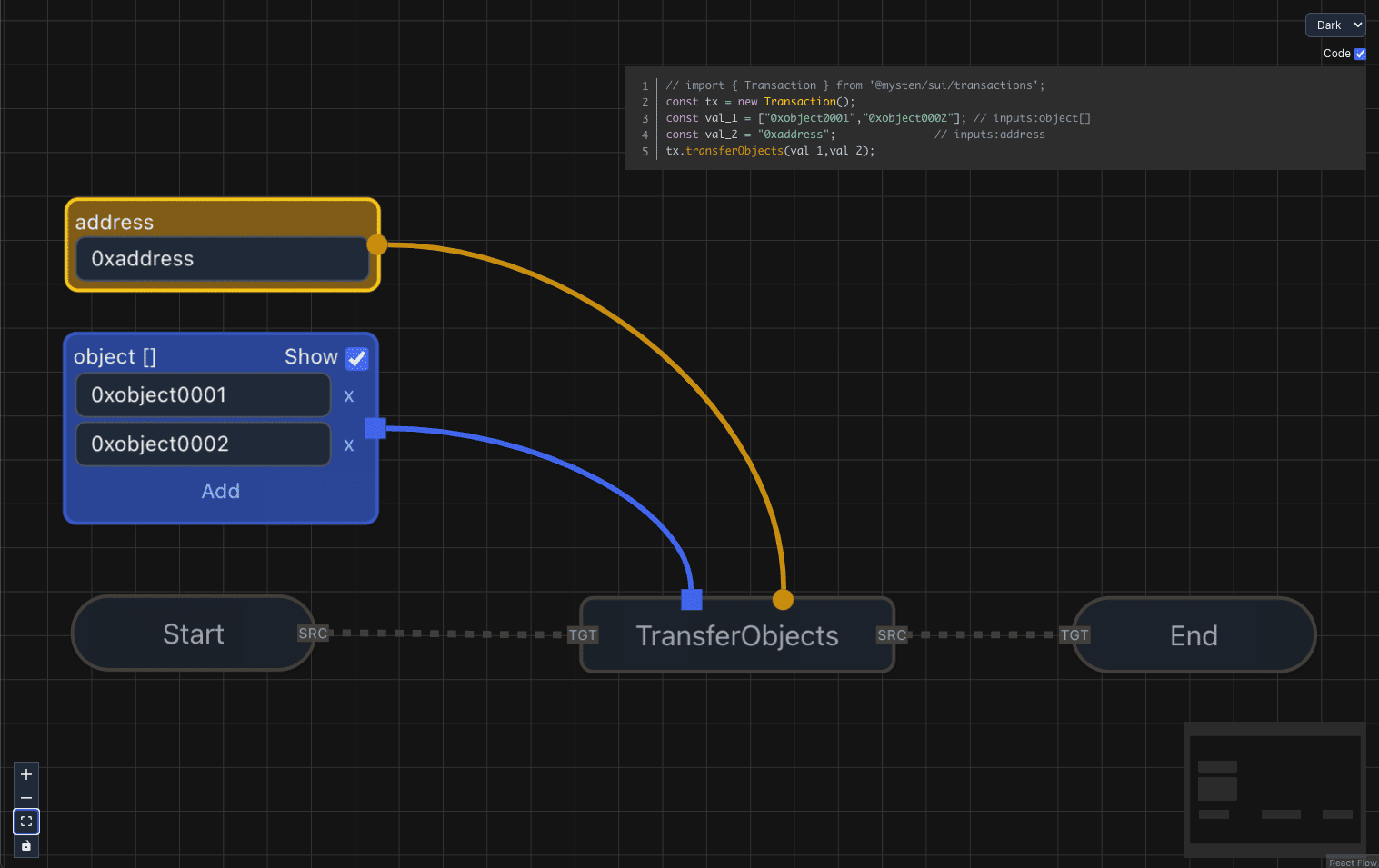
Demo
Features
1. Transaction Construction and Pre‑Testing
- Visual Editor: Construct PTBs via a drag‑and‑drop UI (React Flow-based).
- Code Generation: Automatically generate clean TypeScript for the Sui TS SDK.
- Simulation: Dry‑run PTBs before execution to validate behavior.
2. Execute Transactions Without Coding
- Accessible: Non‑developers can create and run PTBs without writing code.
- Real‑Time Feedback: Errors/warnings surface instantly during graph construction.
3. Save and Share
- Graph Persistence: Save PTB graphs locally and reload them later.
- Collaboration: Share saved graphs with teammates or the community.
- Optional Export: Expose an Export .ptb button from the UI (hidden by default).
4. Visualization and Debugging
- Execution Visualization: Visualize executed PTBs as readable graphs.
- Debugging Tools: Trace execution, inspect inputs/outputs, and fix issues.
5. On‑Chain Transaction Loading
- Load from Digest: Import an on‑chain transaction by digest and visualize its structure.
6. Use On‑Chain Assets as Objects
- Asset Browser: Browse objects owned by your address (coins, Move objects, modules, etc.).
- One‑Click Insert: Insert an object as an Object node in one click.
- Seamless Integration: Use assets directly in commands like
TransferObjects, MergeCoins, MoveCall.
7. Themes
- Initial Theme Selection:
dark, light, cobalt2, tokyo night, cream, mint.breeze.
- Switch Anytime: Change themes dynamically from the workspace.
Supported Commands
The following PTB commands are currently supported:
- SplitCoins — split a coin object into multiple parts.
- MergeCoins — merge multiple coins into one.
- TransferObjects — transfer owned objects to a recipient.
- MoveCall — call any Move function from an on‑chain package.
- MakeMoveVec — create vectors from scalar values.
(Additional commands can be added via registry extensions.)
Supported Inputs
Inputs follow tx.option conventions from the Sui TS SDK:
- Scalars: numbers, booleans, addresses, strings ✅
- Objects: direct ownership/transfer supported ✅ (includes
Coin<T>)
- Objects can also be selected from your owned assets via the Assets modal.
- Vectors: scalars only ✅ (❌ objects, including coins, are not supported in vectors)
- Options: available for scalars ✅ (❌ not supported for objects)
Quick Start (dApp Integration)
Below snippets mirror a typical setup using @mysten/dapp‑kit with PTB Builder.
App.tsx
import { PTBBuilder, Chain, ToastVariant } from '@zktx.io/ptb-builder';
import { Transaction } from '@mysten/sui/transactions';
import {
useCurrentAccount,
useSignAndExecuteTransaction,
} from '@mysten/dapp-kit';
import { enqueueSnackbar } from 'notistack';
import '@mysten/dapp-kit/dist/index.css';
import '@zktx.io/ptb-builder/index.css';
function App() {
const account = useCurrentAccount();
const { mutate: signAndExecuteTransaction } = useSignAndExecuteTransaction();
const handleToast = ({
message,
variant,
}: {
message: string;
variant?: ToastVariant;
}) => {
enqueueSnackbar(message, { variant });
};
const executeTx = async (
chain: Chain,
transaction: Transaction | undefined,
): Promise<{ digest?: string; error?: string }> => {
if (!account || !transaction) return { error: 'No account or transaction' };
try {
const jsonTx = await transaction.toJSON();
return new Promise((resolve) => {
signAndExecuteTransaction(
{ transaction: jsonTx, chain },
{
onSuccess: (result) => resolve({ digest: result.digest }),
onError: (error) => resolve({ error: error.message }),
},
);
});
} catch (e: any) {
return { error: e.message || 'Serialization failed' };
}
};
return (
<PTBBuilder
toast={handleToast}
executeTx={executeTx}
address={account?.address}
showExportButton
/>
);
}
export default App;
pages/editor.tsx
import { useCurrentAccount, useSuiClientContext } from '@mysten/dapp-kit';
import { PTB_VERSION, PTBDoc, usePTB } from '@zktx.io/ptb-builder';
import { DragAndDrop } from '../components/DragAndDrop';
type SuiNetwork = 'mainnet' | 'testnet' | 'devnet';
type SuiChain = `sui:${SuiNetwork}`;
export const Editor = () => {
const { network, selectNetwork } = useSuiClientContext();
const account = useCurrentAccount();
const { loadFromDoc } = usePTB();
const parseNetwork = (chain?: string): SuiNetwork | undefined => {
const m = chain?.match(/^sui:(mainnet|testnet|devnet)$/);
return m?.[1] as SuiNetwork | undefined;
};
const handleDrop = (file: PTBDoc) => {
const target = parseNetwork(file.chain);
if (target && target !== network) selectNetwork(target);
loadFromDoc(file);
};
const handleChancel = () => {
loadFromDoc(`sui:${network}` as SuiChain);
};
return (
<div style={{ width: '100vw', height: '100vh' }}>
{account && <DragAndDrop onDrop={handleDrop} onChancel={handleChancel} />}
</div>
);
};
pages/viewer.tsx
import { useEffect, useRef, useState } from 'react';
import { usePTB } from '@zktx.io/ptb-builder';
import queryString from 'query-string';
import { useLocation } from 'react-router-dom';

export const Viewer = () => {
  const initialized = useRef<boolean>(false);
  const { loadFromOnChainTx } = usePTB();
  const location = useLocation();
  const [txHash, setTxHash] = useState<string | undefined>(undefined);

  useEffect(() => {
    const parsed = queryString.parse(location.search);
    if (parsed.tx && !initialized.current) {
      loadFromOnChainTx('sui:testnet', parsed.tx as string);
      initialized.current = true;
    } else {
      setTxHash('');
    }
  }, [loadFromOnChainTx, location.search, txHash]);

  return null;
};
Public API (Provider + Hook)
Provider (component)
import '@zktx.io/ptb-builder/index.css';
import '@zktx.io/ptb-builder/styles/themes-all.css';
import { PTBBuilder } from '@zktx.io/ptb-builder';
<PTBBuilder
theme="dark" // initial theme (dark | light | cobalt2 | "tokyo night" | cream | mint.breeze)
address={myAddress} // sender address
gasBudget={500_000_000} // optional gas budget
executeTx={execAdapter} // adapter to execute transactions
onDocChange={saveDoc} // PTBDoc autosave callback (debounced)
showExportButton // optional: show Export .ptb button (default: hidden)
>
{/* your app here */}
</PTBBuilder>;
Hook (public)
import { usePTB } from '@zktx.io/ptb-builder';
const { exportDoc, loadFromDoc, loadFromOnChainTx, setTheme } = usePTB();
const doc = exportDoc({ sender: myAddress });
loadFromDoc(doc);
await loadFromOnChainTx('sui:testnet', '0x1234…');
setTheme('tokyo night');
Props Reference (<PTBBuilder />)
theme | Theme (dark | light | cobalt2 | tokyo night | cream | mint.breeze) | "dark" | Initial UI theme. |
address | string | – | Sender address for generated transactions. |
gasBudget | number | – | Optional gas budget used for tx build/exec. |
executeTx | (chain: Chain, tx?: Transaction) => Promise<{ digest?: string; error?: string }> | – | Adapter to execute transactions. |
toast | ToastAdapter | console | Custom toast adapter used by the provider. |
onDocChange | (doc: PTBDoc) => void | – | Autosave callback (debounced). |
docChangeDelay | number (ms) | 1000 | Debounce for onDocChange. |
showExportButton | boolean | false | If true, shows Export .ptb button in the CodePip panel. |
children | React.ReactNode | – | Children rendered inside the Provider. |
Document Format
PTB Builder persists graphs as PTBDoc objects containing:
- graph — nodes and edges of the PTB
- modules — embedded Move module metadata (for function signatures)
- objects — embedded object metadata (for owned assets)
- chain — target Sui network (e.g.,
sui:testnet)
This enables saving, sharing, and reloading graphs consistently across environments.
Notes on Network Sync
- Use
useSuiClientContext() from @mysten/dapp‑kit to read/change the active Sui network.
- Keep PTB
doc.chain in the form sui:<network>, e.g., sui:testnet.
- On file drop, prefer validating with
/^sui:(mainnet|testnet|devnet)$/ before switching the network.
Roadmap
- Expanded sharing and collaboration features


