Programmable Transaction Blocks Builder (PTB Builder)
PTB Builder is a graphical toolkit for building, simulating, and executing Programmable Transaction Blocks (PTBs) on the Sui blockchain. It provides an intuitive drag‑and‑drop interface, automatic code generation, and on‑chain execution support — bridging the gap between developers and non‑developers.
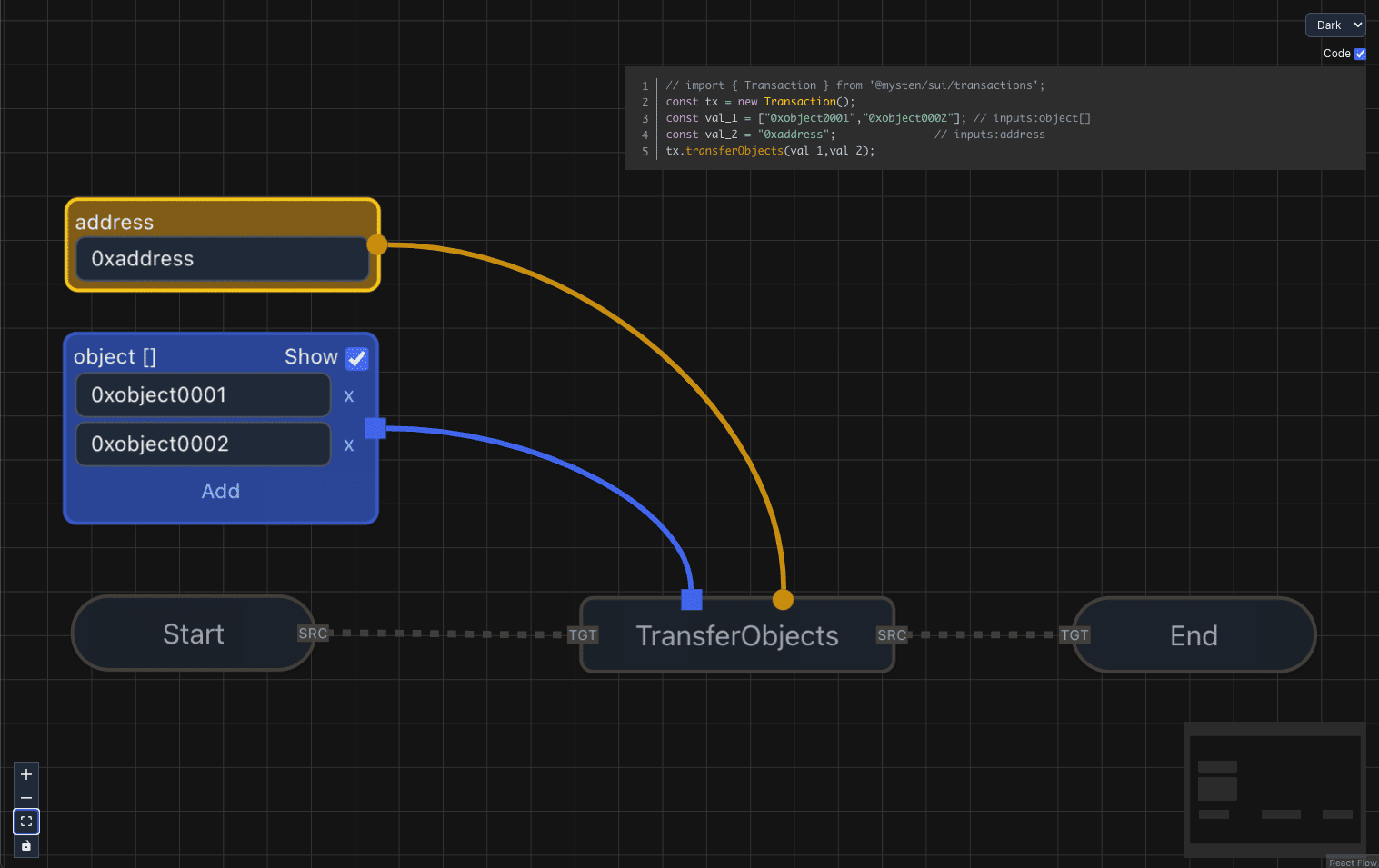
Demo
Features
1. Transaction Construction and Pre‑Testing
- Visual Editor: Construct PTBs via a drag‑and‑drop UI (React Flow-based).
- Code Generation: Automatically generate clean TypeScript for the Sui TS SDK.
- Simulation: Dry‑run PTBs before execution to validate behavior.
2. Execute Transactions Without Coding
- Accessible: Non‑developers can create and run PTBs without writing code.
- Real‑Time Feedback: Errors/warnings surface instantly during graph construction.
3. Save and Share
- Graph Persistence: Save PTB graphs locally and reload them later.
- Collaboration: Share saved graphs with teammates or the community.
- Optional Export: Expose an Export .ptb button from the UI (hidden by default).
4. Visualization and Debugging
- Execution Visualization: Visualize executed PTBs as readable graphs.
- Debugging Tools: Trace execution, inspect inputs/outputs, and fix issues.
5. On‑Chain Transaction Loading
- Load from Digest: Import an on‑chain transaction by digest and visualize its structure.
6. Use On‑Chain Assets as Objects
- Asset Browser: Browse objects owned by your address (coins, Move objects, modules, etc.).
- One‑Click Insert: Insert an object as an Object node in one click.
- Seamless Integration: Use assets directly in commands like
TransferObjects, MergeCoins, MoveCall.
7. Themes
- Initial Theme Selection:
dark, light, cobalt2, tokyo-night, cream, mint-breeze.
- Switch Anytime: Change themes dynamically from the workspace.
Supported Commands
The following PTB commands are currently supported:
- SplitCoins — split a coin object into multiple parts.
- MergeCoins — merge multiple coins into one.
- TransferObjects — transfer owned objects to a recipient.
- MoveCall — call any Move function from an on‑chain package.
- MakeMoveVec — create vectors from scalar values.
(Additional commands can be added via registry extensions.)
Supported Inputs
Inputs follow tx.option conventions from the Sui TS SDK:
- Scalars: numbers, booleans, addresses, strings ✅
- Objects: direct ownership/transfer supported ✅ (includes
Coin<T>)
- Objects can also be selected from your owned assets via the Assets modal.
- Vectors: scalars only ✅ (❌ objects, including coins, are not supported in vectors)
- Options: available for scalars ✅ (❌ not supported for objects)
Quick Start (dApp Integration)
Below snippets mirror a typical setup using @mysten/dapp‑kit with PTB Builder.
App.tsx
import { PTBBuilder, Chain, ToastVariant } from '@zktx.io/ptb-builder';
import { Transaction } from '@mysten/sui/transactions';
import {
useCurrentAccount,
useSignAndExecuteTransaction,
} from '@mysten/dapp-kit';
import { enqueueSnackbar } from 'notistack';
import '@mysten/dapp-kit/dist/index.css';
import '@zktx.io/ptb-builder/index.css';
function App() {
const account = useCurrentAccount();
const { mutate: signAndExecuteTransaction } = useSignAndExecuteTransaction();
const handleToast = ({
message,
variant,
}: {
message: string;
variant?: ToastVariant;
}) => {
enqueueSnackbar(message, { variant });
};
const executeTx = async (
chain: Chain,
transaction: Transaction | undefined,
): Promise<{ digest?: string; error?: string }> => {
if (!account || !transaction) return { error: 'No account or transaction' };
try {
const jsonTx = await transaction.toJSON();
return new Promise((resolve) => {
signAndExecuteTransaction(
{ transaction: jsonTx, chain },
{
onSuccess: (result) => resolve({ digest: result.digest }),
onError: (error) => resolve({ error: error.message }),
},
);
});
} catch (e: any) {
return { error: e.message || 'Serialization failed' };
}
};
return (
<PTBBuilder
toast={handleToast}
executeTx={executeTx}
address={account?.address}
showExportButton
/>
);
}
export default App;
pages/editor.tsx
import { useCurrentAccount, useSuiClientContext } from '@mysten/dapp-kit';
import { PTB_VERSION, PTBDoc, usePTB } from '@zktx.io/ptb-builder';
import { DragAndDrop } from '../components/DragAndDrop';
type SuiNetwork = 'mainnet' | 'testnet' | 'devnet';
type SuiChain = `sui:${SuiNetwork}`;
export const Editor = () => {
const { network, selectNetwork } = useSuiClientContext();
const account = useCurrentAccount();
const { loadFromDoc } = usePTB();
const parseNetwork = (chain?: string): SuiNetwork | undefined => {
const m = chain?.match(/^sui:(mainnet|testnet|devnet)$/);
return m?.[1] as SuiNetwork | undefined;
};
const handleDrop = (file: PTBDoc) => {
const target = parseNetwork(file.chain);
if (target && target !== network) selectNetwork(target);
loadFromDoc(file);
};
const handleChancel = () => {
loadFromDoc(`sui:${network}` as SuiChain);
};
return (
<div style={{ width: '100vw', height: '100vh' }}>
{account && <DragAndDrop onDrop={handleDrop} onChancel={handleChancel} />}
</div>
);
};
pages/viewer.tsx
import { useEffect, useRef, useState } from 'react';
import { usePTB } from '@zktx.io/ptb-builder';
import queryString from 'query-string';
import { useLocation } from 'react-router-dom';

export const Viewer = () => {
  const initialized = useRef<boolean>(false);
  const { loadFromOnChainTx } = usePTB();
  const location = useLocation();
  const [txHash, setTxHash] = useState<string | undefined>(undefined);

  useEffect(() => {
    const parsed = queryString.parse(location.search);
    if (parsed.tx && !initialized.current) {
      loadFromOnChainTx('sui:testnet', parsed.tx as string);
      initialized.current = true;
    } else {
      setTxHash('');
    }
  }, [loadFromOnChainTx, location.search, txHash]);

  return null;
};
Public API (Provider + Hook)
Provider (component)
import '@zktx.io/ptb-builder/index.css';
import '@zktx.io/ptb-builder/styles/themes-all.css';
import { PTBBuilder } from '@zktx.io/ptb-builder';
<PTBBuilder
theme="dark" // initial theme (dark | light | cobalt2 | tokyo-night | cream | mint-breeze); defaults to "dark"
address={myAddress} // sender address
gasBudget={500_000_000} // optional gas budget
executeTx={execAdapter} // adapter to execute transactions
onDocChange={saveDoc} // PTBDoc autosave callback (debounced)
showExportButton // optional: show Export .ptb button (default: hidden)
>
{/* your app here */}
</PTBBuilder>;
Hook (public)
import { usePTB } from '@zktx.io/ptb-builder';
const { exportDoc, loadFromDoc, loadFromOnChainTx, setTheme } = usePTB();
const doc = exportDoc({ sender: myAddress });
loadFromDoc(doc);
await loadFromOnChainTx('sui:testnet', '0x1234…');
setTheme('tokyo-night');
Styling & Theme imports
@zktx.io/ptb-builder/index.css contains the structural styles for nodes, edges, and the builder chrome. It should be imported exactly once in your host app (or exposed by your bundler) regardless of the theme you choose.@zktx.io/ptb-builder/styles/themes-all.css bundles every theme token file so you can switch themes at runtime with setTheme. Pulling in the whole pack adds roughly ~18 kB pre-gzip.- To minimize CSS for static deployments, import only the theme(s) you actually ship, e.g.
import '@zktx.io/ptb-builder/styles/theme-dark.css';. Each theme file is ~3 kB pre-gzip, so picking a single one keeps the bundle lean while still allowing dynamic switching between the themes you explicitly include.
- When you only ship a single theme file, pass the matching
theme value (e.g., theme="light") and set showThemeSelector={false} so the UI doesn’t expose choices that aren’t bundled.
Autosave, undo/redo & onDocChange
- PTB Builder emits
onDocChange immediately when the underlying PTB graph, modules, objects, or active chain changes. Viewport changes (pan/zoom) are debounced by 250 ms so autosave targets are not overwhelmed while the user drags the canvas.
- Loading a document via
loadFromDoc/loadFromOnChainTx resets the internal history cache, replays the snapshot once, and suppresses duplicate events until the user edits again.
- The sample
usePtbUndo hook keeps a stable signature per PTBDoc, so undo/redo operations call loadFromDoc without collapsing the redo stack. A single flag (suppressNext) prevents the ensuing onDocChange from being treated as a fresh edit.
- When integrating your own autosave pipeline, expect
onDocChange to fire often during graph edits but only after the debounce window for viewport-only motions.
Props Reference (<PTBBuilder />)
theme | Theme (dark | light | cobalt2 | tokyo-night | cream | mint-breeze) | "dark" | Initial UI theme. |
showThemeSelector | boolean | true | Renders the theme dropdown in the CodePip panel. |
address | string | – | Sender address for generated transactions. |
gasBudget | number | – | Optional gas budget used for tx build/exec. |
executeTx | (chain: Chain, tx?: Transaction) => Promise<{ digest?: string; error?: string }> | – | Adapter to execute transactions. |
toast | ToastAdapter | console | Custom toast adapter used by the provider. |
onDocChange | (doc: PTBDoc) => void | – | Autosave callback (debounced). |
showExportButton | boolean | false | If true, shows Export .ptb button in the CodePip panel. |
children | React.ReactNode | – | Children rendered inside the Provider. |
Document Format
PTB Builder persists graphs as PTBDoc objects containing:
- graph — nodes and edges of the PTB
- modules — embedded Move module metadata (for function signatures)
- objects — embedded object metadata (for owned assets)
- chain — target Sui network (e.g.,
sui:testnet)
This enables saving, sharing, and reloading graphs consistently across environments.
Notes on Network Sync
- Use
useSuiClientContext() from @mysten/dapp‑kit to read/change the active Sui network.
- Keep PTB
doc.chain in the form sui:<network>, e.g., sui:testnet.
- On file drop, prefer validating with
/^sui:(mainnet|testnet|devnet)$/ before switching the network.
Roadmap
- Expanded sharing and collaboration features


