🚀 Socket Launch Week Day 5:Introducing Repository Access Permissions and Custom Roles.Learn more
Sign In

Gon

Package Overview
Dependencies
Maintainers
2
Versions
70
Alerts
File Explorer

Advanced tools

Socket logo

Install Socket

Detect and block malicious and high-risk dependencies

Install

Gon

Not meer another f2e build tool

latest
Source
npmnpm
Version
0.26.1
Version published
Maintainers
2
Created
Source

Gon

Not meer another f2e build tool.

Gon

Travis Npm download Npm version

Installation

npm install -g Gon

Usage

Gon create [Project's Name]

Creates a new project, generates all the folders and files.

Gon dev

Starts the proxy server and the project, with javascript, stylus and pug files processed by Webpack and Gulp.

Should be used with sudo, because the proxy server runs on port 80.

Gon release

Releases all the static files to the static folder and all template files to the view folder.

Convention

Folder Structure
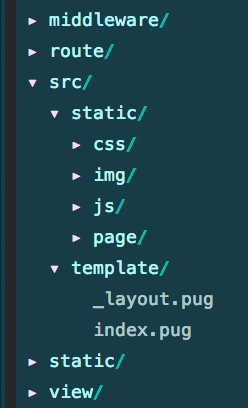
Folder structure

File Name

The module file which will be imported (stylus) or required (js) to the entry file should be named start with the _ prefix.

Custom Config

// gon.config.js
module.exports = {
  domain: 'gon.com',
  port: 8000,
  // web server
  // request to the upper domain will be proxyed to these servers
  fe: {
    local: '127.0.0.1:8000',
    dev: '',
    pre: '',
    pro: '',
  },
  // api server
  // requests to `/api` will be prxoyed to these servers
  be: {
    dev: '127.0.0.1:80',
    pre: '',
    pro: '',
  },
  proxy: {
    // proxy a project's request to an outiside server
    '/data/sk/101010100.html': 'www.weather.com.cn:80',
    // proxy an outside request to project
    '2pmh9.free.natapp.cc': '/ping',
  },
  // used for webpack to avoid compiling these files
  externals: {
    react: 'React',
    'react-dom': 'ReactDOM',
  },
}

Switch Proxy Setting

You can switch all these proxy setting on http://localhost/.
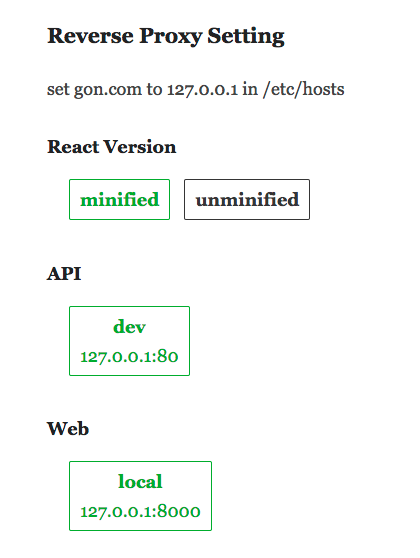
proxy setting

FAQ

  • Name is from Gon Freecss
  • Needs Node.js version >= 7.0.0 and npm version >= 3.3.6

Most thanks to Webpack2.0rc and Gulp4.

Keywords

build tool

FAQs

Package last updated on 25 Sep 2017

Did you know?

Socket

Socket for GitHub automatically highlights issues in each pull request and monitors the health of all your open source dependencies. Discover the contents of your packages and block harmful activity before you install or update your dependencies.

Install

Related posts




