

Security News
Deno Goes the Way of the Dinosaur
Cloudflare is acquiring Deno’s team, which will provide another year of bug fixes and security updates before ending support for the runtime.
By Sarah Gooding - Oct 16, 2026
ai-config-sync-manager
Advanced tools
OSS manager for syncing Claude and Codex developer configuration.
Continuous bidirectional sync between Claude Code and Codex — round-trip lossless, not a one-shot migrator.







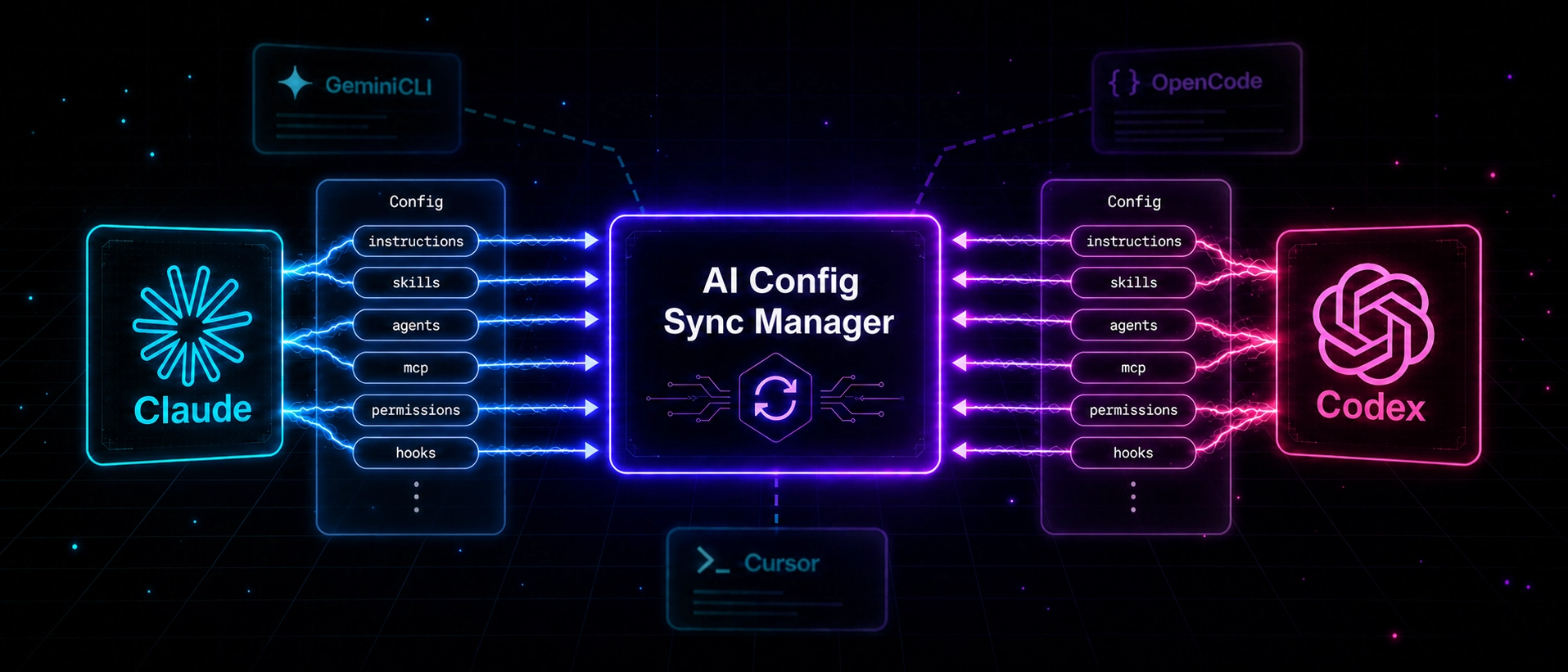
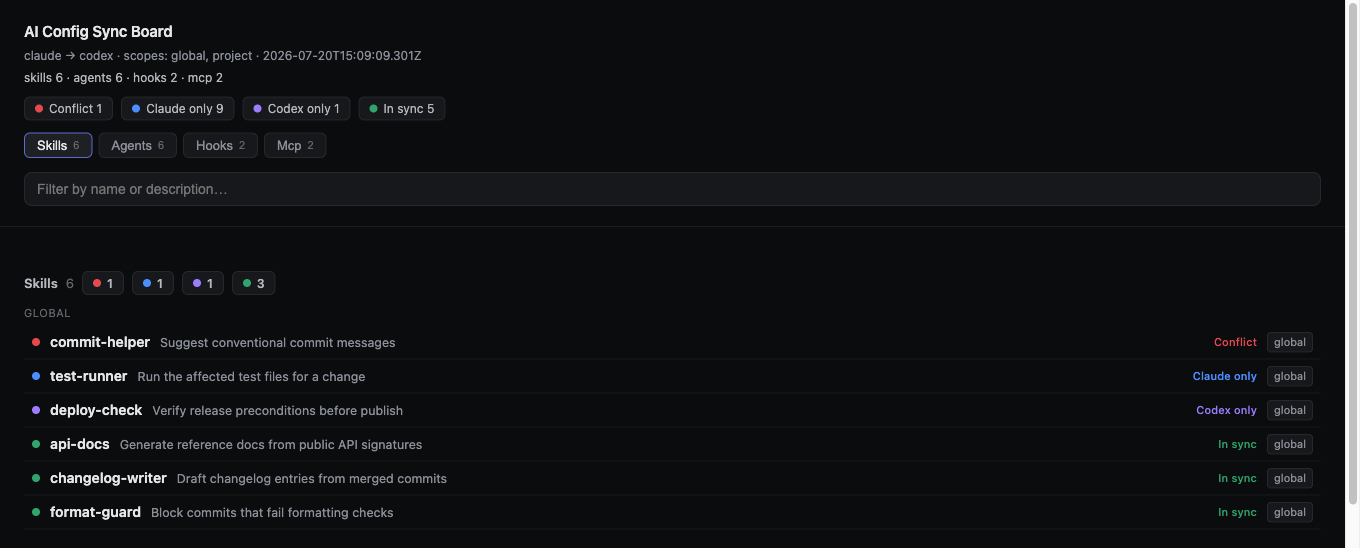
claude → codex and codex → claude, run as often as the two hosts drift; not a one-shot migration.status to compare → sync --dry-run to preview → --apply to write.permissions, hooks, custom commands labeled safe / partial / manual..backups/, FIFO retention (30).--apply writes a per-item sha256 attestation (before/after hash, backup path) to ~/.ai-config-sync-manager/ledgers/.--include skills:code-writer,instructions --exclude mcp style filtering.Write → Codex sandbox_mode = "workspace-write", etc.Read, Bash, TaskCreate, headless claude -p) and Codex-only tokens (spawn_agent, codex exec) auto-translate across hosts and round-trip back./config-manager:* for Claude, config-manager-* for Codex.board renders a self-contained HTML page of every skill, agent, hook, and MCP server on both hosts, colored by sync status (in-sync / conflict / one-host-only) and grouped into per-area tabs and by agent harness. Jump to the board →
Claude Code and Codex use the same concepts (instructions / skills / mcp / permissions / hooks) but in different files, formats, and names:
| Concept | Claude | Codex |
|---|---|---|
| Instructions | ~/.claude/CLAUDE.md | ~/.codex/AGENTS.md |
| Skills | ~/.claude/skills/ | ~/.codex/skills/ |
| Settings | ~/.claude/settings.json | ~/.codex/config.toml |
| MCP | ~/.claude/.mcp.json | [mcp_servers.*] in config.toml |
Hand-rolling the sync invites drift, semantic loss, and accidental secret leaks. This CLI keeps the two hosts aligned while preserving host-native meaning.
This tool is built for two hosts in continuous use — where drift accumulates daily and round-trip integrity matters across repeated syncs — not for a one-shot, one-way migration.
One-shot migrators typically copy Claude-only vocabulary (tool names like Read / Bash, prose like Use the Bash tool, in-line Agent({...}) calls) into the generated file as prompt guidance and flag it for manual review. This CLI instead auto-rewrites those tokens to their host equivalents (Read → workspace-write, TaskCreate → spawn_agent, claude -p → codex exec, …) and round-trips them back when syncing the other direction — so the same content stays correct for both hosts with no manual fix-ups.
npm install -g ai-config-sync-manager
ai-config-sync connect           # register the plugin for any detected host (Claude / Codex)
ai-config-sync status            # show drift across global + project scopes
ai-config-sync sync              # preview changes (--dry-run by default)
ai-config-sync sync --apply      # apply with automatic backups
connect only registers plugins for hosts it actually finds (~/.claude for Claude, ~/.codex or ~/.agents for Codex). Hosts that are missing are reported as skipped and no directories are created — install the host first, then rerun connect.
connect when the matching host directory exists)| Category | Sections |
|---|---|
| Commands | Bundled CLI · Host plugin commands · Flags · Board |
| Workflow | Selector syntax · Ignore rules · Sync direction · Scopes |
| Safety | Safety defaults · Risk levels · Retention |
| Mapping | Native mapping · Areas · Paraphrase · Hidden markers · Unsupported |
| Reference | Install resolution · Local dev · Gotchas · API surface · What's next |
After npm install -g, the same binary is on PATH as ai-config-sync — equivalent to ./bin/ai-config-sync.mjs from a source clone.
ai-config-sync connect
ai-config-sync status
ai-config-sync status --json
ai-config-sync status --scope global
ai-config-sync status --scope project
ai-config-sync status --include skills:code-writer,instructions --exclude mcp
ai-config-sync sync --dry-run
ai-config-sync sync --scope project --dry-run
ai-config-sync sync --scope global --apply
ai-config-sync sync --include instructions,skills:code-writer --exclude mcp --dry-run
ai-config-sync sync --from claude --to codex
ai-config-sync sync --from codex --to claude
ai-config-sync board
ai-config-sync board --scope global --no-open
ai-config-sync reference
ai-config-sync paraphrase
| Command | Purpose |
|---|---|
connect | Detect installed hosts and register the matching plugin |
status | Compare global + project config across both hosts |
status --json | Machine-readable diff |
sync --dry-run | Preview the merge plan without writing |
sync --apply | Apply the plan, snapshot to .backups/ |
board | Render an HTML inventory board of both hosts, colored by sync status |
reference | Emit / persist a self-generated markdown reference |
paraphrase | Line-level override archive for instruction wording |
| Host | Connect | Status | Sync | Paraphrase |
|---|---|---|---|---|
| Claude | /config-manager:connect | /config-manager:status | /config-manager:sync | /config-manager:paraphrase |
| Codex | config-manager-connect | config-manager-status | config-manager-sync | config-manager-paraphrase |
Per-subcommand flag reference, mirroring <command> --help output. Shared flags (--include / --exclude / --scope / --map) get a one-line summary; full syntax lives in the linked section.
connect| Flag | Description |
|---|---|
-h, --help | Show connect help |
ai-config-sync connect
status| Flag | Description |
|---|---|
--json | Print the full status report as JSON |
--compact | One compact line per diff entry |
--tree | Scope/area/item tree output |
--scope global|project|all | Limit scope (default: all = global + project) |
--include area[:item][,...] | Include selector — see Selector syntax |
--exclude area[:item][,...] | Exclude selector — see Selector syntax |
-h, --help | Show status help |
ai-config-sync status --scope project --tree --include skills:code-writer
boardRenders a self-contained HTML inventory board — every skill, agent, hook, and MCP server on both hosts, split into per-area tabs, colored by sync status: green = in sync, red = conflict, blue = Claude only, purple = Codex only, amber = unsupported. Agents are grouped under their harness (subfolder) where they have one. Type in the filter box to narrow rows; click a row for the full description, paths, and status detail. The file is written to ~/.ai-config-sync-manager/board/ with no external requests, so it works offline, and opens in your default browser automatically (pass --no-open to skip). (Screenshot at the top.)
| Flag | Description |
|---|---|
--scope global|project|all | Limit scope (default: all = global + project) |
--include area[:item][,...] | Include selector — see Selector syntax |
--exclude area[:item][,...] | Exclude selector — see Selector syntax |
--no-open | Only write the file; do not open a browser |
-h, --help | Show board help |
ai-config-sync board --scope global
sync| Flag | Description |
|---|---|
--dry-run | Preview without writing (default; mutually exclusive with --apply) |
--apply | Apply with backups |
--plan-json | Print the sync plan as JSON |
--ledger-json | Print the apply ledger as JSON to stdout (--apply only) |
--ledger <path> | Write the apply ledger JSON to <path> (--apply only) |
--from claude|codex | Source host (overrides AI_CONFIG_SYNC_HOST) |
--to claude|codex | Target host (overrides AI_CONFIG_SYNC_HOST) |
--scope global|project|all | Limit scope (default: all = global + project) |
--include area[:item][,...] | Include selector — see Selector syntax |
--exclude area[:item][,...] | Exclude selector — see Selector syntax |
-h, --help | Show sync help |
When --from / --to are omitted, direction follows Sync direction.
ai-config-sync sync --scope project --include mcp:notion --apply
reference| Flag | Description |
|---|---|
--output <path> | Write the reference markdown to <path> (parent directories created) |
-h, --help | Show reference help |
ai-config-sync reference --output ~/.ai-config-sync-manager/reference.md
paraphrase| Flag | Description |
|---|---|
--apply | Rewrite files + register overrides + persist new map entries (default: dry-run) |
--register | Skip rewriting; only register overrides where the effective map already equates both sides — see Paraphrase |
--map token=paraphrase[,...] | Inline token-to-paraphrase pairs (free-form prose accepted) — see --map syntax |
--non-interactive | Skip TTY prompts for tokens missing from paraphrase-map.json |
--json | Print the result as JSON |
--scope global|project|all | Limit scope (default: all = global + project) |
--include area[:item][,...] | Include selector — see Selector syntax |
--exclude area[:item][,...] | Exclude selector — see Selector syntax |
-h, --help | Show paraphrase help |
ai-config-sync paraphrase --map "Read=read the file,Write=write to the file" --apply
--include narrows the plan first, then --exclude removes matches. Both accept area or area:item syntax; itemized areas (skills, permissions, hooks, agents, mcp, commands) accept glob items.
ai-config-sync sync --include skills:code-writer,instructions --exclude mcp --dry-run
ai-config-sync sync --include "permissions:Write*" --exclude "permissions:Bash(rm:*)" --dry-run
| Area | Itemized? | Apply granularity |
|---|---|---|
instructions | — | file merge |
skills | yes | per skill |
agents | yes | per agent |
mcp | yes | per server |
permissions | yes | item-by-item patch |
hooks | yes | item-by-item patch |
commands | yes | per command |
plugins | yes | status only (read-only diff; sync skips this area) |
Persistent ignore lives at one of:
<project>/.ai-config-sync-manager/status-ignore.json (project scope, checked first)~/.ai-config-sync-manager/rules/status-ignore.json (global)Each exclude entry is a string selector (area:item or path glob) or an object whose fields combine with AND. term is a line-level mask — lines containing the substring are removed from both sides before the diff, so the conflict can disappear without hiding unrelated changes.
{
  "version": 1,
  "exclude": [
    "skills:legacy-skill",
    "permissions:Bash",
    "~/.codex/agents/archive-*.toml",
    { "scope": "global", "area": "agents", "item": "refactor-*" },
    { "area": "skills", "host": "claude", "path": "~/.claude/skills/coderabbit-review" },
    { "area": "skills", "term": ".claude/docs/repo-analysis/" },
    { "area": "agents", "host": "claude", "path": "~/.claude/agents/*.md", "term": "TODO: do not sync" }
  ]
}
The active path and rule count are echoed in status output as Status ignore: <path> rules: [...] (N hidden).
| Trigger | Default direction |
|---|---|
AI_CONFIG_SYNC_HOST=codex (Codex plugin invocation) | codex → claude |
| Otherwise (Claude plugin / direct CLI) | claude → codex |
--from <host> --to <host> | Explicit override |
| Scope | Path coverage |
|---|---|
global | ~/.claude/**, ~/.codex/** |
project | <cwd>/.claude/**, <cwd>/.codex/**, <cwd>/AGENTS.md, <cwd>/CLAUDE.md |
default / all | global + project |
sync defaults to dry-run; --apply is required for any write..backups/<area>/<host>/<timestamp>/... before overwrite.--apply records a per-item sha256 attestation (before_hash/after_hash, backup_path, plan_hash) to ~/.ai-config-sync-manager/ledgers/<timestamp>.json; --ledger <path> copies it elsewhere and --ledger-json prints it to stdout.permissions, hooks, custom commands) marked with their risk level in the diff.update_plan) flagged on cross-host copy.AI_CONFIG_SYNC_STRIP_SECRETS=1 to redact.schemaVersion: 1; unknown versions abort.| Level | Meaning | Behavior |
|---|---|---|
safe | Lossless, deterministic mapping | Auto-applied |
partial | Maps to a near-equivalent on the other host | Auto-applied with annotation |
manual | No safe automatic equivalent | Listed in the plan but always review before --apply |
| Directory | Keep | Strategy |
|---|---|---|
.backups/<area>/<host>/ | 30 | FIFO (oldest pruned on next write) |
~/.config/ai-config-sync/status-details/ | 100 | FIFO |
~/.ai-config-sync-manager/ledgers/ | 300 | FIFO (oldest pruned on next --apply) |
| Claude | Codex |
|---|---|
permissions.allow: ["Write"] | sandbox_mode = "workspace-write" |
command-like permissions.allow (e.g. Bash(npm:*)) | approval_policy = "on-request" |
.mcp.json server entries | [mcp_servers.<name>] TOML tables |
hooks.PreToolUse / PostToolUse | mapped where a Codex equivalent exists, else manual |
~/.claude/skills/<name>/SKILL.md | ~/.codex/skills/<name>/SKILL.md |
Full mapping reference: rules/.
Some tokens are mutually exclusive between hosts — Read, Write, Edit, Glob, mcp__* only exist on Claude; update_plan, spawn_agent, apply_patch only exist on Codex (full list: rules/host-strict-vocab.json). When such a token leaks into the wrong host's file, the terminology map cannot translate it, so status keeps reporting the line as a manual-review mismatch forever.
This is what keeps strict YAML round-trip stable across repeated syncs: without it, host-specific vocabulary would oscillate or accumulate as drift on every cycle.
paraphrase resolves these by rewriting both sides to a shared word and registering a per-line override so future status runs treat the pair as in sync.
ai-config-sync paraphrase                                            # dry-run preview
ai-config-sync paraphrase --apply                                    # rewrite + register
ai-config-sync paraphrase --map "Read=Inspect,Write=Author" --apply  # inline mapping
ai-config-sync paraphrase --register --include skills:foo --apply    # register only (no rewrite)
| Flag | Purpose |
|---|---|
--apply | Rewrite files, append to paraphrase-overrides.json, persist new entries to paraphrase-map.json (default: dry-run) |
--map token=paraphrase[,...] | Inline token-to-paraphrase pairs; layered on top of the file map |
--register | Skip rewriting; only register an override when the effective map already makes both sides byte-equal |
--non-interactive | Skip TTY prompts for tokens missing from the map |
--scope global|project|all | Limit paraphrase scope (default: both) |
--include / --exclude | Same selector syntax as status / sync |
--json | Machine-readable result |
--map syntaxToken=Paraphrase for unambiguous tokens listed in host-strict-vocab.json.claude_only: or codex_only: to disambiguate (e.g. claude_only:Read=Inspect).--map "Read=Inspect,codex_only:update_plan=Plan refresh".host-strict-vocab.json are rejected unless prefixed.Read=read the file, Write=write to the file, Glob=glob for files). Quote the value when it contains spaces.| File | Role |
|---|---|
rules/paraphrase-map.json | Token → paraphrase entries grouped under claude_only / codex_only |
rules/paraphrase-overrides.json | Per-line override archive (host paths, line numbers, anchor texts) |
Both files follow the same precedence as terminology rules: <project>/rules/<file>.json → ~/.ai-config-sync-manager/rules/<file>.json → <repo>/rules/<file>.json.
# Preview rewrites for every drifted host-only token
ai-config-sync paraphrase

# Apply with an inline map for two common offenders
ai-config-sync paraphrase --map "Read=Inspect,Write=Author" --apply

# Scope to a single agent file in global config
ai-config-sync paraphrase --scope global --include agents:code-writer --apply

# Side already pre-paraphrased outside the CLI — just record the override
ai-config-sync paraphrase --register --include skills:code-writer \
  --map "Read=Inspect,Write=Emit" --apply

# Natural-language intent — slash-command agent translates this into the
# matching --map flags on the fly (no need to spell out token=paraphrase pairs)
/config-manager:paraphrase rewrite to Codex-compatible wording
Overrides are auto-invalidated when the pinned anchor text on either host drifts, so manual edits cleanly retire the recorded pairing without leaving stale entries. The active / stale counts are echoed in status output.
HTML comment markers the call compiler emits inside transformed text. They are reverse-direction-stable and ignored by humans during normal use.
| Marker | Meaning |
|---|---|
<!-- ai-config-sync:agent-call ... --> | Supported call transformed (see Agent call compiler). |
<!-- ai-config-sync:stripped ... --> | Unsupported call removed; original archived under ~/.ai-config-sync-manager/backups/<timestamp>/unsupported-calls.json. |
<!-- ai-config-sync:manual-review reason="..." --> | Call left intact because the tolerant scanner could not parse it; needs manual translation. |
Items the engine deliberately does not sync, with the reason and the surface where they remain visible:
| Surface | Behavior | Why |
|---|---|---|
TaskCreate / TaskUpdate / TeamCreate SDK calls | Stripped with ai-config-sync:stripped marker; original payload archived under the backup root (unsupported-calls.json) | Codex has no native todo/task tracker tool nor an atomic agent-team primitive |
Symlinked skills (~/.claude/skills/<name> is a symlink) | Reported by status as unsupported (action: manual review); excluded from sync --apply | Whether to copy the link or materialize target content is an unresolved policy. Resolve manually by either rewriting as a real directory on the source host, or applying via --include skills:<name> after the policy lands |
memory / implicit context / agent runtime state | Out of scope for now (no read, no write) | Storage layout, redaction rules, and conflict policy not yet settled. Tracked in What's next — first phase will be read-only status |
Host plugin installations (~/.claude/plugins/installed_plugins.json, ~/.agents/plugins/marketplace.json) | Reported by status --scope global as unsupported (action: manual review); excluded from sync --apply. Self-managed config-manager@ai-config-sync-manager / ai-config-sync-manager are filtered out so they never surface as drift | Plugin install/remove crosses package-manager-like boundaries (marketplace metadata + tree copy + per-host install commands). Status surfaces install hints — /plugin install <name>@<source> for Claude, edit ~/.agents/plugins/marketplace.json for Codex. |
The plugin launcher resolves the CLI in this order:
AI_CONFIG_SYNC_ROOT env (dev override)ai-config-sync (npm install -g or npm link)npm exec --yes --package=ai-config-sync-manager@<pin> fallbackAfter npm install -g, every host calls the same npm package, so the runtime body cannot drift between hosts. The launcher pin is separate: it is baked into each host plugin at build time and refreshed per host, so two plugins can hold different pins against that one global binary. npm install -g <pkg>@<pin> therefore fixes one host's launcher at the cost of the other's; refresh the stale plugin in its host instead.
npm install runs the prepare script, which builds dist/ (without touching active plugin caches) so the launcher and host plugin trees are ready to inspect immediately after clone.
npm run dev and npm run prod toggle between linking the local clone for active development and switching back to a published npm release for verification.
npm install           # also runs `prepare` -> build:dist --skip-sync
npm run dev           # npm link + build:dist (active plugin cache sync) — local dev mode
npm run prod          # unlink + npm i -g ai-config-sync-manager (latest stable) + plugin reinstall hint
npm run prod beta     # opt into a tagged dist-tag (e.g. `beta`, `next`) during prerelease cycles
npm test              # node:test integration suite
npm run check         # opt-in JSDoc / @ts-check
npm run lint
npm run format:check
Inside a clone, invoke the CLI as ./bin/ai-config-sync.mjs <command> (the published ai-config-sync shim only exists after npm install -g or npm link).
bin/ai-config-sync.mjs executes on import. Do not import it from another module — see API surface.TaskCreate / TaskUpdate / TeamCreate, and memory/runtime state are not synced — see Unsupported for the per-surface behavior.syncClaudeAiSkills: false opts out). Anything that lands in a scanned skill directory is treated as an ordinary local skill: it syncs to Codex and takes part in Claude-side deletion propagation. Turn the option off on a machine whose synced config should hold only skills you authored.AI_CONFIG_SYNC_HOST=codex flips the default direction to codex → claude. Use --from/--to for an explicit override.AI_CONFIG_SYNC_STRIP_SECRETS=1.--apply is final, but reversible: every write creates a .backups/ snapshot. --dry-run is the default for a reason.This is a CLI tool, not a library. There is no programmatic API — import-ing this package from another Node module is not supported and the bundled bin/ai-config-sync.mjs is not designed to be loaded as a library (it executes the command on import). All functionality is exposed through the ai-config-sync command and the host plugins. If you need programmatic access to a specific function (mapping rules, plan generation, status diff), open an issue describing the use case so the surface can be designed deliberately.
| Item | Status | Notes |
|---|---|---|
| Additional host integrations (Gemini CLI,Cursor, …) | Planned | The launcher pattern is reusable. Each new host gets its own integrations/<host>-plugin/ after a survey of its plugin/extension spec and config storage layout. |
| Memory / context sync | Deferred (RFC-first) | memory, implicit context, and agent runtime state currently sit outside the sync surface. The first phase will be read-only discovery / status; --apply is reserved for opt-in selectors (e.g. --include memories:<name>) once storage location, schema, redaction, and conflict policy are settled. |
| Skill symlink full support | Deferred | Symlinked skills appear in status only. sync will engage once the link-preserve vs target-materialize policy is finalized. |
Plugin sync (plugins area) | Status-only today | status --scope global lists user-installed plugins from both hosts as unsupported with install hints. Bidirectional sync requires designing the cross-host mapping for marketplace metadata, install commands, and plugin tree copy semantics. |
Extra mappings (rules/*.json import, TOML parser swap) | Tracked | Mechanical refactors with no user-visible API change. |
If any of these unblocks your workflow, an issue with the concrete use case helps prioritize the order.
MIT
FAQs
OSS manager for syncing Claude and Codex developer configuration.
We found that ai-config-sync-manager demonstrated a healthy version release cadence and project activity because the last version was released less than a year ago. It has 1 open source maintainer collaborating on the project.
Security News
Cloudflare is acquiring Deno’s team, which will provide another year of bug fixes and security updates before ending support for the runtime.

Security News
Anthropic’s free OSS Scanner uses Mythos and other Claude models to find open source vulnerabilities and send maintainers reports with proposed fixes.

Security News
On Front Lines’ Early Adopters: CISO podcast, Andrew Becherer shares lessons from Datadog, weighs the long-term costs of AI-built tools, and explains how founders can actually gain a CISO’s trust.