Operate Coolify from your coding agent.
Verify connectivity, discover infrastructure, create workloads, deploy, follow logs, diagnose incidents, and run gated emergency ops — across one or many self-hosted or Cloud instances —
straight from Cursor, Claude, VS Code, Windsurf, or any MCP-speaking agent.
Self-hosted Coolify is one of the best open-source alternatives to Heroku/Vercel-style PaaS platforms — but wiring it up to an AI coding agent has historically meant piecing together several small, overlapping community MCP integrations, each with its own schema, its own error format, and its own idea of what "safe" looks like.
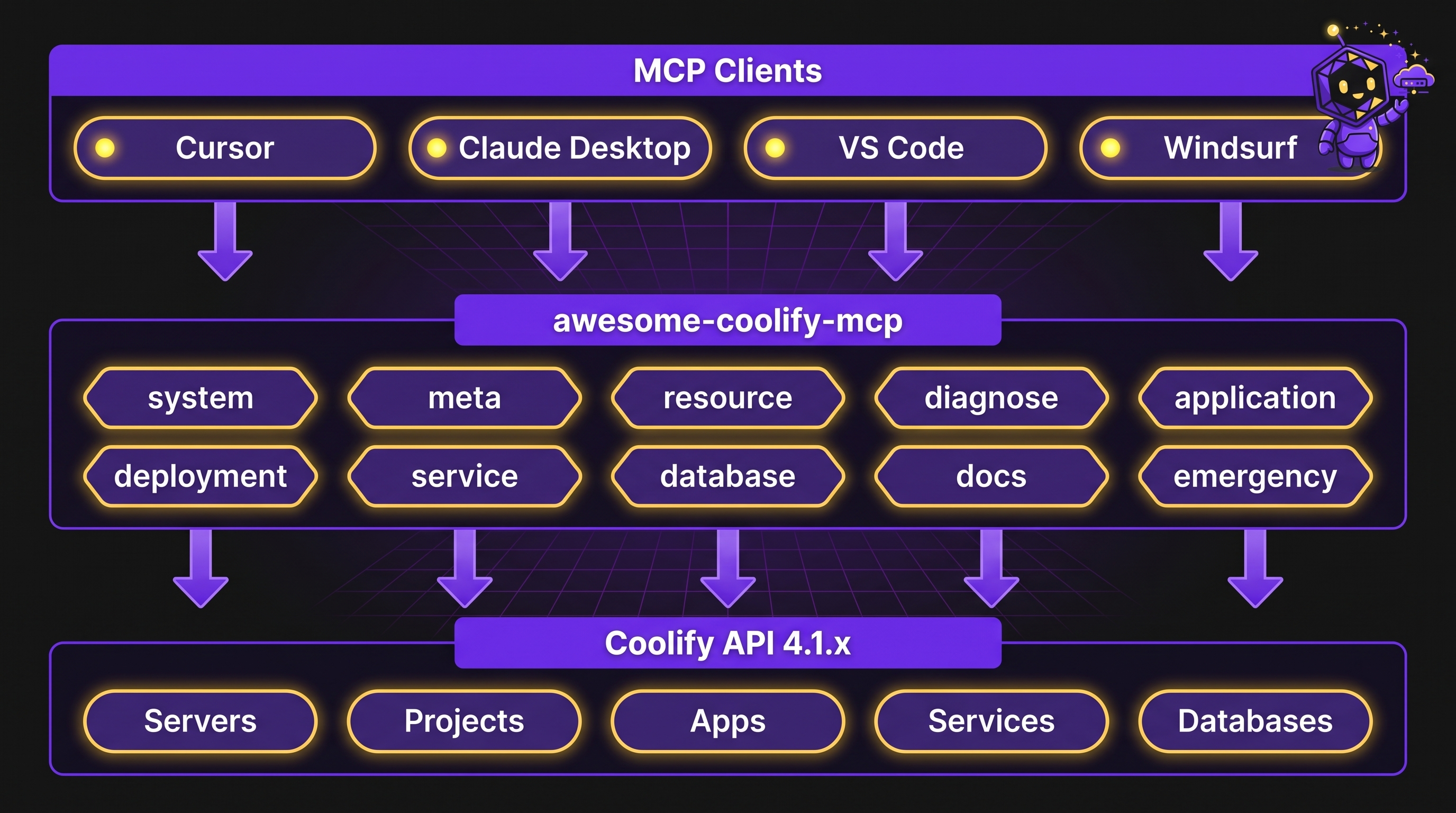
awesome-coolify-mcp1.1.4 replaces that patchwork with a single, community-maintained MCP server that speaks Coolify's REST API 4.1.x through a clean, action-based tool surface. Source, docs, and npm distribution live in one public repo — clezcoding/awesome-coolify — while the installable package stays awesome-coolify-mcp. Instead of memorizing dozens of near-identical tool names, your agent calls one of 19 tools with an action field:
Under the hood, every call goes through the same request pipeline: Zod-validated input, retrying HTTP client, secret-aware output masking, and structured error envelopes with recovery hints — so your agent fails gracefully instead of guessing.
[!NOTE]
This is a community project built for people who run their own Coolify instances. It is not affiliated with or endorsed by Coolify Labs.
🆚 Why awesome-coolify-mcp
Typical setup without it
With awesome-coolify-mcp
Several overlapping community MCP tools, each with its own schema
One server, one consistent schema
Dozens of granular, single-purpose tools per resource
Default secret masking + confirmation gates on destructive actions
Read a wall of raw JSON to find what changed
Bounded, paginated projections tuned for LLM context windows
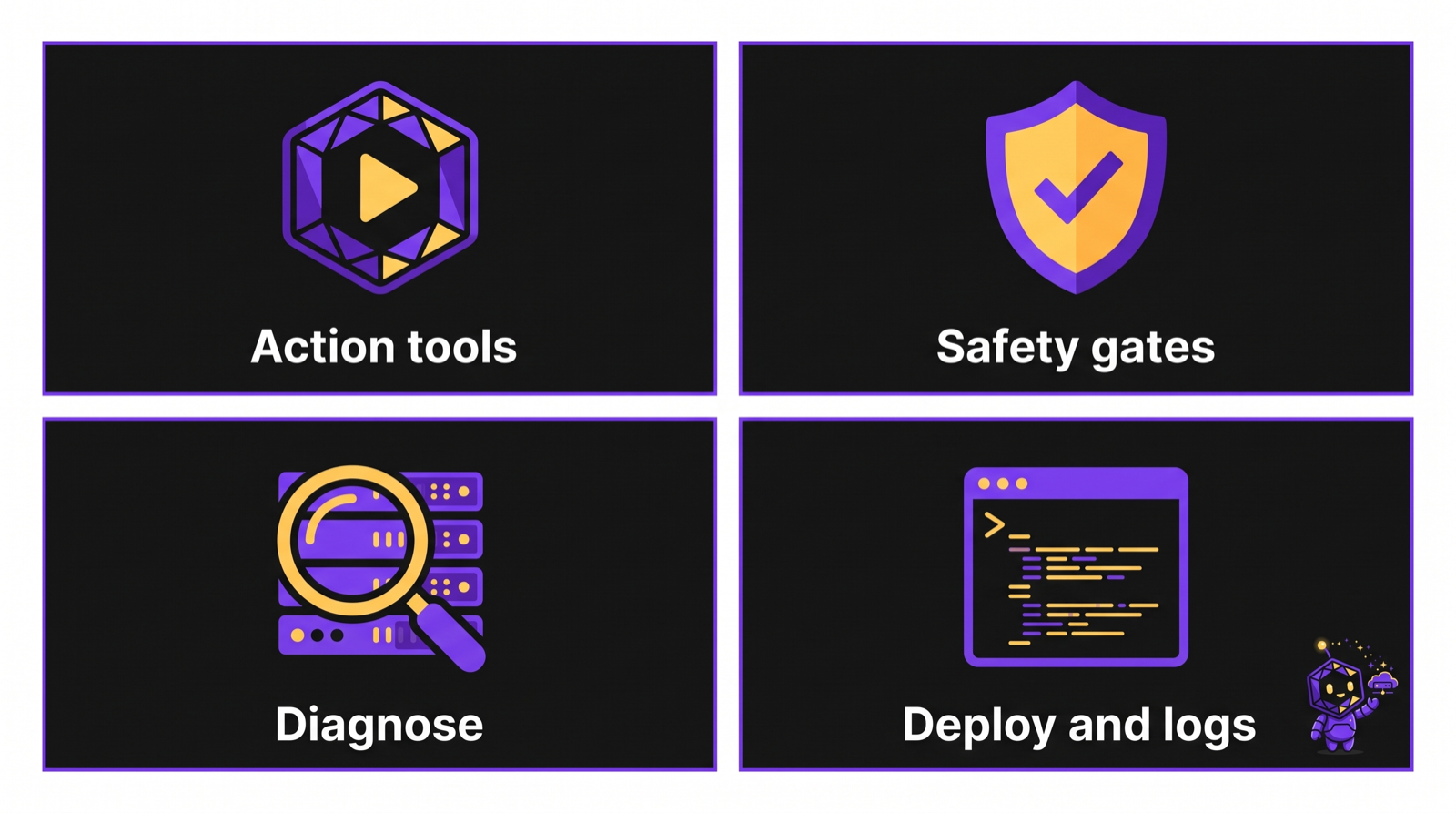
Today, the shipped surface covers day-2 operations and infrastructure creation: verify connectivity, discover fleets, deploy and watch builds, inspect bounded logs, diagnose incidents, run gated emergency ops, and manage applications, services, databases, SSH keys, servers, projects, environments, backups, and environment variables.
✨ Features
18 action-based tools — call application({ action: "deploy", uuid }) instead of hunting through dozens of granular tool names. The registered surface is system, meta, resource, diagnose, application, emergency, deployment, service, database, private_key, instance, manifest, server, project, environment, docs, recipe, and setup.
Multi-instance registry & routing — register every Coolify instance you own in ~/.coolify-mcp/instances.json via the instance tool; per-call credential resolution with no cross-instance leakage.
Coolify Cloud aware — instance({ action: "cloud-info" }) for local discovery, team-scoped tokens, and structured cloud error codes (COOLIFY_CLOUD_FORBIDDEN, COOLIFY_CLOUD_UNSUPPORTED).
Local manifest cache — .coolify/manifest.json sync via manifest({ action: "sync" }), best-effort auto-hooks on app/service/DB mutations, and _meta.manifestWarning when the cache is stale.
Server branding — MCP list icon via serverInfo.icons (embedded data URI + jsDelivr CDN entries from docs/assets/).
Ops workflows that mirror real incidents — a single system.infrastructure_overview call for the big picture, fuzzy resource.find when you only remember a name or domain, diagnose.app / diagnose.server for a specific suspect, and diagnose.scan when you just know something is wrong fleet-wide.
Deploy lifecycle agents can drive — start/stop/restart, force rebuild, deployment.watch with bounded backoff, deployment.logs for builds, bounded application.logs, and runtime follow with idle/overall timeouts.
Full workload CRUD — create, inspect, update, delete, and operate applications, services, and databases; discover live one-click IDs with service.list-types.
Recipes and guided setup — create git apps, app-plus-database stacks, and one-click services; run setup.preflight, setup.wire, or setup.resume; install four matching IDE workflow skills.
Safety by default, not by convention — emergency mutations require an explicit confirm: true; sensitive keys (password, token, secret, private, env) render as *** unless you opt in with reveal: true.
Agent-friendly failure modes — every error is a parseable envelope with a code, a human message, and recoveryHints; transient network/429/5xx failures retry automatically with exponential backoff.
Broad client coverage out of the box — Cursor, VS Code / GitHub Copilot, Claude Desktop, Claude Code, Windsurf, and 15+ more via the install configurator.
The server itself is intentionally boring: it holds no long-lived state and never touches your IDE's config files. Your MCP host (Cursor, Claude, VS Code, …) injects COOLIFY_URL and COOLIFY_TOKEN through its MCP config's env block — or you register named instances in ~/.coolify-mcp/instances.json via the instance tool. The process reads credentials from its environment (or the registry) and forwards authenticated requests to your Coolify instance over HTTPS.
Run it directly with npx — no global install needed:
npx -y awesome-coolify-mcp
Wire the two required environment variables into your MCP host (see Install for every client). Once connected, a minimal smoke test looks like this:
meta({ action: "version" }) // server identity — no Coolify callsystem({ action: "verify" }) // authenticate + connectivity checksystem({ action: "infrastructure_overview" }) // servers, projects, apps, services, DBs at a glance
[!NOTE]
Multi-instance users: register each Coolify instance first with instance({ action: "add", name, url, token }), then call system({ action: "verify" }). Single-instance setups can skip the registry and use COOLIFY_URL / COOLIFY_TOKEN in MCP env.
[!IMPORTANT]
Emergency actions (stop_all, redeploy_project, restart_project) require confirm: true. Call them withoutconfirm first — you'll get a would_affect preview and no mutation runs. Only pass reveal: true when you genuinely need plaintext secrets back.
📦 Install
There are three equally supported paths — pick whichever fits your workflow.
1. One-click deeplink
Best when you already have your Coolify URL and token handy. Placeholder credentials work fine too — you'll be prompted to fill them in, or you can swap them afterwards.
How these links work (click to expand)
Both editors implement a protocol handler that reads a JSON server configuration straight out of the URL:
Client
Scheme
Encoding
Cursor
cursor://anysphere.cursor-deeplink/mcp/install?name=…&config=… (mirrored at https://cursor.com/en/install-mcp?… for a friendlier landing page)
config is base64-encoded JSON
VS Code / Copilot
vscode:mcp/install?name=…&config=…
config is URL-encoded JSON
Clicking the button opens your editor, shows the server it's about to add, and lets you review or edit the command/env before accepting — nothing is installed silently.
2. Install configurator (GitHub Pages)
Use the browser configurator to type in your real COOLIFY_URL / COOLIFY_TOKEN and generate a ready-to-paste snippet for your exact client — JSON, TOML, or YAML depending on what that client expects.
Everything runs client-side in your browser. Your token is never sent to a backend, logged, or stored anywhere but the config file you paste it into.
3. Manual MCP config
Paste this into your host's MCP configuration file. Cursor example (~/.cursor/mcp.json for global, or .cursor/mcp.json in a project):
Install Coolify workflow skills for Cursor, Claude Code, and Codex:
npx skills add clezcoding/awesome-coolify -a cursor -a claude-code -a codex
After MCP install, run setup({ action: "preflight" }) or see the Setup guide for gh preflight, project linkage, and greenfield provisioning.
🖥️ Supported clients
Client
Config location
Notes
Cursor
~/.cursor/mcp.json
One-click deeplink or manual JSON
VS Code / GitHub Copilot
.vscode/mcp.json
Native inputs prompts for URL/token — no plaintext in the file
Claude Desktop
claude_desktop_config.json
Manual JSON or configurator output today
Claude Code
~/.claude.json or .mcp.json
stdio via npx -y awesome-coolify-mcp
Windsurf
~/.codeium/windsurf/mcp_config.json
Same npx + env pattern as Cursor
The install configurator covers a much wider matrix — OpenCode, Codex CLI, Gemini CLI, Cline, Kilo Code, Goose, LM Studio, Hermes Agent, Kimi Code, Google Antigravity, OpenClaw, and more — with the correct config shape for each.
[!NOTE]
Claude Desktop currently uses manual JSON or configurator output.
🔐 Environment variables
Variable
Required
Default
Description
COOLIFY_URL
yes*
—
Coolify base URL, no trailing slash — e.g. https://coolify.example.com
COOLIFY_TOKEN
yes*
—
Bearer API token, scoped to your team
COOLIFY_VERIFY_SSL
no
true
Set to false only for self-signed certs on local/dev instances
COOLIFY_MCP_LOG
no
info
Log verbosity: debug · info · error
Credentials are read from the process environment (your IDE's MCP env block) or an optional local .env file when running the CLI directly. They are never echoed back inside tool responses.
[!NOTE]
With the multi-instance registry (~/.coolify-mcp/instances.json), COOLIFY_URL and COOLIFY_TOKEN become optional — the instance tool resolves credentials per call. Env vars remain the simplest path for single-instance setups.
☁️ Coolify Cloud
awesome-coolify-mcp works with Coolify Cloud using the same 19 tools — team-scoped tokens, structured cloud error codes (COOLIFY_CLOUD_FORBIDDEN, COOLIFY_CLOUD_UNSUPPORTED), and local instance action cloud-info for discovery.
Run instance({ action: "cloud-info" }) before your first Cloud session — it returns isCloud, resolved url, credential source (registry | env | infer), knownLimits, and a docs link. No live API call.
Six parameterized workflow prompts return numbered step guidance (English bodies) that orchestrate existing tools. Most arguments are optional — open any prompt without prefill.
Prompt
Args (all optional unless noted)
Purpose
deploy
instance?, uuid?, force?
Deploy an application and monitor until terminal status
diagnose
instance?, uuid?
Investigate app, server, or fleet-wide issues (includes diagnose.analyze)
new-project
instance?, name?, server_uuid?
Create project, environment, and optional server linkage
incident
instance?, uuid?, project_uuid?
Triage with diagnose.analyze, logs, restart, or emergency redeploy
rollback
instance?, uuid?, name?
Preview then confirm-gated deployment.rollback (STOP for human approval)
maintenance-window
instance?, uuid?, resource_type
Guided change window using existing confirm-gated mutations
Prompt handlers never read .coolify/manifest.json from disk — they steer the agent to resolve UUIDs from manifest or ask the user. Playbooks never auto-set confirm: true.
🧰 Tools reference
Every domain is exposed as one MCP tool with an action discriminator, so your agent's tool list stays short while the capability surface stays wide.
Trigger a deploy with optional force rebuild; use wait: false + deployment.watch (recommended) or legacy wait: true poll
logs
Bounded runtime logs, or bounded follow mode with idle and overall timeouts
envs:list / envs:get
List or fetch env vars (values masked as *** unless reveal: true)
envs:create / envs:update
Create or update individual env vars (supports is_preview, is_literal, is_multiline, is_shown_once)
envs:delete
Delete one env var — requires confirm: true
envs:bulk-update
Patch many env vars at once — requires confirm: true
envs:sync
Diff/apply a local .env file or inline content — application only; see Resource env vars
envs:promote
Compare and promote env vars between two applications in the same Coolify instance (product name: env.promote); preview by default — see Resource env vars
📈 deployment — deploy tracking
Action
Purpose
list
Deployments for a given application
get
Status, commit, and timing details for one deployment
watch
Poll until terminal with bounded timeout, backoff, and jitter
cancel
Cancel an in-flight deployment cleanly
logs
Bounded deployment build logs by deployment UUID, or newest deployment for an application
preflight
Advisory read-only deploy risk check: instance_health, env_completeness, recent_deployment_failures, dns_readiness → risk_score / risk_level; env values masked; no live DNS probes
rollback
Confirm-gated recovery to prior successful finished deployment when the newest deployment is already finished; errors with COOLIFY_ROLLBACK_UNAVAILABLE when only one successful deployment exists — git apps pin git_commit_sha via updateApplication then triggerDeploy; preview without confirm: true
🛡️ Deploy guard (preflight + rollback)
Action
Safety
preflight
Read-only — never calls deploy/mutate APIs; advisory: true; blocking when risk is critical or a deploy is in progress
rollback
Two-step like emergency ops: omit confirm → COOLIFY_CONFIRM_REQUIRED + rollback_target preview (prior successful finished, not the current tip when already finished); confirm: true → composite pin+deploy (no dedicated Coolify rollback REST endpoint)
One MCP call to stand up common workload patterns — application + database wiring, git apps, or validated one-click services.
Action
Purpose
create-git-app
Create a git-backed application with local build_pack detection (Dockerfile / Dockerfile.* glob)
create-app-db
Create a database + application and wire DATABASE_URL (or custom env_key) between them
create-one-click
Create a one-click service after validating type against the live service-templates catalog
recommend
Advisory stack suggestion from the live service-templates catalog — never creates resources
Safety: Recipe creates are intentional — no confirm gate. No dry-run / preview. Partial failure does not auto-rollback; created UUIDs are returned in error.data. Connection strings are masked unless reveal: true. recommend is read-only / advisory.
Also use service.list-types to discover valid one-click type IDs before create-one-click.
🌱 Resource environment variables (envs:*)
Manage Coolify runtime configuration on applications, services, and databases through envs:* actions on the existing domain tools — no separate env MCP tool.
is_preview is not supported on database env vars (Coolify OpenAPI gap)
Confirm gates:envs:delete and envs:bulk-update always require confirm: true on all three tools. On application only, envs:sync requires confirm: true when applying (dry_run: false, the default) or when prune: true. envs:promote requires confirm: true when applying (dry_run: false).
Reveal policy: Env values render as *** by default. Pass reveal: true only after the human explicitly asks for plaintext — the agent must not auto-set reveal: true.
envs:sync semantics (application only): Supply exactly one of env_file (local path) or env_content (inline .env text). dry_run: true returns a diff (added, updated, unchanged, removed, optional conflicts) with no API writes; default dry_run: false applies changes. Remote keys missing locally are never deleted unless prune: true (also requires confirm: true). When local and remote values differ, set conflict_policy to overwrite, keep_remote, or abort after asking the human — apply with conflicts and no policy returns COOLIFY_CONFIRM_REQUIRED.
envs:promote semantics (application only, same instance): Product docs may say env.promote; the implemented action is application.envs:promote. Compare env vars between source_uuid and target_uuid (two applications in one Coolify instance — no cross-instance fan-out). Default dry_run: true returns preview buckets (only_in_source, only_in_target, value_mismatches) plus structured promotion_suggestions with follow-up tool/action hints; values are masked unless reveal: true. Applying copies into the target requires confirm: true. Default conflict_policy is keep_remote — mismatched target keys are skipped unless the human opts into overwrite or abort.
Configure, list, update, delete, and trigger backup schedules — and inspect execution history — on the existing database tool. No separate backup MCP tool.
List executions for a schedule (status, timestamps, size)
Parent identity: All backup actions require the parent database via uuid or name. Schedule-scoped actions (backup:update, backup:delete, backup:now, backup:history) also require scheduled_backup_uuid.
Confirm gates:backup:delete requires confirm: true — otherwise COOLIFY_CONFIRM_REQUIRED. delete_s3 defaults false (config-only delete). When delete_s3: true, deletion still requires confirm: true — purging S3 artifacts is treated as destructive.
Frequency (Pitfall 1):backup:create accepts OpenAPI named presets (every_minute, hourly, daily, weekly, monthly, yearly) or a cron expression. backup:update accepts presets only — passing cron on update returns COOLIFY_VALIDATION_ERROR.
backup:now semantics: Maps to Coolify PATCH with { backup_now: true } on the schedule — no separate trigger endpoint. Requires scheduled_backup_uuid.
Reveal policy: S3-related credentials in backup config responses are masked as *** by default. Pass reveal: true only after the human explicitly asks for plaintext — the agent must not auto-set reveal: true.
Out of scope (v2.x+): Backup execution delete, restore/import from backup, and S3 storage destination CRUD are not available in this release.
Read/write/sync .coolify/manifest.json — a workspace cache, not source of truth. Remote wins on UUID conflict.
Action
Purpose
get
Read the local manifest file
upsert
Merge projects/servers/resources into the cache
set
Replace a manifest section
remove
Remove a cached resource entry
clear
Wipe the manifest — requires confirm: true
sync
Reconcile cache against live Coolify API (optional dry_run, prune with confirm)
diff
Non-destructive diff report — always safe to run
audit
Read-only / advisory drift audit: severity-tagged findings[] with structured remediation hints (which tool/action to call next); optional diff_support detail — never mutates manifest or live state
[!NOTE]
manifest.audit compares local .coolify/manifest.json vs live Coolify inventory for the scoped instance. Findings name follow-up actions such as manifest.sync or manifest.upsert — hints are advisory only; nothing auto-heals. Keep using manifest.diff for the raw structural reconciliation report.
Best-effort auto-hooks update the manifest after app/service/DB mutations. Stale UUID 404s elsewhere surface _meta.manifestWarning — run manifest({ action: "sync" }) to reconcile.
🧭 setup — guided project wiring
Action
Purpose
preflight
Check GitHub CLI and workspace prerequisites without changing the project
wire
Link an existing workload or provision a greenfield project, with optional domains, env sync, recipe, manifest, and deploy watch steps
resume
Continue a paused setup after authentication or another recoverable prerequisite
wire never auto-pushes. The setup flow pauses cleanly when gh authentication is missing and resumes from completed steps.
🎨 Branding (serverInfo.icons)
The MCP server advertises icons in initialize via an embedded PNG data URI (primary) and jsDelivr CDN URLs for mcp-icon-192.png and favicon-32.png. Cursor may still show a letter fallback — see maintainer verify record. Not a Coolify API call.
🛡️ Safety model
Confirmation gate
Destructive emergency actions follow a strict two-step pattern:
Call with confirm omitted or false → you get back a would_affect preview and error code COOLIFY_CONFIRM_REQUIRED — nothing is mutated.
Call again with confirm: true → the action actually executes.
Regular app/service/database mutations (start, stop, deploy, …) are not behind this gate — they simply follow Coolify's own API semantics, since they're scoped to one resource rather than your whole fleet.
Environment variables:envs:delete and envs:bulk-update require confirm: true on application, service, and database. envs:sync apply (dry_run: false) and envs:sync with prune: true require confirm: true on application only. dry_run: true sync previews never mutate. envs:promote apply (dry_run: false) requires confirm: true on application; default conflict_policy is keep_remote.
Drift & heal (read-only audit, preview-first promote):manifest.audit is advisory-only — it never writes manifest or live state. application.envs:promote (product name env.promote) previews by default; values stay masked unless reveal: true. Both stay within one Coolify instance per call.
Deploy guard (advisory preflight, confirm-gated rollback):deployment.preflight is read-only and returns a risk_score with four named factors — no external DNS/HTTP probes. deployment.rollback requires confirm: true before mutating; git rollbacks PATCH the target commit then POST /deploy (MCP composite, not a Coolify rollback API).
Secret masking
Keys matching password, token, secret, private, or env render as *** by default in tool output.
Pass reveal: true only when you explicitly need plaintext — for example, to copy an env var into another system. Ask the human first before setting reveal: true on any envs:* call.
Log line bodies are not masked. Treat raw logs like you would any other sensitive output: don't paste them into long-lived agent memory or public tickets.
[!WARNING]
Registry files (~/.coolify-mcp/instances.json) are written with 0o700 directory and 0o600 file permissions. Tokens are never echoed in tool output unless you explicitly pass reveal: true.
⚠️ Structured errors & retries
Every API failure comes back as a parseable envelope your agent can reason about, instead of a raw stack trace:
{"code":"COOLIFY_401","message":"Unauthorized — invalid or expired API token","recoveryHints":["Verify the token in Coolify UI → Keys & Tokens","Ensure the token has the required team permissions"],"httpStatus":401}
Code
Meaning
COOLIFY_401
Invalid or missing token
COOLIFY_404
Resource not found
COOLIFY_422
Validation error
COOLIFY_500
Coolify server error
COOLIFY_NETWORK
Connection failed
COOLIFY_TIMEOUT
Request timed out
COOLIFY_CONFIRM_REQUIRED
Emergency preview — pass confirm: true to proceed
COOLIFY_AMBIGUOUS_MATCH
Name matched multiple resources — pick a UUID from the ranked list
COOLIFY_CLOUD_FORBIDDEN
Cloud token or team permission issue (HTTP 403)
COOLIFY_CLOUD_UNSUPPORTED
Endpoint not available on Coolify Cloud (HTTP 404)
Transient failures (HTTP 429, 5xx, or network errors) retry automatically up to 3 times with exponential backoff (1s → 2s → 4s) before giving up and returning the error to your agent.
Local manifest sync (.coolify/manifest.json, auto-hooks)
✅ Shipped
Live UAT harness (npm run uat:live)
✅ Shipped
Capability discovery via system.version
✅ Shipped
Deployment build logs via deployment.logs
✅ Shipped
Capability discovery & build logs:system({ action: "version" }) returns coolifyVersion (replacing the legacy version field), mcpVersion, and a capabilities map of Coolify 4.1.2 feature flags. For app triage + bounded runtime tail in one call, use diagnose({ action: "logs", mode: "full", uuid: "..." }) — check capabilities.diagnose_logs. For Log Brain pattern triage, use diagnose({ action: "analyze", uuid: "..." }) — check capabilities.diagnose_analyze. For advisory stack picks from the live catalog, use recipe({ action: "recommend", stack: "..." }) — check capabilities.recipe_recommend. For instance health, dependency graph, impact, and janitor/cleanup, use intelligence({ action: "scorecard" | "graph" | "impact" | "janitor" | "cleanup", ... }) — check capabilities.intelligence_scorecard (and sibling intelligence_* keys); cleanup requires confirm: true. For manifest drift audit and cross-app env promote, use manifest({ action: "audit" }) and application({ action: "envs:promote", source_uuid, target_uuid, ... }) — check capabilities.manifest_audit and capabilities.envs_promote (MCP composites over existing reads/env CRUD, not Coolify-native REST endpoints). For deployment build logs, prefer deployment({ action: "logs", deployment_uuid: "..." }) (or application_uuid to resolve the newest deployment). The application.logs path with deployment_uuid still works for back-compat. For runtime log follow, use application({ action: "logs", uuid: "...", follow: true }) — bounded MCP polling until idle or timeout; check capabilities.application_logs_follow via system.version.
[!WARNING]
Coolify 4.1.x does not expose stable service or database log endpoints. This server therefore does not claim or register service/database log actions. Use application runtime logs and deployment build logs until compatible upstream APIs are available.
🔮 Coming soon
Future work stays bounded by verifiable upstream and repository constraints:
Add service/database logs when compatible Coolify APIs are stable and available.
Close tracked REST mappings in docs/COVERAGE.md where they add useful agent workflows.
Revisit cross-instance fan-out only with explicit rate-limit and credential-isolation guarantees.
No release date or compatibility promise is attached to these boundaries. Use GitHub Issues for concrete requests.
🛠️ Local development
git clone https://github.com/clezcoding/awesome-coolify.git
cd awesome-coolify
pnpm install
pnpm run build # tsup → dist/
pnpm test# vitest
pnpm run dev # watch mode
Logs go to stderr only — stdout is reserved exclusively for the MCP protocol.
The maintainer publish flow (build → pack --dry-run → publish) is documented in CONTRIBUTING.md.
[!NOTE]
Maintainers can run live UAT against a real Coolify instance with npm run uat:live. See CONTRIBUTING.md — Live UAT Harness for prerequisites and report output — do not duplicate the runbook here.
MCP server for Coolify 4.1.x — deploy, diagnose, and CRUD for keys, servers, projects, and environments via action-based tools
We found that awesome-coolify-mcp demonstrated a healthy version release cadence and project activity because the last version was released less than a year ago.It has 1 open source maintainer collaborating on the project.
Package last updated on 31 Jul 2026
Did you know?
Socket for GitHub automatically highlights issues in each pull request and monitors the health of all your open source dependencies. Discover the contents of your packages and block harmful activity before you install or update your dependencies.
A misconfiguration gave three Anthropic models internet access, and one, believing it was in a simulation, shipped a credential-stealing package to PyPI.
Socket has joined the new Composer and Packagist sponsorship program as a launch sponsor, supporting the team that keeps PHP's package ecosystem secure.