BeeLadybug
Universal telemetry and visual inspection overlay.
BeeLadybug is not a Canvas widget. It is a small open-source debugger
core that accepts raw packets from any source — Canvas 2D games, DOM pages,
headless bots, Python processes, AI pipelines — and renders them in one
dark console.
Il Core non sa cosa sta monitorando. Riceve solo dati grezzi.
Perché questa struttura
Il file storico BeeLadybug era accoppiato a un engine di gioco (entità,
hitbox, ctx.drawOverlay). Quello non scala a un sito HTML o a un modello
Python. Per questo il progetto riparte da zero con due strati:
src/core/ | Orologio fittizio, buffer, grafici, overlay cyberpunk |
src/adapters/ | Traduttori. Convertono un mondo specifico in sendData() |
L'overlay non è disegnato sul Canvas. È un pannello HTML in Shadow DOM:
funziona sopra un gioco, sopra una pagina, o da solo in una sandbox.
bee-ladybug/
├── src/
│   ├── index.js                 # API pubblica
│   ├── index.d.ts               # tipi npm / tsc
│   ├── core/
│   │   ├── BeeLadybugCore.js
│   │   └── UIOverlay.js
│   └── adapters/
│       ├── CanvasAdapter.js
│       ├── WebDOMAdapter.js
│       ├── CSSAdapter.js
│       ├── AntAdapter.js
│       ├── SpiderAdapter.js
│       └── python/PythonBridge.js
├── examples/
│   ├── core.html
│   ├── canvas-sandbox.js
│   ├── dom.html
│   ├── css-hunt.html
│   ├── python.html
│   └── python/sender.py
├── tsconfig.json
├── package.json
├── CHANGELOG.md
├── LICENSE
├── index.html
└── README.md
Quick start
Servire la cartella con un server statico (i moduli ES non partono da file://):
python -m http.server 8080
Aprire http://localhost:8080. Premere F2 / F3 / F4. In console:
bee.sendData('log', { source: 'human', message: 'hello core' })
bee.sendData('fps', { value: 61 })
bee.sendData('error', { source: 'ai', message: 'timeout' })
Uso minimo in un'app:
import { BeeLadybugCore } from './src/index.js';

const bee = new BeeLadybugCore();
bee.sendData('log', { message: 'boot', source: 'app' });
Core headless (bot, test, Node con DOM assente):
const bee = new BeeLadybugCore({ ui: false, mount: false, autoAttach: false });
bee.sendData('metric', { name: 'loss', value: 0.12 });
Contratto sendData(type, payload)
Gli adapter parlano solo così. Uno scalare viene avvolto in { value }.
fps | { value } | HUD + grafico storico |
metric | { name, value, unit? } | HUD + serie storica |
coord | { label?, x, y } | HUD |
state | { key, value } | HUD |
log | { message, level?, source? } | console |
warn | { message, source? } | console ambra |
error | { message, source? } | console rossa |
telemetry | { kind?, duration?, source? } | history + lampeggio pulsante adapter |
clear | { channel?: 'logs'|'history'|'hud' } | reset buffer |
sys | emesso dal Core | freeze / visibilità / scala |
Ogni pacchetto viene stampato con:
wallTime — orologio realesimTime — tempo fittizio del Coreframe — frame-count indipendente dall'host
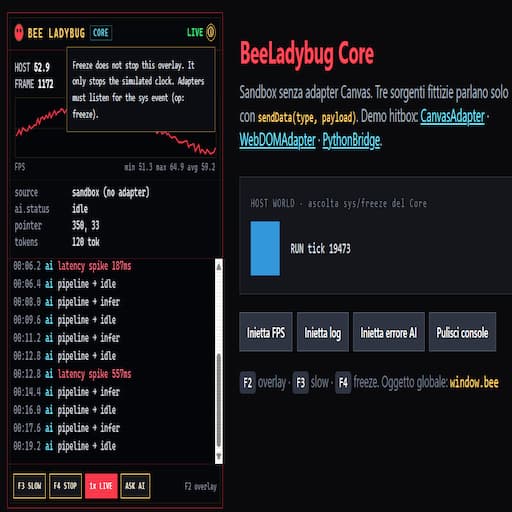
Il freeze non ferma l'overlay. Ferma solo il clock fittizio. Gli adapter
possono ascoltare type: 'sys' e mettere in pausa il loro mondo.
bee.subscribe((packet) => {
  if (packet.type === 'sys' && packet.payload.op === 'freeze') {
    host.paused = packet.payload.frozen;
  }
});
Tasti
F2 | mostra / nascondi overlay (e hitbox canvas) |
F3 | slow-motion del tempo fittizio (0.25x / 1x) |
F4 | freeze / run del tempo fittizio |
F6 | CSS hunt, se CSSAdapter è attaccato |
P | blocca il pannello CSS sull'elemento corrente, solo con la hunt accesa |
S | scansione CSS, solo con la hunt accesa |
Niente F12, niente tilde: sui layout italiani la tilde non è un tasto unico.
CanvasAdapter
import { BeeLadybugCore, CanvasAdapter } from './src/index.js';
const bee = new BeeLadybugCore();
const adapter = new CanvasAdapter(bee, {
canvas,
entities,
overlay: true,
computeCollisions: true
});
adapter.attach();
function loop() {
if (!adapter.frozen) updateGame(adapter.timeScale);
drawGame();
adapter.pump();
requestAnimationFrame(loop);
}
L'adapter accetta oggetti qualsiasi con x/y/width/height (o worldX/worldY).
Disegna le hitbox su un canvas trasparente sopra il gioco: verde = ok, rosso = collide.
Espone frozen e timeScale così l'host può mettere in pausa la simulazione.
Pacchetti: fps, metric entities, metric hits, coord del player, warn all'ingresso collisione.
WebDOMAdapter
import { BeeLadybugCore, WebDOMAdapter } from './src/index.js';
const bee = new BeeLadybugCore();
const adapter = new WebDOMAdapter(bee, {
root: document.body,
watch: ['.card', '#cta'],
overlay: true,
autoTick: true
});
adapter.attach();
Traduce il DOM in pacchetti: nodo sotto il puntatore, box model (margin / padding / content), conteggio nodi, mutazioni (+n -n attr). F4 congela l'hover. F2 nasconde overlay e highlight. Il Core non sa che esiste HTML.
CSS hunt (F6)
import { BeeLadybugCore, CSSAdapter } from './src/index.js';

const bee = new BeeLadybugCore();
const css = new CSSAdapter(bee);
css.attach();
F6 (pulsante F6 CSS accanto a F3/F4) accende la caccia. Sull'elemento sotto il puntatore l'overlay elenca:
- regole
!important che gli corrispondono. Un foglio cross-origin è una nota grigia, una volta sola: unreadable sheet: <href>
- overflow del viewport e margini negativi
- testo trasparente,
opacity: 0, o colore uguale allo sfondo
- chi intercetta il click al centro, inclusi
::before / ::after fissi su html / body
<img> con rapporto del file diverso di oltre il 5% dal riquadro disegnato (getBoundingClientRect), solo se object-fit calcolato è fill (il default)
S con la hunt accesa percorre la pagina. L'overflow resta solo sull'elemento che lo causa: un antenato si salta se un discendente sfora della stessa quantità (±2px), oppure se la larghezza del box ci sta nel viewport e a uscire è un figlio. Righe uguali (stesso selettore e stesso problema) diventano una sola, con il conteggio (article overflows viewport ×4). L'ordine è: causa di overflow, click bloccato, testo invisibile, immagine distorta, !important. Un click sulla riga disegna il contorno rosso. P ferma il pannello sull'elemento corrente. Issues raggruppa per causa: body::after blocks clicks on 10 elements è una riga rossa, e il click la apre sull'elenco degli elementi. In cima alla sezione, la legenda dice rosso = bug e grigio = info. Un foglio illeggibile è una riga grigia, una per foglio, e non entra tra i bug. L'overlay resta alto al massimo metà schermo, scorre al suo interno, e le sezioni Status, Issues, Inspect ed Events si chiudono. In console un elemento pulito non viene scritto, e con la hunt accesa restano fuori anche hover e mutate attr del DOM, a meno che F3 SLOW sia acceso. Ogni problema CSS viene scritto una sola volta per elemento ogni 5 secondi. I fogli di stile restano in cache finché un MutationObserver non vede un cambio a <style> o <link>. Hover è limitato a un frame.
Demo: examples/css-hunt.html.
Registro adapter (overlay)
Il Core non conosce ANT/SPIDER. Gli adapter si iscrivono con hook propri; l'overlay disegna un toggle per ciascuno.
bee.registerAdapter('probe', {
label: 'PROBE',
enable: () => observer.observe(root, opts),
disable: () => observer.disconnect()
});
adapter.detach();
Click sul pulsante → enable() / disable(). Un pacchetto warn o telemetry con source uguale al nome registrato fa lampeggiare quel pulsante, al massimo una volta ogni 1.5s.
AntAdapter
import { BeeLadybugCore, AntAdapter } from './src/index.js';
const bee = new BeeLadybugCore();
const ant = new AntAdapter(bee, {
root: document.body,
threshold: 30
});
ant.attach();
MutationObserver indipendente da WebDOMAdapter (possono condividere lo stesso root). Se un nodo supera la soglia, arriva un warn source: 'ant'.
SpiderAdapter
import { BeeLadybugCore, SpiderAdapter } from './src/index.js';
const bee = new BeeLadybugCore();
const spider = new SpiderAdapter(bee, {
resourceThreshold: 500
});
spider.attach();
PerformanceObserver: longtask > 50ms → telemetry; risorse > soglia → warn. Se il browser non espone longtask (Firefox/Safari), un log una tantum e quella parte si spegne senza errori.
PythonBridge
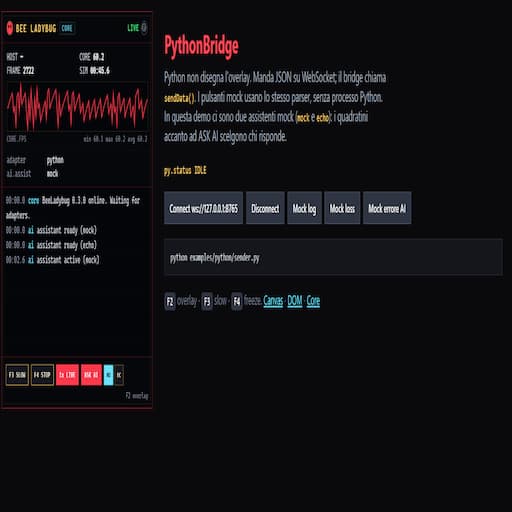
Python non vede l'overlay. Manda JSON. Il browser lo srotola in sendData().
import { BeeLadybugCore, PythonBridge } from './src/index.js';
const bee = new BeeLadybugCore();
const bridge = new PythonBridge(bee, { url: 'ws://127.0.0.1:8765' });
bridge.connect();
bridge.ingest({ type: 'metric', payload: { name: 'loss', value: 0.12 } });
Forma del filo:
{ "type": "log", "payload": { "message": "epoch 3" } }
{ "type": "error", "message": "CUDA OOM" }
Sender di esempio (solo stdlib, nessun pip):
python examples/python/sender.py
Poi aprire http://localhost:8080/examples/python.html e Connect. I pulsanti mock funzionano anche a processo spento.
npm / TypeScript
npm install
npm run typecheck
import { BeeLadybugCore } from 'bee-ladybug';
Il runtime resta JavaScript ESM. I tipi stanno in src/index.d.ts (package.json → "types").
Keyword e repository puntano a BeeLadybug-universal, non a BeeEngine.
npm run typecheck
npm run lint
npm login
npm publish --access public
Versione runtime e pacchetto: 0.4.1 (BEE_LADYBUG_VERSION e package.json devono restare uguali).
Assistente AI (gancio, nessun vendor)
BeeLadybug non chiama OpenAI, Claude o Ollama. Lo sviluppatore innesta i propri modelli. registerAssistant aggiunge (non sostituisce gli altri). setActiveAssistant(name) sceglie chi risponde a ASK AI.
bee.registerAssistant({
  name: 'ollama',
  async complete({ question, snapshot }) {
    const res = await fetch('http://127.0.0.1:11434/api/generate', {
      method: 'POST',
      headers: { 'Content-Type': 'application/json' },
      body: JSON.stringify({
        model: 'llama3',
        prompt: `${question}\n${JSON.stringify(snapshot)}`,
        stream: false
      })
    });
    const data = await res.json();
    return data.response;
  }
});

bee.registerAssistant({
  name: 'mock',
  complete({ snapshot }) {
    return `logs=${snapshot.logs.length}`;
  }
});

bee.setActiveAssistant('ollama');
await bee.ask('perché il loss sale?');
Il Core manda un snapshot (log recenti, HUD, metriche) a complete(). Chiavi tipo token/password vengono redacted. In overlay: pulsante ASK AI e un quadratino per ogni provider; quello attivo è evidenziato. Senza provider, il bottone spiega come collegarlo. setAssistant resta come scorciatoia: registra e attiva, senza cancellare gli altri.
API Core
const bee = new BeeLadybugCore({
toggleKey: 'F2',
slowKey: 'F3',
freezeKey: 'F4',
slowScale: 0.25,
maxLogs: 250,
historySize: 120,
mount: 'auto',
ui: true,
autoAttach: true,
autoStart: true
});
bee.sendData(type, payload);
bee.subscribe(handler);
bee.getState();
bee.getLogs();
bee.getHistory('fps');
bee.getHud();
bee.show(); bee.hide(); bee.toggle();
bee.freeze(); bee.unfreeze(); bee.toggleFreeze();
bee.applySlowMo(); bee.restoreRealtime();
bee.registerAssistant({ name: 'mock', complete: async ({ snapshot }) => 'ok' });
bee.setActiveAssistant('mock');
await bee.ask('why fps drop?');
bee.registerAdapter('probe', { label: 'PROBE', enable() {}, disable() {} });
bee.toggleAdapter('probe');
bee.destroy();
Roadmap
- Ora — Core, adapter, registro toggle overlay, Ant/Spider, PythonBridge, tipi, ESLint, gancio AI multi-provider. Fatto.
- npm 0.4.1 —
npm publish.
Come contribuire
Il Core resta cieco. Se una feature ha bisogno di conoscere Canvas, DOM o
Python, vive in un adapter. Patch al Core solo per clock, buffer, protocollo
o UI condivisa.



