

Security News
upm Launches as a Fast, Tiny Package Manager Written in TypeScript
upm uses Node.js to deliver fast npm installs in about 250 KB, with a JavaScript API and security defaults.
By Sarah Gooding - Sep 29, 2026
block-runner
Advanced tools
The layer between generated content and WordPress — convert what AI, agents, and design tools emit into clean, valid, native Gutenberg blocks, and validate every result. CLI + library.
The primitive between everything and WordPress blocks.





Block Runner is the layer between generated content and WordPress. AI tools, agents, and
design tools spit out HTML, but the block editor only trusts blocks it recognizes, so it
freezes everything else into a single "Custom HTML" blob, or breaks the block outright with
"Attempt Block Recovery." Block Runner converts that output into real, nested, native
Gutenberg blocks (wp:cover > wp:columns > wp:buttons) and proves every result is
editor-valid. Built to sit in an agent loop, a content pipeline, or a CI gate, and
deliberately a primitive rather than a platform: the blocks it emits are plain, native
WordPress, editable in any editor with nothing proprietary to keep installed.
| Generated HTML reaches the editor as… | |
|---|---|
| Today ❌ | one frozen Custom HTML blob, or a broken block and "Attempt Block Recovery" |
| With Block Runner ✅ | wp:cover > wp:columns > wp:buttons: real, nested, editable, valid |
npm install block-runner # requires Node 20+
Then just ask your coding agent (Claude Code, Codex):
Use block-runner to convert this hero into a native Gutenberg block.
Or run the CLI yourself:
# native blocks stream to stdout by default; pipe them anywhere
block-runner convert hero.html

# pipe in from an agent, a generator, or curl
generate-page | block-runner convert -

# or write straight to a file
block-runner convert hero.html --out hero.blocks.html
Every run is checked against headless Gutenberg, so what comes back is guaranteed editor-valid, or Block Runner tells you exactly what wasn't and points at the line.
If you are the one deciding the structure, don't write HTML and convert it. Describe the
structure as an intent tree and pipe it to block-runner assemble — deterministic code builds
the markup, so it cannot come out invalid.
There is a guide covering that path, the block mappings, and how to check markup before saving it to a site:
npx block-runner skill              # print the guide — nothing is installed or written
npx block-runner skill --install    # install it as a skill (ask the user first)
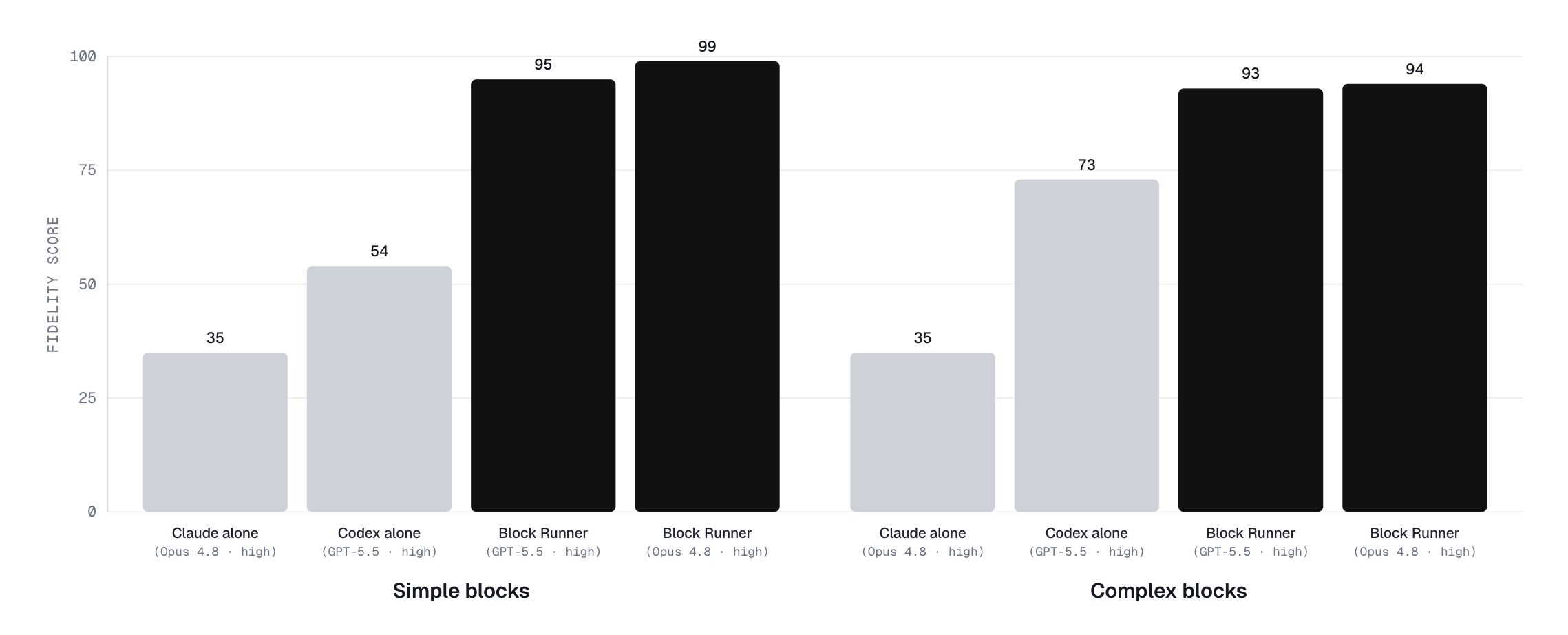
Every conversion is scored from 0 to 100 against a fixed suite of design sections with a
known ideal block tree, by how faithfully it reproduces the intended wp:* structure and
content. The comparison is raw LLMs writing the block markup themselves versus Block Runner
pairing the same model (GPT-5.5, Opus) with its validity gate, across simple and complex layouts.
Two jobs: convert generated HTML into native blocks, and validate that what you ship is editor-valid. Use either half on its own: convert in your agent pipeline, or run the gate as a standalone validator in CI.
wp:cover > wp:columns > wp:buttons, properly nested, with real media ids: plain core blocks anyone can edit in any WordPress, not a builder's proprietary block types you have to keep its plugin installed to touch.<details>, YouTube/Vimeo embeds, and image galleries all map to their native core blocks — not just the hero primitives. What genuinely has no native home (inline SVG icons, definition lists, arbitrary iframes) is preserved as Custom HTML with a warning pointed at the line, never dropped and never crashing the run.Content pours out of AI and agents faster than anyone can hand-build it, but "a block the editor actually accepts" is a brutally exact bar. To land one valid block, every one of these has to be right:
save() would output. Attribute order,
class names, whitespace, a stray self-closing slash: one mismatch and the editor throws
"This block contains unexpected or invalid content" and offers Attempt Block Recovery.<!-- wp:cover {"dimRatio":50,...} -->),
order-sensitive, with defaults that must or must not appear depending on the block.wp:columns accepts only wp:column, wp:buttons only wp:button,
wp:cover wraps a specific inner container. Put the wrong child inside and the block is invalid.wp-block-cover, wp-element-button,
has-background-dim, wp-image-1234). Miss one and it breaks or renders wrong.var:preset|spacing|40,
has-accent-color), not raw hex and pixels, or the result is off-brand or rejected outright.save() may not
validate against this year's.Get any of it wrong and you ship invalid blocks, broken layouts, or one giant uneditable blob. Block Runner gets all of it right: it turns whatever your agents and tools generate into real, nested, editable blocks with resolved media, then proves every result against headless Gutenberg before it reaches the editor.
Any content in. Real blocks out.
| Command | What it does |
|---|---|
convert | Authored HTML to native blocks. The only path that carries CSS. |
assemble | An intent tree — JSON describing which blocks and how they nest — to native blocks, built with createBlock so the result cannot be invalid. |
validate | Check block markup against headless Gutenberg. |
fix | Canonicalize near-miss block markup. |
context | Read a WordPress site into a site.context.json manifest (read-only). |
skill | Print or install the agent guide. |
block-runner convert hero.html                    # blocks to stdout
block-runner assemble intent.json                 # structure in, blocks out
block-runner validate "content/**/*.html" --json
block-runner fix post-content.html --out post-content.fixed.html
Read from stdin with -:
cat hero.html | block-runner convert -
All commands:
| Flag | Description |
|---|---|
--config <path> | Use a specific config file (otherwise auto-loaded from the working directory). |
--json | Emit a machine-readable JSON report instead of text or markup. |
--strict | Exit 1 on strict warnings (unresolved media, fallback blocks). |
--explain | Include rule attribution and near-misses in the report. |
convert and fix also take --out <path> to write the result to a file instead of stdout.
convert adds styling flags:
| Flag | Description |
|---|---|
--styling <level> | Styling ceiling: strict, relaxed (default), open. See Styling fidelity. |
--css-out <path> | Write the sidecar CSS emitted by --styling open to a file. |
convert adds media-resolution flags:
| Flag | Description |
|---|---|
--resolver <kind> | Media resolver: noop, map, wpcli, rest. |
--wp-url <url> | WordPress URL for wpcli or rest resolution. |
--wp-user <user> | WordPress username for rest resolution. |
--wp-app-password-env <name> | Env var holding a WordPress application password. |
0: clean1: problems found2: usage or I/O error3: headless Gutenberg boot failureIt's a Node CLI, so it drops into whatever you already use: your shell, a pre-commit hook, GitHub Actions, or any other CI (GitLab, CircleCI, and friends all run Node). And it's model-agnostic: it works on the output of any model, from any vendor.
pre-commit (add to .pre-commit-config.yaml):
- repo: https://github.com/humanmade/block-runner
  rev: v0.1.0
  hooks:
    - id: block-runner
      args: ['content/**/*.html']   # glob of files that contain block markup
GitHub Actions (or any CI) validate blocks on every push:
- uses: actions/setup-node@v4
  with: { node-version: 22 }
- run: npx block-runner validate "content/**/*.html" --strict
import { canonicalize, convert, validate } from 'block-runner';

const validation = await validate(markup);
const fixed = await canonicalize(markup);
const converted = await convert(html, { resolver: 'noop' });
A <img src="hero.jpg"> in generated HTML is just a URL, but WordPress image and cover blocks
want a real media-library attachment with an ID (wp-image-1234). Media resolution is how
Block Runner connects the two: matching or importing each image into the library and threading
the right id into the block. Choose how it does that:
noop: leave URLs as-is and warn when an ID is missing (good for a dry run).map: look up IDs and URLs from a JSON map you provide.wpcli: find or import media with wp media list and wp media import.rest: find or import via the WordPress REST API, with credentials supplied explicitly.Remote sideloading is off by default. Under --strict, unresolved media (and fallback blocks)
cause exit code 1.
Block Runner auto-loads block-runner.config.{mjs,js,json} from the working
directory, so most runs need no flags; the config sets the media resolver, tokens,
and rules. Pass --config <path> only to point at a config elsewhere.
block-runner.config.mjs:
export default {
  strict: false,
  media: {
    resolver: 'map',
    mapFile: './media-map.json',
  },
  tokens: {
    colors: {
      dark: 'contrast',
      light: 'base',
      accent: 'accent',
    },
    fonts: {
      heading: 'display',
      body: 'body',
    },
    spacing: ['20', '30', '40', '50', '60'],
  },
};
Design HTML often carries custom CSS (and sometimes JavaScript) that doesn't match
the target theme. The styling level controls how much of it Block Runner keeps. The
levels run from safest (cleanest, most editable blocks) to most faithful (keeps the
original look, but less editable):
| Level | What it does |
|---|---|
strict | Map to the theme only. Off-theme styles are dropped. Cleanest, fully on-brand, fully editable. |
relaxed | Keep exact off-theme values on the block (custom color, size, spacing). Still native and fully editable. |
open | Also keep CSS no block can express, by putting a class on the block and emitting that CSS as a stylesheet you ship alongside. Look preserved, structure still editable. |
source | Keep the original markup as a Custom HTML block. Exact, but not editable. Last resort. |
You set one ceiling. Per block, Block Runner uses the strictest level that still
captures the design, and never goes past your ceiling. Configure it in
block-runner.config.mjs, or per run with --styling:
export default { styling: 'relaxed' }; // the default
Styling is read from inline style attributes and from single-class <style> rules
(.hero { … }). An inline style outranks a class rule, matching CSS. Every declaration
is accounted for: mapped onto the block, recognised as consumed by the structure, or
reported with the input line and the rule that authored it — nothing is dropped silently.
open emits a stylesheet, so it needs somewhere to put it. --styling open requires
either --css-out <path> or --json (where it arrives as sidecarCss) and is an error
otherwise — a level that quietly discarded the CSS it promised to keep would be worse
than not offering it.
Custom JavaScript is never inlined. A behavior maps to a native interactive block, comes from a block plugin, or is dropped, and every drop or escalation is reported.
Status:
strict,relaxedandopenare implemented.sourceis not built yet and is rejected rather than silently downgraded — though the converter already falls back to a Custom HTML block for structure it cannot convert.
A conversion benchmark lives under benchmarks/: it measures how faithfully real generator
output (Impeccable, Codex, Claude, and more) converts to native blocks, across swappable
converters (the built-in rules, plus experimental LLM translators run via their CLIs).
npm run bench          # score the suite; write benchmarks/presentation/review.html + benchmarks/presentation/scoreboard.html
npm run bench:record   # also append a provenance-tagged run to benchmarks/results.jsonl
Runs are recorded with engine / model / effort / suiteHash, so older engines stay
backtestable against the current suite (scripts/backtest.sh). See benchmarks/README.md
for adding producers and engines.
GPL-2.0-or-later.
FAQs
The layer between generated content and WordPress — convert what AI, agents, and design tools emit into clean, valid, native Gutenberg blocks, and validate every result. CLI + library.
The npm package block-runner receives a total of 1,340 weekly downloads. As such, block-runner popularity was classified as popular.
We found that block-runner demonstrated a healthy version release cadence and project activity because the last version was released less than a year ago. It has 1 open source maintainer collaborating on the project.
Security News
upm uses Node.js to deliver fast npm installs in about 250 KB, with a JavaScript API and security defaults.

Company News
Socket is joining the OpenJS Security Stewardship Program to fund Node.js vulnerability research, maintainer remediation, and security releases.

Security News
Two compromised GitHub Actions were re-enabled with malicious tags intact, exposing thousands of downstream repositories to Mini Shai-Hulud.