Block Runner
The primitive between everything and WordPress blocks.





Block Runner is the layer between generated content and WordPress. AI tools, agents, and
design tools spit out HTML, but the block editor only trusts blocks it recognizes, so it
freezes everything else into a single "Custom HTML" blob, or breaks the block outright with
"Attempt Block Recovery." Block Runner converts that output into real, nested, native
Gutenberg blocks (wp:cover > wp:columns > wp:buttons) and proves every result is
editor-valid. Built to sit in an agent loop, a content pipeline, or a CI gate, and
deliberately a primitive rather than a platform: the blocks it emits are plain, native
WordPress, editable in any editor with nothing proprietary to keep installed.
| Today ❌ | one frozen Custom HTML blob, or a broken block and "Attempt Block Recovery" |
| With Block Runner ✅ | wp:cover > wp:columns > wp:buttons: real, nested, editable, valid |
Quickstart
npm install block-runner
Then just ask your coding agent:
Use block-runner to convert this hero into a native Gutenberg block.
Or run the CLI yourself:
block-runner convert hero.html
generate-page | block-runner convert -
block-runner convert hero.html --out hero.blocks.html
Every run is checked against headless Gutenberg, so what comes back is guaranteed
editor-valid, or Block Runner tells you exactly what wasn't and points at the line.
Using Block Runner from an AI agent
If you are the one deciding the structure, don't write HTML and convert it. Describe the
structure as an intent tree and pipe it to block-runner assemble — deterministic code builds
the markup, so it cannot come out invalid.
Block Runner ships a canonical skill in the open Agent Skills layout. Install it into the
current project (ask the user before writing files):
npx block-runner skill --install
That installs the same skill to the cross-agent .agents/skills/block-runner location and
Claude Code's .claude/skills/block-runner compatibility location. Project scope is the
default so the instructions can travel with a repository. Use user scope or one target when
that is what you want:
npx block-runner skill --install --scope user
npx block-runner skill --install --target agents
npx block-runner skill --install --target claude
For a harness with another skills directory, use --dir <skills-directory>. With no skill
system, npx block-runner skill prints the complete harness-neutral guide to stdout and writes
nothing. Project discovery is the most portable choice; user-wide discovery paths still vary
between harnesses, so use --dir when a client documents a different global root.
Benchmark
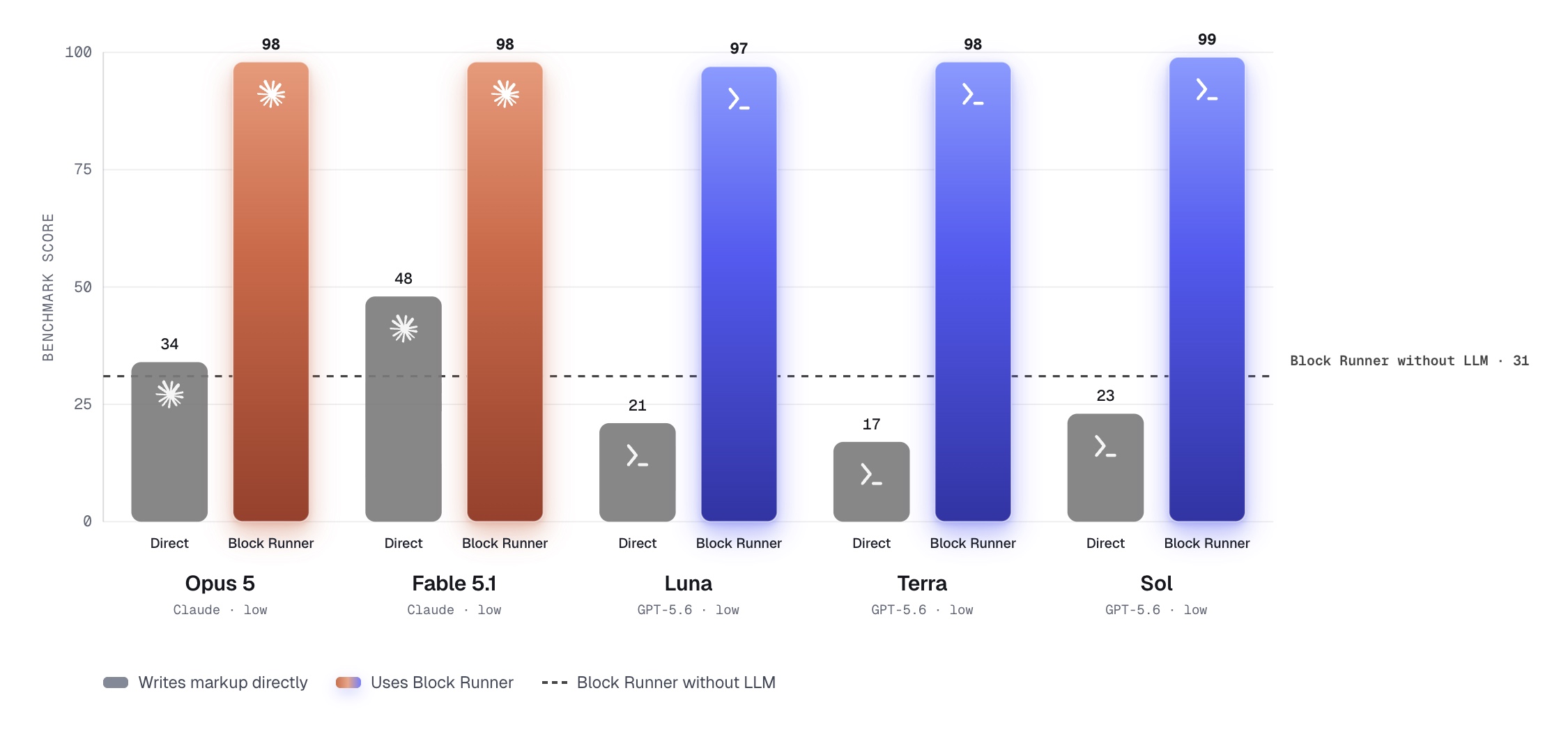
The benchmark runs 63 fixed HTML fixtures. Each model gets the same fixture in two lanes:
Direct writes Gutenberg markup itself; Block Runner returns an intent tree that the
package assembles and validates. The dashed line is the deterministic rules converter running
without an LLM. Every result is scored from 0 to 100 against the fixture's accepted block tree.
What it does
Two jobs: convert generated HTML into native blocks, and validate that what you ship
is editor-valid. Use either half on its own: convert in your agent pipeline, or run the gate
as a standalone validator in CI.
Convert: generated HTML → native blocks
- Native blocks, never locked in. Real
wp:cover > wp:columns > wp:buttons, properly nested, with real media ids: plain core blocks anyone can edit in any WordPress, not a builder's proprietary block types you have to keep its plugin installed to touch.
- Broad element coverage. Tables, quotes, code, separators, video/audio,
<details>, YouTube/Vimeo embeds, and image galleries all map to their native core blocks — not just the hero primitives. What genuinely has no native home (inline SVG icons, definition lists, arbitrary iframes) is preserved as Custom HTML with a warning pointed at the line, never dropped and never crashing the run.
- Any model, any agent. Feed it whatever your LLM, agent, or design tool emits, from any vendor, and drop it into your own pipeline instead of adopting someone else's editor.
- Media resolution. Resolve images to real attachment ids via a map, WP-CLI, or the REST API.
- Styling fidelity, your call. Keep off-theme styles or map them to your theme, up to a ceiling you set.
- Extensible. Built-in rules out of the box; add your own, or hand the hardest layouts to an LLM (experimental).
Validate: prove it's editor-valid
- A seatbelt for generated blocks. Models and builders will cheerfully emit markup that corrupts the editor; every result is held to a gate wired to headless Gutenberg first, so valid means what the editor means, not what a generator hoped.
- Reproducible gate. Same markup, same verdict, every time. Safe to run on every request and in CI.
- Canonicalize. Rewrite near-miss markup into the exact shape the editor expects.
- Never fails silently. When something can't be expressed natively, it says so and points at the exact line.
Why Block Runner
Content pours out of AI and agents faster than anyone can hand-build it, but "a block the
editor actually accepts" is a brutally exact bar. To land one valid block, every one of these
has to be right:
- Markup is validated against what the block's
save() would output. Attribute order,
class names, whitespace, a stray self-closing slash: one mismatch and the editor throws
"This block contains unexpected or invalid content" and offers Attempt Block Recovery.
- Attributes live in a typed HTML-comment schema (
<!-- wp:cover {"dimRatio":50,...} -->),
order-sensitive, with defaults that must or must not appear depending on the block.
- Nesting is enforced.
wp:columns accepts only wp:column, wp:buttons only wp:button,
wp:cover wraps a specific inner container. Put the wrong child inside and the block is invalid.
- Each block expects its exact generated classes (
wp-block-cover, wp-element-button,
has-background-dim, wp-image-1234). Miss one and it breaks or renders wrong.
- Images need a real attachment ID, not just a URL, so you also have to resolve and import
media into the library and thread the id through the markup.
- Colors, spacing, and fonts have to map to your theme presets (
var:preset|spacing|40,
has-accent-color), not raw hex and pixels, or the result is off-brand or rejected outright.
- Blocks carry deprecations. Markup that validated against last year's
save() may not
validate against this year's.
- Anything it can't place collapses into one frozen "Custom HTML" blob, and the structure,
nesting, and editability are gone.
Get any of it wrong and you ship invalid blocks, broken layouts, or one giant uneditable blob.
Block Runner gets all of it right: it turns whatever your agents and tools generate into real,
nested, editable blocks with resolved media, then proves every result against headless
Gutenberg before it reaches the editor.
Any content in. Real blocks out.
CLI
convert | Authored HTML to native blocks. The only path that carries CSS. |
assemble | An intent tree — JSON describing which blocks and how they nest — to native blocks, built with createBlock so the result cannot be invalid. |
validate | Check block markup against headless Gutenberg. |
fix | Canonicalize near-miss block markup. |
context | Read a WordPress site into a site.context.json manifest (read-only). |
skill | Print or install the agent guide. |
block-runner convert hero.html
block-runner assemble intent.json
block-runner validate "content/**/*.html" --json
block-runner fix post-content.html --out post-content.fixed.html
Read from stdin with -:
cat hero.html | block-runner convert -
Flags
All commands:
--config <path> | Use a specific config file (otherwise auto-loaded from the working directory). |
--json | Emit a machine-readable JSON report instead of text or markup. |
--strict | Exit 1 on strict warnings (unresolved media, fallback blocks). |
--explain | Include rule attribution and near-misses in the report. |
convert and fix also take --out <path> to write the result to a file instead of stdout.
convert adds styling flags:
--styling <level> | Styling ceiling: strict, relaxed (default), open. See Styling fidelity. |
--css-out <path> | Write the sidecar CSS emitted by --styling open to a file. |
convert adds media-resolution flags:
--resolver <kind> | Media resolver: noop, map, wpcli, rest. |
--wp-url <url> | WordPress URL for wpcli or rest resolution. |
--wp-user <user> | WordPress username for rest resolution. |
--wp-app-password-env <name> | Env var holding a WordPress application password. |
skill --install adds installation flags:
--scope project|user | Install for the current project (default) or the current user. |
--target all|agents|claude | Install both discovery copies (default), only .agents/skills, or only .claude/skills. |
--dir <path> | Install under one explicit skills directory; cannot be combined with --scope or --target. |
--dry-run | Show resolved destinations without writing files. |
--force | Replace locally changed or unmanaged files at canonical bundle paths. |
Installed instructions pin runtime commands to the package version that installed them, while
their explicit update command stays on @latest. Re-run
npx block-runner@latest skill --install to update them. Existing local edits are refused
unless --force is explicit.
An installation made by 0.7.x predates the managed manifest, so the first upgrade is
deliberately refused as unmanaged. Review that copy, rerun once with --force, and remove the
preserved root-level GUIDE.md after confirming the new references/GUIDE.md copy.
Exit codes
0: clean1: problems found2: usage or I/O error3: headless Gutenberg boot failure
Run it anywhere
It's a Node CLI, so it drops into whatever you already use: your shell, a pre-commit hook,
GitHub Actions, or any other CI (GitLab, CircleCI, and friends all run Node). And it's
model-agnostic: it works on the output of any model, from any vendor.
pre-commit (add to .pre-commit-config.yaml):
- repo: https://github.com/humanmade/block-runner
rev: v0.1.0
hooks:
- id: block-runner
args: ['content/**/*.html']
GitHub Actions (or any CI) validate blocks on every push:
- uses: actions/setup-node@v4
  with: { node-version: 22 }
- run: npx block-runner validate "content/**/*.html" --strict
Library
import { canonicalize, convert, validate } from 'block-runner';

const validation = await validate(markup);
const fixed = await canonicalize(markup);
const converted = await convert(html, { resolver: 'noop' });
Media Resolution
A <img src="hero.jpg"> in generated HTML is just a URL, but WordPress image and cover blocks
want a real media-library attachment with an ID (wp-image-1234). Media resolution is how
Block Runner connects the two: matching or importing each image into the library and threading
the right id into the block. Choose how it does that:
noop: leave URLs as-is and warn when an ID is missing (good for a dry run).map: look up IDs and URLs from a JSON map you provide.wpcli: find or import media with wp media list and wp media import.rest: find or import via the WordPress REST API, with credentials supplied explicitly.
Remote sideloading is off by default. Under --strict, unresolved media (and fallback blocks)
cause exit code 1.
Configuration
Block Runner auto-loads block-runner.config.{mjs,js,json} from the working
directory, so most runs need no flags; the config sets the media resolver, tokens,
and rules. Pass --config <path> only to point at a config elsewhere.
block-runner.config.mjs:
export default {
  strict: false,
  media: {
    resolver: 'map',
    mapFile: './media-map.json',
  },
  tokens: {
    colors: {
      dark: 'contrast',
      light: 'base',
      accent: 'accent',
    },
    fonts: {
      heading: 'display',
      body: 'body',
    },
    spacing: ['20', '30', '40', '50', '60'],
  },
};
Styling fidelity
Design HTML often carries custom CSS (and sometimes JavaScript) that doesn't match
the target theme. The styling level controls how much of it Block Runner keeps. The
levels run from safest (cleanest, most editable blocks) to most faithful (keeps the
original look, but less editable):
strict | Map to the theme only. Off-theme styles are dropped. Cleanest, fully on-brand, fully editable. |
relaxed | Keep exact off-theme values on the block (custom color, size, spacing). Still native and fully editable. |
open | Also keep CSS no block can express, by putting a class on the block and emitting that CSS as a stylesheet you ship alongside. Look preserved, structure still editable. |
source | Keep the original markup as a Custom HTML block. Exact, but not editable. Last resort. |
You set one ceiling. Per block, Block Runner uses the strictest level that still
captures the design, and never goes past your ceiling. Configure it in
block-runner.config.mjs, or per run with --styling:
export default { styling: 'relaxed' };
Styling is read from inline style attributes and from single-class <style> rules
(.hero { … }). An inline style outranks a class rule, matching CSS. Every declaration
is accounted for: mapped onto the block, recognised as consumed by the structure, or
reported with the input line and the rule that authored it — nothing is dropped silently.
open emits a stylesheet, so it needs somewhere to put it. --styling open requires
either --css-out <path> or --json (where it arrives as sidecarCss) and is an error
otherwise — a level that quietly discarded the CSS it promised to keep would be worse
than not offering it.
Custom JavaScript is never inlined. A behavior maps to a native interactive block,
comes from a block plugin, or is dropped, and every drop or escalation is reported.
Status: strict, relaxed and open are implemented. source is not built yet and is
rejected rather than silently downgraded — though the converter already falls back to a
Custom HTML block for structure it cannot convert.
Running the benchmark
A conversion benchmark lives under benchmarks/: it measures how faithfully real generator
output (Impeccable, Codex, Claude, and more) converts to native blocks, across swappable
converters (the built-in rules, plus experimental LLM translators run via their CLIs).
npm run bench
npm run bench:record
Runs are recorded with engine / model / effort / suiteHash, so older engines stay
backtestable against the current suite (scripts/backtest.sh). See benchmarks/README.md
for adding producers and engines.
License
GPL-2.0-or-later.



