Block Runner
Turn HTML into editable WordPress blocks, or generate the source for a reusable registered block.





Block Runner is an open-source CLI and JavaScript library from Human Made. It converts supported HTML into native Gutenberg blocks and checks the generated markup with the Gutenberg packages used by the WordPress editor. It can also generate a static registered block: source files you build into a plugin, with native editable blocks inside.
The package makes no AI model calls. Built-in rules can convert HTML on their own. An external agent can interpret a design and give Block Runner a structured plan to assemble or compile. The optional skill provides instructions for that agent.
Quickstart
Requires Node.js 20.19.0+ on 20.x, 22.13.0+ on 22.x, or 24.0.0+. Node 21 and 23 are unsupported. Basic conversion needs no AI agent, Docker or running WordPress site.
npm install block-runner
printf '<p>Hello WordPress</p>\n' > hello.html
npx --no-install block-runner convert hello.html
Output:
<p>Hello WordPress</p>
This is Gutenberg page content, ready to paste into the editor's code view. To save the markup or inspect its warnings:
npx --no-install block-runner convert hello.html --out hello.blocks.html
npx --no-install block-runner convert hello.html --json
The JSON report includes ok, block counts, warnings and source locations. Review it when converting a more complex design. The shipped hero example is a larger input to explore.
Choose your workflow
| Convert HTML using built-in rules | convert | Gutenberg markup for page content |
| Build page content from an agent's block tree | CLI assemble | Gutenberg markup, assembled and validated |
| Create a reusable named block from a design | author | A plan and generated block source; preview and confirm before writing |
| Check or repair existing block markup | validate / fix | A report or canonicalised markup |
For straightforward HTML, start with convert. For a design that needs interpretation, an agent can choose the block structure and send it to CLI assemble. Both page-content routes finish with media resolution, theme-token handling and validation. Neither creates a registered block's source files.
Registered-block authoring
Use author when the result should be a named block such as acme/notice, available for repeated insertion. Here, “authoring” means generating block source code. Block Runner can analyse HTML directly or accept an agent's source-linked proposal for the structure and editable fields.
The output is a static wrapper around native blocks, with block metadata, editor code, styles and assets. Source generation, plugin build and verification in WordPress are separate steps. Follow the complete registered-block delivery guide, including the shipped notice example and destination-specific write confirmations. That guide is also bundled with the installed skill.
Library
The library is ESM-only. Save this as hello.mjs in the project where you installed Block Runner, then run node hello.mjs:
import { convert } from 'block-runner';
const result = await convert('<p>Hello WordPress</p>');
console.log(result.output);
console.log(result.items);
convert returns the same report used by the CLI. For an intent JSON string, use realize to get the complete assembly and validation report. The lower-level library assemble only builds Gutenberg objects; it does not run that full workflow. See the API reference for validation, registered-block generation and compatibility contracts.
CommonJS callers can use await import('block-runner').
Using Block Runner from an AI agent
Install the bundled skill in your project:
npx --no-install block-runner skill --install
This writes .agents/skills/block-runner and .claude/skills/block-runner. Then ask your agent:
Use Block Runner to create a reusable block from this design in the existing plugin.
Your agent interprets the design and runs the tools. The package handles conversion, generation and validation. Installing the skill does not add a model or require an API key for Block Runner.
See skill installation options for user scope, specific harnesses and upgrades. Without --install, the command prints the guide without writing files.
Capabilities and limits
- Supported HTML becomes native blocks. Unsupported structures can remain as Custom HTML, with warnings;
--strict fails on fallback blocks and unresolved media.
- Media IDs can come from a supplied map, WP-CLI or REST. Collecting site context or using WP-CLI resolution needs a site and the selected external tooling.
- Styles can map to existing theme presets, native block attributes or supported CSS. Block Runner does not rewrite
theme.json.
- Registered-block generation produces static source. It does not generate arbitrary PHP renderers, custom field editors or JavaScript interactions.
Use the original design HTML rather than scraped frontend markup. Valid markup does not prove visual fidelity or compatibility with every site. Inspect warnings and verify the result in its target WordPress environment. The construction guide explains other approaches when the static generator does not fit.
Benchmark
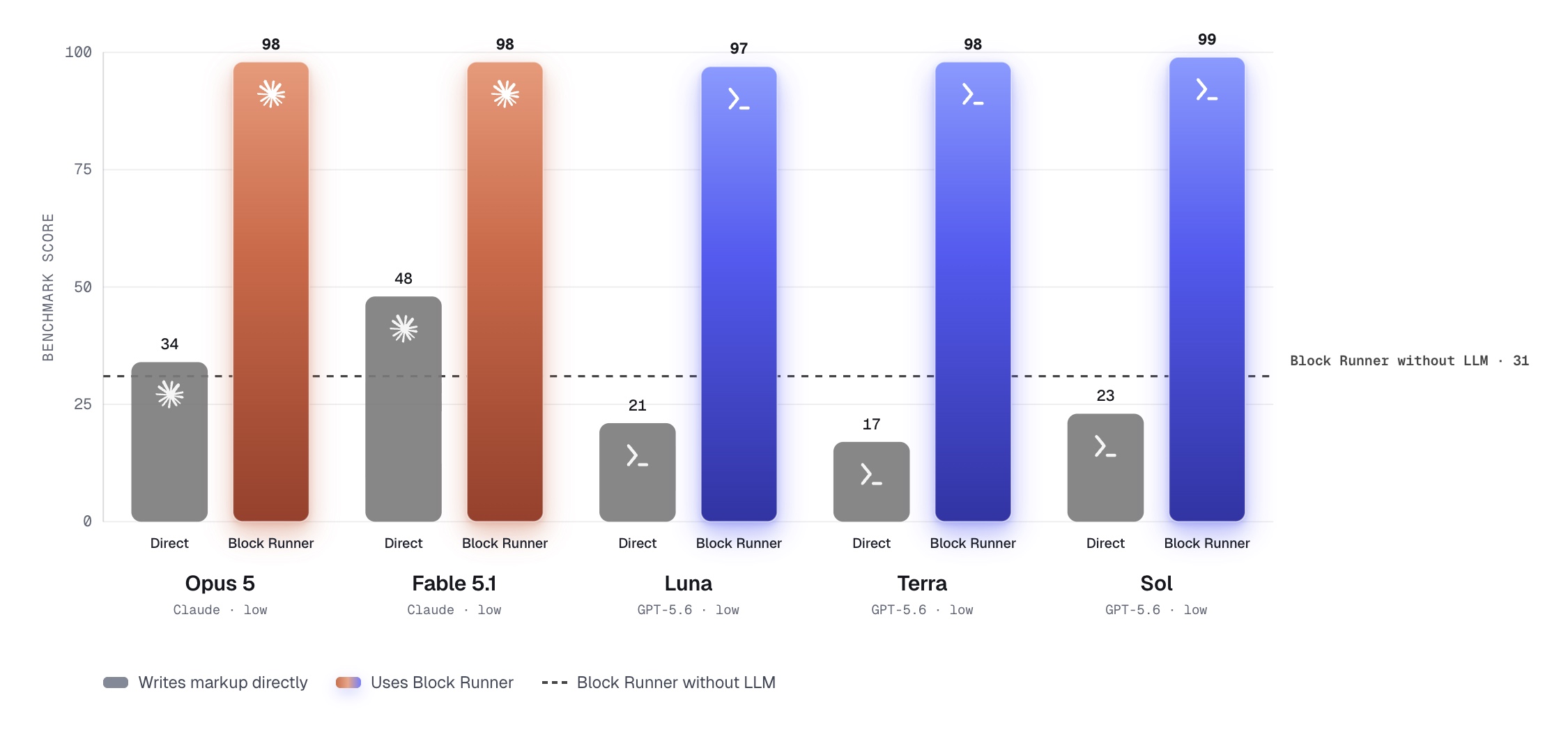
This historical benchmark compares models writing Gutenberg markup directly with models supplying block trees to Block Runner. The deterministic rules converter has its own separately scored lane; the model-assisted scores do not describe plain convert. Each lane uses the same 63 HTML sections.
These are page-content conversion results, not measurements of registered-block generation, visual fidelity or editor persistence. See the method and limitations and the original report.
Documentation
The bundled context command uses Wesper 0.4.1. See the site-context reference for what the manifest supplies and its limitations.
License
GPL-2.0-or-later.



