
English |
Tiếng Việt |
简体中文 |
한국어






Follow product updates on x.com/clisbot.
clisbot - Turn your favorite coding CLI into an agentic personal assistant, workplace assistant, coding partner - on the go
Want to use OpenClaw but are struggling because:
- API cost is too high, so you end up looking for LLM proxy workarounds
- you have to switch between OpenClaw for daily work and Claude / Codex / Gemini for real coding
- you want to code on the go and work on the go
clisbot is the right solution for you.
clisbot turns native frontier agent CLIs like Claude Code, Codex, and Gemini CLI into durable Slack and Telegram bots. Each agent runs inside its own tmux session, keeps a real workspace, and can behave like a coding bot, a daily-work assistant, or a team assistant with SOUL, IDENTITY, and MEMORY.
It is not just a tmux bridge with chat glued on top. clisbot treats Slack and Telegram as real channel surfaces with routing, durable conversation state, pairing, follow-up control, file sending and receiving, and the ability to keep frontier coding agents inside the tools and communication surfaces where teams already work.
clisbot is also meant to grow into a reusable agent runtime layer that can support many CLI tools, many channels, and many workflow shapes on top of the same durable agent session.
Start Here By Goal
I Want A Personal Coding Bot In Telegram Or Slack
- start with the Quick Start
- best fit when you want Codex, Claude, or Gemini available from chat without
giving up a real workspace
- current release value: a much more AI-native control path, where the bot can
increasingly set up
/queue, loops, schedules, and other recurring work for
you from normal chat instead of forcing you to memorize command syntax first
I Want A Shared Team Bot
- start with Quick Start, then read Surface Access Model
- best fit when you need one bot in a real Slack channel, Telegram group, or
Telegram topic with explicit route and sender control
- current release value: safer shared-surface policy, tighter topic or thread
isolation, per-group sender control, and permission boundaries that let one
bot live in a team group without opening it to everyone there
I Need Operator Control And Debugging
- start with Common CLI commands
- most useful surfaces:
clisbot status, clisbot logs,
clisbot watch --latest, clisbot inspect --latest, and clisbot queues
- current release value: more truthful
sessionId, lighter runner inventory,
and less confusing restart behavior during updates
I Just Want To Know What Changed Recently
Why I Built This
I’m Long Luong (Long), Co-founder & CTO of Vexere, Vietnam’s #1 transportation booking platform, where we also build SaaS and inventory distribution infrastructure for transportation operators. As we scale a 300-person company with a 100-member Engineering, Product, and Design team, I’ve been searching for the most practical way to roll out AI-native workflows across the organization.
The challenge is not whether AI is useful. It is how to make it work at enterprise scale without creating a fragmented, expensive, or ungovernable stack. In practice, that means solving several hard problems at once: cost control, workflow truthfulness, team accessibility, governance, and the ability to bring frontier AI into the real tools and communication surfaces where work already happens.
clisbot is the approach I landed on. Instead of building yet another isolated AI layer, it turns the coding CLIs we already trust into durable, chat-native agents that can work across Slack, Telegram, and real team workflows.
Why clisbot
- One frontier-agent stack for both daily work and real coding. You do not need one product for assistant work and another for actual engineering work.
- Reuses native CLI subscriptions you already pay for, such as Claude Code, Codex, and Gemini CLI, instead of pushing you toward a separate API-cost-heavy stack.
- Learns from and integrates the two biggest strengths that made OpenClaw popular: memory and native channel integration with deep, channel-specific conversation and presentation capabilities.
- Not just a tmux bridge. Slack and Telegram are treated as real channel surfaces with routing, thread or topic continuity, pairing, follow-up control, and attachment-aware interaction instead of plain text passthrough so you can work from your laptop or on the go without giving up a real coding workspace.
- Team-first by design, with
AGENTS, USER, and MEMORY context bootstrapping shaped for shared team reality instead of only personal solo-assistant flows.
- Shared-surface permission control is a first-class feature: a bot can be in a team group but still answer only the specific people you allow there, while sensitive control actions stay behind explicit auth roles and permissions.
- Useful for coding, operations, teamwork, and general assistant work, with fast chat controls such as
!<command>, /bash <command>, /queue, /loop, /streaming, and /mention.
- New in the
v0.1.50 to v0.1.52 stable line: the AI-native control experience is much better, the default runner startup window is now 60 seconds, and stale old startup-delay pins no longer silently keep upgraded installs on shorter timeouts.
Who This Fits Best
- Anyone who wants a high-agency personal assistant with OpenClaw-style memory,
workspace context, and a skill-oriented operating model that can do far more
than a thin chat wrapper.
- Solo builders who want a real coding assistant in Telegram or Slack, backed
by Codex, Claude, or Gemini, without rebuilding their workflow around a new
web product.
- Team leads who want one shared bot with explicit group or topic safety,
durable context, and attachment-aware chat workflows.
Surface Access Model
The important current config mental model is:
Inside each bot:
directMessages is the one-person surface mapgroups is the multi-user surface map- stored keys use raw provider-local ids plus
*
Examples:
- Slack shared surface:
groups["C1234567890"]
- Telegram group:
groups["-1001234567890"]
- Telegram topic:
groups["-1001234567890"].topics["42"]
- DM wildcard default:
directMessages["*"]
Operator CLI ids stay prefixed:
dm:<id>dm:*group:<id>group:*topic:<chatId>:<topicId>
Current invariants:
- Slack
channel:<id> is compatibility input only, not canonical operator naming
- stored config under one bot uses only raw ids plus
* inside directMessages and groups
group:* is the default multi-user sender policy node for one bot and should be updated or disabled, not removeddisabled means silent for everyone on that surface, including owner/admin and pairing guidance- owner/admin do not bypass
groupPolicy/channelPolicy admission; after a group is admitted and enabled, they bypass sender allowlists, while blockUsers still wins
- the deny message intentionally uses one common human-facing term,
group, for every multi-user surface
CLI Compatibility Snapshot
clisbot currently works well with Codex, Claude, and Gemini.
codex | Best today | Strongest default for routed coding work. |
claude | Usable with caveats | Claude can surface its own plan-approval and auto-mode behavior even when launched with bypass-permissions. |
gemini | Fully compatible | Gemini is supported as a first-class runner for routed Slack and Telegram workflows. |
CLI-specific operator notes:
Quick Start
Platform support:
- Linux and macOS are the supported host environments today.
- Native Windows is not supported yet because
clisbot currently depends on tmux and Bash-based runtime flows.
- If you use Windows, run
clisbot inside WSL2.
Most people should start here:
npm install -g clisbot
clisbot start \
  --cli codex \
  --bot-type personal \
  --telegram-bot-token <your-telegram-bot-token> \
  --persist
If you want to try first without persisting the token yet, just remove --persist.
Day-to-day rescue commands are clisbot stop, clisbot restart,
clisbot status, and clisbot logs.
Next steps:
- For security, DMs default to pairing.
clisbot also has a smart autopairing path to reduce first-run friction. If
you send the bot a DM within the first 30 minutes, you can usually claim the
owner role immediately and start using it without a separate pairing round.- New from the current
v0.1.50 to v0.1.52 stable line: the AI-native operator experience is much stronger. You
can increasingly ask the bot through chat to explain how to use it, update
itself and summarize what's new, help onboard you, create or add a new bot or
agent, or set up loops and schedules for recurring work instead of relying
only on slash commands.
- Existing configs from any version before
0.1.50 still update directly on first run when you install v0.1.52. clisbot writes a backup first under ~/.clisbot/backups/, then rewrites the config to the current 0.1.50 schema shape.
- Shared Slack channels, Slack groups, Telegram groups, and Telegram topics are a separate gate: normal users need an explicit route such as
group:<id> or topic:<chatId>:<topicId> before the bot will talk there. Legacy Slack channel:<id> input still works for compatibility.
- After a shared surface is admitted, per-surface sender control comes from the bot's default shared rule
groups["*"] plus any route-local allowUsers or blockUsers.
- With that permission model, a bot can be added to a team group but still be
allowed to answer only some people in that group.
- If the effective shared policy is
disabled, the bot stays silent there for everyone, including owner/admin.
- If the effective shared policy is
allowlist and a sender is not allowed, the bot denies before the runner:
You are not allowed to use this bot in this group. Ask a bot owner or admin to add you to \allowUsers` for this surface.`
- To chat with the bot in a group:
- telegram: Add the bot to the group, then use
/start there. It will guide
you toward the route you need to add. You can run that command directly or
copy it into a DM with the bot and ask it to do the setup for you if you
are already authorized.
- slack: similar flow, but Slack-native slash command handling is awkward.
Use a leading space such as
/start, or use the alias \start. The same
workaround applies to other slash commands such as /streaming on or
\mention.
- group conversations require a mention by default to avoid abuse, but smart
follow-up stays open for a short window so you do not need to tag the bot
again on every reply. You can also ask the bot to change that mode for you.
- If you want stricter mention behavior, use
/mention for this conversation only, /mention channel for the current channel or group default, or /mention all for the current bot default.
- For long running tasks such as coding, turn streaming on with
/streaming on
and check it with /streaming status. In Slack, use a leading space such
as /streaming on or the alias \streaming on.
- If you want to add more owner or app admin, grant that principal explicitly with the platform prefix plus the channel-native user id, for example
clisbot auth add-user app --role owner --user telegram:1276408333 or clisbot auth add-user app --role admin --user slack:U123ABC456.
clisbot auth --help now covers role scopes, permission sets, and add/remove flows for users and permissions.- App-level auth and owner-claim semantics in Authorization And Roles describe both the current runtime reality and the remaining target-model gaps.
Need the step-by-step setup docs instead of the shortest path?
What happens next:
--bot-type personal creates one assistant for one human--bot-type team creates one shared assistant for a team, channel, or group workflow- literal token input stays in memory unless you also pass
--persist
--persist promotes the token into the canonical credential file so the next clisbot start can reuse it without retyping- fresh bootstrap only enables the channels you name explicitly
- after the persisted first run, later restarts can use plain
clisbot start
Recent Release Highlights
v0.1.52: clarifies shared-route setup so routes add ... clearly means “use the agent currently assigned to that bot by default,” and prunes stale short startupDelayMs overrides so upgraded installs can actually inherit the newer 60-second startup default.v0.1.51: raises the default runner startup window to 60 seconds across the
standard CLI families and the shared runner fallback, so slower fresh launches
are less likely to fail before the first prompt can be submitted.v0.1.50: a much more AI-native operator experience, where you can
increasingly talk to the bot to manage itself; plus safer personal and team
bots in real Slack and Telegram groups, automatic direct updates from older
installs, durable queue control, clearer session continuity truth, more
reliable scheduled loops, stronger trust/restart behavior, and stricter
streaming/session isolation.v0.1.43: more durable runtime recovery, clearer routed follow-up controls, more truthful tmux prompt submission checks, better queued-start notifications, and safer Slack thread attachment behavior.
What the current stable line most likely means for you:
- The headline is AI-native control: ask the bot in chat to queue work,
schedule recurring briefs, help update itself, explain release changes, or
guide setup and routing instead of dropping to the shell for every action.
- personal user: fewer fragile long-run failures, better
/queue, better media
handling on Telegram
- shared bot owner: clearer route safety, easier direct upgrade from older
installs, and more interesting team use cases where one bot lives in the
group but only responds to selected people there
- operator: better queue visibility, better session continuity truth, and
restart behavior that is less misleading during updates, plus faster
watch and inspect shortcuts when something goes wrong
There are many more useful fixes and operator improvements in the full release
notes, including config update safety, CLI help, setup docs, runner debugging,
route policy behavior, channel-specific polish, and the broader AI-native
workflow direction behind this release.
Read the full notes here:
If you prefer Slack first:
clisbot start \
  --cli codex \
  --bot-type team \
  --slack-app-token SLACK_APP_TOKEN \
  --slack-bot-token SLACK_BOT_TOKEN
Short alias:
clis start --cli codex --bot-type personal --telegram-bot-token <your-telegram-bot-token>
Local repo path:
bun install
bun run start --cli codex --bot-type personal --telegram-bot-token <your-telegram-bot-token> --persist
Repo-local bun run start|stop|restart|status|logs|init|pairing is pinned by .env to CLISBOT_HOME=~/.clisbot-dev, so local testing does not accidentally reuse your main ~/.clisbot runtime.
Update note for existing installs:
- Older installs before
v0.1.50 now update directly on first run with a
backup written first, so most people can update and restart without a manual
migration pass.
v0.1.52 keeps that direct-upgrade path and does not introduce a new config
schema bump; it also cleans up stale short startup-delay overrides that would
otherwise keep some upgraded installs on older timeout behavior.- After you are on the
v0.1.50 schema line, future upgrades should feel much
more AI-native:
in many cases you can simply ask the bot to update clisbot to the latest
version, and it can follow the update guide, perform the upgrade flow, then
brief you on what changed.
- If you still want an agent to inspect your current config before updating,
ask Codex or Claude in this repo to review it first.
- The manual package upgrade path is now simpler:
npm install -g clisbot && clisbot restart
clisbot --version
First conversation path:
- send a DM to the bot in Slack or Telegram
- if that principal is already app
owner or app admin, pairing is bypassed and the bot should answer normally
- otherwise,
clisbot defaults DMs to pairing mode and replies with a pairing code plus approval command
Approve it with:
clisbot pairing approve slack <CODE>
clisbot pairing approve telegram <CODE>
Fresh config starts with no configured agents, so first-run clisbot start requires both --cli and --bot-type before it creates the first default agent.
Fresh config also starts with no preconfigured Slack channels or Telegram groups or topics. Add those routes manually in ~/.clisbot/clisbot.json.
clisbot start requires explicit channel token input before it bootstraps anything. You can pass raw values, env names such as MY_TELEGRAM_BOT_TOKEN, or placeholders such as '${MY_TELEGRAM_BOT_TOKEN}'.
If you want a separate dev instance beside your main bot, see the Development Guide.
Showcase
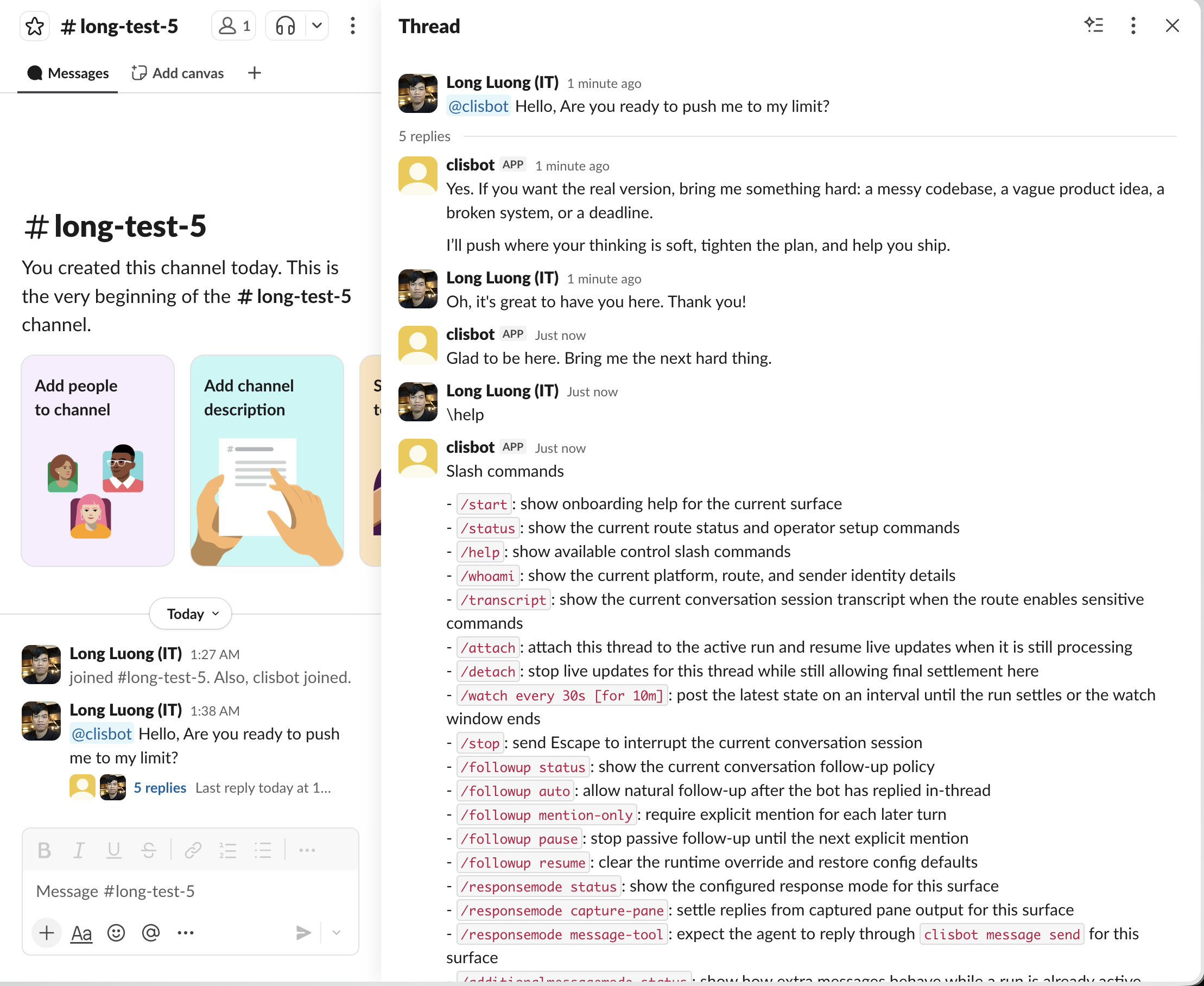
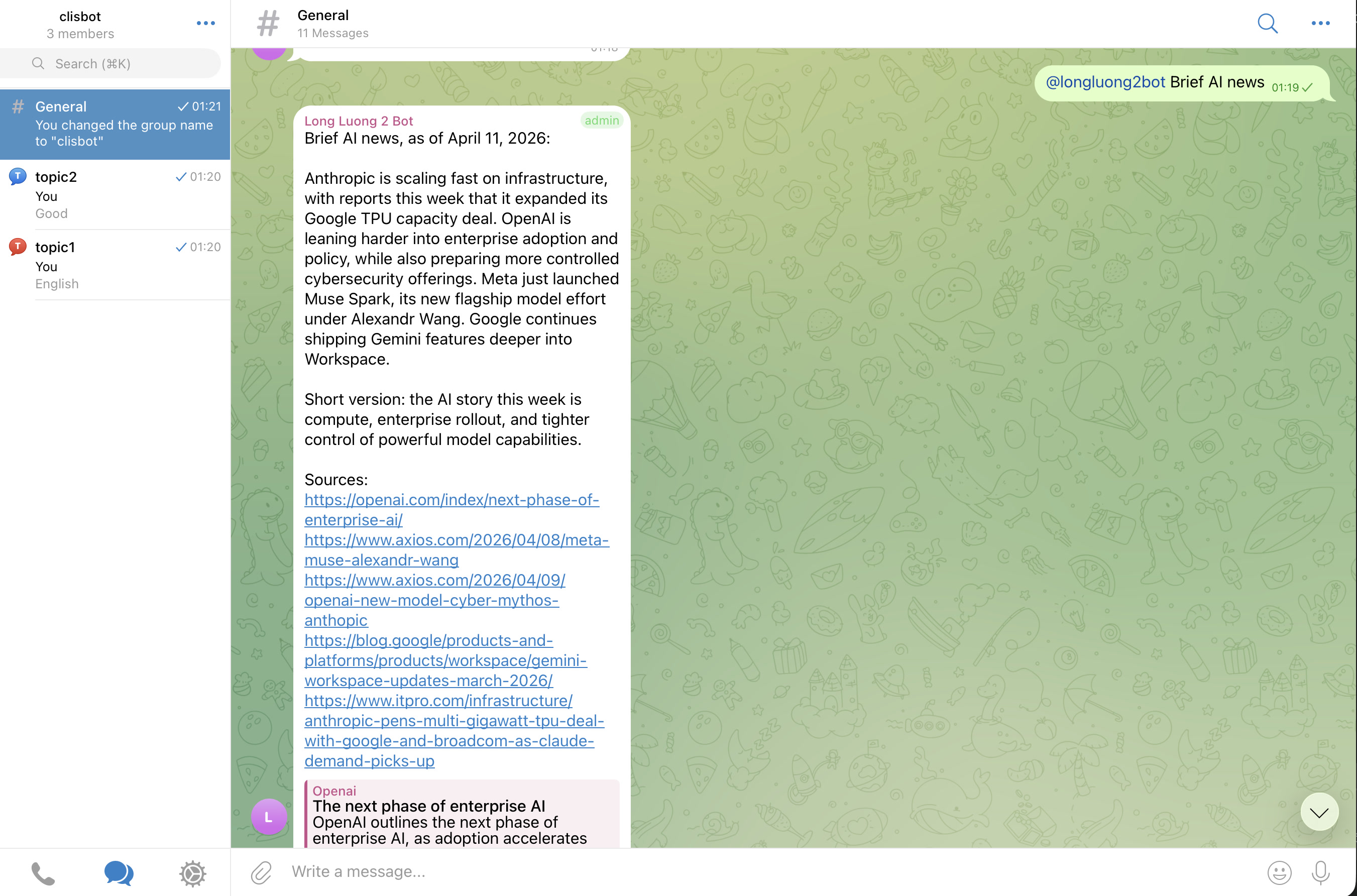
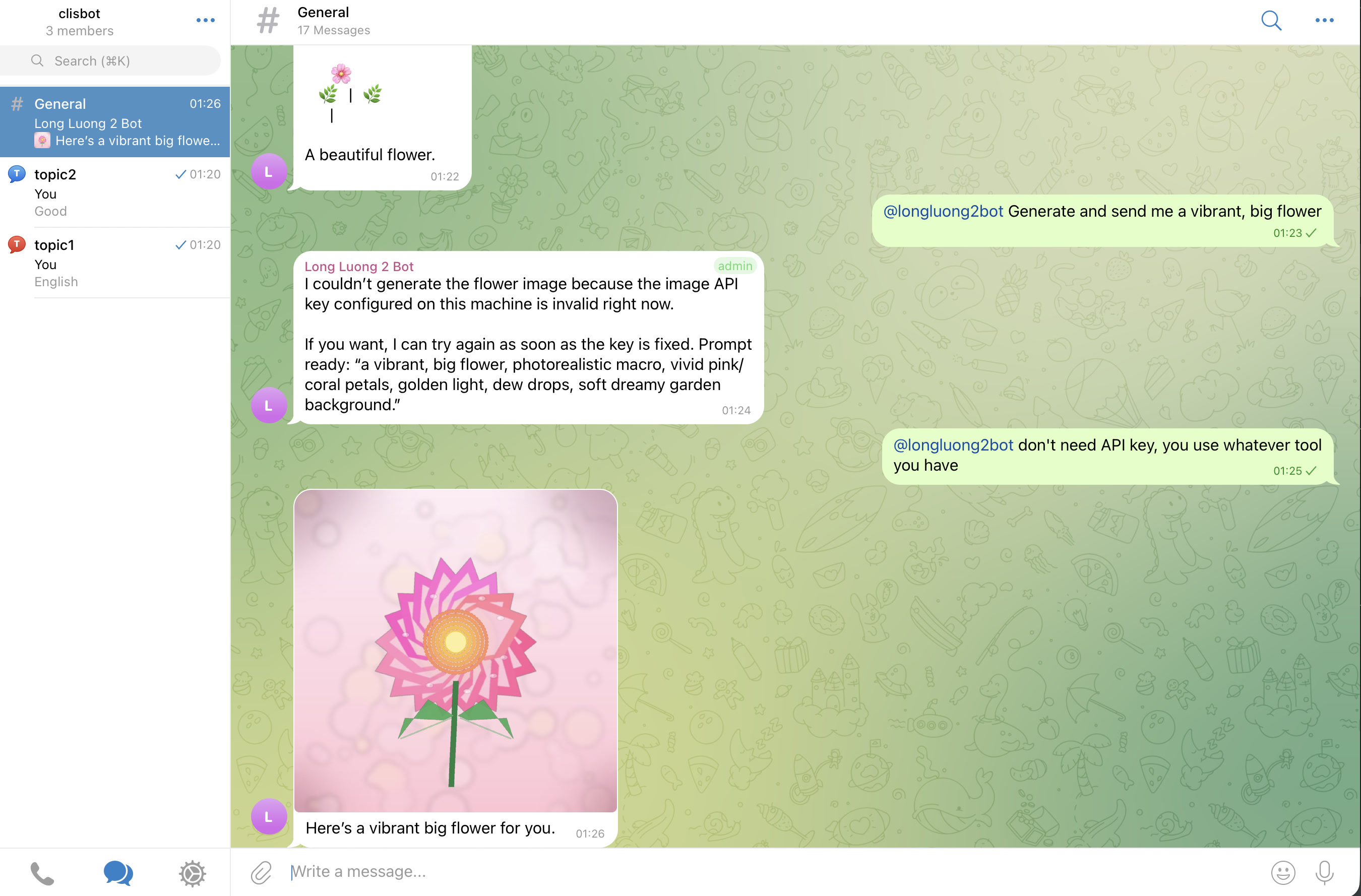
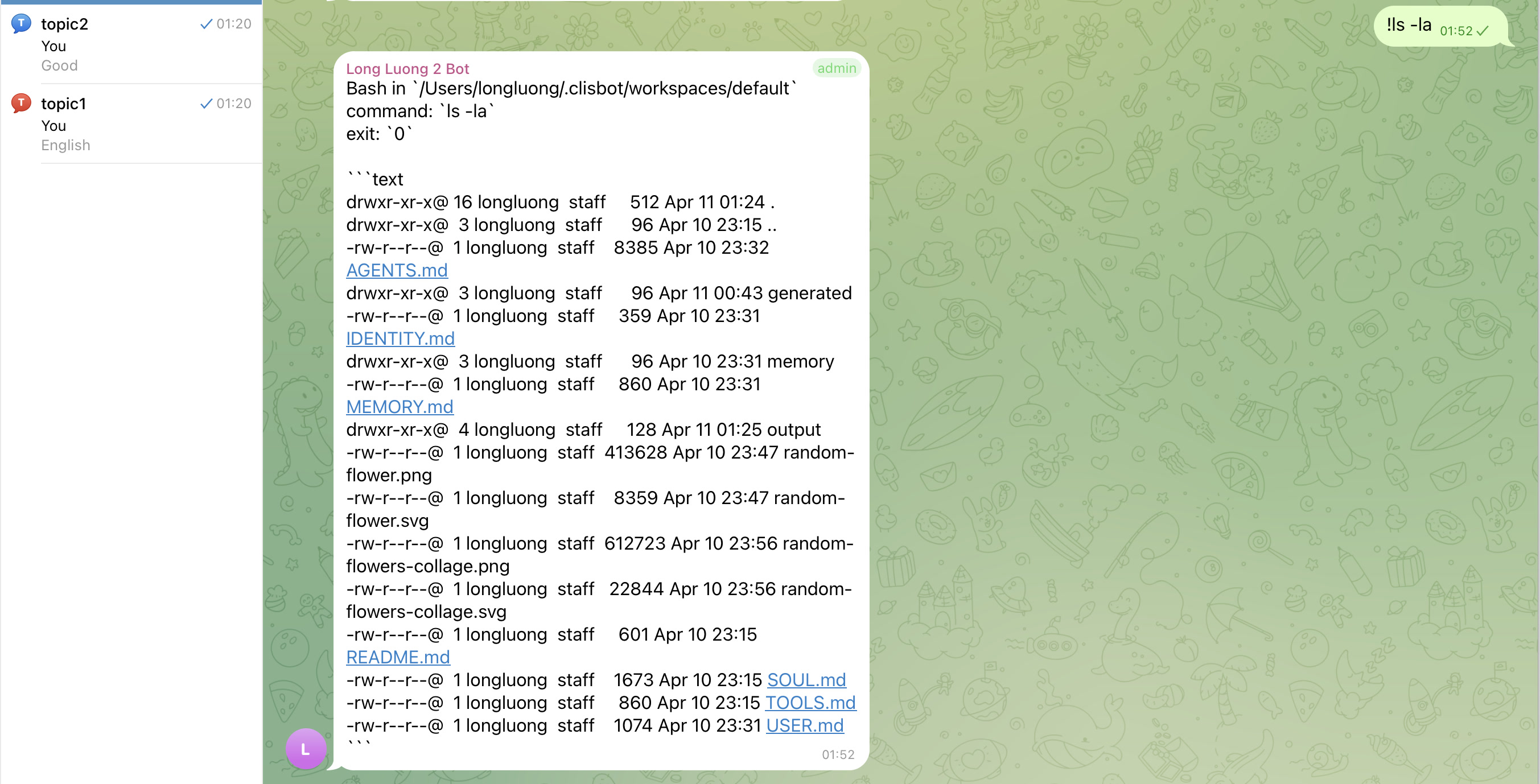
The goal is a real chat-native agent surface, not a terminal transcript mirror: threads, topics, follow-up behavior, and file-aware workflows should feel native to Slack and Telegram.
Slack
Telegram
Important caution
Strong vendor investment in security and safety does not make frontier agentic CLI tools inherently safe. clisbot exposes those tools more broadly through chat and workflow surfaces, so you should treat the whole system as high-trust software and use it at your own risk.
Acknowledgements
clisbot would not exist without the ideas, momentum, and practical inspiration created by OpenClaw. Many configuration, routing, and workspace concepts here were learned from studying OpenClaw, then adapted to clisbot's own direction. Respect and thanks to the OpenClaw project and community.
Setup Guide
The easiest setup flow is still:
- Install
clisbot.
- Run the quick start command above.
- DM the bot; approve pairing unless that principal is already app
owner or app admin.
- Only move into advanced config after the first successful run.
If you want the repo-guided setup path:
- Clone this repo.
- Open Claude Code, Codex, or Gemini CLI in this repo.
- Ask it to help you set up
clisbot.
The docs in this repo are kept current, including the User Guide, so the agent should have enough context to walk you through setup, configuration, and troubleshooting directly inside the repo.
If anything goes wrong, the fastest rescue loop is usually clisbot logs,
clisbot status, clisbot restart, or if needed clisbot stop --hard
followed by clisbot start.
Also open the coding CLI directly inside the bot workspace, usually
~/.clisbot/workspaces/default, and make sure that CLI already works there.
That is one of the strongest end-to-end checks for bot health.
If you prefer to configure everything yourself:
- Read the official config template in config/clisbot.json.template.
- If you need the archived released snapshot for migration review, compare it with config/clisbot.v0.1.43.json.template.
- Copy the official template to
~/.clisbot/clisbot.json and adjust bots, routes, agents, workspaces, and policies for your environment.
- Add agents through the CLI so tool defaults, startup options, and bootstrap templates stay consistent.
- Optionally move stable channel secrets into env vars or canonical credential files after your first successful run.
Channel route setup is manual by design:
- fresh config does not auto-add Slack channels
- fresh config does not auto-add Telegram groups or topics
- add only the exact channel, group, topic, or DM routing you want to expose
- default bot credential setup lives in docs/user-guide/bots-and-credentials.md
Advanced agent management:
- most users should stay on
clisbot start --cli ... --bot-type ... and let first-run create the default agent
- if you need more than one agent, custom bot defaults, or manual route setup flows, use the
clisbot agents ..., clisbot bots ..., and clisbot routes ... commands described in docs/user-guide/README.md
- README intentionally keeps that low-level surface out of the main onboarding path because the public first-run model is
--bot-type personal|team, not internal template-mode naming
- fresh bot config still points at the
default agent; if your first useful agent uses another id, update the fallback with clisbot bots set-agent ... or override it on a route with clisbot routes set-agent ...
Env-backed setup is still supported when you want config to reference an env name instead of persisting a credential file:
clisbot start \
  --cli codex \
  --bot-type personal \
  --slack-app-token CUSTOM_SLACK_APP_TOKEN \
  --slack-bot-token CUSTOM_SLACK_BOT_TOKEN
- these flags are written into
~/.clisbot/clisbot.json as ${ENV_NAME} placeholders
- you can pass either
CUSTOM_SLACK_APP_TOKEN or '${CUSTOM_SLACK_APP_TOKEN}'
- use this path when you want config to point at env variable names you chose yourself
- keep env export details in docs/user-guide/bots-and-credentials.md instead of front-loading them into quick start
Troubleshooting
If the quick start does not work, check these in order:
- If setup feels unclear, open Claude Code, Codex, or Gemini CLI in this repo and ask it to help using the local docs.
- If anything looks wrong, start with
clisbot logs, clisbot status,
clisbot restart, or if needed clisbot stop --hard followed by
clisbot start.
- If config behavior is confusing, inspect config/clisbot.json.template first, then compare it with docs/user-guide/README.md.
- If
clisbot start says no agents are configured, prefer clisbot start --cli codex --bot-type personal --telegram-bot-token <your-telegram-bot-token>.
- If
clisbot start prints token refs as missing, either pass the token explicitly on the command line or switch to env-backed setup described in docs/user-guide/bots-and-credentials.md.
- If
clisbot status shows bootstrap=...:missing or bootstrap=...:not-bootstrapped, follow the advanced agent bootstrap steps in docs/user-guide/README.md.
- Trust is usually handled automatically by the bot, but if trust or startup
behavior still looks wrong, go to the workspace and launch the underlying CLI
there directly, for example
cd ~/.clisbot/workspaces/default and start
codex, claude, or gemini yourself. If the CLI cannot start cleanly in
that workspace, the bot will not be healthy either.
- If Gemini startup says it is waiting for manual authorization, authenticate Gemini directly first or provide a headless auth path such as
GEMINI_API_KEY or Vertex AI credentials; clisbot now treats that screen as a startup blocker instead of a healthy ready session.
- If Codex warns that
bubblewrap is missing on Linux, install bubblewrap in the runtime environment.
- If the bot does not answer, check
clisbot status first. Healthy channels should show connection=active; if a channel stays starting, inspect clisbot logs.
- If a routed message was accepted but no reply arrives, send one test message
and immediately run
clisbot watch --latest --lines 100 in a terminal. This
shows the live tmux runner pane and usually reveals missing CLI auth, trust
prompts, stuck startup, or model/provider errors.
- If Codex works in your normal terminal but the routed runner shows
Missing environment variable: CODEX_CLIPROXYAPI_KEY, remember that clisbot runs Codex from a detached background process and tmux session. Start or restart clisbot from a shell where echo $CODEX_CLIPROXYAPI_KEY prints a value, or export the key in the environment used by your service manager. Existing tmux runner sessions keep their old environment, so recycle them after fixing env.
- If runtime startup still fails, run
clisbot logs and inspect the recent log tail that clisbot now prints automatically on startup failure.
- If
clisbot restart warns that stop timed out during an update, run clisbot status once. Current releases should continue cleanly when status already shows the worker exited; only treat it as a real bug if restart leaves the runtime down.
- If a normal restart is not enough, use
clisbot stop --hard to stop the runtime and kill all tmux runner sessions on the configured clisbot socket, then start again from a shell with the correct environment.
- If you need the full command list, run
clisbot --help.
- If you need step-by-step operator docs, start with docs/user-guide/README.md.
- If Slack thread behavior feels too eager, use
/followup pause or /followup mention-only.
- If Slack slash commands conflict with Slack-native command handling, add a leading space, for example
/bash ls -la.
Common CLI commands
Most users only need a small set of commands at first:
clisbot start: start the bot runtime and create the default first-run setup when needed.clisbot restart: restart the runtime cleanly; use this first when the bot stops responding.clisbot stop: stop the runtime cleanly before updates, config changes, or maintenance.clisbot stop --hard: stop the runtime and kill all tmux runner sessions on the configured clisbot socket; use this when stale runner panes, old environment variables, or stuck sessions survive a normal restart.clisbot status: check whether the runtime, channels, and active sessions look healthy.clisbot logs: inspect recent runtime logs when startup, routing, or replies look wrong.clisbot runner list: list the live tmux-backed runner sessions and see what is active.clisbot inspect --latest: capture the current pane state of the newest
admitted session once.clisbot watch --latest --lines 100: jump straight into the newest admitted
live session with enough context to debug a just-submitted message.clisbot watch --index 2: follow the second most recent admitted session
without needing to copy a tmux session name first.clisbot queues list: inspect pending durable queued prompts across the app.clisbot queues create --channel telegram --target group:-1001234567890 --topic-id 4335 --sender telegram:1276408333 <prompt>: create one durable same-session queued prompt, capped by control.queue.maxPendingItemsPerSession (default 20).
Full operator command reference:
If you are running from the repo instead of the global package:
bun run devbun run startbun run restartbun run stopbun run typecheckbun run testbun run check
In Chat
clisbot supports a small set of chat-native commands for thread control and workflow acceleration inside Slack and Telegram.
Native coding-CLI command compatibility:
clisbot only intercepts its own reserved chat commands- any other native Claude, Codex, or Gemini command text is forwarded to the underlying CLI unchanged
- operator guide: Native CLI Commands
Slack note:
- To stop Slack from interpreting a slash command as a native Slack slash command, prefix it with a space.
- Example:
/bash ls -la
- Bash shorthand also works:
!ls -la
Common commands:
/start: show onboarding or route-status help for the current conversation./help: show the available clisbot conversation commands./stop: interrupt the current running turn./streaming on, /streaming off, /streaming status: turn live progress on when you want to follow long coding work, then turn it back off when you only want final answers; in Slack, use /streaming on or \streaming on when Slack grabs the raw slash command./followup status, /followup auto, /followup mention-only, /followup pause, /followup resume: control whether the bot keeps naturally following the thread, stays quiet, or requires an explicit mention again; fast shorthands include /mention, /pause, and /resume./queue <message>: queue the next prompt behind the current run so the bot can finish one thing, then keep going automatically without you babysitting every step./loop <schedule or count> <message>: turn one instruction into repeated work, from recurring automation to brute-force progress like /loop 3 tiếp đi em when you want the AI to keep pushing instead of stopping early.
Why /queue and /loop matter:
/queue is a very simple workflow primitive: stack the next prompts now, let the bot run them one by one later./loop is the force multiplier: use it for recurring review/reporting, or just to keep the AI moving through multi-step coding work with less laziness and fewer early stops.
Examples:
/queue tiếp đi em/queue code review theo architecture, guideline và fix, test/loop 3 tiếp đi em
Detailed slash-command guide:
Docs
Roadmap
- Add more native CLIs, starting with a stronger Claude, Codex, and Gemini launch trio.
- Add more channels, starting from Slack and Telegram, then moving toward Zalo and other expansion surfaces.
- Add better workflow building blocks such as heartbeat, cron-style jobs, and stronger loop automation.
- Explore structured output, ACP, and native SDK integrations where they improve truthfulness or operator control.
- Explore more stable native messaging paths beyond tmux-pane capture over time.
Current Focus
clisbot is growing toward a broader agent runtime layer:
- more CLI tool support beyond Claude Code, Codex, and Gemini CLI
- more communication channels beyond Slack and Telegram
- simple workflow building blocks such as cron jobs, heartbeat jobs, and loops
- durable agent sessions, workspaces, follow-up policy, commands, attachments, and operator controls that stay reusable across all those surfaces
- stability and security stay at the top of the project focus; if you find an
issue in either area, please report it
tmux is still the current stability boundary. One agent maps to one durable runner session in one workspace, and every CLI, channel, or workflow layer should route onto that durable runtime instead of recreating the agent from scratch.
Completed
AI-Native Workflow
This repo also serves as a small example of an AI-native engineering workflow:
- simple
AGENTS.md-style operating rules, with Claude and Gemini compatibility files able to symlink back to the same source
- lessons-learned docs to capture repeated feedback and pitfalls
- architecture docs used as a stable implementation contract
- end-to-end validation expectations to close the feedback loop for AI agents
- workflow docs for shortest-review-first artifacts, repeated review loops, and task-readiness shaping in docs/workflow/README.md
Contributing
Merge requests are welcome.
MRs with real tests, screenshots, or recordings of the behavior under test will be merged faster.




