

Research
/Security News
Miasma Mini Shai-Hulud Hits ImmobiliareLabs npm Packages
Miasma Mini Shai-Hulud hits @immobiliarelabs Backstage plugins, targeting GitLab and LDAP auth packages on npm.
By Socket Research Team - Jun 26, 2026

vscode代码片段管理器,通过 本地包(本地某个文件夹) 或 官网 的 远程包(代码片段集合) 生成本地项目的 vscode 代码片段配置。
不使用vscode的话也能在命令行中通过某个触发词搜索某个代码片段。
在 Visual Studio Code (VSCode) 中,代码片段(Code Snippets)是一种提高编码效率的功能,它们是预定义的代码模板,可以通过对应的触发词快速插入到编辑器中。使用代码片段可以减少重复性编码工作,提高开发速度,并帮助维护代码一致性。
比如:
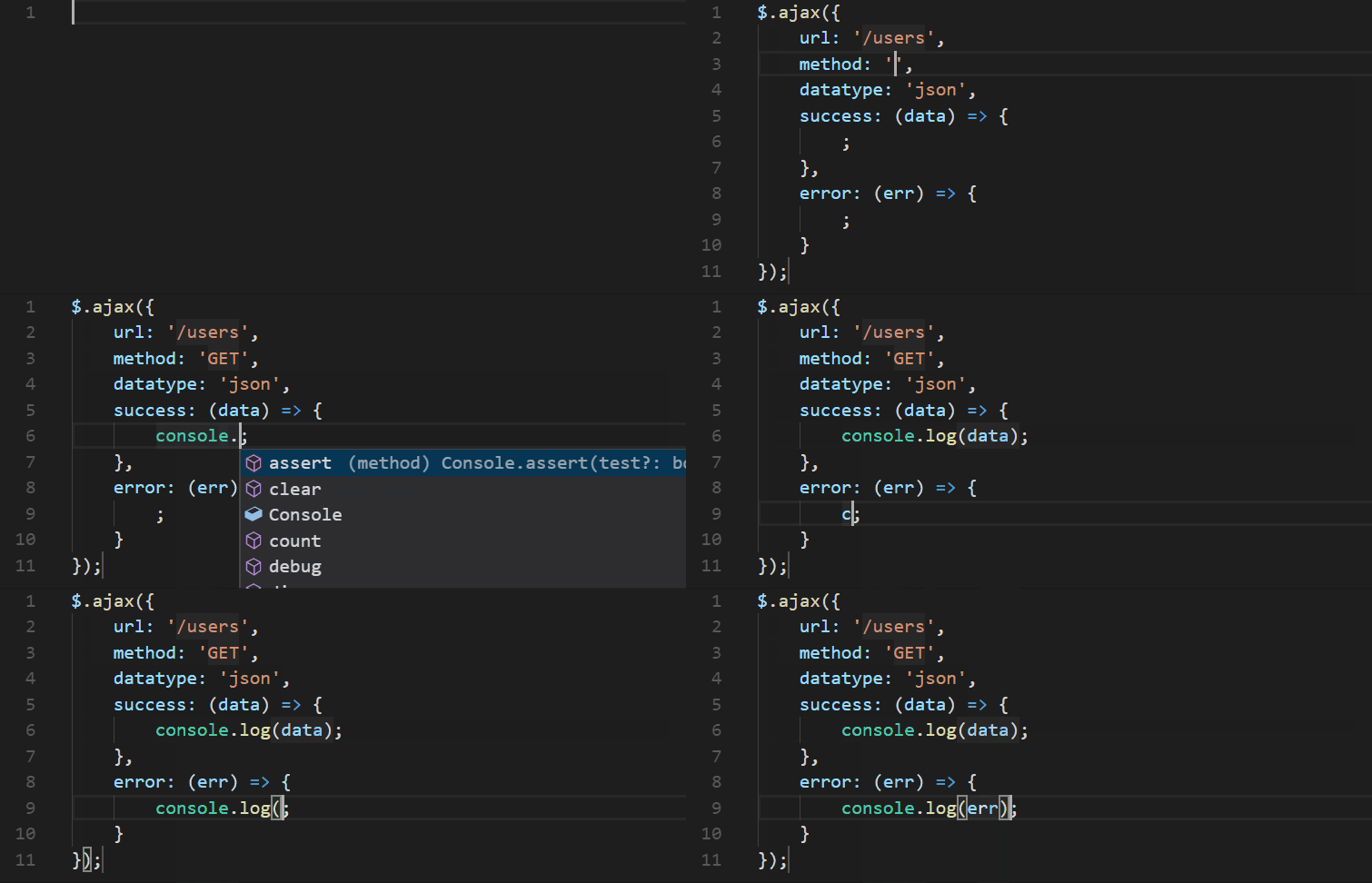
可以通过添加 xx.code-snippets 文件到项目 .vscode/ 中自定义代码片段,比如:
{
"Hello World": {
// 作用域,代码片段能在哪些语言中被提示出来
"scope": "javascript,typescript",
// 触发词,相当于是提示词
"prefix": "helloworld",
// 代码片段内容
"body": [
"console.log('Hello, World!');"
],
// 描述
"description": "Insert 'Hello, World!'",
// 文件模板代码段
"isFileTemplate": false,
}
}
代码片段内容有一些特殊的语法,详情请看 vscode官方文档
codess 能帮助开发者把一个或多个本地文件夹中的文件打包成 .code-snippets 配置文件并放到 .vscode 文件夹中,然后开发者就能通过编辑文件编辑自己的代码片段了。
还可以在 codess 的 官网 上选择自己项目常用的公共代码片段包安装到本地项目中。也可以创建属于自己的专有代码片段包。还可以安装github某仓库的某个目录。
需要 node.js >=12.0.0 运行环境 安装node.js
npm install --global codess | yarn global add codess
国内建议用镜像安装比较快
npm install --global codess --registry https://registry.npmmirror.com | yarn global add codess --registry https://registry.npmmirror.com
codess [options] [command]
-V, --version
-h, --help
init
install [lists...] | i [lists...]
codess install ./dir vue reactbuild [lists...] | b [lists...]
uninstall [lists...] | uni [lists...]
search <name> [prefix] [languages] | s <name> [prefix] [languages]
[prefix] 参数能查看某个触发词下的代码片段,[languages]则指定要筛选的代码语言,多种语言用,分隔remote-to-local <name> [path] | rtl <name> [path]
clear-snippets | cs
doc | d
help [command]
codess 会在项目目录下生成一个配置文件codess.config.json,用来管理项目安装的代码片段包。
也可以通过命令 codess init主动生成它,如果已经有配置文件的话将会提示是否覆盖。
格式为:
{
    // 依赖的代码片段包列表
    "dependent": [],
    // 包安装记录,主要记录已安装包的信息
    "installRecord": {},
    // codess 官方文档
    "document": "https://codess.dumogu.top/doc"
}
以下是一个示例:
{
    "dependent": [
        {
            // 包名
            "package": "vue",
            // 包触发词
            "prefix": "v",
        },
        {
          "package": "file:snippets",// 一个本地片段包 ./snippets/
          "prefix": "my"
        }
    ],
    "installRecord": {
      "vue": {
          "home": "",
          "description": "",
          "version": "3",
          "iterationNumber": "1"
        }
    },
    "document": "https://codess.dumogu.top/doc"
}
远程包
官网上创建的代码片段集合,可通过codess install [包名]命令安装到本地,可以通过codess remote-to-local <包名> <本地目录路径>命令转成本地包安装。
本地包
本地的某个目录,该目录下的所有文件都会被解析成代码片段,文件相对路径解析成触发词,例如 a>b>c,文件内容解析成代码片段内容,如果是.md的文件则可以包含多个代码片段。
本地包示例(包触发词为 my):
xxxx/
  -dir/
    -a.css
  -a.vue
  -b.js
  -c
打包后的vscode配置为:
{
  "my/a.vue": {
      "scope": "vue",
      "prefix": "my>a",
      "body": [],
      "description": "",
      "isFileTemplate": true
  },
  "my/b.js": {
      "scope": "javascript",
      "prefix": "my>b",
      "body": [],
      "description": "",
      "isFileTemplate": true
  },
  "my/c": {
      "scope": "",
      "prefix": "my>c",
      "body": [],
      "description": "",
      "isFileTemplate": true
  },
  "my/dir/a.css": {
      "scope": "css",
      "prefix": "my>dir>a",
      "body": [],
      "description": "",
      "isFileTemplate": true
  }
}
.md 文件内容格式:
## prefix
description
``` language
code
```
例如文件夹 dir/ (包触发词为 my ) 下的2个文件 a.md, b.js:
dir/a.md:

默认代码片段,所有语言中可用
```
code
```

## js
只在js语言中使用的代码片段
```js
console.log('js');
```

## ts
只在ts语言中使用的代码片段
```ts
let a: string = 'ts';
```

dir/b.js:
console.log("hello world");
打包后配置为:
{
  "my/a": {
      "scope": "",
      "prefix": "my>a",
      "body": [
          "code"
      ],
      "description": "默认代码片段,所有语言中可用"
  },
  "my/a-js javascript": {
      "scope": "javascript",
      "prefix": "my>a-js",
      "body": [
          "console.log('js');"
      ],
      "description": "只在js语言中使用的代码片段"
  },
  "my/a-ts typescript": {
      "scope": "typescript",
      "prefix": "my>a-ts",
      "body": [
          "let a: string = 'ts';"
      ],
      "description": "只在ts语言中使用的代码片段"
  },
  "my/b javascript": {
      "scope": "javascript",
      "prefix": "my>b",
      "body": [
          "console.log('hello world');"
      ],
      "isFileTemplate": true
  }
}
仓库包
安装github上某个仓库的某个目录,比如安装 https://github.com/wudawuer/snippets 就是把这个仓库当成本地包来安装。
不管是本地包还是远程包,它都包含了若干个代码片段,每个代码片段都会有一个触发词,如果安装了很多包难免会出现重名,当然vscode会把它们都提示出来,但是更好的做法是为每个包添加一个不同的包触发词,当输入这个包触发词的时候vscode就会尽量提示这个包触发词对应包下的某个代码片段了。
远程包的包触发词默认等于包名,也可以在 官网 上自行更改
本地包在安装时会提示输入包触发词。
包触发词都可以在配置文件中自由更改。改完记得执行codess install命令更新。
vscode的代码片段触发规则不是完整输入触发词才会提示,比如 el>button>primary 对应的代码片段为<el-button type="primary">主要按钮</el-button>,其实输入ebp时vscode就能提示出对应的代码片段,算是一种简写了。
FAQs
vscode代码片段管理器,通过 本地包(本地某个文件夹) 或官网的 远程包(代码片段集合) 生成本地项目的 vscode 代码片段配置。
The npm package codess receives a total of 10 weekly downloads. As such, codess popularity was classified as not popular.
We found that codess demonstrated a healthy version release cadence and project activity because the last version was released less than a year ago. It has 1 open source maintainer collaborating on the project.
Did you know?

Socket for GitHub automatically highlights issues in each pull request and monitors the health of all your open source dependencies. Discover the contents of your packages and block harmful activity before you install or update your dependencies.
Research
/Security News
Miasma Mini Shai-Hulud hits @immobiliarelabs Backstage plugins, targeting GitLab and LDAP auth packages on npm.

Security News
Rolldown paused Rust React Compiler integration after a 5MB binary size increase raised concerns about shipping React-specific code to all Vite users.

Security News
/Research
Mini Shai-Hulud expands into the Go ecosystem after hitting LeoPlatform npm packages and targeting GitHub Actions workflows.