


Security News
Ruby's Bundler 4.0.18 Extends Cooldown to bundle lock and bundle cache
The supply chain control that delays freshly published gems now covers lockfile generation and gem vendoring in Ruby projects.
By Sarah Gooding - Aug 06, 2026
cool-workflow
Advanced tools
A workflow control plane and run-time you are able to check: it sends out jobs in TypeScript, makes certain of work against facts before it goes through, puts state into fixed records, orders jobs by time, runs jobs again and again, gets a group of agents
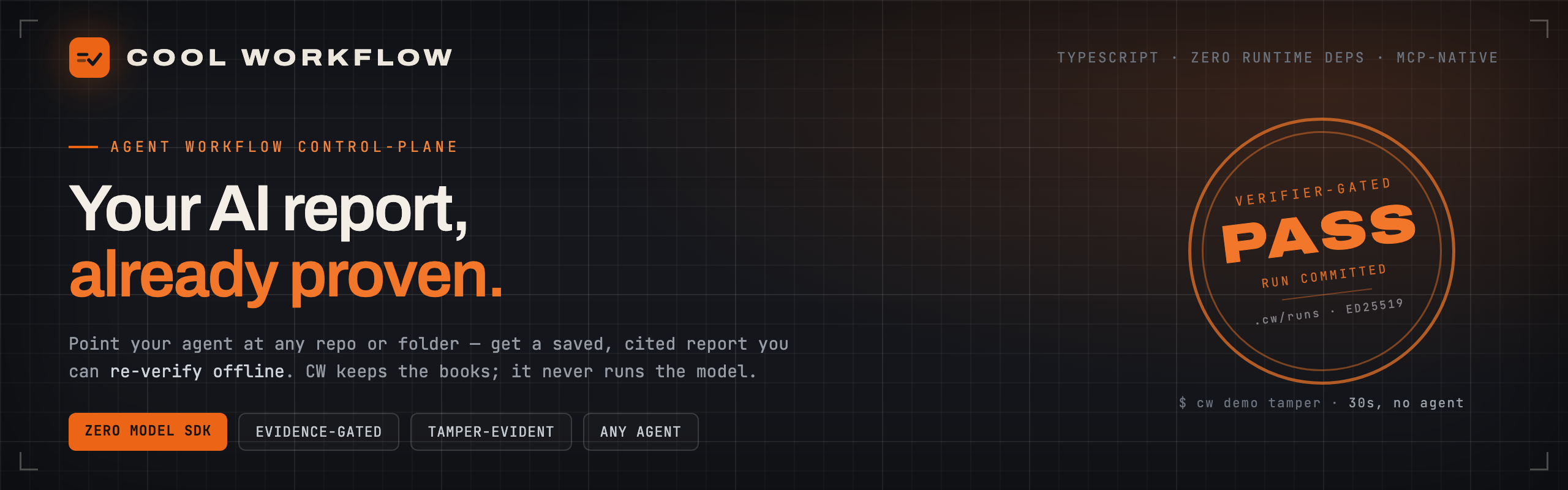






Point an AI coding agent at a repo (or any folder of docs) and Cool Workflow turns the run into a
durable, inspectable workflow: it plans the work, delegates each task to your agent, records and
verifies every result, then writes a report where every claim is cited to a file.ts:42.
The model is fuel. CW is the black-box recorder, the dashboard, and the gearbox — never the engine. It never calls a model API, never holds your keys, and never uploads your code. Your agent spends the tokens; CW keeps the books — as plain JSON on your own disk.
npm install -g cool-workflow
brew tap coo1white/cool-workflow https://github.com/coo1white/cool-workflow
brew install coo1white/cool-workflow/cool-workflow
cw version
Upgrade later with brew update && brew upgrade cool-workflow.
You need: Node.js v18+ and one agent CLI on your machine — claude, codex, gemini, or
opencode (all auto-detected). No agent yet? cw demo tamper still works — CW never runs a model itself.
cw demo tamper
# → builds a real signed ledger, forges it three ways, catches all three offline
# → VERDICT: tamper-evidence holds ✓
cw -q "What are the main risks here?"
CW auto-detects the current repo and the first agent on your PATH. Pin a specific one with a flag
(-claude, -codex, -gemini, -deepseek). Point it anywhere — no cd required — or review a
remote repo by URL and CW clones, snapshots, and reviews the checkout:
cw -q "What are the security risks?" -dir /path/to/project
cw -q "What are the risks?" --link https://github.com/owner/repo
Not just code. Aim CW at a folder of docs, notes, or papers and it reads them as sources for the same saved, cited report:
cw quickstart research-synthesis --repo /path/to/papers \
  --question "What do these papers conclude?"
The command prints the path. Every finding carries a clickable file.ts:42 pointer:
cat .cw/runs/<run-id>/report.md
While it runs you get a calm, Claude-Code-style live view — a compact rolling window of tool calls that updates in place instead of an endless wall — and a clean findings table when it's done.
Most agent tooling runs a whole task as one long prompt, then hands you a chat message. When the work is long, parallel, or high-stakes, you can't tell what happened or trust the result. CW treats it as a runtime problem — and rests on four commitments:
| Commitment | What it means for you |
|---|---|
| Model as fuel, not engine | CW never calls a model API. Execution is always delegated to your agent, so the backend is swappable and your credentials and code never leave your machine. |
| Evidence-gated decisions | Every adopted result records its basis, authority, rationale, and the alternative it beat. Missing evidence doesn't slip through — it fails closed to a visible unexplained state. |
| Deterministic, local replay | Every step is plain JSON under .cw/runs/<id>/ — read it, diff it, resume it, replay it. No hidden database; the runtime never guesses success. |
| Vendor-neutral by design | One source-of-truth manifest generates every vendor adapter (Claude, Codex, …) over a shared CLI + MCP runtime, with a fail-closed drift check. No lock-in, no forked logic. |
What CW is not. CW is not the model — it never calls a model API and never holds your keys;
your agent does that work out of process. It is not a CI system or a build tool — it keeps and
checks the record of agent work, it does not stand in for your tests or your release pipeline.
And it is not a big framework to take up — it is a small set of commands over plain .cw/ files
on your own disk, not a library your code has to be built around.
CW is a small TypeScript tool with zero runtime dependencies. It drives your agent over a repo — or any folder — in saved, replayable stages, writing everything to disk as inspectable files. It never imports a model SDK or stores an API key.
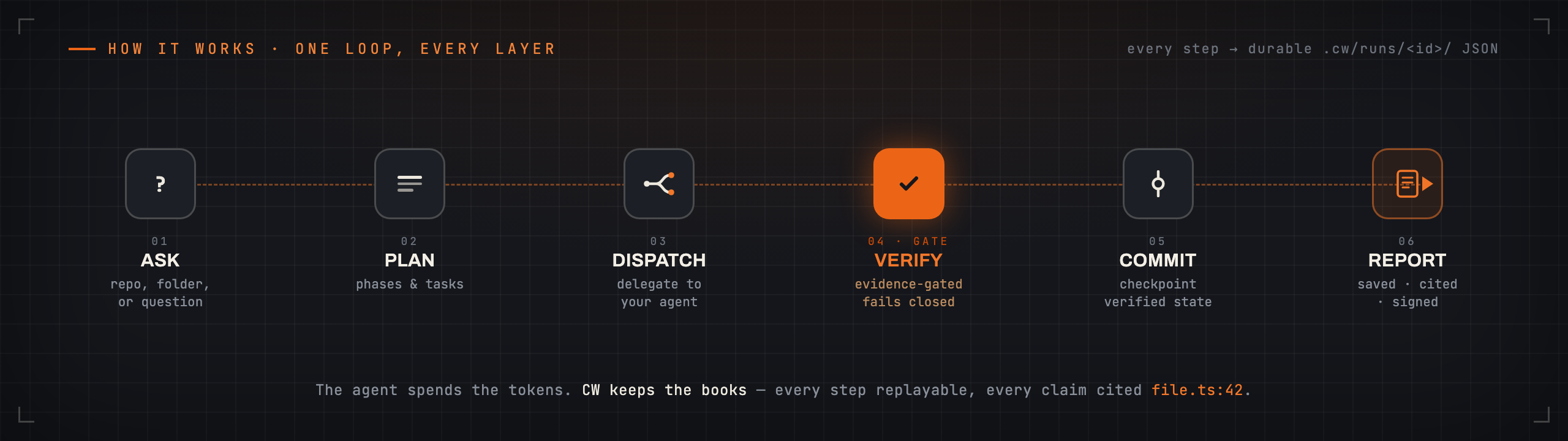
ask simple → run simple → verify simple → resume simple
| Workflow | What it produces |
|---|---|
architecture-review | Map a repo, rank risks, and back every claim with file:line evidence |
pr-review-fix-ci | Review a PR or branch, diagnose CI, and propose + verify fixes |
research-synthesis | Answer a question over a local folder of files — your docs, notes, or papers |
release-cut | Run a gated, reviewed release with dry-run evidence |
Every app writes the same thing: a saved, cited report you can re-verify offline. These four are
the main lanes; cw app list shows all eight installed apps.
cw app list            # see everything installed
cw doctor              # check your setup    →    cw fix   shows the fix commands
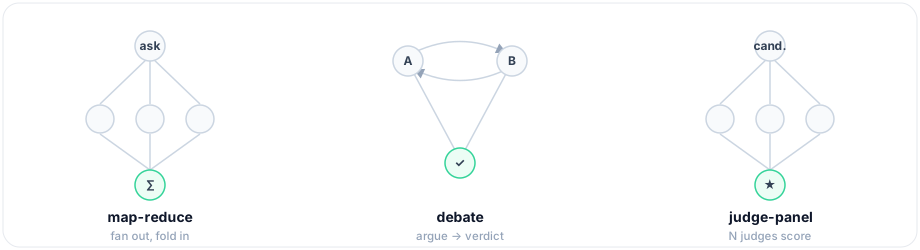
Multi-agent, when you need it. Fan work out across agents with built-in topologies, compose flows
(a task can run a whole child workflow with subWorkflow, or a loop() phase can iterate until a
predicate or token budget says stop), and re-run fast — cw run <app> --drive --incremental reuses
every step whose inputs didn't change.
CW doesn't run the model — it keeps the books. Your agent signs its findings (ed25519), and
cw report verify-bundle checks — offline, with nothing but the public key — that every signed
finding is in the report unaltered. Edit a finding, in the report or in the agent's own result, and the
check fails. CW holds no private key: the agent signs, CW only verifies.
cw demo tamper                                  # proves it in 30s — edits a signed result, watch it fail
cw -q "…" --bundle                              # seal a run into one portable file
cw report verify-bundle report.cwrun.json       # anyone can re-check it offline, with just the file
This attests the agent's signed findings — not that nothing else was added or that nothing was left out. For exactly what is and isn't proven, see the Trust Model.
CW exposes the same runtime over MCP — Claude Desktop, Cursor, and VS Code call CW as a tool, so your agent can plan a run, drive it, and verify a report without leaving the editor. CLI and MCP share one registry and are parity-checked. See the Wiki.
| Problem | Fix |
|---|---|
| No agent found | cw doctor — shows which agents are on your machine |
status: blocked | Set CW_AGENT_COMMAND=builtin:claude or pass -claude |
claude: command not found | Install Claude Code and run again |
| Where is my report? | <repo>/.cw/runs/<id>/report.md |
New here? Start with the Wiki → Getting Started · Mental Model · Glossary · Trust & Audit
Building on CW? See the Getting Started doc, Project Index, and CLI ↔ MCP Parity.
CW dogfoods its own release process — every cut runs the release-cut workflow against this repo.
BSD-2-Clause. Built by COOLWHITE LLC.
FAQs
A workflow control plane and run-time you are able to check: it sends out jobs in TypeScript, makes certain of work against facts before it goes through, puts state into fixed records, orders jobs by time, runs jobs again and again, gets a group of agents
The npm package cool-workflow receives a total of 37 weekly downloads. As such, cool-workflow popularity was classified as not popular.
We found that cool-workflow demonstrated a healthy version release cadence and project activity because the last version was released less than a year ago. It has 1 open source maintainer collaborating on the project.
Did you know?

Socket for GitHub automatically highlights issues in each pull request and monitors the health of all your open source dependencies. Discover the contents of your packages and block harmful activity before you install or update your dependencies.
Security News
The supply chain control that delays freshly published gems now covers lockfile generation and gem vendoring in Ruby projects.

Security News
During a UK cyber test, a Mythos 5 agent used sockpuppets, social engineering, and prompt injection to try to get a maintainer to merge malware.

Company News
Socket is now in the AWS Security Hub Extended plan. Adopt it through AWS, apply committed spend, and block malicious open source packages.