cordova-plugin-openinstall-global
OpenInstall 国际版(Global) Cordova 插件:
文档最后提供了在 Capacitor 中使用需要做的配置。
一、安装插件
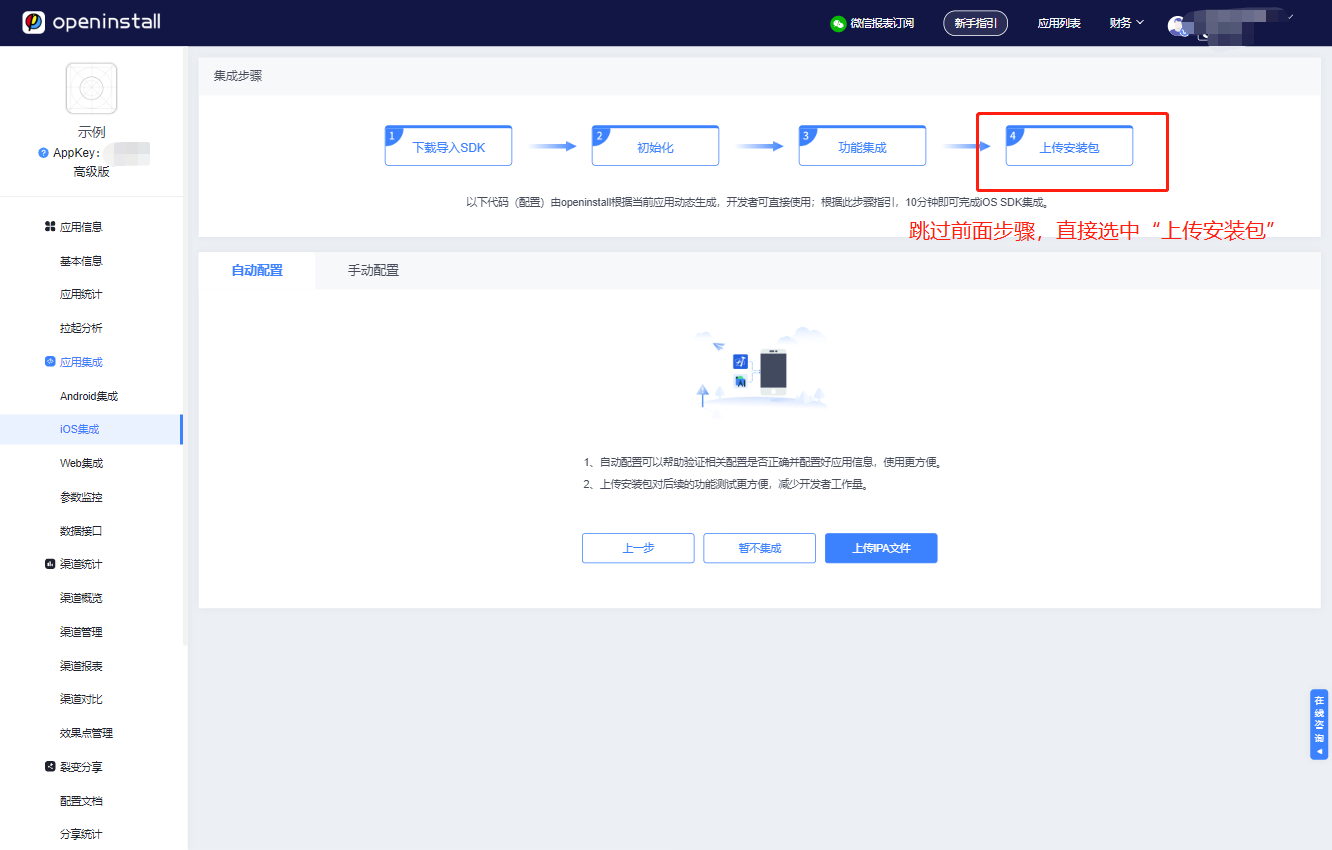
前往 openinstall 官网,注册账户,登录管理控制台,创建应用后,跳过 "集成指引",在 "应用集成" 的对应平台的 "应用配置" 中获取 appkey 和 scheme 以及 iOS 的关联域名。
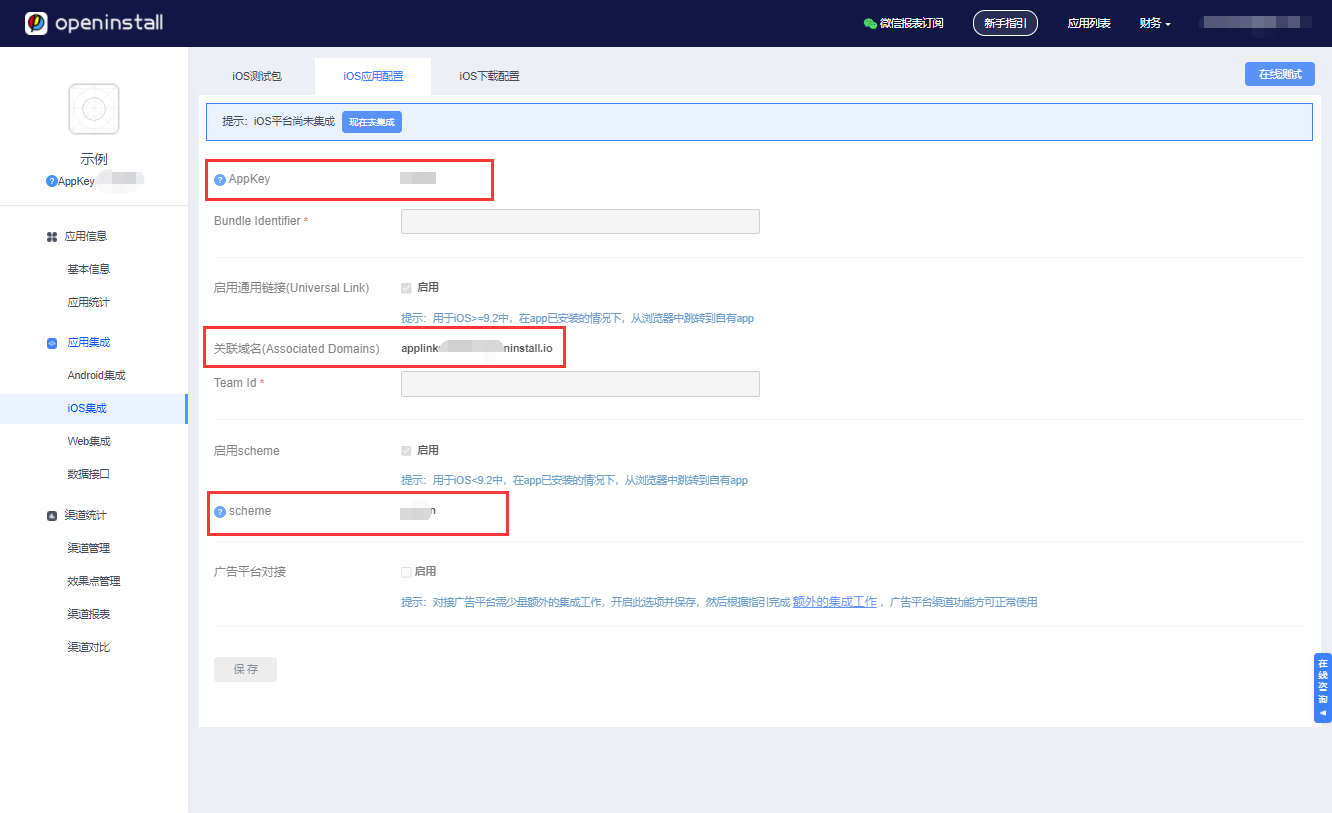
使用下列命令安装并配置 openinstall 插件:
cordova plugin add cordova-plugin-openinstall-global --variable OPENINSTALL_APPKEY=appkey --variable OPENINSTALL_SCHEME=scheme
如配置错误,可先卸载再安装插件
cordova plugin rm cordova-plugin-openinstall-global --variable OPENINSTALL_APPKEY=appkey --variable OPENINSTALL_SCHEME=scheme
二、调用API
1 初始化
App 启动时,请确保用户同意《隐私政策》之后,再调用初始化;如果用户不同意,则不进行openinstall SDK初始化。参考 应用合规指南
window.openinstall.init();
2 快速安装和一键拉起
拉起参数获取
调用以下代码注册拉起回调,应尽早调用。如在 deviceready 事件回调之时注册
window.openinstall.registerWakeUpHandler(function(data){
  console.log("openinstall.wakeup success : " + JSON.stringify(data));
}, function(msg){
  console.log("openinstall.wakeup error : " + msg)
});
成功回调的data数据格式
{"channel": "渠道号", "data": {"自定义key": "自定义value"}}
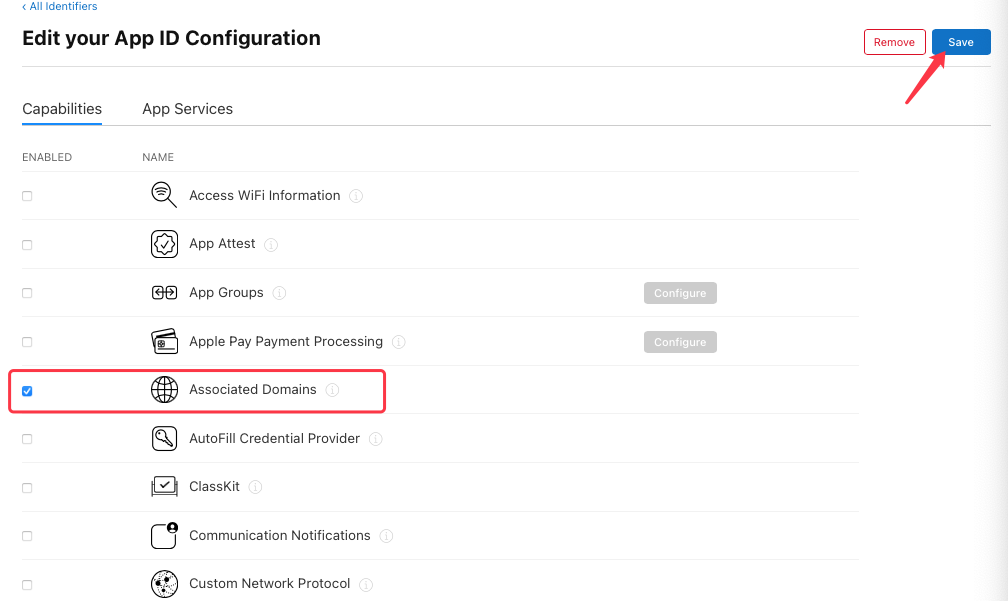
对于 iOS,为确保能正常跳转,AppID 必须开启 Associated Domains 功能,请到 苹果开发者网站,选择 Certificate, Identifiers & Profiles,选择相应的 AppID,开启 Associated Domains。注意:当 AppID 重新编辑过之后,需要更新相应的 mobileprovision 证书。
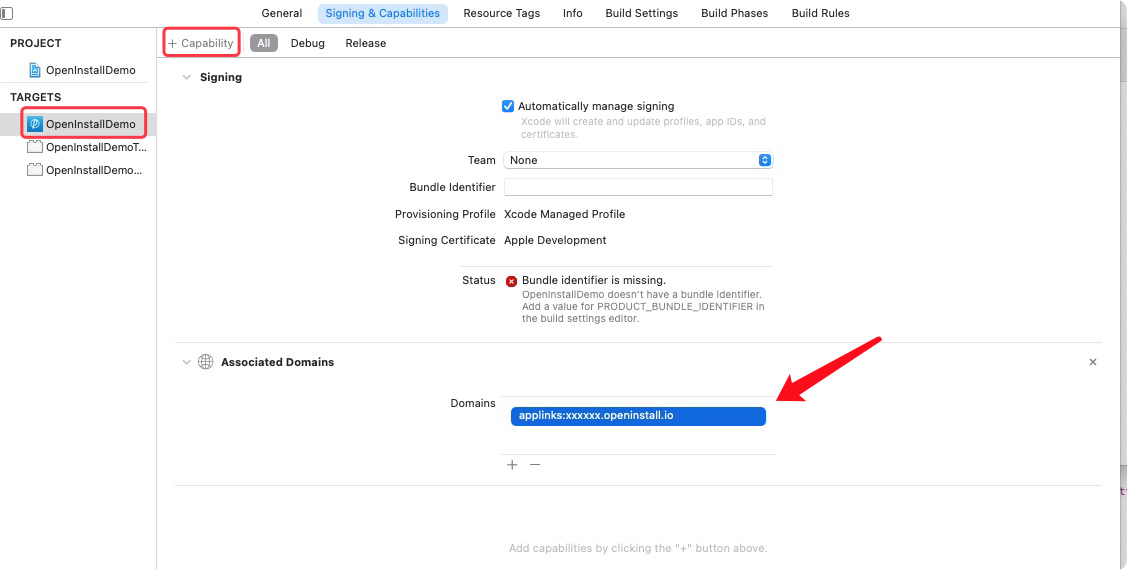
在 Xcode 中配置 openinstall 为当前应用生成的关联域名(Associated Domains):
3 携带参数安装 (高级版功能)
获取安装参数
window.openinstall.getInstall(function(data){
    console.log('openinstall.getInstall success: ' + JSON.stringify(data));
}, function(msg){
    console.log('openinstall.getInstall error: ' + msg);
});
也可传入一个整形数值,单位秒,指定时间未返回将超时
window.openinstall.getInstall(function(data){
    console.log('openinstall.getInstall success: ' + JSON.stringify(data));
}, function(msg){
    console.log('openinstall.getInstall error: ' + msg);
}, 10);
成功回调的data数据格式
{"channel": "渠道号", "data": {"自定义key": "自定义value"}}
4 渠道统计 (高级版功能)
SDK 会自动完成访问量、点击量、安装量、活跃量、留存率等统计工作。其它业务相关统计由开发人员使用 api 上报
4.1 注册量统计
根据自身的业务规则,在确保用户完成 app 注册的情况下调用 api
window.openinstall.reportRegister();
4.2 渠道效果统计
统计终端用户对某些特殊业务的使用效果,如充值金额,分享次数等等。
请在 openinstall 控制台 的 “效果点管理” 中添加对应的效果点
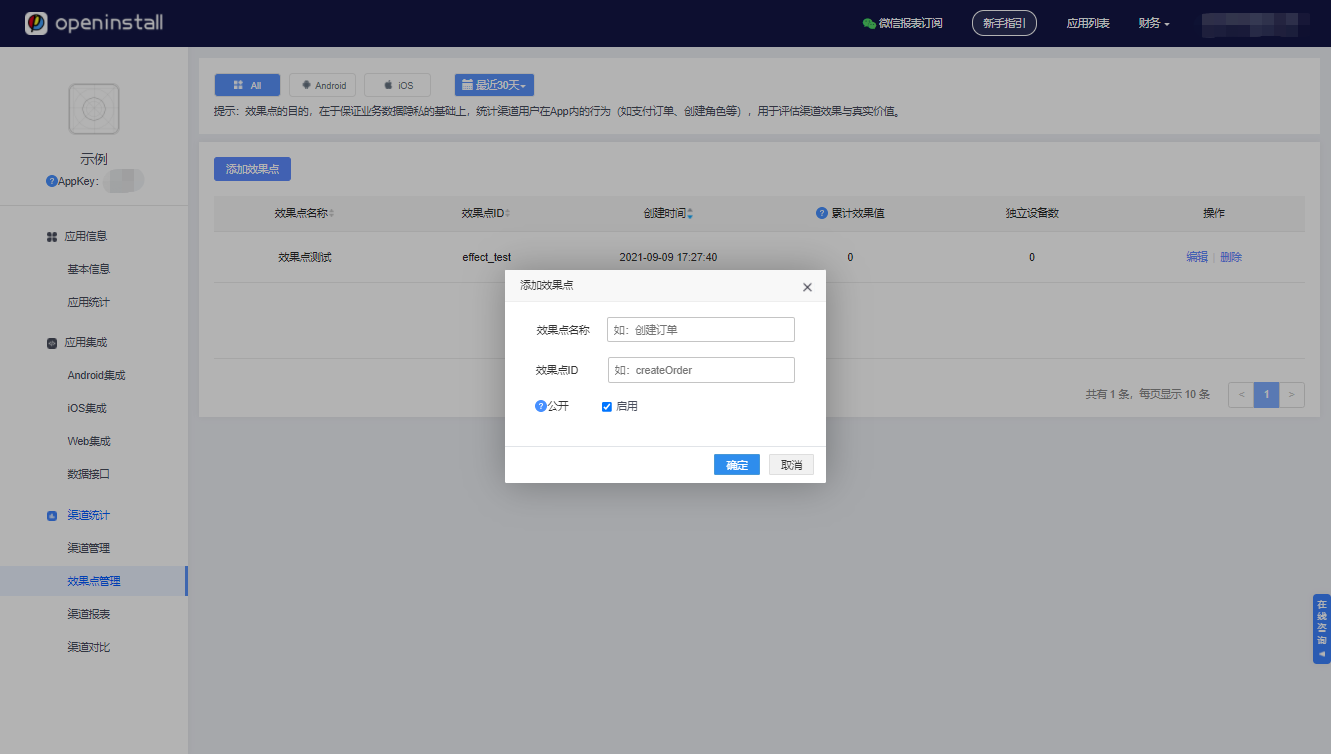
调用接口进行效果点的上报,第一个参数对应控制台中的 效果点ID
window.openinstall.reportEffectPoint("effect_test", 1);
4.3 效果点明细统计
效果点建立在渠道基础之上,主要用来统计终端用户对某些特殊业务的使用效果。调用此接口时,请使用后台创建的 “效果点ID” 作为 pointId
var extras = {
    "key1": "value1",
    "key2": "value2"
}
window.openinstall.reportEffectPoint("effect_detail", 1, extras);
三、导出apk/ipa包并上传
代码集成完毕后,需要导出安装包上传openinstall后台,openinstall会自动完成所有的应用配置工作。
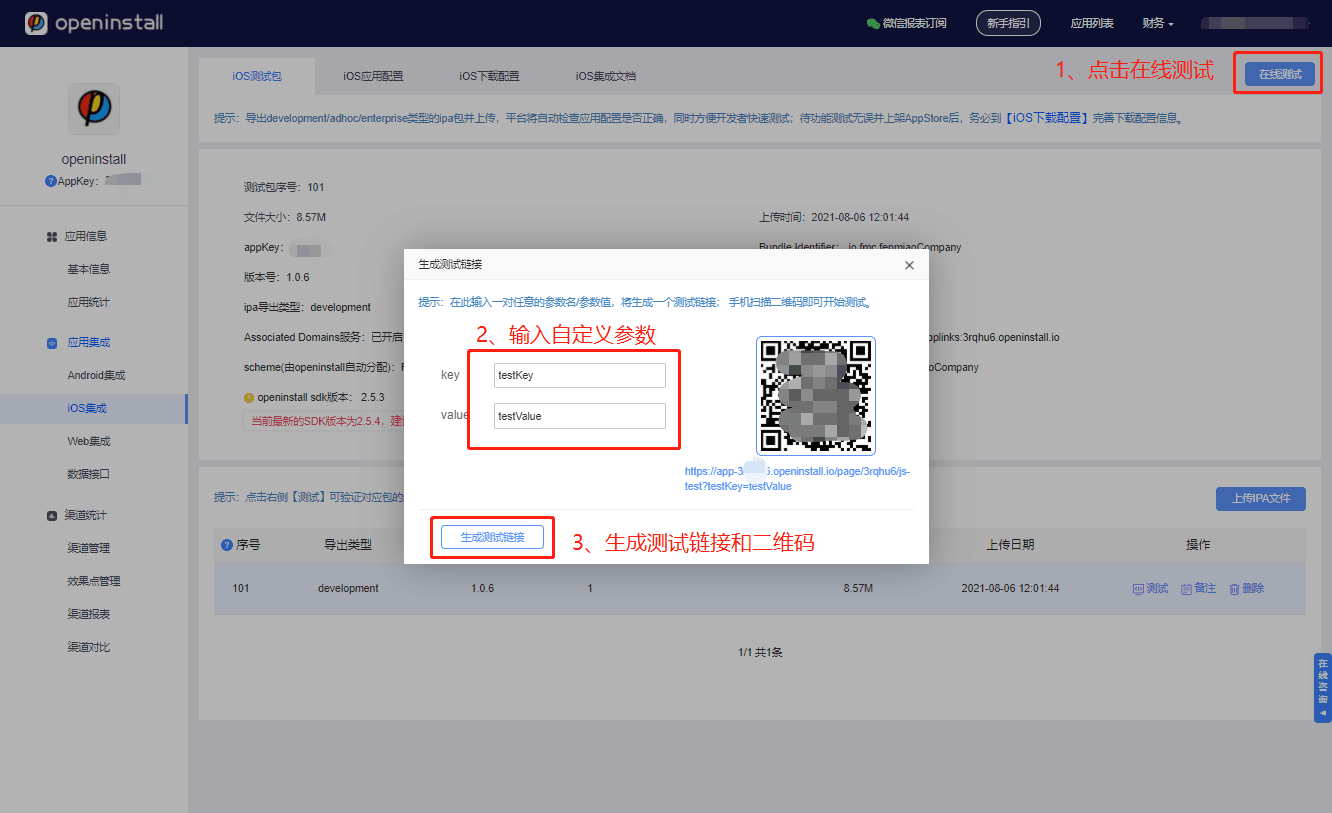
上传完成后即可开始在线模拟测试,体验完整的App安装/拉起流程;待测试无误后,再完善下载配置信息。
如有疑问
若您在集成或使用中有任何疑问或者困难,请 咨询openinstall客服。
如何在 capacitor 中使用?
1.安装插件
npm install cordova-plugin-openinstall-global
2.同步到原生平台
npx cap sync
3.手动修改:
Android平台
1)修改 capacitor-cordova-android-plugins module 下的 AndroidManifest.xml 文件,将
<meta-data
   android:name="com.openinstall.APP_KEY"
   android:value="$OPENINSTALL_APPKEY"/>
中的 $OPENINSTALL_APPKEY 修改为 openinstall 为应用分配的 appkey
2)修改 app module 下的 AndroidManifest.xml 文件,将
<intent-filter>
   <action android:name="android.intent.action.VIEW" />
   <category android:name="android.intent.category.DEFAULT" />
   <category android:name="android.intent.category.BROWSABLE" />
   <data android:scheme="@string/custom_url_scheme" />
</intent-filter>
的 @string/custom_url_scheme 修改为 openinstall 为应用分配的 scheme 或者新增配置
<intent-filter>
   <action android:name="android.intent.action.VIEW" />
   <category android:name="android.intent.category.DEFAULT" />
   <category android:name="android.intent.category.BROWSABLE" />
   <data android:scheme="openinstall为应用分配的appkey" />
</intent-filter>
iOS平台
不要同时使用Cordova模式和Pod模式安装插件或SDK,会报错,最好使用Cordova模式安装插件,Pod模式安装的是原生SDK。
1)找到 Info.plist 文件,添加appkey
    <key>com.openinstall.APP_KEY</key>
    <string>“从openinstall官网后台获取应用的appkey”</string>
2)找到 Info.plist 文件,添加scheme
    <key>CFBundleURLTypes</key>
    <array>
        <dict>
        <key>CFBundleTypeRole</key>
        <string>Editor</string>
        <key>CFBundleURLName</key>
        <string>openinstall</string>
        <key>CFBundleURLSchemes</key>
        <array>
            <string>"从openinstall官网后台获取应用的scheme"</string>
        </array>
        </dict>
    </array>




