Daemora
Self-hosted AI agent platform - autonomous, multi-channel, multi-model.




Deploy once on your machine. Connect your channels. Message the bot - it writes code, does research, sends emails, runs cron jobs, and reports back. You own everything.
52 built-in tools. 20 channels. 14 security layers. 7 AI providers. Multi-agent teams. Production-grade scheduling. Continuous brain with three-layer memory. Crew system with Media Studio. MCP integration. Provider failover. Smart loop detection. All self-hosted - nothing leaves your infrastructure except the tokens you send to model APIs.
Watch Daemora In Action
https://github.com/user-attachments/assets/be0fadad-c307-4487-a4fd-2adc0f967421
What Daemora Can Do
| Code | Write, edit, run, test, and debug code across multiple files. Takes screenshots of UIs to verify output. Fixes failing tests. Ships working software. |
| Research | Search the web, read pages, analyse images, cross-reference sources, write reports. Spawns parallel sub-agents for speed. |
| Goals | Set persistent goals - the agent works toward them autonomously on schedule. No prompting needed. Runs 24/7 with isolated sessions, auto-pauses on repeated failures. |
| Watchers | Named event triggers - "when GitHub issue opens, triage and notify Telegram." Webhook-driven with pattern matching and cooldown. |
| Scheduler | Production-grade scheduling (one-shot, interval, cron expressions) with overlap prevention, retry with backoff, channel delivery, failure alerts, Morning Pulse daily briefing, and run history. |
| Communicate | Send emails, Telegram messages, Slack posts, Discord messages - autonomously. Screenshots, files, and media sent directly back to you via replyWithFile. |
| Crew | Self-contained specialist sub-agents - Media Studio (video editing, image/music generation), smart home control, SSH, notifications, calendars. Build your own crew member in 3 files. |
| Media Studio | Generate AI images, videos, and music. Edit existing videos with Remotion (React-based) - add music, captions, transitions, effects, titles. 38 Remotion rule files for comprehensive video production. |
| Provider Failover | Automatic retry with exponential backoff on transient errors (429, 503). Permanent errors (401, 404) cooldown the provider and switch to fallback. |
| Loop Detection | Prevents agents from burning tokens in repetitive patterns - exact repeat, ping-pong, semantic repeat, and polling detection with smart exclusions for legitimate workflows. |
| Live Status | Typing indicators on Discord/Telegram while processing. Status reactions track task progress (queued → thinking → working → done). |
| Continuous Brain | Three-layer memory (semantic/episodic/procedural) with automatic extraction, composite-scored recall, confidence decay, and context pruning. Learns from every task - no manual saving needed. Unified session across all channels. |
| Integrations | One-click OAuth connect to X/Twitter, Gmail, Google Calendar, LinkedIn, Reddit, TikTok, YouTube, Facebook, Instagram, GitHub, Notion. Tokens stored encrypted in the vault, auto-refreshed in the background — connect once, the agent posts/reads/replies on your behalf. |
| Gallery | Group reference assets (logos, brand guidelines, source PDFs, scripts) into projects in the Gallery section. Each project has a free-form purpose/brief plus its files. The agent calls list_gallery_projects (always-on tool) whenever a brand or saved asset is relevant, then loads files via read_file / read_pdf. Uploaded images are auto-described by a vision model so the agent gets structured info (colors, text-in-image, kind) without re-reading bytes every turn. Crews receive a project's manifest automatically when the parent agent passes references: [{ kind: "gallery", value: "<slug>" }]. |
| Tools | Connect to any MCP server - create Notion pages, open GitHub issues, update Linear tasks, manage Shopify products, query databases. |
| Voice & Meetings | Join any meeting (Google Meet, Zoom, Teams) via phone dial-in. OpenAI Realtime STT + ElevenLabs/OpenAI TTS. Voice cloning. Outbound voice calls. Auto-transcription + meeting summaries. |
| Multi-Agent | Spawn parallel sub-agents (researcher + coder + writer working simultaneously). Create agent teams with shared task lists, dependencies, and inter-agent messaging. |
See It In Action
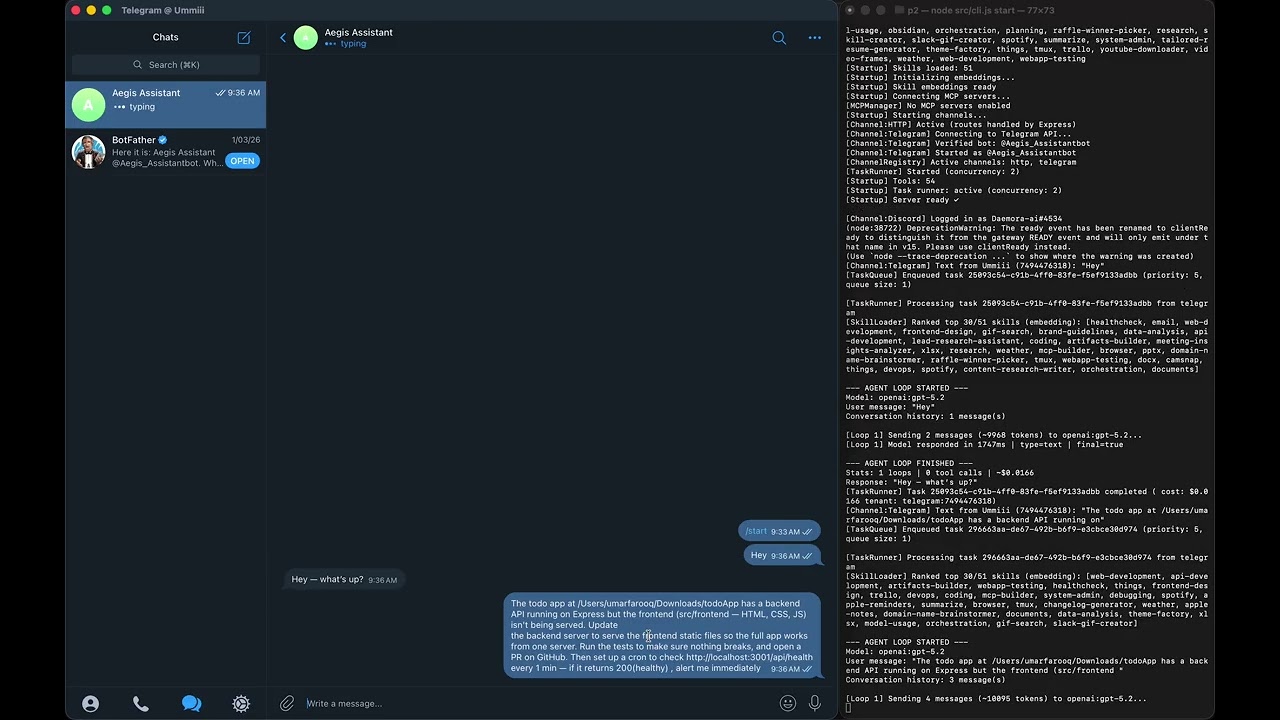
Demo 1 — GitHub PR + Local Tests + Health Monitoring
Daemora fixes a bug in a GitHub repo, opens a PR, runs the test suite
locally, and pings you every minute with a health check — autonomously.
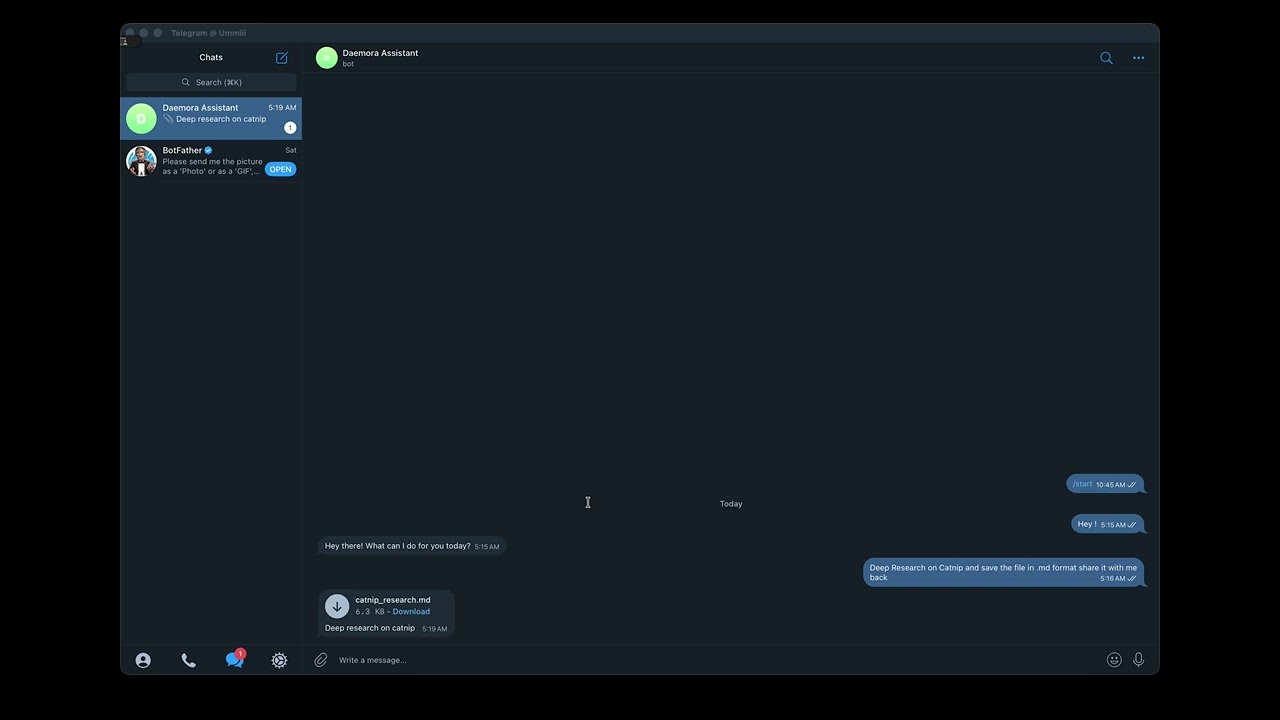
Demo 2 — Research → Save File → Telegram Delivery
Ask Daemora to research catnip. It searches the web, synthesises a report,
saves it to your machine, and sends you the file directly on Telegram.
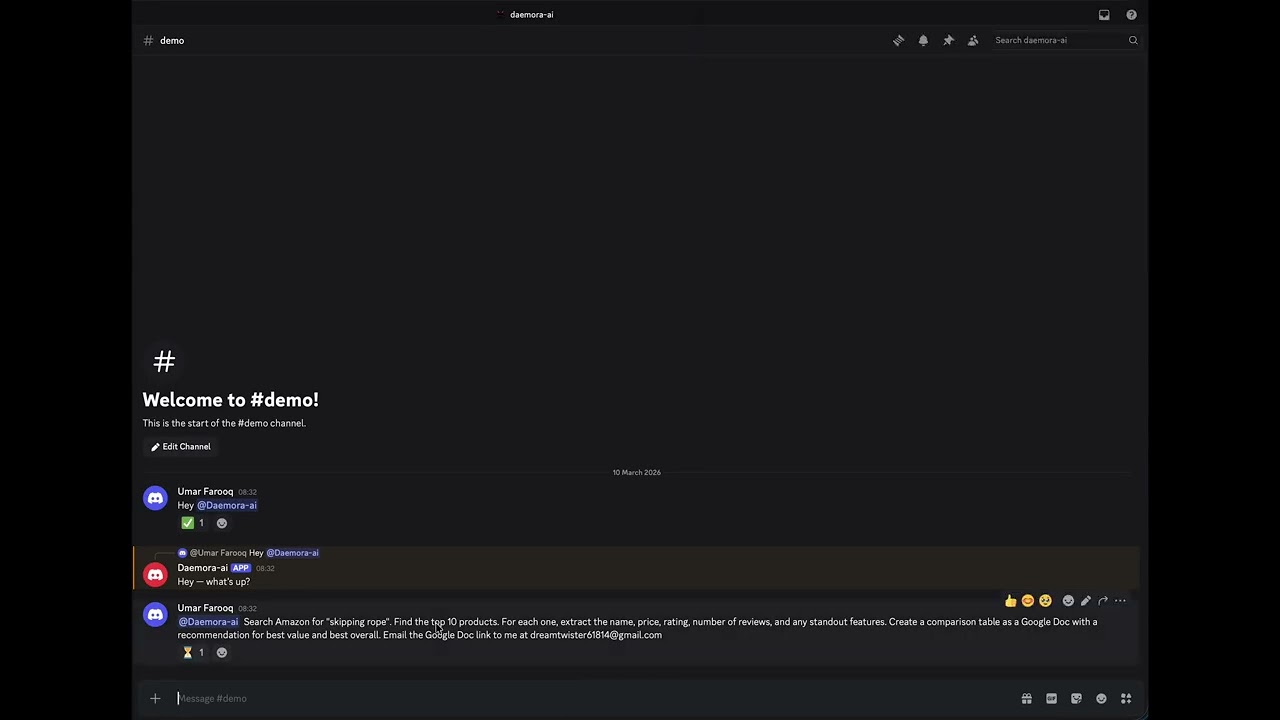
Demo 3 — Amazon Research → Google Doc → Email
"Find the top 10 skipping ropes on Amazon, analyse them, create a Google Doc
with the results, and email it to someone." One message. Fully autonomous.
Architecture
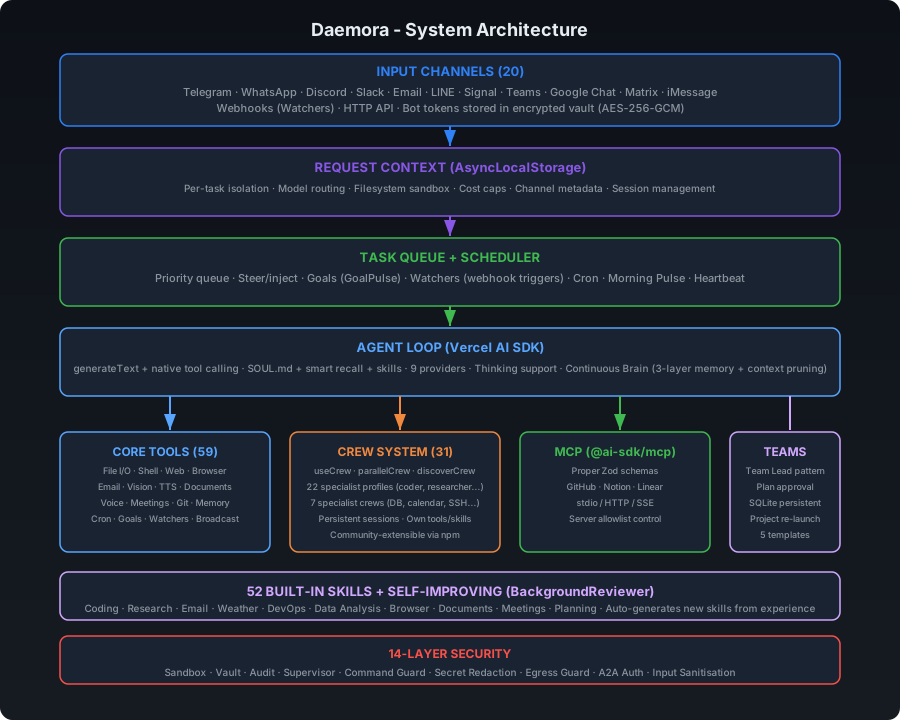
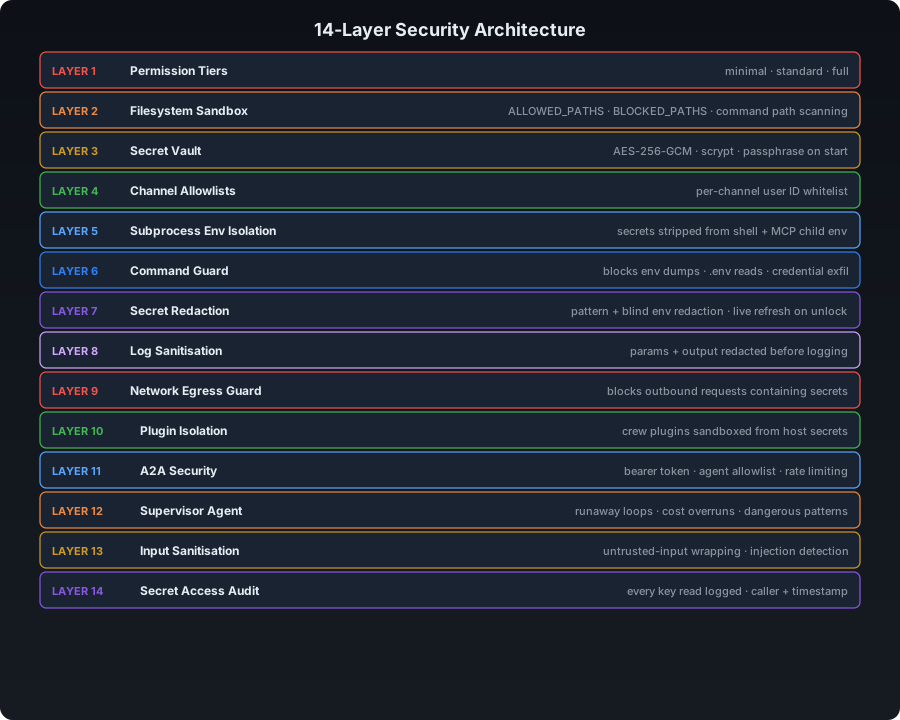
Security Architecture (14 Layers)
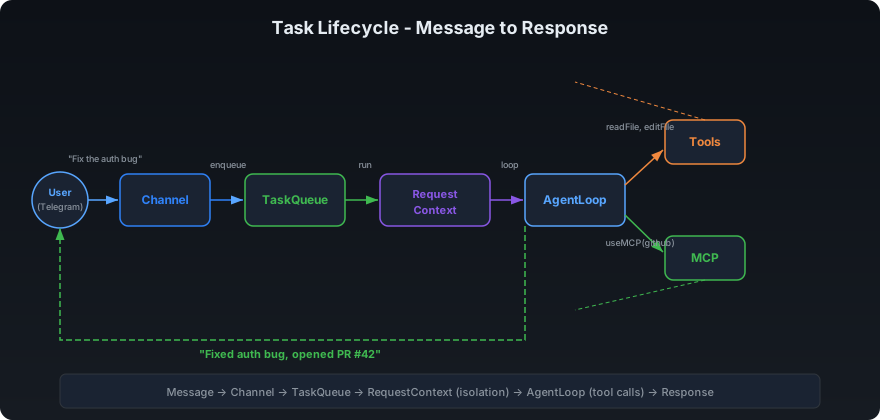
Task Lifecycle - Message to Response
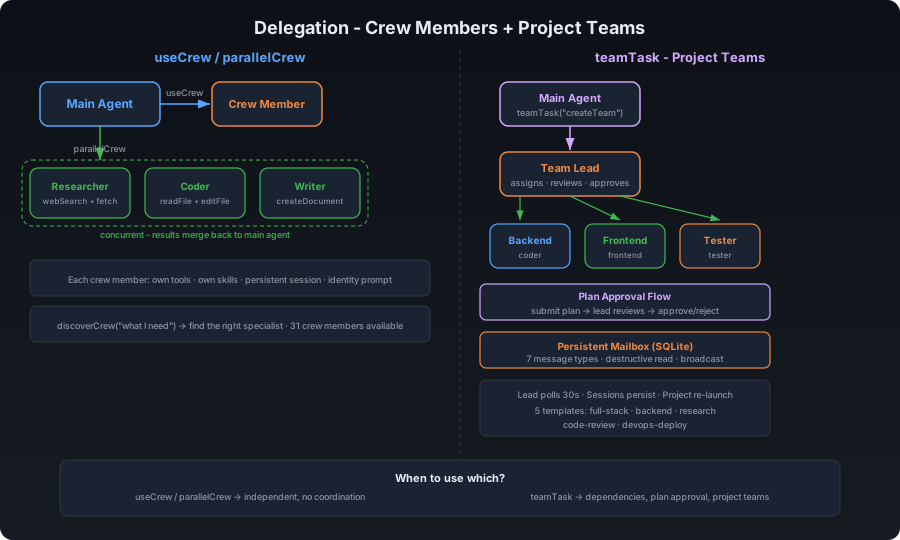
Multi-Agent - Parallel Sub-Agents + Teams
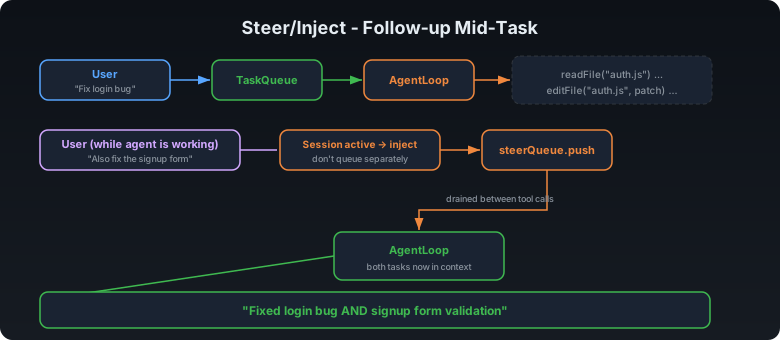
Steer/Inject - Follow-up Mid-Task
Quick Start
npm install -g daemora
daemora setup
daemora start
Then message your bot. That's it.
Installation
Download the installer (recommended — no terminal needed)
Native installers handle everything: Node.js, the daemora package, app icons, Desktop / Start Menu shortcuts, and the launcher. Click the icon → browser opens to the dashboard. First-run walks through the setup wizard.
| macOS (12+, Apple Silicon or Intel) | Daemora.pkg | Standard install wizard. Daemora.app and Stop Daemora.app land in /Applications. Desktop alias. Spotlight + Launchpad indexed. |
| Windows (10+) | DaemoraSetup.exe | Inno Setup wizard. Start Menu + Desktop shortcuts. |
Double-click the installer → walk through the wizard → enter your password (it writes to /Applications on macOS or Program Files on Windows). Then double-click the Daemora icon. Browser opens at http://localhost:8081. The setup wizard inside the app collects your model API key and configures channels.
Closing the browser does not stop daemora — the daemon is detached and survives logout. Use the Stop Daemora shortcut to actually shut it down.
Building the installer locally (e.g. for an unreleased commit)? See installer/README.md and the per-platform BUILD.md files.
npm (developers)
npm install -g daemora
daemora setup
daemora start
pnpm, yarn, and bun work the same way.
Clone from source
git clone https://github.com/CodeAndCanvasLabs/Daemora.git
cd Daemora
npm install
cp .env.example .env
daemora setup
daemora start
Run as a system daemon (always on)
daemora daemon install
daemora daemon start
daemora daemon status
daemora daemon logs
daemora daemon stop
Configuration
Copy .env.example to .env and fill in what you need.
AI Models
At least one provider is required:
OPENAI_API_KEY=sk-...
ANTHROPIC_API_KEY=sk-ant-...
GOOGLE_AI_API_KEY=...
XAI_API_KEY=...
DEEPSEEK_API_KEY=...
MISTRAL_API_KEY=...

# Default model (used when no model is specified)
DEFAULT_MODEL=openai:gpt-4.1-mini
7 providers, 59+ models - including:
| OpenAI | gpt-5.4, gpt-5.2, gpt-5.1, gpt-5, gpt-4.1, gpt-4.1-mini, gpt-4o, o4-mini, o3, o3-mini, o1, gpt-5.3-codex, gpt-5.1-codex |
| Anthropic | claude-opus-4-6, claude-sonnet-4-6, claude-sonnet-4-5, claude-haiku-4-5 |
| Google | gemini-3.1-pro-preview, gemini-3-pro-preview, gemini-2.5-pro, gemini-2.5-flash, gemini-2.0-flash |
| xAI | grok-4, grok-3-beta, grok-3-mini-beta |
| DeepSeek | deepseek-chat, deepseek-reasoner |
| Mistral | mistral-large-latest, codestral-latest, mistral-small-latest |
| Ollama | llama3, llama3.1, qwen2.5-coder - local, no API key needed |
Use format provider:model-id (e.g. openai:gpt-5.2, anthropic:claude-sonnet-4-6). Supports dynamic passthrough for any model ID your provider accepts.
Task-Type Model Routing (optional)
Route different task types to the best model automatically:
CODE_MODEL=anthropic:claude-sonnet-4-6
RESEARCH_MODEL=google:gemini-2.5-flash
WRITER_MODEL=openai:gpt-4.1
ANALYST_MODEL=openai:gpt-4.1
SUB_AGENT_MODEL=openai:gpt-4.1-mini    # default model for all sub-agents
When a sub-agent is spawned with profile: "coder", it automatically uses CODE_MODEL. Sub-agents without a profile route fall back to SUB_AGENT_MODEL, then the parent's model, then DEFAULT_MODEL.
Channels (20)
Enable only what you need. Each channel supports {CHANNEL}_ALLOWLIST and {CHANNEL}_MODEL overrides.
| Telegram | TELEGRAM_BOT_TOKEN |
| WhatsApp | TWILIO_ACCOUNT_SID, TWILIO_AUTH_TOKEN |
| Discord | DISCORD_BOT_TOKEN |
| Slack | SLACK_BOT_TOKEN, SLACK_APP_TOKEN |
| Email | EMAIL_USER, EMAIL_PASSWORD |
| LINE | LINE_CHANNEL_ACCESS_TOKEN, LINE_CHANNEL_SECRET |
| Signal | SIGNAL_CLI_URL, SIGNAL_PHONE_NUMBER |
| Microsoft Teams | TEAMS_APP_ID, TEAMS_APP_PASSWORD |
| Google Chat | GOOGLE_CHAT_SERVICE_ACCOUNT |
| Matrix | MATRIX_HOMESERVER_URL, MATRIX_ACCESS_TOKEN |
| Mattermost | MATTERMOST_URL, MATTERMOST_TOKEN |
| Twitch | TWITCH_BOT_USERNAME, TWITCH_OAUTH_TOKEN, TWITCH_CHANNEL |
| IRC | IRC_SERVER, IRC_NICK |
| iMessage | IMESSAGE_ENABLED=true (macOS only) |
| Feishu | FEISHU_APP_ID, FEISHU_APP_SECRET |
| Zalo | ZALO_APP_ID, ZALO_ACCESS_TOKEN |
| Nextcloud | NEXTCLOUD_URL, NEXTCLOUD_USER, NEXTCLOUD_PASSWORD |
| BlueBubbles | BLUEBUBBLES_URL, BLUEBUBBLES_PASSWORD |
| Nostr | NOSTR_PRIVATE_KEY |
Channels are configured from the Channels page in the web UI, or by setting
the required env vars before daemora start. Once secrets are present and the
vault is unlocked, the channel boots automatically.
Integrations (one-click OAuth)
Channels are chat platforms. Integrations are the OAuth-backed services
the agent acts on — read your inbox, post a thread, search a subreddit, upload
to YouTube. Connect from the Integrations page in the web UI: click the
provider, sign in, done. Tokens are stored encrypted in the vault, refreshed
automatically (30-minute background sweep plus per-account early-refresh timers
for short-TTL tokens), and revoked instantly when you disconnect.
| X / Twitter | Post, search, reply, like, read timeline | OAuth 2.0 + PKCE |
| Gmail | Read, send, label, search threads, manage drafts | Google OAuth |
| Google Calendar | Read events, create/update/delete, RSVP | Google OAuth |
| Google Drive | List, search, read, upload files | Google OAuth |
| LinkedIn | Post, read profile, share articles | LinkedIn OAuth |
| Reddit | Post, comment, vote, search subreddits, read inbox | Reddit OAuth |
| TikTok | Upload videos, read account info | TikTok OAuth |
| YouTube | Upload, list videos, manage comments, read analytics | Google OAuth |
| Facebook | Page posts, comments, insights | Meta OAuth |
| Instagram | Publish, comments, insights, basic profile | Meta OAuth |
| GitHub | Issues, PRs, repo browsing, gists | GitHub OAuth |
| Notion | Pages, databases, search, block edits | Notion OAuth |
Each provider auto-spawns a matching crew member the moment a token lands —
e.g. connecting X enables useCrew("twitter", ...) and the related tools
(twitter_post, twitter_search, etc.) without a restart. Multiple accounts
per provider are supported (post from @brand and reply from @personal); the
agent picks per call or you can pass an explicit accountId.
Cost Limits
MAX_COST_PER_TASK=0.50     # Max $ per task (agent stops mid-task if exceeded)
MAX_DAILY_COST=10.00       # Max $ per day across all tasks
Security
PERMISSION_TIER=standard           # minimal | standard | full
ALLOWED_PATHS=/home/user/work      # Sandbox: restrict file access to these directories
BLOCKED_PATHS=/home/user/.secrets  # Always block these, even inside allowed paths
RESTRICT_COMMANDS=true             # Block shell commands referencing paths outside sandbox
MCP Servers
MCP (Model Context Protocol) lets Daemora control external tools. Each connected server gets a specialist sub-agent with focused context.
daemora mcp add
daemora mcp add github npx -y @modelcontextprotocol/server-github
daemora mcp add notion npx -y @notionhq/notion-mcp-server
daemora mcp add myserver https://api.example.com/mcp
daemora mcp add myserver https://api.example.com/sse --sse
daemora mcp list
daemora mcp enable github
daemora mcp disable github
daemora mcp reload github
daemora mcp remove github
Popular MCP servers:
| GitHub | npx -y @modelcontextprotocol/server-github |
| Notion | npx -y @notionhq/notion-mcp-server |
| Linear | npx -y @linear/mcp-server |
| Slack | npx -y @modelcontextprotocol/server-slack |
| PostgreSQL | npx -y @modelcontextprotocol/server-postgres |
| Filesystem | npx -y @modelcontextprotocol/server-filesystem |
| Brave Search | npx -y @anthropic-ai/brave-search-mcp-server |
| Puppeteer | npx -y @modelcontextprotocol/server-puppeteer |
Browser Automation
Daemora drives a real Chromium browser via Microsoft's Playwright MCP. It's auto-registered, enabled by default, and uses a persistent profile so your logins survive across agent runs.
How logins work
The agent's browser launches with --user-data-dir <dataDir>/browser/<profile>/. Anything you log into in that profile (Gmail, X, GitHub, banks, anything) is saved to disk and inherited by the agent on every future browser action — until you clear the profile or switch to a different one.
You log in once, in a real browser window you control. The agent never sees your password.
One-time setup per profile
daemora browser
daemora browser --profile work
daemora browser --list
The window opens. Sign into Google, X, LinkedIn, your bank — whatever the agent will need. Close the window when done. Cookies, session tokens, and saved state flush to disk. Re-running daemora browser later opens the same profile with everything still logged in.
Switching which profile the agent uses
The agent uses one profile at a time, controlled by you:
- From Settings UI — Settings → "Browser Profile" → pick from dropdown. Saves and restarts the Playwright MCP server in ~1 second.
- From the API —
PUT /api/browser/profile with { "name": "work" }.
- From CLI — set the
DAEMORA_BROWSER_PROFILE setting and restart daemora.
Switching profiles is instant from the user's side and gives the agent full access to whichever account set you've chosen.
Tips
- One profile per identity. Use
default for personal accounts, work for work, client-acme for a client. Each gets its own logins, no cross-contamination.
- 2FA / MFA accounts work fine — log in once via
daemora browser, complete the 2FA flow yourself in the visible window, close. Future agent sessions inherit the trusted-device cookie.
- Browser extensions installed via
daemora browser persist in the profile and are active when the agent runs.
- Profile dirs live at
<dataDir>/browser/<name>/. Delete a dir to wipe a profile; create a new one with daemora browser --profile <name>.
- Anti-bot sites (Cloudflare, banks): the persistent profile + a real prior login defeats most challenges. For the rest, attach to your already-running Chrome via Playwright MCP's
--cdp-endpoint flag.
The agent reaches the browser via the browser-pilot crew. The main agent never calls Playwright directly — use_crew("browser-pilot", task) is the only path. This keeps browser discipline contained and avoids the main agent burning tokens on snapshot/click cycles.
Crew System
Crew members are self-contained specialist sub-agents. Each has its own tools, profile, skills, and persistent session. The main agent delegates via useCrew(crewId, task).
Built-in Crew Members
| video-editor (Media Studio) | generateImage, generateVideo, generateMusic, textToSpeech, transcribeAudio, imageOps | Video editing via Remotion + AI media generation. 38 rule files. |
| google-services | calendar, contacts, googlePlaces | Google Calendar, Contacts, Places |
| smart-home | philipsHue, sonos | Philips Hue lights, Sonos speakers |
| ssh-remote | sshTool | SSH exec, SCP file transfer |
| notifications | notification | Desktop, ntfy, Pushover push notifications |
| imessage | iMessageTool | Send/read iMessages (macOS) |
| system-monitor | systemInfo | CPU, memory, disk, processes, network |
| notion | useMCP | Notion pages, databases, views via MCP |
| twitter | X API v2 | Post, read timeline, search, reply, like |
Install from npm
daemora crew install daemora-crew-weather
daemora crew list
daemora crew remove weather
Build Your Own
See crew/README.md for the full guide. Three files:
crew/my-crew/
├── plugin.json       # manifest (id, name, description, profile, skills)
├── index.js          # register tools via api.registerTool()
└── tools/
    └── myTool.js     # tool implementation
CLI
daemora crew list
daemora crew install <pkg>
daemora crew remove <id>
daemora crew reload
Gallery (reference projects)
The Gallery section is where you organise reference assets (logos, brand guidelines, source PDFs, scripts) into named projects the agent can reach for whenever they're relevant.
Workflow
- Open
Gallery in the sidebar.
- Create a project — e.g.
AuditionAid. Add a one-paragraph purpose / brief so the agent knows what this project is for (e.g. "AuditionAid brand kit — use these assets for any AuditionAid-related work, primary purple is #a855f7").
- Upload assets: logos, screenshots, brand-guidelines PDFs, scripts, etc.
- Image uploads are auto-scanned by a vision model, producing a
<file>.md "filer" alongside the original. The filer contains structured frontmatter (kind, dominant colors, text-in-image, primary subject) plus a 60-150 word prose description.
- In Chat, just talk normally. The agent has
list_gallery_projects always available and calls it when you mention a brand or it's about to produce derivative work — getting back every project's purpose, file paths, and image descriptions in one shot.
- The agent then uses
read_file / read_pdf to load file contents on demand. Only the small image filers are inlined in the list response, so token cost stays bounded.
When the agent generates derivative work (videos, slides, posts) and delegates to a crew, it passes the gallery project as references: [{ kind: "gallery", value: "auditionaid" }] on the use_crew call, and the crew sees the same manifest auto-injected — without spending a tool call on its side.
On-disk layout
data/file-projects/
└── auditionaid/
    ├── project.json          # manifest with file list + scan status
    ├── files/                # original uploads
    │   ├── logo.png
    │   └── brand-guidelines.pdf
    └── filers/
        └── logo.png.md       # auto-generated structured description
No DB tables — listing is a readdir walk, each project is one JSON manifest. Easy to back up, easy to inspect.
Image scanning
Images go through describeImage() (src/files/imageFiler.ts). Provider chain:
- Vertex Gemini 3.1 Flash Lite (when
DAEMORA_VERTEX_SA_KEY_PATH + DAEMORA_VERTEX_PROJECT_ID are set, or GOOGLE_VERTEX_API_KEY is in the vault).
- OpenAI
gpt-4o-mini (when OPENAI_API_KEY is in the vault).
- Anthropic
claude-haiku (when ANTHROPIC_API_KEY is in the vault).
The first available provider wins. Scan runs asynchronously after upload (UI shows a scanning… badge); a process restart re-enqueues anything left in pending state, so a crash mid-scan doesn't strand the file.
Override the model with DAEMORA_IMAGE_ANALYSIS_MODEL=... (Vertex path only).
REST endpoints
GET    /api/file-projects                              List projects
POST   /api/file-projects                              Create  { name, color?, description? }
GET    /api/file-projects/:slug                        Read one
PATCH  /api/file-projects/:slug                        Edit  { name?, color?, description? }
DELETE /api/file-projects/:slug                        Delete (recursive)
POST   /api/file-projects/:slug/files                  Upload  { filename, mimeType, base64 }
DELETE /api/file-projects/:slug/files/:fileId          Remove a file
GET    /api/file-projects/:slug/files/:fileId/raw      Download original
GET    /api/file-projects/:slug/files/:fileId/filer    Fetch the auto-generated description
Built-in Tools
52 tools the agent uses autonomously:
| Files | readFile, writeFile, editFile, listDirectory, applyPatch |
| Search | glob, grep |
| Shell | executeCommand (foreground + background) |
| Web | webFetch, webSearch (browser automation lives in the browser-pilot crew via Playwright MCP — see Browser Automation) |
| Vision | screenCapture (in-chat images are passed to the model directly as native multimodal content; the file-scan pipeline calls an internal describeImage helper) |
| Communication | sendEmail, messageChannel, sendFile, replyWithFile, replyToUser, makeVoiceCall, meetingAction, transcribeAudio, textToSpeech |
| Documents | createDocument (Markdown, PDF, DOCX), readPDF |
| Memory | readMemory, writeMemory, searchMemory, pruneMemory, readDailyLog, writeDailyLog, listMemoryCategories |
| Delegation | useCrew, parallelCrew, discoverCrew, teamTask, useMCP, manageAgents |
| MCP + Crew | useMCP, manageMCP, useCrew |
| Scheduling | cron, goal, watcher, broadcast (Fleet Command) |
| Tracking | projectTracker, taskManager |
| Dev Tools | gitTool (status, diff, commit, branch, log, stash) |
| Media | generateImage, generateVideo, generateMusic, imageOps (resize/crop/convert), textToSpeech, transcribeAudio |
| System | clipboard |
| Admin | reload (config, models, vault, caches) |
Agent Teams
Teams enable coordinated multi-agent collaboration with shared task lists, dependency tracking, and inter-agent messaging. Use teams when agents need to coordinate - use parallelCrew when they don't.
Team Lifecycle
createTeam("feature-sprint")
  → addTeammate({ profile: "coder", instructions: "..." })
  → addTeammate({ profile: "researcher" })
  → addTeammate({ profile: "writer" })
  → addTask({ title: "Research API options", ... })
  → addTask({ title: "Implement chosen API", blockedBy: ["task-1"] })
  → addTask({ title: "Write docs", blockedBy: ["task-2"] })
  → spawnAll()
  → teammates claim tasks, work, complete, message each other
  → disbandTeam()
Capabilities
| Shared Task List | addTask with blockedBy dependency tracking. Teammates claim → complete or fail tasks. |
| Inter-Agent Messaging | sendMessage(to, message) for direct, broadcast(message) for all. Teammates read mail between tool calls. |
| Dependency Tracking | Tasks with unmet blockedBy deps are not claimable. Automatically unblocked when deps complete. |
| Status Monitoring | getTeamStatus returns full state - teammates, tasks, messages. |
When to Use
| 5 independent web searches | parallelCrew - no coordination needed |
| Research → implement → document pipeline | Team - tasks depend on each other |
| Coder + reviewer need to discuss approach | Team - inter-agent messaging |
| Translate a doc into 3 languages | parallelCrew - independent, no coordination |
Limits
- Max 5 teams active
- Max 10 teammates per team
- Max 7 concurrent sub-agents
- Max nesting depth: 3
Skills
Skills inject behaviour instructions when a task matches certain keywords. Create a .md file in skills/ with a YAML frontmatter:
---
name: deploy
description: Handle deployment tasks for web apps and APIs
triggers: deploy, release, ship, production, go live
---
Always follow this order when deploying:
1. Run the full test suite - never deploy broken code
2. Check for .env differences between dev and prod
3. Build the production bundle
4. Use zero-downtime deployment if possible (blue/green, rolling)
5. Verify the deployment is healthy before reporting done
6. Notify the user with the live URL
60 built-in skills cover: coding, research, email, weather, Spotify, Obsidian, Apple Notes, Apple Reminders, Things, Trello, Tmux, PDF, image generation, video editing (Remotion), video frames, music generation, health checks, GIF search, webcam capture, documents (PDF/DOCX/XLSX/PPTX), data analysis, DevOps, API development, browser automation, meeting attendance, planning, orchestration, GitHub, Discord ops, Slack ops, Google Workspace, macOS automation, and more.
Security
daemora doctor
| 1 | Permission tiers | minimal / standard / full - controls which tools the agent can call |
| 2 | Filesystem sandbox | Directory scoping via ALLOWED_PATHS, hardcoded blocks for .ssh, .env, .aws. All 19 file-touching tools enforce FilesystemGuard |
| 3 | Secret vault | AES-256-GCM encrypted secrets in SQLite, scrypt key derivation, passphrase required on start |
| 4 | Channel allowlists | Per-channel user ID whitelist - blocks unknown senders |
| 5 | Subprocess env isolation | Secrets stripped from executeCommand child processes and MCP stdio subprocesses. Agent cannot dump env. |
| 6 | Command guard | Blocks env dumps, .env reads, credential exfiltration, CLI privilege escalation |
| 7 | Comprehensive secret redaction | ALL env secrets tracked (not just 3). Pattern + blind redaction. Live refresh on vault unlock. |
| 8 | Log sanitisation | Tool params and output redacted before console.log - secrets never written to logs |
| 9 | Network egress guard | Outbound HTTP requests and emails scanned for secret values - blocks exfiltration attempts |
| 10 | A2A security | Agent-to-agent protocol: bearer token, agent allowlist, rate limiting |
| 11 | Supervisor agent | Detects runaway loops, cost overruns, rm -rf, `curl |
| 12 | Input sanitisation | User messages wrapped in <untrusted-input> tags; prompt injection patterns flagged |
| 13 | Secret access audit trail | Every resolveKey() call logged to SQLite - caller, key name, timestamp |
| 14 | Tool filesystem guard | All 19 file-touching tools enforce checkRead/checkWrite scoping |
Data Storage
SQLite database (data/daemora.db) stores configuration, sessions, tasks, cron jobs, vault secrets, channel identities, and three-layer memory (semantic/episodic/procedural). File-based storage is used for audit logs and cost tracking.
data/
├── daemora.db      SQLite database (config, sessions, tasks, vault, cron, memory, learning_log)
├── audit/          Append-only JSONL audit logs (secrets stripped)
├── costs/          Per-day cost tracking logs
└── skill-embeddings.json
Data Cleanup
Configurable retention prevents unbounded growth. Set via CLEANUP_AFTER_DAYS env var, CLI, or setup wizard.
daemora cleanup stats
daemora cleanup set 30
daemora cleanup set 0
daemora cleanup
Auto-cleanup runs on startup. Cleans: tasks, audit logs, cost logs, and stale sub-agent sessions. Main user sessions are never auto-deleted.
CLI Reference
daemora start                    Start the agent server
daemora setup                    Interactive setup wizard
daemora doctor                   Security audit - scored report

daemora mcp list                 List all MCP servers
daemora mcp add                  Add an MCP server (interactive)
daemora mcp add <name> <cmd>     Add an MCP server (non-interactive)
daemora mcp remove <name>        Remove an MCP server
daemora mcp enable <name>        Enable a disabled server
daemora mcp disable <name>       Disable without removing
daemora mcp reload <name>        Reconnect a server

daemora daemon install           Install as a system daemon
daemora daemon start             Start the daemon
daemora daemon stop              Stop the daemon
daemora daemon status            Check daemon status
daemora daemon logs              View daemon logs

daemora vault set <key>          Store an encrypted secret
daemora vault get <key>          Retrieve a secret
daemora vault list               List all secret keys
daemora vault unlock             Unlock the vault

daemora sandbox show             Show current sandbox rules
daemora sandbox add <path>       Allow a directory (activates scoped mode)
daemora sandbox remove <path>    Remove from allowed list
daemora sandbox block <path>     Always block a path
daemora sandbox restrict         Enable command restriction
daemora sandbox clear            Back to unrestricted mode

daemora channels                 List all channels + setup status
daemora channels add             Configure a new channel interactively
daemora channels add <name>      Configure a specific channel directly

daemora cleanup                  Run data cleanup now (uses configured retention)
daemora cleanup stats            Show storage usage (tasks, sessions, audit, costs)
daemora cleanup set <days>       Set retention period (0 = never delete)

daemora help                     Show full help
HTTP API
The agent exposes a REST API on http://localhost:8081.
curl http://localhost:8081/health
curl http://localhost:8081/tasks
curl http://localhost:8081/tasks/{taskId}
curl http://localhost:8081/costs/today
curl http://localhost:8081/mcp
POST /chat and POST /tasks (unauthenticated task submission) are disabled by default - use a channel (Telegram, Slack, etc.) instead.
Self-Hosting
Daemora runs entirely on your own machine. Nothing is sent to any third party beyond the AI model APIs you configure.
Requirements:
- Node.js 20+
- 512 MB RAM minimum
- macOS, Linux, or Windows WSL
Production setup:
npm install -g daemora
daemora setup
daemora daemon install
daemora daemon start
daemora doctor
Use nginx or Caddy as a reverse proxy for HTTPS if exposing the API port.
Tech Stack
| Runtime | Node.js 20+ - ES modules, no build step |
| AI SDK | Vercel AI SDK (ai) - model-agnostic, 25+ providers |
| Models | OpenAI, Anthropic, Google Gemini, xAI, DeepSeek, Mistral, Ollama (local) |
| Testing | Vitest (unit + integration), Playwright (E2E) |
| MCP | @modelcontextprotocol/sdk - stdio, HTTP, SSE |
| Channels | grammy, twilio, discord.js, @slack/bolt, nodemailer/imap, botbuilder, google-auth-library |
| Voice/Meetings | Twilio (phone dial-in + WebSocket media streams), OpenAI Realtime API (STT), ElevenLabs/OpenAI (TTS), cloudflared (auto-tunneling) |
| Scheduling | croner - production-grade cron with overlap prevention, retry, delivery |
| Vault | Node.js crypto built-in - AES-256-GCM + scrypt, no binary deps |
| Sandbox | Node.js tool-level path enforcement - no Docker required |
| Storage | SQLite (node:sqlite) + file-based (Markdown, JSONL) |
Testing
pnpm test
pnpm test:watch
pnpm test:coverage
pnpm test:unit
pnpm test:integration
97 tests covering: Task lifecycle, CostTracker (daily budgets), SecretScanner (pattern + blind env-var redaction), FilesystemGuard (blocked patterns, path scoping), ModelRouter (task-type routing, profile resolution), and integration tests.
Contributing
git clone https://github.com/CodeAndCanvasLabs/Daemora.git
cd daemora-agent
pnpm install
cp .env.example .env
daemora setup
pnpm test
daemora start
Contributions are welcome. Please open an issue before submitting large PRs.
License
AGPL-3.0 - Daemora is open source. If you modify Daemora and distribute it, or run it as a network service, you must open-source your changes under AGPL-3.0.
See LICENSE for the full text.
Links




