

Security News
Ruby's Bundler 4.0.18 Extends Cooldown to bundle lock and bundle cache
The supply chain control that delays freshly published gems now covers lockfile generation and gem vendoring in Ruby projects.
By Sarah Gooding - Aug 06, 2026
dbb-react-native-gifted-chat
Advanced tools



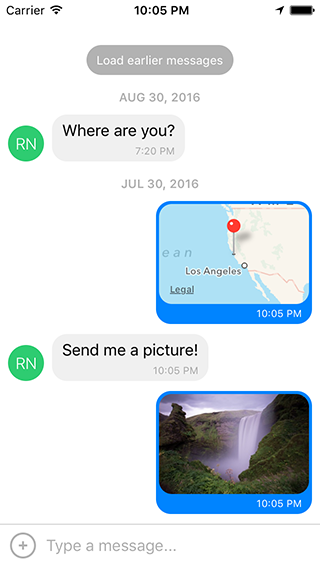
The most complete chat UI for React Native (formerly known as Gifted Messenger).

0.2.x for RN >= 0.44.00.1.x for RN >= 0.40.00.0.10 for RN < 0.40.0npm install react-native-gifted-chat --saveyarn add react-native-gifted-chatimport { GiftedChat } from 'react-native-gifted-chat';
class Example extends React.Component {
state = {
messages: [],
};
componentWillMount() {
this.setState({
messages: [
{
_id: 1,
text: 'Hello developer',
createdAt: new Date(),
user: {
_id: 2,
name: 'React Native',
avatar: 'https://facebook.github.io/react/img/logo_og.png',
},
},
],
});
}
onSend(messages = []) {
this.setState((previousState) => ({
messages: GiftedChat.append(previousState.messages, messages),
}));
}
render() {
return (
<GiftedChat
messages={this.state.messages}
onSend={(messages) => this.onSend(messages)}
user={{
_id: 1,
}}
/>
);
}
}
See example/App.js for a working demo!
e.g.
{
  _id: 1,
  text: 'My message',
  createdAt: new Date(Date.UTC(2016, 5, 11, 17, 20, 0)),
  user: {
    _id: 2,
    name: 'React Native',
    avatar: 'https://facebook.github.io/react/img/logo_og.png',
  },
  image: 'https://facebook.github.io/react/img/logo_og.png',
  // Any additional custom parameters are passed through
}
messages (Array) - Messages to displaytext (String) - Input text; default is undefined, but if specified, it will override GiftedChat's internal state (e.g. for redux; see notes below)placeholder (String) - Placeholder when text is empty; default is 'Type a message...'messageIdGenerator (Function) - Generate an id for new messages. Defaults to UUID v4, generated by uuiduser (Object) - User sending the messages: { _id, name, avatar }onSend (Function) - Callback when sending a messagelocale (String) - Locale to localize the datestimeFormat (String) - Format to use for rendering times; default is 'LT'dateFormat (String) - Format to use for rendering dates; default is 'll'isAnimated (Bool) - Animates the view when the keyboard appearsloadEarlier (Bool) - Enables the "Load earlier messages" buttononLoadEarlier (Function) - Callback when loading earlier messagesisLoadingEarlier (Bool) - Display an ActivityIndicator when loading earlier messagesrenderLoading (Function) - Render a loading view when initializingrenderLoadEarlier (Function) - Custom "Load earlier messages" buttonrenderAvatar (Function) - Custom message avatar; set to null to not render any avatar for the messageshowUserAvatar (Function) - Whether to render an avatar for the current user; default is false, only show avatars for other usersonPressAvatar (Function(user)) - Callback when a message avatar is tappedrenderAvatarOnTop (Bool) - Render the message avatar at the top of consecutive messages, rather than the bottom; default is falserenderBubble (Function) - Custom message bubbleonLongPress (Function(context, message)) - Callback when a message bubble is long-pressed; default is to show an ActionSheet with "Copy Text" (see example using showActionSheetWithOptions())renderMessage (Function) - Custom message containerrenderMessageText (Function) - Custom message textrenderMessageImage (Function) - Custom message imageimageProps (Object) - Extra props to be passed to the <Image> component created by the default renderMessageImagelightboxProps (Object) - Extra props to be passed to the MessageImage's LightboxrenderCustomView (Function) - Custom view inside the bubblerenderDay (Function) - Custom day above a messagerenderTime (Function) - Custom time inside a messagerenderFooter (Function) - Custom footer component on the ListView, e.g. 'User is typing...'; see example/App.js for an examplerenderChatFooter (Function) - Custom component to render below the MessageContainer (separate from the ListView)renderInputToolbar (Function) - Custom message composer containerrenderComposer (Function) - Custom text input message composerrenderActions (Function) - Custom action button on the left of the message composerrenderSend (Function) - Custom send button; you can pass children to the original Send component quite easily, for example to use a custom icon (example)renderAccessory (Function) - Custom second line of actions below the message composeronPressActionButton (Function) - Callback when the Action button is pressed (if set, the default actionSheet will not be used)bottomOffset (Integer) - Distance of the chat from the bottom of the screen (e.g. useful if you display a tab bar)minInputToolbarHeight (Integer) - Minimum height of the input toolbar; default is 44listViewProps (Object) - Extra props to be passed to the messages <ListView>; some props can't be overridden, see the code in MessageContainer.render() for detailskeyboardShouldPersistTaps (Enum) - Determines whether the keyboard should stay visible after a tap; see <ScrollView> docsonInputTextChanged (Function) - Callback when the input text changesmaxInputLength (Integer) - Max message composer TextInput lengthfocusTextInput() - Open the keyboard and focus the text input boxThe messages prop should work out-of-the-box with Redux. In most cases this is all you need.
If you decide to specify a text prop, GiftedChat will no longer manage its own internal text state and will defer entirely to your prop.
This is great for using a tool like Redux, but there's one extra step you'll need to take:
simply implement onInputTextChanged to receive typing events and reset events (e.g. to clear the text onSend):
<GiftedChat
  text={customText}
  onInputTextChanged={(text) => this.setCustomText(text)}
  /* ... */ />
If you are using Create React Native App / Expo, no Android specific installation steps are required -- you can skip this section. Otherwise we recommend modifying your project configuration as follows.
Make sure you have android:windowSoftInputMode="adjustResize" in your AndroidManifest.xml:
<activity
  android:name=".MainActivity"
  android:label="@string/app_name"
  android:windowSoftInputMode="adjustResize"
  android:configChanges="keyboard|keyboardHidden|orientation|screenSize">
If you plan to use GiftedChat inside a Modal, see #200.
You can use wml to keep the example app in sync
with any changes you make to the library during development. Steps:
npm install -g wmlwml add . example/node_modules/react-native-gifted-chat from the root directorycd examplenpm startwml start in another terminal window (doesn't matter where)Note that it's important for wml start to come after npm start, or you'll get Can't find entry file index.js errors.
If you have any issues, you can clear your watches using watchman watch-del-all and try again.
Feel free to ask me questions on Twitter @FaridSafi!
FAQs
The most complete chat UI for React Native
We found that dbb-react-native-gifted-chat demonstrated a not healthy version release cadence and project activity because the last version was released a year ago. It has 1 open source maintainer collaborating on the project.
Did you know?

Socket for GitHub automatically highlights issues in each pull request and monitors the health of all your open source dependencies. Discover the contents of your packages and block harmful activity before you install or update your dependencies.
Security News
The supply chain control that delays freshly published gems now covers lockfile generation and gem vendoring in Ruby projects.

Security News
During a UK cyber test, a Mythos 5 agent used sockpuppets, social engineering, and prompt injection to try to get a maintainer to merge malware.

Company News
Socket is now in the AWS Security Hub Extended plan. Adopt it through AWS, apply committed spend, and block malicious open source packages.