

Security News
Deno Goes the Way of the Dinosaur
Cloudflare is acquiring Deno’s team, which will provide another year of bug fixes and security updates before ending support for the runtime.
By Sarah Gooding - Oct 16, 2026
deep-read-summarize
Advanced tools
Deep reading & summarization for DSH: books/papers/videos/web → structured Markdown notes (Obsidian / Logseq / static sites). Plugin parsers, MapReduce deep-read, JSON Schema-constrained sub-tasks.


Disclaimer: This is an unofficial third-party tool. It is not affiliated with, endorsed by, or sponsored by DeepSeek or the DeepSeek Harness project. "DeepSeek" and "DeepSeek Harness" are trademarks of their respective owners. This project only orchestrates the workflow tool available in your DSH environment; it does not redistribute any DeepSeek software.
⚠️ 最重要:本工具是「辅助精读」工具,不能代替自主学习。 它帮你快速提取、归纳、结构化阅读内容,但真正的理解、思考与批判仍需你自己完成;请始终以原文为准,不要把它当作学习成果本身。
给 DSH(DeepSeek Harness)写的一个精读工作流:输入一本书、一篇论文、一个视频链接或网页,输出一份结构化的标准 Markdown 笔记(YAML frontmatter,可直接放进 Obsidian / Logseq / 静态站点内容目录 / 任意 Markdown 编辑器)。
内容会被拆成若干块,由多个子代理并行精读,再合并成一篇带 YAML frontmatter 的 Markdown。关键结论附原文出处,成稿前有一道质量校验。
使用中遇到问题、或觉得哪里能更好,欢迎随时在 GitHub issue 反馈。
注意:DSH 目前是 developer preview,接口可能变化。本仓库针对特定版本的 workflow 工具语义编写,见下文兼容性。
平台:Windows / macOS / Linux 同等支持(0.3.9 起),详见下文支持平台。
(图用 GitHub 绝对地址,npm 页面同样能显示;图片本身不打进 npm 包,只随仓库分发)
| 精读论文 | 视频笔记(元信息) |
|---|---|
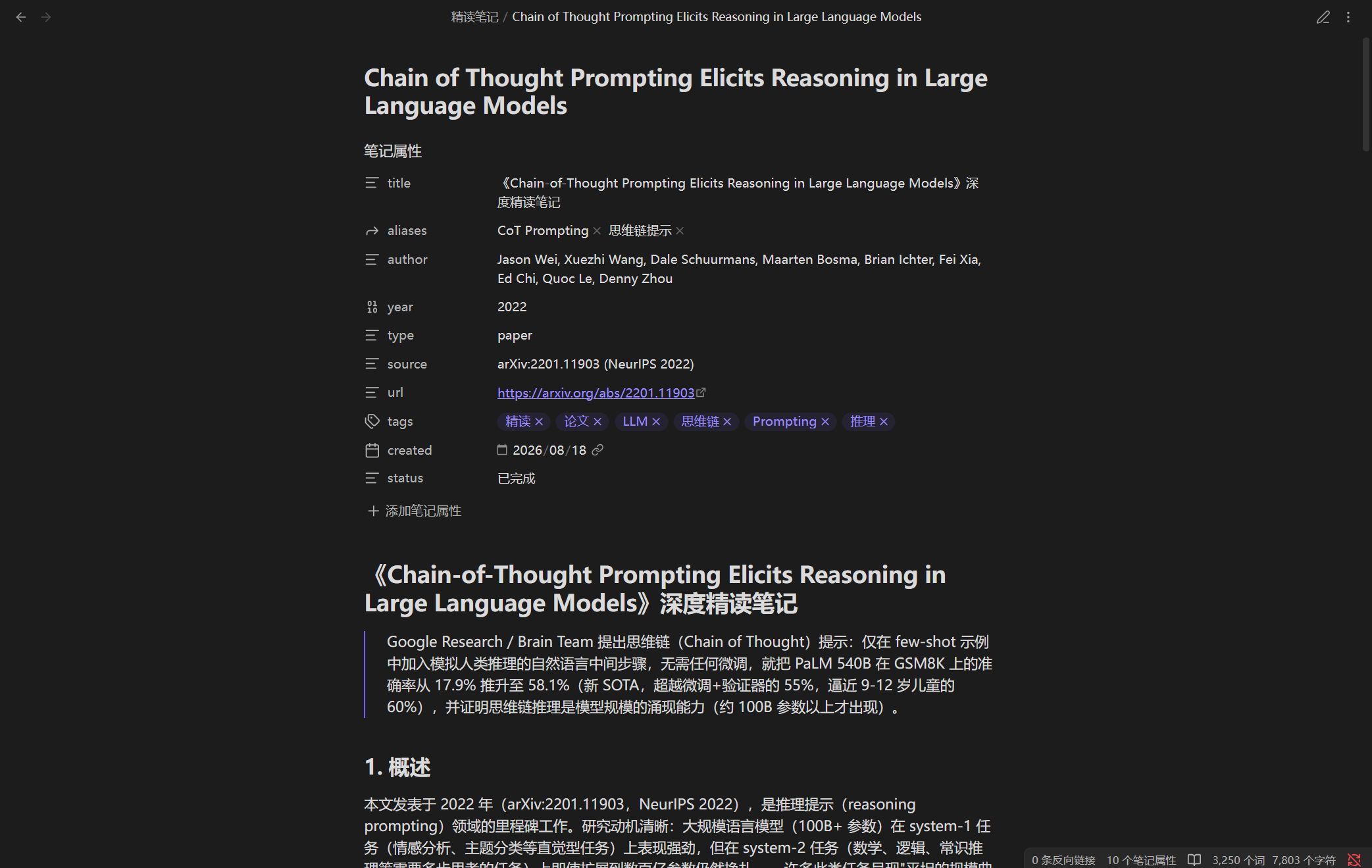 | 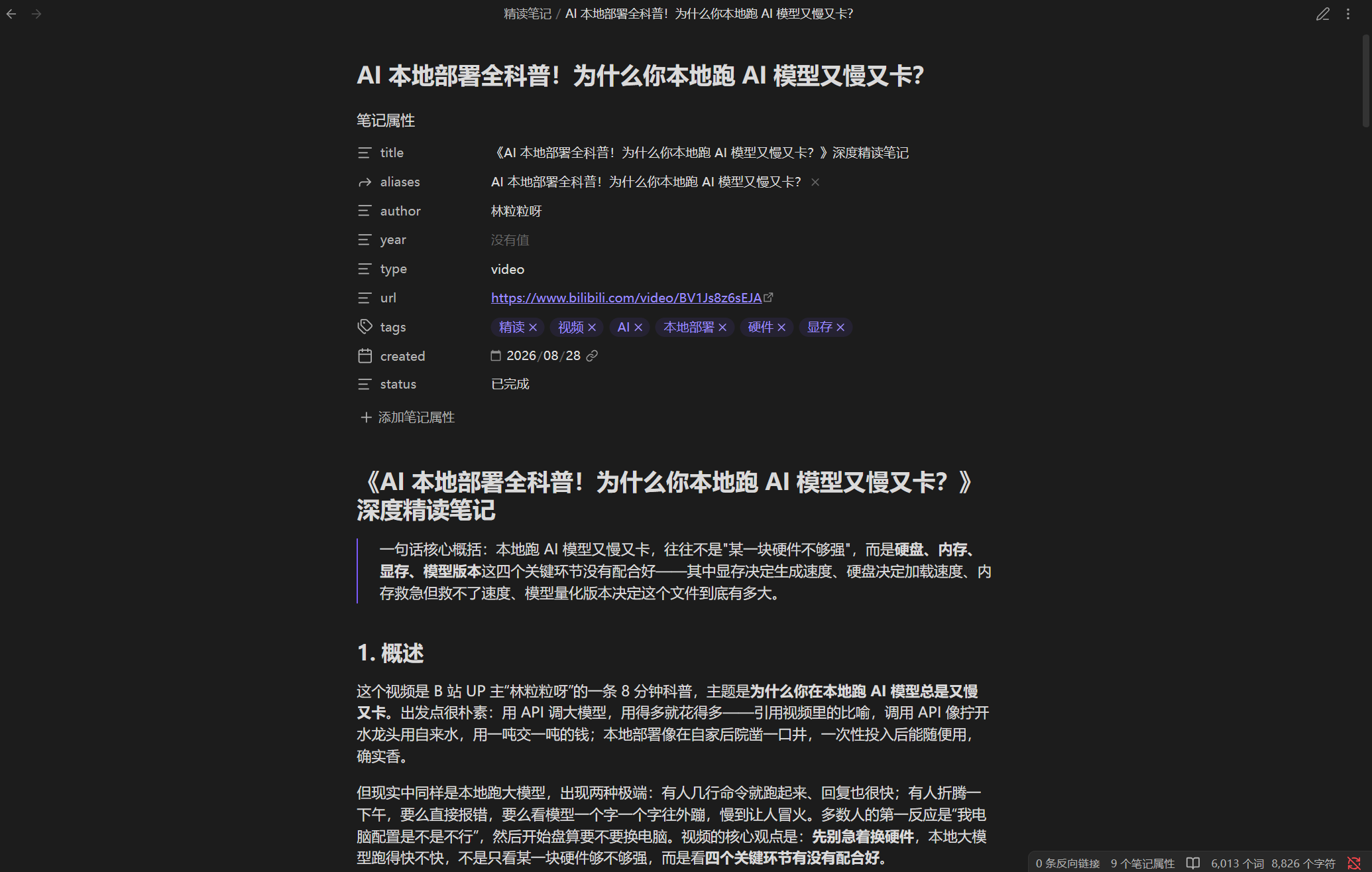 |
| 视频笔记(行动要点) | 会话内摘要 |
|---|---|
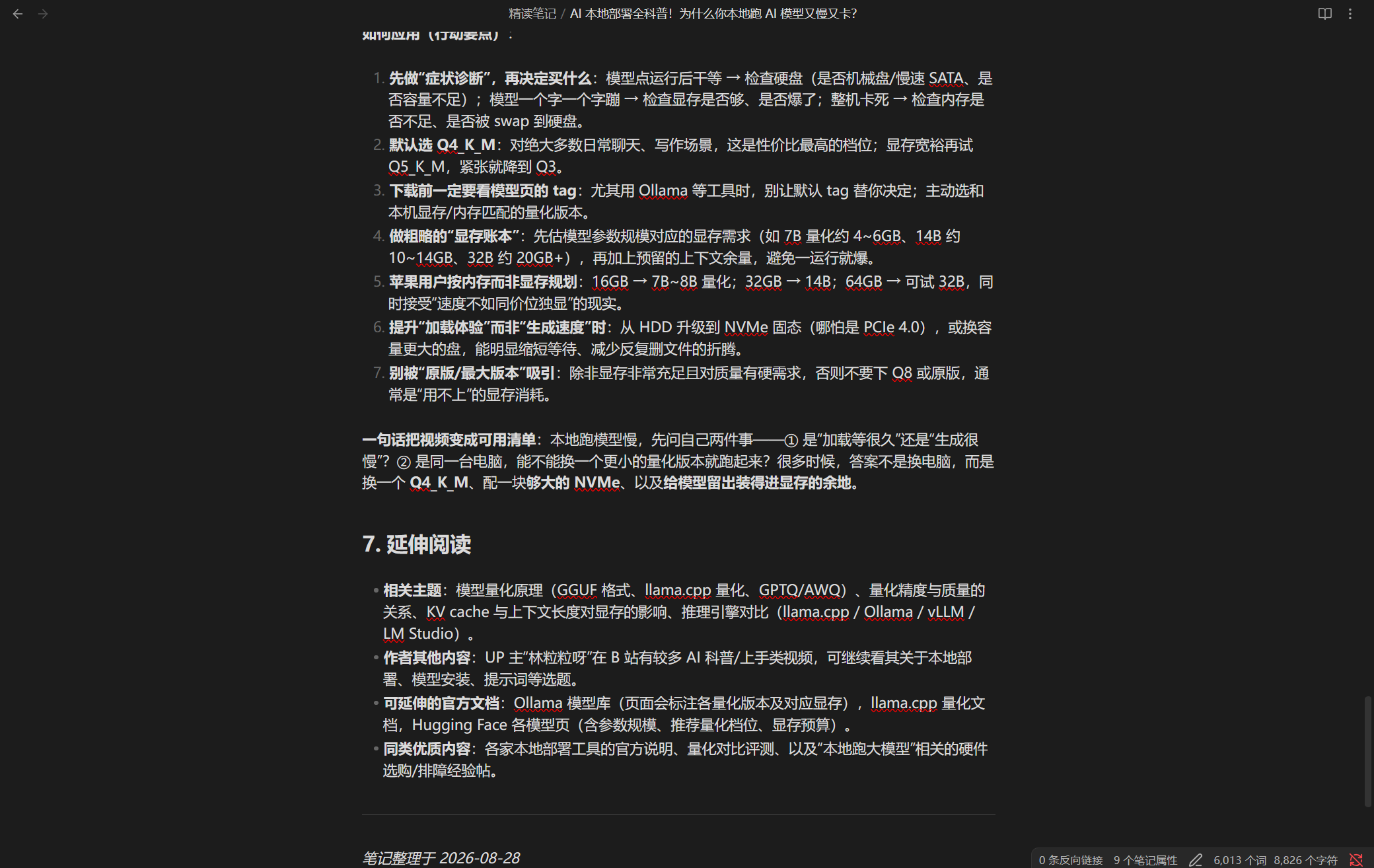 | 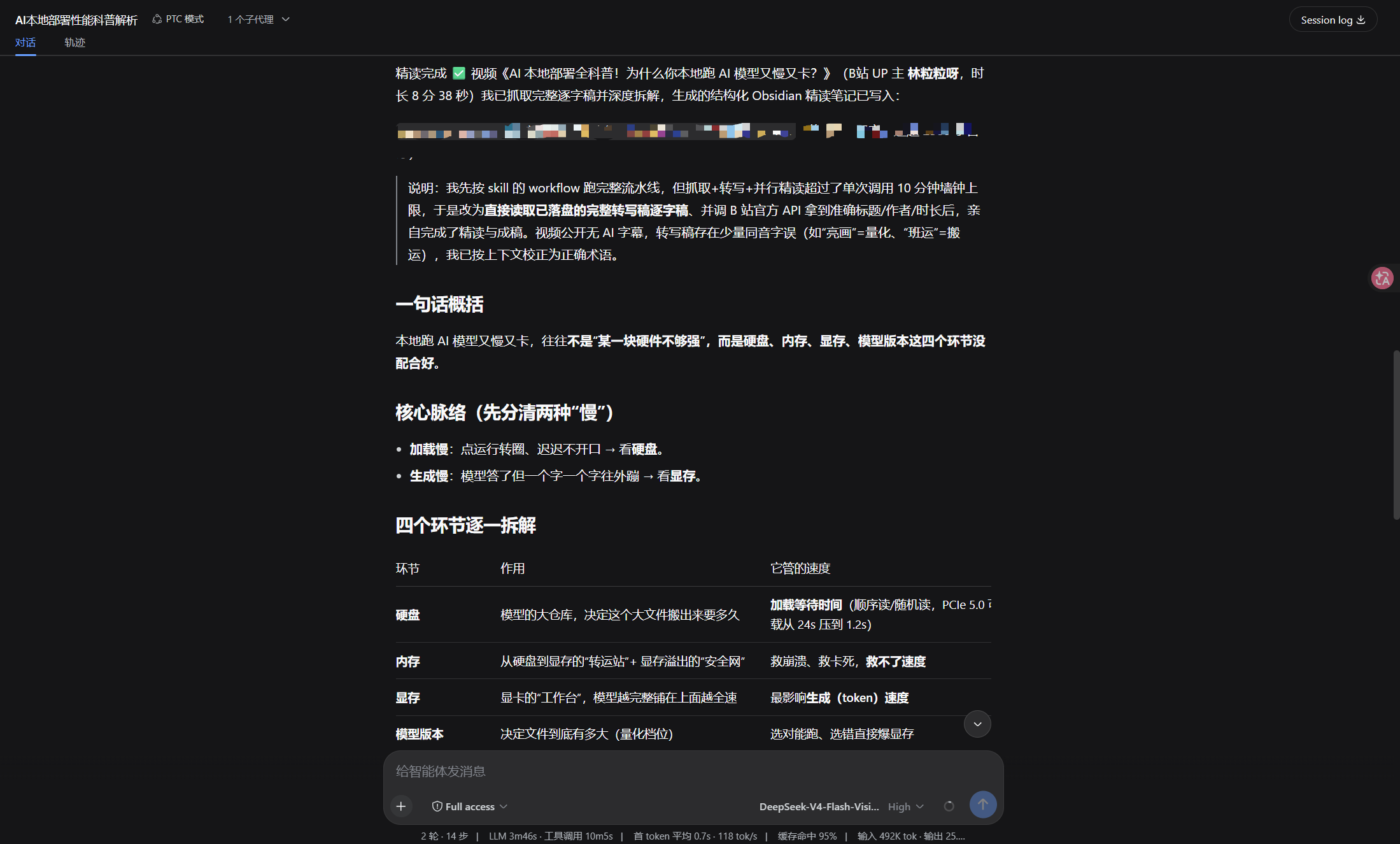 |
maxChunks 强制约束(计划失控会顶穿单次调用时限)输入(链接或文件路径)
│
▼
解析器注册表 ── book / paper / video / web
│
▼
波次1 获取内容 → 写入临时文件 → 生成分块计划
│
▼
波次2 N 个子代理并行精读各块(Map)
│
▼
波次3 合并成稿 + 质量校验(Reduce)
│
▼
Markdown 笔记
三个波次,子代理总数约 N+2 个,N 是分块数。
parsers/         各输入类型的解析器,按类型分发
  book.js        书籍:PDF/EPUB/MOBI 文本提取、章节分块
  paper.js       论文:arXiv/PDF/HTML 结构识别
  video.js       视频:完整逐字稿(字幕优先,无字幕自动转写,走 scripts/transcribe.js)
  web.js         网页:正文提取
  index.js       注册表:解析器发现与回退
schemas/         输出约束的 JSON Schema(波次1 由 workflow.js 注入脚本,单一真相)
scripts/         lint、安全检查、跨平台转写引导(transcribe.js)
tests/           fixture 测试与验证脚本
workflow.js      workflow 脚本本体(meta + script)
想换某个输入类型的处理方式,在 custom-parsers/ 放一个同接口的解析器即可,同名类型会覆盖内置实现;用新类型名(如 podcast)也可以——注册表里的解析器会全部内联进 workflow 脚本,type 白名单与 schema 的 kind 枚举都跟着注册表走。接口只有三个字段:name、types、buildPrompt(input, opts)。
Windows / macOS / Linux 同等支持(0.3.9 起)。插件本身只依赖 Node(DSH 自带),各环节需要的额外工具按平台装:
pdftotext(poppler):macOS brew install poppler、Windows winget install poppler、Debian/Ubuntu apt install poppler-utilscurl:Windows 10+ 与 macOS / Linux 都自带,零安装yt-dlp:macOS brew install yt-dlp、Windows winget install yt-dlp.yt-dlp、任意平台 pip install -U yt-dlpuv(脚本自举:建 Python 3.12 环境 + 装 faster-whisper):macOS brew install uv、Windows winget install astral-sh.uv,macOS / Linux 也可用官方安装脚本(curl -LsSf https://astral.sh/uv/install.sh 交给 sh)其余说明:
node scripts/transcribe.js --audio <音频> --out <txt>。options.device: "auto" 会尝试并在失败时自动回退 CPU。~/Library/Caches/deep-read-summarize、Linux $XDG_CACHE_HOME/deep-read-summarize、Windows %LOCALAPPDATA%\deep-read-summarize。uv 自举 Python 3.12 → 装 faster-whisper → 下载模型 → 输出逐字稿,退出码 0;CI 的 macos-latest 作业另外覆盖平台路径解析与整套测试。遇到报错欢迎开 issue 反馈。deep-read-summarize 是 DSH 插件,可通过 npm 或本地安装:
# npm 安装(已发布到 registry,无第三方依赖)
npm install deep-read-summarize

# 或本地安装(dsh profile 目录)
pnpm add ./deep-read-summarize-0.3.10.tgz
# 然后在 dsh 配置的 dsh.profile.bundles 追加:
#   - deep-read-summarize
# 重启 dsh web 即可(POST /dsh-market/restart)
安装后自动注册:
deep-read-summarize workflow(meta + script)deep-read-summarize 技能(skills/deep-read-summarize/SKILL.md)parsers/)与 JSON Schema(schemas/)# 方式 A:npm 直接安装(无需 clone)
npm install deep-read-summarize
# 方式 B:从源码开发
git clone https://github.com/<your-org>/deep-read-summarize.git
cd deep-read-summarize
npm install # 无第三方依赖,仅初始化
npm test # 25 项 fixture 测试,全部离线跑通
看到 TOTAL: 25 passed, 0 failed 即环境就绪。
node -e "const wf = require('./workflow.js'); console.log('meta:', wf.meta.name); console.log('parsers:', wf.parsers.list().map(p => p.name).join(', '));"
输出类似:
meta: deep-read-summarize
parsers: book, paper, video, web
把下面的 JSON 传给 DSH 的 workflow 工具(见下节「用法」):
{ "input": "https://arxiv.org/abs/2307.09042", "type": "paper", "options": { "maxChunks": 4, "fastMode": true } }
工作流会返回结构化结果:{ ok, kind, title, filePath, qualityPassed, note },note 即最终 Markdown 笔记。
⚠️ 笔记由主代理落盘:DSH 的 workflow 契约规定脚本只能协调子代理(沙箱内没有文件系统),所以脚本只返回
note正文与建议路径filePath,不会自己写文件。插件自带的 SKILL.md 已明确要求模型在拿到结果后用write工具写入filePath——自己拼 workflow 调用时也要记得这一步,否则笔记只存在于返回值里。
把下面这段 JSON 传给 DSH 的 workflow 工具:
{
  "input": "https://arxiv.org/abs/2307.09042",  // 链接或文件路径
  "type": "auto",   // auto | book | paper | video | web
  "options": {
    "minWords": 2500,
    "fastMode": false,        // true 时跳过 5-7 节,速度快一些
    "maxChunks": 4,           // 分块上限,1-12(默认调低,控制子代理数与耗时)
    "transcribe": true,       // 视频:无字幕时自动本地转写(faster-whisper);false 则跳过转写,见「视频」节
    "whisperModel": "small",  // 视频转写模型档位:small | base | medium
    "language": "zh",         // 视频转写语言:纯英文视频可设 "en"
    "device": "cpu",          // 转写设备:cpu(默认)| auto | cuda;auto/cuda 需自备 CUDA 运行库,失败自动回退 cpu
    "maxRetries": 0,          // 质量校验重试次数(默认 0 = 不重试,重试会明显变慢)
    "requireCitations": true, // 关键结论是否必须标注出处
    "includeTimestamps": false,
    "outputDir": "./output",    // 笔记输出目录(可指向 Obsidian 仓库或静态站点内容目录)
    "tempDir": "./.tmp"        // 临时文件目录
  }
}
示例:
| 类型 | input |
|---|---|
| 论文 | https://arxiv.org/abs/2307.09042 |
| 书籍 | 本地路径,如 ~/books/xxx.pdf |
| 视频 | https://youtube.com/watch?v=xxx |
| 网页 | https://example.com/article |
笔记写到 options.outputDir 指定的目录(默认 ./output,可指向你的 Obsidian 仓库或静态站点内容目录),文件名取自内容标题。
视频取文本是统一流水线(已去掉「三档」):目标 = 拿到完整逐字稿再精读。
⚠️ 为保证精读质量,处理时间可能略长(刻意取舍,不是卡死):无字幕视频会先做一次转写(CPU 上约为视频时长的 0.5–2×)再精读,所以这类视频整体会明显比有字幕视频慢;换来的是完整逐字稿 + 真正的精读。有字幕视频仍是秒级。请勿把转写的较慢误判为卡死。
scripts/transcribe.js(faster-whisper small / int8 / VAD / 中文)得到全文。desc 作背景;绝不阻塞。options.transcribe:默认 true(无字幕自动转写);设为 false 则跳过转写(只用字幕/desc 或降级)。
转写工具链(本机/用户一致):脚本自举——用 uv 建 Python 3.12 环境 + 清华镜像装 faster-whisper + HF_ENDPOINT=https://hf-mirror.com 下模型并缓存复用;faster-whisper 内置 PyAV 解码音频,无需单独 ffmpeg;版本已锁定(Python 3.12 / faster-whisper / uv),保证本机与用户环境一致。脚本是 Node 写的,Windows / macOS / Linux 同一份实现、同一条命令(node scripts/transcribe.js --audio <音频> --out <txt>);转写默认走 CPU(options.device 默认 cpu),GPU 需自备 CUDA 运行库(cuBLAS/cuDNN),可设 options.device: "auto" 尝试,失败会自动回退 CPU。缓存目录按平台取:Windows %LOCALAPPDATA%\deep-read-summarize、macOS ~/Library/Caches/deep-read-summarize、Linux $XDG_CACHE_HOME/deep-read-summarize。 装 Python 时默认走镜像加速,镜像失败会自动改用直连 GitHub 重试(镜像挂掉不该让用户彻底装不上);可用环境变量 DRS_UV_PYTHON_MIRROR 覆盖(设为空字符串 = 完全不用镜像)。
⚠️ 首次转写会先下载模型(small 约 484MB,走 hf-mirror,非 GitHub),可能需要几分钟,请耐心等待;本机只下这一次,之后所有视频转写用缓存、秒开。只有「无字幕」视频才会触发转写(有字幕的视频直接用字幕,不触发、不下载)。
质量/速度:small + int8 量化 + VAD 静音过滤,中文质量可用且 CPU 友好。有字幕的视频不转写(快);无字幕视频转写,CPU 上约为视频时长的 0.5–2×。
失败处理:安装/下载失败则明确报错并降级(提示手动提供转写文本),不静默、不长期阻塞。此时可用 options.transcribe: false 跳过转写。
怎么知道本次用了什么来源:来源信息不写进笔记(保证笔记干净),透出在:① 运行日志的 [source] <值> -> <标签> 行;② 返回结果里的 textSource 字段(subtitle / transcription / desc / manual)。
输出时长与内容会因「模型」和「输入」不同而有明显差异,属正常现象,请知悉:
small(默认,中文可用)→ base(更快、质量略降)→ medium(更好、更慢)。可用 options.whisperModel 调整;下载量与速度随模型变大而增长。language: "en"。device='auto' 自动选)。CPU 上无字幕视频约 0.5–2× 时长。fastMode/maxChunks 可省。分两类:
{ ok: false, stage, fatal: false },由调用方决定。某一块失败时跳过它、在成稿里标注缺口,不整体中断。一篇论文、6 块、完整模式,大约 15-25k token。用 fastMode 并调低 maxChunks 能省四成左右。
npm install
npm run lint       # node --check 全部 JS
npm test           # fixture 测试(25 项,全部离线)
npm run validate   # 发布前验证(含安全检查)
npm publish 会自动先跑 prepublishOnly(测试 + lint + 安全检查),任何一项失败都不会发布。
改动说明见 CHANGELOG.md,贡献规范见 CONTRIBUTING.md。
已验证的宿主:DSH 0.2.0-rc.2(Node 24)。本仓库的依赖面只有两处:
| 依赖面 | 现行契约 | 本仓库的用法 |
|---|---|---|
| workflow 脚本钩子 | agent() / pipeline() / parallel() / phase() / log() / args | 只用了 agent/parallel/phase/log/args;agent() 选项只用 label/phase/schema(引擎只接受 label/phase/schema/provider/model,其它选项会被判为 fatal) |
| JSON Schema 子集 | type / properties / required / additionalProperties / items / enum / const / oneOf + 注解键 | 两个 agent() schema 已用宿主真实的 assertObjectJsonSchema 实测通过 |
两点容易踩的契约细节:
UNSUPPORTED_SCHEMA,整条 workflow 直接失败。仓库的 npm test 里有对应回归(含反向断言,确保校验器不是空放行)。升级 DSH 后先跑 npm test + npm run test:node;坏了对照 CHANGELOG.md 排查。
MIT,见 LICENSE。
FAQs
Deep reading & summarization for DSH: books/papers/videos/web → structured Markdown notes (Obsidian / Logseq / static sites). Plugin parsers, MapReduce deep-read, JSON Schema-constrained sub-tasks.
The npm package deep-read-summarize receives a total of 610 weekly downloads. As such, deep-read-summarize popularity was classified as not popular.
We found that deep-read-summarize demonstrated a healthy version release cadence and project activity because the last version was released less than a year ago. It has 1 open source maintainer collaborating on the project.
Security News
Cloudflare is acquiring Deno’s team, which will provide another year of bug fixes and security updates before ending support for the runtime.

Security News
Anthropic’s free OSS Scanner uses Mythos and other Claude models to find open source vulnerabilities and send maintainers reports with proposed fixes.

Security News
On Front Lines’ Early Adopters: CISO podcast, Andrew Becherer shares lessons from Datadog, weighs the long-term costs of AI-built tools, and explains how founders can actually gain a CISO’s trust.