




DonnyClaude
The verified workflow engine for Claude Code.
Claude Code is excellent at generating code. It is weaker at long projects:
context gets messy, /clear loses decisions, and the model can call a task
"done" before tests, requirements, or security checks actually pass.
DonnyClaude wraps Claude Code in a durable planning layer and a deterministic
verification loop:
- writes project state to
.planning/ so work survives /clear and new sessions
- breaks large work into explicit phases with requirement and dependency gates
- routes work to scoped subagents: planners, implementers, reviewers, verifiers
- refuses to mark work complete until engine-backed checks pass
npx donnyclaude
One command installs the Donny engine,
the skills and agents, coding rules for 13 languages, project hooks, and a
curated MCP setup - then Claude itself walks you through your first project.
Why this exists
LLM coding tools are good at producing work. They are much worse at knowing
when work is actually finished. The recurring failure modes:
- the model forgets project decisions after
/clear
- long tasks turn into messy chat history instead of durable state
- one overloaded prompt tries to plan, code, review, and verify itself
- "looks good" replaces tests, security checks, and requirement coverage
- unfinished work gets marked complete because the model graded its own output
Most Claude Code setups are prompt packs: they change what the model is told,
then still trust it to declare success. DonnyClaude is built around one idea:
the model generates the work, but completion is decided by durable state,
skeptical review, and deterministic gates.
What this changes on your machine
Everything installs under ~/.claude/ (user scope); nothing touches a project
until you start one there.
~/.claude/skills/, agents/, commands/, hooks/, rules/ - the toolkit~/.claude/donny/ - the workflow engine~/.claude/bin/, cco-memory/, scrapers/, docs/, statusline.py, and a
skill-index registry (.donnyclaude-skill-index.json) - support tools~/.claude/CLAUDE.md - a fresh machine gets the full operating guide; an
existing file gets only a clearly marked, idempotent standards block appended~/.claude/settings.json - merged, with your original backed up to
settings.json.bak first- MCP registrations for Context7 (live docs) and Playwright (browser), at user
scope
Existing settings are preserved, not clobbered. And you can inspect or reverse
all of it:
npx donnyclaude --dry-run
npx donnyclaude doctor
npx donnyclaude diff
npx donnyclaude uninstall
uninstall accepts --dry-run, --yes, and --no-mcp. It removes only files
this package ships, strips just the managed block from CLAUDE.md, leaves
settings.json in place, and never touches anything you created yourself.
Quickstart
npx donnyclaude
/donny-init
/donny-plan-phase 1
/donny-execute-phase 1
/donny-verify-work 1
/donny-ship
Use /donny-progress any time to see where you are, /donny-autonomous to
advance the whole roadmap hands-off, and /donny-help for every command.
Install as a plugin (experimental)
/plugin marketplace add d0nmega/donnyclaude
/plugin install donnyclaude@donnyclaude
The plugin surfaces the skills, commands, and agents through Claude Code's
plugin system. The Donny engine, hooks, rules, and MCP registrations still
come from npx donnyclaude - run that once first. Pick one distribution for
the skill surface: a plugin install on top of a full npx install registers
the slash commands twice.
A project under Donny keeps its state on disk, not in chat history:
.planning/
  PROJECT.md               # what is being built, and why
  REQUIREMENTS.md          # scoped requirements with IDs
  ROADMAP.md               # phases mapped to requirements
  STATE.md                 # current position, decisions, blockers
  phases/
    01-foundation/
      01-CONTEXT.md        # locked decisions from the discuss step
      01-01-PLAN.md        # executable plan with tasks and gates
      01-01-SUMMARY.md     # what was actually built
      01-VERIFICATION.md   # goal-backward verification report
How it works
Durable project state
Every non-trivial task writes requirements, roadmaps, phase plans, summaries,
and verification reports to .planning/, so long-running projects survive
/clear and new sessions. Subagents get a curated, isolated slice of that
state rather than the whole transcript. The Context7 MCP supplies live library
docs so the model codes against current APIs, and a global operating guide
loads the coding and writing standards every session.
Specialized subagents
48 agents and 94 slash-command skills, each a deliberately engineered prompt
with a single responsibility and a minimal tool grant: planners, implementers,
reviewers, build-fixers, researchers, verifiers. The right prompt runs for the
right job instead of one overloaded system prompt trying to do everything.
Model-tiered execution (Opus for planning and verification, lighter tiers for
mechanical work) keeps cost proportional to the task.
Deterministic gates: the Donny engine
Under the agents sits a deterministic Node CLI that checks the things a
language model should not guess at:
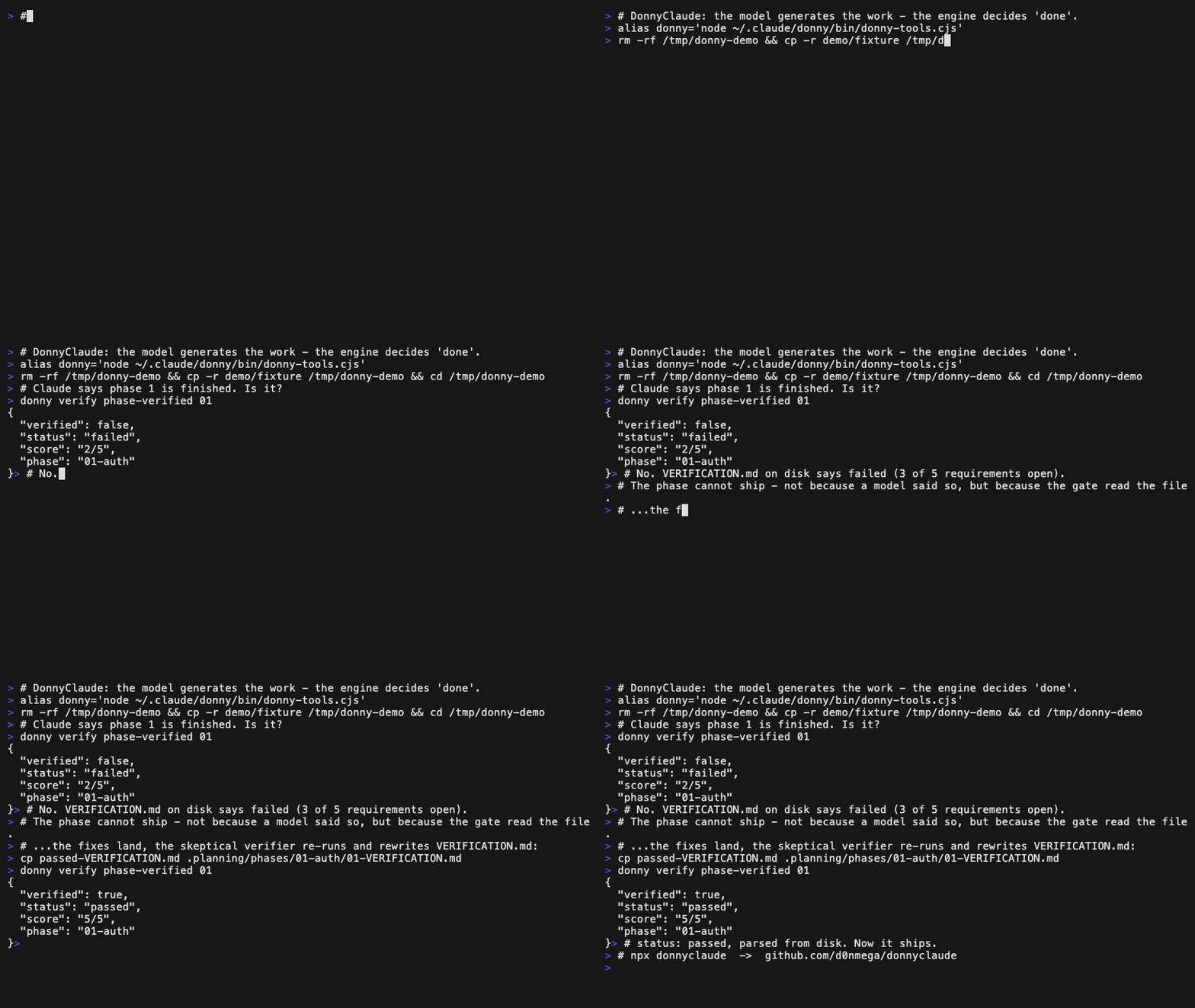
verify phase-verified - a phase ships only when its verification status is
actually passed, parsed from disk, never an LLM's say-soverify milestone-coverage - requirement coverage computed across plans,
summaries, and verifications, not hand-talliedverify threats-clear / security scan-secrets - open threats and leaked
credentials block the commit deterministicallyphase defer - a skipped phase is recorded honestly as deferred, never
silently marked complete
The verified delivery loop
discover -> plan -> execute -> verify -> ship -> repeat
The generator never grades its own work: a separate skeptical verifier checks
goal achievement by running code, and beneath that sits the engine gate so the
verdict cannot drift from the truth. Run one phase by hand, or hand the whole
roadmap to /donny-autonomous and let it advance unattended.
Why not just CLAUDE.md?
CLAUDE.md is the right place for project instructions. DonnyClaude adds the
workflow layer around it:
| Persistent project memory | partial | yes, via .planning/ |
| Phase-based roadmap | no | yes |
| Specialized subagents | manual | included |
| Deterministic verification gates | no | yes |
| Requirement coverage checks | no | yes |
| Autonomous phase loop | no | yes |
| Installable, repeatable setup | no | one command |
Who this is for
DonnyClaude is for developers who use Claude Code on projects large enough
that chat history stops being enough. It earns its weight if you:
- work across multiple Claude Code sessions on the same project
- use
/clear often but need decisions and progress to survive it
- want phase plans, requirement coverage, and verification artifacts on disk
- want specialized agents instead of one giant prompt
- want Claude to stop marking work complete without evidence
It is probably overkill if you only use Claude Code for one-off edits, small
scripts, or quick explanations.
What gets installed
| Skills | 94 | Slash commands - the Donny workflow plus utilities and language packs |
| Agents | 48 | Specialized subagents - planners, reviewers, verifiers, build-fixers |
| Commands | 63 | Prompt commands - review, verification, and harness utilities |
| Rules | 13 | Coding and writing standards (common + 12 language packs), auto-loaded |
| Hooks | 24 | Format, guard, and state-integrity scripts (33 registrations across 8 lifecycle events) |
| MCP | 2 | context7 (live docs) and playwright (browser), registered at user scope |
| Engine | 1 | The Donny CLI and workflow library |
| Config | 1 | A global operating guide (~/.claude/CLAUDE.md) that loads the rules; never clobbers an existing one |
Requirements
- Claude Code (the installer
installs it if missing)
- Node.js >= 20
uv for the bundled research scrapers (optional; self-bootstraps on first run)
Optional tools
Known limitations
- DonnyClaude is intentionally heavier than a minimal Claude Code setup.
- The install modifies user-level Claude Code configuration under
~/.claude/.
- Re-running the installer refreshes DonnyClaude-owned files, overwriting local
edits to those specific files; your own skills and settings are untouched.
- Autonomous mode should be supervised on repositories you care about.
- Some optional tools (Obsidian, browser-harness) require separate setup.
- The project is early and needs more real-world test cases - see below.
Help wanted
The best way to improve DonnyClaude is to run it on a real repo and report
where the workflow breaks. Especially useful:
- failing real-world examples
- missing verification gates
- better language-specific rules
- smaller install profiles
- plugin/marketplace packaging
- demo projects and terminal recordings
Credits and license
DonnyClaude is MIT licensed. The Donny engine began as a fork of the GSD
workflow engine and has since diverged substantially - rebuilt around
deterministic verification gates, model-tiered subagents, and a subagent-safe
research path.
The optional browser-harness integration references
browser-use/browser-harness
(MIT, Copyright (c) 2026 Browser Use); it is not bundled, and all credit for
that project belongs to its authors.
If you want Claude Code workflows with durable memory and real verification
gates, star the repo so other Claude
Code users can find it.