
The supercharged toolkit for modern web development, AI engineering & DevTools.









About
dphelper is a powerful, zero-dependency utility library that brings together 53 production-ready tools for web developers, AI engineers, and DevTools creators.
Think of it as your universal toolbox - from DOM manipulation to cryptographic operations, from real-time WebSocket handling to AI-powered token optimization. No more juggling multiple packages. One import, infinite possibilities.
Why dphelper?
- ⚡ Zero Dependencies - Pure vanilla JavaScript/TypeScript. No bloat, no surprises.
- 🤖 AI-First Design - Built for LLM apps with TOON optimization, token counting, and RAG support.
- 🌐 Universal - Works in browser, Node.js, Bun, and Deno.
- 🔒 Type-Safe - Full TypeScript definitions auto-generated for every tool.
- 📦 Tiny Bundle - Only ~171KB minified, tree-shakeable.
"dphelper is what you'd build if you combined lodash, socket.io, and an AI SDK - but lighter."
[!IMPORTANT]
Application state is currently handled through Memorio and RGS.
To integrate state management into your project
🚀 Version 3.3: New Powerful Modules
dphelper has expanded with powerful new modules for modern web development:
✨ Highlights
- 💾 IndexedDB Module: Full-featured wrapper for IndexedDB with query builder, transactions, and bulk operations.
- ⚙️ Web Worker Module: Create and manage workers, worker pools for parallel processing, and SharedWorkers for cross-tab communication.
- 🌍 i18n Module: Complete internationalization with translations, pluralization, date/number formatting, and relative time.
- 🖼️ Image Module: Image processing including resize, crop, filters, rotation, flip, and compositing.
- 🗜️ Compression Module: Gzip, deflate, LZW compression, plus base64, URL, and HTML encoding/decoding.
- 🔐 Biometric Module: WebAuthn support for fingerprint, face recognition, and secure credential management.
💾 IndexedDB Module
const db = await dphelper.idb.open('mydb', 1, { users: 'id++,name,email' });
await dphelper.idb.put('mydb', 'users', { name: 'John', email: 'john@example.com' });
const users = await dphelper.idb.getAll('mydb', 'users');
const johns = await dphelper.idb.query('mydb', 'users', 'name', 'John');
await dphelper.idb.bulkPut('mydb', 'users', [{name: 'A'}, {name: 'B'}]);
⚙️ Web Worker Module
const worker = dphelper.worker.create('worker.js', {
onmessage: (e) => console.log(e.data)
});
const inlineWorker = dphelper.worker.createInline(`
self.onmessage = e => postMessage(e.data * 2);
`);
const pool = dphelper.worker.pool('worker.js', 4);
const results = await dphelper.worker.poolExec(pool, [1, 2, 3, 4]);
const shared = dphelper.worker.shared('worker.js', { name: 'my-shared' });
🌍 i18n Module
dphelper.i18n.setLocale('it');
dphelper.i18n.addTranslations('it', {
hello: 'Ciao {name}!',
items: '{count, plural, one{# item} other{# items}}'
});
dphelper.i18n.t('hello', { name: 'World' });
dphelper.i18n.pluralize(5, { one: 'item', other: 'items' });
dphelper.i18n.number(1234.56, 'de-DE', { style: 'currency', currency: 'EUR' });
dphelper.i18n.relativeTime(Date.now() - 3600000);
🖼️ Image Module
const img = await dphelper.image.load('photo.jpg');
const resized = dphelper.image.resize(img, 100, 100);
const cropped = dphelper.image.crop(img, { x: 0, y: 0, width: 50, height: 50 });
const filtered = dphelper.image.filter(img, { brightness: 1.2, sepia: 0.5 });
const rotated = dphelper.image.rotate(img, 90);
const flipped = dphelper.image.flip(img, 'horizontal');
const gray = dphelper.image.grayscale(img);
const blurred = dphelper.image.blur(img, 5);
🗜️ Compression Module
const compressed = await dphelper.compress.gzip('Hello World');
const decompressed = await dphelper.compress.gunzip(compressed);
const encoded = dphelper.compress.base64Encode('Hello');
const decoded = dphelper.compress.base64Decode(encoded);
const urlEncoded = dphelper.compress.urlEncode('Hello World!');
const urlDecoded = dphelper.compress.urlDecode(urlEncoded);
const htmlEncoded = dphelper.compress.htmlEncode('<script>');
const htmlDecoded = dphelper.compress.htmlDecode('<script>');
🔐 Biometric Module (WebAuthn)
const available = dphelper.biometric.isAvailable();
const support = dphelper.biometric.getWebAuthnSupport();
const { success, credentialId } = await dphelper.biometric.register('user123');
const { success } = await dphelper.biometric.authenticate('user123');
const hasFingerprint = await dphelper.biometric.isSensorAvailable('fingerprint');
Table of Contents
Installation
npm i dphelper --save-dev
Usage
Import it precisely once in your entry point (e.g., index.js, main.ts, or App.tsx):
import "dphelper";
For plain HTML/CDN:
<script src="https://unpkg.com/dphelper/dphelper.js"></script>
<script>
console.debug(dphelper.version);
console.debud(dphelper.isBrowser);
</script>
AI Power User Guide
The new dphelper.ai module is designed for the modern AI stack (LLMs, RAG, Vector Search).
const toonData = dphelper.ai.toon(myJsonObject);
const tokens = dphelper.ai.tokenCount(myJsonObject);
const chunks = dphelper.ai.chunker(longText, { size: 1000, overlap: 200 });
const score = dphelper.ai.similarity(embeddingA, embeddingB);
const { reasoning, content } = dphelper.ai.extractReasoning(rawAiReply);
const appStateToon = dphelper.ai.snapshot();
Modular Architecture
Every tool in dphelper is now a self-contained module. Our new build system automatically:
- Scans the
tools/ directory.
- Generates dynamic imports for the core.
- Synchronizes TypeScript interfaces in
dphelper.d.ts.
This ensures that adding new tools is instantaneous and always documented with full Intellisense support.
🔄 UI Mirror & Auto-Recovery
dphelper makes your web app feel like a native desktop application with cross-tab intelligence.
dphelper.UI.anchorContext();
const bus = dphelper.sync.pulse('my-app', (msg) => {
console.debug('Received from another tab:', msg);
});
bus.emit({ action: 'theme-change', value: 'dark' });
dphelper.browser.interlock((count) => {
console.debug(`Active tabs: ${count}`);
});
const stream = dphelper.sse.open('/api/ai', {
method: 'POST',
headers: { 'Authorization': 'Bearer ...' },
body: JSON.stringify({ prompt: 'Hello AI' })
});
stream.on('message', (data) => console.debug('Chunk:', data));
stream.on('error', (err) => console.error('Stream failure:', err));
Browser Extension (Chrome/Edge)
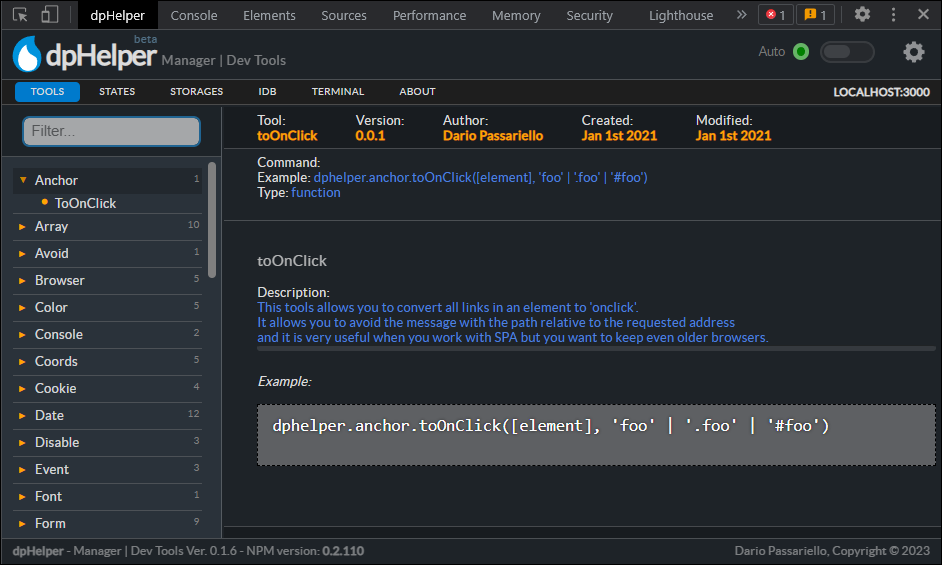
Manage your dphelper environment, monitor memory usage, and access documentation directly from your browser.
Environment Compatibility
dphelper tools are classified by their execution target to ensure stability across the stack.
| 🌐 | Client | Browser only (requires DOM, window, or navigator). |
| 🖥️ | Server | Node.js / Bun / Deno only (access to process, fs, etc). |
| 🧬 | Isomorphic | Universal. Works in both Browser and Server (AI, Logic, Math). |
Core Module Status
dphelper.ai: 🧬 Isomorphicdphelper.fetch: 🧬 Isomorphic (Supports Node 18+)dphelper.sse: 🌐 Client (Streaming fetch)dphelper.socket: 🌐 Client (WebSocket)dphelper.sync: 🌐 Client (BroadcastChannel)dphelper.UI: 🌐 Client (DOM based)
License
MIT License
Credits
Copyrigth (c) Dario Passariello





