

Security News
Deno Goes the Way of the Dinosaur
Cloudflare is acquiring Deno’s team, which will provide another year of bug fixes and security updates before ending support for the runtime.
By Sarah Gooding - Oct 16, 2026
dsh-undo-savepoint
Advanced tools
DSH undo/rollback system: snapshot config files on change, undo/redo the last action from the WebUI or by chat, and roll back broken plugin trees without reinstalling. Works even when DSH fails to boot (offline CLI + GUI).


DSH 崩溃急救插件:配置与插件代码一键回滚、快照密钥脱敏、一键安全模式,DSH 起不来时也能用(离线 CLI/GUI)。
还在为 DSH 崩溃而苦恼?还在担心小改动会带来大灾难?这款工具能帮到你!
为 DeepSeek Harness (DSH) 打造的撤销/回退系统:装插件、换皮肤、改设置,自动保存即存档;手动保存随时存档;一键撤销/恢复/回退到任意版本,DSH 启动不了时还有局外工具(GUI 窗口 + 命令行)兜底。
| v0.3.5 会话头部:撤销/恢复/快照按钮全部图标化 + 自动快照状态徽章(点击徽章打开快照面板) |
|---|
 |
| WebUI 快照管理面板(差异/回退/删除/清理/导出/导入/安全模式) | WebUI 设置「快照」独立栏目(敏感模式/插件白名单/目录选择) |
|---|---|
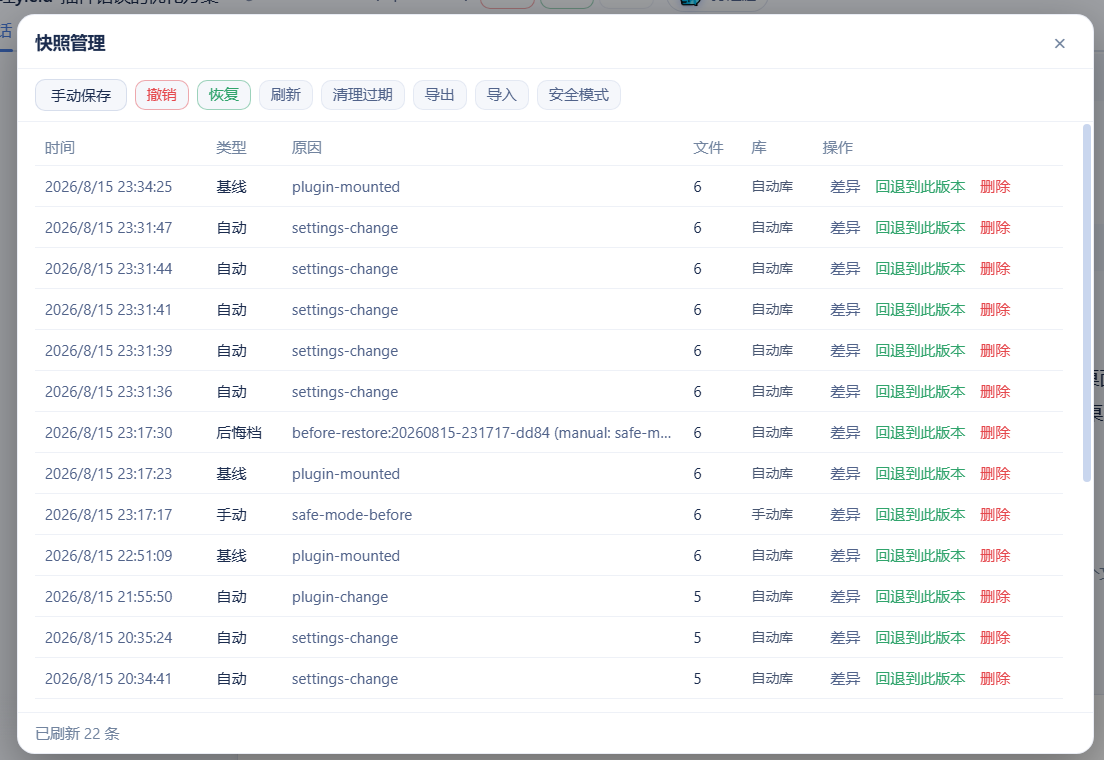 | 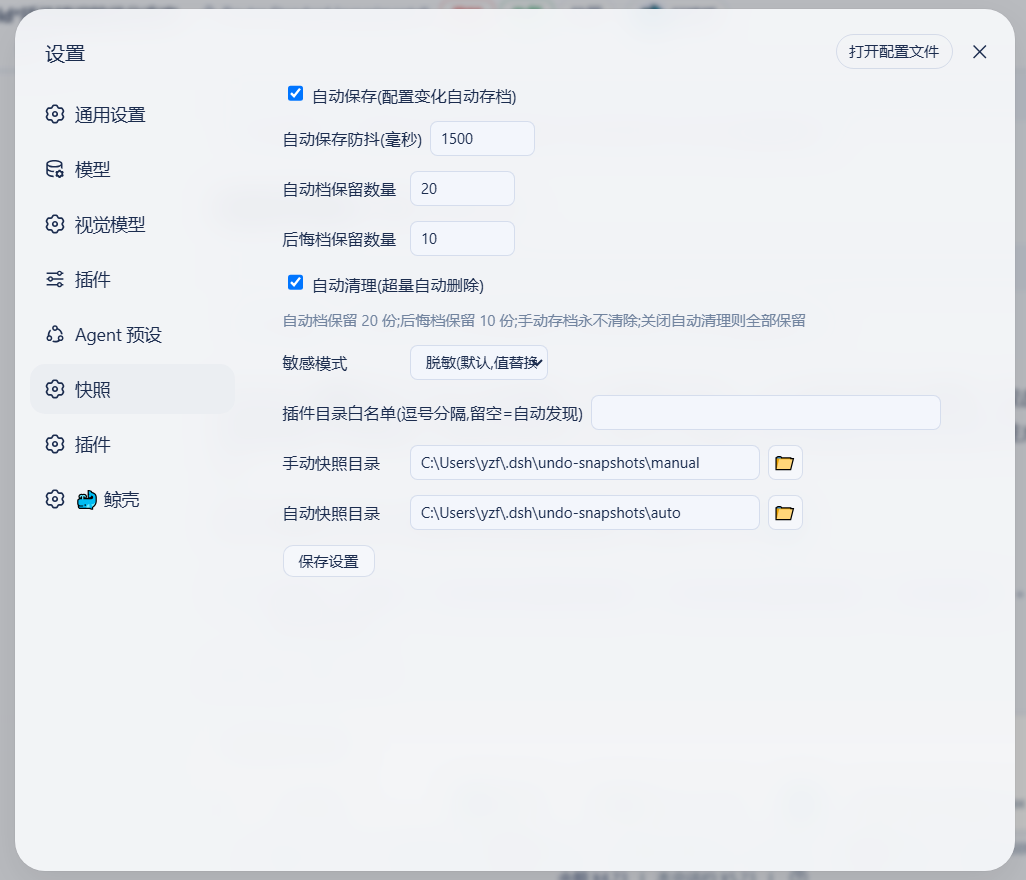 |
| 局外程序窗口(两行工具栏 + 安全模式按钮,DSH 挂了也能用) | 局外设置对话框(敏感模式/浏览选目录) |
|---|---|
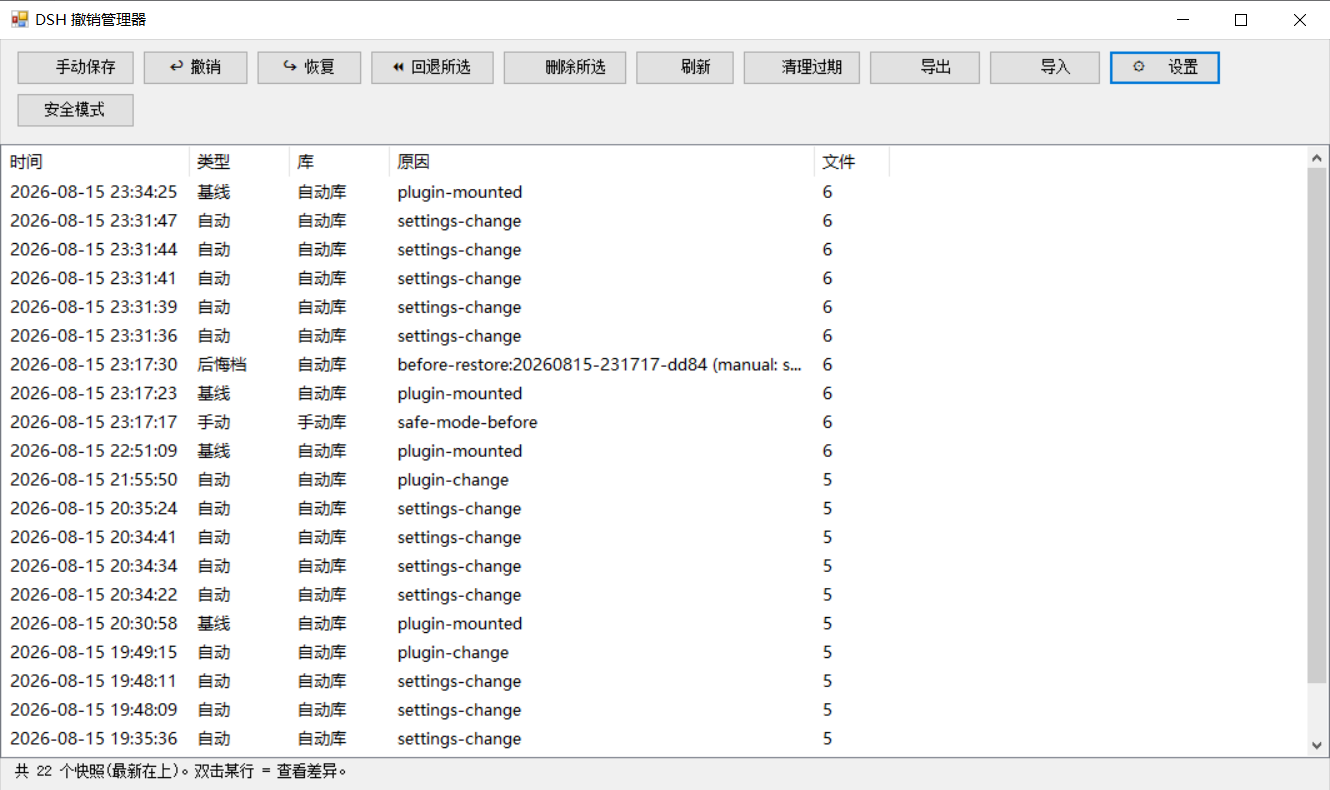 | 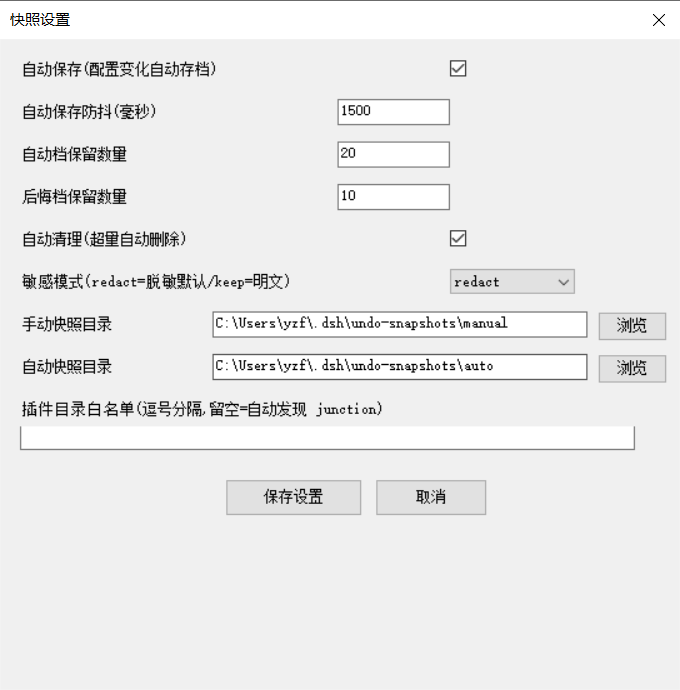 |
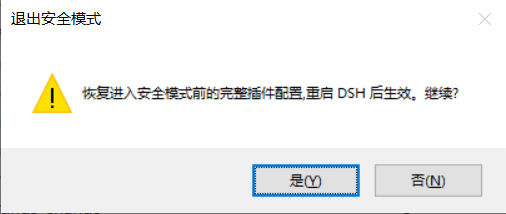
| 安全模式确认(进入/退出) | 安全模式状态提示 |
|---|---|
 |  |
| 能力 | 说明 |
|---|---|
| 配置 + 插件代码一键回滚 | 快照覆盖配置与用户插件代码树,改坏任何一处都能撤销(含 yield* 类纯代码事故);支持 undo / redo / 回退任意版本,WebUI / 对话 / 离线 CLI 三入口 |
| 密钥脱敏 + 本机 vault | .env / 凭据进快照自动脱敏(结构保留),导出 ZIP 零泄露;真实值存本机 vault,本机回滚完整还原 |
| 一键安全模式 | DSH 完全起不来时,禁用除撤销系统外所有插件保证能启动,自动快照+备份配置,一键退出 |
| 崩溃归因 | 上次异常退出时直接给出「最后正常快照」id + 一键回退按钮,不用自己猜回退到哪 |
| 跨机迁移安全 | 恢复前自动预检缺失插件并明确提示;快照可一键导出/导入 ZIP 迁移(见 docs/migration.md) |
| 局外急救(DSH 挂了也能用) | 离线 CLI + GUI 窗口 + 一键桌面快捷方式:撤销/回退/安全模式/崩溃横幅/回滚日志一应俱全 |
基础能力(键盘快捷键、对话指令、自动清理、双模式保存、可配置参数等)详见下文与 更新日志。
| 场景 | 操作 |
|---|---|
| 配置/插件被改坏 | 对话/WebUI/CLI:undo 或 restore -Id <id> |
| 插件代码被改坏 | 同上(快照含插件代码树,一键还原) |
| 上次异常退出,不知回退到哪 | WebUI 横幅 / GUI 横幅 显示 last-good 快照,一键回退 |
| DSH 完全起不来 | 桌面「DSH撤销管理器」→ 安全模式按钮(或 CLI safe-mode -Label on)→ 重启 DSH 保证能启动 |
| 恢复后可能缺插件(跨机) | 恢复报告预检提示;先装插件或安全模式 |
| 配置"突然变了" | CLI recent / 对话 undo_recent 查回滚日志 |
| 撤销涉及插件/挂载 | 报告提示"重启 DSH 后生效" |
快照对象是 DSH 的 6 个配置文件:cordis.patch.yml、package.json、cordis.yml、pnpm-workspace.yaml(profile 下)+ settings.yaml、.env($DSH_HOME 下,默认 ~/.dsh)。
| 库 | 默认路径(可在设置中修改) | 内容 |
|---|---|---|
| 手动库 | <快照根>\manual\ | 手动保存的快照(永不自动清理) |
| 自动库 | <快照根>\auto\ | 自动快照、启动基线、撤销后悔档(自动档保留最近 20 份) |
| 旧库(兼容) | <快照根>\ 根 | 旧版扁平布局,读取兼容,启动时自动迁移到新库 |
⚠️ 快照含
.env等配置副本,可能含密钥——不要外传。
插件从启动参数自动识别当前 profile(dsh --profile mine / --profile=mine;dsh web 回退为 web),并按当前 profile 工作:
$DSH_HOME/profiles/<当前 profile>(DSH_HOME 默认 ~/.dsh;此前硬编码 web——非 web profile 下快照读错、监听错、恢复写错位置);<快照根>/<当前 profile>/{auto,manual}(按 profile 隔离);作用域目录不存在而旧版平铺目录存在时自动回退平铺,旧快照不会"隐身";profile 字段,undo_list 显示当前 profile。离线 CLI/GUI 看不到启动参数,通过环境变量 DSH_UNDO_PROFILE 或 settings 里的 profileName 指定(默认 web)。
显式配置优先级不变:profileDir / manualDir / autoDir / profileName(config 或 settings)始终生效。
DSH 数据家目录的解析与官方启动器(@deepseek-ai/dsh-home-paths)完全一致:DSH_HOME 环境变量优先(空白视为未设置,支持 ~ / ~/ / ~\ 前缀),否则回退 <用户家目录>\.dsh。设置文件($DSH_HOME\undo\settings.json)、默认快照根($DSH_HOME\undo-snapshots)、profile 目录($DSH_HOME\profiles\<profile>)、home 根、插件发现路径全部基于它——第三方客户端(自定义 DSH_HOME)不再出现"设置写到 ~/.dsh、DSH 实际用 $DSH_HOME"的两套家分裂,重启后自定义目录稳定保留。
显式覆盖仍然保留:DSH_UNDO_SETTINGS / DSH_UNDO_ROOT / DSH_UNDO_EXPORT(环境变量)与 config 里的 homeDir / profileDir / manualDir / autoDir 优先级最高。
方便在 GitHub 搜索与 Explore 中被发现,仓库已设置以下 topics:
deepseek-harness · dsh · dsh-plugin · undo · rollback · snapshot · crash-recovery · backup · windows · powershell
前置:已安装 DSH(@deepseek-ai/dsh)与 Node.js(≥20)。
方式 A(推荐,npm 发布版) — 本插件已发布到 npm registry(dsh-undo-savepoint)并声明 dsh.bundle manifest,一条命令安装:
dsh plugin --profile web add dsh-undo-savepoint
安装完成后重启 DSH 即生效(快照目录、参数等均可在设置中修改)。
需要手动挂载时,也可在 DSH 安装根目录直接用 npm 安装(peer 依赖由 DSH 提供,无需额外安装):
npm install dsh-undo-savepoint
方式 A2(GitHub 直装) — 想装 master 最新提交、不等 npm 同步时:
dsh plugin --profile web add github:lire1131/dsh-undo-savepoint#master
方式 B(本地源码/免发布) — clone 到本地目录并手工挂载:
D:\dsh\plugins\dsh-undo-savepoint:git clone https://github.com/lire1131/dsh-undo-savepoint.git D:\dsh\plugins\dsh-undo-savepoint
dsh-undo-savepoint 找到本地源码(host 插件与 WebUI client 插件都靠它):mklink /J "<你的DSH安装>\node_modules\dsh-undo-savepoint" "D:\dsh\plugins\dsh-undo-savepoint"
说明:DSH 从它自己的
node_modules向上解析包名。默认安装位置是C:\Users\<用户名>\node_modules(npm 安装在用户目录时);若用 npx 缓存运行,则对 npx 缓存目录下的node_modules建 junction。执行npm root -g/ 检查 DSH 启动报错路径即可确认。
<DSH_HOME>\profiles\web\cordis.patch.yml,追加:- insert:
- id: dsh-undo-savepoint
name: dsh-undo-savepoint
依赖说明:host 插件通过
createRequire('<DSH安装根>/package.json')加载@deepseek-ai/dsh-tools。若 DSH 安装在其他位置,设置环境变量DSH_ROOT=<DSH安装根>即可,无需额外安装依赖。
局外撤销工具(GUI 窗口 + 命令行)不装到桌面,而是随插件装在安装目录里:
| 安装方式 | 工具位置 |
|---|---|
方式 A:dsh plugin add | $DSH_HOME\profiles\web\node_modules\dsh-undo-savepoint\tools\(DSH_HOME 默认 %USERPROFILE%.dsh) |
| 方式 B:clone + junction | 你 clone 的目录 ...\dsh-undo-savepoint\tools\ |
一键创建桌面快捷方式(推荐,以后从桌面直接打开):
双击 tools\make-desktop-shortcut.bat(它会自动定位插件目录),桌面出现「DSH撤销管理器」图标;
或者把下面整段复制到 PowerShell 窗口回车(无需先找文件,自动定位):
$dshHome = if ($env:DSH_HOME) { $env:DSH_HOME } else { "$env:USERPROFILE\.dsh" }
$d = @("$dshHome\profiles\web\node_modules\dsh-undo-savepoint", "$dshHome\profiles\node_modules\dsh-undo-savepoint", "$env:USERPROFILE\node_modules\dsh-undo-savepoint") | Where-Object { Test-Path (Join-Path $_ 'tools\dsh-undo-savepoint-gui.bat') } | Select-Object -First 1
if ($d) {
  $w = New-Object -ComObject WScript.Shell
  $s = $w.CreateShortcut((Join-Path ([Environment]::GetFolderPath('Desktop')) 'DSH撤销管理器.lnk'))
  $s.TargetPath = Join-Path $d 'tools\dsh-undo-savepoint-gui.bat'
  $s.WorkingDirectory = Join-Path $d 'tools'
  $s.Save()
  Write-Host "已创建桌面快捷方式:$($s.FullName)"
} else { Write-Host '未找到插件目录,请先安装:dsh plugin --profile web add github:lire1131/dsh-undo-savepoint#master' }
只想打开工具目录看一眼:
$dshHome = if ($env:DSH_HOME) { $env:DSH_HOME } else { "$env:USERPROFILE\.dsh" }
explorer "$dshHome\profiles\web\node_modules\dsh-undo-savepoint\tools"
之后双击桌面「DSH撤销管理器」即可打开局外工具(DSH 崩溃、启动不了时也能用)。
Ctrl+Alt+Z / 对 AI 说"撤销上一步"。Ctrl+Alt+Y(仅当撤销后没有新操作)。snapshot。restore -Id <id>。remove -Id <id>。界面语言:程序窗口按系统 UI 语言自动显示中文/英文;可用环境变量
DSH_UNDO_LANG=zh|en强制指定。
进入仓库目录后:
# 程序窗口(推荐):双击 tools\dsh-undo-savepoint-gui.bat,或:
powershell -NoProfile -ExecutionPolicy Bypass -File "tools\dsh-undo-savepoint-gui.ps1"

# 命令行
powershell -NoProfile -ExecutionPolicy Bypass -File "tools\dsh-undo-savepoint.ps1" list
powershell -NoProfile -ExecutionPolicy Bypass -File "tools\dsh-undo-savepoint.ps1" snapshot -Label "原因"
powershell -NoProfile -ExecutionPolicy Bypass -File "tools\dsh-undo-savepoint.ps1" undo
powershell -NoProfile -ExecutionPolicy Bypass -File "tools\dsh-undo-savepoint.ps1" redo
powershell -NoProfile -ExecutionPolicy Bypass -File "tools\dsh-undo-savepoint.ps1" restore -Id <id> -Force
powershell -NoProfile -ExecutionPolicy Bypass -File "tools\dsh-undo-savepoint.ps1" remove -Id <id>
powershell -NoProfile -ExecutionPolicy Bypass -File "tools\dsh-undo-savepoint.ps1" prune -KeepAuto 20

# 安全装插件(自动前后存档,失败自动回退)
powershell -NoProfile -ExecutionPolicy Bypass -File "tools\dsh-plugin.ps1" add <包名>
常见事故场景:DSH 启动报 duplicate loader entry id 之类错误 → 打开「DSH 撤销管理器」选中出问题前的快照 → 回退 → 重启 DSH。不用重装、不丢会话。
| 端点 | 说明 |
|---|---|
GET /api/undo/status | {canUndo, canRedo, total} |
GET /api/undo/list | 快照列表(含 location: manual/auto/legacy) |
GET/POST /api/undo/settings | 读/写保存参数(自动保存、防抖、保留数、目录),POST 即时生效 |
POST /api/undo/undo | 撤销上一步 |
POST /api/undo/redo | 恢复 |
POST /api/undo/restore | body {id} 回退到指定版本 |
POST /api/undo/remove | body {id} 删除快照 |
POST /api/undo/snapshot | body {reason} 手动保存 |
POST /api/undo/pick-dir | 弹出系统目录选择器,返回选中路径 |
cordis.patch.yml 后自动检查并重新写入 dsh-undo-savepoint 挂载条。createRequire(<DSH安装根>/package.json) 加载 @deepseek-ai/dsh-tools(环境变量 DSH_ROOT 可覆盖),无需在仓库内安装依赖。node tools\smoke-test.mjs :: 29 项逻辑测试(快照/撤销/重做/存储分流/无变化提示)
node tools\e2e-watch.mjs :: 6 项真实时序回归(自动存档/撤销不误伤/重做)
FAQs
DSH undo/rollback system: snapshot config files on change, undo/redo the last action from the WebUI or by chat, and roll back broken plugin trees without reinstalling. Works even when DSH fails to boot (offline CLI + GUI).
The npm package dsh-undo-savepoint receives a total of 615 weekly downloads. As such, dsh-undo-savepoint popularity was classified as not popular.
We found that dsh-undo-savepoint demonstrated a healthy version release cadence and project activity because the last version was released less than a year ago. It has 1 open source maintainer collaborating on the project.
Security News
Cloudflare is acquiring Deno’s team, which will provide another year of bug fixes and security updates before ending support for the runtime.

Security News
Anthropic’s free OSS Scanner uses Mythos and other Claude models to find open source vulnerabilities and send maintainers reports with proposed fixes.

Security News
On Front Lines’ Early Adopters: CISO podcast, Andrew Becherer shares lessons from Datadog, weighs the long-term costs of AI-built tools, and explains how founders can actually gain a CISO’s trust.