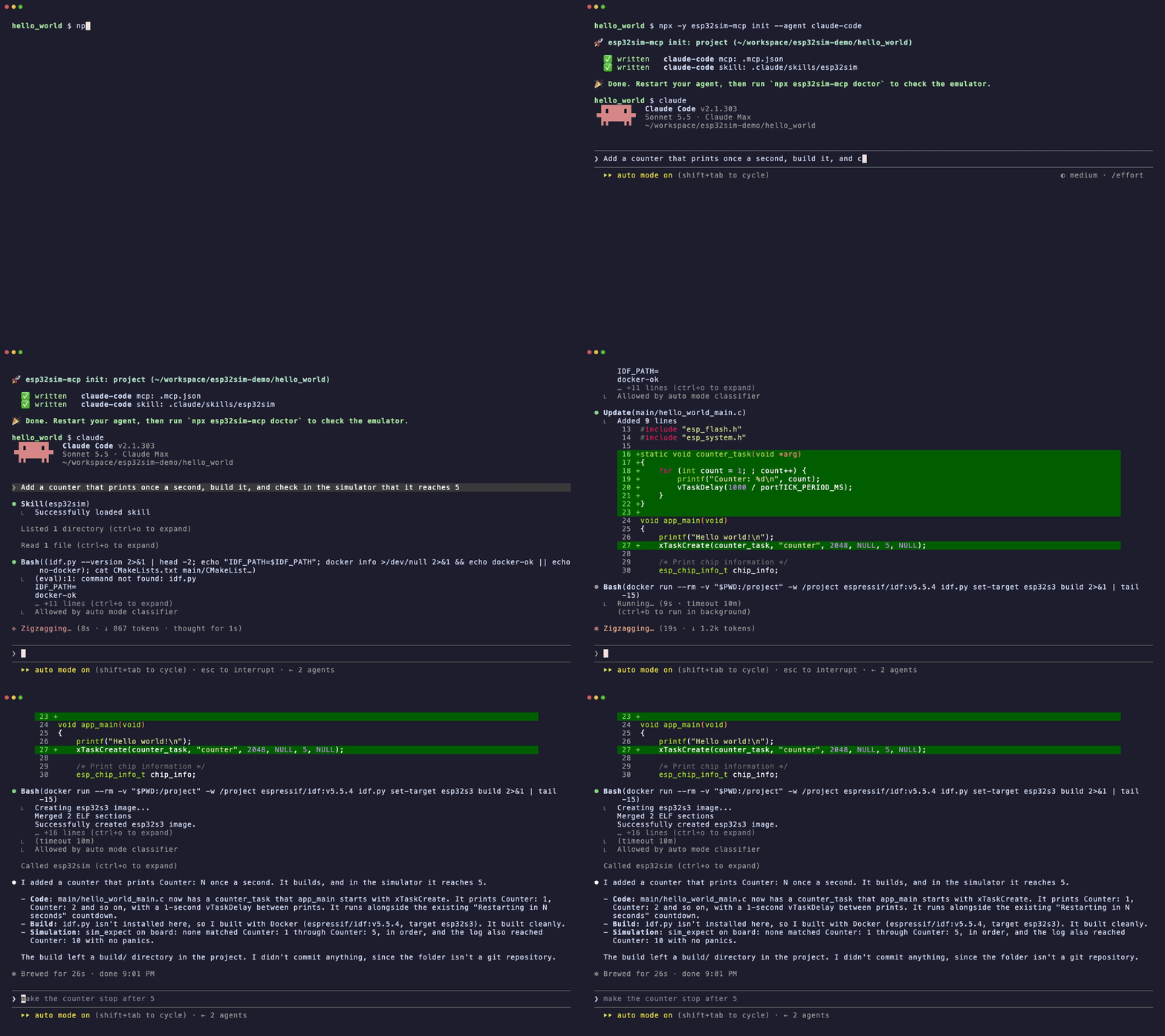
Coding agents are good at writing embedded C. They are blind when it comes to running it: without a board on the desk, "it compiles" is where the feedback loop ends.
esp32sim-mcp closes that loop. It gives Claude Code, Codex, Cursor or any MCP client a set of tools that boot the firmware the agent just built inside esp32sim, a local instruction-level ESP32 emulator, and hand back what the chip printed, whether it crashed, and what was on the display. The agent reads the result, fixes the code and tries again, the way you would with a board on the bench.
- 🔌 No hardware, no cloud. Everything runs on your machine. No account, no token, no board.
- 🧬 Real boot chain. Espressif's mask ROM, the ESP-IDF bootloader and your unmodified app, on ESP32-S3, C3, C6 and the classic ESP32.
- 📡 More than a console. Virtual WiFi access point with DHCP, DNS and NAT, buttons, rotary encoder, GPIO, UART input, touch, and display screenshots.
- 🧪 Assertions, not vibes.
sim_expect returns pass/fail and the exact line that is missing, so the agent knows what to fix.
- ⚡ Fast. Emulation usually runs ahead of real time: on Apple silicon, 8 emulated seconds of a WiFi station joining a network take about 0.6 s.
- 🤖 Comes with a skill.
init installs an agent skill that teaches the write → build → simulate → fix loop, including building in Docker when ESP-IDF is not installed.
Quickstart
npx -y esp32sim-mcp setup
cd your-esp-idf-project
npx -y esp32sim-mcp init
Then ask your agent for something you can see on the serial console:
Add a counter that prints once a second, build it, and check in the simulator that it reaches 5.
Requirements: Node.js 22+, and ESP-IDF or Docker to build firmware. Prebuilt emulator binaries cover macOS (Apple silicon) and Linux (x64, arm64); see other platforms.
What the agent sees
From a real session, the agent calls:
{
  "tool": "sim_expect",
  "projectDir": ".",
  "chip": "s3",
  "board": "none",
  "maxSeconds": 10,
  "patterns": ["Hello world!", "Counter: 1", "Counter: 2", "Counter: 3", "Counter: 4", "Counter: 5"]
}
and gets back:
### Expect Test: ✅ PASSED

Matched 6 / 6 patterns.

- ✅ Matched (line 54): `Hello world!`
- ✅ Matched (line 55): `Counter: 1`
  ...
- ✅ Matched (line 65): `Counter: 5`

#### Full UART Logs:
ESP-ROM:esp32s3-20210327
Build:Mar 27 2021
rst:0x1 (POWERON),boot:0xf (SPI_FAST_FLASH_BOOT)
...
When something goes wrong, it gets the panic instead (Guru Meditation Error, stack overflow, failed assert, heap corruption) with the log leading up to it, and the missing pattern spelled out.
Tools
sim_run | Boots the firmware and returns the console log, stop reason, emulated time and any panic. |
sim_expect | Runs the firmware and asserts that strings or regexes appear on the console, in order by default. |
sim_script | Drives the hardware at emulated timestamps: press/release buttons, gpio levels, knob turns, uart/serial input, touch, stop. |
sim_screenshot | Returns a PNG of the board's display at a given emulated time. |
sim_list_boards | Lists chips, boards, displays and inputs. |
sim_doctor | Checks the emulator and ROMs and says how to fix what is missing. |
All tools take a projectDir (the ESP-IDF build is found through build/flasher_args.json) or explicit appBin/bootloaderBin/ptableBin paths, plus chip, board and wifi (e.g. ssid=demo,psk=secret). Both UART0 and the USB-Serial/JTAG console are captured, so output shows up whichever one the project logs to.
How it works
flowchart LR
    A["Coding agent<br/>(Claude Code, Codex, Cursor)"] -- "edits code,<br/>runs idf.py build<br/>(local or Docker)" --> B["ESP-IDF build/"]
    A -- "MCP: sim_expect, sim_run, ..." --> C["esp32sim-mcp"]
    C -- "flasher_args.json" --> B
    C -- "spawns" --> D["esp32sim emulator<br/>mask ROM → bootloader → app"]
    D -- "UART / USB-JTAG, panics,<br/>display, virtual WiFi" --> C
    C -- "pass/fail, logs, PNG" --> A
esp32sim-mcp is a thin, tested layer: it finds the build, translates tool calls into esp32sim's command line, separates and de-duplicates the two consoles, detects panics, and shapes the result for an agent. The emulation itself is esp32sim's work.
Use it in CI
The same checks run without an agent, with exit code 0 on pass and 1 on fail. A GitHub Actions job that builds your firmware and asserts its boot log:
jobs:
  firmware:
    runs-on: ubuntu-latest
    steps:
      - uses: actions/checkout@v5
      - uses: actions/setup-node@v5
        with:
          node-version: 22
      - name: Build
        run: docker run --rm -v "$PWD:/project" -w /project espressif/idf:v5.5.4 idf.py set-target esp32s3 build
      - name: Install the emulator
        run: npx -y esp32sim-mcp setup
      - name: Boot and check the console
        run: npx -y esp32sim-mcp expect --max-seconds 10 --pattern "app_main" "Counter: 5"
This is what this repository's own CI does with examples/hello-esp32, including a scripted button press.
All CLI commands
esp32sim-mcp setup
esp32sim-mcp init [--global] [--agent claude-code|codex|cursor|claude-desktop] [--dry-run]
esp32sim-mcp run [-p dir] [--chip s3] [--board none] [--max-seconds 5] [--wifi ssid=x,psk=y]
esp32sim-mcp expect --pattern "a" "b" [--unordered] [--script actions.txt] [...run options]
esp32sim-mcp list [--chip c6]
esp32sim-mcp doctor
esp32sim-mcp serve
Supported chips and boards
| ESP32-S3 | atech14 (default: ST7735 TFT, buttons, rotary encoder, LED ring, audio), waveshare-lcd4b (480×480 touch), waveshare-amoled18-v2 (368×448 AMOLED touch), waveshare-cam (OV5640 camera), none |
| ESP32-C3 | console only (no board models) |
| ESP32-C6 | waveshare-c6-lcd147 (172×320 LCD), none |
| ESP32 (classic) | ttgo-tdisplay (135×240 TFT), esp32dev-loopback, none |
Use none for stock ESP-IDF projects. The virtual WiFi access point works on all four chips.
Agent setup
init detects the agents you have and configures each one. It runs in your firmware project by default; --global writes user-level settings instead.
| Claude Code | .mcp.json / claude mcp add --scope user | .claude/skills/ / ~/.claude/skills/ |
| Codex | ~/.codex/config.toml (user only) | .agents/skills/ / ~/.codex/skills/ |
| Cursor | .cursor/mcp.json / ~/.cursor/mcp.json | .cursor/skills/ / ~/.cursor/skills/ |
| Claude Desktop | --global only | — |
Existing entries are kept, reruns are no-ops, and a config file that does not parse is left untouched.
Claude Code plugin. Instead of init, install the server and skill together as a plugin, for every project:
/plugin install esp32sim --marketplace stramanu/esp32sim-mcp
MCP registry. The server is published to the official MCP registry as io.github.stramanu/esp32sim-mcp. For any other MCP client:
{
  "mcpServers": {
    "esp32sim": { "command": "npx", "args": ["-y", "esp32sim-mcp", "serve"] }
  }
}
Other platforms
setup installs prebuilt binaries on macOS arm64 and Linux x64/arm64. They are built from source by this repository's emulator workflow with signed build provenance (gh attestation verify <archive> -R stramanu/esp32sim-mcp). Elsewhere, build esp32sim with Cargo (rustup), pinned to the commit this release is tested against:
cargo install --locked --git https://github.com/mikroverk/esp32sim --rev f535f3b42293a76ab64c231a0425f35857ab6cf1 esp32sim
npx esp32sim-mcp fetch-roms
ESP32SIM_PATH points at an emulator binary elsewhere and ESP32SIM_ROM_DIR at another ROM directory; ROMs inside an ESP-IDF install are found automatically.
How it compares
| esp32sim-mcp | ✅ local emulator | No | ✅ MCP server + skill |
| Wokwi CLI MCP | ✅ | Yes (WOKWI_CLI_TOKEN) | ⚠️ experimental |
| esparagus (Espressif) | ❌ flashes real hardware | No | ✅ |
| esp32sim on its own | ✅ | No | ❌ CLI and web UI |
esparagus is the natural next step: simulate first with esp32sim-mcp, then confirm on a real board.
Limitations
- An emulator is not silicon. Peripherals esp32sim does not model, RF timing and Bluetooth are out of reach here; confirm on hardware before you ship.
- The agent builds the firmware itself (
idf.py, locally or in Docker); the MCP server does not compile.
- Windows is untested.
Contributing
Issues and pull requests are welcome. See CONTRIBUTING.md for the development setup and how the end-to-end tests run against the real emulator, and CHANGELOG.md for what changed.
Credits
License
MIT © Emanuele Strazzullo