


Company News
AWS Security Hub Adds Socket for Supply Chain Security
Socket is now in the AWS Security Hub Extended plan. Adopt it through AWS, apply committed spend, and block malicious open source packages.
By Feross Aboukhadijeh - Aug 04, 2026
ExecBro — MCP server giving AI agents eyes and hands into React Native apps. Logs, REPL, state inspection, tap, screenshot.
Give your AI assistant eyes and hands into your running React Native app. Like Chrome DevTools — but for AI agents.
Build, debug, and verify features end-to-end — without leaving the chat.
ExecBro is the runtime bridge between your AI coding assistant and your running React Native app — exposing MCP tools to read logs and network, inspect component state, capture screenshots, tap the UI, and run JS. Zero config, no SDK or code changes required to start — and installing the optional SDK is recommended for the most robust log and network capture.
npm start / expo start)Log in at execbro.com to see your ExecBro activity rendered back to you: which tools you use most, tool error rates, and your session history — so you can spot flaky tools, track usage over time, and understand how your agent drives the app across sessions. It's built from the same anonymous telemetry described in Telemetry & Privacy, tied to your installation ID.
Linking your installation here is also required to unlock ExecBro Pro — signing in and authorizing your installation is what lets the unlimited-usage plan take effect; without it, the free tier's monthly cap applies even after subscribing.
console.log, warn, error, info, debug with filtering and search. Note: on a cold start (first app launch), logs emitted before the MCP server connects are missed — subsequent reloads capture everything. Install the optional SDK to buffer logs from the very first line of app startup_debugStack via Metro symbolication. Works on React 19, where _debugSource no longer exists. Selections are buffered in the background, so taps you make during a manual inspector session are captured without asking the agent firsttap tool with automatic fallback chain: fiber tree → accessibility → OCR → coordinates. Auto-detects platform, accepts coordinates from screenshots and layout tools unchanged. Returns post-tap screenshot and verifies visual change by defaultswipe tool that auto-routes to iOS or Android based on the connected device. Takes coordinates in the same screen space as the layout tools and screenshots — no conversion — and returns a verification.meaningful signal so agents detect end-of-list, non-scrollable surfaces, and missed coordinates. Essential for scrolling virtualized lists (FlatList/SectionList) where off-screen items aren't in the fiber treepinch tool that sends two genuine kernel touch contacts through the Android emulator's multi-touch bridge, so it zooms maps, galleries, WebViews, and native views alike — it works below the app, not through React Native. Returns the same verification.meaningful signal as swipe, and refuses on unsupported targets instead of faking a resultdismiss_keyboard operates on whatever has focus, and ios_input_text / android_input_text accept replace:true to overwrite pre-filled values — updating React state through onChangeText so controlled components (Formik, react-hook-form, useState) stay consistentscan_metro automatically discovers and connects to all Bridgeless targets on each Metro portdevice parameter for targeting specific devices by name (case-insensitive substring match)Add ExecBro to Claude Code in one command — no installation, npx fetches the latest version on demand:
claude mcp add execbro --scope user -- npx -y execbro@latest
Then fully restart the client (quit and relaunch) so it picks up the new server.
Using a different client or need platform setup? The full setup guide covers Claude Desktop, Codex CLI, Cursor, VS Code Copilot, Windsurf, Zed, and Gemini CLI, plus Android and iOS simulator UI automation requirements.
ExecBro works with zero app changes, but installing the companion execbro-sdk package is the single biggest upgrade to debugging quality. It lets you wire up the important parts of your app — your state stores and your network layer — directly into the agent's reach, so the AI inspects real Redux/TanStack Query state and full request/response bodies instead of guessing from the outside.
| Without SDK | With SDK | |
|---|---|---|
| State stores (Redux, TanStack Query, …) | Manual via execute_in_app | Wired up — direct references |
| Request/response bodies | Not available | Full (including GraphQL) |
| Startup network requests (auth, config) | Missed | Captured from first fetch |
| Console logs from startup | May miss early logs | Captured from first log |
| Works on Bridgeless (Expo SDK 52+) | Partial | Full |
It's one npm install plus a single init() call in your app's entry file. See the SDK guide for install, initialization, and every config option.
execbro-sdk in your app — wires stores and the network layer into the agent for dramatically better debugging (optional; ExecBro works without it)brew install cameroncooke/axe/axe, default) or Facebook IDB (brew install idb-companion, opt in via IOS_DRIVER=idb) — required for tap, swipe, text input, accessibility on iOS SimulatorPre-built skills for common debugging workflows — session setup, log inspection, network debugging, and more. See the skills guide for the full list and installation instructions.
See the full tool reference for all tools with descriptions. Key tools:
| Tool | Description |
|---|---|
scan_metro | Start here — scan for Metro servers and auto-connect |
get_logs / search_logs | Capture and search console logs with filtering and summaries |
get_network_requests | Monitor HTTP requests with method/status filtering |
get_screen_state | Orientation snapshot — active route, overlays, and every element with a tap-ready (x, y) |
get_screen_layout | Screen map of visible components with positions, sizes, and text content |
tap | Unified tap — auto-detects platform, tries fiber → accessibility → OCR → coordinates |
pinch | Real two-finger pinch-to-zoom — Android emulator only (iOS in progress) |
ios_input_text / android_input_text | Type text into the focused field. replace:true clears pre-filled values first (Fabric) |
dismiss_keyboard | Blur the focused input and close the on-screen keyboard |
execute_in_app | Run JS expressions in the app runtime (REPL-style) |
ios_screenshot / android_screenshot | Take device screenshots |
Start your React Native app:
npm start
# or
expo start
Just describe what you want in plain language — the agent picks the right tools. You don't need to know tool names or ask for a specific one. For example:
Connect to the simulator and investigate what caused the error on the screen
Check the network logs and investigate why this error is happening
Why is the current screen empty? Take a look and figure it out
Tap the "Sign in" button and tell me what happens
The list won't scroll — scroll it down and check what's going on
Why does this button look wrong — what component renders it and where?
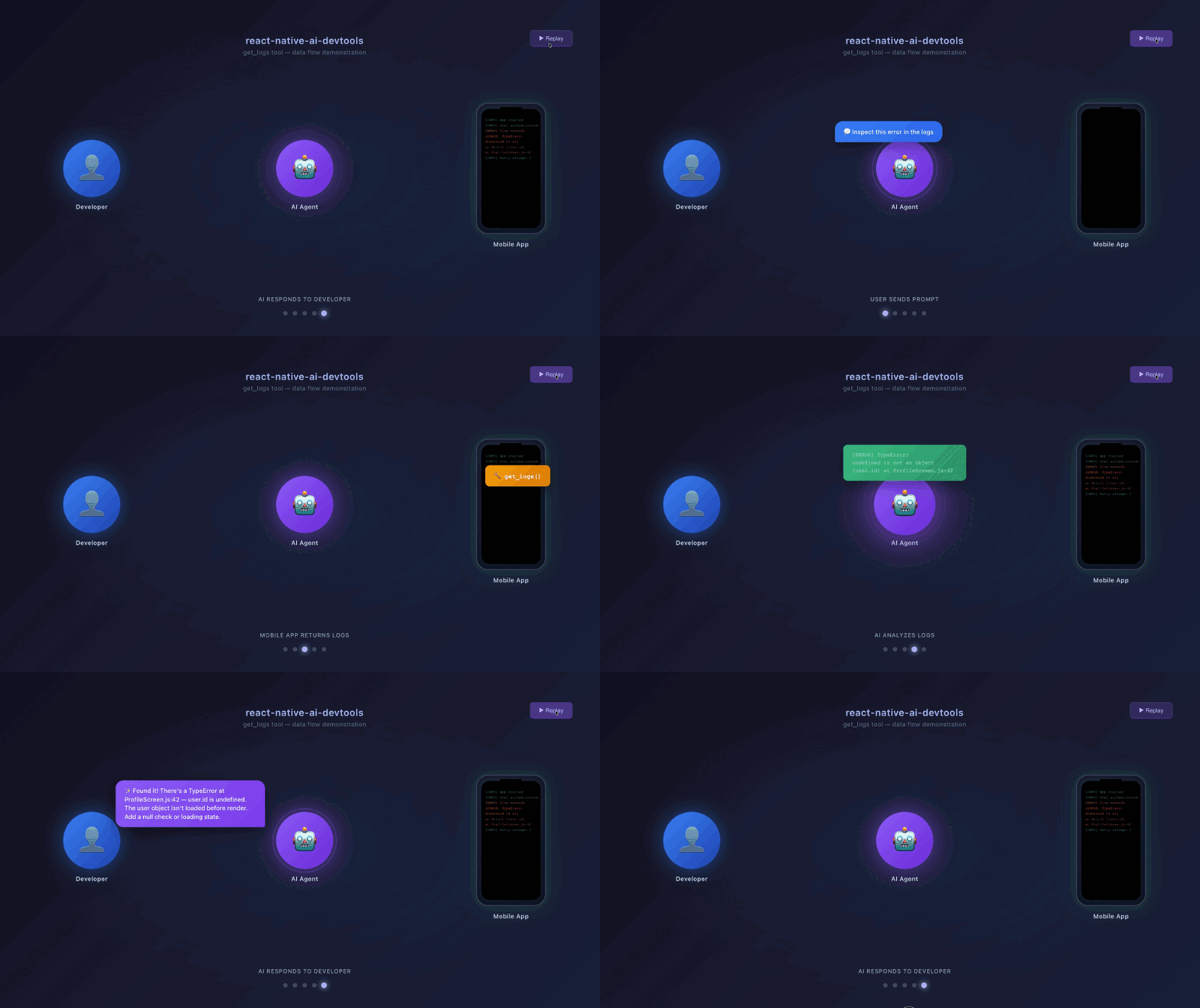
The agent connects to Metro, reads logs and network, inspects the screen, and drives the UI as needed to answer.
| Guide | Description |
|---|---|
| Setup | Per-client MCP config (Claude, Codex, Cursor, VS Code, …), Android & iOS setup |
| SDK Setup | Install & init() the in-app SDK to wire stores + network layer into the agent |
| Console Logging | get_logs parameters, filtering, summary mode, token optimization |
| Network Tracking | SDK setup for full capture, filtering, request details, statistics |
| App Inspection | Debug globals (Apollo, Redux, Expo Router), execute_in_app, limitations |
| Layout & Component Inspection | get_screen_layout, component tree, inspect_at_point, find_components |
| Device Interaction | Unified tap, platform-specific gestures, text input, key events |
| OCR Text Extraction | Cloud Vision OCR, offline fallback, language config, workflows |
| Claude Code Skills | Pre-built skills for session setup, debugging, and automation |
| Full Tool Reference | Complete list of all 58 tools with descriptions |
/json endpointRuntime.enable to receive Runtime.consoleAPICalled eventsRuntime.evaluate — captures all requests from startup with full headers and bodies, including cold-start events that CDP would missNetwork.enable (on supported targets) or injects a JS fetch interceptor as fallback. On cold start, events emitted before the CDP connection is established are lost; subsequent reloads capture everythingscan_metro), so it stays out of the way until you actually need a device.main on the default 8081 and start the worktree's Metro on 8082 (npx react-native start --port 8082, or npx expo start --port 8082), then launch that worktree's app pointed at 8082. Each agent session then scan_metros and drives its own device, so the two never fight over the connection.npm start)clear_logs then trigger some actions in the appget_apps to verify connection statusreload_app — the subsequent reload captures everything from the beginning because the connection is already in place. To capture startup events on every launch, install the optional SDKExecBro sends two separate signals, not one:
EXECBRO_TELEMETRY=false in your MCP server config. Doing so turns off analytics only — it does not disable usage metering, which keeps counting tool calls against the free-tier cap regardless.See the Telemetry & Data Collection guide for the full breakdown of what's collected, auto-registration, and how to opt out, and PRIVACY.md for the complete privacy policy.
| Version | Architecture | Engine | Status |
|---|---|---|---|
| Expo SDK 54+ | Bridgeless (New Arch) | Hermes | ✓ Fully supported |
| RN 0.76+ | Bridgeless (New Arch) | Hermes | ✓ Fully supported |
| RN 0.73 - 0.75 | Bridge (Old Arch) | Hermes | ✓ Fully supported (best network capture via CDP) |
| RN 0.70 - 0.72 | Bridge (Old Arch) | Hermes / JSC | ✓ Supported |
| RN < 0.70 | Bridge | JSC | Not tested |
ExecBro is free to use — every feature, fully intelligent — up to 600 tool calls per month. That covers evaluation and everyday debugging. Heavy users can remove the cap with ExecBro Pro ($8.99/mo) for unlimited calls and every future hosted feature. See execbro.com/pricing.
[!NOTE] Grandfather notice: the 600-call monthly cap starts applying 2026-08-01 for new installs. If you already had ExecBro installed before then, you get a free month on top — your cap doesn't start until 2026-08-31. You'll also see this as an in-app notice. No action needed unless you want to link your account and upgrade to Pro ahead of time. Questions? zigor535@gmail.com.
Please run this at the end of your session to help me make the tools better. ExecBro is built for AI agents, so the most valuable feedback comes from the agent itself — paste this prompt to your agent:
Write a report about your experience with the ExecBro tools — where you were struggling and what could be improved. Save it as a Markdown file for me, then submit it using the
send_feedbacktool (type"feedback") so it becomes a GitHub issue.
It takes 30 seconds: your agent runs send_feedback, hands you a pre-filled GitHub issue URL (environment info already attached), and you click submit — no GitHub setup, no copy-pasting. Real friction logs from real sessions are what shape the roadmap and get fixed first, so please send one. 🙏 And if you just have a quick idea or question, drop into GitHub Discussions to share feedback, request features, and vote on what gets built next.
Ships as the npm package execbro. The package was previously published as react-native-ai-devtools and before that as react-native-ai-debugger — both legacy names keep receiving identical builds via mirror-publish, so existing installations and MCP configs keep working unchanged. New installs should use execbro.
[!IMPORTANT] Already using ExecBro?
npxcaches packages indefinitely, so you may be stuck on an old version without realizing it. Update your MCP config to usenpx -y execbro@latest(see Setup) so every session pulls the latest release with new tools and bug fixes. New installs after this change auto-update automatically.
MIT
FAQs
ExecBro — MCP server giving AI agents eyes and hands into React Native apps. Logs, REPL, state inspection, tap, screenshot.
The npm package execbro receives a total of 2,009 weekly downloads. As such, execbro popularity was classified as popular.
We found that execbro demonstrated a healthy version release cadence and project activity because the last version was released less than a year ago. It has 1 open source maintainer collaborating on the project.
Did you know?

Socket for GitHub automatically highlights issues in each pull request and monitors the health of all your open source dependencies. Discover the contents of your packages and block harmful activity before you install or update your dependencies.
Company News
Socket is now in the AWS Security Hub Extended plan. Adopt it through AWS, apply committed spend, and block malicious open source packages.

Research
/Security News
Popular npm packages keyv and cacheable compromised.

Security News
A misconfiguration gave three Anthropic models internet access, and one, believing it was in a simulation, shipped a credential-stealing package to PyPI.