



🚀 Socket Launch Week Day 5:Introducing Repository Access Permissions and Custom Roles.Learn more
Sign In

filmgram-ui

Package Overview
Dependencies
Maintainers
1
Versions
19
Alerts
File Explorer

Advanced tools

Socket logo

Install Socket

Detect and block malicious and high-risk dependencies

Install

filmgram-ui

latest
npmnpm
Version
0.0.21
Version published
Weekly downloads
0
-100%
Maintainers
1
Weekly downloads
 
Created
Source

Filmgram-UI 一个轻量级的UI库

一.安装使用

1.使用npm对包进行安装

npm install filmgram-ui

2.在根组件中加入样式

@import '../assets/basic.css';
:root {
  --button-height: 32px;
  --font-size: 14px;
  --button-bg: white;
  --button-active-bg: #eee;
  --border-radius: 4px;
  --color: #333;
  --border-color: #bbb;
  --border-color-hover: #999;
  --font-color-active: #555
}

3.导入样式

import {Button,Icon,ButtonGroup} from 'filmgram-ui'
import 'filmgram-ui/dist/style.css'

4.注册样式并使用

二、使用指南

1.按钮样式

按钮
<gButton icon="setting" icon-position="left" openLoading='true'>一个按钮</gButton>
<gButton icon="setting" icon-position="right" openLoading='true'>一个按钮</gButton>
<gButton>一个按钮</gButton>
指令名称可选值特性
Iconloading/setting/download/arrow-left/arrow-right控制图标
Icon-positionleft/right控制图标在按钮左方或者右方显示,默认值为left,只有icon传入值之后才出现效果
openLoadingtrue/false开启后点击图标会变为动态Loading的状态,默认值为false,只有icon传入值后才会出现效果
colorblue red blue控制图标的颜色样式,不传值为默认样式
按钮组
<g-button-group>
                <g-button icon="arrow-left" >上一页</g-button>
                <g-button icon="arrow-right" icon-position="right" >下一页</g-button>
</g-button-group>

开启后两个按钮会进行并排排列,注意只能传入gButton,不能传入其他DOM

2.输入框

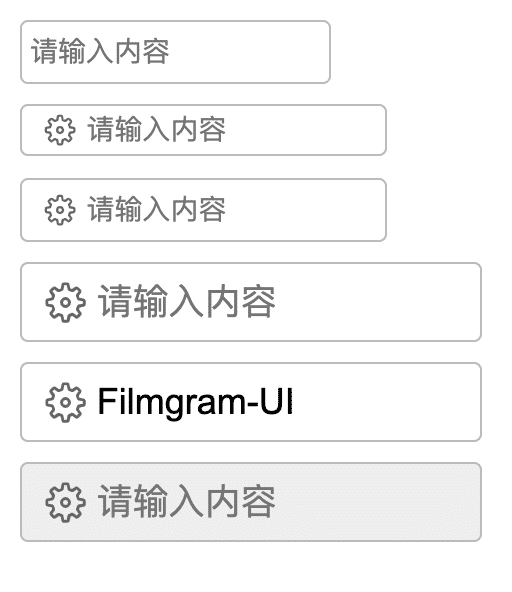
输入框
<gInput placeholder="请输入内容"></gInput>
<gInput placeholder="请输入内容"  icon="setting" size="small"></gInput>
<gInput placeholder="请输入内容"  icon="setting"></gInput>
<gInput placeholder="请输入内容"  icon="setting" size="large"></gInput>
<gInput value="Filmgram-UI"     icon="setting" size="large"></gInput>
<gInput placeholder="请输入内容"  icon="setting" size="large" disabled="true"></gInput>
指令名称可选值默认值特性
Iconloading/setting/download/arrow-left/arrow-right-不填写值时默认无图标,控制图标
placeholderString-输入框占位文本
Sizenormal/small/largenormal控制输入框的大小,可以在配置css中进行自定义更改
disabledBooleanfalse控制输入框是否被禁用
ValueString-控制输入框的内容
事件函数特性回调参数
g-input在Input值发生改变时触发(String | event: Event)
g-change在输入框失去焦点或者用户按下回车时触发(String | event: Event)
g-focus在Input获得焦点时触发(event: Event)
g-blur在Input失去焦点时触发(event: Event)

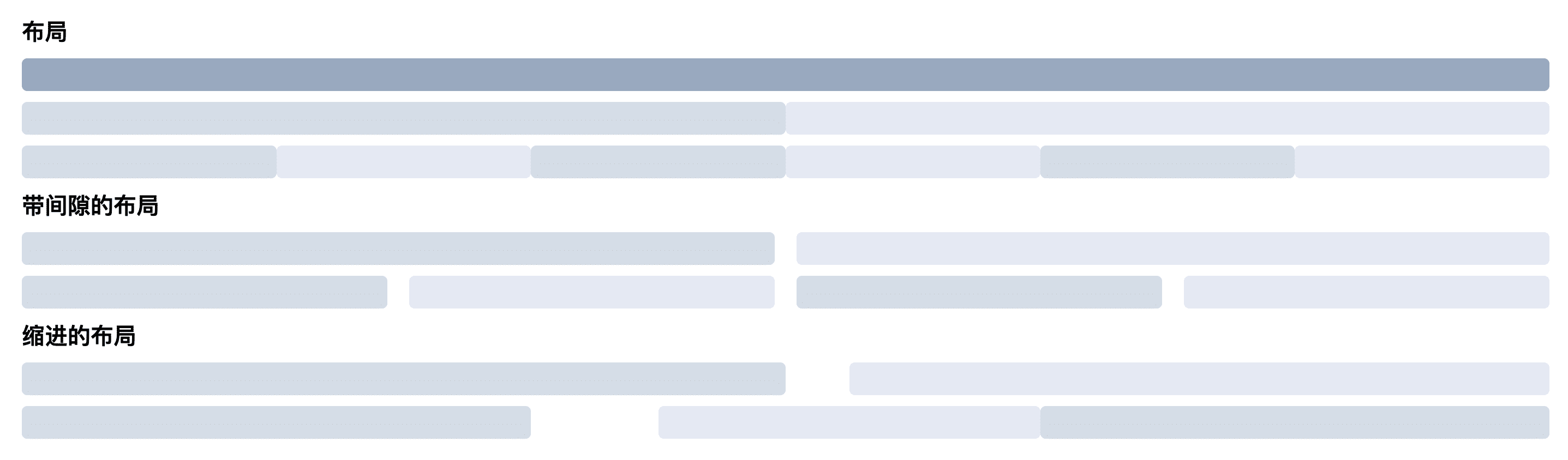
3.布局

  <h2>布局</h2>
    <g-row >
      <g-col :span="24"></g-col>
    </g-row>
    <g-row >
      <g-col :span="12" ></g-col>
      <g-col :span="12" ></g-col>
    </g-row>
    <g-row >
      <g-col :span="4" ></g-col>
      <g-col :span="4" ></g-col>
      <g-col :span="4" ></g-col>
      <g-col :span="4" ></g-col>
      <g-col :span="4" ></g-col>
      <g-col :span="4" ></g-col>
    </g-row>
    <h2>带间隙的布局</h2>
    <g-row :gutter="20">
      <g-col :span="12" ></g-col>
      <g-col :span="12" ></g-col>
    </g-row>
    <g-row :gutter="20">
      <g-col :span="6" ></g-col>
      <g-col :span="6" ></g-col>
      <g-col :span="6" ></g-col>
      <g-col :span="6" ></g-col>
    </g-row>
    
    <h2>缩进的布局</h2>
    <g-row >
      <g-col :span="12" ></g-col>
      <g-col :span="11" :offSet="1"></g-col>
    </g-row>
    <g-row >
      <g-col :span="8" ></g-col>
      <g-col :span="6" :offSet="2"></g-col>
      <g-col :span="8" ></g-col>
    </g-row>
指令名称UI对象可选值默认值特性
gutter<g-row></g-row>Number0栅格间隔
span<g-col></g-col>Number24栅格占据的列数
offSet<g-col></g-col>Number0栅格左侧的间隔格数

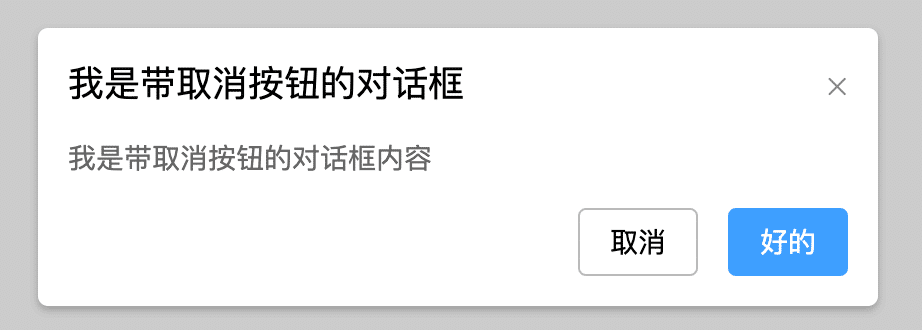
4.对话框

使用
import MessageBox from 'plugin/MessageBox/index'
// 导入当前对话框

MessageBox.success({
 		  title:'我是带取消按钮的对话框',
      content:'我是带取消按钮的对话框内容',
      confirmButtonText:'好的',
      callback:()=>{},
      cancelButtonText:'取消',
      cancelCallBack:()=>{}
})  //成功通知

MessageBox.normal({}) //正常通知
MessageBox.warn({}) //警告通知
选项参数默认值说明
通知类型-MessageBox.normal 正常通知
MessageBox.success 成功通知
MessageBox.warn 警告通知
title-通知标题
content-通知内容
confirmButtonText确定确定按钮内容
callback-确定按钮按下后,触发的回调函数
cancelButtonText-取消按钮内容,不传值时取消按钮不显示
cancelCallBack-取消按钮按下后,触发的回调函数

FAQs

Package last updated on 14 Jul 2022

Did you know?

Socket

Socket for GitHub automatically highlights issues in each pull request and monitors the health of all your open source dependencies. Discover the contents of your packages and block harmful activity before you install or update your dependencies.

Install

Related posts

