FireSchema
Interactive schema viewer for Firestore databases.
Like SwaggerUI, but for NoSQL.
Document your Firestore database structure using JSON Schema — the official standard for defining object structures — and visualize it with a beautiful dark-themed UI.
Why FireSchema?
- Firestore has no built-in schema documentation. FireSchema fills that gap.
- JSON Schema is an open standard — not a proprietary format. Your schemas are portable and IDE-compatible.
- Zero backend required — it's a static SPA. Drop the files and open in a browser.
- One file per collection — folder structure mirrors your Firestore hierarchy 1:1.
Quick Start
1. Create your schema files
Create a schemas/ folder in your project. Each .schema.json file represents one Firestore collection:
schemas/
├── users.schema.json                → /users/{userId}
├── users/
│   └── orders.schema.json           → /users/{userId}/orders/{orderId}
└── products.schema.json             → /products/{productId}
The folder structure mirrors Firestore. Subcollections go inside a folder named after the parent collection. Firestore paths are inferred automatically — you never write them manually.
Example schemas/users.schema.json:
{
  "$schema": "https://raw.githubusercontent.com/juanisidoro/firestore-schema-viewer/main/schema/collection.schema.json",
  "collection": "users",
  "description": "Application users",
  "schema": {
    "$schema": "https://json-schema.org/draft/2020-12/schema",
    "type": "object",
    "properties": {
      "email": { "type": "string", "format": "email" },
      "displayName": { "type": "string" },
      "role": { "type": "string", "enum": ["admin", "editor", "viewer"] },
      "createdAt": { "type": "string", "format": "date-time" }
    },
    "required": ["email", "displayName", "role"]
  }
}
Tip: The $schema line at the top gives you autocomplete and validation in VS Code.
2. Create the viewer page
Create an index.html next to your schemas/ folder. Pick one of the setup options below:
Setup Options
Option A: CDN (recommended — zero install)
No dependencies, no node_modules. Just 1 HTML file + your schema files.
Step by step:
-
Create a folder for your docs (e.g. docs/firestore/):
your-project/
└── docs/firestore/
    ├── index.html
    └── schemas/
        ├── users.schema.json
        └── users/
            └── orders.schema.json
-
Create index.html:
<!DOCTYPE html>
<html lang="en" class="dark">
<head>
  <meta charset="UTF-8">
  <meta name="viewport" content="width=device-width, initial-scale=1.0">
  <title>My Project - Firestore Schemas</title>
  <link rel="preconnect" href="https://fonts.googleapis.com">
  <link rel="preconnect" href="https://fonts.gstatic.com" crossorigin>
  <link href="https://fonts.googleapis.com/css2?family=Inter:wght@400;500;600;700&family=JetBrains+Mono:wght@400;500;600;700&display=swap" rel="stylesheet">
  <link rel="stylesheet" href="https://cdn.jsdelivr.net/npm/firestore-schema-viewer-dist@0.3/style.css">
</head>
<body>
  <div id="schema-viewer"></div>
  <script src="https://cdn.jsdelivr.net/npm/firestore-schema-viewer-dist@0.3/fsv.umd.js"></script>
  <script>
    FirestoreSchemaViewer.render('#schema-viewer', {
      title: 'My Project',
      schemasDir: './schemas/'
    })
  </script>
</body>
</html>
-
Add your .schema.json files to schemas/ and serve:
cd docs/firestore
npx serve .
Custom port: npx serve . -l 8080
That's it. The viewer auto-discovers all .schema.json files in the schemas/ folder (including subdirectories). Add new schemas, refresh the browser — no need to touch index.html.
How it works: When served with npx serve, python3 -m http.server, or any server with directory listing enabled, the viewer parses the directory listing to find all schema files automatically. If your server doesn't support directory listing (GitHub Pages, Netlify, Vercel), create a schemas/index.json manifest — see Hosting without directory listing below.
Full quicksheet: QUICKSHEET-CDN.md — schema templates, field patterns, checklist.
Option B: Static files via npm (no dependency tree)
Install the dist-only package — 1 package, ~335 KB total, zero sub-dependencies:
npm install --save-dev firestore-schema-viewer-dist
Step by step:
-
Create your docs folder and install:
mkdir -p docs/database/firebase/schemas
cd docs/database/firebase
npm init -y
npm install --save-dev firestore-schema-viewer-dist
echo "node_modules/" > .gitignore
-
Create index.html:
<!DOCTYPE html>
<html lang="en" class="dark">
<head>
  <meta charset="UTF-8">
  <meta name="viewport" content="width=device-width, initial-scale=1.0">
  <title>My Project - Firestore Schemas</title>
  <link rel="preconnect" href="https://fonts.googleapis.com">
  <link rel="preconnect" href="https://fonts.gstatic.com" crossorigin>
  <link href="https://fonts.googleapis.com/css2?family=Inter:wght@400;500;600;700&family=JetBrains+Mono:wght@400;500;600;700&display=swap" rel="stylesheet">
  <link rel="stylesheet" href="./node_modules/firestore-schema-viewer-dist/style.css">
</head>
<body>
  <div id="schema-viewer"></div>
  <script src="./node_modules/firestore-schema-viewer-dist/fsv.umd.js"></script>
  <script>
    FirestoreSchemaViewer.render('#schema-viewer', {
      title: 'My Project',
      schemasDir: './schemas/'
    })
  </script>
</body>
</html>
-
Add your .schema.json files to schemas/ and serve:
npx serve .
Custom port: npx serve . -l 8080
Full quicksheet: QUICKSHEET-NPM-DIST.md — complete setup, schema templates, field patterns, checklist.
Option C: Full package (for bundler projects)
If your project uses a bundler (Vite, Webpack, etc.):
npm install firestore-schema-viewer
import { render } from 'firestore-schema-viewer'
import 'firestore-schema-viewer/dist/style.css'

render('#schema-viewer', {
  title: 'My App',
  schemasDir: './schemas/'
})
Full quicksheet: QUICKSHEET-BUNDLER.md — complete setup for bundler projects, schema templates, field patterns.
Hosting without directory listing
If your server doesn't support directory listing (GitHub Pages, Netlify, Vercel), create a schemas/index.json file listing all your schema paths:
[
  "users.schema.json",
  "users/orders.schema.json",
  "products.schema.json"
]
Generate it automatically:
find schemas -name "*.schema.json" | sed 's|^schemas/||' | sort > schemas/index.json
The viewer will automatically look for this file if directory listing is not available.
Schema File Format
Each .schema.json file has this structure:
collection | Yes | Collection name (e.g. "users") |
schema | Yes | Standard JSON Schema object |
description | No | What this collection stores |
documentCount | No | Approximate number of documents (hidden in UI if omitted) |
The schema field is plain JSON Schema draft 2020-12. You can use all standard features: type, properties, required, enum, format, pattern, minimum, maximum, nested object and array types, etc.
How Paths Are Inferred
You never write Firestore paths manually. They're inferred from the file location:
users.schema.json | /users/{userId} |
users/orders.schema.json | /users/{userId}/orders/{orderId} |
frontend-shops/products.schema.json | /frontend-shops/{frontend_shopId}/products/{productId} |
API
FirestoreSchemaViewer.render(selector, config)
selector | string | CSS selector for the container element |
config.title | string (optional) | Title shown in the sidebar header |
config.schemasDir | string (recommended) | Path to schemas folder — auto-discovers all .schema.json files |
config.schemas | string[] or object[] | Explicit URLs to .schema.json files, or inline collection objects |
Use one of schemasDir or schemas:
FirestoreSchemaViewer.render('#viewer', {
schemasDir: './schemas/'
})
FirestoreSchemaViewer.render('#viewer', {
schemas: [
'./schemas/users.schema.json',
'./schemas/users/orders.schema.json',
'./schemas/products.schema.json'
]
})
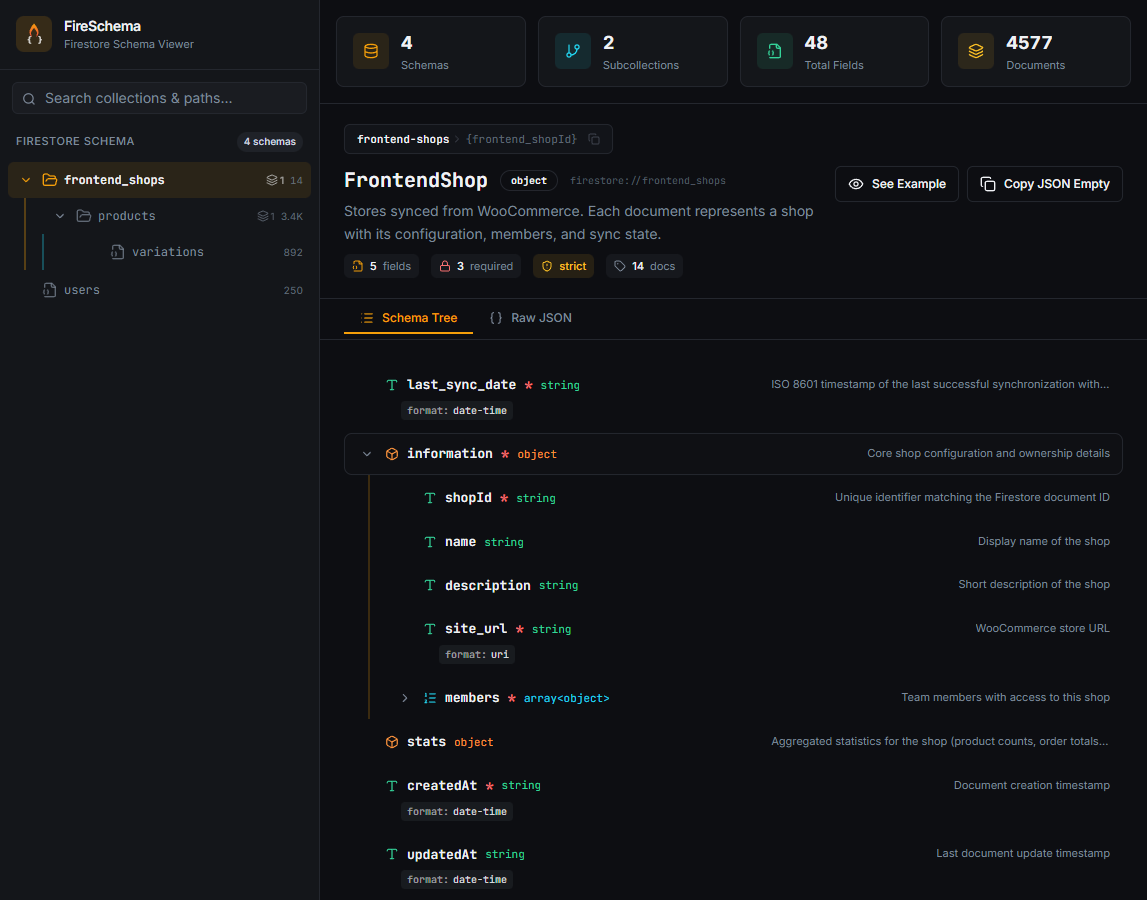
What You See
- Sidebar — navigable tree of all collections and subcollections
- Stats bar — total schemas, subcollections, fields, and documents
- Schema tree — expandable view of all fields with types, constraints, and descriptions
- Raw JSON tab — full JSON Schema source
- Example generator — auto-generated example documents from the schema
- Copy buttons — one-click copy for paths, empty objects, and examples
Packages
Generate Schemas with AI
Use this prompt with Claude Code, ChatGPT, Copilot, or any LLM to auto-generate your schema files. Copy the prompt below and adapt the collection list to your project:
Prompt: Generate FireSchema files (click to expand)
Generate Firestore schema files for the FireSchema viewer (https://github.com/juanisidoro/firestore-schema-viewer).

Rules:
- One .schema.json file per collection
- Folder structure mirrors Firestore hierarchy: subcollections go inside a folder named after the parent collection
- If a subcollection exists, the parent .schema.json MUST also exist
- Every field must have "type" and "description"
- Use standard JSON Schema features: type, enum, format, required, minimum, maximum, etc.
- Use "format": "date-time" for timestamps, "format": "email" for emails, "format": "uri" for URLs
- Do NOT include "path" or "subcollections" fields — they are inferred from folder structure

Each file must follow this format:
{
  "$schema": "https://raw.githubusercontent.com/juanisidoro/firestore-schema-viewer/main/schema/collection.schema.json",
  "collection": "<collection-name>",
  "description": "<what this collection stores>",
  "schema": {
    "type": "object",
    "required": [...],
    "properties": { ... }
  }
}

Generate the schema files for the following collections:

- users (email, displayName, role: admin/editor/viewer, createdAt)
- users/orders (total, status: pending/paid/shipped, items array, createdAt)
- products (name, price, category, inStock boolean)

Output each file with its path (e.g. schemas/users.schema.json) so I can create them directly.

After generating the files, follow the setup instructions at:
https://github.com/juanisidoro/firestore-schema-viewer#setup-options
Replace the collections list at the bottom with your own. The LLM will generate ready-to-use .schema.json files with the correct format and folder structure.
Roadmap
- v0.3 (current): Static viewer, dark theme, CDN support, auto-discovery
- Future (based on demand): CLI tool, hot reload, schema validation, light theme, CI/CD integration
Want a feature? Open an issue.
License
MIT



