firma
You earned well this year.
Do you know where it went?
Drop your trade history into Claude.
Get back a full financial picture — portfolio, net worth, cash flow — stored in a local SQLite file.


npm install -g firma-app
You:    Here's my IBKR trade history [trades.csv]. Set up firma.
Claude: I see 47 transactions. Logging in chronological order... done.
        Syncing prices and FX history... your portfolio: $179K, +61% all-time. TSLA is 78%.

You:    My portfolio feels really volatile lately. Should I be worried?
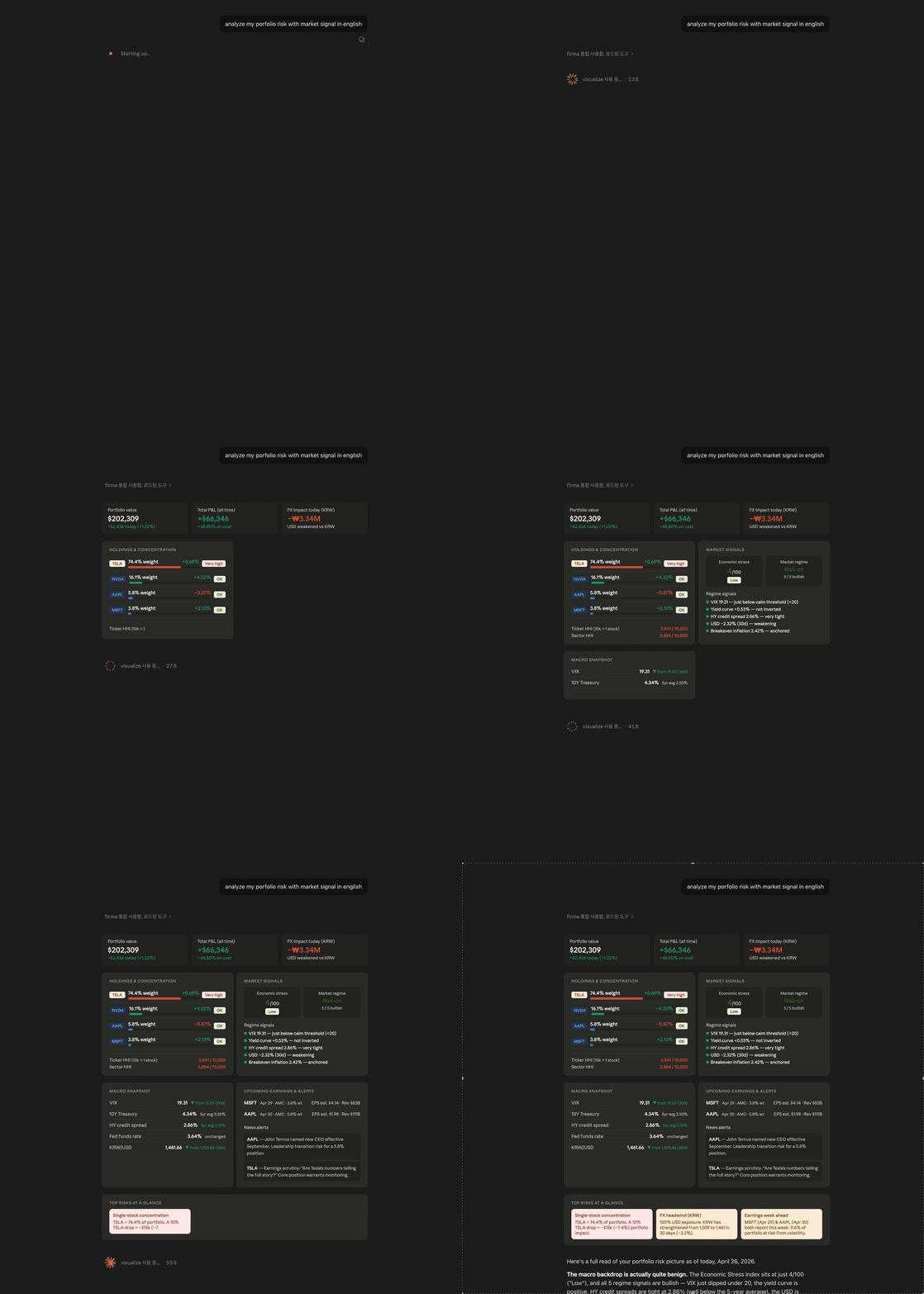
Claude: TSLA is 74% of your equity — a 10% TSLA move is a 7% net worth move.
        Cash flow is solid at $6.4k/month saved. The volatility is market, not lifestyle.

You:    That July expense spike looks alarming.
Claude: That was $57k in TSLL — a leveraged bet, not spending.
        Strip it out: expenses flat at ~$7k/month, savings rate 47.8%.

You:    Give me a full overview with charts.
Claude: Net worth: $294k → $490k in 8 months, pulled back to $427k with TSLA's Q1 dip.
        [builds net worth trend, income vs expenses, portfolio allocation, unrealized P&L]
Why firma
- Talks to Claude natively.
firma mcp install wires firma into Claude Desktop. Every command you can run in the terminal, Claude can call through MCP — log trades, sync prices, render charts, reason about your data.
- Local-first, no exceptions. Everything lives in
~/.firma/firma.db. No server, no sync, no account. Your financial data never leaves your machine.
- Built for US market investors. Multi-currency (USD, KRW, EUR, JPY, and more) with historical FX rates from FRED — so a 2018 balance shows the 2018 exchange rate, not today's.
- Transactions as source of truth. No holdings table to drift out of sync. Portfolio, cost basis, and P&L are always derived live from your trade log.
- Developer-friendly.
--json on every read command. Three clean verb groups: add, show, report.
Get started
npm install -g firma-app
firma config set finnhub-key YOUR_KEY
firma config set fred-key YOUR_KEY
firma mcp install
4. Drop your data into Claude. Paste a CSV, brokerage export, or plain text — Claude logs everything and syncs prices automatically.
Prefer the terminal? Every MCP tool has a matching firma command — see CLI reference.
If firma helps you track your money, please ⭐ star the repo — it's the cheapest way to help others find it.
CLI reference
--json is available on every read command. Alias: firma rm = firma delete.
Portfolio
firma show portfolio | Holdings with P&L, avg cost, market value |
firma show txns [ticker] | Transaction history with running avg cost |
firma show dividend | Estimated annual income + per-ticker yield |
firma show concentration | HHI concentration by ticker, currency, sector, country |
firma show snapshot [ticker] | Portfolio value history; --from/--to for date range |
firma show benchmark | Portfolio return vs SPY/QQQ (or custom benchmarks via -b) |
firma show risk | Volatility, drawdown, Sharpe, Sortino, beta — requires snapshots |
firma profile | Set up your goals (birth year, retirement target, target net worth, risk tolerance, notes) — every field optional |
firma show profile | Show the stored profile |
Balance & Cash Flow
firma add balance [-p YYYY-MM] | Monthly asset & liability snapshot |
firma add flow [-p YYYY-MM] | Monthly income & expense entry |
firma add monthly [-p YYYY-MM] | Balance + flow in one call (month-end) |
firma show balance [-p YYYY-MM] | Stored balance entries for a period |
firma show flow [-p YYYY-MM] | Stored cash flow entries for a period |
firma report | Net worth trend + cash flow charts (combined) |
firma report balance / flow / settle | Targeted views |
firma report -c USD | Display in USD, EUR, JPY, CNY, or GBP |
Transactions
firma add txn | Record a transaction (buy / sell / deposit / dividend / tax) |
firma edit txn [id] | Edit a transaction |
firma delete txn [id] | Delete a transaction |
Snapshots
firma add snapshot | Sync prices and record today's portfolio snapshot |
firma edit snapshot | Edit a snapshot entry (interactive picker) |
firma delete snapshot [date] | Delete all entries for a date |
Research (Finnhub)
firma show news <ticker> | Recent company news |
firma show insider <ticker> | Insider buy/sell transactions |
firma show financials <ticker> | SEC-reported quarterly financials |
firma show earnings [ticker] | Earnings calendar + EPS history |
Macro (FRED)
firma show macro | VIX, 10Y yield, yield curve, USD index, HY spread, inflation, fed funds, FX |
firma show stress | Economic Stress Index (0–100) from 5 FRED series |
firma show regime | Macro regime bias — Risk-on / Mixed / Risk-off |
firma show fx [currency] | Inspect cached FX history with --from/--to/--limit |
Daily Brief & Actions
firma brief | Movers, news, upcoming earnings, macro context (cached per day; --refresh to regenerate) |
firma sync | Fetch latest prices (Finnhub) + FX rate history (FRED) |
firma sync fx | FX history only — incremental backfill from your earliest entry date |
firma doctor | Check setup status — API keys, data, FX cache |
firma mcp install | Register MCP server in Claude Desktop |
firma config set finnhub-key KEY | Set Finnhub API key |
firma config set fred-key KEY | Set FRED API key |
firma config set currency CODE | Set home currency (KRW, USD, JPY, …) |
Claude integration (MCP)
After firma mcp install, Claude has full read/write access to your data through conversation. Two tools are available only via MCP:
fetch_fred_series | Fetch any FRED time series by ID (800K+ series) |
search_fred_series | Search the FRED catalog by keyword |
get_brief is the richest single call for daily check-ins — holdings with weights, daily P&L, concentration, movers, news, earnings, macro context, stress/regime signals, all in one response. If today's snapshot is missing, get_brief records one automatically before assembling the brief, so daily history accrues even when you forget to run firma add snapshot.
Prompts — type / in Claude Desktop to access guided workflows:
import-trades | Confirms column mapping then bulk-inserts every row in a single add_txns call — handles 100s of rows in one shot |
import-balance | Same flow for a net-worth spreadsheet (rows = months, columns = balance categories) → bulk add_balances |
import-flow | Same flow for an income/expense spreadsheet → bulk add_flows |
month-end | Walks through balance + cash flow entry for the period, submits in one batch |
morning | Calls get_brief and surfaces only what needs attention |
analyst | Activates a financial-analyst persona — Claude leads with concentration risk, frames every number against net worth or runway, and combines portfolio + cash flow + macro into a single view |
setup-profile | Captures your goals (birth year, retirement target, target net worth, risk tolerance, notes) so all future analysis is anchored to them — every field optional |
pre-mortem | Five plausible ways a position could go wrong over 12 months — concrete failure modes tied to actual data, with portfolio impact in dollars |
rebalance | Compares current allocation against your stated target, flags drift, suggests specific trades while accounting for tax cost and wash-sale risk |
tax-harvest | Scans unrealized losses, checks 30-day wash-sale rule, suggests similar-but-not-identical replacements, estimates tax savings by bracket |
scenario | Models a market shock or macro shift on your actual portfolio with explicit beta assumptions you can override |
setup_status (called by Claude at the start of any conversation) also returns an analyst_context block — a lightweight version of the analyst persona that influences every reply without a manual prompt invocation.
Historical FX note: firma sync fx backfills daily KRW/JPY/EUR/CNY/GBP rates from FRED starting at your earliest transaction date. Subsequent runs are increment-only. This means a 2018 balance in KRW uses the 2018 rate — not today's.
Development
Requires Node.js 22+ and Yarn Berry.
corepack enable
yarn install
yarn dev:cli show portfolio
yarn typecheck
See CONTRIBUTING.md for architecture overview and extension points.
License
MIT © Evan Moon




