🚀 Socket Launch Week Day 5:Introducing Repository Access Permissions and Custom Roles.Learn more
Sign In

fs-alipay-ad-component

Package Overview
Dependencies
Maintainers
1
Versions
16
Alerts
File Explorer

Advanced tools

Socket logo

Install Socket

Detect and block malicious and high-risk dependencies

Install

fs-alipay-ad-component

支付宝小程序广告组件

latest
npmnpm
Version
0.1.6
Version published
Weekly downloads
39
-20.41%
Maintainers
1
Weekly downloads
 
Created
Source

fs-alipay-ad-component 支付宝广告组件

使用前准备

request合法域名 中增加如下配置

https://advertising.adcomeon.com
https://fshows-ecs-pro.cn-hangzhou.log.aliyuncs.com

使用方法

一. npm 安装

npm install fs-alipay-ad-component --save

二. 使用

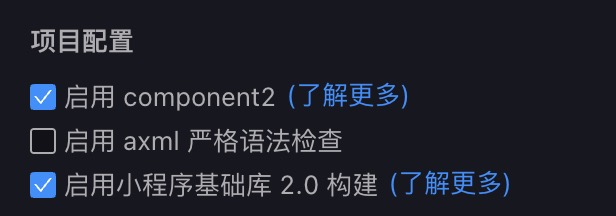
  • 开发者工具中启用component2 tip
  • 引入组件,页面的 json 文件中做如下配置
{
  "usingComponents": {
    "fs-ad": "fs-alipay-ad-component"
  }
}
  • 页面的 axml 文件
<fs-ad
  a:if="{{showFsAd}}"
  ref="fsAd"
  flowMasterId="xxx"
  openId="xxx"
  onAdInfoReady="handleOpenAd"
/>

注意

  • 如果在新开页面接入组件,需要添加onAdInfoReady属性,用于获取到广告后立即展示广告。
  • 如果组件接在支付页,支付完成后不跳页面,那么不需要写onAdInfoReady,只需要在支付完成的回调中去调用handleOpenAd方法即可。
  • 页面的js文件,展示广告

注意:showFsAd在data中的初始值应设置为false

Page({
  data: {
    showFsAd: false // showFsAd在data中的初始值应设置为false
  },
  onLoad () { // 获取广告
    this.setData({
      showFsAd: true
    })
  },
  fsAd (ref) {
    this.fsAdRef = ref // 通过ref获取广告方法
  },
  /**
   * @function 展示广告
   */
  handleOpenAd () {
    this.fsAdRef.showAd()
  }
})

三. 参数说明

变量类型必填说明
openIdString用户 openId
flowMasterIdString流量位标识, 运营提供的字段

四.事件

事件名称参数必填说明
onAdInfoReady广告数据获取成功的回调函数

Tips

  • 如果你的必传参数中,有异步获取的,请通过a:if,在获取参数后再进行组件的一个显示,以防提示缺少必传参数

FAQs

Package last updated on 06 Jan 2026

Did you know?

Socket

Socket for GitHub automatically highlights issues in each pull request and monitors the health of all your open source dependencies. Discover the contents of your packages and block harmful activity before you install or update your dependencies.

Install

Related posts