

Product
Introducing Repository Access Permissions and Custom Roles
Socket now supports Custom Roles and Repository Access Permissions so organizations can control who can access specific repositories and actions.
By Joe Werle - Jun 19, 2026





A simple but useful tool to manage multiple git repositories.
Be similar to repo, git submodule.
Node.js v0.12.0+
npm install gitm -g
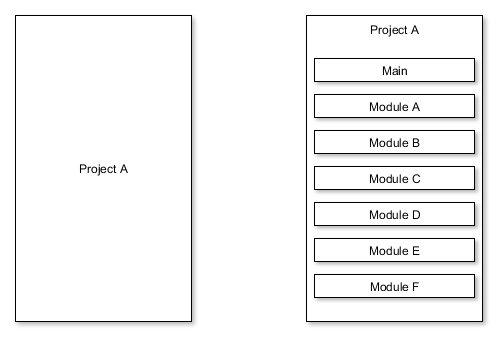
If you have a project A on the left.
Now, you want to modularize it to the project A on the right.
For the project A on the left, It is a git repository.
For the project A on the right, project A is not a git repository, project Main and project Module ** are all git repositories.
Browse the example at repositories
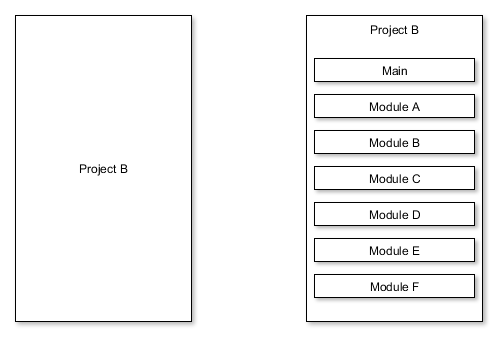
If you have a project B on the left.
Now, you want to modularize it to the project B on the right.
For the project B on the left, It is a git repository.
For the project B on the right, project B, project Main and project Module ** are all git repositories.
Browse the example at repository
Usually, gitm needs two config files. repo.gitm and branch.gitm
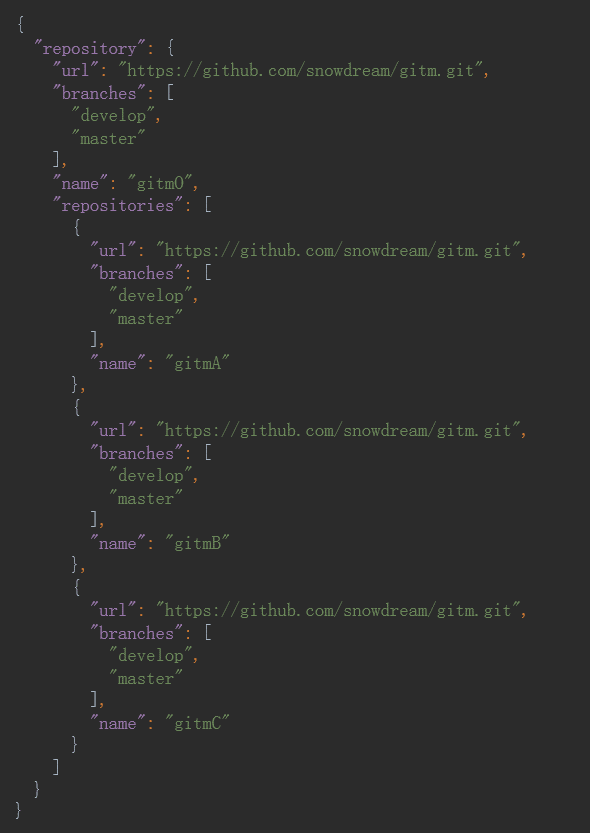
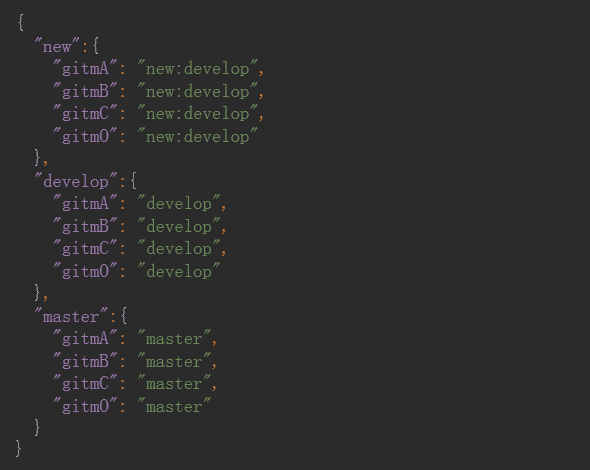
Warning: All the commands as follows should be executed in the root path. For Scene One, the root path is Project A. For Scene Two, the root path is Project B.
gitm clone
Read the file repo.gitm in the current directory, and clone every git repository.
If the property branches exist, every branch will be checkout. The fisrt branch will be the default branch.
gitm clone https://raw.githubusercontent.com/snowdream/gitm/master/examples/repository/repo.gitm
Read the file repo.gitm from the url, other operation is the same as the command gitm clone
Check the file branch.gitm,if the name does not exist in the names of group, then git checkout [name] will be executed in every git repository.else deal it with the following rules.
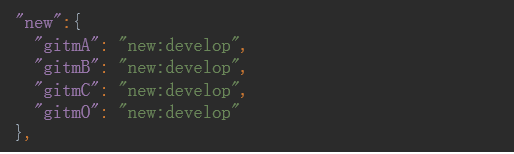
gitm checkout new
git checkout new will be executed in every git repository. such as gitmA.
git checkout newgit checkout –b new origin/newgit checkout –b new developgit checkout –b new origin/developgit checkout –b newAll the steps will be taken in order. once a step has been taken, then the command is finished, and the rest steps will not be taken.
gitm fetch
Check the file repo.gitm,execute the following command in every git repository.
git fetch --all --progress -v
If gitm fetch has any other parameters, such as gitm fetch origin master
Then git fetch origin master will be executed in every git repository.
gitm pull
Check the file repo.gitm,execute the following command in every git repository.
git pull origin branch --progress -v
branch is the current branch of the git repository.
If gitm pull has any other parameters, such as gitm pull origin master
Then git pull origin master will be executed in every git repository.
gitm push
Check the file repo.gitm,execute the following command in every git repository.
git push origin branch:branch --progress -v
branch is the current branch of the git repository.
If gitm push has any other parameters, such as gitm push origin master
Then git push origin master will be executed in every git repository.
Such as gitm help clone. It will execute the following command only once.
git help clone
show helps for gitm
show version for gitm
gitm tag v0.1Use git in place of gitm, then execute the command in every git repository.
Copyright (C) 2015 Snowdream Mobile <yanghui1986527@gmail.com>

Licensed under the Apache License, Version 2.0 (the "License");
you may not use this file except in compliance with the License.
You may obtain a copy of the License at

        http://www.apache.org/licenses/LICENSE-2.0

Unless required by applicable law or agreed to in writing, software
distributed under the License is distributed on an "AS IS" BASIS,
WITHOUT WARRANTIES OR CONDITIONS OF ANY KIND, either express or implied.
See the License for the specific language governing permissions and
limitations under the License.
FAQs
A simple but useful tool to manage multiple git repositories.
The npm package gitm receives a total of 12 weekly downloads. As such, gitm popularity was classified as not popular.
We found that gitm demonstrated a not healthy version release cadence and project activity because the last version was released a year ago. It has 1 open source maintainer collaborating on the project.
Did you know?

Socket for GitHub automatically highlights issues in each pull request and monitors the health of all your open source dependencies. Discover the contents of your packages and block harmful activity before you install or update your dependencies.
Product
Socket now supports Custom Roles and Repository Access Permissions so organizations can control who can access specific repositories and actions.

Product
Socket MCP now lets AI assistants review org alerts, investigate threats using the Socket threat feed, and inspect package files in addition to dependency scoring.

Product
Socket Firewall blocks malicious VS Code and Open VSX extensions before install, protecting developers from compromised editor marketplaces.