


Security News
Rust 1.100 Will Add Dependency Cooldowns to Cargo
Rust 1.100 will add opt-in dependency cooldowns to Cargo, giving security scanners and maintainers time to catch malicious crate releases.
By Sarah Gooding - Oct 20, 2026
Real Excel files in your web app and in your agent: an embeddable spreadsheet with a Rust/WebAssembly engine, in-place .xlsx saves and AI tools, plus an MCP server for coding agents.


Real Excel files, in your web app and in your agent. Open the .xlsx
your users already have, keep every formula live at full size, let AI edit
it with review, and save back the same file.
| In your web app | In your coding agent | |
|---|---|---|
| Install | npm install gridpath | claude mcp add gridpath -- npx -y gridpath mcp |
| What you get | An embeddable spreadsheet: a canvas grid over a Rust/WebAssembly engine in a Web Worker, in-place .xlsx saves, and agent tools for your own model | An MCP server for Claude Code, Claude Desktop, Cursor, Codex: the agent edits files on disk and you review every change before it is saved |
| Docs | In your web app | In your coding agent |
Both run the same engine (a fork of IronCalc): real formulas evaluated in process, and saves that patch the original file so charts, pivots, VBA macros, add-in data and custom XML come back byte-identical.
npm install gridpath react react-dom
React and React DOM are peer dependencies. Your app does not have to use
React: createSpreadsheet mounts the grid into any element.
import { createSpreadsheet } from "gridpath";

const el = document.getElementById("sheet")!; // give it a height
const sheet = await createSpreadsheet(el, {
  file: await file.arrayBuffer(), // omit for a blank workbook
  onEdit: () => console.log("edited"),
});

sheet.setCell("Sheet1", "B2", "=SUM(A1:A10)");
console.log(await sheet.getCell("Sheet1", "B2")); // { value: 55, formula: "=SUM(A1:A10)" }

const xlsx = await sheet.save(); // Uint8Array; or saveBlob() for a download
React:
import { Spreadsheet } from "gridpath";

<div style={{ height: 600 }}>
  <Spreadsheet file={bytes} onReady={(sheet) => (sheetRef.current = sheet)} />
</div>;
The workbook loads once per mount. To open another file, remount with a new
key.
| Option | |
|---|---|
file | .xlsx bytes (ArrayBuffer or Uint8Array). Without it the workbook starts blank. |
sheets | Sheet names for a blank workbook (default ["Sheet1"]). |
fileName | Name used in messages. |
onEdit | Called after each user edit. |
onProgress | Loading stages. |
engine.worker | false runs the engine on the page instead of a worker. |
engine.workerUrl, engine.wasmUrl | Where to load the worker script and .wasm from, when your bundler does not serve them next to the package. |
| Method | |
|---|---|
getSheetNames() | Sheet names in order. |
getCell(sheet, "A1") | { value, display?, formula } or null; waits for pending recalculation. |
setCell(sheet, "A1", value) | Strings starting with = are formulas. |
setCells(sheet, [{ row, col, value }]) | Many cells in one step (0-based). |
whenCalculated() | Resolves when pending writes are recalculated. |
select(sheet, "A1"), focus() | Move the selection; give the grid keyboard focus. |
save(), saveBlob() | The workbook as .xlsx. Throws PendingChangesError while agent changes await review; { includePending: true } saves them anyway. |
destroy() | Unmount and stop the engine (createSpreadsheet only). |
sheet.ai is GridPath's agent tool set (the same tools and result shapes as
the MCP server) acting on the grid the user is
looking at. Give the tools to your model, run its tool calls with
sheet.ai.run(), and let the user review: every write lands at once,
highlighted, as a pending batch they accept or reject.
GridPath never sees a key. The model call happens on your server; the tool calls run in the browser, where the workbook is.
Server (any Node route; this one is the demo's server/agent.ts). The
system prompt and tools are fixed here; taking them from the request would
make the route a general proxy for your key. Add your own auth and rate
limits.
import Anthropic from "@anthropic-ai/sdk";
import { AGENT_INSTRUCTIONS, agentTools } from "gridpath/agent";

const client = new Anthropic(); // ANTHROPIC_API_KEY
const tools = agentTools() as Anthropic.Beta.BetaTool[];

export async function agentTurn(messages: Anthropic.Beta.BetaMessageParam[]) {
  const response = await client.beta.messages.create({
    model: "claude-opus-5-5",
    max_tokens: 16000,
    output_config: { effort: "high" },
    system: AGENT_INSTRUCTIONS,
    tools,
    cache_control: { type: "ephemeral" }, // system + tools are identical every call
    betas: ["server-side-fallback-2026-07-01"],
    fallbacks: "default", // a declined request re-runs on a fallback model
    messages,
  });
  return { content: response.content, stop_reason: response.stop_reason };
}
Browser (the demo's src/agentLoop.ts, shortened):
const messages = [{ role: "user", content: [
  { type: "text", text: `The open workbook:\n${await sheet.ai.context()}` },
  { type: "text", text: prompt },
] }];
for (;;) {
  const out = await (await fetch("/api/agent", { method: "POST", body: JSON.stringify({ messages }) })).json();
  messages.push({ role: "assistant", content: out.content }); // unchanged, thinking blocks included
  const calls = out.content.filter((b) => b.type === "tool_use");
  if (out.stop_reason !== "tool_use" || calls.length === 0) break;
  const results = [];
  for (const c of calls) {
    const r = await sheet.ai.run(c.name, c.input);
    results.push({ type: "tool_result", tool_use_id: c.id, content: JSON.stringify(r), ...(r?.ok === false ? { is_error: true } : {}) });
  }
  messages.push({ role: "user", content: results }); // all results in one message
}
Already have an agent framework? Use sheet.ai.tools() (Anthropic format)
or sheet.ai.tools("openai") and route tool calls to sheet.ai.run().
sheet.ai | |
|---|---|
tools(format?) | Tool definitions: "anthropic" (default) or "openai". Also exported from gridpath/agent as agentTools(). |
instructions() | How to use them, for the system prompt (AGENT_INSTRUCTIONS). |
context() | The workbook overview for the first turn. |
run(name, input) | Run one tool call; resolves with JSON for the model. Never throws. |
list(), onChange(fn) | The batches, pending or accepted. |
accept(id?) | Keep one batch, or every pending one. |
reject(id?) | Undo a batch and every batch after it, newest first, so rows and columns moved by later batches stay right. Resolves with the ids undone. |
Included: describe_workbook, find_rows, query_rows, read_range, set_cell, set_range, copy_range, set_format, clear_range, run_script (sandboxed in a worker), row/column/sheet structure, freeze, hide, merge, notes, sizes, define_name. Not included: tools that need the desktop app or the network (fetch_web, edgar_lookup, reference workbooks).
save() refuses while changes are pending: it throws a
PendingChangesError (with a pending count) until the user accepts or
rejects them, so nothing unreviewed reaches the file by accident.
save({ includePending: true }) saves them anyway.
Every save replays the session's changes (cells, formats, sizes, rows and
columns, sheets, filters) onto the bytes the workbook was opened from. Parts
the session did not touch are copied through unchanged. Formulas carry
their results: every new formula, and every formula the session's edits
recalculated, is saved with its current result as the cached value (the
formula text is left as it was), so a reader that never calculates (pandas,
openpyxl with data_only=True, file previews) sees current numbers. Formulas
the session did not affect keep the values Excel saved. The file is also
marked for recalculation on open, which Excel honours.
Against the spreadsheet components a web app would otherwise embed, on real models in Chromium (workbooks, method and full results):
| GridPath | SpreadJS 19.2 | Handsontable 18.1 + HyperFormula 3.5 + ExcelJS 4.4 | |
|---|---|---|---|
| 1.4 MB analyst model: open, fully recalculated | 0.6 s, 0.8 s | 1.5 s, 3.6 s | 1.9 s |
| … agrees with Excel's results | 95.5% | 94.0% | 56.9% |
| … lost on save | nothing (75 of 76 parts byte-identical) | custom XML, printer settings | custom XML, printer settings, comments, 3,335 of 3,418 names |
| Data-intensive model over 10 MB (2.3M cells): open, fully recalculated | 4.2 s, 10.9 s | tab crashes (lazy mode: 6.5 s, 3.7 min) | 10.8 min |
| … edit → dependent updated | 2.7 s | — (lazy mode crashes on the first edit) | 64 s |
The package loads its worker and engine with
new URL("…", import.meta.url), which Next.js, Vite, webpack 5 and Rollup
bundle on their own.
Next.js (tested on 16 with React 19, Turbopack and webpack, next dev
and production builds): no configuration. Render the spreadsheet from a
client component; the page around it can stay a server component, and
gridpath/agent works in a route handler:
// app/Sheet.tsx
"use client";
import { Spreadsheet } from "gridpath";

export function Sheet() {
  return <Spreadsheet onReady={(sheet) => { /* keep `sheet` */ }} />;
}
// app/api/agent/route.ts
import { AGENT_INSTRUCTIONS, agentTools } from "gridpath/agent";
A complete app is in examples/nextjs-demo.
Vite: production builds work as is. For the dev server, exclude the package from dependency pre-bundling:
// vite.config.ts
export default defineConfig({ optimizeDeps: { exclude: ["gridpath"] } });
webpack 5 (outside Next.js): no configuration; new URL workers and
assets are built in.
Anything else: copy engine.worker.js, its chunks and
gridpath_engine_bg.wasm from dist/ to your static files and pass
engine: { workerUrl, wasmUrl }.
Size in the browser: about 84 KB of JavaScript and a 1.2 MB engine, gzipped (0.87 MB with brotli). The engine downloads once and is cached by the browser.
crates/engine-wasm/build.sh   # needs rustup target wasm32-unknown-unknown and wasm-bindgen-cli
cd packages/gridpath && npm install && npm pack
examples/embed-demo installs the packed tarball the way an app would.
Let your agent edit Excel files. Review before anything is saved.
An MCP server for Claude Code, Claude Desktop, Cursor, Codex or any MCP host
that edits the .xlsx / .xlsm files you already have, with a review step:
review_url: a local page with
the workbook, changed cells highlighted, before/after per cell, Accept /
Reject per batch or per cell, Save or Save as… (a copy). With --review-required, only
that page can write the file; the agent just hands you the link.run_script runs the agent's JavaScript against the
workbook in a worker with a hard timeout and lands the result as one
reviewable batch.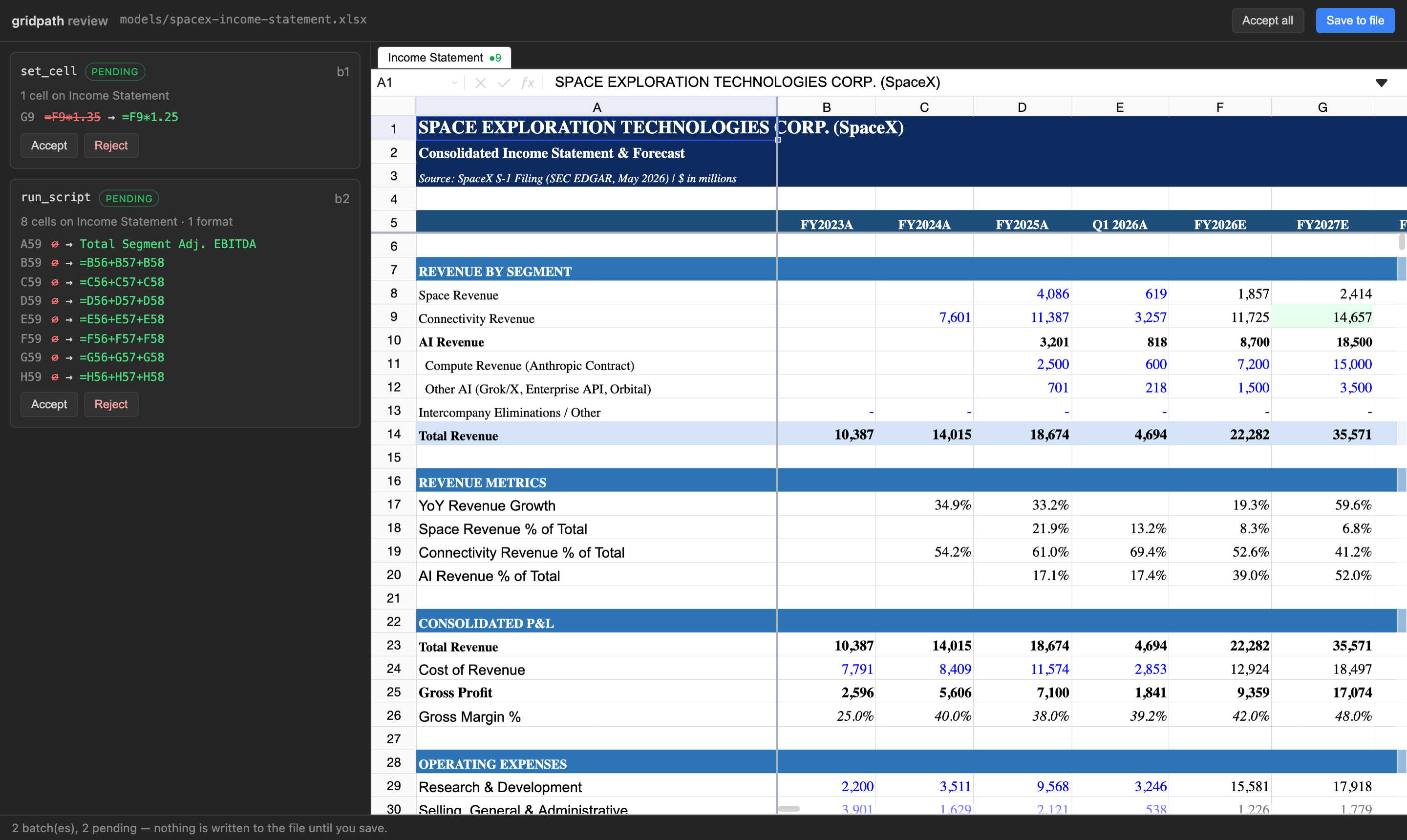
Download gridpath-0.2.1.mcpb
and open it. Claude Desktop shows an install dialog where you pick the folders
Claude may edit and whether saving requires review. Node is bundled; nothing else
to install. Claude Desktop shows its standard "not verified" warning for any
extension installed from a file; the source is public
and nothing is written until you accept and save on the review page.
claude mcp add gridpath -- npx -y gridpath mcp --review-required
Add to Cursor
(one click), or add to mcp.json:
{ "mcpServers": { "gridpath": { "command": "npx", "args": ["-y", "gridpath", "mcp", "--review-required"] } } }
~/.codex/config.toml)[mcp_servers.gridpath]
command = "npx"
args = ["-y", "gridpath", "mcp", "--review-required"]
Same command/args as the Cursor JSON in that host's MCP settings. The server
speaks stdio.
| Flag | Meaning |
|---|---|
--allow <dir> [<dir>...] | Limit the server to these folders. Default: your home directory. |
--review-required | The agent cannot save. save_workbook returns the review link; you accept and save there. Also GRIDPATH_REVIEW_REQUIRED=true. |
--port <n> | Port for the local review server (default: random). |
gridpath review <file> | Reopen the review page for a workbook's pending batches later. |
Pending changes live next to the workbook (.gridpath/<file>.batches.json) until
saved or rejected, so nothing is lost if the agent's session ends.
Every tool takes path. Cells and ranges are A1 notation.
| Tool | What it does |
|---|---|
describe_workbook (sheet?) | Structural map: sheets, used ranges, header rows, sections, named ranges. Call first. |
find_rows (query, sheet?, max_results?) | Find rows by label across sheets, with an evaluated sample. |
read_range (sheet, range) | Evaluated values, formulas and display text for a range (≤ 500 cells). |
set_cell (sheet, cell, value | formula) | Write one cell. |
set_range (sheet, top_left, values[][]) | Write a block; strings starting with = are formulas. |
copy_range (sheet, source, dest_sheet, dest, mode) | Excel-style copy with reference shifting; all / values / formats. |
run_script (script) | Sandboxed JS with sheet(name).get/set/values/setValues/format/clear; one batch. |
set_format (sheet, range | operations[], format) | Number formats, bold/italic, colors, alignment, wrap. |
clear_range (sheet, range) | Clear values and formulas, keep formatting. |
insert_rows / delete_rows / insert_columns / delete_columns | Structural edits; references, CF and validation ranges follow. |
create_sheet / rename_sheet / delete_sheet | Sheet ops. |
set_column_width / set_row_height / freeze_panes / unfreeze_panes / hide_rows / show_rows / hide_columns / show_columns | Layout. |
merge_cells / unmerge_cells / set_note / delete_note / define_name | Merges, notes, named ranges. |
list_batches | Pending batches and the review link. |
reject_batch (batch_id) | Drop a pending batch; the rest replay onto a fresh model. |
save_workbook (as?) | Patch pending changes into the file, or with as write a patched copy and leave the original untouched. The only tool that writes. In-place saves are gated by --review-required. |
Writes never touch the file. They accumulate as pending batches and every write
returns a readback of what landed (values, formulas, a row_map of labels) plus
the review_url.
Claude, after editing a 1,400-row sell-side model (2,500+ named ranges, hidden sheets) through GridPath in Cursor, asked how it compared with its built-in approach:
It recalculates live. After I changed row 58, I could read back the new growth rates right away (28.0%, 28.0%, 27.9%) and confirm the change worked. My usual approach, a Python library called openpyxl, doesn't calculate formulas. I'd have to run the file through LibreOffice to get values, and that can differ from Excel on some functions.
It finds things fast. Its row search and workbook map located "Product revenue" and the Assumptions structure in a few calls. Otherwise I'd be scanning a 1,400-row sheet cell by cell.
It leaves the rest of the file alone. It rewrites only the cells that changed. When openpyxl opens and re-saves a heavy model like this one, it can quietly drop or damage charts, data validation, pivot caches or some formatting. That's the biggest risk with my built-in approach.
| gridpath | File-library MCPs (openpyxl etc.) | Live-Excel MCPs (COM) | Browser spreadsheet SDKs | |
|---|---|---|---|---|
| Edits the file you have | yes, patched in place | rewrites the whole file | yes, via Excel | converts to its own format |
| Formulas evaluated | yes, in process | no | yes, needs Excel open | yes, in a hosted app |
| Review before write | yes | no | no | in the vendor's UI |
| Needs installed | Node | Python | Windows + Excel | a web app + account |
| Macros, pivots, add-in data survive | byte-identical | often dropped | yes | not guaranteed |
Benchmarks and methodology, including runs where a plain coding agent does as well as we do, are in the gridpath-evals repo.
.xlsx and .xlsm. Verified on real analyst models: a 1.4 MB, 12-sheet,
55,000-formula workbook (76 package parts, 75 byte-identical after an edit) and a
13-sheet .xlsm bank model whose vbaProject.bin came back byte-identical.
The engine parses the .xlsx into an in-process model; edits mutate it and
read back evaluated results, recalculating only what an edit affects. Saving
diffs the session's changes against the file as loaded and patches the
original bytes at the zip-part level: untouched parts are copied through,
nothing regenerates the package. In the browser the engine runs in a Web
Worker and the grid draws only the visible window, so large models stay light.
gridpath/headless is the engine without the grid: open a workbook, apply
the same tool calls, read results, and save, from a server or a script.
import { WorkbookSession } from "gridpath/headless";
v0.2. The browser spreadsheet is new in this release (previously the package
was the MCP server only; its Node API moved from gridpath to
gridpath/headless). Not yet: charts drawn in the grid (they are preserved,
not rendered), data-validation dropdowns, real-time collaboration; for agents,
fetch_web / edgar_lookup sourcing tools and charts or pivots as edits.
GridPath is also a desktop app with the same engine and review and its own agent built in.
Apache-2.0 (LICENSE, NOTICE); third-party software in the package is listed in THIRD_PARTY_NOTICES.md. Releases before 0.2.0 were FSL-1.1-Apache-2.0. "GridPath" is a trademark of Heelix Technologies Inc.
FAQs
Real Excel files in your web app and in your agent: an embeddable spreadsheet with a Rust/WebAssembly engine, in-place .xlsx saves and AI tools, plus an MCP server for coding agents.
The npm package gridpath receives a total of 0 weekly downloads. As such, gridpath popularity was classified as not popular.
We found that gridpath demonstrated a healthy version release cadence and project activity because the last version was released less than a year ago. It has 1 open source maintainer collaborating on the project.
Security News
Rust 1.100 will add opt-in dependency cooldowns to Cargo, giving security scanners and maintainers time to catch malicious crate releases.

Security News
Cloudflare is acquiring Deno’s team, which will provide another year of bug fixes and security updates before ending support for the runtime.

Security News
Anthropic’s free OSS Scanner uses Mythos and other Claude models to find open source vulnerabilities and send maintainers reports with proposed fixes.