humanish
Synthetic user research for apps, CLIs, and agent-facing product flows.
Open-source and public-safe.
Humanish runs studies. Realistic synthetic participants, each with its own
goals, patience, and skill, actually use your product on hosted desktops while
you watch. A study leaves verifiable evidence: screenshots, action traces,
per-task completion funnels, participant outcomes with the denominator
attached, and estimated cost lines. A fail-closed share-safety gate stands
between that evidence and anything public, and the end of the pipeline is a
public-safe feedback draft you can turn into a real issue. Committed study
source lives under humanish/; run evidence lands under gitignored
.humanish/.
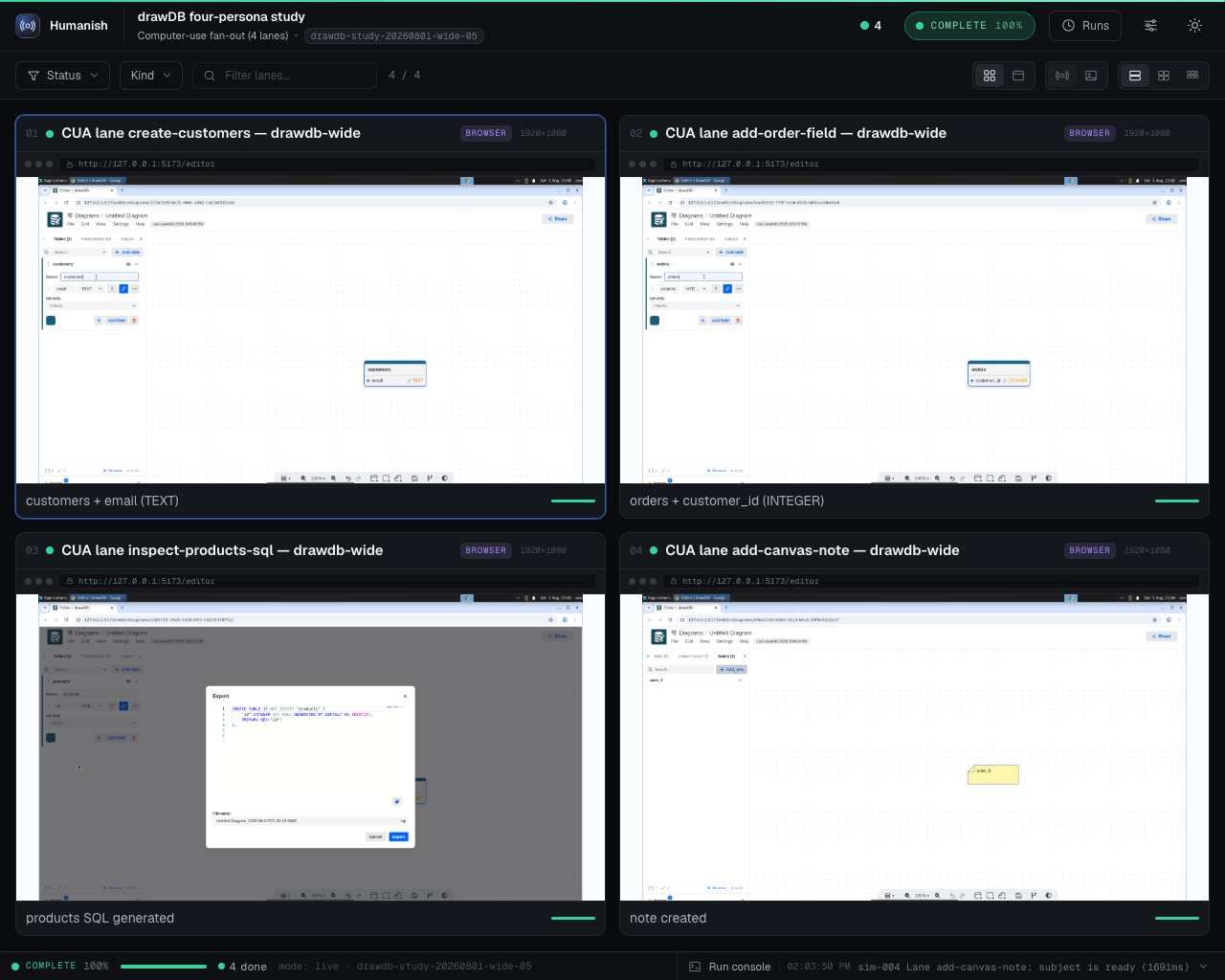
A live four-persona study of drawDB, a
public open-source database diagram editor, driven against a commit-pinned
local checkout. Every lane is a real computer-use session on a hosted desktop;
the captions are each persona's own final report. drawDB is the application
studied; it is not a Humanish adopter or endorser.
Quickstart · Study your app · CLI reference · Limits and evidence
Install
Use Node.js 20 or newer, in a project directory:
npm install --save-dev humanish @e2b/desktop
npx humanish init --yes
@e2b/desktop is the optional peer for live hosted desktops. Install it alongside
Humanish so the CLI can resolve it; a one-shot npx humanish@latest can miss the
peer. The keyless preview needs only humanish.
Run a live study. Set the desktop and model keys with hidden prompts, then
send one synthetic participant into the included drawDB study:
npx humanish keys set e2b
npx humanish keys set openai
npx humanish doctor
npx humanish lab preflight try-live
npx humanish run try-live
npx humanish observe --run latest --open
Existing E2B_API_KEY and OPENAI_API_KEY environment variables also work.
try-live clones and studies drawDB, not your project. Its $2 cap covers
estimated model spend; hosted desktop time is additional. Caps are checked
between turns and are not provider billing ceilings. Allow a few minutes for
the app to build and the participant to work. See budgets and privacy.
Preview without keys. To see the evidence format before connecting providers:
npx humanish run first-run
npx humanish observe --run latest --open
This generates an evidence preview with no provider spend. It does not open
your app, run an actor, or validate product behavior. To study your own product,
follow the complete own-app lab.
For coding agents, install the companion skill:
npx skills add danielgwilson/humanish --skill humanish
Source: skills/humanish/SKILL.md.
How It Works
humanish/     committed labs, personas, scenarios, policy, adapters
.humanish/   ignored run evidence, Observer output, reviews, local state
After a run, read its findings and verification grade:
npx humanish runs --json
npx humanish review --run latest --json
npx humanish verify --run latest --json
npx humanish feedback issue --run latest --repo owner/repo --format markdown
feedback issue prints a draft and requires share_ready evidence. A live run
with raw screenshots can be valid local evidence and still fail that sharing
gate. Read results explains the
participant's report, task outcomes, costs, and how to turn a finding into an issue.
Public-Safety Boundary
Humanish is designed for public repositories and public issue queues. The
boundary is three planks, each enforced where it actually holds:
1. This repo and the published package are kept public-safe by CI. Every
push runs a public-surface scan (secret/key/path shapes, a sha256 binary-asset
allowlist, over both tracked files and the packed npm payload) plus a
full-history gitleaks scan. That protects what we ship; it does not scan your
repo.
2. Persisted text is scrubbed for known values and secret patterns. Humanish
uses literal matching for provisioned secret values and pattern redaction for
secret-shaped text in logs, errors, and model narration. Environment provenance
records variable names. These checks have coverage limits: unknown values,
unrecognized formats, and implementation defects can escape them. Raw
screenshots contain whatever was on screen. Use synthetic data, verify the
bundle, and review the actual text and pixels before sharing.
3. Run bundles are local by default. Evidence lands under gitignored
.humanish/, and no command publishes it for you. Sharing evidence (committing
screenshots, pasting transcripts, attaching bundles to issues) is a deliberate
act, and reviewing what you share is on you. Use synthetic personas and
synthetic data so there is nothing sensitive to capture in the first place.
What the automated gate enforces. humanish verify scans public-bound
artifacts and fails closed on secret, key, and token shapes and on known local
path shapes. It does not yet detect free-form PII or PHI such as names, emails,
phone numbers, dates of birth, or medical identifiers. Keeping those out depends
on using synthetic data and on review, so redaction: passed means the
automated secret and path scan found no matches, not that the artifact was
certified free of PII or PHI. A first-class PII/PHI detector is on the roadmap
(#108).
humanish verify --json also reports shareSafety.status:
share_ready: the verified bundle is eligible for public feedback drafts;local_only: the bundle is valid local evidence, but should not be shared as-is
(for example, full-fidelity raw screenshots are present);blocked: the bundle failed verification or public-safety gates.
Feedback commands require share_ready. A valid local run can still be
reviewed in Observer without being promoted into a public issue draft.
Commands
Use npx humanish from your project. Full arguments and options are generated
from the shipped CLI in the command reference.
humanish init --yes | Scaffold study source and ignored runtime state. |
humanish doctor --json | Check setup without exposing key values. |
humanish lab list --json | List available labs. |
humanish lab inspect <lab> --json | Read a lab before running it. |
humanish lab preflight <lab> --json | Check configuration and route warnings. |
humanish run <lab> | Run the named preview or live study. |
humanish watch <lab> | Run a lab with an attached Observer. |
humanish runs --json | List local run history. |
humanish review --run latest --json | Read an existing run's evidence. |
humanish verify --run latest --json | Check evidence and share-safety gates. |
humanish feedback issue --run latest --repo owner/repo | Print an eligible feedback draft. |
Exit Codes
0 | Success. |
1 | Commander usage error: unknown command, unknown option, or a missing/invalid argument. |
2 | Humanish domain or validation failure. Check the JSON envelope's error.code for detail. |
128+N | Terminated by signal N: 130 for SIGINT, 143 for SIGTERM, 129 for SIGHUP. |
The Terminal Surface
humanish tui is for a person browsing labs and runs. It needs Node 22+ and an
interactive stdin/stdout, and refuses detected coding-agent sessions even with
a TTY. Agents should use lab list --json, lab inspect <lab> --json, and
runs --json. Read TUI behavior and JSON alternatives.
Serve the Library
humanish serve serves your run library on loopback. The Observer and terminal guide
covers local viewing, authenticated remote access, and share-safe public exposure.
Watch a live run from your phone
See authenticated live viewing.
Lab Manifests
See the lab manifest reference for
source directories, route selection, and ignored private labs.
Computer-Use Labs
The computer-use reference covers
subjects, screenshots, devices, mobile emulation, stop rules, dwell windows,
and failed-lane reruns. The cost model
explains model selection, dated estimates, and study/per-participant caps.
Mobile viewport and touch flags do not certify gesture equivalence. The
2026-09-05 input-conformance correction
qualifies the historical phone-lane results: they describe Humanish's measured input path,
not established physical-device app behavior.
Adapters: drive a local app via its JS state contract (no E2B, no vision)
See state-driven local adapters.
Browser Scenario Manifests
See scripted browser scenarios
for executable steps against a running local app.
A First Live Run Without a Provider API Key
A signed-in local Codex or Claude Code
can supply the participant's model. It consumes your existing plan; E2B still
requires a key and bills for desktops.
Three Roles
The researcher declares the study, the participant tries the product, and the
stakeholder reads what happened. Three roles
explains the design; the email-gated signup receipts
show a completed two-participant study and a reported keyboard-accessibility finding.
Maintainer OSS Meta-Lab Example
The bundled oss lab is a dry-run contract. Live OSS meta-lab execution is
unavailable until repository instructions have an isolated credential boundary.
See the maintainer reference.
Telemetry
Humanish collects anonymous command usage by default, excluding labs, subjects,
personas, paths, and evidence. humanish telemetry disable or DO_NOT_TRACK=1
turns it off. See TELEMETRY.md for the exact fields.
Development
pnpm install
pnpm check
pnpm public-surface:scan
pnpm pack:dry-run
Local dogfood:
pnpm humanish:watch
pnpm humanish:verify
pnpm humanish:feedback
pnpm humanish:lab:list
Docs
Dated design documents may preserve historical mechanisms. Start with the
current goals and the executable CLI when checking what is supported.
Release Status
The package is published on npm. Publishing a new version requires explicit
maintainer authorization; see the release procedure.



