🎩 You're Invited:Meet the Socket team at Black Hat in Las Vegas, August 3-6.RSVP
Sign In

imessage-mcp

Package Overview
Dependencies
Maintainers
1
Versions
3
Alerts
File Explorer

Advanced tools

Socket logo

Install Socket

Detect and block malicious and high-risk dependencies

Install

imessage-mcp

iMessage MCP server — 25 tools for searching, analyzing, and exploring your entire iMessage history on macOS

latest
Source
npmnpm
Version
1.3.0
Version published
Maintainers
1
Created
Source

imessage-mcp

npm version npm downloads License: MIT TypeScript MCP CI Node

25 tools for exploring your iMessage history on macOS.

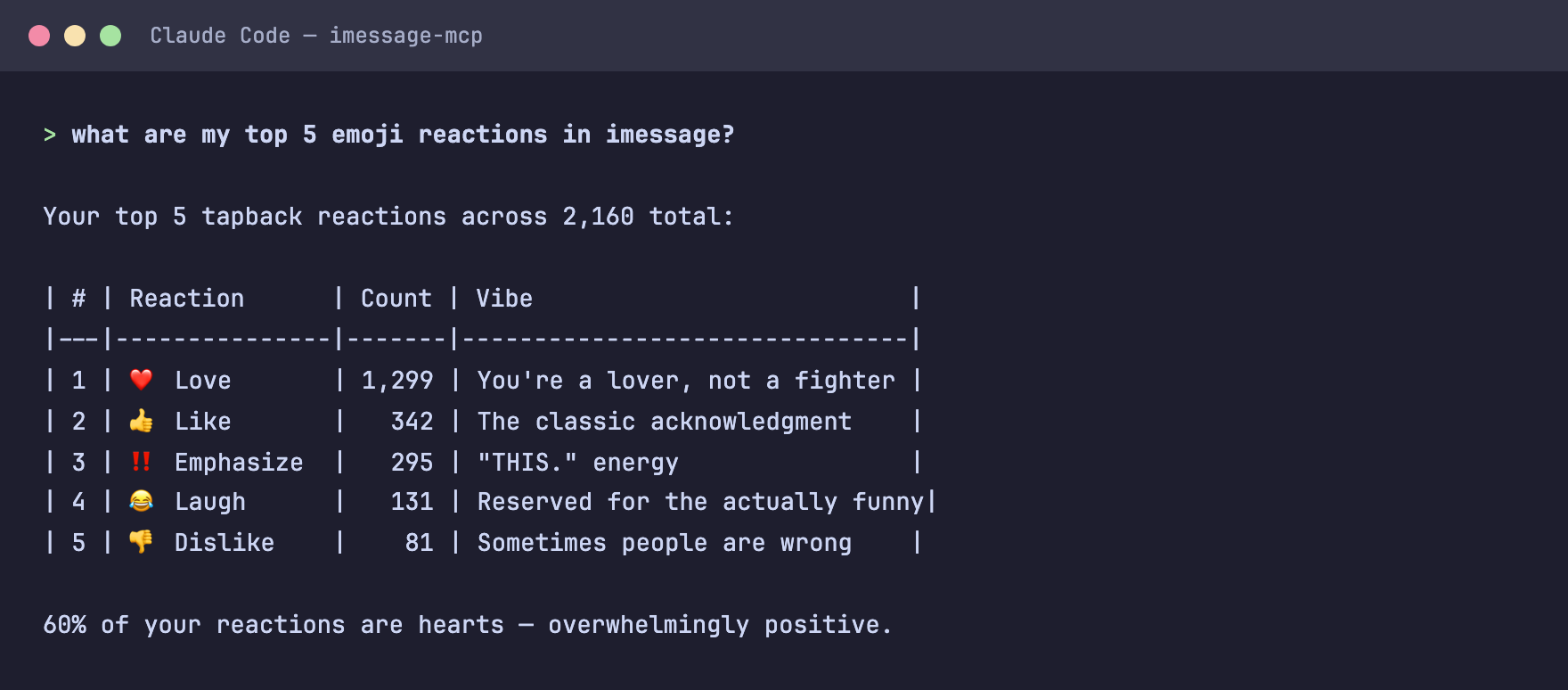
imessage-mcp demo — emoji reactions analysis

An MCP server that gives AI assistants read-only access to your local iMessage database. Search messages, analyze conversations, explore reactions, read receipts, reply threads, edited messages, effects, streaks, conversation patterns, and more. Nothing leaves your machine.

Install

npm install -g imessage-mcp

Or run without installing:

npx imessage-mcp doctor

Add to your AI client

# Claude Code (one command)
claude mcp add imessage -- npx -y imessage-mcp

Claude Code Plugin

For slash commands and agents:

claude plugin add anipotts/imessage-mcp
# Claude Desktop — add to ~/Library/Application Support/Claude/claude_desktop_config.json
{
  "mcpServers": {
    "imessage": {
      "command": "npx",
      "args": ["-y", "imessage-mcp"]
    }
  }
}

See Setup for Cursor, Windsurf, VS Code, Codex CLI, Cline, JetBrains, and Zed.

Prerequisites

  • macOS (iMessage is macOS-only)
  • Node.js 18+ (node --version)
  • Full Disk Access for your terminal: System Settings > Privacy & Security > Full Disk Access

Tools

25 tools across 9 categories. All read-only. All annotated with readOnlyHint: true for auto-approval.

Messages

ToolDescription
search_messagesFull-text search with filters: query, contact, date range, direction, group chat, attachments
get_conversationConversation thread with cursor-based pagination

Contacts

ToolDescription
list_contactsAll contacts with message counts and date ranges
get_contactDeep contact info with stats and yearly breakdown
resolve_contactFuzzy-match a name, phone number, or email to a contact

Analytics

ToolDescription
message_statsAggregate stats with time-series grouping
contact_statsPer-contact volumes, trends, and hourly patterns
temporal_heatmap7x24 activity heatmap (day-of-week by hour)

Memories

ToolDescription
on_this_dayMessages from this date in past years
first_last_messageFirst and last message ever exchanged with a contact

Patterns

ToolDescription
who_initiatesWho starts conversations? Initiation ratio per contact
streaksConsecutive-day messaging streaks
double_textsDetect double-texting and unanswered message patterns
conversation_gapsFind the longest silences in a conversation
forgotten_contactsContacts you've lost touch with

Wrapped

ToolDescription
yearly_wrappedSpotify Wrapped for iMessage -- full year summary

Groups

ToolDescription
list_group_chatsGroup chats with member counts and activity
get_group_chatPer-member stats and monthly activity timeline

Attachments & Media

ToolDescription
list_attachmentsQuery attachments by contact, MIME type, and date range

Reactions, Receipts, Threads, Edits & Effects

ToolDescription
get_reactionsTapback distribution, top reactors, most-reacted messages
get_read_receiptsRead/delivery latency and unread patterns
get_threadReconstruct reply thread trees
get_edited_messagesEdited and unsent messages with timing
get_message_effectsSlam, loud, confetti, fireworks analytics

System

ToolDescription
helpFull tool guide with usage examples

What Can You Ask?

Once connected, ask your AI assistant anything about your messages in plain language:

  • "How many messages have I sent this year?"
  • "Show my conversation with Mom"
  • "Who reacts to my messages the most?"
  • "What time of day am I most active texting?"
  • "What was the first text I ever sent my partner?"
  • "What was I texting about on this day last year?"
  • "Do I always text first with [name]?"
  • "What's my longest texting streak?"
  • "Show me messages people unsent"
  • "Give me my 2024 iMessage Wrapped"
  • "Who have I lost touch with?"
  • "Show me the longest silence between me and [name]"
  • "Do I double-text [name] a lot?"
  • "What are the most popular group chats?"

Setup

Claude Desktop

Add to ~/Library/Application Support/Claude/claude_desktop_config.json:

{
  "mcpServers": {
    "imessage": {
      "command": "npx",
      "args": ["-y", "imessage-mcp"]
    }
  }
}

Restart Claude Desktop after saving.

Claude Code

claude mcp add imessage -- npx -y imessage-mcp

Or add to .mcp.json in your project root:

{
  "mcpServers": {
    "imessage": {
      "command": "npx",
      "args": ["-y", "imessage-mcp"]
    }
  }
}

OpenAI Codex CLI

codex --mcp-config '{"imessage":{"command":"npx","args":["-y","imessage-mcp"]}}'

Or add to ~/.codex/config.json:

{
  "mcpServers": {
    "imessage": {
      "command": "npx",
      "args": ["-y", "imessage-mcp"]
    }
  }
}
Cursor

Add to ~/.cursor/mcp.json:

{
  "mcpServers": {
    "imessage": {
      "command": "npx",
      "args": ["-y", "imessage-mcp"]
    }
  }
}
Windsurf

Add to ~/.codeium/windsurf/mcp_config.json:

{
  "mcpServers": {
    "imessage": {
      "command": "npx",
      "args": ["-y", "imessage-mcp"]
    }
  }
}
VS Code (GitHub Copilot)

Add to .vscode/mcp.json in your project root:

{
  "servers": {
    "imessage": {
      "command": "npx",
      "args": ["-y", "imessage-mcp"]
    }
  }
}
Cline (VS Code)

Add via the Cline MCP settings UI, or edit cline_mcp_settings.json:

{
  "mcpServers": {
    "imessage": {
      "command": "npx",
      "args": ["-y", "imessage-mcp"]
    }
  }
}
JetBrains IDEs

Settings > Tools > AI Assistant > MCP Servers > Add:

  • Name: imessage
  • Command: npx
  • Args: -y imessage-mcp
Zed

Add to ~/.config/zed/settings.json:

{
  "context_servers": {
    "imessage": {
      "command": {
        "path": "npx",
        "args": ["-y", "imessage-mcp"]
      }
    }
  }
}

CLI Commands

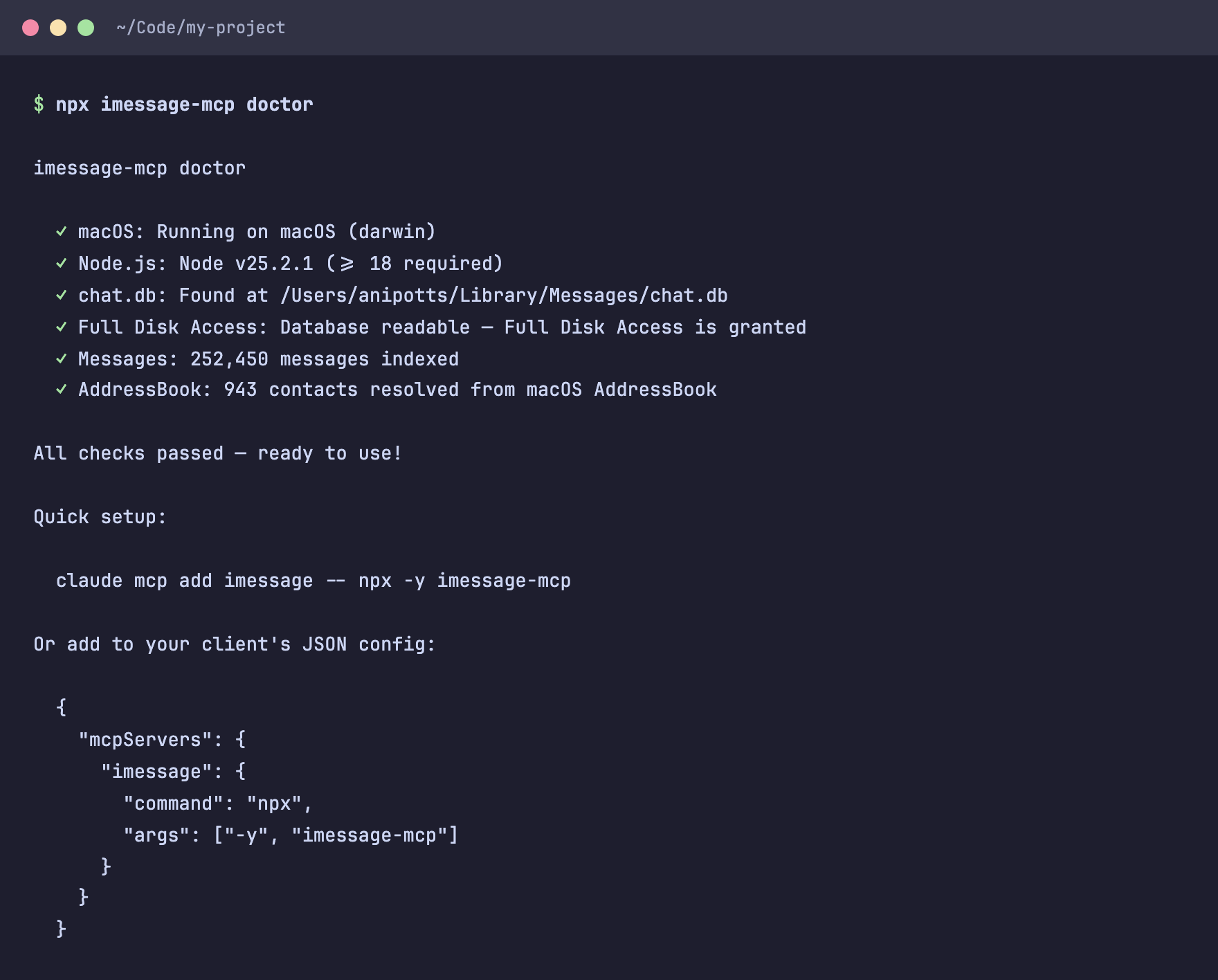
imessage-mcp doctor

Run setup diagnostics. Checks macOS version, Node.js version, chat.db access, Full Disk Access, AddressBook, and message count.

$ npx imessage-mcp doctor

imessage-mcp doctor

  ✓ macOS: Running on macOS (darwin)
  ✓ Node.js: Node v22.0.0 (>= 18 required)
  ✓ chat.db: Found at /Users/you/Library/Messages/chat.db
  ✓ Full Disk Access: Database readable
  ✓ Messages: 97,432 messages indexed
  ✓ AddressBook: 342 contacts resolved

All checks passed — ready to use!

imessage-mcp doctor output

Pass --json for machine-readable output:

npx imessage-mcp doctor --json

imessage-mcp dump

Export messages or contacts to JSON.

# Export last 1000 messages
npx imessage-mcp dump > messages.json

# Filter by contact
npx imessage-mcp dump --contact "+15551234567"

# Date range with custom limit
npx imessage-mcp dump --from 2024-01-01 --to 2024-12-31 --limit 5000

# Export contacts (excluding spam/promo by default)
npx imessage-mcp dump --contacts > contacts.json

# Include all contacts (even ones you never replied to)
npx imessage-mcp dump --contacts --all > all-contacts.json

# Export all messages (including unfiltered contacts)
npx imessage-mcp dump --all > all-messages.json

Privacy & Security

imessage-mcp reads your local iMessage database in read-only mode. No data leaves your machine. Nothing is written, modified, uploaded, or shared.

The tool accesses exactly two locations on disk:

PathAccessPurpose
~/Library/Messages/chat.dbRead-onlyYour iMessage database
~/Library/Application Support/AddressBook/Read-onlyContact name resolution

No other files are accessed. No external APIs are called. You can verify this yourself:

grep -rn "readFileSync\|openDatabase\|sqlite" src/

Why Full Disk Access?

macOS protects ~/Library/Messages/chat.db. Your terminal needs Full Disk Access to read it. This is an Apple requirement, not something imessage-mcp imposes.

How your data flows

chat.db --> [imessage-mcp] --> stdio --> [Your MCP Client] --> AI Provider
  ^                                          ^
  Your Mac only                     Already authorized by you

imessage-mcp makes zero network requests. Your data only leaves your machine through your MCP client (Claude Desktop, Cursor, etc.), which you have already authorized separately.

Safe Mode

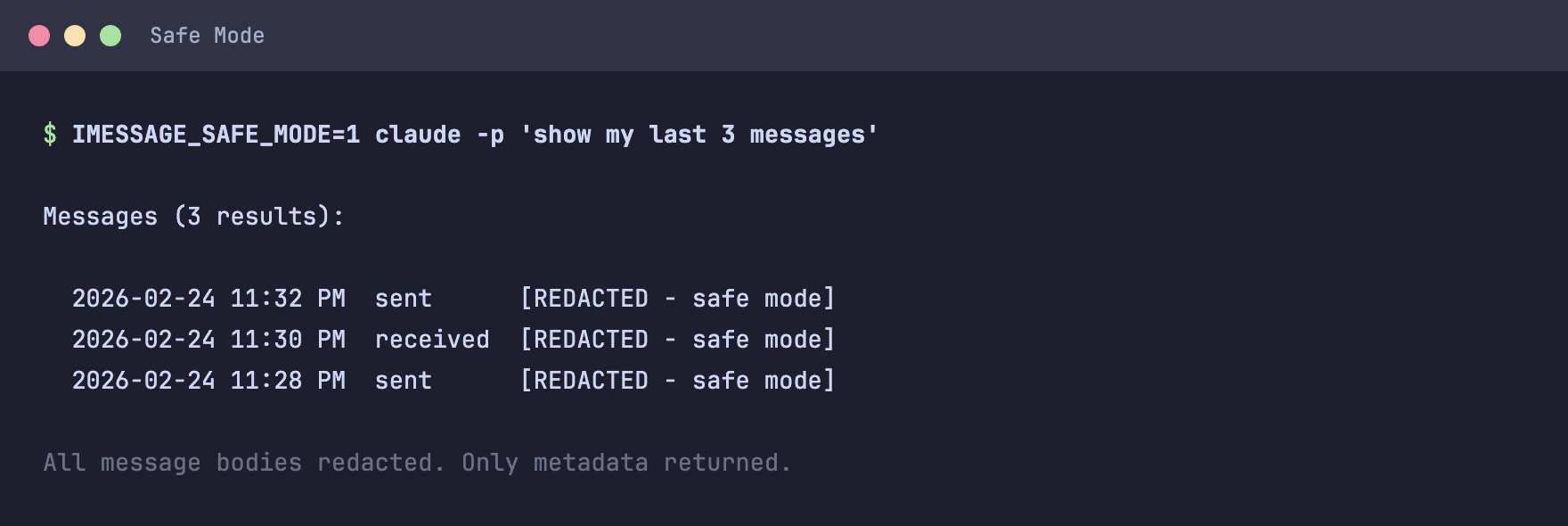
Prevent message bodies from being sent to the AI. Only metadata (counts, dates, contact names) is returned. No actual message text.

{
  "mcpServers": {
    "imessage": {
      "command": "npx",
      "args": ["-y", "imessage-mcp"],
      "env": { "IMESSAGE_SAFE_MODE": "1" }
    }
  }
}

Safe Mode — all message bodies redacted

Useful for demos, shared environments, or when you want analytics without exposing private conversations.

Smart Filtering

By default, listing and global search tools only include contacts you have actually replied to. This filters out spam, promo texts, and unknown senders.

Filtered tools: search_messages (global), list_contacts, message_stats (global), temporal_heatmap (global), who_initiates (global), streaks (global), on_this_day (global), forgotten_contacts, yearly_wrapped.

Unfiltered tools: get_conversation, get_contact, contact_stats, first_last_message. These always return results for any contact you specify.

To include all contacts (including unrecognized senders), pass include_all: true to any filtered tool.

Configuration

VariableDefaultDescription
IMESSAGE_DB~/Library/Messages/chat.dbPath to iMessage database
IMESSAGE_SAFE_MODEfalseSet to 1 to redact all message bodies. Tools return only metadata.

Troubleshooting

"Cannot read chat.db" / SQLITE_CANTOPEN

Grant Full Disk Access to your terminal app:

System Settings > Privacy & Security > Full Disk Access > enable your terminal app.

Restart your terminal after granting access.

"No messages found"

Make sure Messages.app has been used on this Mac and has synced your messages. Run npx imessage-mcp doctor to verify.

Messages show phone numbers instead of names

Contact resolution uses your macOS AddressBook. If contacts are only on your phone and not synced to your Mac, names will not resolve. Sync contacts via iCloud or add them in the Contacts app.

Node.js version mismatch (MODULE_NOT_FOUND / NODE_MODULE_VERSION)

Your MCP client's bundled Node.js version differs from the one that compiled better-sqlite3's native module.

Fix by pointing to your system Node directly:

  • Find your Node path: which node (usually /opt/homebrew/bin/node or /usr/local/bin/node)
  • Find imessage-mcp: npm root -g or dirname $(which imessage-mcp)
  • Replace "command": "npx" with your system Node:
{
  "mcpServers": {
    "imessage": {
      "command": "/opt/homebrew/bin/node",
      "args": ["/path/to/node_modules/imessage-mcp/bin/imessage-mcp.js"]
    }
  }
}
Claude Desktop does not show the tools
  • Verify the config file is at ~/Library/Application Support/Claude/claude_desktop_config.json
  • Restart Claude Desktop completely (Cmd+Q, then reopen)
  • Run npx imessage-mcp doctor to confirm the server works independently

Uninstall

npm uninstall -g imessage-mcp

To revoke database access, remove your terminal from System Settings > Privacy & Security > Full Disk Access.

How It Works

imessage-mcp reads ~/Library/Messages/chat.db using better-sqlite3 in read-only mode with query_only = ON. Contact names are resolved from your macOS AddressBook automatically.

On macOS 14 (Sonoma) and later, Apple changed how message text is stored. Some messages have NULL in the text column but contain the actual text in the attributedBody binary blob. imessage-mcp extracts text from this blob automatically so no messages are left behind.

All 25 tools are annotated with readOnlyHint: true so MCP clients can auto-approve them without user prompts.

Requirements

  • macOS -- iMessage is macOS-only
  • Node.js 18+
  • Full Disk Access for your terminal app

License

MIT

Keywords

imessage

FAQs

Package last updated on 25 Feb 2026

Did you know?

Socket

Socket for GitHub automatically highlights issues in each pull request and monitors the health of all your open source dependencies. Discover the contents of your packages and block harmful activity before you install or update your dependencies.

Install

Related posts