

Security News
Happy Birthday, Shai-Hulud
It has been one year since Shai-Hulud made its first appearance on npm.
By Sarah Gooding - Sep 18, 2026
lineupify-mcp
Advanced tools
MCP server that builds Spotify playlists from festival lineups, genres, moods, similar artists, other playlists or a blend of several people's taste. Bring your own Spotify client ID.

Say what you want to hear. Get a playlist you can read, edit and trust, in your own account.




Lineupify is an MCP server for Claude Desktop, Claude Code, Cursor and any other MCP host. Paste a festival poster, describe a mood, name an artist or a song you like, point at a playlist, or blend two people's playlists. Lineupify finds the artists, picks their most popular songs, matches them exactly (by ISRC) and builds a draft you can review and edit before anything is published to Spotify. Everything runs on your machine; there is no Lineupify server and no telemetry.
| Spotify | Deezer mode | |
|---|---|---|
| What you need | A Spotify Premium account and a free Spotify developer app (2 minutes, no secret) | Nothing. No account, no key |
| What you get | Playlists created in your Spotify account, plus reading and comparing your own playlists and library | Drafts with Deezer links that you export and import anywhere (Deezer, Apple Music, YouTube Music) |
| Why the difference | Spotify only lets a new app serve its owner, who must have Premium | Deezer's public API is keyless, but Deezer no longer issues write credentials |
Both need Node.js 20 or newer. Package: lineupify-mcp on npm.
Streaming apps are good at playing music and bad at letting you say what you want.
Lineupify answers each of these with a draft you can see, a reason for every track, and a playlist that ends up in your own account.
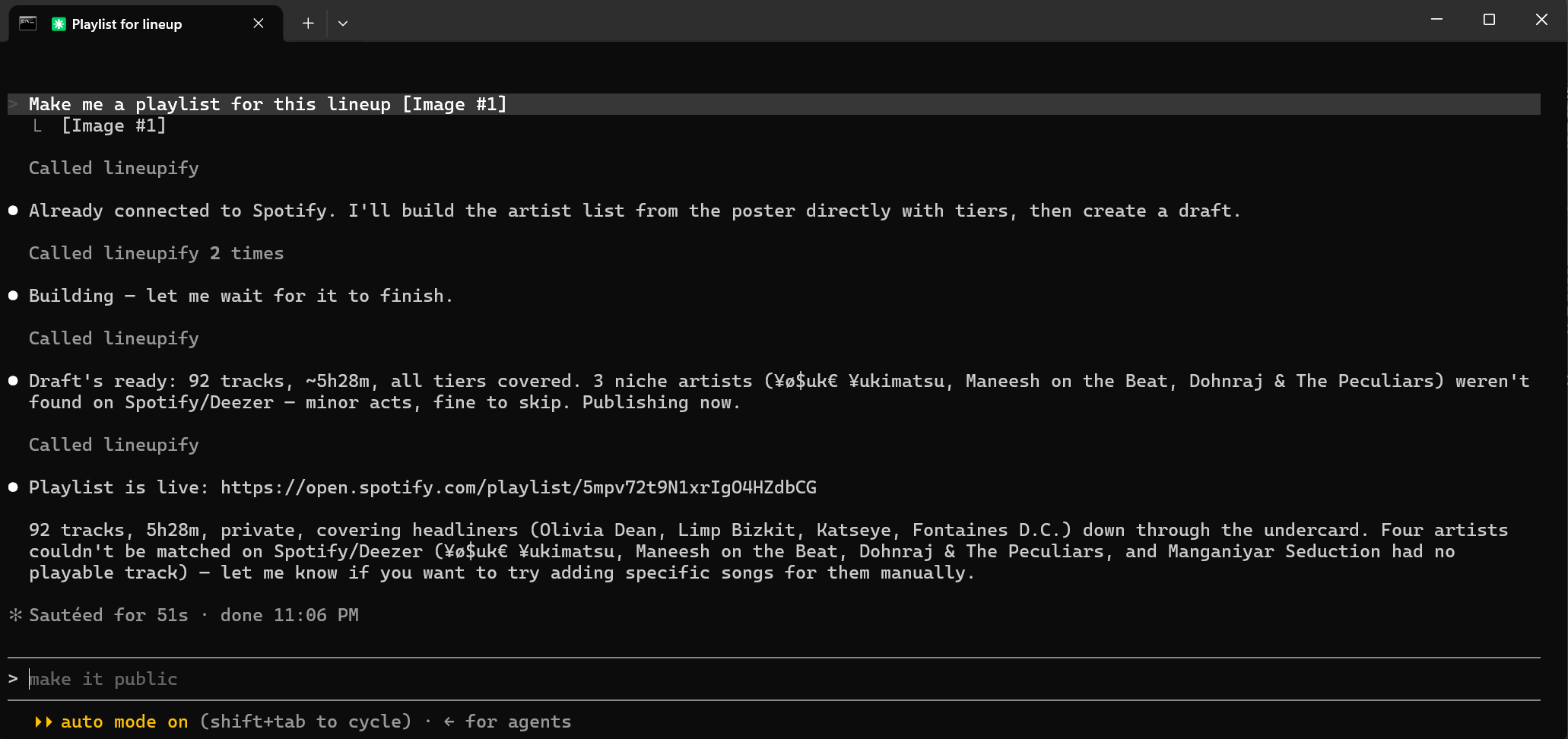
One sentence and a poster photo in Claude Code: 92 tracks, published private, with the four unmatched acts named instead of silently dropped.
Pick one of the three ways to install. All of them end with the same server registered in your host; the Spotify app is the only step nobody can automate, because it is created in your Spotify account.
If your assistant can run terminal commands (Claude Code, Cursor, and similar), paste this into a chat and follow along:
Install the Lineupify MCP server for me and guide me through it. It is the npm package
lineupify-mcp(https://www.npmjs.com/package/lineupify-mcp); read its README at https://github.com/SHREESHMAN/lineupify first. Ask me whether I have a Spotify Premium account. If yes, walk me through creating a Spotify app at https://developer.spotify.com/dashboard with the Redirect URIhttp://127.0.0.1:8765/callback, ask me for the Client ID, then runnpx -y lineupify-mcp setup --client-id <id>andnpx -y lineupify-mcp auth, and tell me when to approve the login in my browser. If no, skip Spotify: Deezer mode needs nothing. Then runnpx -y lineupify-mcp install --claude-code(or--cursor/--claude-desktop, whichever host you are running in), thennpx -y lineupify-mcp doctor, show me the result, and tell me what to say next. On Windows run npx throughcmd /c.
If Lineupify is already registered but Spotify is not connected (the one-click route, or a hand-written config), paste this instead:
Call Lineupify's
statustool. If Spotify is not connected, callconnectwith my Client ID PASTE_CLIENT_ID_HERE, tell me to approve the login in the browser, then callstatusagain to confirm.
Create a Spotify app (2 minutes; skip for Deezer mode). Go to https://developer.spotify.com/dashboard, click Create app, tick Web API, set the Redirect URI to exactly http://127.0.0.1:8765/callback, save, then copy the Client ID from the app's Settings page. No client secret is needed. Full walkthrough with every field: docs/setup-spotify.md.
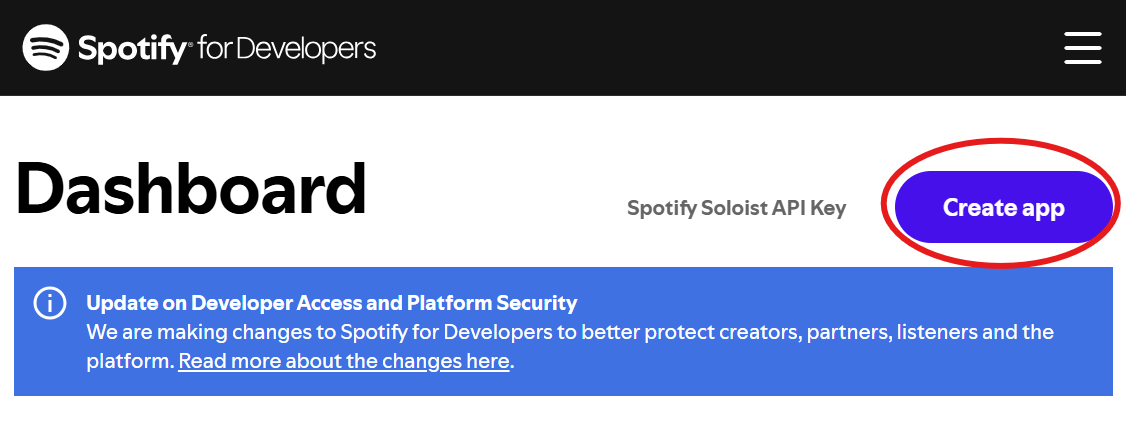
The dashboard. "Create app" is top right.
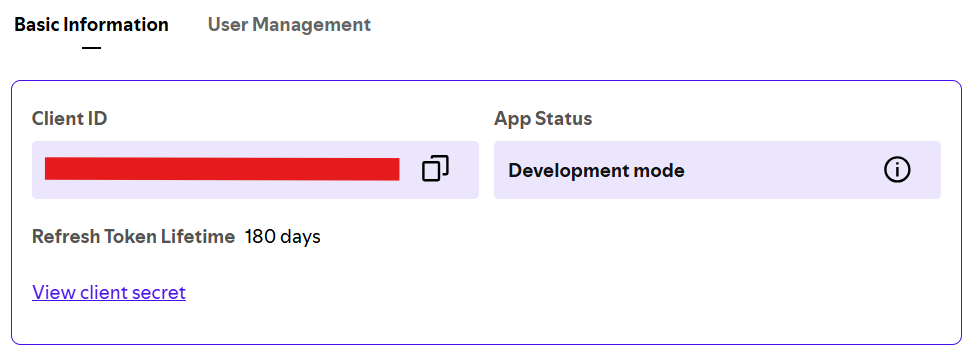
After saving: the Client ID is the value to copy. The client secret is never needed. The 180-day refresh-token lifetime shown here is why status asks you to reconnect twice a year.
Run the guided setup:
npx -y lineupify-mcp init
It takes the Client ID, logs you in through your browser, adds Lineupify to Claude Desktop, Claude Code or Cursor (whichever it finds), and runs a health check. Every step can be skipped. Restart your host afterwards.
init looks like
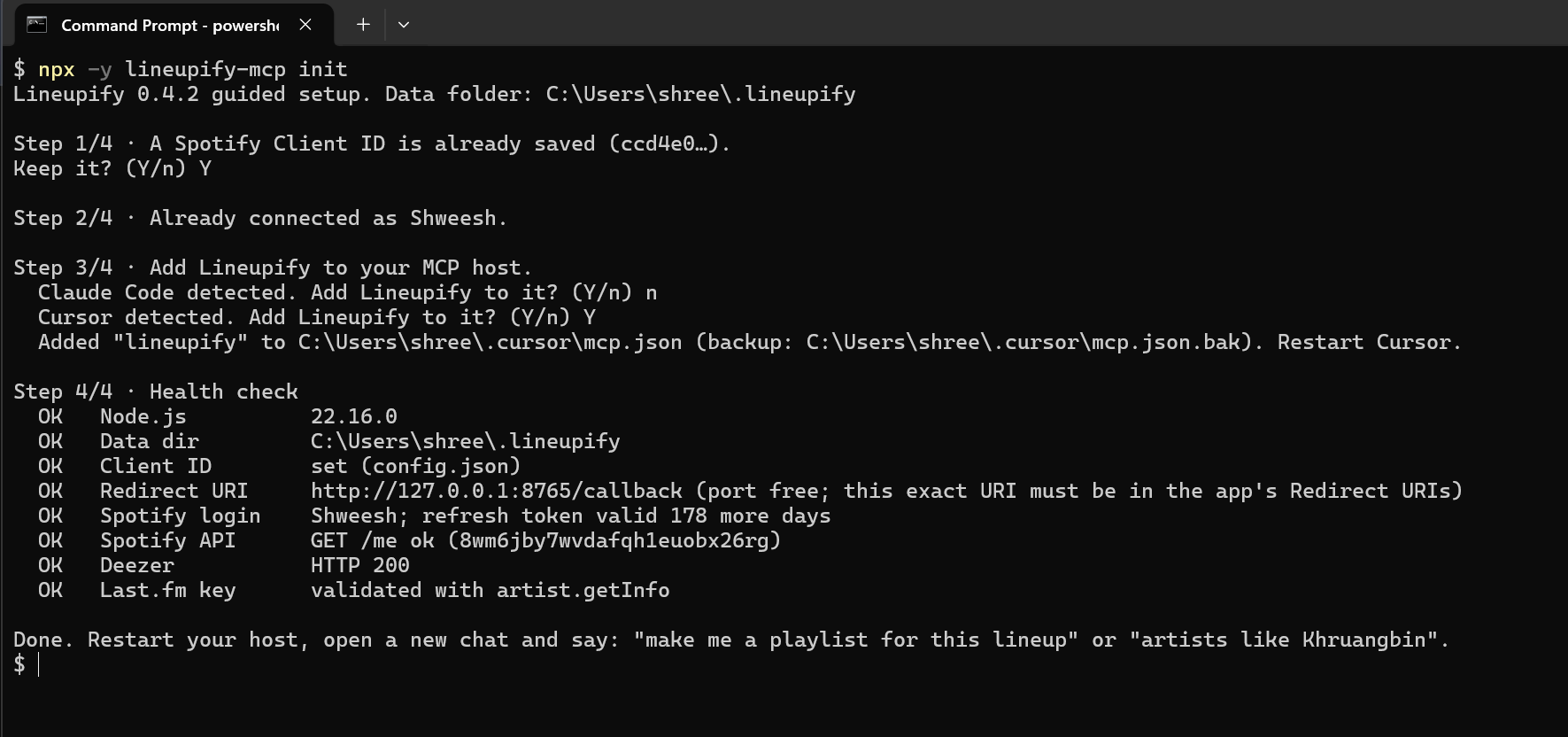
A second run on a machine that is already set up: every step is skippable, and the health check at the end is the same one doctor prints.
Ask for a playlist. Any of these work:
Download lineupify-<version>.mcpb from the releases page and double-click it (or drag it onto Claude Desktop). Paste your Client ID into the form, or leave it empty for Deezer mode. Node.js 20 or newer must still be installed. Then say "connect Lineupify to Spotify" in a chat.
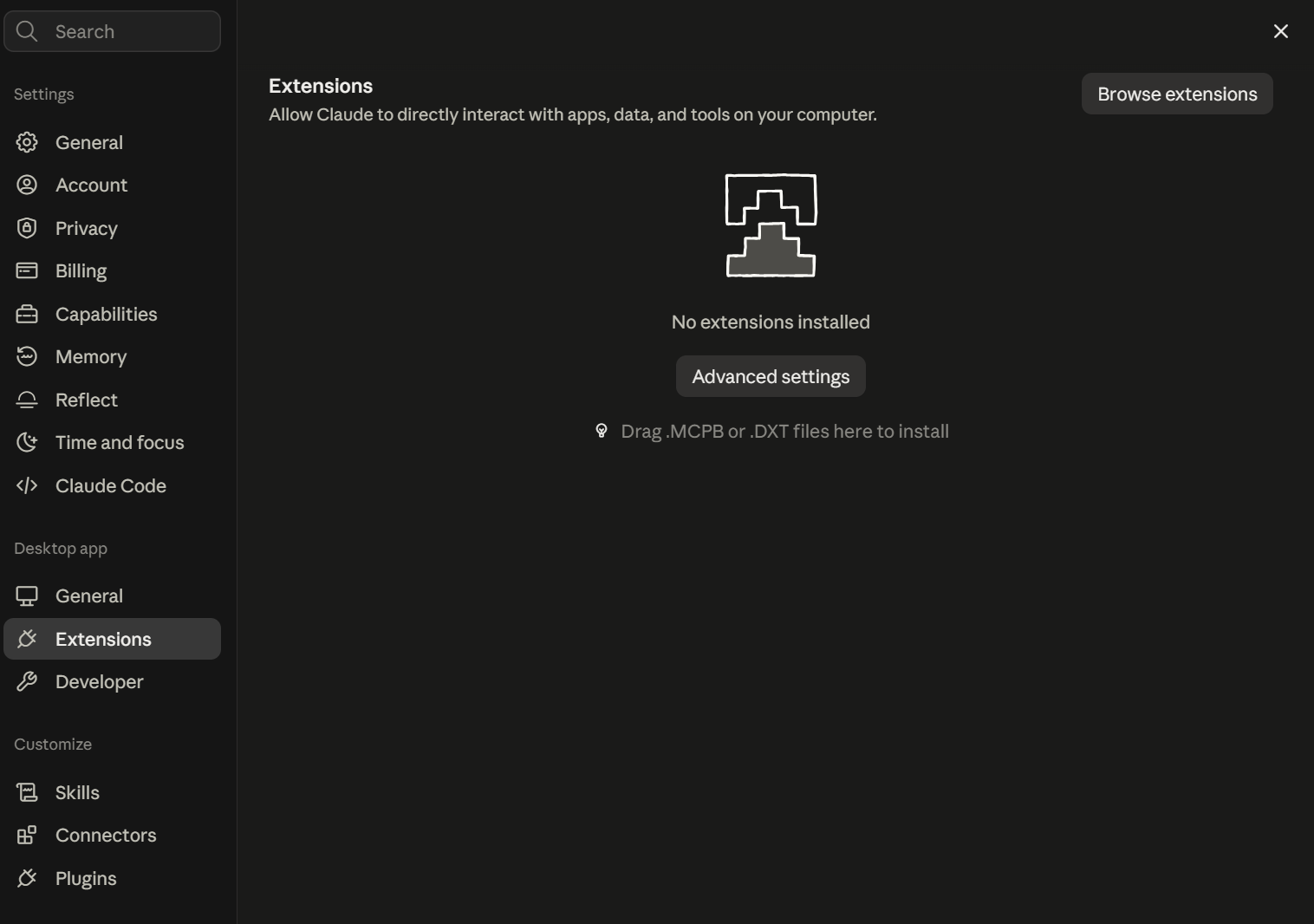
Settings → Extensions. Drop the .mcpb file here.
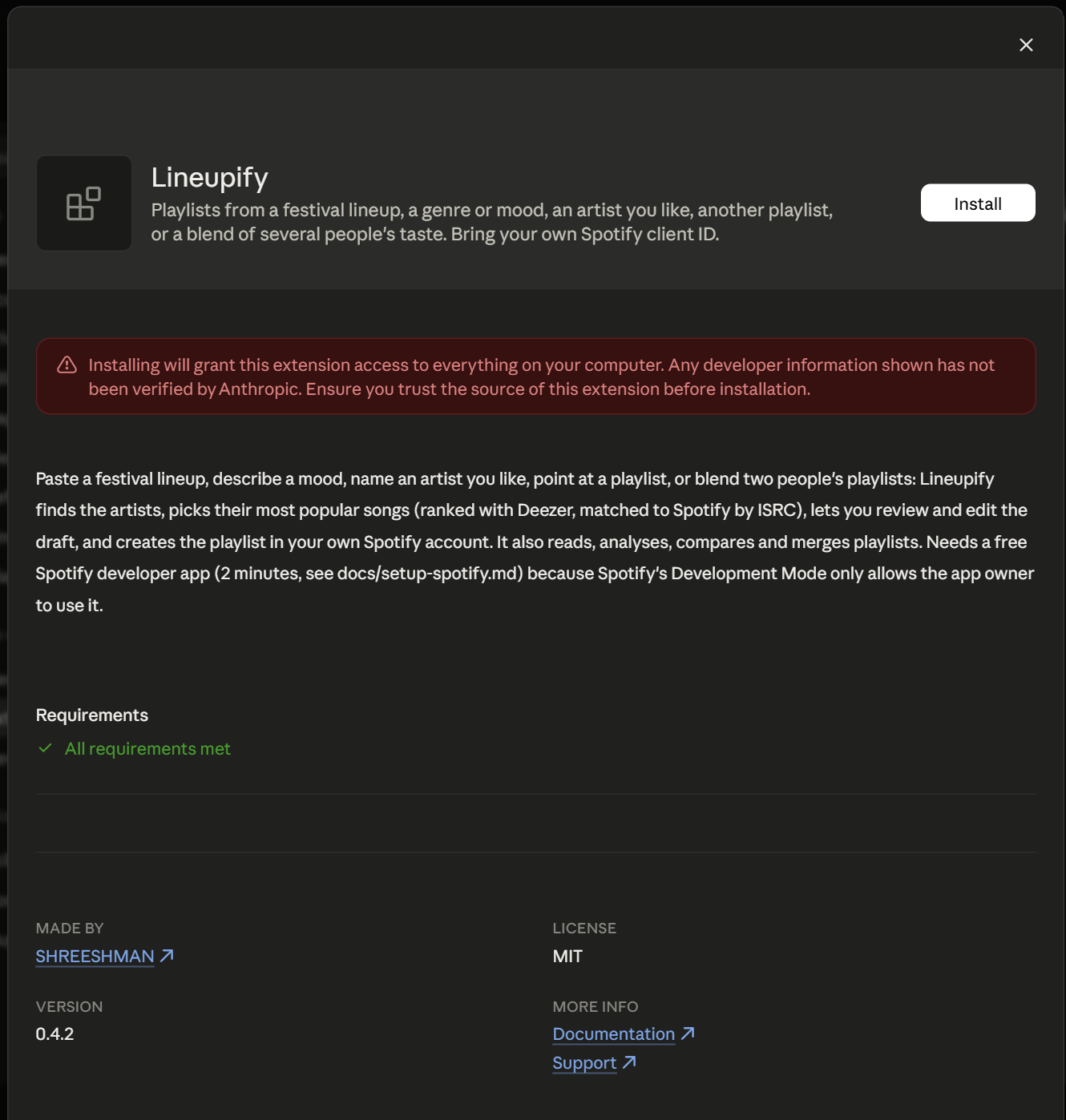
The install dialog. The red warning is Claude Desktop's standard notice for every third-party extension; the code is on GitHub and the package on npm carries a provenance attestation.
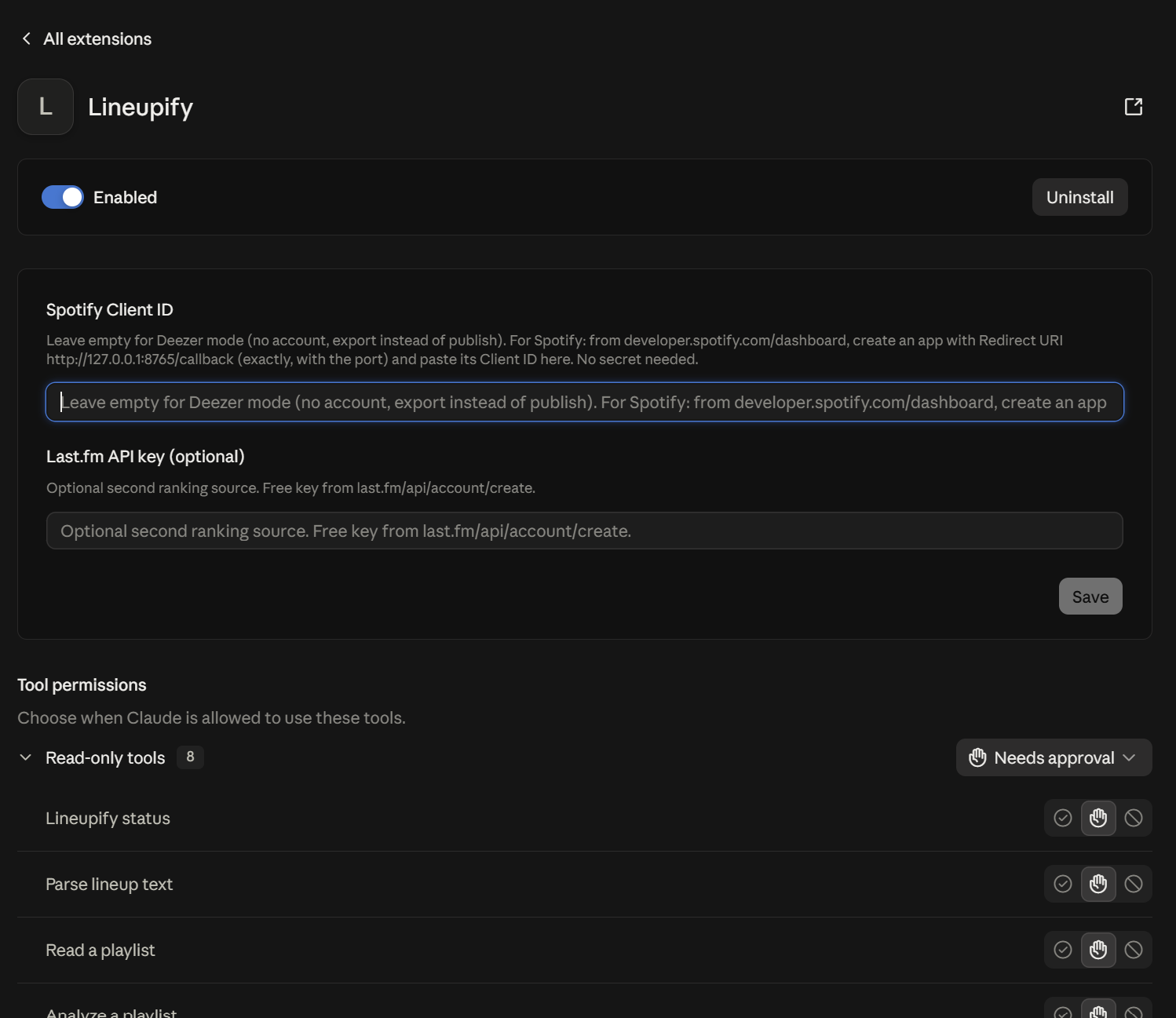
After installing: the Client ID field (empty means Deezer mode), the optional Last.fm key, and per-tool permissions. Read-only tools are grouped so you can approve them once.
Other hosts, the config-file route, and running two hosts at once: docs/hosts.md.
Skip the Spotify app entirely: add Lineupify to your host and ask for a playlist. With no Spotify login, drafts build on Deezer automatically (or say "use Deezer"; the option is provider: "deezer"). Deezer's public API is keyless, so there is nothing to create, paste or approve.
What works in Deezer mode: every seed except your own Spotify taste, every filter, reading, analysing, comparing and merging Deezer playlists and drafts, editing, and all exports. What does not: publishing into an account. Deezer stopped issuing API credentials to new apps in 2025, so no tool can write to a Deezer account today. If Deezer reopens its API, publishing will be added.
Getting a Deezer draft into your Deezer (or Apple Music, YouTube Music) account takes one paste:
export_draft, format: "links"; "text" gives "Artist - Title" lines instead).Both tools have free tiers that cover a normal playlist.
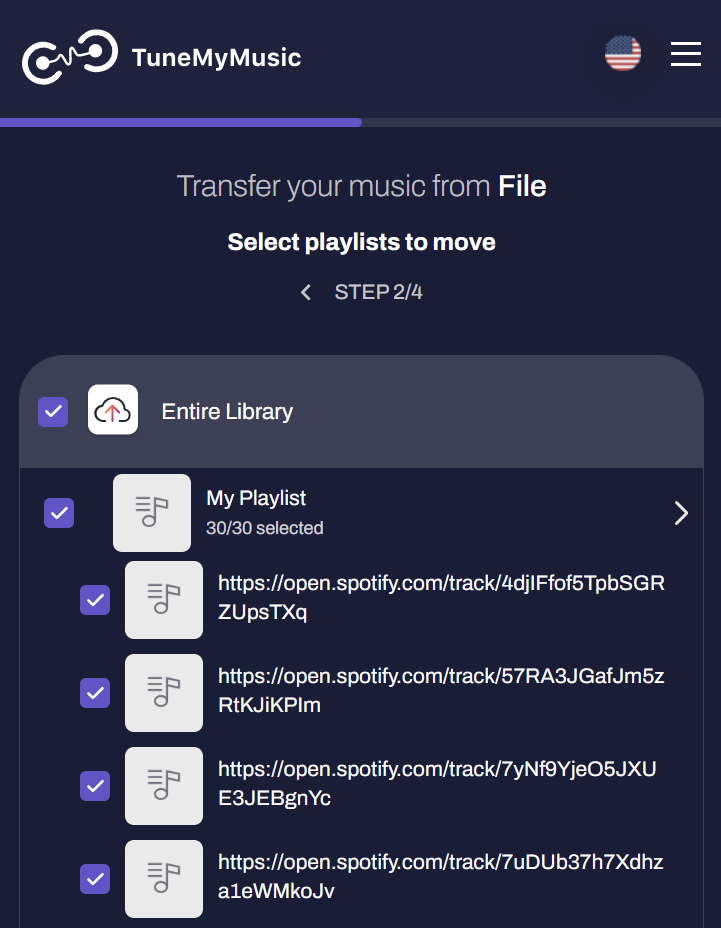
The links export pasted in: TuneMyMusic recognises every line as a track and lets you pick the destination.
Spotify's Premium rule applies to the person who owns the developer app, not to everyone who uses it. An owner can add up to four other people by email under User Management in the dashboard (five users per app in total), and those people log in with their own accounts, free ones included. So if someone you know has Premium:
npx -y lineupify-mcp init with that Client ID and log in as yourself. Your tokens stay on your machine; the owner never sees your account.Two limits: an app serves five people at most, and the owner's daily API quota is shared across all of them and all of the owner's apps. Handing the Client ID to someone who is not on the User Management list does nothing; their login fails with a 403. Fine for friends and family; not a way to serve strangers, which Spotify's terms also rule out. Details: docs/setup-spotify.md.
You: Make me a playlist for this lineup.
SUNFALL FESTIVAL 2026 · 14-16 AUGUST
FRED AGAIN..   CHARLI XCX
Jamie xx · Four Tet · Overmono
Yaeji  Nia Archives  Barry Can't Swim  DJ Fluffhead
TICKETS ON SALE NOW
The assistant calls parse_lineup, which returns nine artists with tiers and drops the dates and ticket line, then create_draft with lineup: "Sunfall 2026". The draft comes back within about 15 seconds; a big lineup keeps building in the background:
Draft d_7k2mq "Sunfall 2026 · Lineupify"  rev 1  status ready  provider spotify  spotify: Alex
Artists 9 (resolved 8 · unresolved 1)
Tracks 27 · 1h42m · explicit 6 · via isrc 25 / text 2 · sources dz 27 / lfm 0 / sp 0
Tiers headliner 2×5 · sub 3×3 · undercard 4×2 · order interleave · private
Not found on Deezer or Spotify (1): DJ Fluffhead
Next: get_draft view=tracks to review, get_draft view=unresolved for misses, edit_draft to change, create_playlist with confirm: true to publish.
You: Show me the tracks.
t_4k2p  #1   Fred again.. – Marea (we've lost dancing)  4:52  dz/isrc  2021
t_c81z  #2   Charli xcx – Von dutch  2:44  dz/isrc [E]  2024
t_m0r3  #3   Jamie xx – Gosh  4:50  dz/isrc  2015
t_9x1c  #4   Four Tet – Baby  3:47  dz/isrc  2020
…
You: Drop the Four Tet track "Baby", forget DJ Fluffhead, and publish it.
edit_draft removes the track and excludes the artist; create_playlist returns the link:
Created playlist "Sunfall 2026 · Lineupify" with 26 tracks (1h38m).
URL: https://open.spotify.com/playlist/3cEYpjA9oz9GiPac4AsH4n
Later edits go through edit_draft followed by update_playlist, which replaces the playlist contents in place.
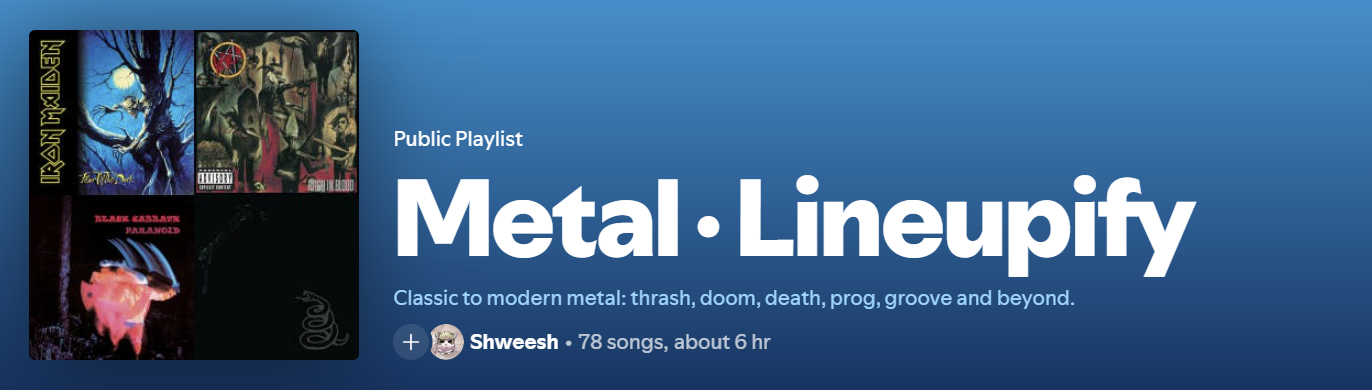
What lands in Spotify: the name follows your namingTemplate, the description is yours or the default, and the tracks are the draft you reviewed.
You: Rainy Sunday jazz for cooking, about an hour, nothing explicit.
The assistant proposes fitting artists itself, adds a genre seed with the same words so the list is not only its own guess, and calls create_draft with maxDurationMin: 60 and excludeExplicit: true:
Draft d_r47h8 "Rainy Sunday jazz · Lineupify"  rev 1  status ready
Seed genre "rainy sunday jazz" → 7 artists (Deezer playlists: Jazz for a Rainy Sunday Morning, a jazz Sunday in the rain, …)
Filters: clean only
Artists 10 (resolved 10 · unresolved 0)
Tracks 10 · 52:10 · explicit 0 · via isrc 10 / text 0
You: Compare my "6626" playlist with my listening history, then make a mix we would both like without anything that is already on it.
compare_playlists explains the overlap in numbers the assistant turns into words:
Compared 2 sides: 6626 (64 tracks, 52 artists) · your listening history (0 tracks, 210 artists)
Shared by all — artists (18): Mitski, My Chemical Romance, Linkin Park, Olivia Rodrigo, …
6626 vs your listening history: artist overlap 7% (18 shared, 0 identical tracks)
Only in 6626 (34): Camila Cabello, Sara Kays, Prelow, …
Then create_draft with seeds: [{ type: "blend", sources: ["6626", "me"] }] and excludeTracksFrom: ["6626"]:
Seed blend 6626 + me → 10 artists (99 artists on 2+ sides, 10 of the 10 picked on every side)
Excluded tracks from: 6626 (64 tracks)
Tracks 10 · 33:57 · explicit 1
Every request becomes an artist list, and every artist list goes through the same pipeline. Nothing touches Spotify until you publish.
flowchart LR
    subgraph give[What you give]
        A[Festival poster or lineup text]
        B[A description or a mood]
        C[An artist or a song you like]
        D[A country or the charts]
        E[A playlist link or your library]
        F[Two or more people's playlists]
    end
    subgraph engine[Lineupify]
        G[Artists]
        H[Most popular songs per artist]
        I[Matched by ISRC]
        J[Filters, dedupe, order]
        K[Draft you can read and edit]
    end
    L[(Your Spotify account)]
    M[CSV / M3U / links / text]
    A --> G
    B --> G
    C --> G
    D --> G
    E --> G
    F --> G
    G --> H --> I --> J --> K
    K -->|create_playlist| L
    K -->|export_draft| M
flowchart TD
    A[artists and/or seeds] --> B[Expand seeds in the background<br/>genre · similar_to · similar_songs · chart · country · playlist · taste · blend]
    B --> C[Resolve each artist<br/>Deezer → Last.fm → Spotify]
    C --> D[Ranked candidate songs<br/>lead tracks first, featured next, live/remix last]
    D --> E[Match by ISRC<br/>text search as fallback]
    E --> F{Filters}
    F -->|yearRange · bpmRange · explicit · excludeTracksFrom| G[Dedupe by URI, ISRC and title+artist]
    G --> H[Per-tier counts and maxTracks cap]
    H --> I[skipCovers · maxDurationMin · order]
    I --> J[(Draft on disk<br/>revisions, undo)]
    J -->|get_draft / edit_draft| J
    J -->|create_playlist| K[Spotify playlist]
    J -->|export_draft| L[CSV · M3U · links · text · Markdown]
Why Deezer and Last.fm for ranking? Spotify no longer exposes top tracks, recommendations, related artists, genres or audio features to new apps. Deezer's public API is keyless and gives popularity, related artists, tempo and playlists; Last.fm (optional key) adds tags, similar artists, similar songs and per-country charts; ListenBrainz (open data) adds song-level neighbours. Spotify is where the playlist ends up, and ISRC codes make the match exact.
A draft is a small state machine, checkpointed to disk after every artist, so a killed process resumes where it stopped:
stateDiagram-v2
    [*] --> building: create_draft
    building --> ready: all artists fetched
    building --> paused: quota / token / network
    building --> failed: nothing to build
    paused --> building: get_draft
    ready --> building: edit_draft asks for more tracks
    ready --> published: create_playlist
    published --> published: edit_draft + update_playlist
Every tool, every edit_draft op, every seed, every create_draft option, the CLI and config.json live in docs/reference.md rather than here, so this page stays a page you can actually read top to bottom. Five tools cover most of what you will ask for:
| Tool | What it does |
|---|---|
status | Call first: connection state, setup steps, drafts in progress. |
create_draft | Builds a draft from artists and/or seeds (genre, mood, similar artist, a playlist, a blend). |
get_draft | Shows a draft: summary, tracks, artists, or what could not be found. |
edit_draft | Swap a track, drop an artist, reorder, undo. |
create_playlist | Publishes a reviewed draft and returns its URL. |
set_playlist_image | Sets the playlist cover from a JPEG saved on your machine. |
Lineupify runs on your machine with a Spotify app you created. It has no server of its own, no telemetry, and no access to your account beyond the token on your disk. SECURITY.md lists what it can and cannot do and how to report a problem.
What is stored, all under ~/.lineupify/ (or LINEUPIFY_HOME):
| File | Contents | Lifetime |
|---|---|---|
config.json | Client ID, defaults, optional Last.fm key | until you change it |
tokens.json | Spotify access and refresh tokens | until disconnect / logout; refresh tokens die after 6 months anyway |
cache/artists.json, spotify-tracks.json, deezer-tracks.json, artist-genres.json, covers.json | artist matches, track lookups, tempo, genres | 30-90 days |
cache/playlists.json | the track lists of playlists you read, including your liked songs when you use library | 12 hours |
drafts/ | one JSON file per draft plus up to 10 undo revisions | unpublished drafts are deleted after 30 days; published ones kept |
exports/ | the only place export_draft writes files | until you delete them |
tokens.json is written with mode 0600 on macOS and Linux. On Windows, where that mode means nothing, its inherited permissions are replaced with an entry for your own account only (icacls /inheritance:r /grant:r); if that fails, the file keeps your user profile's default permissions, like other CLIs' credential files.
Spotify permissions requested at login, and what needs each one:
| Scope | Needed by |
|---|---|
playlist-modify-private | create_playlist, update_playlist |
playlist-modify-public | the same, when public: true |
user-read-private | market-aware search (market=from_token), i.e. every build |
user-top-read, user-follow-read | compare_taste, discoveryOnly, compare_playlists with me, taste and blend seeds, refresh_taste |
playlist-read-private, playlist-read-collaborative | reading your own private playlists, and playlists by name |
user-library-read | library (liked songs) in reads, exclusions and refresh_taste |
ugc-image-upload | set_playlist_image, the only tool that uploads anything; it reads the local JPEG file you name and sends it to your playlist |
Lineupify never deletes or unfollows a playlist, never changes your library or follows, and creates playlists private unless you ask for public. The only overwrite is update_playlist on a playlist Lineupify created, and it refuses if that playlist changed inside Spotify unless forced.
Where data goes. Lineupify talks to api.spotify.com and accounts.spotify.com (your account), api.deezer.com (keyless, no account), ws.audioscrobbler.com (only with a Last.fm key), musicbrainz.org and labs.api.listenbrainz.org (only for a similar_songs seed: the seed songs' ISRC, title and artist are looked up there) and registry.npmjs.org (a version check at most every 6 hours; LINEUPIFY_NO_UPDATE_CHECK=1 turns it off). Artist names, track titles and ISRCs from your playlists, liked songs and top artists are sent to Deezer as search queries for ranking, tempo, genres and cover checks, and to Last.fm when a key is set. No account identifier goes with them. If you would rather keep your listening data out of Deezer, use typed artist lists with sources: ["spotify"] and skip analyze_playlist, bpmRange and skipCovers.
Switches.
LINEUPIFY_READ_ONLY=1 disables create_playlist and update_playlist; everything else works. Good for "analysis only" setups.disconnect (tool) or lineupify-mcp logout forgets the login; purge: true (with confirm: true) / --purge deletes the whole data folder, and refuses if the folder holds anything Lineupify did not create. Remove the app's access on Spotify's side at https://www.spotify.com/account/apps/.claude mcp remove lineupify).Model-driven writes. create_playlist refuses until the draft has been shown to you, unless the assistant passes confirm: true. Like any MCP server, Lineupify does what the assistant asks; the write tools carry MCP destructiveHint annotations so hosts that ask for permission can single them out. Review the draft before publishing, or run read-only.
External text. Poster text, track titles, playlist descriptions and Deezer playlist names are cleaned (control characters stripped, length capped) and shown inside fixed table layouts, which reduces the chance that external text is read as an instruction. It cannot rule it out: a poster line that says "publish this as public" reaches the assistant as data, and nothing stops a model from acting on it. The real protections are the switches above: playlists are private by default, create_playlist needs a reviewed draft or an explicit confirm, disconnect purge needs confirm too, LINEUPIFY_READ_ONLY turns every write off, and Spotify has no delete endpoint. Logs go to stderr only, with tokens and keys redacted.
Terms. You are the owner of the Spotify app, so Spotify's Developer Policy binds you. As read on 2026-09-08: it allows an app to let a user move "the metadata of the user's playlists to another service" (section III.9), which is what export_draft does; it forbids using Spotify content "to train a machine learning or AI model or otherwise ingest Spotify Content into a machine learning or AI model" (III.14). Lineupify trains nothing, but it does hand track names to the assistant you are chatting with; if you read III.14 strictly, use Deezer mode or LINEUPIFY_READ_ONLY. Spotify's refresh-token expiry is 6 months from the original authorization, not extended by refreshing. Deezer's API terms are for non-commercial use (article IV) and say nothing about caching; Lineupify keeps Deezer lookups for 30 to 90 days. Last.fm data is for non-commercial use. Check all three before using Lineupify for a business (a venue, a radio schedule).
status warns when 30 days are left; reconnect with connect force: true (or lineupify-mcp auth --force).SPOTIFY_QUOTA_EXCEEDED, the draft is paused, and get_draft resumes it once the quota resets. Results already fetched are cached, so nothing is lost. Connection failures pause the build the same way (NETWORK_ERROR).create_draft therefore returns within about 15 s and keeps building in the background; poll with get_draft waitSeconds: 25. Claude Code has no such limit.add_track covers the rest.maxTracks, up to 10,000).status lists missing permissions after an upgrade, reconnect with connect force: true.analyze_playlist uses Deezer's coarse genres (Pop, Rock, Metal, …), Last.fm tags when a key is set, and Deezer tempo sampled over up to 60 tracks. Remastered releases carry the remaster year, so yearRange treats them as unknown unless strictYear is on.similar_songs without a Last.fm key uses ListenBrainz alone, whose coverage is thinner for small or non-Western artists; a key adds Last.fm's co-listening data. Both sources work at recording level, so the song must exist in MusicBrainz (ListenBrainz) or have Last.fm scrobbles.setup lastfmApiKey) adds tag, similar-artist and per-country data.npx -y lineupify-mcp keeps the first version it downloaded. Update with npm i -g lineupify-mcp@latest or npx -y lineupify-mcp@latest. status tells you when a newer version exists.npm install
npm run typecheck && npm run lint && npm test # unit tests, offline (Spotify and Deezer mocked); includes a stdio boot test of the server
npm run coverage # the same with a coverage report
npm run test:live # live Deezer checks
npm run smoke:spotify # every Spotify endpoint, needs a connected account
npx tsx test/smoke/playlists.ts <playlist link> # reads, analysis and seeds against live APIs
npm run build # dist/
npm run bundle:mcpb # build/lineupify-<version>.mcpb for Claude Desktop
Contributions: CONTRIBUTING.md. Changes are listed in CHANGELOG.md.
LASTFM_API_KEY is configured. Last.fm data is for non-commercial use.@modelcontextprotocol/server).Lineupify is not affiliated with Spotify, Deezer, Last.fm or MetaBrainz.
MIT. See LICENSE.
FAQs
MCP server that builds Spotify playlists from festival lineups, genres, moods, similar artists, other playlists or a blend of several people's taste. Bring your own Spotify client ID.
The npm package lineupify-mcp receives a total of 466 weekly downloads. As such, lineupify-mcp popularity was classified as not popular.
We found that lineupify-mcp demonstrated a healthy version release cadence and project activity because the last version was released less than a year ago. It has 1 open source maintainer collaborating on the project.
Security News
It has been one year since Shai-Hulud made its first appearance on npm.

Research
/Security News
Operators behind PolinRider used a compromised GitHub account to plant malware in four development versions of a Packagist package with 700,000+ downloads.

Security News
GitHub Actions now supports cache-mode, a least-privilege control on the Actions cache aimed at the cache poisoning technique behind recent compromises.