

Security News
Deno Goes the Way of the Dinosaur
Cloudflare is acquiring Deno’s team, which will provide another year of bug fixes and security updates before ending support for the runtime.
By Sarah Gooding - Oct 16, 2026



See what your local AI is actually doing.
One command, one browser tab. Token-by-token streaming, cache diagnostics, model comparison, benchmarks and cost tracking
for the models running on your own machine through Ollama. No cloud. No API keys. No cost.





🌐 English • Français • 中文 • العربية • Srpski
Quick Start • What it shows you • Who is this for • Install • Ollama compatibility • Changelog
You need Ollama running with at least one model pulled (ollama pull llama3.2). Then:
npx llmxray
Or with Docker:
docker run -p 5174:5174 djovaneli/llmxray
Open http://localhost:5174. Pick a model, send a message, and watch what happens. That's it.
You run a local model. You chat with it. LLMxRay answers the questions that come next: how fast was each token, what did the prompt cost, did the cache help, which setting was actually better, and what are your other tools sending to the same model.
Every page below is one of those answers.
Each turn your tool sent, as a bar. Colour is what each part of the prompt was: system prompt, tool schemas, earlier turns, the new message. Brightness is what happened to it: dim was already in the model's memory and cost nothing, bright had to be read again, striped was cut by the daemon and never seen. Stack the turns of a conversation and you watch the cache grow, see the turn where a timestamp in the system prompt emptied it, and the turn where the prompt outgrew the context and Ollama silently dropped the start, system prompt included, and answered anyway. Click a part and the request opens at that place in the text.
One line per tool, sorted by what it cost the others, in seconds: the one that sends keep_alive: 0 and unloads the model after every run, the one that asks for a 128K context on 4K prompts and drops the daemon to one request at a time, the one that waited 22 seconds behind them. Each with the setting to change. A tool that cost nothing is listed too, so you can see what good looks like.
One bar the width of your card: each loaded model as a block split into its weights and what its context costs on top, then the free space. Under it, every pulled model with one of three verdicts: fits now, fits only if what is loaded unloads first, larger than the card.
Thirteen request shapes agents send all day, scored on what the daemon returned: the right tool, the right arguments, the right number of calls, no call when none is needed. Each cell is one sentence: "the path argument is missing", "wrote the call into the answer text", "called search_web when no tool was needed". Click it for what the model returned.
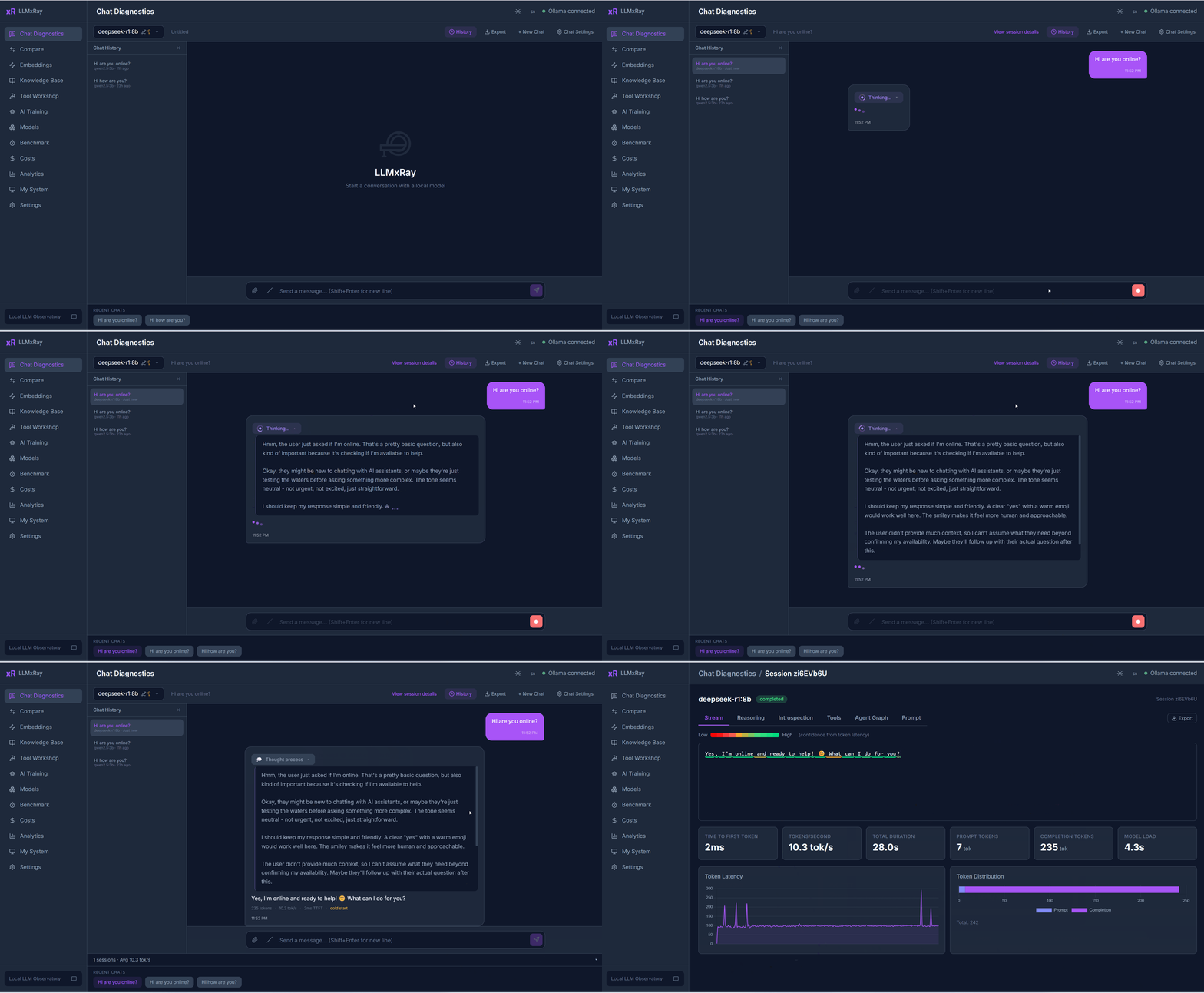
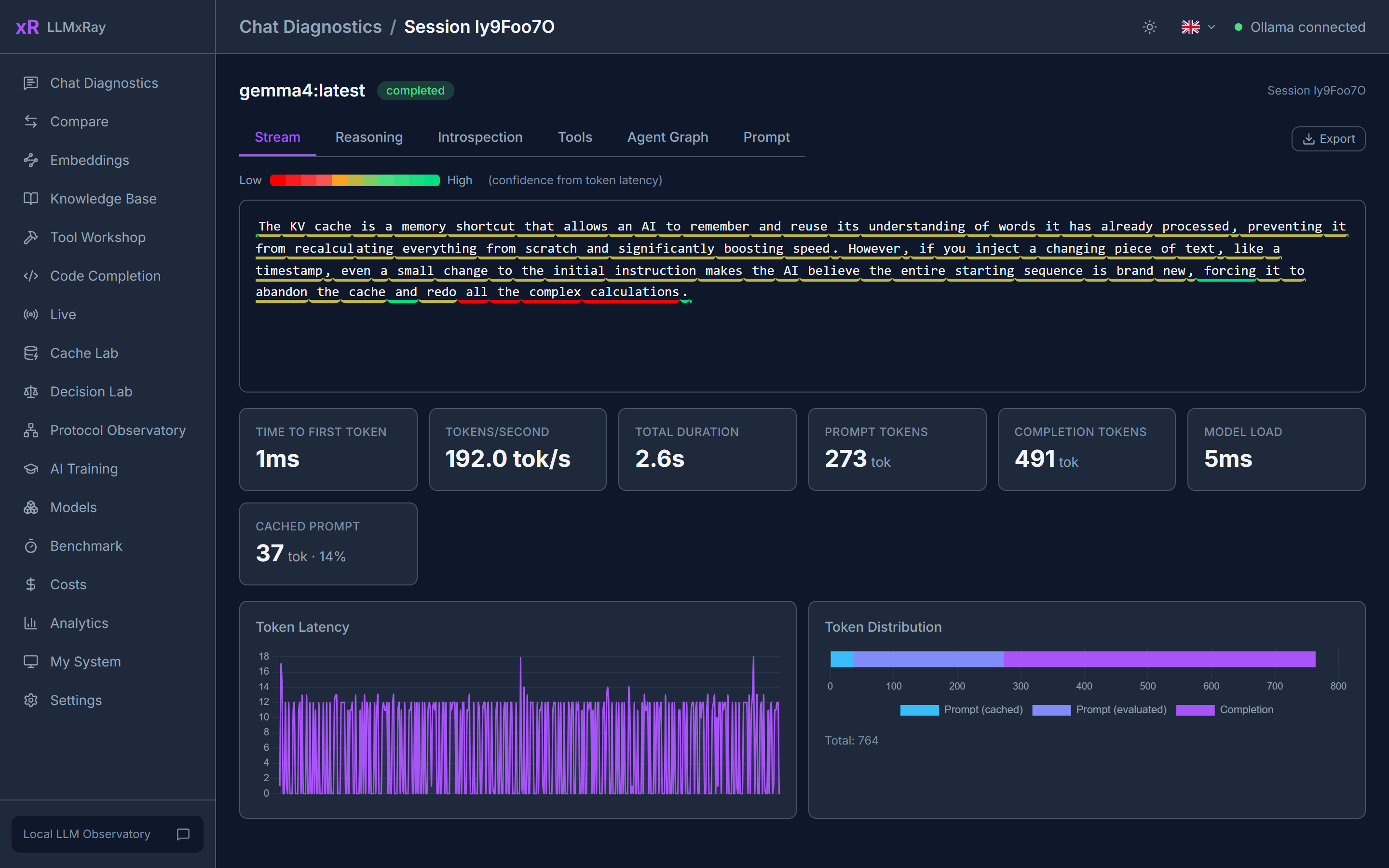
Every token is drawn as it arrives, coloured by confidence. You see where the model hesitated and where it was sure. Markdown, multi-turn, file and image attachments, slash commands, and a thinking budget for reasoning models (off, model's choice, or low / medium / high / max).
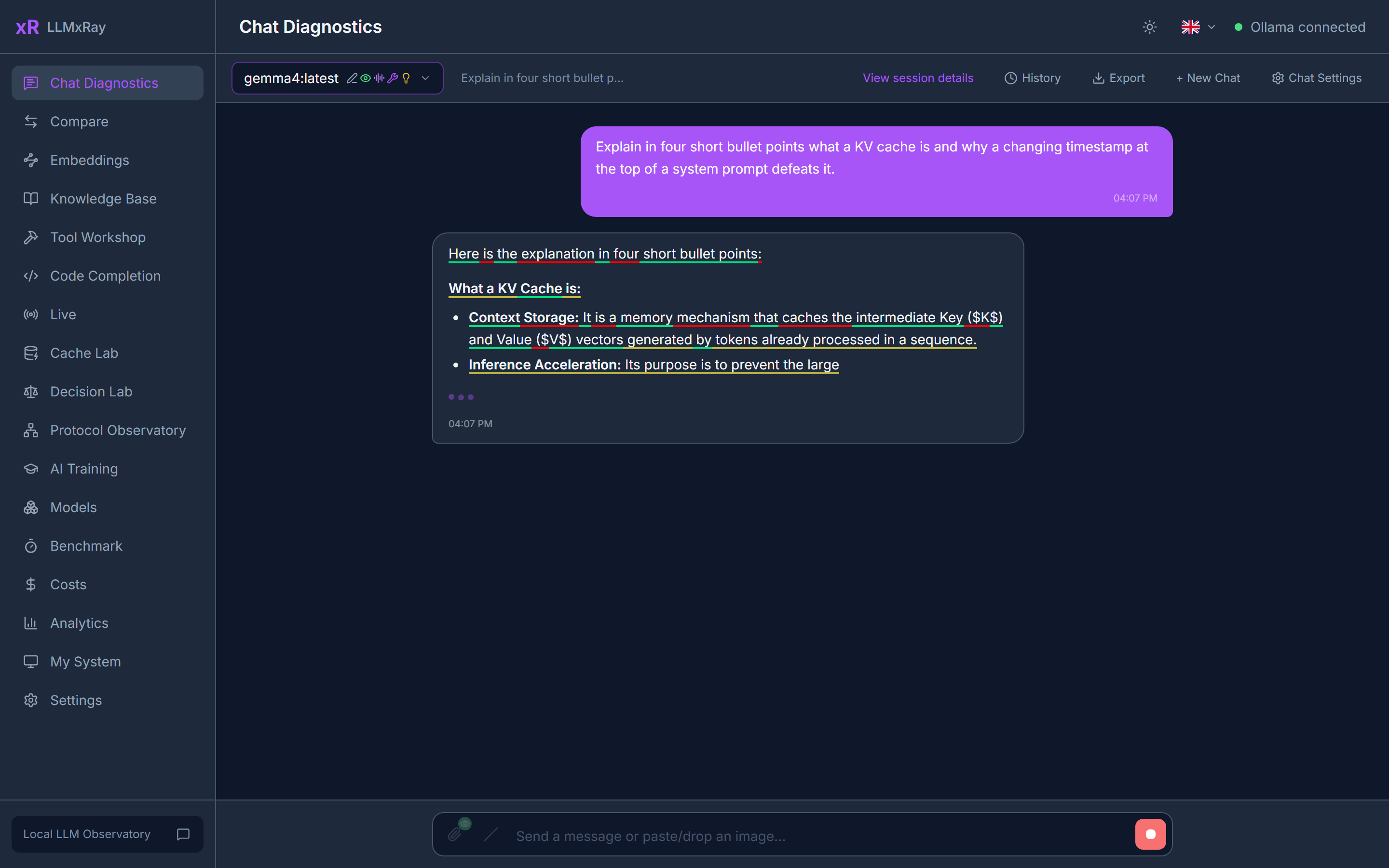
Each response is also checked as it lands. A badge appears only when something is wrong: repetition, a refusal, gibberish, an empty answer, or a reply cut off at the token limit.
Open any turn to see it as a timeline: time to first token, inter-token gaps, the reasoning block if there was one, tool calls, and the exact prompt that was sent.
LLMxRay opens a second port, 11435, that behaves exactly like Ollama and forwards everything to it. Point VS Code Copilot, Open WebUI, Continue, n8n or your own script at http://localhost:11435 and every turn they send appears here: client, model, prompt size, how much came from the cache, prefill and generation speed, tool calls.
VS Code Copilot ─┐
Open WebUI ──────┤                                   ┌─ Live page: every turn,
Continue / n8n ──┼─► http://localhost:11435 ─► Ollama ┤  cache hits, prefill speed,
your scripts ────┘        (LLMxRay)                   └─ where the cache broke
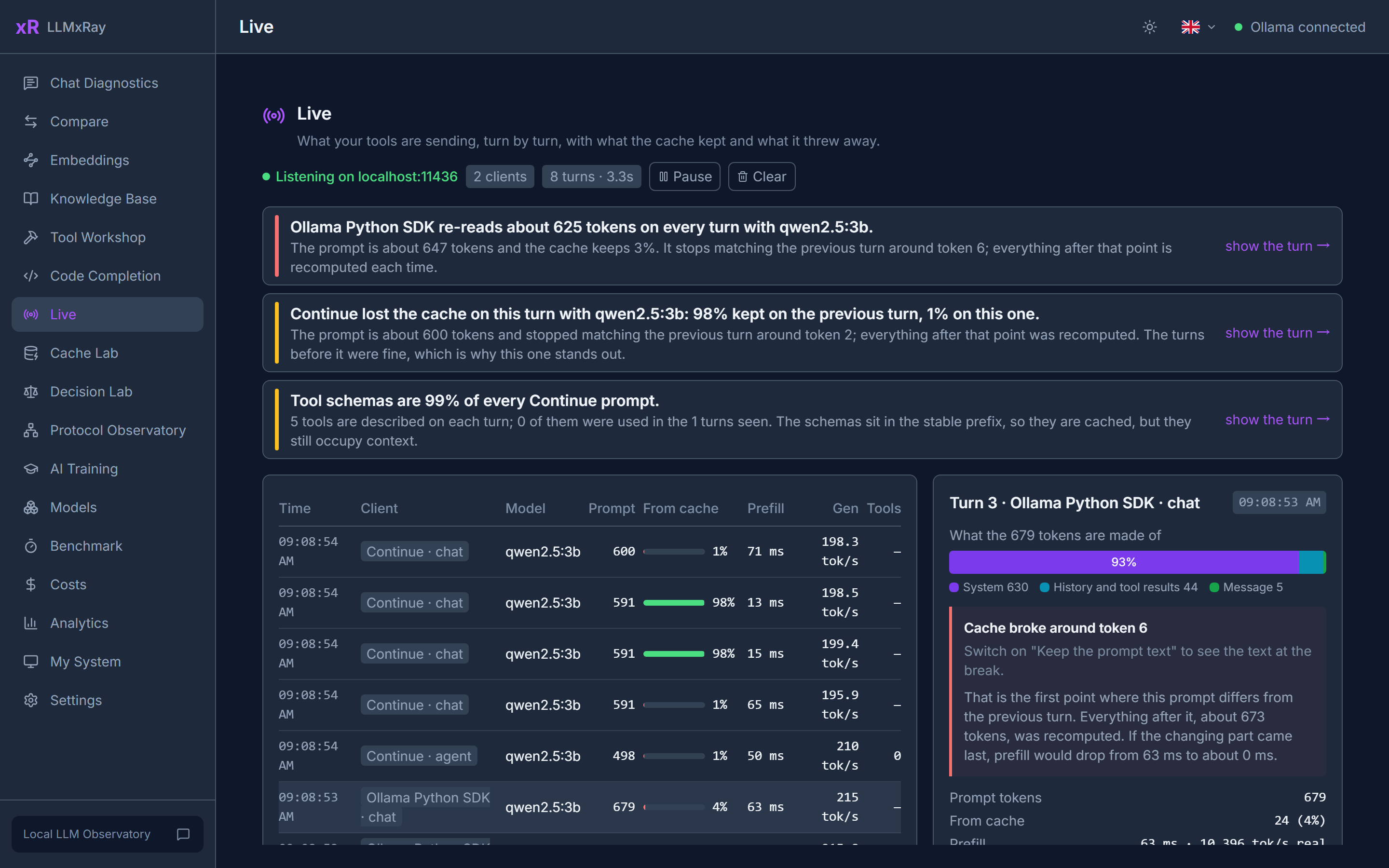
Select a turn to see what the prompt is made of and the exact point where it stopped matching the previous one, which is where the cache broke. Findings are plain sentences, each linked to the turn that proves it: a client re-reading its whole prompt every turn, a prompt the daemon silently cut to fit the context (Ollama keeps the first few tokens and the end, drops the rest, and says nothing), a model running partly on CPU, tool schemas taking 40% of every prompt. Only counts and timings are kept, in memory. Prompt text is an opt-in that writes to a local file. Nothing leaves your machine.
Both ports answer only this machine by default, because the Live log holds whatever your tools sent. Start with npx llmxray --host 0.0.0.0 to let other machines on your network reach them, for a Live page on a second screen or a shared GPU box.
A local model reuses its prompt cache only while the prompt matches from the very first token. One timestamp near the top forfeits everything below it. Cache Lab finds the values that change between turns, shows where reuse dies, and then measures against your own daemon what moving them to the end saves.
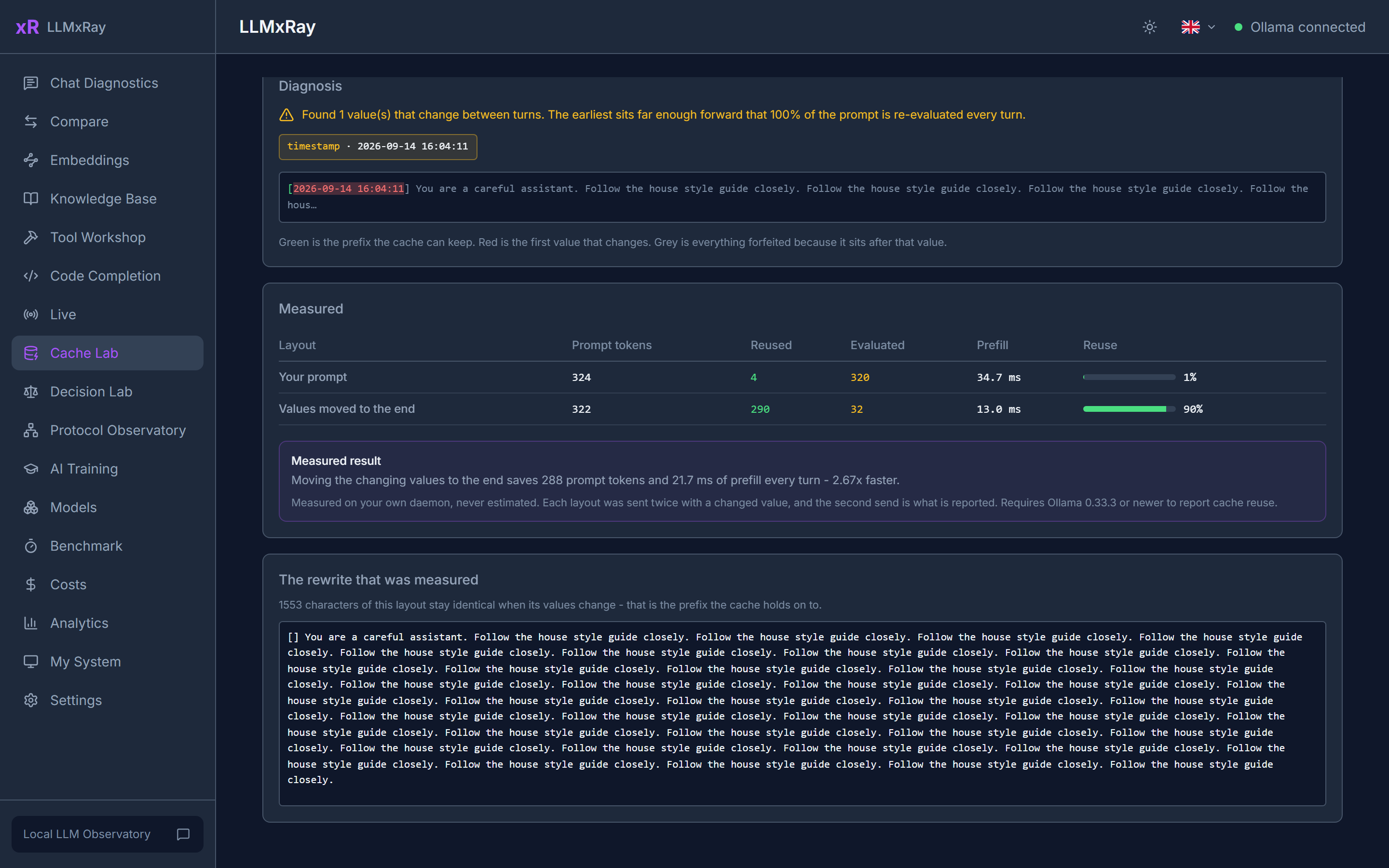
Measured on a real 324-token prompt: 4 tokens reused and 64.6 ms of prefill with the timestamp at the front, 290 reused and 18.6 ms with it at the back. 3.5x faster, same words.
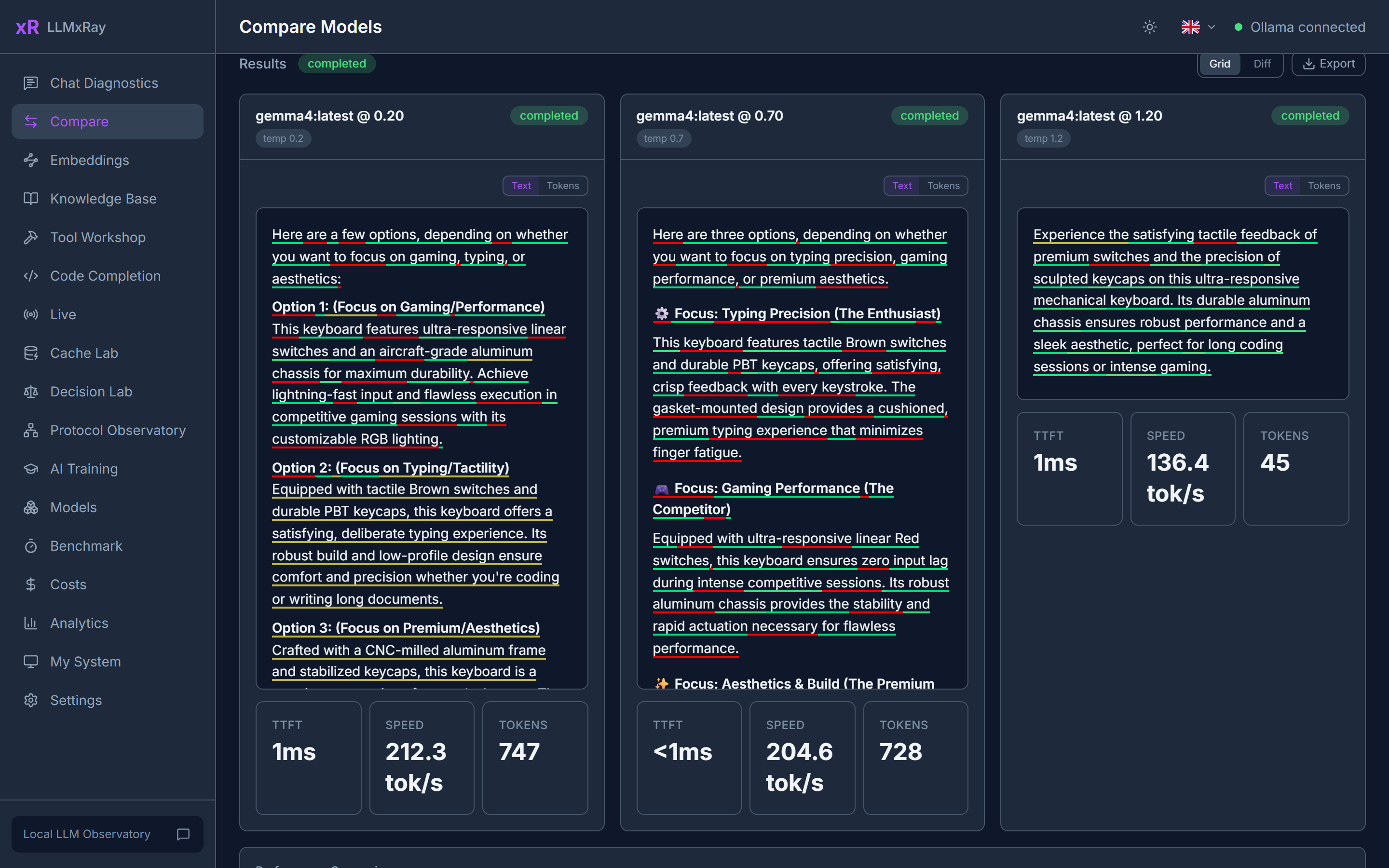
The same prompt against up to four slots, each with its own model, temperature and system prompt, streaming side by side. One-click presets: Temperature Sweep, Deterministic Pair, Language Compare. A word-level diff shows exactly what changed between two answers.
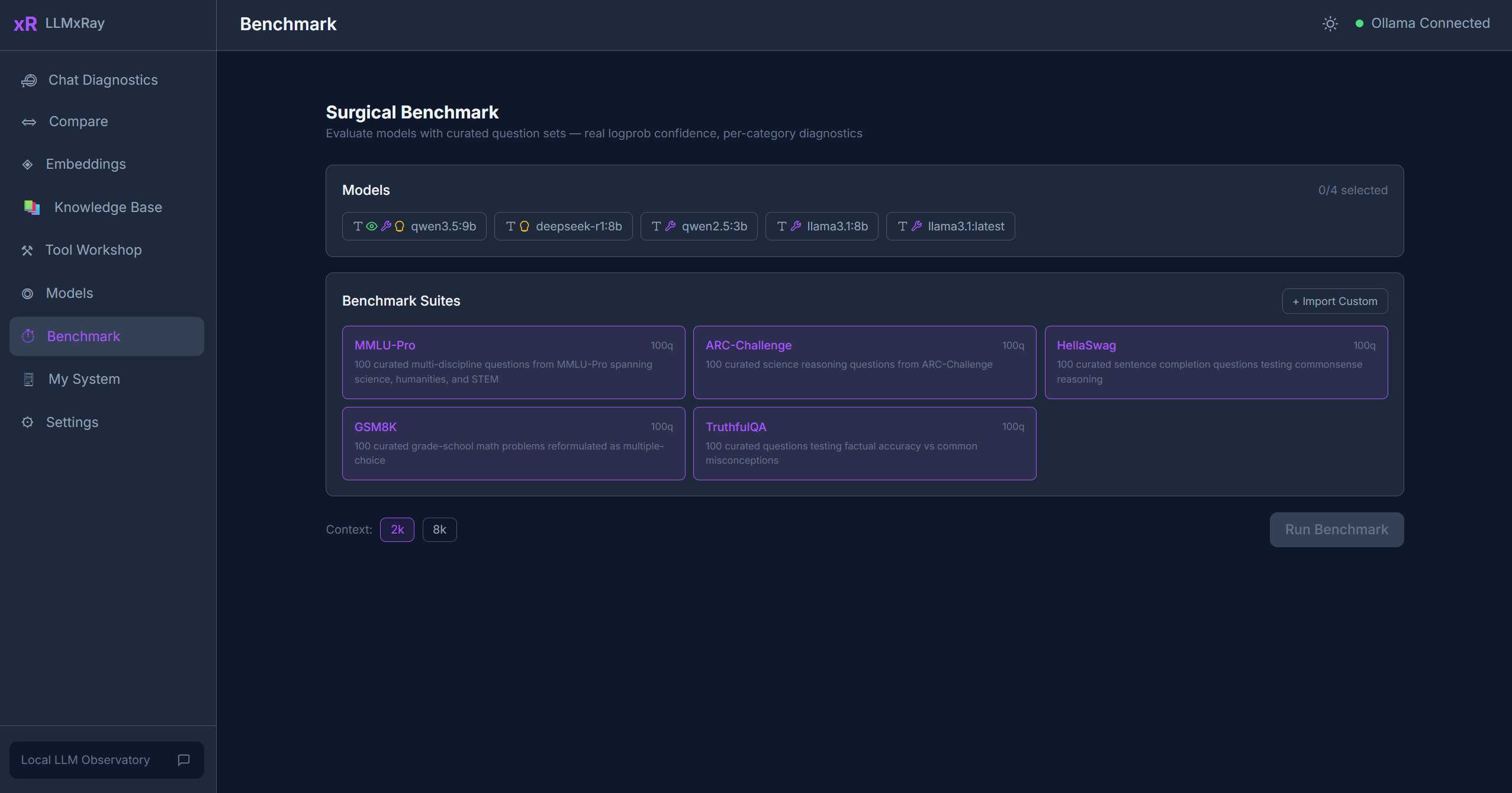
Score models on curated question suites (MMLU-Pro, ARC-Challenge, HellaSwag, GSM8K, TruthfulQA) using the model's real token logprobs, not whether the answer happened to look right. Confidence versus accuracy per category, so you see where a model is confidently wrong. Import your own suites as JSON.
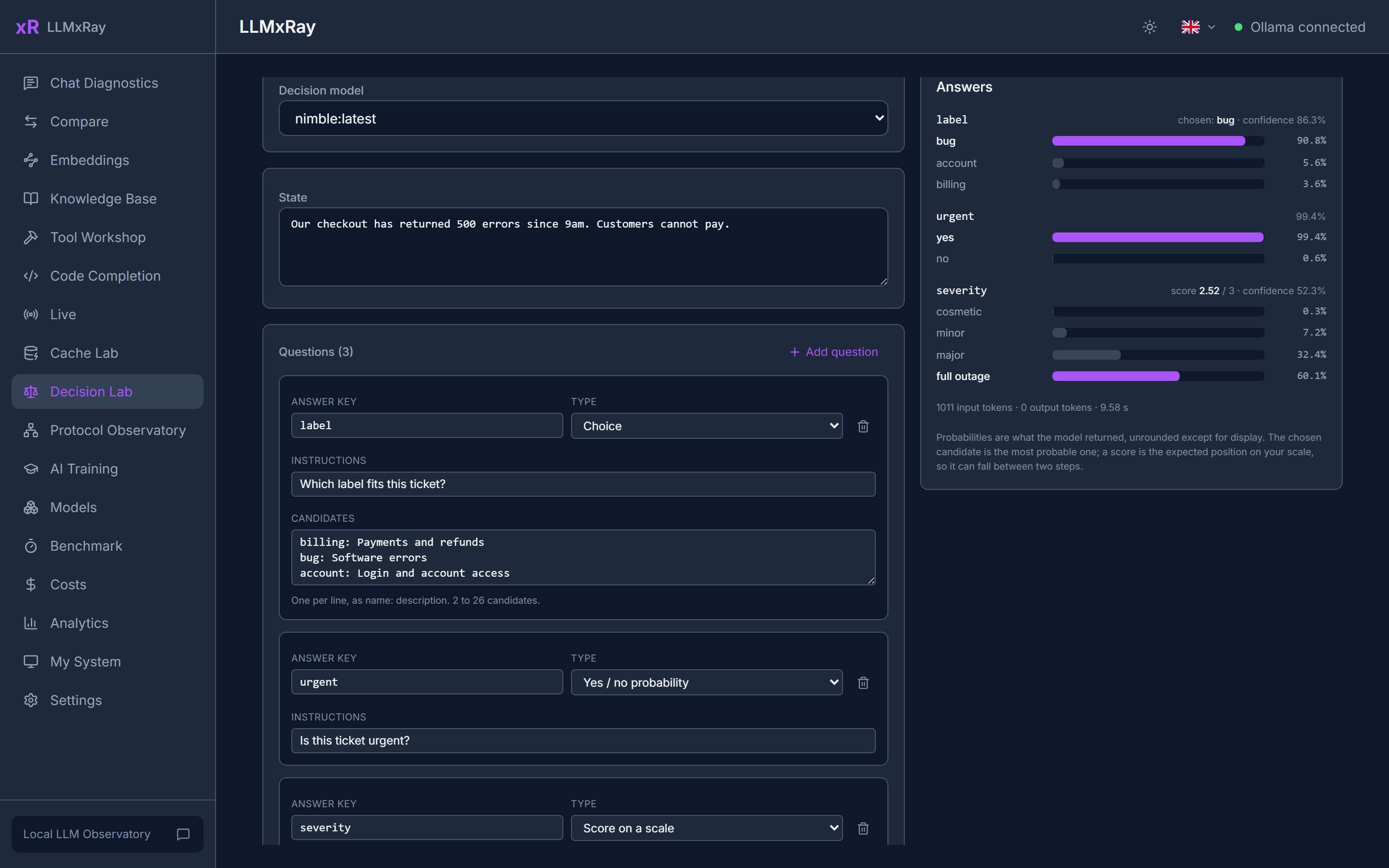
Decision models (nimble, tev1, clef) answer typed questions with probabilities instead of prose. Give the lab a situation and ask for a choice among candidates, a yes/no probability, or a score on a scale. Every answer comes back as the model's own distribution, drawn as bars.
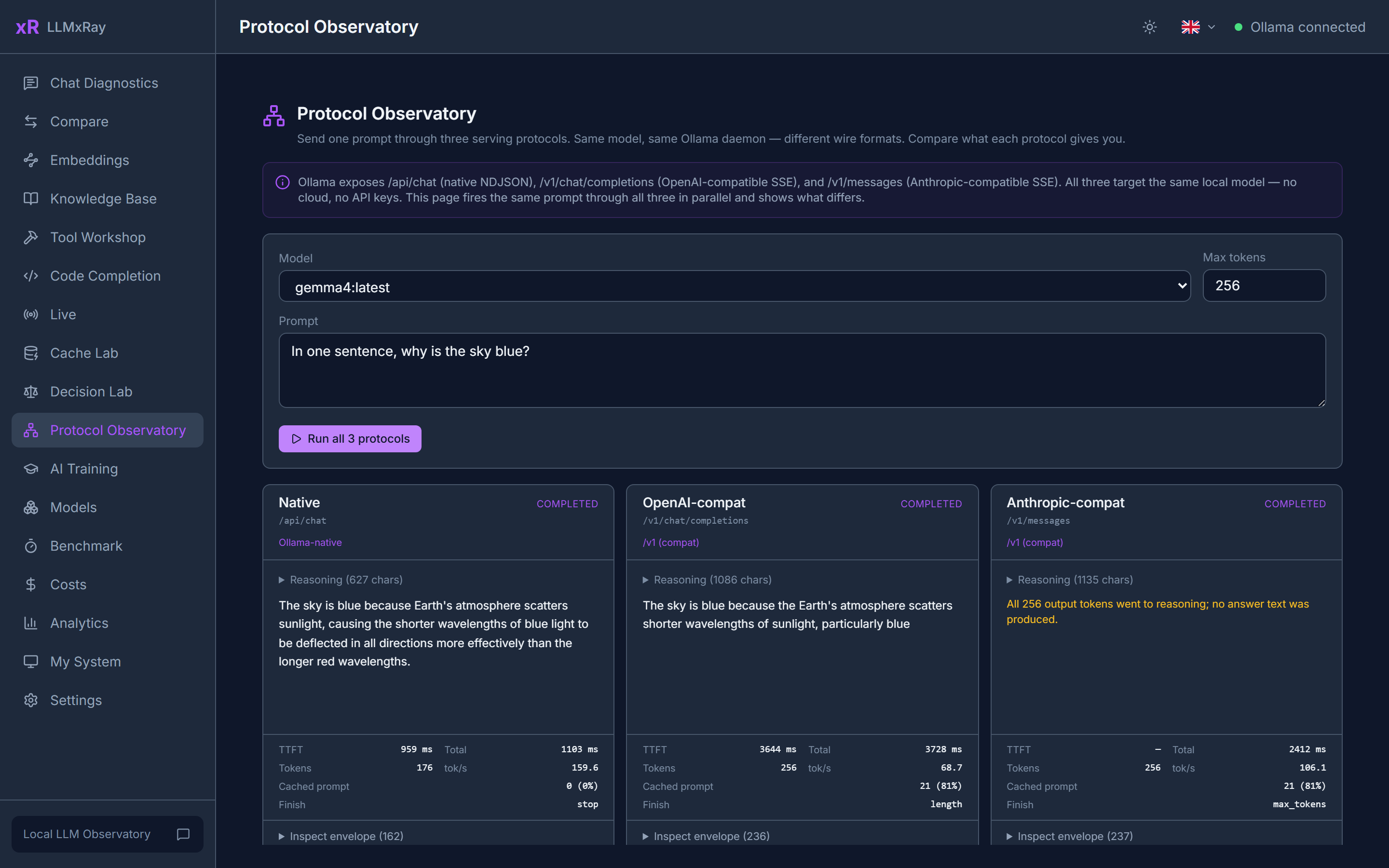
The same prompt through Ollama's three serving protocols in parallel: native /api/chat, OpenAI-compatible /v1/chat/completions, and Anthropic-compatible /v1/messages. Side-by-side streaming, per-protocol metrics, and an envelope diff that shows how each one frames finish reasons, token counts and errors.
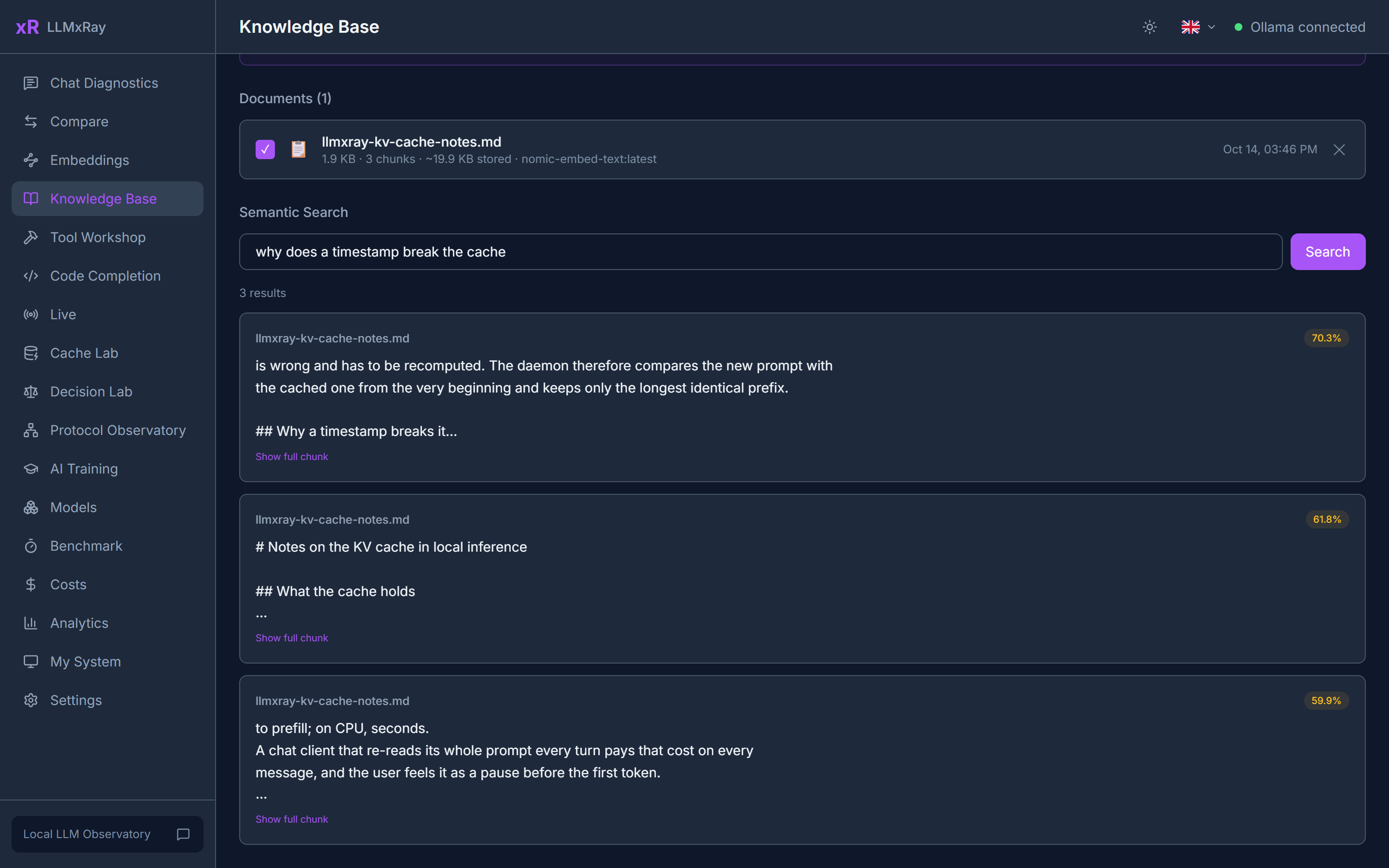
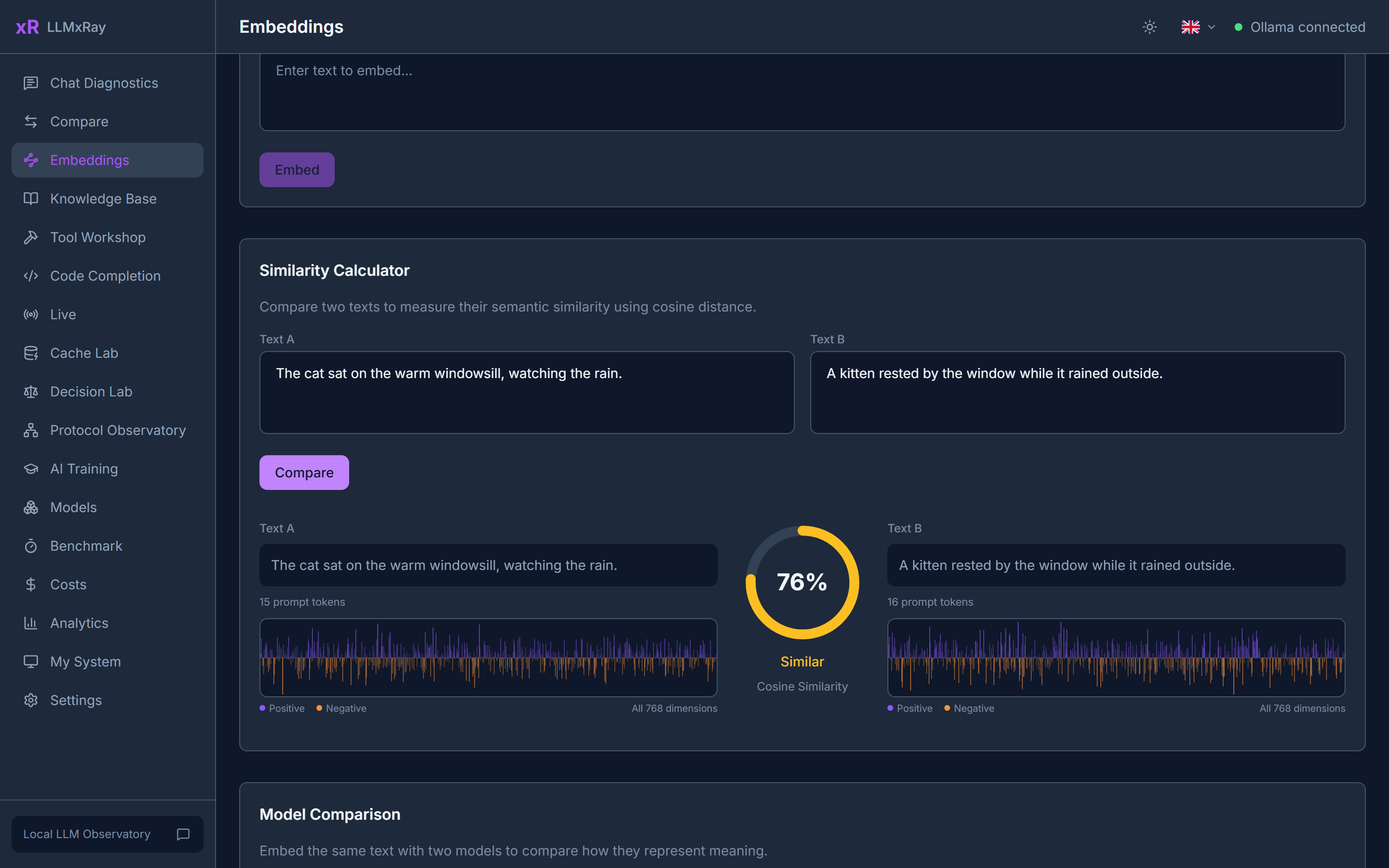
Drop in PDF, DOCX, Markdown or CSV files. They are chunked, embedded and searchable, so you see what retrieval actually returns before a model ever sees it. The Embeddings page lets you compare any two texts by cosine similarity, visualise the vectors, and see what Matryoshka truncation costs.
|
|
|
Everything stays in your browser's IndexedDB.
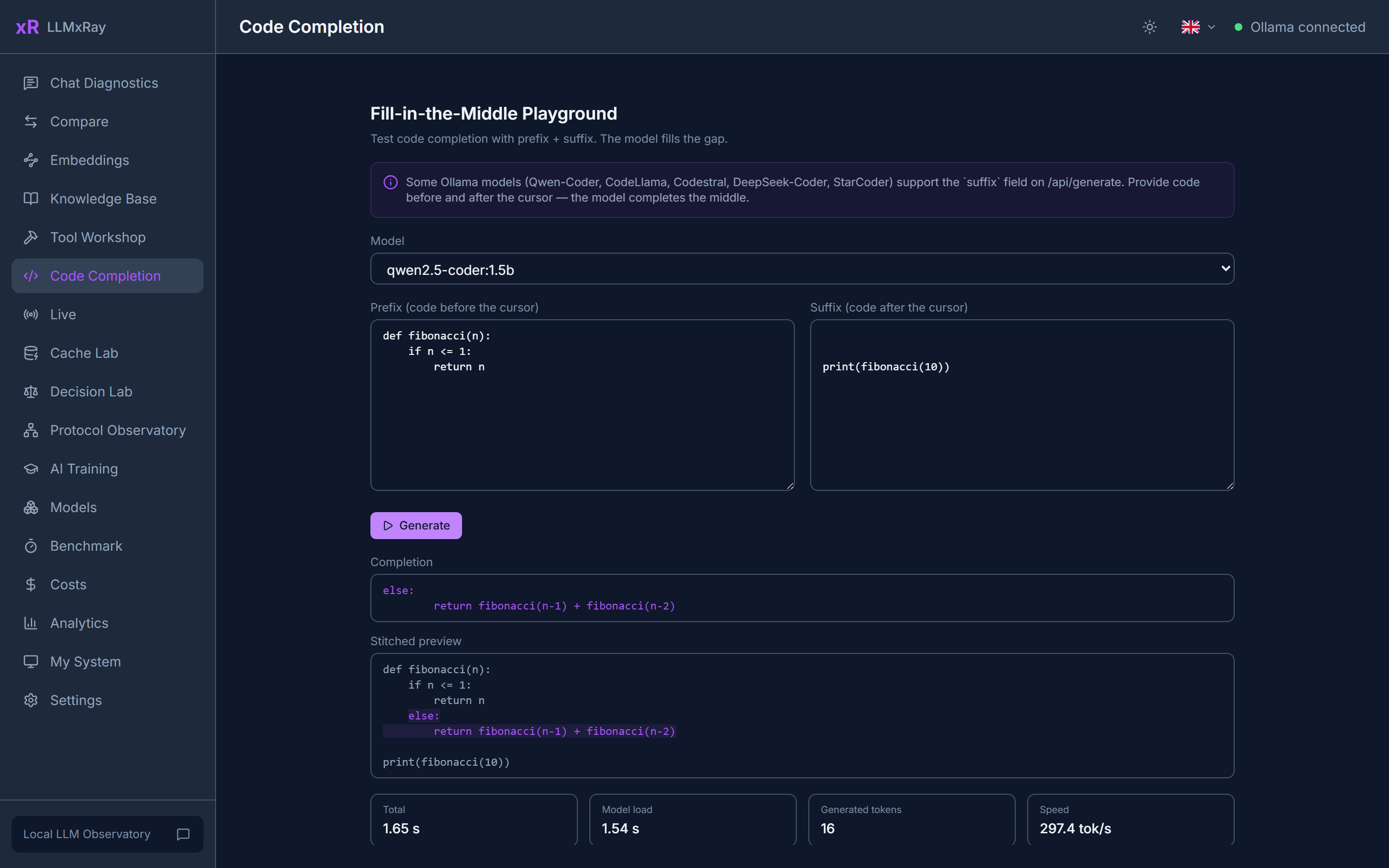
Fill-in-the-middle for Qwen-Coder, CodeLlama, Codestral, DeepSeek-Coder and StarCoder: a prefix, a suffix, and the model fills the gap. The stitched preview shows the result as your editor would.
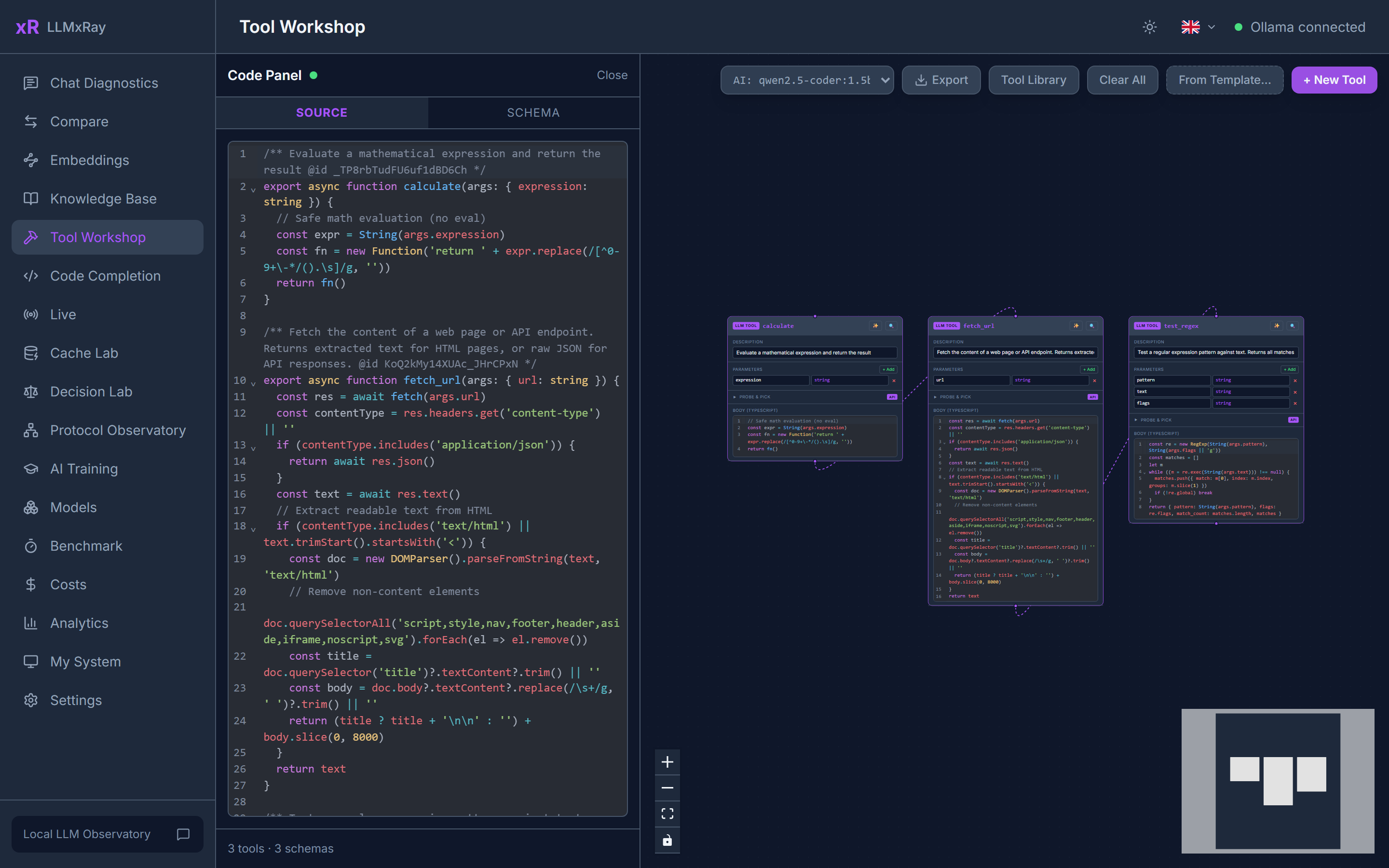
A node canvas for building tool definitions, with the TypeScript kept in sync both ways: edit the nodes or edit the code. Probe an API, generate the schema, and test the tool with a live call.
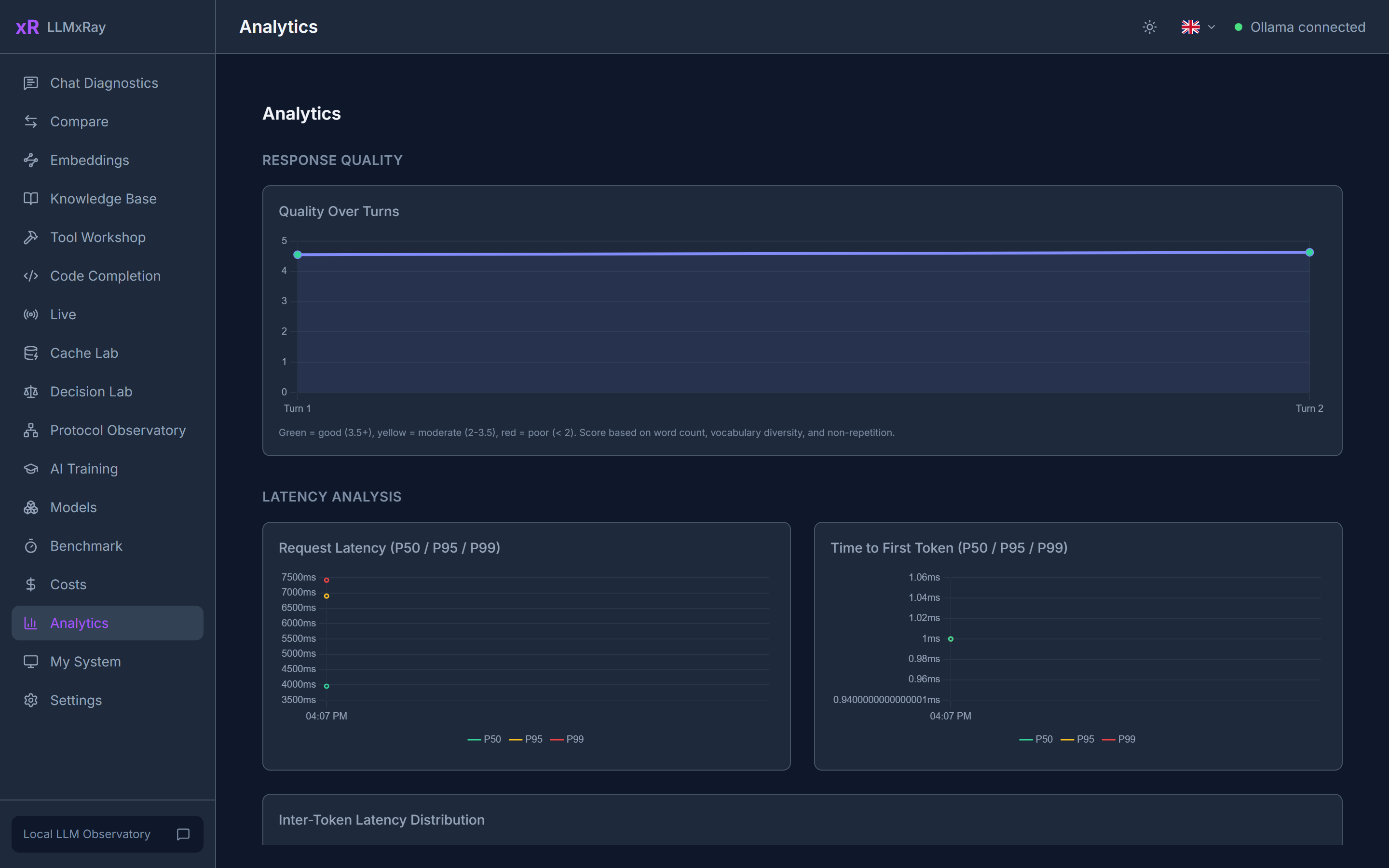
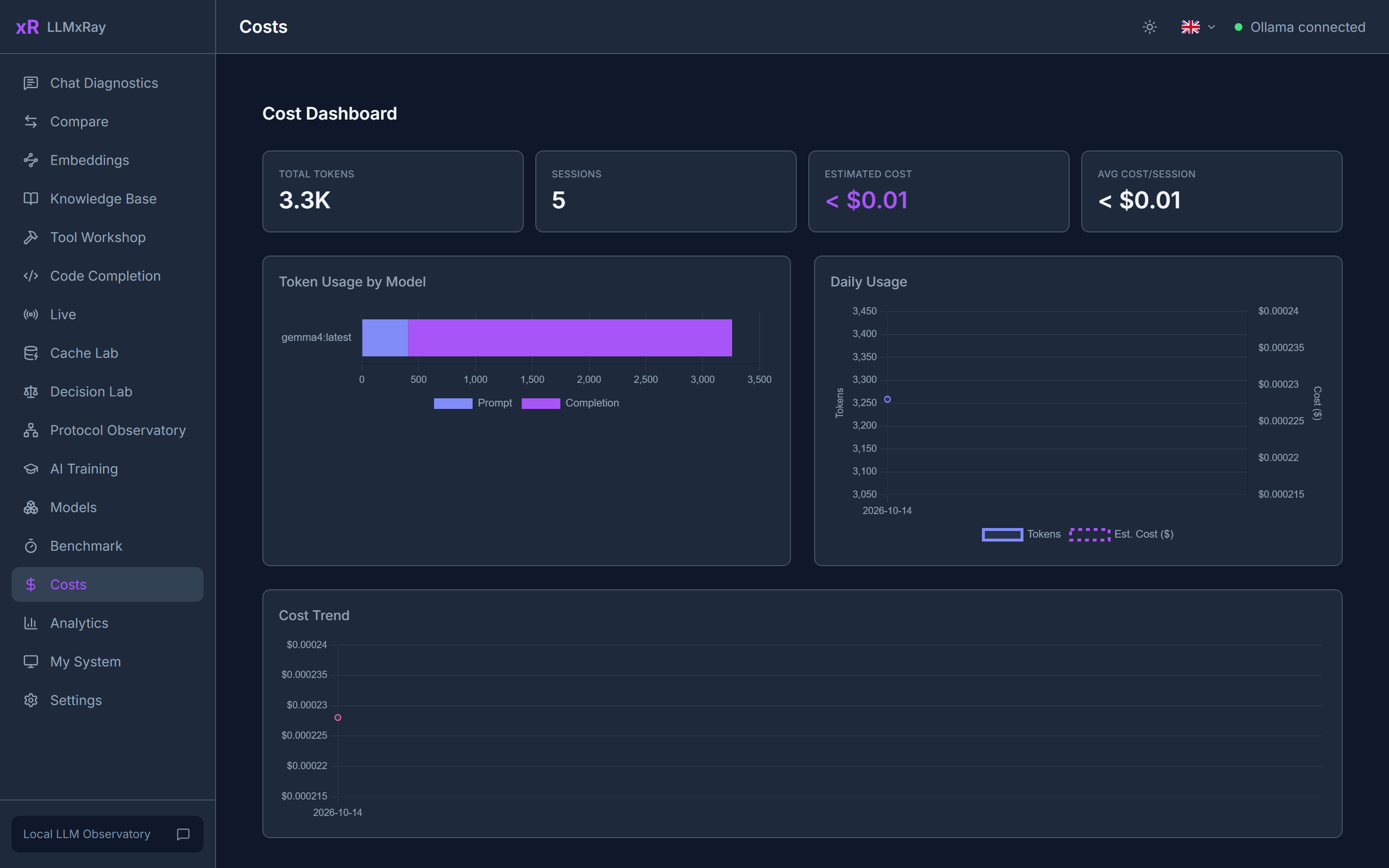
Latency percentiles (P50 / P95 / P99) for requests and first tokens, quality over turns, errors by model, a usage heatmap, and temperature against tokens per second. The cost page prices your local usage at cloud rates, so you see what running locally saves.
|
|
|
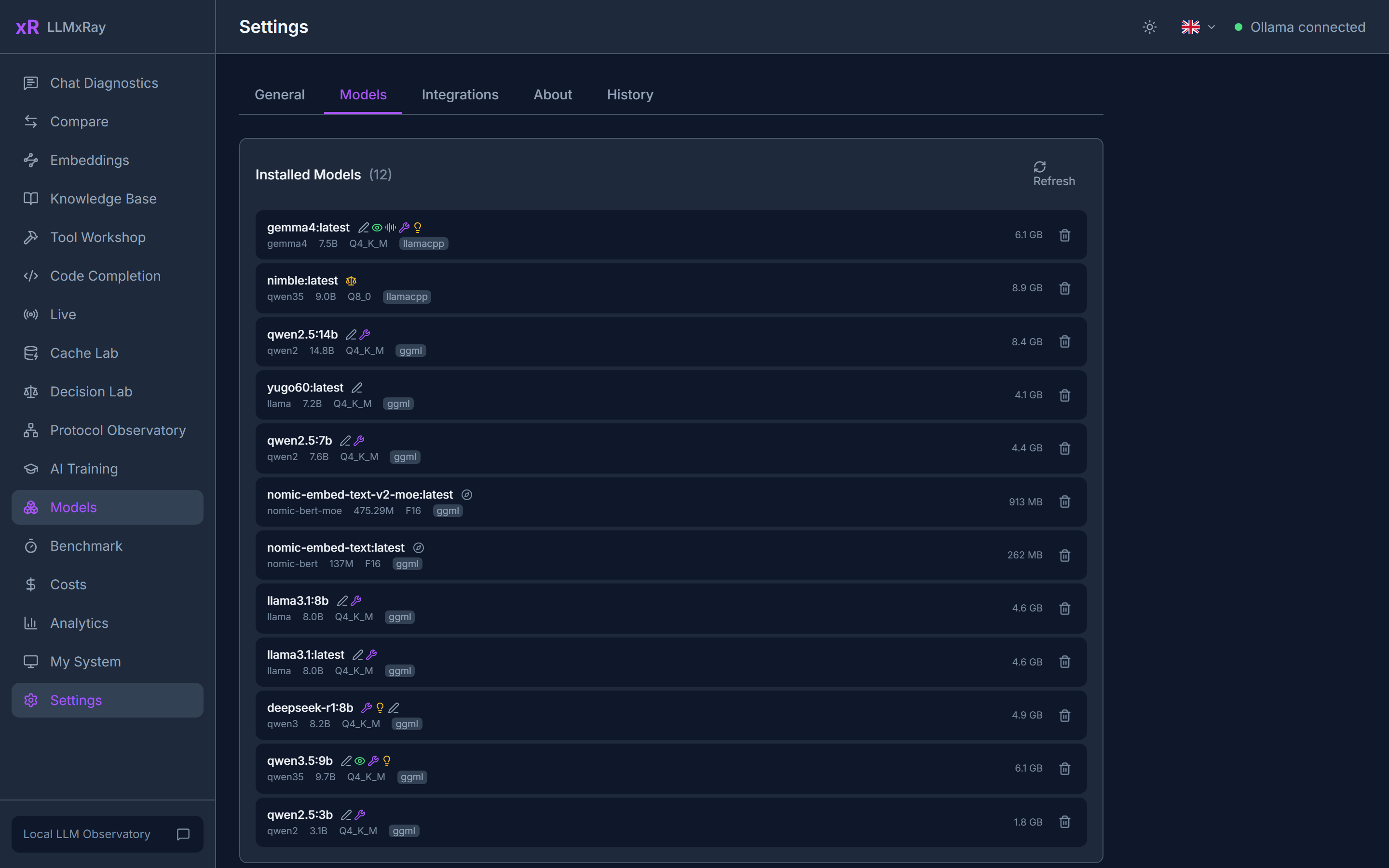
Hardware, runtime and inference overview on one page: CPU, memory, GPU, which models are loaded and where. The Models tab lists every installed model with its parameters, template and runner, and pulls new ones from the catalog.
|
|
|
If you are an agent running on a local model, LLMxRay can tell you what went wrong with your own calls. Two steps.
{ "mcpServers": { "llmxray": { "command": "npx", "args": ["-y", "-p", "llmxray", "llmxray-mcp"] } } }
Seven tools, all read-only, nothing leaves the machine:
| Tool | Answers |
|---|---|
diagnose_my_turns | What stands out in your recent turns, as sentences with the fix: a prompt rejected for exceeding the loaded context, the prompt cache lost on every turn or on one turn, a model running partly on CPU, tool schemas crowding the prompt. |
read_my_last_turn | Your last turn in numbers: prompt tokens and cached share, prefill time and speed, generated tokens and speed, why generation stopped, what the prompt was made of, whether the model fit in video memory. |
list_local_models | Which models are pulled, their size and quantisation, which are loaded now and with what context, and whether each fits in video memory. |
list_my_turns | The history: one line per turn with tokens, cached share, prefill, generation speed, stop reason and flags. |
compare_my_turns | Did a change help: medians of cached share, prefill, speed and prompt size before and after a moment, with a verdict. |
estimate_my_prompt | Before sending: does a prompt of N tokens fit the loaded context, how much headroom is left, does the model sit in video memory, how much the cache would reuse. |
read_llmxray_status | Where LLMxRay runs, the observe port, the Ollama it forwards to, how many turns it keeps. |
LLMxRay itself must be running (npx llmxray). The MCP server reads from it over localhost.
The same procedure, as an Agent Skill your agent can load: npx skills add LogneBudo/llmxray (skills.sh) or clawhub install llmxray-diagnose-ollama-calls (ClawHub). Source: skills/diagnose-ollama-calls/SKILL.md.
Name yourself so your turns are yours: send the header X-LLMxRay-Client: my-agent, or use http://localhost:11435/?client=my-agent as the base URL, and pass my-agent as client to the tools. Where to set the base URL: Ollama SDKs and CLI OLLAMA_HOST=127.0.0.1:11435; OpenAI-compatible clients base_url=http://localhost:11435/v1; Claude Code ANTHROPIC_BASE_URL=http://localhost:11435; Continue apiBase; Open WebUI OLLAMA_BASE_URL.
| You are... | LLMxRay helps you... |
|---|---|
| Developer | Debug prompts, profile latency, compare models, inspect tool calls, see what your editor sends |
| Researcher | Run controlled experiments with the same settings across models and temperatures |
| Student / Educator | Watch model behaviour instead of reading about it, with the nine-module Educators Kit |
| AI team lead | Give every developer the same local setup, and collect the benchmark results and training pairs they export |
npx llmxray
npx llmxray --port 3000
npx llmxray --ollama-url http://192.168.1.50:11434
npx llmxray --observe-port 11436     # the Live port, 11435 by default
docker run -p 5174:5174 -p 11435:11435 djovaneli/llmxray
docker run -p 5174:5174 -p 11435:11435 -e OLLAMA_URL=http://host.docker.internal:11434 djovaneli/llmxray
git clone https://github.com/LogneBudo/llmxray.git
cd llmxray
npm install
npm run dev     # http://localhost:5173
Tested against Ollama 0.40.x (verified on 0.40.4, October 2026). Works with 0.20 and newer; older versions chat but lack think and JSON-schema format. Recommended: 0.33.3 or newer, which reports prompt-cache reuse, so prefill speed is measured over the tokens actually evaluated.
| Endpoint | Used for |
|---|---|
/api/chat | Streaming chat (NDJSON, with tools, think effort levels, format schema) |
/api/generate | Generation and Fill-in-the-Middle via suffix |
/api/tags, /api/show | Model list, capabilities, context length, parameters, template |
/api/embed | Vector embeddings for the Knowledge Base, with optional dimensions truncation |
/api/pull, /api/delete, /api/ps, /api/version | Model management and status |
/v1/chat/completions | OpenAI-compatible path, used by Surgical Benchmark for real logprobs |
/v1/messages | Anthropic-compatible path, used by Protocol Observatory |
/v1/systemone | Decision models, used by Decision Lab |
Vue 3.5, TypeScript 5.9 (strict), Vite 7, Tailwind CSS 4, Pinia stores per concern, Chart.js and D3 for charts, Vue Flow for the tool canvas, CodeMirror 6 for code. Storage is the browser's IndexedDB. The backend is Ollama, local.
Streaming reads Ollama's NDJSON through fetch() and a ReadableStream, and tokens update the UI through Pinia. Chat confidence is approximated from inter-token latency and labelled as such; benchmarks use real logprobs. Hardware detection is a small Vite plugin that asks the OS directly. The Live port is a transparent proxy that keeps counts and timings in memory.
| Command | What it does |
|---|---|
npm run dev | Dev server (port 5173) |
npm run build | Type-check and production build |
npm run test | Unit tests (Vitest) |
npm run test:e2e | End-to-end (Playwright) |
Contributions welcome. See CONTRIBUTING.md for setup and guidelines. Community translations are especially welcome: scaffold files are ready for Hebrew and Japanese.
LLMxRay is a trademark of Ivan Stankovic (LogneBudo). See TRADEMARK.md.
If LLMxRay helps you understand your AI better, consider giving it a star.
It helps others discover the project.

FAQs
Local LLM Observatory — See what your AI is actually doing, token by token.
The npm package llmxray receives a total of 480 weekly downloads. As such, llmxray popularity was classified as not popular.
We found that llmxray demonstrated a healthy version release cadence and project activity because the last version was released less than a year ago. It has 1 open source maintainer collaborating on the project.
Security News
Cloudflare is acquiring Deno’s team, which will provide another year of bug fixes and security updates before ending support for the runtime.

Security News
Anthropic’s free OSS Scanner uses Mythos and other Claude models to find open source vulnerabilities and send maintainers reports with proposed fixes.

Security News
On Front Lines’ Early Adopters: CISO podcast, Andrew Becherer shares lessons from Datadog, weighs the long-term costs of AI-built tools, and explains how founders can actually gain a CISO’s trust.