


Company News
Jerod Santo Joins Socket as Head of Media
Allow myself to introduce... myself.
By Jerod Santo - Sep 14, 2026
Loop engineering toolkit. Run any command on a cadence, in the background, managed from a terminal board. Schedule tests, builds, syncs, or agent prompts.
Loop engineering for your terminal. Run any command on a cadence.
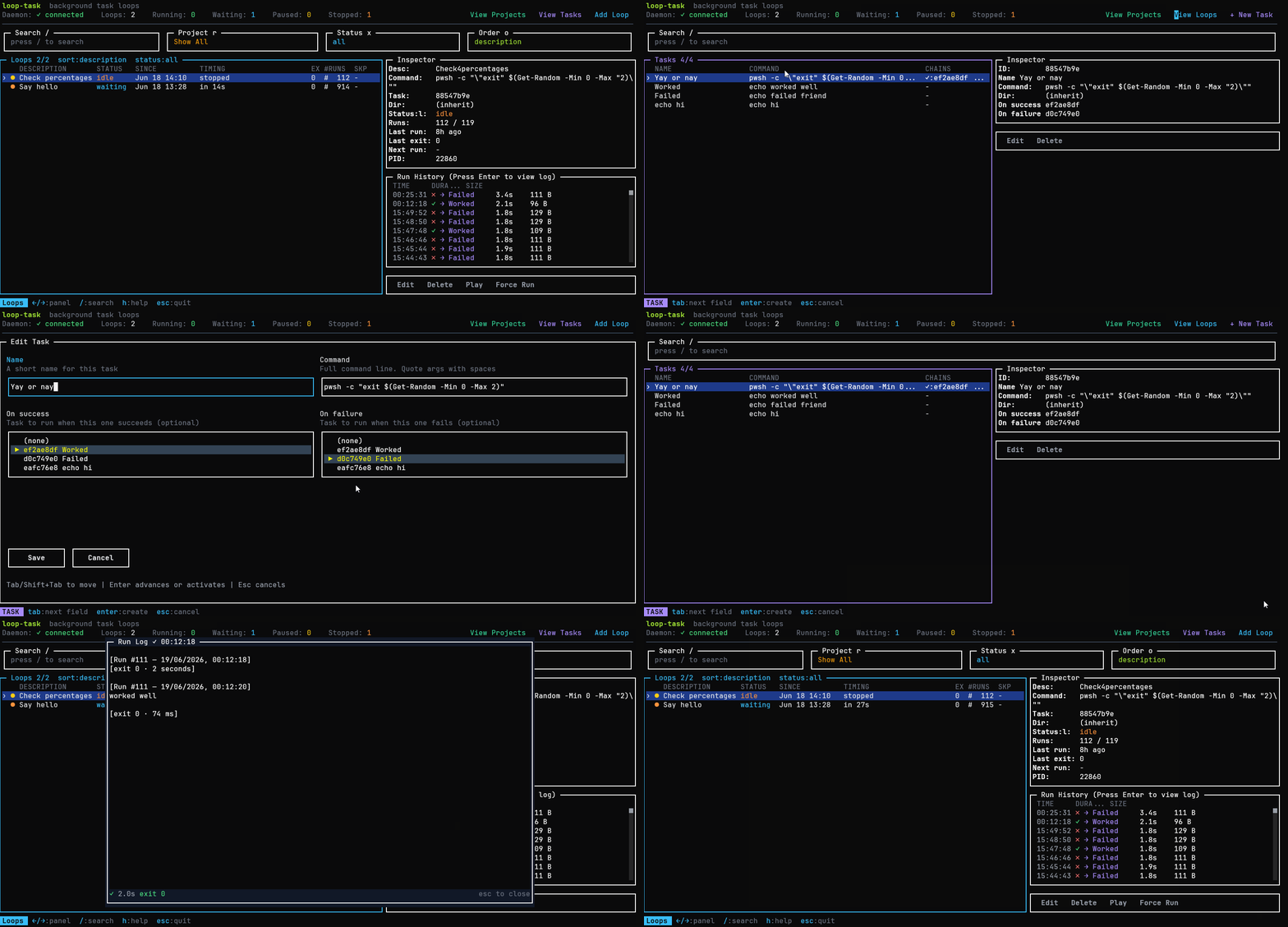
loop-task is a cross-platform CLI that runs shell commands at human-readable intervals. Create loops in the background, manage them from an interactive TUI board, or run them in the foreground. It is the heartbeat primitive for loop engineering: instead of running a task by hand every time, you schedule it once and let it run.



Loop engineering is designing systems that run work on a cadence instead of triggering each run yourself. A loop is a recurring goal: you define a purpose, give it an interval, and let it iterate. It applies to ordinary engineering work just as much as to AI agents: health checks, sync jobs, test watches, data pulls, deploy polls, and report generation are all loops.
loop-task is that heartbeat as a tiny local primitive. Some examples:
# Run the test suite every 30 minutes
loop-task new 30m -- npm test

# Poll a deploy every 10 seconds until you stop it
loop-task new 10s -- curl -sf https://example.com/health

# Re-sync a data export once an hour, scoped to a project
loop-task new 1h --project etl -- ./scripts/sync.sh

# Have a coding agent chip away at a backlog every 30 minutes
loop-task new 30m -- opencode run "find missing translations and translate them, 3 max"
No cron files to maintain and no daemon to babysit: loops persist across reboots, run in the background, and you watch them from a terminal board. The idea is described well in Addy Osmani's Loop Engineering, where scheduled automations are the first of the five pieces of a working loop.
Stay in control. A loop running unattended is also a loop failing unattended. Use
--max-runs, watch the run history on the board, and review what each loop produces. The leverage moves to the loop; the responsibility stays with you.
npm install -g loop-task
loop-task                          # open the board (requires Bun)
loop-task start                    # start the daemon, restore persisted loops
loop-task new 30m -- npm test      # create a background loop
loop-task run --now 10s -- echo hi # run a loop in the foreground
loop-task stop <id>                # stop a frozen loop and kill its child process
loop-task restart                  # kill daemon + all loops, restart fresh
Or run it directly:
npx loop-task
npx loop-task new 30m -- npm test
Install Bun:
npm install -g bun
start, new, and run work with Node alone. The board auto-delegates to Bun when needed.
A loop is a schedule - it defines when something runs. Loops trigger tasks.
| Field | Description |
|---|---|
| Interval | How often to run (30s, 5m, 1h, 1d, 1w) |
| Task | Inline command or a reference to a previously defined task |
| Description | Optional label shown in the list; defaults to the task name |
| Run immediately? | Run once now, then every interval, or wait the first interval |
| Max runs | Stop after N runs, or leave blank to run forever |
A task is an executable unit - it defines what runs. Tasks can chain to other tasks on success or failure.
| Field | Description |
|---|---|
| Name | A short label for the task |
| Command | The full command line |
| On success | Optional task to run when this one exits with code 0 |
| On failure | Optional task to run when this one exits with a non-zero code |
Tasks are reusable - the same task can be referenced by multiple loops or by other tasks' success/failure chains.
A project is an organizational scope for loops. Every loop belongs to exactly one project. The board shows only loops in the currently selected project.
| Field | Description |
|---|---|
| Name | A short label for the project |
| Color | One of six colors: white, cyan, orange, green, red, yellow |
Key behaviors:
localStorage.To use projects from the board:
c to open the Project selector (switch between projects)n creates a new project, e renames the selected project, d deletes it, Esc returns to the boardFrom the CLI:
loop-task project list - list all projectsloop-task project new <name> [--color <color>] - create a projectloop-task project rename <id|name> <new-name> - rename a projectloop-task project color <id|name> <color> - change a project's colorloop-task project delete <id|name> - delete a project (loops move to Default)loop-task new <interval> --project <name> -- <command> - create a loop assigned to a projectColors can be a name (white, cyan, green, yellow, orange, pink) or a #rrggbb hex value.
| Command | Description |
|---|---|
loop-task | Open the interactive board (requires Bun) |
loop-task start | Start the background daemon, restore persisted loops |
loop-task new <interval> -- <command> | Create a background loop (creates an inline task) |
loop-task new <interval> --project <name> -- <command> | Create a loop assigned to a project |
loop-task run <interval> -- <command> | Run a loop in the foreground |
loop-task stop <id> | Stop a loop and interrupt its running child process |
loop-task restart | Kill the daemon and all running loops, then restart fresh |
loop-task project list | List all projects |
loop-task project new <name> [--color <color>] | Create a project |
loop-task project rename <id|name> <new-name> | Rename a project |
loop-task project color <id|name> <color> | Change project color |
loop-task project delete <id|name> | Delete a project (loops move to Default) |
new and run)| Option | Description |
|---|---|
--now | Run immediately before waiting |
--max-runs <n> | Stop after N executions |
--cwd <dir> | Working directory for the command |
--verbose | Show execution details |
-h, --help | Display help |
-V, --version | Display version |
# Run tests every 30 minutes
loop-task new 30m -- npm test

# Run immediately, then every hour
loop-task new --now 1h -- npm test

# Run up to 5 times, then stop
loop-task run --max-runs 5 5m -- npm test

# Agent workflow - schedule an AI task every 30 minutes
loop-task new 30m --now -- opencode run "search missing translations and translate them, 3 maximum" --model "opencode/big-pickle"
# Run in a specific directory
loop-task new 30m --cwd ./packages/api -- npm test

# Verbose mode
loop-task run --verbose 30m -- npm test
When the command has its own flags, use -- to stop argument parsing:
loop-task new 30m -- node -e "console.log('hello')"
The board is the primary way to manage loops and tasks. It shows all loops, their status, run history, and logs in a single terminal interface.
↑/↓, j/k    move selection
Enter       edit selected loop
e           edit loop
d/del       delete loop
p           pause (when waiting) / play (when idle/paused)
s           stop loop (resets schedule)
n           create a new loop
t           create a new task
o           cycle sort mode (order by)
←/→         switch between panels
/           search loops
h           toggle help
esc         quit
Destructive actions (pause, force run, delete) prompt a confirmation before executing.
p) - temporarily halts the loop. Resuming continues the original schedule (e.g., a loop that runs every 6h at :00 paused at 12:00 and resumed at 14:00 will still fire at 16:00).s) - halts the loop and clears the schedule. Playing starts a fresh interval from now (e.g., the same loop stopped at 12:00 and played at 14:00 will fire at 20:00).loop-task (board) ──IPC──► daemon ──► loop 1 ──► task (command)
├──► loop 2 ──► task ──► on-success task
└──► loop 3 ──► task ──► on-failure task
loop-task start or any command that needs it.loop-task start or loop-task new ... spawns the daemon if not runningloop-task opens the board for interactive managementloop-task start restores all persisted loops with correct timing| Format | Description |
|---|---|
10s | 10 seconds |
5m | 5 minutes |
1h | 1 hour |
1d | 1 day |
1w | 1 week |
When tasks are arranged in a chain (on-success or on-failure), context flows between them automatically. This lets later tasks reference output from earlier ones without custom glue.
{"key": "value"}) - each key is merged into the shared context.output key.{{key}} in the command or arguments of any task. Before spawning, {{key}} is replaced with the current value of key from the shared context.{ "id": "42" }, task 2 can use {{id}} and also add { "status": "ok" }. Task 3 sees both.output key. Use JSON with named keys when data must survive across multiple downstream tasks.A four-task chain that finds an issue, marks it in-progress, rewrites it with AI, and relabels it - all without re-querying:
Task 1 (primary): Find an issue to refine
gh issue list --label "to refine" --limit 1 --json number,title,body --jq '{number: .[0].number, title: .[0].title, body: .[0].body}'
stdout: {"number":123,"title":"Fix login","body":"It doesn't work"}
context: { number: 123, title: "Fix login", body: "It doesn't work" }
Task 2 (chain, onSuccess): Mark as in-progress
gh issue edit {{number}} --add-label "refining" --remove-label "to refine"
interpolated: gh issue edit 123 --add-label "refining" --remove-label "to refine"
Task 3 (chain, onSuccess): Rewrite with AI (edits the issue directly)
opencode run "Rewrite this GitHub issue as a detailed user story using project context. Update the issue title and body directly using gh issue edit. Issue number: {{number}} Original title: {{title}} Original body: {{body}}" --model "opencode/big-pickle"
interpolated: opencode run "Rewrite this GitHub issue as a detailed user story using project context. Update the issue title and body directly using gh issue edit. Issue number: 123 Original title: Fix login Original body: It doesn't work" --model "opencode/big-pickle"
Task 4 (chain, onSuccess): Relabel as ready to implement
gh issue edit {{number}} --remove-label "refining" --add-label "to implement"
interpolated: gh issue edit 123 --remove-label "refining" --add-label "to implement"
number, title, and body via --jq. The primary task cannot use {{key}} interpolation because the chain context is empty when it runs.{{number}} interpolated from task 1's context. It relabels the issue from "to refine" to "refining" - no re-query needed.gh issue edit. The AI agent edits the issue directly - no need to parse its stdout as JSON.{{number}} (still 123 from task 1) and relabels the issue as "to implement" - no re-query needed.To avoid the plain-text output clobbering, wrap any value in a named JSON key using --jq (requires --json before --jq):
gh issue list --label "to refine" --json number,title --jq '{number: .[0].number, title: .[0].title}'
This stores { "number": 123, "title": "Fix login" } in context instead of overwriting output.
A four-task chain that finds an issue to implement, marks it in-progress, runs an AI agent to implement it, then closes it - all without re-querying:
Task 1 (primary): Find an issue to implement (or exit if one is already in progress)
gh issue list --label "implementing" --limit 1 --json number --jq 'length == 0' | grep -q true && gh issue list --label "to implement" --limit 1 --json number,title,body --jq '{number: .[0].number, title: .[0].title, body: .[0].body}'
stdout: {"number":456,"title":"Add dark mode toggle","body":"Users want a dark theme"}
context: { number: 456, title: "Add dark mode toggle", body: "Users want a dark theme" }
If an issue with the "implementing" label already exists, length == 0 returns false, grep -q true fails, and the && short-circuits - the chain does not fire. The loop waits for the next iteration.
Task 2 (chain, onSuccess): Mark as in-progress
gh issue edit {{number}} --add-label "implementing" --remove-label "to implement"
interpolated: gh issue edit 456 --add-label "implementing" --remove-label "to implement"
Task 3 (chain, onSuccess): Implement with AI agent
git fetch origin && git checkout main && git reset --hard origin/main && opencode run "Implement this GitHub issue using /ob-autopilot and return only JSON with fields title and body after implementation is completed, merged to main, pushed to origin and the issue has been referenced in GitHub. Issue title: {{title}} Issue body: {{body}}" --model "opencode/big-pickle"
interpolated: git fetch origin && git checkout main && git reset --hard origin/main && opencode run "Implement this GitHub issue using /ob-autopilot ... Issue title: Add dark mode toggle Issue body: Users want a dark theme" --model "opencode/big-pickle"
stdout: {"title":"Add dark mode toggle","body":"Implemented dark mode toggle with CSS variables..."}
context: { number: 456, title: "Add dark mode toggle", body: "Implemented dark mode toggle..." }
Task 4 (chain, onSuccess): Verify sync and close the issue
git push && git fetch origin && [ "$(git rev-parse HEAD)" = "$(git rev-parse origin/main)" ] && gh issue edit {{number}} --remove-label "implementing" && gh issue close {{number}}
interpolated: git push && git fetch origin && [ "$(git rev-parse HEAD)" = "$(git rev-parse origin/main)" ] && gh issue edit 456 --remove-label "implementing" && gh issue close 456
The git rev-parse check ensures local and remote are in sync before closing - if the push failed or remote is ahead, the command fails and the issue stays open.
Requires Bun >= 1.2 for package management and the board, and Node.js >= 20 for the CLI and daemon.
bun install
npm run build
Run locally:
bun run dev                                    # board
node dist/entry.js new --now 30m -- npm test   # background loop
node dist/entry.js run --now --max-runs 1 10s -- echo hello  # foreground
Quality gates:
bun run typecheck
bun run lint
bun run test
npm run build
MIT
FAQs
Loop engineering toolkit. Run any command on a cadence, in the background, managed from a terminal board. Schedule tests, builds, syncs, or agent prompts.
The npm package loop-task receives a total of 7 weekly downloads. As such, loop-task popularity was classified as not popular.
We found that loop-task demonstrated a healthy version release cadence and project activity because the last version was released less than a year ago. It has 1 open source maintainer collaborating on the project.
Company News
Allow myself to introduce... myself.

Research
/Security News
A Twitch browser extension on Chrome and Firefox forwards users’ live OAuth session tokens through proxies controlled by a Russian bot service.

Security News
Anthropic found biased reasoning and recklessness drove Claude Mythos 5 to publish malware on PyPI and compromise a security vendor.