


Product
PHP and Composer Support Is Now in Beta
Socket’s PHP and Composer support is now in Beta for all customers, with PHP reachability analysis generally available.
By Trevor Norris, Benjamin Barslev - Aug 21, 2026
neurarch-mcp
Advanced tools
MCP server that exposes a Neurarch model graph to Claude Code, Cursor, Windsurf, and other MCP-aware AI agents. Structural awareness of your neural network: layer list, parameters, FLOPs, blast-radius impact, validation (cycles / orphans / dangling edges)





Model Context Protocol server that exposes a Neurarch model graph to Claude Code, Claude Desktop, Cursor, VS Code, Windsurf, Codex, and any other MCP-aware AI agent.
The agent gets structural awareness of your neural network: layer list, parameter counts, FLOPs, blast-radius impact analysis, and Mermaid diagrams, without you pasting 200 lines of nn.Module into chat.
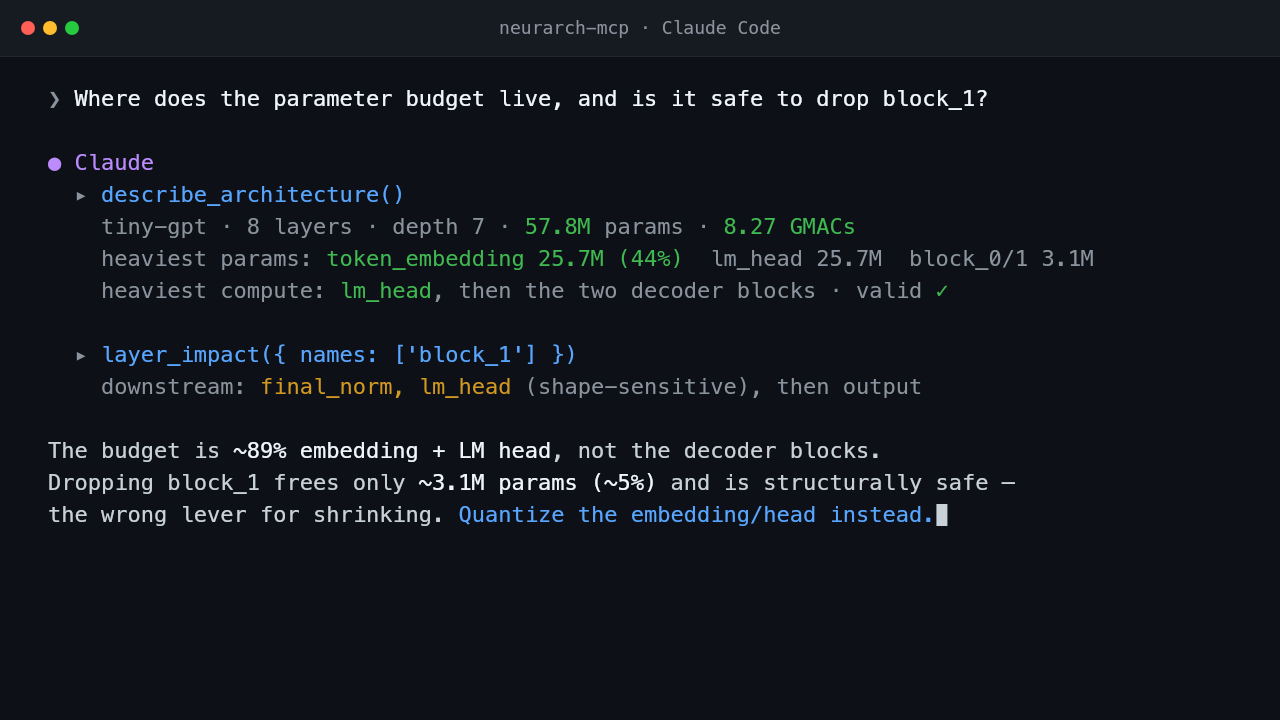
▶ Watch the 13s demo — every number above is produced by the tools, not guessed by the model.
When you ask Claude Code "rewrite the training loop for my new encoder block", it sees your train.py but not your model. It guesses at shapes and parameter counts. neurarch-mcp plugs the structured model graph into the same conversation so the agent can answer "what depends on attn_8?" or "where does the parameter budget actually live?" with one call instead of ten.
A real exchange against examples/tiny-gpt.neurarch.json:
You ▸ Where does the parameter budget live, and is it safe to drop block_1?

Claude ▸ (calls describe_architecture)
  tiny-gpt — 8 layers, depth 7, 57.8M params, 8.27 GMACs.
  Heaviest by params: token_embedding (25.7M, 44%), lm_head (25.7M), block_0/1 (3.1M each).
  Heaviest by compute: lm_head, then the two decoder blocks. Validation: clean.

  (calls layer_impact { names: ["block_1"] })
  Downstream of block_1: final_norm and lm_head (shape-sensitive, weight-carrying), then output.

  The budget is dominated by the embedding + LM head (~89%), not the decoder blocks,
  so dropping block_1 frees only ~3.1M params (~5%) while removing one of just two
  decoder layers. It is structurally safe (final_norm just re-reads block_0's output),
  but it is the wrong lever if your goal is shrinking the model — quantizing the
  embedding/head would do far more.
Numbers above are produced by the tools, not estimated by the model.
No install step. Every client below launches the server the same way:
npx -y neurarch-mcp /abs/path/to/your-model.neurarch.json
To produce the model file: open your model in the Neurarch app, then File → Save (.json). The MCP server reads that file directly. Add --watch so the agent sees app-side saves without a restart, and --write if you want the agent to be able to edit the model (off by default).
Use an absolute path to the model file in any global config: npx does not run from your project directory, so relative paths only work in project-scoped configs.
One command:
claude mcp add neurarch -- npx -y neurarch-mcp /abs/path/to/your-model.neurarch.json --watch
Or commit a project-scoped .mcp.json at the repo root so every collaborator gets the server automatically:
{
  "mcpServers": {
    "neurarch": {
      "command": "npx",
      "args": ["-y", "neurarch-mcp", "./model.neurarch.json", "--watch"]
    }
  }
}
Open Settings → Developer → Edit Config, or edit the file directly:
~/Library/Application Support/Claude/claude_desktop_config.json%APPDATA%\Claude\claude_desktop_config.json{
"mcpServers": {
"neurarch": {
"command": "npx",
"args": ["-y", "neurarch-mcp", "/abs/path/to/your-model.neurarch.json", "--watch"]
}
}
}
Fully quit and reopen Claude Desktop (the config is read at startup). The tools appear under the search-and-tools icon in the chat input.
Create .cursor/mcp.json in your project (or ~/.cursor/mcp.json for all projects), then enable the server under Settings → MCP:
{
  "mcpServers": {
    "neurarch": {
      "command": "npx",
      "args": ["-y", "neurarch-mcp", "./model.neurarch.json", "--watch"]
    }
  }
}
Create .vscode/mcp.json (note the servers key, not mcpServers):
{
  "servers": {
    "neurarch": {
      "command": "npx",
      "args": ["-y", "neurarch-mcp", "${workspaceFolder}/model.neurarch.json", "--watch"]
    }
  }
}
Or from a shell: code --add-mcp '{"name":"neurarch","command":"npx","args":["-y","neurarch-mcp","/abs/path/to/model.neurarch.json"]}'
Same command + args shape; only the config file location differs. For clients that speak Streamable HTTP instead of stdio, run the server with --http and point the client at it:
{
  "mcpServers": {
    "neurarch": {
      "type": "http",
      "url": "http://127.0.0.1:8787/mcp"
    }
  }
}
If you set NEURARCH_MCP_TOKEN, add "headers": { "Authorization": "Bearer <token>" }. See Remote access for tunnels and security.
Ask the agent: "List the Neurarch tools you can see." You should get describe_architecture, layer_impact, validate_model and friends (17 read tools; 6 more with --write). From a shell, npx -y neurarch-mcp --help prints usage and the full tool list.
This repo ships runnable example models under examples/. Point the server at one and your agent can immediately answer structural questions:
{
  "mcpServers": {
    "neurarch": {
      "command": "npx",
      "args": ["-y", "neurarch-mcp", "./examples/tiny-gpt.neurarch.json"]
    }
  }
}
examples/tiny-gpt.neurarch.json — a small GPT-style decoder (embedding, 2 transformer blocks, LM head).examples/tiny-cnn.neurarch.json — a CIFAR-style CNN (2 conv stages + classifier).examples/resnet-mini.neurarch.json — a residual block with a skip/merge node (a branchier graph for impact and path tools).Then ask:
Look at the Neurarch model. Where do the parameters actually live, and which block would shrink the model fastest if I cut it in half?
The agent calls describe_architecture (one shot: pipeline, depth, param + compute hotspots, validation), then layer_impact on the heaviest block, and writes a recommendation grounded in the actual numbers from the model, like the transcript above.
| Tool | What it does |
|---|---|
get_model_summary | One-shot overview: layer count, total params, dominant types, input/output shape. |
describe_architecture | One-call orientation: topo-ordered pipeline, depth, IO shapes, total params/MACs, top-5 param and compute hotspots, validation rollup. Replaces a 4-tool chain. |
get_layer | Full definition of one layer by name: params, shapes, notes, upstream/downstream ids. |
compare_layers | Structural diff of two layers: same-type, param-count delta, shape match, and exactly which param keys differ. |
find_layers | Search layers by type, name regex, scope prefix, or augmentation (e.g. frozen layers); optionally rank by parameter count. |
layer_impact | Blast radius of changing a layer or matched set. Flags shape-sensitive and weight-carrying downstream layers. |
validate_model | Structural invariants: cycles, dangling connection refs, duplicate ids/names, orphan layers. |
find_path | Shortest directed path between two layers, or null when unreachable. |
list_connections | Flat edge list with optional from / to filters. |
param_count_by_block | Parameter counts grouped by block / scope / type. |
flops_by_block | MAC counts (FLOPs ÷ 2) grouped by block / scope / type. |
mermaid_diagram | Render the model as Mermaid flowchart TD syntax; groups render as labelled subgraphs. Truncates past 60 layers (keeping the topological head). |
list_blocks | List collapsed groups (or scope-derived blocks if none): members, params, FLOPs. |
get_block | Drill into one block (group or scope prefix): per-layer params/FLOPs, totals, and the edges crossing the block boundary (what feeds it, what it feeds). |
diff_models | Structurally diff the current model against another .neurarch.json file: layers added / removed / modified (field-level) and connection changes. |
list_hyperparams | Model-level hyperparameters (learning rate, batch size, ...) the user set in the app. |
get_design_notes | Pinned design rationale: agent / advisor / manual notes, optionally filtered by layer. |
--write)| Tool | What it does |
|---|---|
add_layer | Insert a new layer, optionally auto-wired downstream of an existing one. |
modify_layer | Shallow-merge params, rename, or change scope. Returns a before/after diff. |
add_connection | Wire two existing layers. Fails on self-loops and duplicate edges. |
delete_layer | Remove a layer and every connection touching it. Invalidates downstream shapes. |
delete_connection | Remove a single directed edge. Invalidates the target's cached shape. |
save_model | Persist the in-memory model to disk. Call this after any mutation. |
layer_impact is the headline read tool. Before the agent recommends delete every conv_X, it can call layer_impact and tell the user "this rewires 8 downstream layers, 3 of which carry weights and will need rebuild." validate_model is the headline safety tool — call it before recommending a destructive edit to surface pre-existing issues separately from the change.
--write — expose mutation tools. Off by default so accidental writes can't clobber a file you're editing in the Neurarch app.--watch — poll the model file for changes and reload on save. Pair with the Neurarch app: edit visually, agent sees the latest graph without restarting the MCP server. Note: an external save will overwrite any unsaved in-memory edits made via --write.--http[=PORT] — serve over Streamable HTTP instead of stdio (default port 8787). See Remote access below.--host=ADDR — bind address for --http. Defaults to 127.0.0.1 (loopback only).--version (alias -v) — print the version and exit. --help (-h) prints usage and the full tool list.By default the server talks stdio, so the agent and the model file live on the same machine. --http serves the same tools over Streamable HTTP, so a hosted or phone-based agent can drive a model running on your machine — e.g. behind a Cloudflare or Tailscale tunnel.
# local only (safe default: loopback, no auth needed)
npx neurarch-mcp model.neurarch.json --http

# expose to a tunnel with a bearer token and write tools
NEURARCH_MCP_TOKEN=$(openssl rand -hex 16) \
  npx neurarch-mcp model.neurarch.json --write --http --host=0.0.0.0
# then point cloudflared / tailscale funnel at :8787 and connect the agent to
# https://<tunnel>/mcp with the same token.
POST JSON-RPC to /mcp; GET /health is a liveness probe. Sessions follow the standard Streamable HTTP handshake (Mcp-Session-Id), so any MCP-aware client connects unchanged.
Security:
127.0.0.1 by default. Without a token, the Host header is checked against a loopback allowlist (DNS-rebinding protection) and no CORS headers are sent.NEURARCH_MCP_TOKEN to require Authorization: Bearer <token> on every request (constant-time checked). It is required before --write may bind to a non-loopback host — the server refuses to start otherwise.Set NEURARCH_REPORT=1 to share one anonymous structure+verdict row per
validate_model call with the Neurarch corpus: the structural fingerprint
(8-char hash), the layer-type histogram and edge count that let the server
verify it, and the finding (rule id, severity) pairs. Never the graph,
parameter values, layer names, file paths, or any identity: the payload shape
cannot carry them, and the server rejects rows whose fingerprint does not
recompute from the histogram it came with.
Off by default: without the flag this server makes no network calls at all. Reporting is fire-and-forget with a 5-second cap, so it can never slow or fail a tool call. Policy: neurarch.com/rules.html#data.
npx does not run from your project directory. Relative paths only work in project-scoped configs (.mcp.json, .cursor/mcp.json, .vscode/mcp.json).--write. It is off by default so accidental writes can't clobber a file you're editing in the app.npx fails on first run. Node >= 20 is required (node --version).--watch, or restart the server..neurarch.json file. For codebase structure, use GitNexus or similar.This repo is the public home for both:
| 🐛 Report a bug | Something is broken or behaving unexpectedly. |
| 💡 Request a feature | An idea that would make Neurarch or the MCP server better. |
| ❓ Ask a question | Something specific you can't figure out. |
| 💬 Start a discussion | Open-ended ideas, design feedback, "how would you…". |
Please tag issues with mcp, app, linter, or feature-request so we can triage faster.
If neurarch-mcp saved you from pasting an nn.Module into chat, a ⭐ helps other ML engineers find it. It is the lowest-effort way to support the project.
A new tool is a small, self-contained PR. See CONTRIBUTING.md for the 3-step "add a tool" guide.
git clone https://github.com/neurarch-ai/neurarch-mcp
cd neurarch-mcp
npm install
npm run typecheck             # tsc --noEmit
npm run build                 # tsup → dist/index.js
npm test                      # vitest (≈100 unit tests)
node dist/index.js --help     # confirm bin works
CI runs typecheck + build + test on Node 20 and 22 for every push and PR.
The package vendors a small set of pure-TypeScript utilities (model types, parameter and FLOP estimators, impact analyzer) from the main Neurarch repo. They live under src/lib/ and have no runtime dependencies beyond @modelcontextprotocol/sdk.
MIT. See LICENSE.
FAQs
MCP server that exposes a Neurarch model graph to Claude Code, Cursor, Windsurf, and other MCP-aware AI agents. Structural awareness of your neural network: layer list, parameters, FLOPs, blast-radius impact, validation (cycles / orphans / dangling edges)
We found that neurarch-mcp demonstrated a healthy version release cadence and project activity because the last version was released less than a year ago. It has 1 open source maintainer collaborating on the project.
Product
Socket’s PHP and Composer support is now in Beta for all customers, with PHP reachability analysis generally available.

Product
Socket is bringing experimental protection to Firefox, scanning 97,000+ extensions in Mozilla's official directory for malware and risky updates.

Research
/Security News
Three compromised Rust crates pulled in a malicious dependency that downloaded and executed cross-platform malware during Cargo builds.